Friday Timewaster: Frobot

Two words: Robot + Disco.

If you’re still reading this, and not playing Frobot, you probably never will. Just in case I can convince the non robot and disco fans out there, this is a kind of shoot ’em up. It’s free, and plays in your browser with Flash. You control the Frobot, on a mission to save boring suits and government agents from themselves, and turn them into party loving disco dancers. Move with the keyboard, and aim with the mouse. You have to be careful – once you shoot a suit, they turn into a dancer, but will die if you shoot them some more! The music’s cool, the robot’s cool… it is a bit tough, but I can forgive that, as it’s got robots and disco in it!

Download Bing backgrounds in seconds

I didn’t expect to like Bing, but I have to admit it’s a pretty cool search engine. I’m still using Google by default – it’s hard to break the habit – but it’s nice to have Bing around too. The first thing anyone notices about Microsoft’s new wannabe is the great background images.

With the free Bing Downloader, you can quickly grab every day’s Bing backgrounds just by opening it. It doesn’t need an installation, just double click the EXE file to go. Download it free here. Once you have, wherever you keep the EXE file, create a folder in the same place called “BingImages”. All the images will then be automatically saved there.

It only takes a moment to open it, and doing so daily, you’ll soon have a ton of great looking wallpaper images! There are three every day – did you know there are three different local versions of Bing? I had no idea, but US, Japan and the rest of the world (International) each get different backgrounds.

Apply instant warping effects to your photos

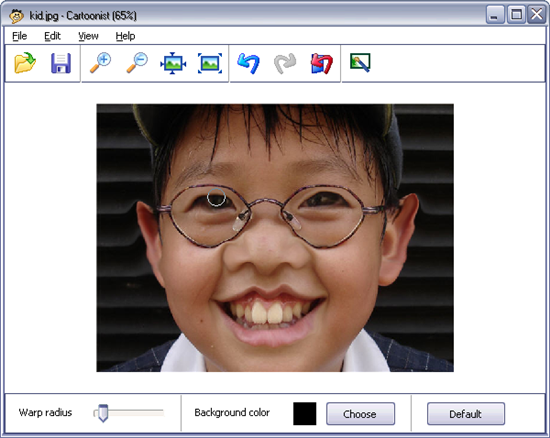
Don’t have any exciting plans for the weekend? Don’t worry! Even if you’re going to spend most of your spare time sitting in front the computer at home, there’s still plenty of fun things to do. If you don’t believe me, get a few photos from your friends, download Cartoonist and be ready for a good laugh.

Apply instant warping effects to your photos

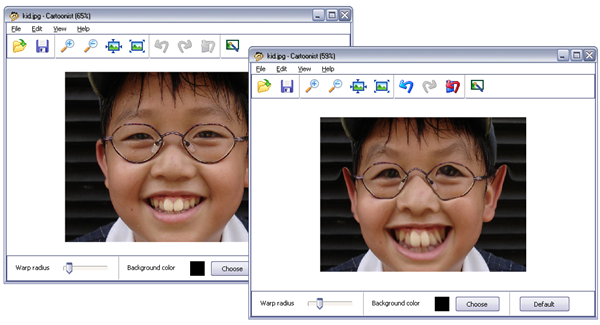
This simple tool enables you to apply hilarious warping effects to your pictures in just a few mouse gestures. The best thing about Cartoonist is that it doesn’t require any technical or artistic skills at all! Just select the appropriate warp radius size, click on the photo area you want to modify and you’ll see the results in real time.

Apply instant warping effects to your photos

You can undo any change you make (only the last five actions though) and also revert to the original image at any time. When done, you can save the image in several formats (JPG, BMP, PNG, GIF and TIFF). Don’t forget to send a copy by email to the friend you just warped!

What to do when Firefox 3.5 goes bad

Firefox holds a special place in my heart. I’ve used it for years, blissfully happy since day one. I’ve told all my friends about it, lobbied for it among the IE crowd, and sneakily installed it on any computer I was left alone with for more than 5 minutes. So, why, oh why, has Firefox turned against me?!

A few days ago I noticed that funny things were happening on my computer. Gmail displayed the dreaded ‘still working’ message and Facebook photos went crazy. I checked my Internet connection, logged out and logged in. I even restarted my computer, the fail-safe to solution to everything! Nothing worked and, for the first time ever, I had a sneaking suspicion that my beloved Firefox was at fault. It was time to find out what you can do when Firefox 3.5 goes bad…

Clear your history

Not a revolutionary idea, but once it was mentioned, I realized I hadn’t done it (or checked the settings) since upgrading to 3.5. Go to Tools > Clear Recent History and choose ‘Everything’ from the drop down menu.

ff_bad.png

Erase the cache

When you clear the history, make sure you’re including the cache: in the ‘Clear Recent History’ option, click on ‘Details’ and make sure ‘Cache’ is marked.

Update to the latest version

Make sure you have updated Firefox 3.5 to 3.5.1. Technically this patch was security related, but it also included a fix for “an issue that was making Firefox take a long time to load on some Windows systems“. Continue reading “What to do when Firefox 3.5 goes bad”

How to: Download and convert YouTube videos

Along all these years as software reviewer I’ve come across many applications that let you download videos from YouTube and other popular online video websites. But it wasn’t until yesterday that I tried out a handy little Firefox add-on called Video DownloadHelper, and after only a few hours of usage I’ve already decided this is the only app I’ll ever use to download YouTube videos.

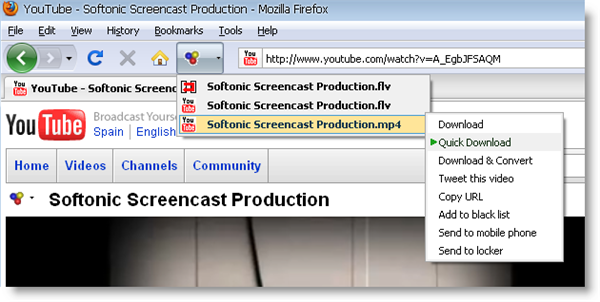
Video DownloadHelper is installed just like any other Firefox add-on. After the ubiquitous Firefox restart you’ll notice a new button on your Firefox toolbar that will light up with colors and move every time you’re on a web page with embedded videos. Click the button and you’ll access download links for all the videos included in the page, both in FLV and MP4, as well as a series of available actions for each selected video. There’s also an icon beside the video’s title that lets you access the same menu. All you have to do is click the link of the video you want to download, and you’ll be prompted for the target folder. That’s all!

How to: download and convert YouTube videos

But what about all those other options available in the context menu? They let you perform several different actions with the selected video, besides downloading it straightaway to your hard drive:

Download & Convert – Helps you convert the selected video to a handful of formats, including WMV, iPod and iPhone, 3GP, MOV and AVI. This tool requires the installation of a third-party video converter – ConvertHelper, also developed by the Video DownloadHelper guy. You can easily get this tool in the extension’s settings menu: go to Tools > DownloadHelper > Preferences and then click the Conversions tab.

Tweet this video – Lets you send a message about the selected video to your Twitter account. You need to fill in your Twitter credentials (username and password) in the extension’s settings menu, inside the Services > Twitter tab.

Copy URL – Copies the video’s URL to the Windows clipboard so that you can use it elsewhere. Note that this option doesn’t copy the standard YouTube URL you see on your web browser, but the address that points to the actual video file – either in FLV or MP4.

Add to black list – This option enables you to add certain websites to a blacklist and thus block them from appearing on the list of available media generated by Video DownloadHelper. It’s a smart way to avoid advertising videos, for example. You can also check the complete blacklist in the settings menu.

Send to mobile phone / Send to locker – Lets you upload the selected video (or only its audio stream) to your mobile phone or your personal web locker via a special online service called MP3tunes. You need to set up an account though. Video DownloadHelper lets you create one in the Services > MP3tunes tab inside the settings menu.

Top 10 Nokia games

You’ve probably seen countless TV and magazine adverts for Nokia game downloads. You know, the ones where you have to text a number, it costs about 10 dollars and you get plagued with spam forever after. The trouble is a lot of these games are actually pretty crappy and you’ll most likely end up hating yourself for being so stupid to download them in the first place. If you want to play games on your Nokia phone then start with this hand-picked selection of top titles. Many of them are even free!

The best Nokia games

Bowling Master – If it’s realistic bowling fun you’re after then Bowling Master is the place to find it. The game gives you four different lanes to play, lots of funny animations and great graphics to boot. The ball physics are some of the best you’ll see anywhere, and the one-button control system makes Bowling Master a dream to play. Strike!

Pro Tour Golf– Become the next Tiger Woods by downloading Pro Tour Golf. This realistic 3D golf sim comes with two challenging courses to play in either single or multi-player modes. You can customize your set of clubs, choose between match and stroke play competitions, and enter as a male or female golfer. Hole in One!

Legacy – Here’s one for all you RPG fans. Legacy combines combat and puzzle-solving in a rip-roaring adventure that will consume your life. The graphics and sounds are superb giving the game an atmosphere that puts you in mind of classic RPG adventure games such as Eye of the Beholder, Black Crypt, and Might & Magic. There’s even a free level editor for expanding your World. Magical!

ScummVM – Remember how addictive those old LucasArts point-and-click games like Sam & Max, Monkey Island and Day of the Tentacle used to be? Well, now you can relive those eight-hour gaming stints by installing ScummVM. It’s a free utility that lets you run any LucasArts game based on the SCUMM (Script Creation Utility for Manic Mansion) engine. Manic mayhem!

Virtual Pool – Chalk up and smack into the pack – it’s time to play the most realistic mobile pool game ever. Virtual Pool lets you take to the circuit and try to become the best in the World, in its highly enjoyable career mode.The game’s realistic ball figures and natural-feeling control system make it the most realistic pool experience on the S60 platform. Pool potty!

Sky Force – This one has been around for some time now and has earned its placed as one of the all-time classic games for Series 60 phones. It’s a top-down scrolling shooter in the mold of Raiden and 1942, and boasts astounding graphics and mesmerizing gameplay. You really get the impression that you’re hurtling through the sky at full speed. Supersonic!

vNES – Love Nintendo games? Then get your hands on vNes, an NES emulator for Symbian devices. With this utility you’ll be able to download and install all your old favorites for the classic console, such as Super Mario, Zelda, Donkey Kong, and the like. vNES is lightweight, easy-to-use, and comes with customizable controls. Retro!

Cricket 20-20 – This one might be a bit niche, but if you like cricket you’ll be bowled over by this one. Cricket 20-20 sees you take control of one of the World’s finest teams and enjoy the thrills and spills of a limited-overs cricket match. Both graphics and gameplay are excellent, as is the game’s attention to detail. Howzat!

Aces Texas Hold ’em – No Limit – Get practicing your poker face because you’re going to need it and in this no limit game of cards you better be good, otherwise you’ll end up losing a lot of money. Not real money, thankfully, although when you win it’s a bit disappointing not to be able to pocket the cash. There are loads of options including playing a huge game of 22-man poker. Full house!

Lemonade Tycoon – I bet you never thought a lemonade selling sim would be fun. Well, think again because Lemonade Tycoon is a ridiculously addictive Nokia game. You start out with a small lemonade stand on a street corner and must build yourself an empire through a combination of sweet recipes and business savvy. Fizzy!


Share your files on Twitter

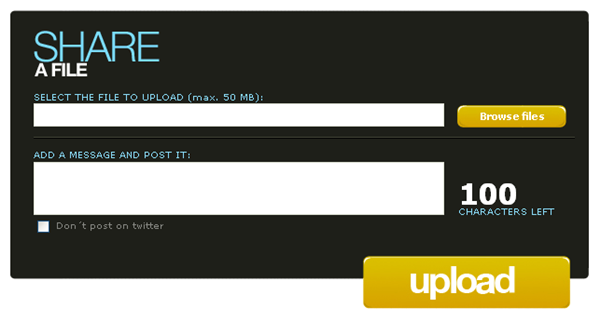
Stop the presses, it’s a Twitter service that doesn’t use the prefix “twit”! That already makes FileSocial pretty cool even before you try it. FileSocial is a file sharing service for Twitter, that allows you to share any file up to 50mb.

Using it is simple, you have to allow it access to your Twitter account, then just choose your file, upload it, write a message, and it will be tweeted from your account. You can choose not to tweet directly, and just create a link to your upload. As FileSocial accepts any format, including compressed files, you can share whatever you like, which is excellent. According to their site, there is no expiry date on your uploads, although you can of course delete whatever you upload.

The service is quite new and still in a beta testing phase, but works well. You can see how many visits your link has got, although not how many downloads. Hopefully they will release a desktop application so you don’t need to always go through their website. Otherwise, FileSocial looks like a really promising Twitter service.

Win a Sony Reader with Google Books

Win a Sony Reader with Google BooksDo you like reading? And playing games? Then this is the perfect pastime for you: 10 Days in Google Books Game is a fun literature-based quiz that gives you the chance of winning a set of Google stickers and enter a draw to win a Sony Reader.
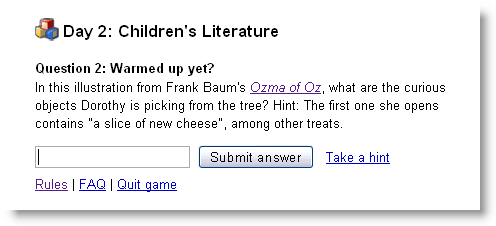
Playing the Google Books game is very easy. Check out the game’s website, where you’ll find a set of five new questions everyday. They’ll be all questions related to books, authors and famous fictional characters, but don’t worry if you’re not precisely a bookworm: you can easily find the answer in the Google Books website, by using the book preview function or the built-in search engine. You’re also given a hint in case you get stuck.

Win a Sony Reader with Google Books

Win a Sony Reader with Google BooksAfter answering all five questions, you’ll reach a web form you need to fill in if you want to receive a set of Google stickers at home – only for the first 20,000 participants who successfully complete each day’s challenge.

The last field in the form also gives you the possibility to write a short creative piece about what the experience of reading will be like in 100 years. The three most imaginative and original entries will win a Sony Reader! The game ends in August 7th, so what are you waiting for?

Edit and mix videos online with JayCut

When you hear the expression “video editing” you probably think about complicated software applications that only computer gurus know how to use. But there are also really simple video editing tools that almost anyone can use. One of them is JayCut, an online video editor that has no reason to envy other popular desktop tools like Windows Movie Maker.

Edit and mix videos online with JayCut

JayCut is pretty easy to use. The first step is creating a user account on the JayCut website, which gives you access to your profile page. This page features a list of the media you’ve uploaded to JayCut so far, as well as your video mixes, JayCut friends, personal data and also a guestbook where your visitors can drop a line.

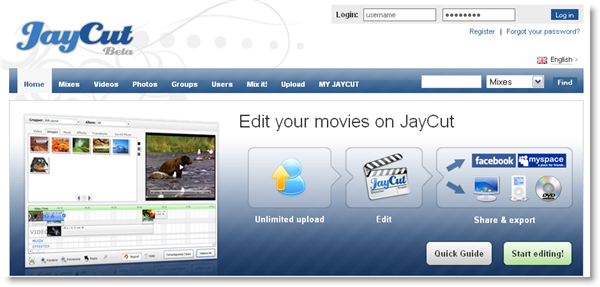
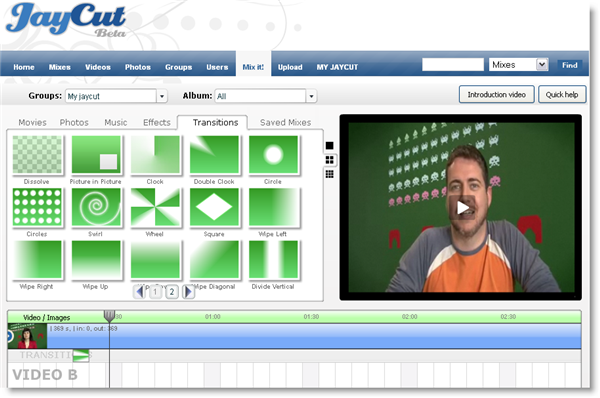
Once you’ve created an account, you’re ready to start using JayCut. You can begin uploading some media (music, photos, videos) to the server by clicking the “Upload” tab. I must say the uploading process was surprisingly fast! Then click the “Mix it!” tab and you’ll be taken to the classic editing interface, with a media library for your uploaded files, an embedded player to preview the result and a timeline to drag and drop elements into your mix.

Edit and mix videos online with JayCut

Like I said, JayCut is pretty straightforward but if you get lost, you can either use the “Introduction videos” button to access a series of introductory videos that teach you how to create your first mix, apply transitions and effects and add music, or click the “Quick help” button, which overlays a transparent layer on the editor’s interface that explains the function of each element on the page.

When your mix is finished, you can give it a title and description and then save it. You’re also given the option to mark it as private, share with friends or publish it straight away on Facebook.

JayCut is nowhere near professional video editing suites like Adobe Premiere or Final Cut Pro, but it’s well worth a try and can do the trick for quick, uncomplicated video editing.