There is a school of thought which says that if you want to create a Facebook app you need years of coding experience. Not so. Because, although the really fancy dynamic apps do require a lot of PHP knowledge, it is possible to make your own Facebook apps without any scripting whatsoever. In fact, you can put together a simple, yet functional app in around half an hour, thanks to Dapper’s Facebook AppMaker. Dapper is a data mapping application that lets you extract and reuse content from a web site in another format. It creates feeds which can be exported to XML, RSS, Google Maps, widgets and more. You can then transform these feeds into Facebook applications with the AppMaker. Here’s how it’s done:
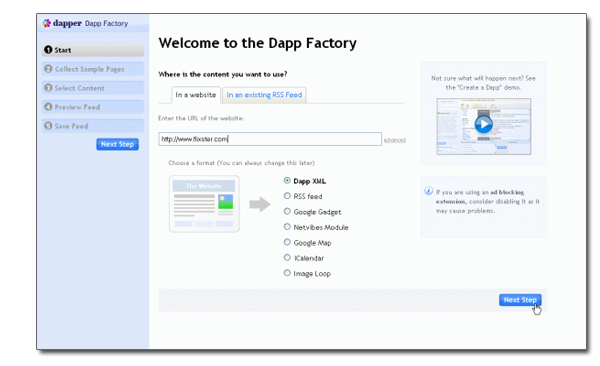
1. Start by signing up for a Dapper account on the site’s home page, then click on the ‘Create a new Dapp’ link. Here we need to choose the content we want to include in our Facebook app. You’ll need to enter the URL of the site you want to draw content from (in this case Flixster) and hit ‘Next step’.
2. A preview of the site will appear in the main window. From here you need to choose a variable (e.g. search field, radio button, drop-down menu selection, etc.). In this case it’s the search field. Enter a search and click ‘Add to basket’. This directs Dapper to the content that it needs to load when a search is produced. Enter a couple more search terms and add the search results pages to the basket. Once you’re done, click ‘Next step’. Continue reading “Make a Facebook app in 30 minutes with Dapper”








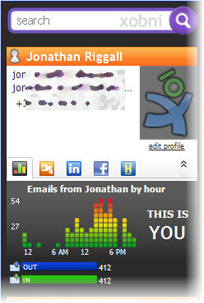
 Another trend with apps, online and off is aggregating your web-life in one place. Two cool examples of this recently are the Firefox add-on
 There’s nothing that looks more unsightly on a website than long URLs. This is especially true when it comes to commenting on blogs where you want to leave a link but the comment box can’t handle them properly. However, it seems that keeping URLs trim still isn’t something that’s caught-on, even among the big boys.
 A while back I needed to save a sound byte from a DVD for a video project I was working on in iMovie. I thought this would be pretty simple but soon found out that it wasn’t. Thinking that QuickTime would surely feature a decent audio recording function, I was frustrated to discover that you had to pay and upgrade to the Pro version for sound recording. In fact, every other package I looked at for recording sound required some kind of payment. Either that, or it would only work with certain sound sources.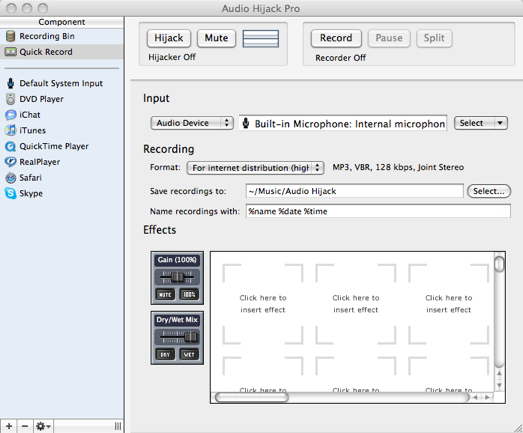
 The more data we download and store, the more information you have to organise and store it all in a way that makes it easy to find what you’re looking for when you need it. In addition to my hard drive, I now have 2 external drives connected to my Mac and remembering where everything I need is in becoming increasingly difficult. Fortunately, there are now several desktop search tools out there that allow you to search everything connected to your computer from the comfort of your desktop. Here’s 3 of the best:
 Though I currently have only two Firefox extensions installed (Download Statusbar and Tab Mix Plus), I could say I’m a bit of an extension junkie. I love finding new extensions and trying them out. Sometimes I’ve been asked for advice regarding the best extensions for Firefox, but the truth is that these recommendations depend a lot on each user’s personal habits when browsing the web.