Twitter starts Google Play Store beta group for testing beta version

The Google Play Store may have disabled side-loading beta APKs for Android devices, but companies like Facebook have started using Android Studio to allow users to test its apps.

Twitter has started its own app beta testing group where you can download and install a unfinished build of the Twitter Android app and give feedback. Like most betas, it’s unclear if everything Twitter will include will get released in the official build.

To sign up for the beta you have to join the Google Group for the app and opt into the beta.

The beta build of Twitter will replace your current Twitter app so if you want stability, signing up for the beta isn’t the best idea because of bugs and instability.

Source: Android Police

The Softonic Minute: Angry Birds, Facebook, Sims 4 and Skype

Angry Birds learn to drive, Facebook tests out shared photo albums, the Sims 4 add new ways to fall in love, and Skype celebrates its 10th anniversary. Check out this week’s biggest news stories on The Softonic Minute.

Default player

<!–
By use of this code snippet, I agree to the Brightcove Publisher T and C
found at https://accounts.brightcove.com/en/terms-and-conditions/.
–>

<!–
This script tag will cause the Brightcove Players defined above it to be created as soon
as the line is read by the browser. If you wish to have the player instantiated only after
the rest of the HTML is processed and the page load is complete, remove the line.
–>
brightcove.createExperiences();

Angry Birds learn to drive. The next game featuring the famous birds is called Angry Birds Go! Game developers Rovio have shown a teaser video of the game, which we anticipate will be a new go-karting game. Are we looking at the possible Mario Kart of smartphones?

Facebook tests shared albums. A few users are testing the option to create shared photo albums with friends and colleagues. This function will be available to all users soon. On the flip side, Facebook has also revealed which governments have requested access to its users’ private information.

Sims 4 brings on the romance. The fourth installment of the famous life simulator will have more options to play out your love stories. But that’s not all: there will also be more places where your characters can have sex. The Sims 4 will be available for PC and Mac in 2014.

Skype celebrates its 10th anniversary. The most widely-used video calling service reaches its first decade with more than 300 million active monthly users. What’s in store for the future? 3D calls to begin with, which Microsoft says could be a new option for Skype. You can review Skype’s entire history in our feature article.

The Sims 4: More romance, more ‘WooHoo’

The Sims 4 will have new romantic elements and even more places to have The Sims’ famous “WooHoo” interactions. This has been confirmed by the official Sims 3 Tumblr. The preview image, seen below, speaks for itself, along with the caption: “Start a new romance or two with the new release! Are you ready?”

Stronger relationships

The Sims 4 promises more intelligent avatars that are even more complex and emotionally deep than in previous versions. During its presentation at Gamescom 2013, the first trailers for the game confirmed that romantic relationships will be even more developed, giving people the chance to form even stronger connections.

The return of “WooHoo”

Along with romance, The Sims 4 brings back another fan favorite, “WooHoo”, a rather obvious innuendo for sex. There are actions that show love and attraction for a Sim; from there, you can progress to the option of ‘playing games in bed’. As the relationship grows, so do the number of places you can ‘play’: elevators, a cars, even public buildings.

Check out some of the other new features of The Sims 4 revealed at Gamescom 2013.

Facebook releases proposed updates to Governing Documents

On August 27, 2013, Facebook published a blog post stating it released its first Global Government Requests Report detailing information requests.

The exact information included:

  • Which countries requested information from Facebook about our users
  • The number of requests received from each of those countries
  • The number of users/user accounts specified in those requests
  • The percentage of these requests in which we were required by law to disclose at least some data

Today, Facebook announced proposed updates to two documents: Data Use Policy (DUP) and Statement of Rights and Responsibilities (SRR). These documents define how Facebook collects and uses data and rules it applies “when you choose to use Facebook.”

The social network released a section-by-section summary update defining the changes it’s proposing.

The Data Use Policy proposal appears to add transparency to the information it gathers like when people know you’re on Facebook, information Facebook gathers, and removing personally identifiable data before providing it to advertisers. Using the information can be defined by using Facebook, you grant permission to use the information gathered to operate the network and use profile pictures to suggest tags. There is also a section on information accessible through other websites and applications and rewriting of the Personalized Ads section.

The Statement of Rights and Responsibilities expands to explain that you are responsible for all fees incurred through text or data accumulated by using the mobile app. Facebook is going to “further explain” how your information can be used for advertisements or commercial content.

The changes are not final, but it’s good to be aware of what Facebook wants to change.

Read the summary below.


Data Use Policy

Information we receive and how it is used >> Information we receive about you

Your information. We clarified that information is shared with Facebook when you communicate with us, like by sending us an email.

Other information we receive about you. We made a few updates to this section to:

  • simplify the explanation for when information is received from people (such as whenever you use or are running Facebook);
  • clarify that some of the information we receive from the device you use to access or run Facebook is from and about the device itself (such as an IP address, operating system, or mobile phone number);
  • add an example to help explain how we use data we already have about you and your friends to tailor your experience (such as making friend suggestions and picking stories for your News Feed); and
  • explain that we only provide data to our advertisers after we’ve removed personally identifiable information or combined it with other data so that it no longer personally identifies you.

Usernames and User IDs. We clarified the language to make it easier to understand Usernames and User IDs and how they can be used to identify and reach you. For example, through a Facebook URL (facebook.com/username) or by sending you a message (username@facebook.com).

How we use the information we receive. We made a few updates to this section to:

  • emphasize that by using our services, you grant us permission to use the information we receive to operate Facebook.
  • add an example to underscore that we may share information with service providers when they help us provide services.
  • reiterate that public information may be accessed by anyone on or off Facebook.
  • explain that we will use profile pictures to suggest tags of you in photos.

Sharing and finding you on Facebook

Control each time you post. We added an example to explain that if the audience of a post changes after someone comments, that change impacts who can see the comment.  We also made it easier to understand that you control the audience of your posts, even after you posted.

Links and Tags. We edited the tip to make clear that, unlike tags, links do not expand an audience of a post. We also added a tip about the social reporting tool, which gives people a quick and easy way to ask for help from someone they trust.
Pages. We added a tip to remind you that you can learn about how to control who sees the pages you’ve liked in our Help Center.

Other websites and applications


Controlling what information you share with applications.
We made a few updates to this section to:

  • clarify that apps are authorized to have your information from the time you agree to share it until you ask them directly to delete it, including updating the information they have permission to access.
  • remind you that you should consider removing an app that you no longer use.
  • remind you that you always can contact an app directly to ask them to delete the data you shared with it.
  • add an example to show you how an app may use information to personalize the app experience (e.g. some apps use information such as your friends list to personalize your experience or show you which of your friends use that particular app).

How advertising works

Personalized Ads. We rewrote this section to:

  • highlight how we use the information we receive to show you ads that we hope you find relevant and interesting.
  • expand the explanation of the controls we give you over the ads you see on our ad page at www.facebook.com/about/ads.
  • explain that advertisers may also be able to reach you on Facebook using the information they already have about you (such as email addresses or whether you have visited their websites previously).

Statement of Rights and Responsibilities

Mobile and Other Devices. Facebook provides its services for free, but we wanted to make sure you know that you are responsible for any normal rates and fees, including text messaging and data charges, associated with using Facebook and receiving content on their device, including sponsored or commercial content.

About Advertisements and Other Commercial Content Served or Enhanced by Facebook. As part of a legal settlement, we agreed to further explain how we may use your name, profile picture, content and information in connection with ads or commercial content. We included an example of how these ads work and explained that when you limit your audience, we’ll respect that choice. We also added a provision stating that minor users must represent that a parent or guardian has consented to this section of our terms, on their behalf.

  • Special Provisions Applicable to Software. We explain that, by downloading our apps or software, you allow us to keep them up-to-date, which helps improve, enhance, and further develop the software.
  • Disputes. We made an administrative change related to the location of our headquarters.
  • Special Provisions Applicable to Users Outside the United States. We made clear that you are not allowed to use Facebook if you are prohibited from receiving products or services from the United States.
  • Definitions. We updated the term “use” to make it clear it includes anytime you run Facebook.

Source: Facebook Section-by-Section Summary

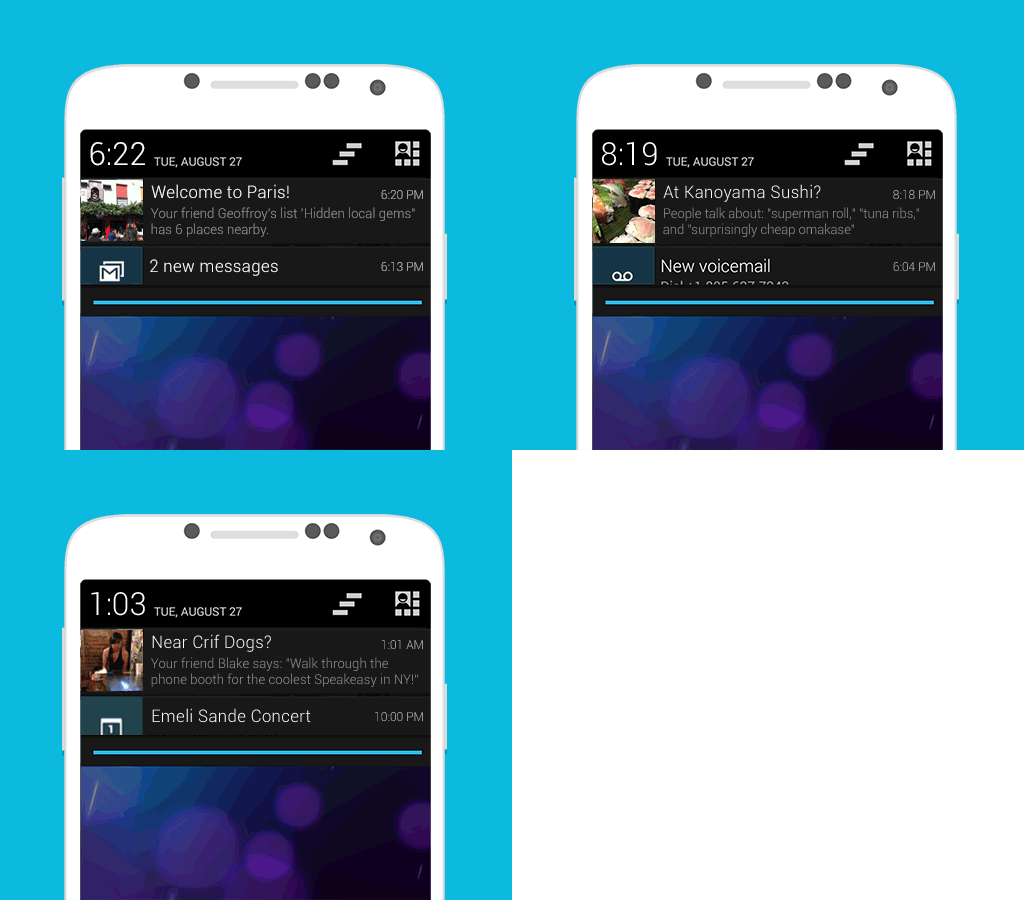
Foursquare on Android updates with ‘proactive’ recommendations

Foursquare is a popular app for users with friends who are constantly trying to one-up each other on check-ins and new discoveries.

According to Foursquare, the app has “two main interactions: one between you and your friends, and another between Foursquare and you.” After spending time collecting and analyzing data between the interactions of users, the company is rolling out “proactive” recommendations to Android users.

Using “over 4 billion check-ins” to improve location accuracy, the app will give recommendations through the use of background location data. Foursquare claims the internal tests on phones resulted in a drain of “about 0.7% per hour.”

The feature can be used to suggest different things like menu items at a restaurant or if in a new city, Foursquare will suggest places that friends have visited.

The staggered roll out is to thousands of Android users now and a complete update for all Android users in “coming months.”

iOS users will receive the update after the Android roll out, but Foursquare may be waiting for the launch of iOS 7 before committing to release the app.

Source: Foursquare

Steam Greenlight achieves 1 year anniversary

Steam Greenlight was launched on August 30, 2012 as a way for independent developers to propose new titles for distribution on Steam with the help of players.

The service has seen titles gain a lot of popularity through the Steam community and the feedback developers can receive for games in alpha and beta stages is very helpful.

In one year the amount of available independent titles has doubled and “new titles [are] being submitted every day.”

Gabe Newell stated in the official press release:

Ultimately our goal is to have no bottlenecks at all between developers and consumers. As we move closer to that, launching Greenlight and evolving our backend toolset has helped us increase our publishing throughput, pushing the number of independent titles released in the last twelve months to equal the number of titles published from all other categories combined. We expect that number to grow dramatically as we continue to iterate upon our developer service features and seek more ways to improve Steam’s value to the community.

Steam Greenlight also announced on August 28th that 100 titles were greenlit bringing the total number of titles to 260.

Source: Steam

Flickr iOS app updates with customizable filters and editing tools

Flickr on iOS received an update today optimizing the app to work with Flickr’s most popular camera, the iPhone 5.

A new set of filters have been added to give your photos a different perspective. But the most interesting addition is live filters and filter customization.

Live filters let you preview your photo before you take it. You’re able to choose “composition grids, focus lock and exposure points” with each filter. Added to live filters is the option to customize after the photo is taken, like enhancement, cropping, and color adjustment are available.

Source: Flickr

[Updated] Giphy can embed GIFs directly into Facebook feeds

Giphy is a great source of GIFs for people who need to share their feelings through animated images. It was impossible to embed a GIF into Facebook for friends to watch and comment. You used to have to click out of Facebook to the source for viewing.

Now Giphy has opened the doors to sharing GIFs through Facebook by allowing users to embed them into a timeline. Embedding doesn’t work 100% of the time as Facebook might not read the embed correctly.

The embed is actually a workaround as the GIF is converted into a format readable by Facebook for looping playback.

Now you can communicate with your friends through GIFs all the time.

Source: Giphy | The Verge

[Update] Mashable has found that the embedding GIFs into Facebook adds a “Flash wrapper” around the file so it’s playable. Facebook doesn’t support GIFs and this should be seen as a workaround.

Rockstar releases GTA V launch trailer before September 17th release

September 17th is a day that many people are waiting for. Rockstar Games will release Grand Theft Auto V for PlayStation 3 and Xbox 360 right before the start of the push for next generation consoles.

The launch trailer hints more of the story behind the trio of protagonists cutscenes showing off additional gameplay and possible scenarios.

Fans will be able to enjoy the single player campaign before Grand Theft Auto Online launches October 1st with a small title update to unlock the online multiplayer component.

Learn more about Grand Theft Auto V with our round up.

Everything you need to know about Skype

As you might have already read, world-famous internet calling app, Skype, has just celebrated its 10th birthday. Crazy, right? It feels like it’s been around forever!

Over these 10 years, we’ve written a lot about how to get the most from the VoIP app. Want to know how to get the most from your video calls? How to add crazy voices to your conversations? How to delete chats and chat history? Then read on. Who knows, you might even learn something!


Recent Skype news and releases

Skype: “We monitor customer feedback and adjust our product constantly”

Skype is replacing Windows Live Messenger

Skype for Outlook.com now available in six countries


Skype how-tos

How to: share a screen in Skype

How to: delete a Skype chat history

How to: use Skype – getting started

How to: use Skype – using audo and video

How to: record Skype calls using PrettyMay


Other Skype articles

Which Skype download is best for you?

Skype – not just for computers!

Viber vs Skype: Which is the best?

Skype vs. Facetime

Best Skype alternatives for Android

Top Skype voice changers

Pimp my Skype: Top 10 VOIP add-ons

Tips to optimize your next video call