The Sims 4 Update is Here With New Sims Sessions

The Sims 4 Brings Bug Fixes and New Events

The developers of The Sims 4 have updated the fun simulation game with a few new fixes. The community has been complaining about several issues lately, which has come to be known as the “laundry list”. They hope that addressing these concerns will improve gameplay and satisfy the upset gamers.

Many of the fixes take place in Create a Sim mode. There was notably an issue with teeth vanishing when applying new hairstyles, so you can understand why players were unhappy. If your character is a keen gardener, you might have been annoyed when your plants reverted to a previous stage of growth.

‘The Sims 4' Update is Here With New Sims Sessions

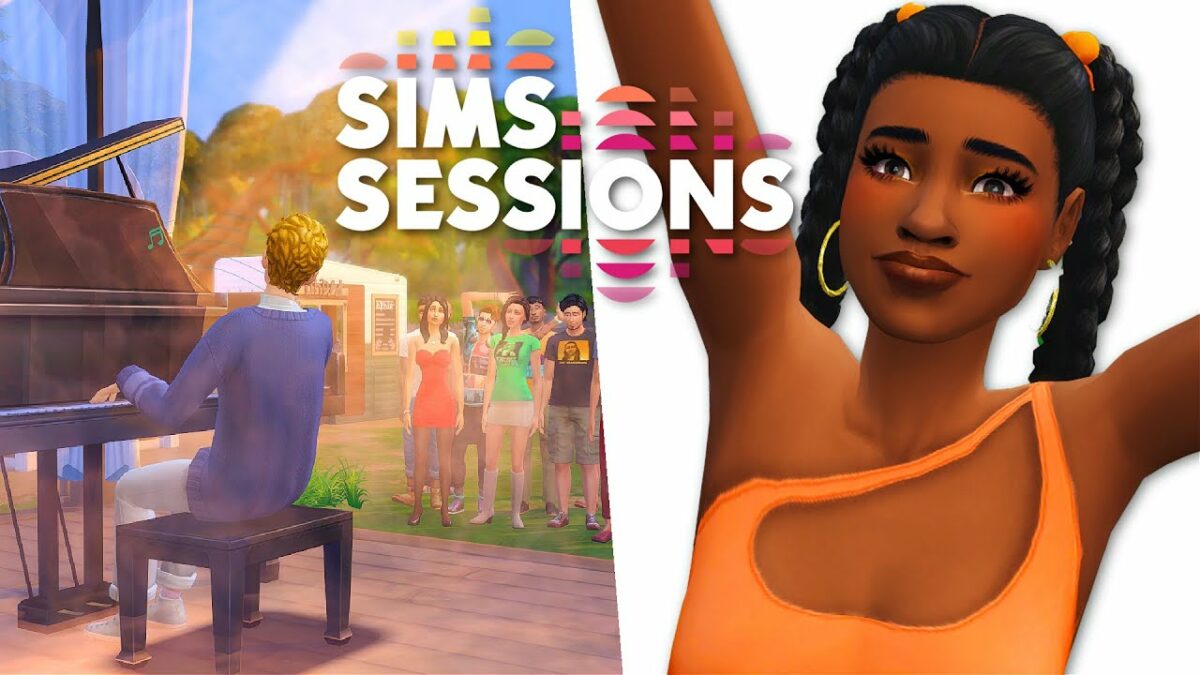
Fortunately, these problems and more have been resolved. What’s more, The Summer of Sims has a new music festival called Sims Sessions. It’s an in-game event where you can watch top performers strut their musical talents on stage. 

Some of the songs listed include “Sabotage” by Bebe Rexha and “Heat Waves” by Glass Animals. You can only catch these events on Sundays from June 29 until July7, so make sure your Sim doesn’t miss out!

Please note that “Sunday” refers to in-game days and not real life. If you have updated your game, your character will have to wait for it to be Sunday before they can attend the festival. We’re sure you’ll enjoy the fun either way, and you’ll see your Sim’s mood change thanks to the entertainment and social opportunities.
Google Chrome Search Widget Announced for Android

Google Adds A New Widget For Chrome on Android for Quick Searches

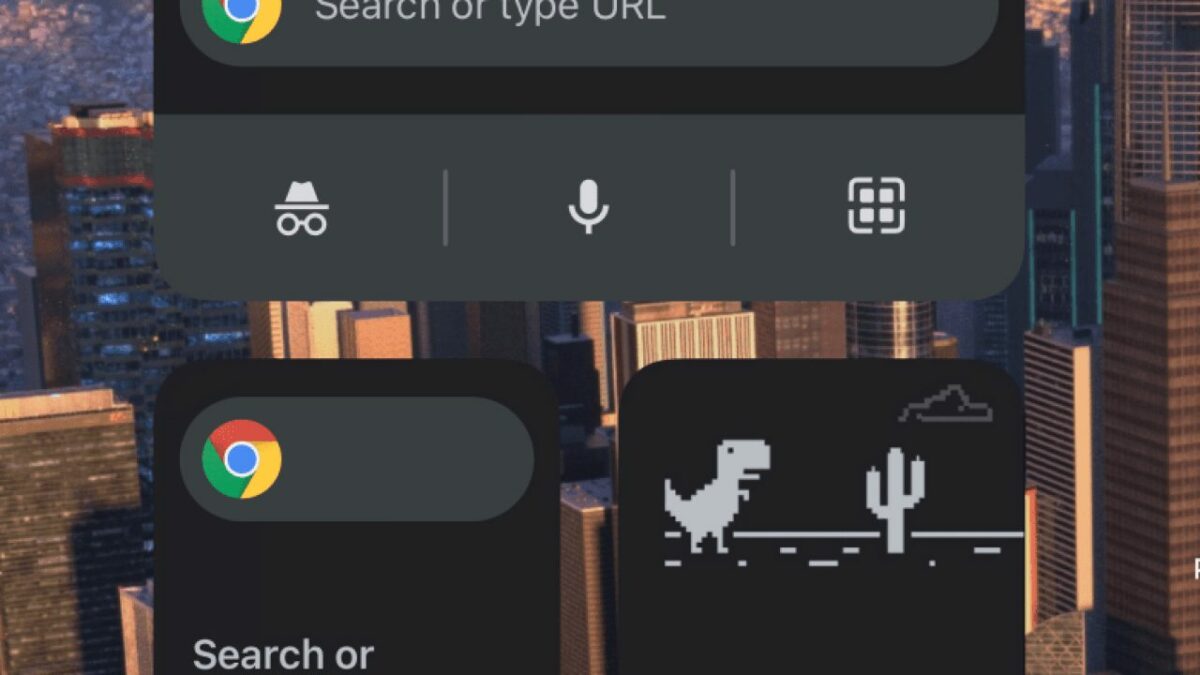
With so many web browsers updating and appearing, it appears as if Google Chrome is stepping it up a notch. With the latest Canary update, it seems that there’s a new ‘Quick Action Search Widget’ that lets you hunt for content quicker in the search bar on your home screen. However, you might not see the function in your Widgets function as yet.

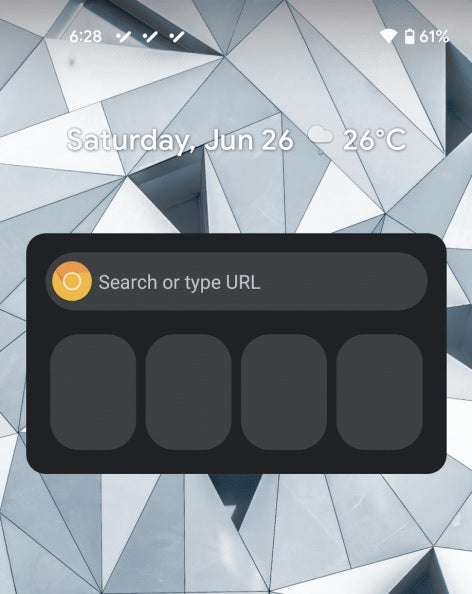
The new search widget is in the experimental phase, but you can still make use of it. You’ll need to head to chrome://flags on your phone’s browser before selecting ‘Quick Action Search Widget’ to enable it. When you activate it in your Widgets section, you’ll see a spanking new search bar with three shortcut options.

Google Chrome Search Widget Announced for Android

You may notice that nothing happens when you try to use it. At the moment, it’s nothing but an adorable decoration for your phone’s home screen. As Google develops it further, you’ll be able to add shortcuts and there may be suggestions based on your search activity. 

While Google amps up its search engine capabilities, it’s still nothing compared to Opera GX for mobile devices. The browser is optimized for gaming, giving you access to improved gameplay and features. The battle for online supremacy continues as we watch 2021 unfold and the competition heats up. The new ‘Quick Action Search Widget’ will have to do a lot more to impress us.

The World Of Warcraft Arena World Championship is Back

The Fantastic WoW Arena Competition Returns on July 31, 2021

Gamers, get your keyboards and controllers ready as Shadowlands Season 2 gears up for the return of the World of Warcraft Arena World Championship on July 31, 2021. Blizzard made the announcement on the WoW forum, presenting all the details from Season 1 and who is pushing through in the competition. It’ll see 16 teams from Europe and North America preparing for the intense online battle.

When the competition begins, there will be round-robin battles over four weeks. Those who finish in the top four for their region will pass through to the exciting Grand Finals, where they can take their shot at the prize pool that stands at $300k. We’re sure we’ll see intense PvP battles as these matches unfold over the next month.

World Of Warcraft Arena World Championship is Back

Of course, there’s some new content that will cause a stir. With the release of Shadowlands: The Chains of Domination, players will able to use new abilities and casters against opponents. That means that gamers who have already installed and mastered the new content may have a significant advantage over the others.

There are also classes that some gamers don’t have access to yet. Some of these include Assassin Rogues, Feral Druids, and Death Knights. It will test the metal of some players to see how well they cope under pressure. We can’t wait to see how this championship unfolds!

PRIDE documentary series comes to Disney+

To celebrate Pride Month, Disney+ has released the acclaimed documentary series PRIDE as an exclusive Star Original. In it, six directors chronicle the struggle for LGBTQ+ civil rights in America spanning the 1950s to the 1990s. Both heartbreaking and inspiring, their stories reveal the need for tolerance and respect for diversity.

Produced by Killer Films and VICE Studios, PRIDE explores true stories told by some of its renowned directors over the course of six episodes. They range from the persecution of homosexuals in the 1950s – the so-called Lavender Scare – promoted by Senator Joseph McCarthy to the culture wars of the 1990s and the queer legacy.

Through recordings, personal testimonies and interviews, PRIDE reveals how the liberation movement and Pride were born, standing out as an exceptional docuseries. In fact, episode three features the first Gay Pride march, a historic event in the 1970s. Even though it’s a well-established celebration today, considered absolutely mainstream, it was a heroic act at the time, defying the backward thinking of the era.

But PRIDE doesn’t just offer an honest, heartwrenching view of the struggles and advancement of the LGBTQ+ movement in America over the course of 40 years. It also transmits the message that the battle isn’t over. While members of this community have begun to be recognized in American society, there’s still a lot of work to be done.

Disney+ and its Star platform have joined in celebrating Pride Month with this six-part gem, available now to all Disney+ subscribers. PRIDE is a documentary of great historical value, reminding us of the imperative need to update society’s old-fashioned values and usher in an era of tolerance, inclusion and acceptance of diversity.

Windows 11 and Android apps Compatibility

Windows 11 Will Have A Function To Sideload Android Applications

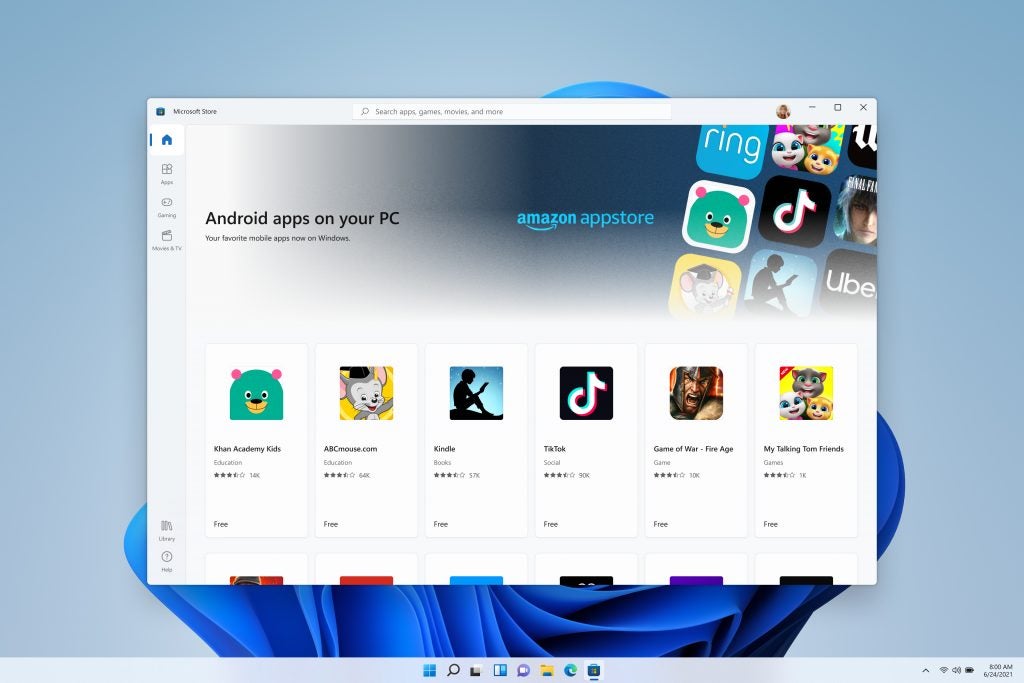
Things are steaming up as we await the arrival of the upcoming Windows 11 operating system. The one aspect that has been on everyone’s mind is whether you would be able to load apk files directly from the desktop. According to an inside source on Twitter, sideloading Android applications will become a reality.

At the moment, performing a similar function on the current Chrome OS is only possible by running line commands on Linux. It sounds like Windows 11 will use Amazon Appstore for the functionality, but how it will work isn’t exactly clear at the moment. All Microsoft is saying is that you’ll be able to acquire the apps via the store to load on the operation system.

Windows 11 and Android apps Compatability

A notable concern is that there are many apps on Google Play Store that aren’t on Amazon Appstore. If users have the ability to load their own apk files, the question of security and piracy arises. Where will you be able to access Play Store files, and will Microsoft have systems in place to check the sources? We’re sure Snapchatters will want some answers.

We’ll be waiting to see how much more information Microsoft will release on this feature. Hopefully, we’ll see some technical details over the next few weeks as more and more questions arrive. All we want to know is whether we’ll need to switch from Bluestacks to play PUBG mobile on Windows 11.

Google Delays Cookie Deprecation by 2 Years

Web Developers Have More Time to Prepare for Google’s Privacy Sandbox

For all of you who become annoyed at browser advertisements and user information collection, you’ll recall that Google was planning to depreciate third-party cookies in Chrome by Q2 in 2022. It’s all in preparation for the Privacy Sandbox where your data has more security. Some new browsers already have these systems in place, such as Brave Search.

Well, web developers and advertisers have received a reprieve. Google is delaying killing off third-party cookies by two years. It gives them more time to work on sustainable alternatives, something we’re sure many of them will appreciate. However, the U.K. Competition and Markets Authority (CMA) will assess changes to cookies for six months to ensure everything is going according to plan.

Google Delays Cookie Deprecation by 2 Years

Of course, not everyone will welcome this news. Companies and developers have been hard at work to get new systems in place for Privacy Sandbox, working long days and nights for when it was supposed to launch next year. Many have also onboarded engineers and vendors capable of creating the new technology needed to meet the new requirements.

There are also the FLEDGE trials, which were meant to test the Privacy Sandbox environment. It appears as if these have also been delayed for the time being, which means the CMA will have to wait to perform its evaluations. We’ll have to put up with third-party cookies a little bit longer.

New Brave Search Engine Revealed

The Developers of Brave Browser Launches A New Search Engine

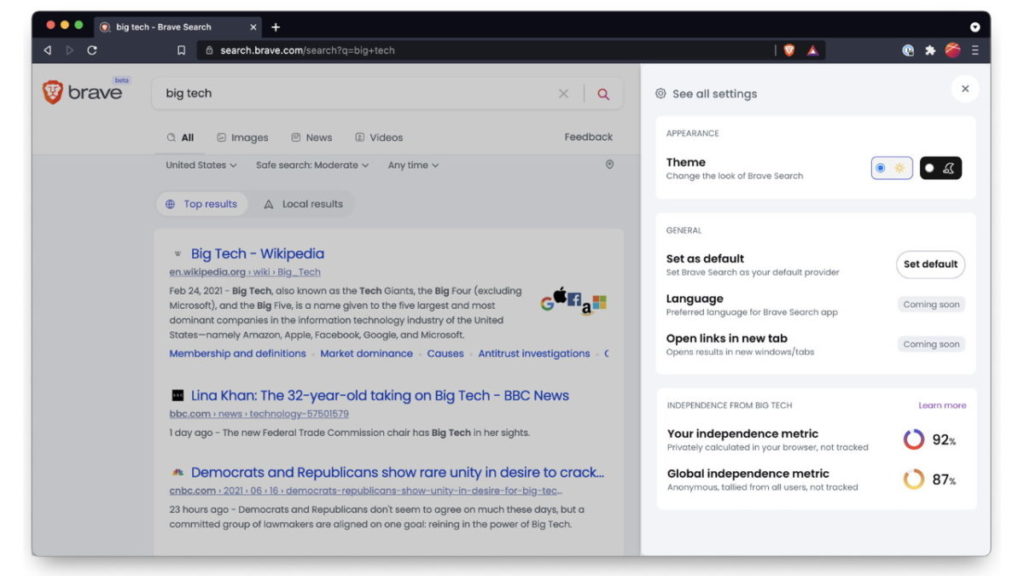
The company Brave has recently acquired a new search engine, formerly known as Tailcat. Renamed Brave Search, it uses Tailcat as the foundation for the industry’s first independent alternative to Google Search. It’ll use its own indexing system, with a primary focus on protecting your information.

Unlike its rival, Brave Search won’t collect I.P. address or store your personal data. The Brave Browser already saw a massive jump in users into the millions in 2021, with people wanting to move away from the current top guns. It’s hoping that there’ll be the same migration to Brave Search as was seen with WhatsApp to Signal earlier this year.

New Brave Search Engine Revealed

The company mentions that the user will always be the main priority. You won’t see adverts thrown in your face with every search you perform, and third parties won’t be able to pay for user information. What’s more, it’ll steer clear of user-intent algorithms and focus more on community-curated content.

While Brave Search will work seamlessly with the company’s browser, it’s also offering the engine to other browsers. Of course, Google has grown aware that people are moving away from engines with cookies that track behavior for third parties, and it has started phasing out this function.

Is it enough, though? Will we see fewer websites relying on the Google Search Console for ranking, and more on new privacy-protecting engines like Brave Search with open ranking systems? Only time will tell.

How to Customize Download List on Tubemate in 5 Steps

It’s easy to download videos with Tubemate on Android. However, sometimes you want to automate things and make the downloading more efficient. That’s when customizing your download list can be very useful.

Let’s look at how you can customize your download list with Tubemate.

  1. Launch Tubemate

    How to Customize Download List on Tubemate

    Open the app on your Android phone by tapping on the icon in your app menu. Signing in with your Google account, using the email/password combo linked to your first name and contact number is the easiest way to see all your prefered Youtube videos.

  2. Select ‘Download List’

    How to Customize Download List on Tubemate

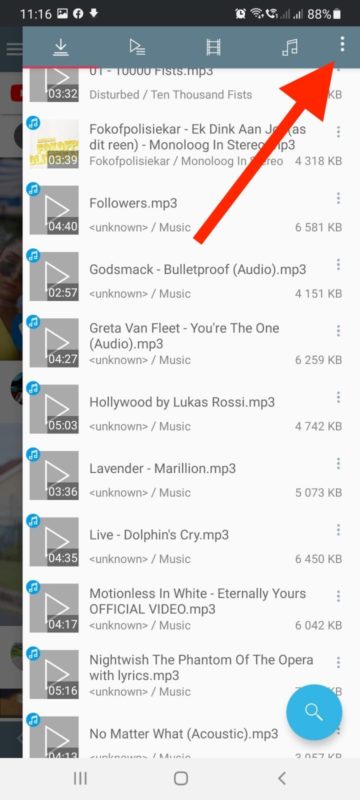
    From Tubemate’s main screen, tap on the ‘Menu’ tab and choose ‘Download List’ from the available options.

  3. Choose ‘Menu’

    How to Customize Download List on Tubemate

    In the Download List, you can tap on the menu to find many different features for downloading your videos.

  4. Choose ‘Playlist’

    How to Customize Download List on Tubemate

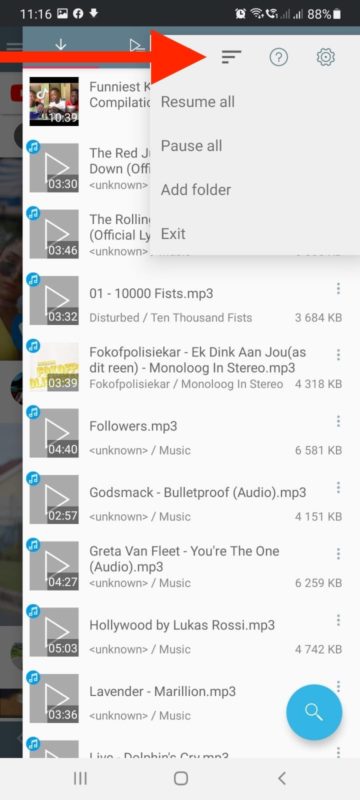
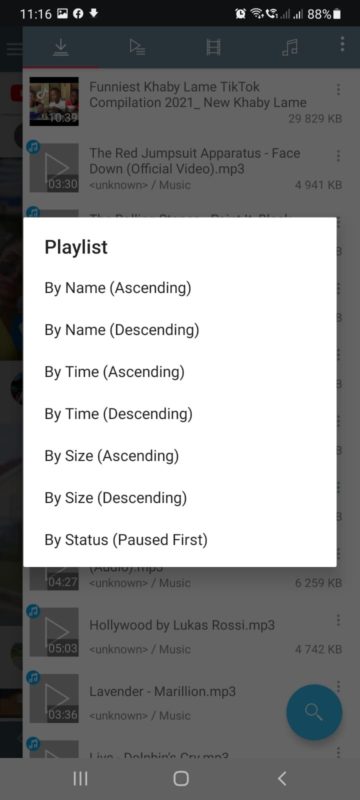
    Choose the ‘Playlist’ option that is represented by the three horizontal lines that are staggered. This will show you all the customization options that you can choose from.

  5. Choose Your Customization Option

    How to Customize Download List on Tubemate

    Choose how you wish to organize your download list on Tubemate. Tubemate will continue downloading according to your customization.

More Freedom to Choose How You Download

Tubemate offers you more freedom and customization options so that you can download your favorite videos easily without issues and exactly how you want. Why not try using Tubemate as your Youtube downloader now?

How to Share Videos on TubeMate in 3 Fast Steps

Your curiosity led you to download TubeMate, you’ve learned how to use save YouTube videos, and now you’re ready to roll. We’re sure you’ve found many items that made you laugh, cry, or sing. 

The next step is working out how to share videos on TubeMate with your family and friends so they can enjoy it with you. We’re going to spend a brief moment showing the best way to so do.

  1. Search for video

    How to Share Videos on TubeMate

    Before you can share anything, you’ll need to find a video that’s interesting, hilarious, or thought-provoking. How it works is that TubeMate will share a link to the video with the recipients. All you need to do at this stage is insert text into the search bar for any topic, band, or song.

  2. Select Share button

    How to Share Videos on TubeMate

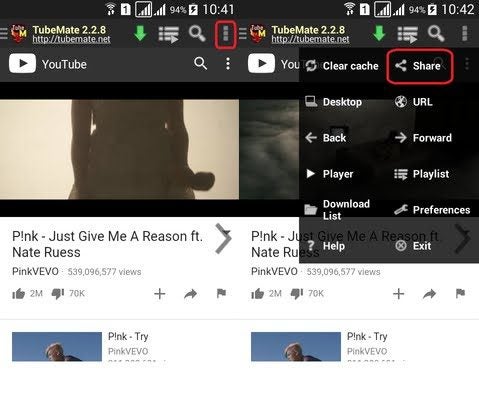
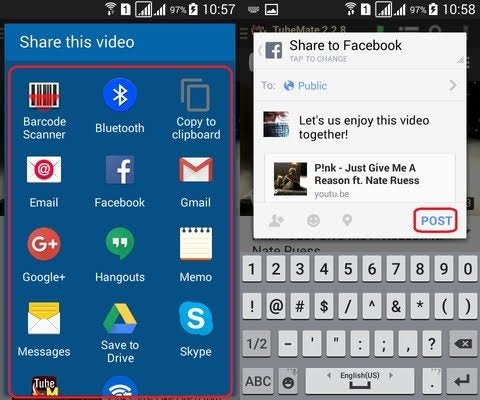
    When you find the video you want to share with someone, select the Menu option on the bottom of your screen. You’ll see several options available, one of which is “Share.” After a new window appears, you’ll need to click on “Share this video.”

  3. Choose sharing platform

    How to Share Videos on TubeMate

    You’ve reached the final step. A new window will appear that shows the message that the recipient will receive. Once you’re happy with it, click on “Submit.” TubeMate will provide you with a list of options as to where or how you would like to share it. 

    After you click on one of them, you’ll need to insert the last details and tap on “Post” or “Send.” It all depends on which option you chose. A social media platform will post to your feed, while an email will require an email address.

Share far and wide

TubeMate is an excellent YouTube downloader when you’re wanting to save any media to your phone. Of course, sharing the content is just as much fun, especially if you have a close friend that enjoys the same things as you. 

So, head on over to your favorite videos and start making them go viral!

Monster Hunter Stories Tips & Tricks

If you’re a fan of Pokemon games and episodes, you may want to download Monster Hunter Stories. There are loads of Monsties for you to collect and bond with, delivering different powers and abilities to vanquish your foes.

However, you may need a guide before you start your journey to make the gameplay easier. Here are our top Monster Hunter Stories tips and tricks.

  1. Explore as much as possible

    Monster Hunter Stories Tips & Tricks

    While Monster Hunter Stories has a linear progression so that you can easily follow the story, there are plenty of environments to explore and items to find. If you have some spare time, take a detour and see if you can locate a powerful object to help you on your quest. 

    There’s a massive map in the game, which is what makes it such an exceptional RPG. Even if you find the same items over and over again, ensure that you stack at least 50 of each one. Don’t sell them, as you’ll need them later on during your missions.

  2. Collect the best Monsties

    Monster Hunter Stories Tips & Tricks

    Instead of focusing on heroes and character development, you’ll want to locate and tame as many Monsties as possible. There’s a long list available, which makes it challenging to work out which would be best to complete battles and quests as quickly as possible. 

    We’ll take a look at the top three Monsties we recommend:

    – Stygian Zinogre: one of the most powerful Monsties, having a natural ability to use the Dragon element. It also has exceptional overpowered moves.

    – Silver Rathalos: this Monstie has some outstanding elemental moves that cause massive damage.

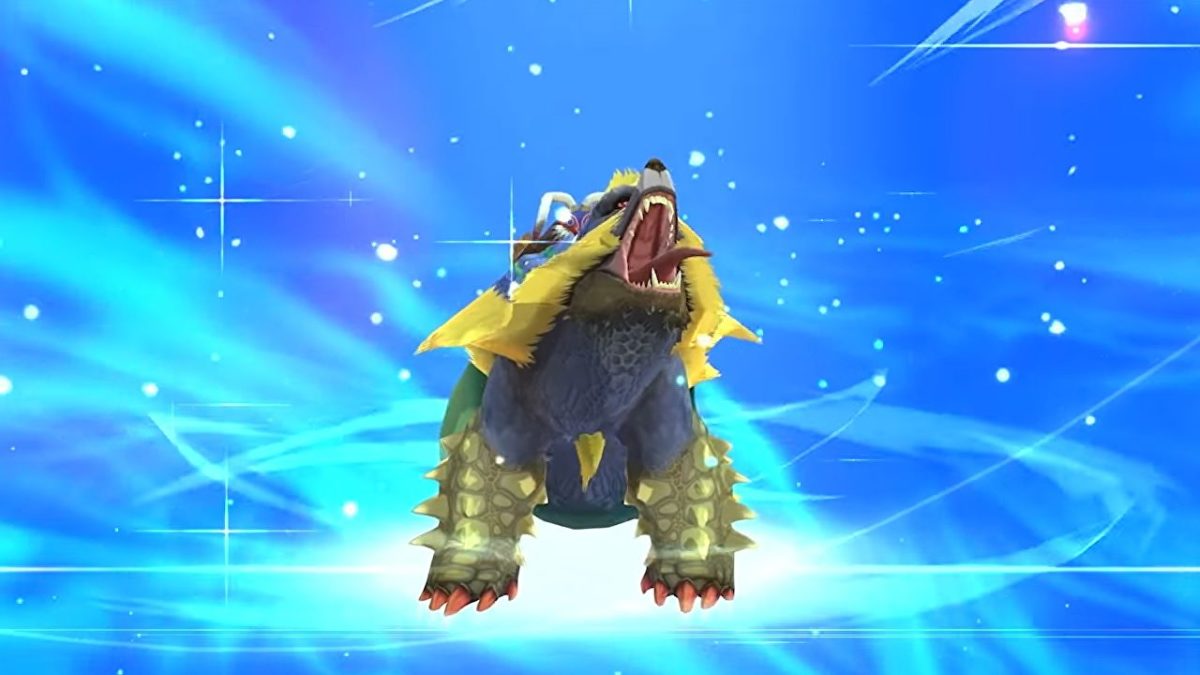
    • Glavenus: an exceptional mix of stats, presenting a greater performance over the other Monsties.
  3. Extract Monster Genes

    Monster Hunter Stories Tips & Tricks

    When you start Monster Hunter Stories, you may receive several low-class monsters. There may even be duplicates of the same Monsties. However, don’t release them yet, as you can extract genes later when you unlock the Rite of Channeling.

    When you perform this ritual, it will consume the monster. Your beasts will learn secret skills, which will also help them to level up. You’ll need to extract as many genes as possible to make your Monsties powerful and potent in battle.

  4. The art of egg-stealing

    Monster Hunter Stories Tips & Tricks

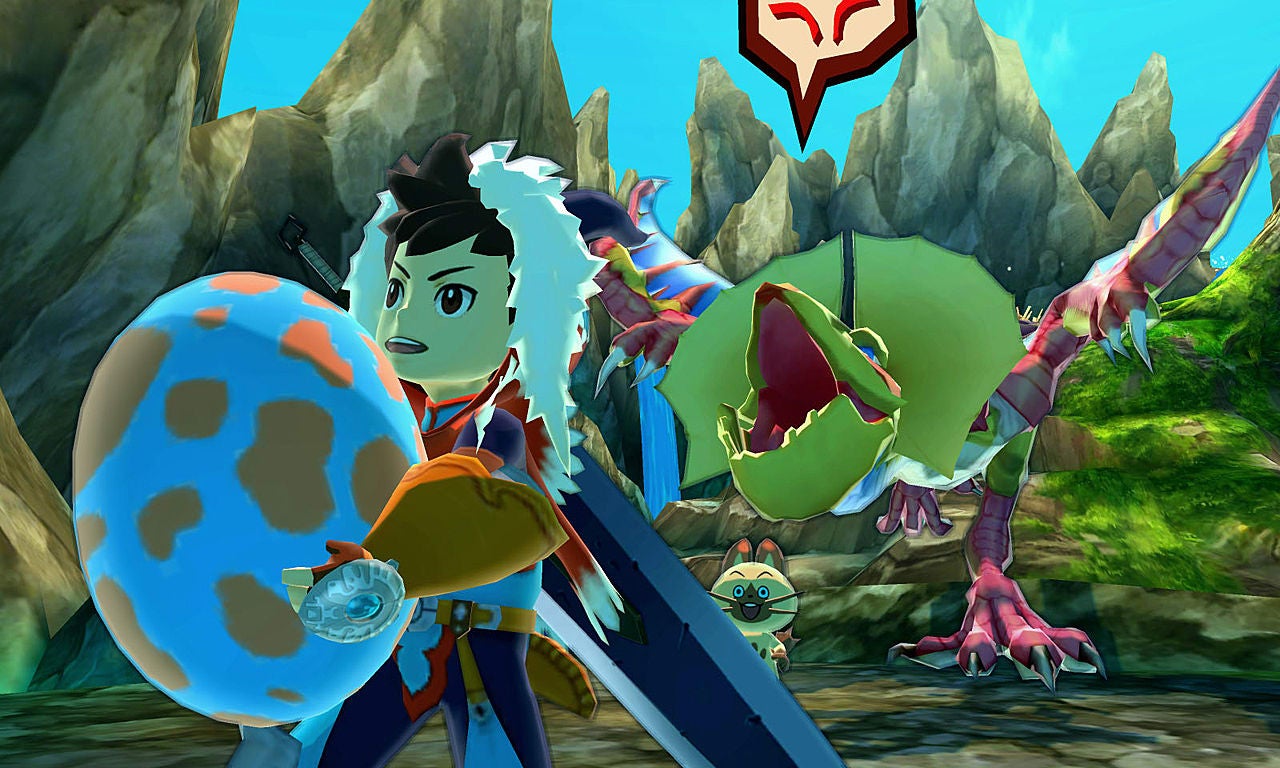
    Before you can tame a Monstie in Monster Hunter Stories, you’ll need to grab some eggs. When the monster hatches, you can train it to be dedicated to you. Taking it back to Navi will reveal whether it will be a good match for you.

    However, you won’t be able to pick up anything while the egg is in your hands. You should clear the surrounding areas first before you attempt any egg-snatching.

Become the best Monster Hunter

Monster Hunter Stories is an exciting role-playing game you’ll enjoy spending time on during your free time. Remember to rest as much as you can, and don’t use your precious potions unless you really need to. There are also many homes around where your Monstie can heal, so make free use of them.

Of course, we’re all waiting for when Monster Hunter Stories 2 drops on July 9, 2021, as it seems to be promising new features, Monsties, and abilities. Watch our new channels for more information as it becomes available.