5 tips for Google Earth Pro

For most people, the regular version of Google Earth is robust enough in terms of its feature set and rich imagery. So why bother with Google Earth Pro, Google’s supercharged, highly customizable version? The Pro version is an essential tool for land developers, city workers, and others who need to create highly customized maps.

But even if you’re not a real estate developer, there are some neat features in Google Earth Pro that don’t exist on Google Earth or Google Maps. Check them out and see if you want to try it for yourself. Here’s a bonus: it’s free!

Create your own customized maps

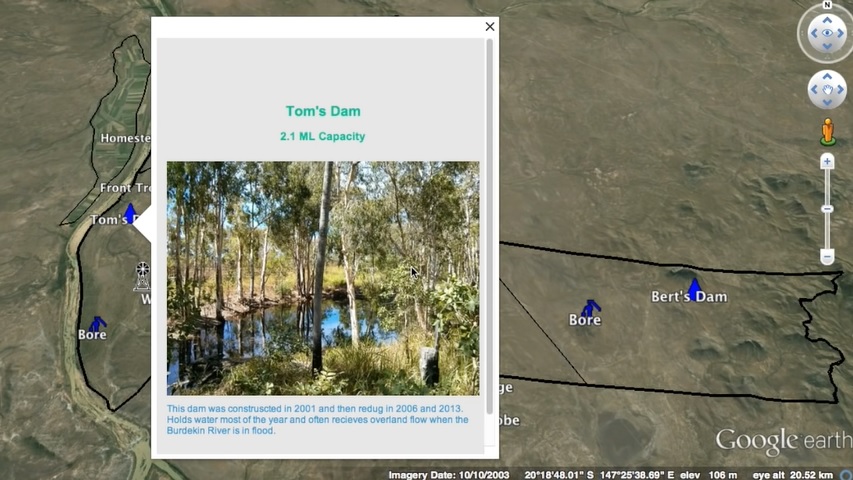
Google Earth Pro lets you create customized maps with a lot of extras. Not only can you draw lines and define areas on your map, but you can also add images and other types of files that represent different areas or points. So when you scroll over a point on your customized map, you can display multiple images, media files or other types of content.
Source: Google Earth Pro

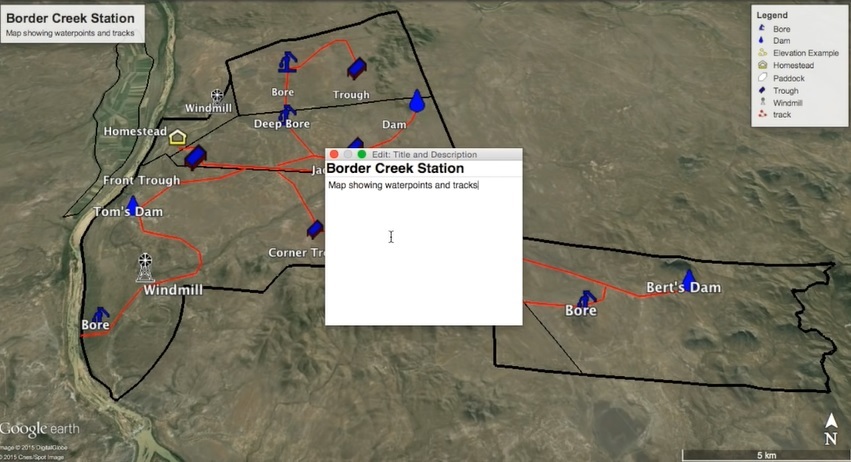
You can also add roads, pipelines, and paths to your map. A legend at the top right of the screen helps readers of the map understand what each graphic and line means. When you’re done creating your map, you can easily share the map with others via email.
Source: Google Earth

Measure land easily

Don’t bother going out with a tape measure to measure the size of a patch of land; simply use the Google Earth Pro measuring tool. Draw a line from one point to another and see the distance between the two points, or draw any shape on your map to find the dimensions. This is especially helpful if you are buying land or planning a project.
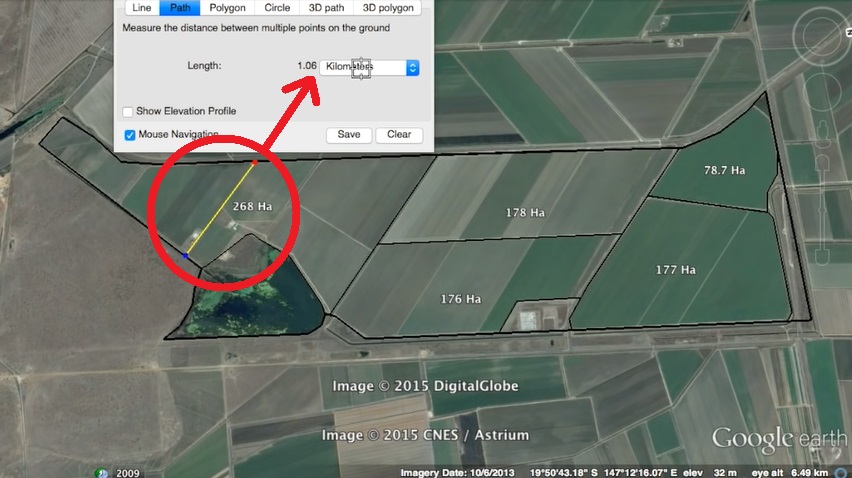
Source: Google Earth

See plot plans and tenures

Google Earth Pro pulls information from databases all over the world to give you access to very detailed information on land ownership – plot plans, tenures, plot areas, and more. So if you’ve ever wondered about the history and ownership of that haunted house down the street, now’s your chance to find out! Just zoom into the desired area to access more detailed information about a location.
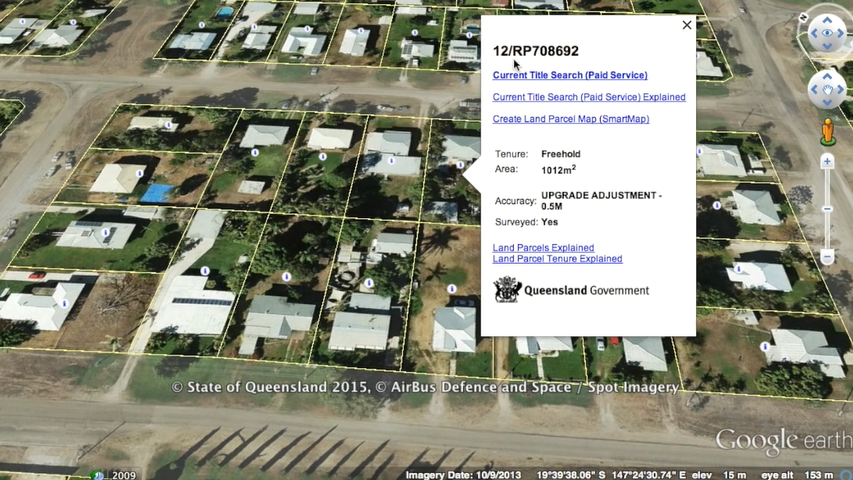
Source: Google Earth

Add more info to Google Earth for your convenience

There’s a wealth of other information you can add to your maps, perhaps the most useful of which is GPS data. The GPS function may be especially handy if you want to capture hiking or walking trails that are not shown on the map. You can import waypoints, track routes, and adjust altitudes to ground height if you wish.
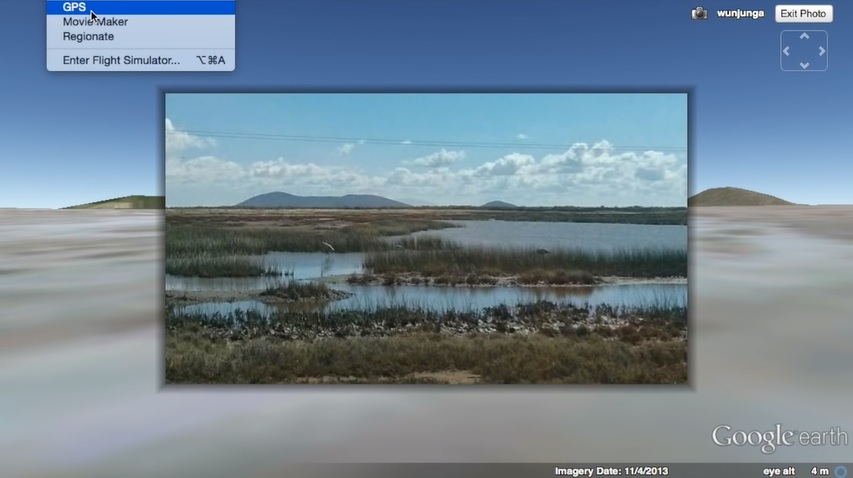
Source: Google Earth

Use the elevation tool to plan hikes

Speaking of hikes… Let’s say you’re planning on taking a hike and don’t want to sign up for more climbing than you can handle. Or maybe you are looking at land and want to know if it is low enough to be a flood risk. These would be good uses for the Google Earth Pro elevation tool. As you can see in the image below, you can view the elevation across a defined line.
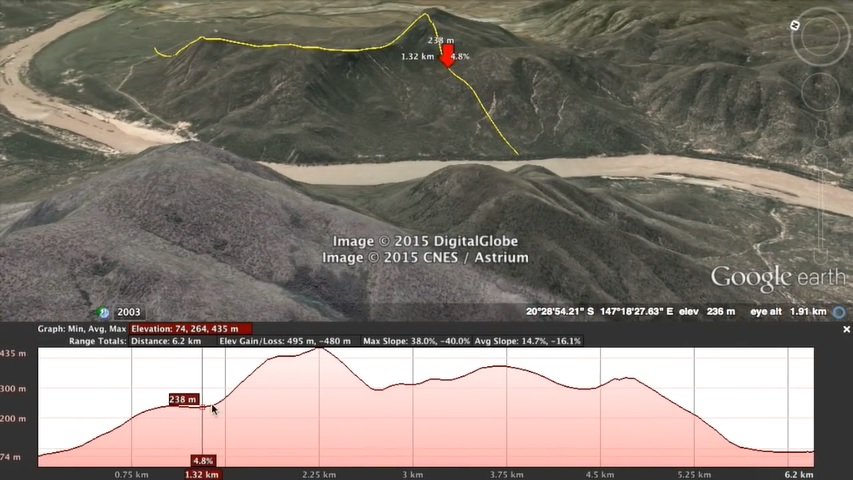
Source: Google Earth

So what do you think? Are you enough of a map nerd to try out the Pro version, or will you stick with the regular Google Earth? Tell us in the comments.

Related:

5 things you didn’t know you could do with Google Earth

How did this week’s Mac security vulnerability affect you?

You spend your life hearing from your Apple fanboy friends that their Macs are so much secure than your Windows PC. Then, out of nowhere, a software analyst on Twitter comes along highlights the most basic security flaw. That’s what’s happening with MacOS Sierra.

Apple being Apple meant it didn’t take long before an official patch was released, but for one glorious day, all those Apple fanboys were fiddling around with unofficial fixes and flapping about the security of their glorious Macs. Let’s have a look at the whole saga in a bit more detail.

Our Softonic Solutions users are talking about The 35 best MacOS apps. Join the conversation now!

Nov. 28, 2017 – 10:38AM

All hell breaks loose

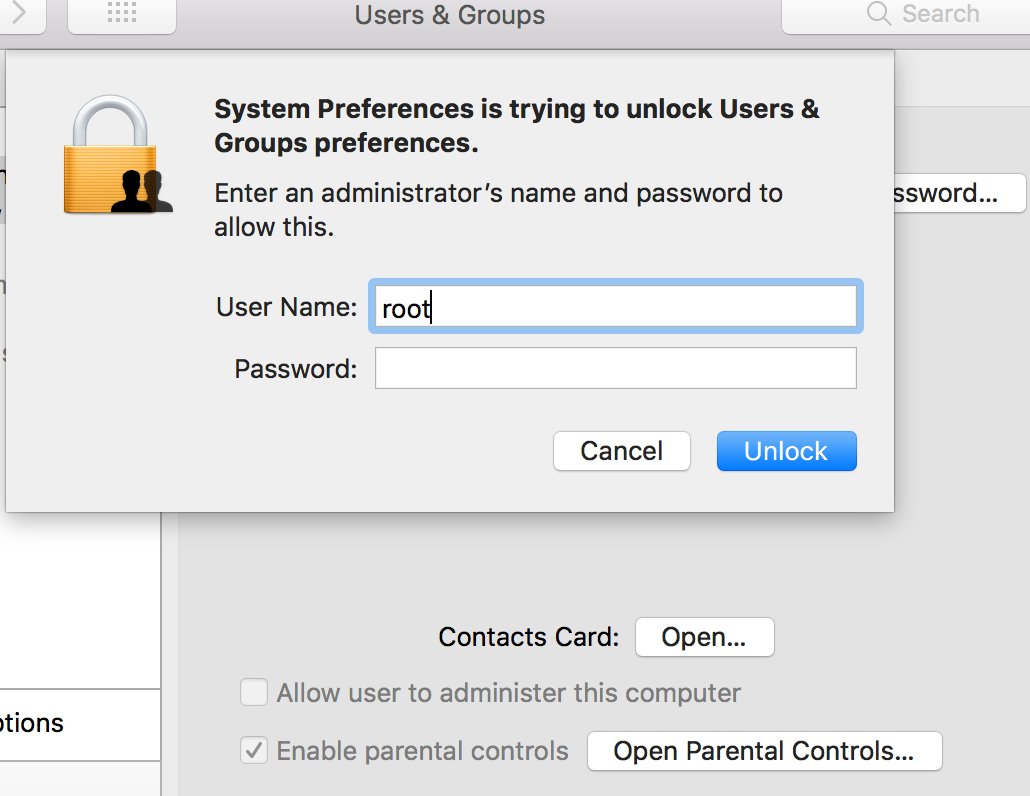
Lemi Orhan Ergin, a software craftsman and analyst, highlights on Twitter a “*HUGE*” security issue that, he says, affects all Macs running MacOS Sierra. The vulnerability allows people to log into any Mac by entering root into the username, leaving the password blank and clicking login several times.

Other Twitter users give it a try and shriek in horror as this massive hole in their Mac’s security checks out.

Nov. 28, 2017 – 12:25pm

Apple responds

The panic sets in at the new Apple HQ, so they get all customer service and send the most generic response ever. Behind the scenes, however, the “geniuses” are at work, and it doesn’t take them long to come up with a plan of action to calm their darling fanboys.

Nov. 28, 2017 – 12:45pm

The unofficial patch is released

It doesn’t take Apple long to come up with the most common sense solution to the problem. If somebody can log in to the Mac via the root account  without entering a password, all users have to do is change the password for the root account. Before long, sites like 9to5mac are running detailed tutorials on how to change the password of the root account.

Nov. 29, 2017 – 08:17

The official fix is out there

This is why you have to give it to Apple. Less than 24 hours after this huge flaw in Mac security was released on Twitter, they had an official patch ready for release that closed up the potential breach. It was a pretty huge flaw to begin with, but the =efficiency with which they dealt with the issue is commendable. This Windows user isn’t quite ready to call them geniuses just yet, but he gives credit where it is due and Apple deserves a bit on this one.

The patch isn’t an OTA update, however, so if you haven’t already updated your Mac, you can download the file here or follow Apple’s instructions here.

Where were you when the root security vulnerability was discovered?Did you fret over the vulnerability of your Macbook Air as you worked on that freelance project while sipping on a skinny Christmasccino down at the Starbucks? Or did you keep the faith in your genius overlords? Let us know in the comments below if you think this whole debacle has shaken your faith in Apple or strengthened it.

If you’re a Windows user and you were impressed by how quickly Apple solved this problem, you might want to check out Questions to ask when switching from Windows to Mac.

Follow me on Twitter: @PatrickDevaney_

Get started with CCleaner

Many people think that CCleaner is a great piece of software simply because it speeds up your computer, but in the era of fast modern computers, that’s not where its greatest value lies.

Unless your computer is littered with ludicrous amounts of temporary and junk files, there is little chance of this program making a modern computer any faster. Most modern computers have enough disk space and RAM to handle large numbers of junk files without a problem. Where Piriform’s CCleaner really shines is in its byproduct effect:  It helps protect your computer from malware.

The easiest way to infect a computer these days is to have a user download segments of malware in different parts of their computer. Each part is harmless on its own, but when the malware is sufficiently downloaded in fragmented parts, it can be activated with little more than a cookie from a website. CCleaner allows you to clear out the junk from numerous areas in your computer, which dramatically lowers the chances of your computer ever receiving a full malware download.

If you’re using CCleaner for the first time, here are some tips on how to make the most of this valuable software to keep malware at bay.

CCleaner installation tips

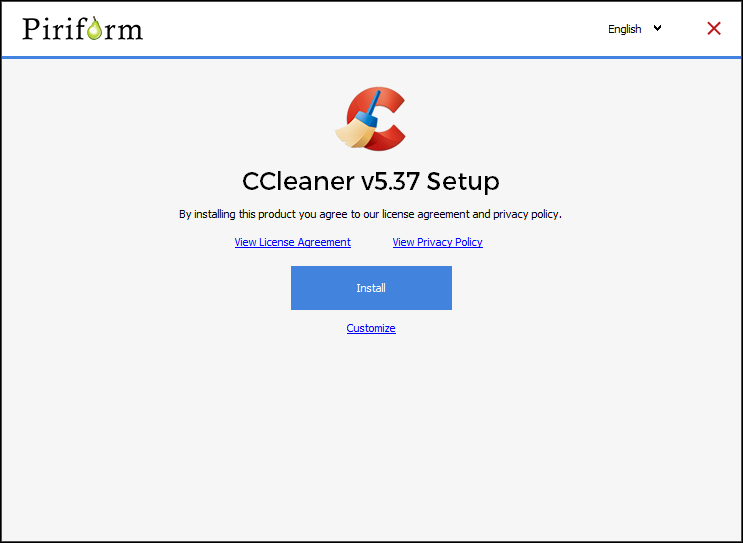
Is this your first time using CCleaner? Download it here. When you first install CCleaner, make sure you read all of what is presented to you – always a good idea when you’re installing software. For example, there is a box that you need to uncheck unless you want to install Google Chrome on your computer, too.

Click the Customize link during the installation process to choose where you’d like to access the tool. For example, you might not want the CCleaner to appear in the context menu when you open your recycle bin.

Do your cleaning chores on a regular schedule

Once you’ve installed CCleaner, decide on the frequency of your cleanings. If you want to protect yourself from having pieces of malware floating around your computer, you need to routinely clear things such as your cache files, temp files, and cookies.

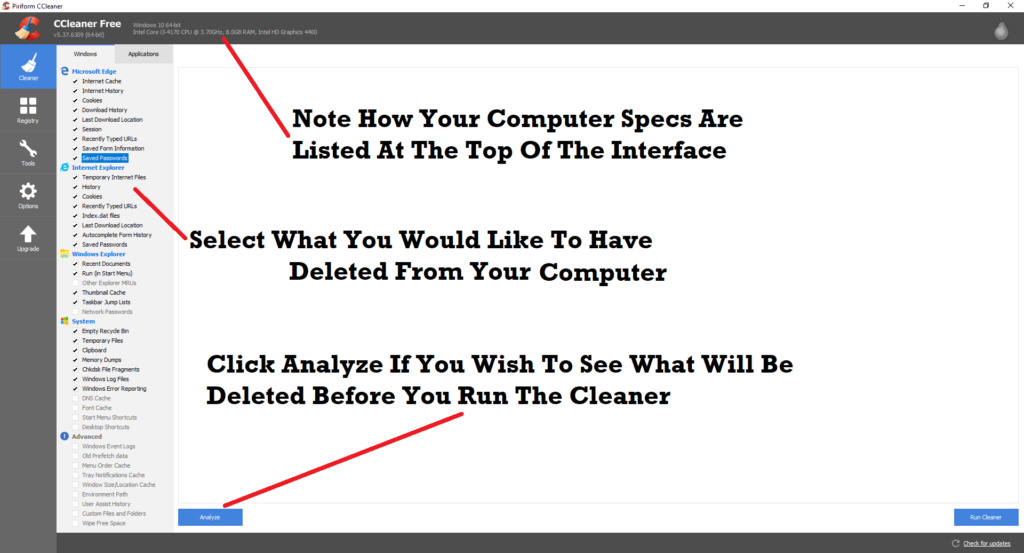
Fortunately, CCleaner makes this task pretty easy, putting the deletion and cleaning tools in one place. Instead of cleaning your browsers one at a time, you can clean them all at once by going to CCleaner and selecting what you want to clean. As you can see from the image below, you can even choose to have your saved passwords deleted in case you’re worried about spyware gaining access to your passwords.

First do a Windows scan, then an Applications scan

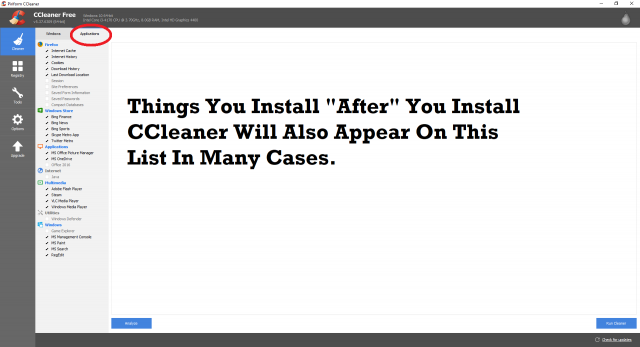
To get started cleaning out the junk, keep the default tab, Windows, selected in the left panel of the CCleaner interface, and select the files you would like to delete. If you are concerned about the possibility of deleting important files, click the Analyze button to see a preview of what will be deleted. If there are files that you would prefer to keep, simply uncheck those files in the list, and re-run the analyzer before clicking on the Run Cleaner button.

Once you’ve finished, select the Applications tab on the panel, which includes a limited number of your apps. Some apps do not appear on the list for a number of reasons – for example, because CCleaner can’t find them, or because they do not leave fragments of junk/temporary information in your device. Now click the Run Cleaner button again.

Check out the other tools in CCleaner’s toolbox

In addition to the basic scan functionality, CCleaner has a few other tools up its sleeve. The Registry tool allows you to scan for issues and then remove them. Be cautious using this tool; messing with the registry can have consequences. The scan is usually harmless, but save a backup of your drive so you can restore it if things go wrong.

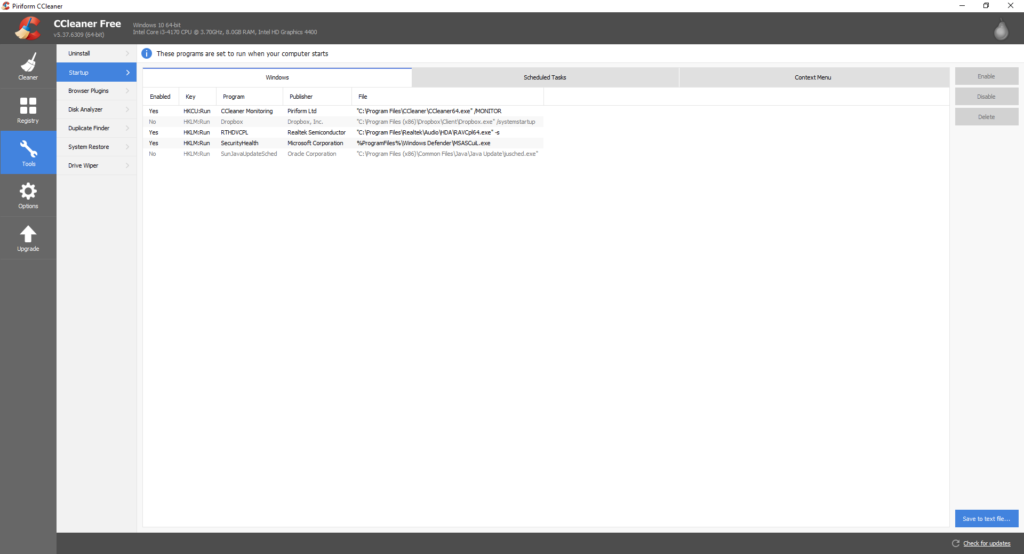
If your computer starts up very slowly, the Startup tool allows you to see which programs are slowing down your startup process and then lets you disable them. And the Browser Plugins tool speeds up your web browsing by helping you disable the apps, add-ons, and plugins that are slowing down your web surfing.

Once you’ve completed your first scan, remember to schedule future scans at regular intervals to keep your PC free of dangerous file fragments that could let in malware.

You’re going to love the latest WhatsApp update!

Note: This feature has now been added to iOS

WhatsApp’s latest update is bringing with it a fix to one of the app’s most annoying features. According to WABetaInfo, when the new update hits it’ll allow you watch YouTube videos directly in WhatsApp. No longer will you have to open YouTube and then switch back and forth, as you click on the video links your friends have sent you. Instead, you’ll be able to watch YouTube videos on a little floating window right there in WhatsApp.

With video content being shared a LOT on the messaging app this is an update that makes perfect sense. It will save users time and will cutout one of the most frustrating aspects of WhatsApp.

As well as the YouTube tweak, the latest update will bring a much easier way to record and send longer voice messages. Rather than having to hold your finger down, you’ll simply have to swipe up with you finger, which will lock the recording. You’ll then be free to do whatever else you wanted to do rather than keep your finger on the mic button.

Two user-friendly features. Great work WhatsApp, keep it up.

Let us know what you think of these changes in the comments below.

Via: WABetaInfo

Follow me on Twitter: @PatrickDevaney_

10 Facebook Messenger tricks and secrets that will amaze your friends

Facebook Messenger has introduced loads of developments since the beginning of 2016 – some you’ll have managed to work out for yourselves, and others might still be completely unaware of!

Here we’re happy to reveal ten tips and tricks to help you get the most out of Facebook Messenger’s hidden features. Your friends will love you for these! Let’s take a look!

10 Unknown Messenger Features

1) Chat with bots

Chat Extensions allow users to converse with bots individually and in group chats. Stuff like sharing music whilst talking to Spotify’s bot, which would, in time, learn your musical tastes based on your behavior.

Via: skrdigital

2) Secret Conversations

Although this feature rolls out automatically on WhatsApp, it is good to see that Facebook are giving users the option converse using end-to-end encrypted messages. All messages sent via end-to-end encryption will be completely secret. Facebook, the government or even nefarious third parties like hackers won’t be able to read your messages.

To activate this feature, all you have to do is click Secret in the top right corner. You’ll then be given the option to send self-destructing messages that will disappear after a certain amount of time. All you have to here is click the Clock icon on the left-hand side of the text box.

3) Scribble Chat

Via: Mashable

Scribble Chat is great new feature that enables you to turn your messages into cool little 3D animations. All you need to do is open a conversation and then hit + button in the bottom left corner. From here you simply swipe left and select Scribble Chat. At the time of writing, you could choose from 42 different options. There might be even more now.

4) Cheer up your friend with seriously-cute pictures

Is one of your friends feeling down at the moment? Why not cheer them up by sending them a ridiculously cute picture of a ridiculously cute cat or dog. Simply type in the message box “@DailyCute” to get a random picture and caption of something adorable!

cute-animal-photos


5) Challenge your friends to a game of chess

How about impressing your friends with your master chess skills? Or maybe you just want to kill some time? To start playing chess on Messenger, simply type (to whoever you wish to challenge) “@FBChess”. The recipient will receive a message requesting them to make the first move!

Sadly, Facebook has decided that you can’t just drag the pieces to where you want them, instead you have to use specific codes (which you’ll eventually get used to). To learn how, simply type “@FBchess help” within a chat. You’ll be check-mating your friends in no time!

facebook-messenger-juego-ajedrez-050216


6) The Messenger secret that will help you make friends outside of Facebook!

This trick won’t make you more popular on Facebook, but it will help you become super popular in that strange place called “reality”.

Let’s set the scene: You’re having a coffee with a friend, and things are going great. You’re catching up on everything you’ve missed, reminiscing about the good times and how strong your friendship has become over the many years. Then all of a sudden, your friend gets a Messenger notification and the conversation drops, and all of a sudden your friendship is lost.

Luckily, Messenger has now introduced a similar function to WhatsApp and allows you to mute notifications for a specific amount of time!

mute-notifications_thumb800

7) What happens when an emoji isn’t enough?

You may find that sometimes, the standard small emojis are not enough to surprise your friends or put a smile on their face. But what would happen if you could make them bigger? Well, you can! Simply press and hold the emoji to watch it expand in front of your very eyes!

Captura

8) Send money to your friends via Messenger!

Messenger’s function that allows you to send and receive money from your contacts is quite frankly, genius. Imagine you’ve purchased tickets for a concert, and need to get the correct amount of money (without worrying about finding change, going to the ATM, etc) from your friends. Easy. It could also be very useful if you have your grandparents on Facebook (now you’ll accept them, right?), who might want to send you a monetary gift for your birthday or Christmas!

At the moment, this feature is only available in the United States, but we should start to see reaching other parts of the world by the end of the year!

how_to_send_money_messenger_thumb800


9) Touch somebody with music

Nobody can deny the power of music to stir out emotions – has it ever occurred to you to send motivational songs to your friends instead of a plain and simple old-school message?

There’s a hidden Facebook Messenger feature that integrates your chat with your Spotify account. It’s as simple as accessing the other options (most of which you will have never heard of)directly on the application. Once you’ve found it you can now share your Spotify music such as songs, albums and your best playlists. Please note that your friend will not be able to play what is sent to them from within the chat – they will be sent a link that will open in Spotify- but it’s the thought the counts right?

messenger-spotify-integration_thumb800

10) Slam dunk time!

Some of you may not be aware of the terribly-addictive basketball game that’s hidden within Messenger. If you’ve ever played Paper Toss for smartphones, it works on a very similar basis. Simply flick your finger upwards to throw the ball into the hoop. You can even play against your friends!

To start it up, simply send the basketball emoji within a message and the game will start. The real question is whether or not you’ve got what it takes to be part of the 1% elite of players?

Dark Web version puts Wikipedia in the hands of people living in internet censored regions

The Dark Web is often associated with illicit acts like drug and weapon dealing and even the exchange of pedophilic images. The anonymous nature of the Dark Web, borne of the encrypted TOR network that allows access to it, makes illegal behavior possible but it also provides other very important concepts in today’s increasingly online world: discretion and trust.

There are still parts of the world where access to the normal internet is heavily restricted, and the information that people can access is heavily controlled. In countries where this is true, the Dark Web can provide a vital source of information for people looking to find out more than just what their government wants them to see or to communicate if they want to say something that a repressive and authoritarian regime might not want them to say.

In turn, this makes one particular site found on the mainstream internet perfect for The Dark Web: Wikipedia. Alec Muffet, a former security engineer at Facebook, is currently working on such a dark version of Wikipedia so that people living under internet-censored governments can access what is possibly the greatest repository of humanity’s knowledge that has ever existed. Muffet said:

“Onion sites are considered to be about ‘anonymity’, but really they offer two more features: Discretion (e.g.: your employer or ISP cannot see what you are browsing, not even what site) and trust (if you access facebookcorewwwi.onion you are definitely connected to Facebook, because of the nature of Onion addressing)… I am doing it because it is worth it.”

In other words, the nature of the Onion sites that are found on the Dark Web means that the information shown on them is 100% trustworthy for representation of what is shown on the mainstream versions of the website. The encryption protects both the integrity of the site and the identity of the user accessing it via The Dark Web.

At the moment, the project is read-only, as it isn’t possible to edit Wikipedia from The Dark Web, but Muffet hopes that Wikipedia might get involved itself at some point in the future. For him, the project is more of a proof of concept to show that it is possible.

Do you think it is important for people in internet-censored regions to be able to access Wikipedia? Let us know in the comments below.

Via: IBTimes and Motherboard

Follow me on Twitter: @PatrickDevaney_

5 things you didn’t know you could do with Google Earth

Rendering fantastically detailed images of the planet in three dimensions, Google Earth is an app like few others. You might not have noticed just how much Google has improved the program since it first launched the service in 2001 using images collected from aircraft and satellites.

Let’s look at some of the more clever features of Google Earth that you might not have noticed.

Google Eartch Download Google Earth
7

Zoom underwater and study the ocean’s floors

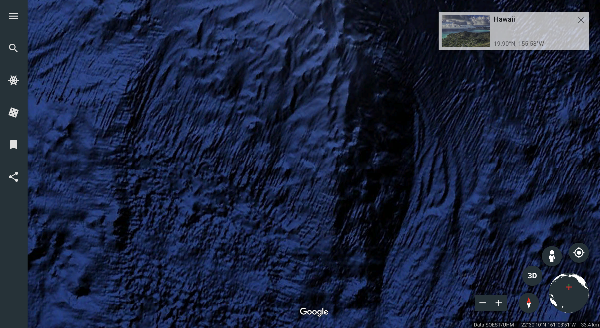
You might already know that Google Earth lets you zoom around the planet’s surface with ease. But did you know that you can also plumb the depths under the surface of the world’s waterways?

Seas and major lakes are mapped beneath the surface so users can engage in bathymetry – the study of the ocean’s floors. In 2011, high-resolution images were added to the system for places like the Hudson River, which allows resolutions up to 100 meters. Simply zoom in on the water’s surface and keep going to discover what lies beneath in three dimensions.

Source: Google

Travel in time

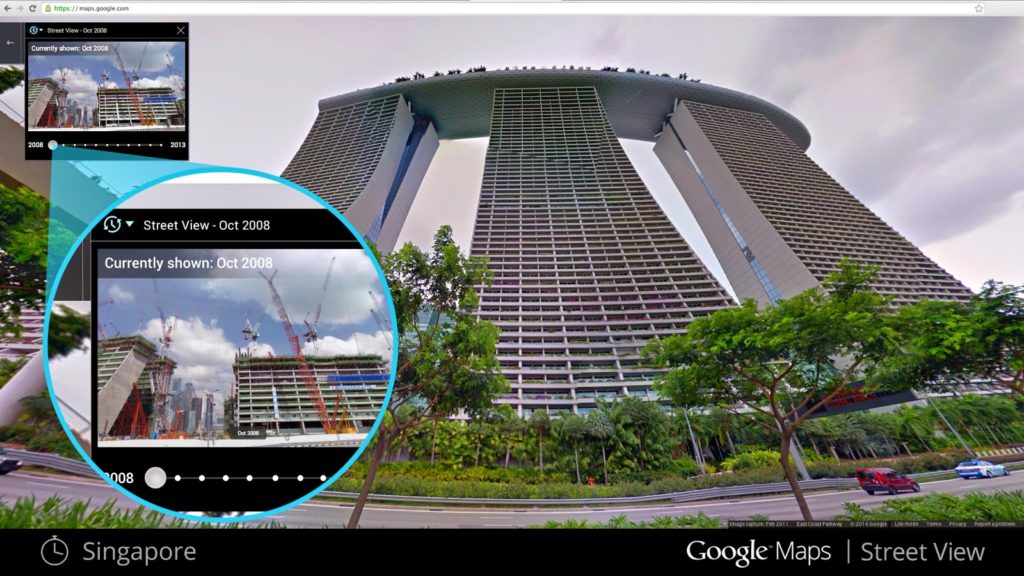
As well as moving through space, Google Earth allows you to move through time. If you are looking at an image of a city, for example, then you might see a year appear in the bottom left-hand corner of the screen. Simply hover over the number to see an alternative image from the past of the section of the Earth you are looking at. It is a great way of seeing how the planet has changed over the years.

Take a virtual tour of your favorite places

If you’re heading somewhere on vacation and planning a tour of your destination, then Google Earth will help you by allowing you to preview it. Pre-loaded guided tours of tourist destinations in cities like Paris allow you to see which places you’d like to visit in person.

Source: Google

To find a tour for a given city, go to that city in Google Earth and click the thumbnail image at the bottom of the screen.

Simulate flight

Thanks to its realistic sense of hovering over the planet, Google has developed a flight simulator that allows users to get a real sense of taking to the skies. You can pitch, roll, and dive over the city where you live or experiment with controlling an airplane in a completely different part of the planet.

Source: Google

Simply head to the Tools section in the main menu and select Enter Flight Simulator. Don’t forget to plug in a joystick for the perfect simulation experience!

Learn more about places with Wikipedia cards

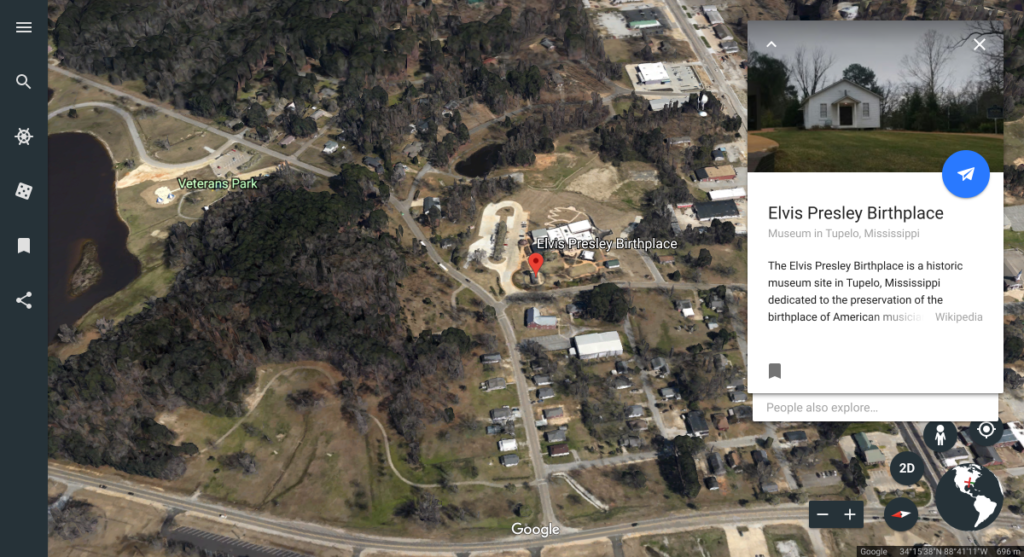
Google Earth is a great way to get to know a place. You can get even more from the experience by using the Wikipedia option, known as a point of interest layer. This will display a card with facts about the place you are looking at at while you are viewing the 3D images, so you can gain knowledge while exploring.

Source: Google

This option is enabled by default; to use it, simply click a place and the card appears.

Want to start your own virtual tour? Download Google Earth here.

Amazon’s best Black Friday deals for Thursday November 23rd 2017

Happy Thanksgiving!

Today is a good day to focus on friends and family and leave your devices in a basket by the door. But just in case you need a break from the action, peep these deals for today, which include big savings on Artificial Intelligence, Storage options, VR, Wi-Fi Boosters and killer headphones. Let’s get down to business – there’s a turkey leg in the next room with your name on it!

Best Black Friday Deals November 23 2017

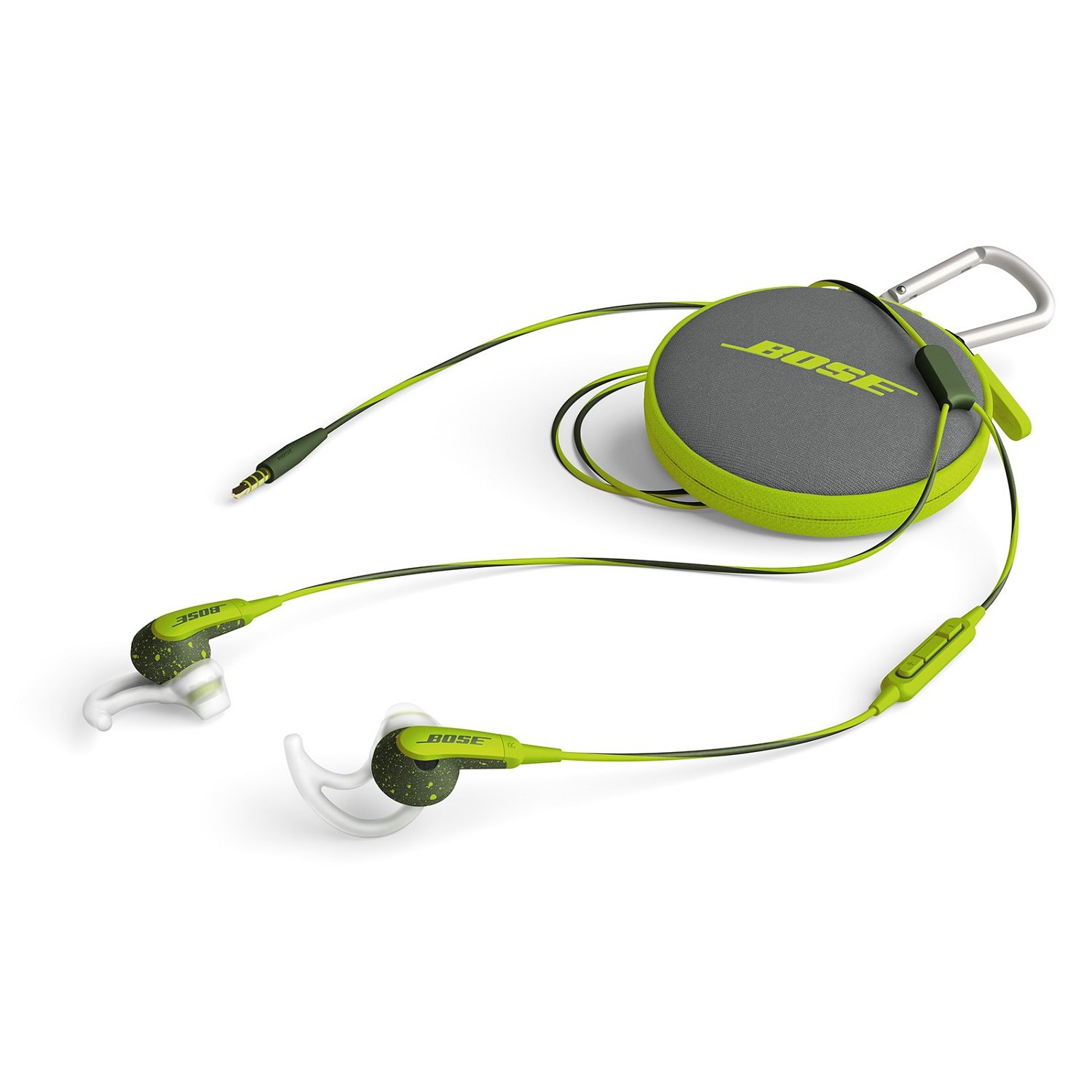
Bose SoundSport in-ear headphones

You read that right. You can get that Bose sound today for a heavily reduced price. Bose’s exclusive TriPort technology allows them to pack big sounds into small spaces and these SoundSport headphones will be a treat for anybody going the gym or otherwise. With a massive 51% off this could be an opportunity not to be missed.

$99.99
   $49.99  Buy them Now

Amazon Echo Dot

This is an excellent opportunity to get Amazon’s home assistant Alexa into your home setup. Alexa has been learning new skills all year and can do all sorts of amazing things for you from ordering you a pizza to playing music and adjusting the lights.. With a huge 40% off for this deal now is the time to bring some AI-powered organization into your life.

$49.99   $29.99 Buy it Now

PlayStation VR

This is the cheapest I’ve ever seen PlayStation VR offered. PlayStation VR offers Sony PlayStation owners an affordable route into truly immersive Virtual Reality worlds. With 38% off the RRP this deal will be snapped up by a lot of people. Grab this one while you can.
$399.99
   $249.99 Buy it Now

Wi-Fi Booster

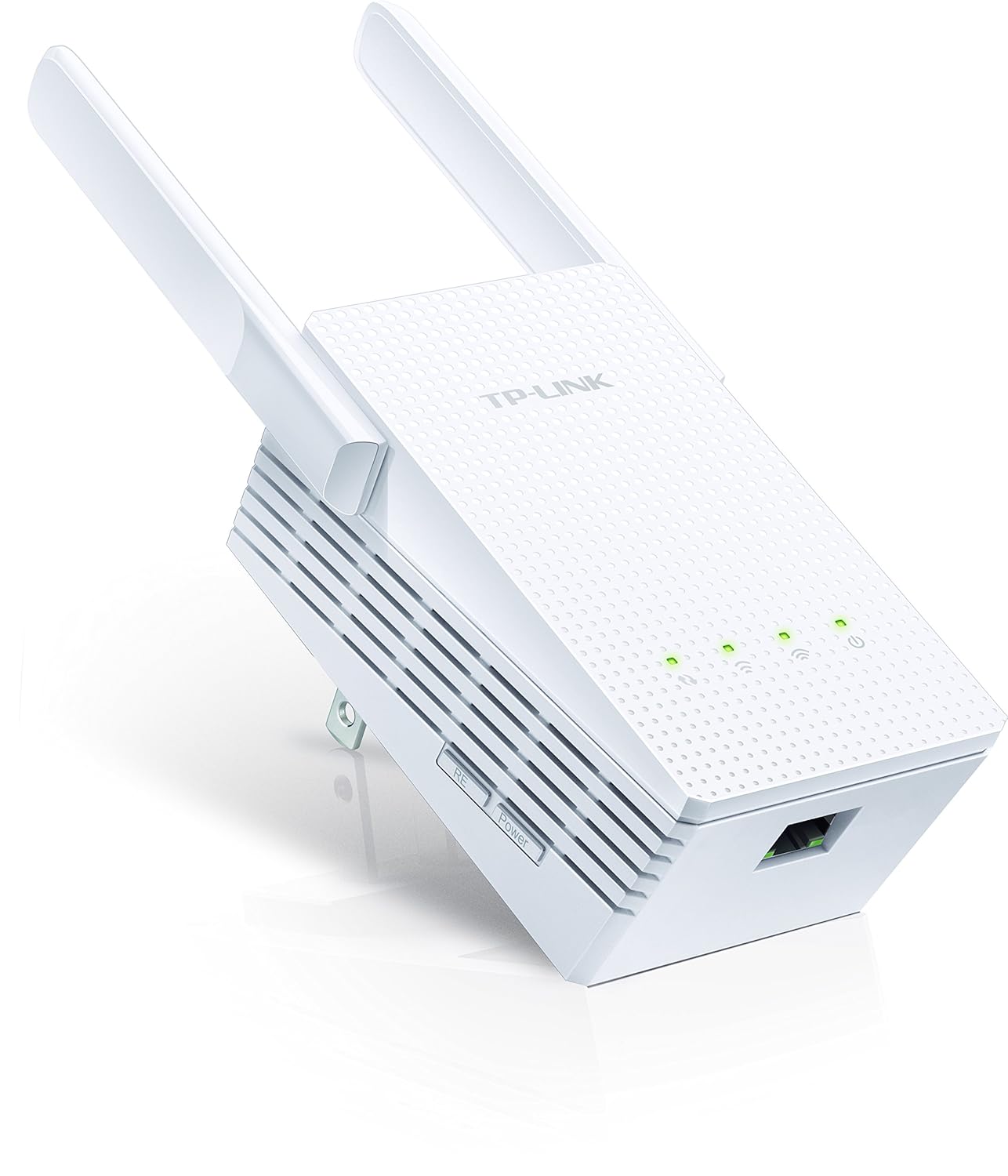
This TP-Link dual band Wi-Fi range extender will bring light to the dark places. What we mean is, it will bring Wi-Fi to those far-flung corners of your abode that are beyond the wireless reaches of our online digital civilization. We all have those dark spots and we all hate them. Boost your signal and save over $25 with this deal.

$59.99
   $34.98 Buy it Now

SanDisk Cruzer Blade 64GB

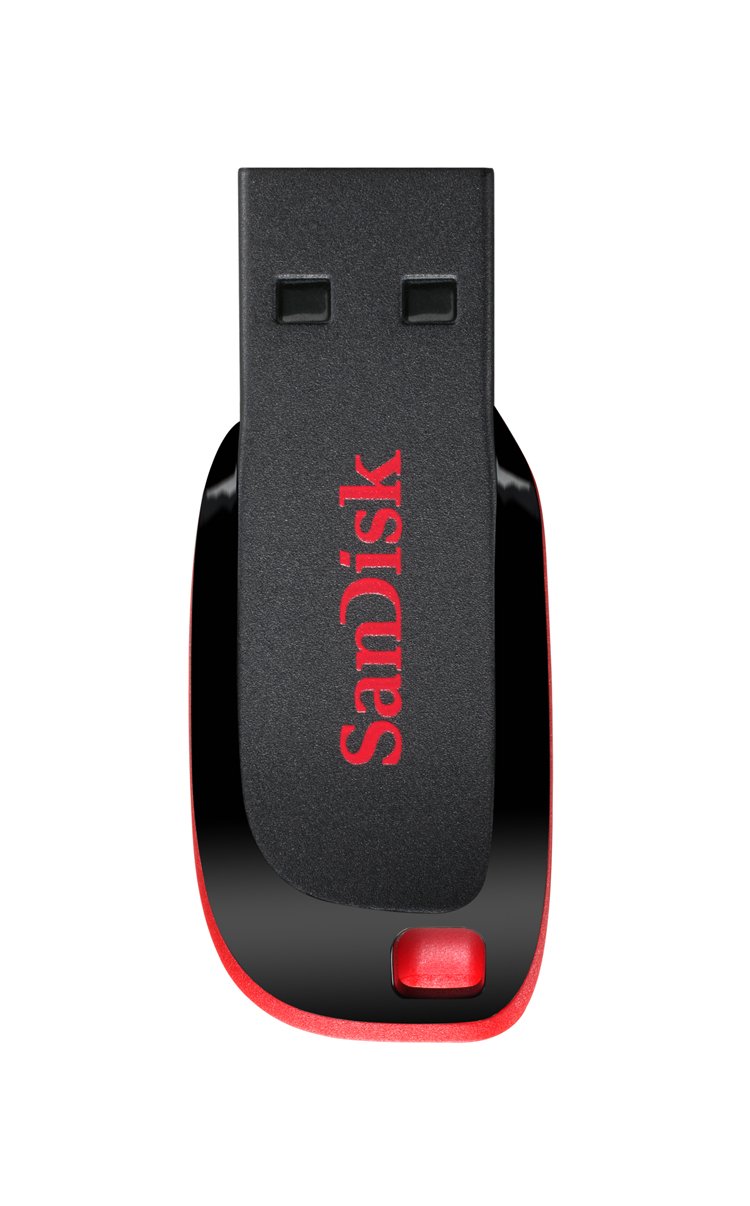
USB pen drives are incredibly useful and the amount of data they can hold just seems to keep increasing. It might still cost hundreds of dollars to get your hands on the highest capacity drives but drives 32 or even 64GB can now be snapped up at bargain basement prices. This high quality SanDisk Pen Drive is on sale for 59% cheaper than it is normally.

$32.99   $13.49   Buy it Now

Google has been tracking you through cell towers

There are some estimates that Android phones make up 55% of all smartphone sales in the United States, making it the most widely used smartphone OS in the country. A lot of those users know that Google, and some other apps, might be tracking their location. What those same users don’t know is that Google knows where you are even if you disabled location services and even if you don’t have a SIM card in your phone.

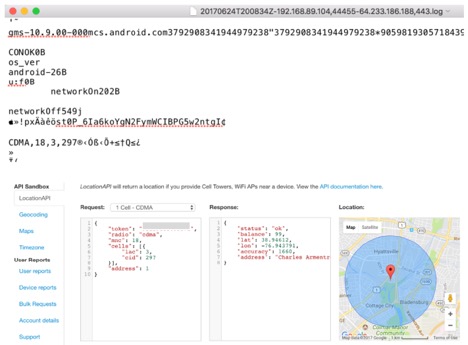
Quartz has conducted an investigation and found some very interesting info. Since the beginning of 2017 Google has been keeping track of user location via nearby cellular towers. This resulted in Google having a lot of data on you even if you didn’t want it to. After contacting Google about this Quartz got a response that this practice is still used but that it will end by the end of the year.

“In January of this year, we began looking into using Cell ID codes as an additional signal to further improve the speed and performance of message delivery, however, we never incorporated Cell ID into our network sync system, so that data was immediately discarded, and we updated it to no longer request Cell ID.” a spokesperson told Quartz in their response regarding this tracking issue.

Google Tracking
Source: qz.com

What remains unclear is how can cell-tower addresses that are transmitted as data strings improve messaging speed. What is clear is that Google can pinpoint your location by triangulating signals from different cellular towers. This is a lot easier in urban areas that have more towers close together.

All data sent to Google is encrypted but that doesn’t completely remove the doubt that this data could also be sent to third parties. It isn’t a troubling fact for a lot of people but if Google knows the locations of law enforcement workers and victims of domestic abuse that data could have big consequences.

Companies like Facebook are known to make huge profits from this data. Geo and location-targeted ads are becoming a common thing. Based on your search history and current location you will be served with ads that match your current interests and location. While it may look harmless, such data can always be collected by hackers and be used against you.

This location-sharing practice wasn’t limited to a specific model of Android phone or tablet so everyone’s location data has been collected. The data was sent once the device got connected to a WiFi network or had cellular data enabled. Bill Budington, a software engineer who works for the Electronic Frontier Foundation, a nonprofit organization commented on this event. “You can kind of envision any number of circumstances where that could be extremely sensitive information that puts a person at risk.”

Google’s privacy policy does mention that user data will be collected but they did not mention how they will be collecting it.

“When you use Google services, we may collect and process information about your actual location. We use various technologies to determine location, including IP address, GPS, and other sensors that may, for example, provide Google with information on nearby devices, Wi-Fi access points and cell towers.”

What are your thoughts on this? Let us know in the comments below.

The app we’ve all forgotten about is back, with a huge update

We’ve always had it, but for years this app has been relegated to some hidden folder that we never click.  I’m talking about the humble SMS app. Although we hardly ever use it, Google hasn’t forgotten about it and has actually just rolled out quite a hefty update.

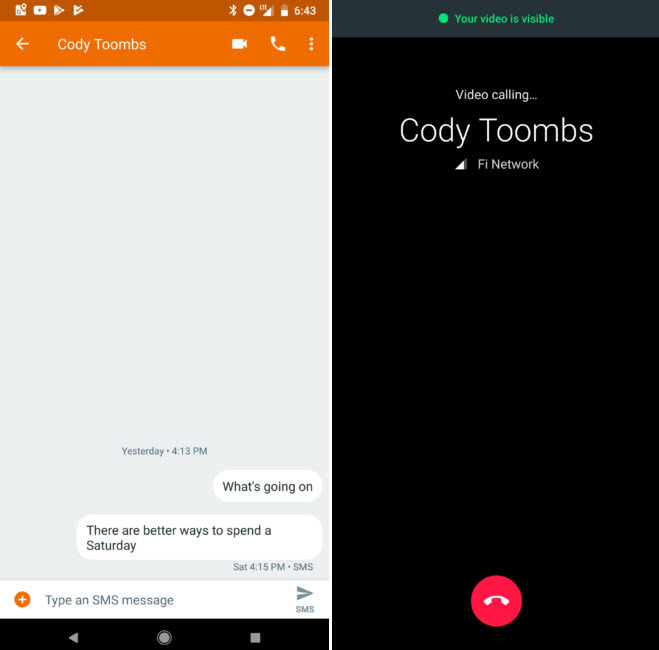
Google has integrated the SMS app with Google Duo. Duo is Google’s video call service, and it is actually quite good. This integration will only happen if you have Duo installed on your mobile.

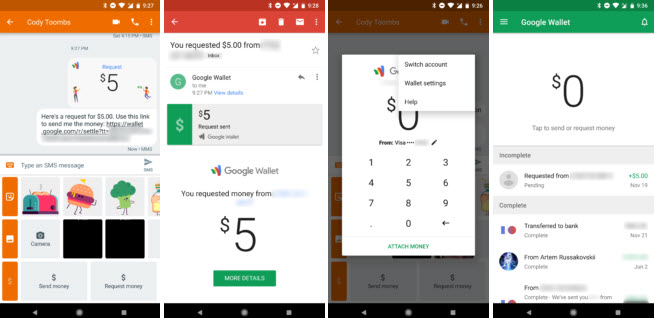
Google Duo also includes the option to make payments through Google Wallet. This is particularly useful as it means you can now make payments to your contacts.

The app has also added some cool features for people with dual SIM phones. It is now easier than ever to manage the SMS messages of both SIMs, which in the past was a bit chaotic.

The SMS app now takes up considerably less space. It is just 5.7MB, 30% less than what it was in the past.

Soon the messaging app will be updated automatically on all Android phones. If yours hasn’t been updated yet and you want to try out these new features you can download the APK from APK Mirror.

Do you still use your SMS app? Let us know in the comments below.

Via: Android Police

Follow me on Twitter: @PatrickDevaney_