
Best apps to clean and optimize your Android

These are all the best Android apps for cleaning and optimizing your smartphone and tablet

Android optimizer apps

Google’s Android operating system is great for many reasons. Now in its tenth version, it is chock full of advanced mobile features, works flawlessly, and is even optimized to work well on lower-powered low to mid-range devices. Furthermore, it is free, and when you combine all of the above you see just why the number of global Android users dwarfs the number of users walking around with Apple iOS-powered iPhone’s in their pocket.

The thing is though, sometimes our Android phones need a bit of a tune-up. We use our phones all the time, which means things can slow down, the internal storage can get clogged up, and apps stop working as well as they should do. If this has happened to your phone, don’t worry. You don’t need to start thinking about buying a new phone just yet. We’re here to show you the best Google Play cleaning apps that will help you clean and optimize your Android smartphone

Best Android cleaner apps


CCleaner
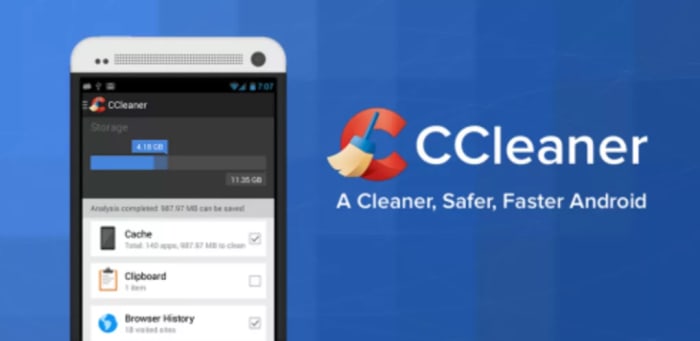
CCleaner for Android

CCleaner by Piriform is famous for being one of the best PC maintenance programs available today. This Android version of the highly acclaimed software also has a lot to offer too. The app can clear your device’s cache files, your browser history, and other temporary files including those found in your download folder. There is also an app manager feature, and tools for staying on top of your device’s CPU and RAM usage, internal storage levels, and temperature. A handy battery saver feature will also boost your phone’s battery life. Although it might not have a massive effect on your device’s performance, CCleaner also allows you to delete your call and SMS histories quickly and simply.

CCleaner Download Now
8

Virus Cleaner 2019

Virus Cleaner

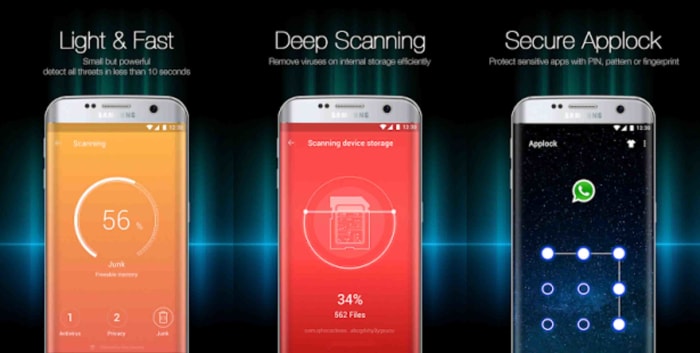
Hi Security Lab’s Virus Cleaner 2019 – Antivirus, Cleaner, & Booster is a very popular and very efficient file cleaner Android app that will help you keep on top of your device’s performance and security. Powered by McAfee, this Android app offers plenty of optimization features including File Scan, Deep Scan, and an added Scheduled Virus Scan, which will automate your security procedures. Virus Cleaner also comes with an App Lock feature and a Notification Cleaner. The app does offer in-app-purchases but with so many core features available for free it is easy to see why this app has been downloaded over 100,000,000 times with over 1.6 million Android users giving it a positive review.

Virus Cleaner 2019 Download now
8

Norton Clean

Norton Clean

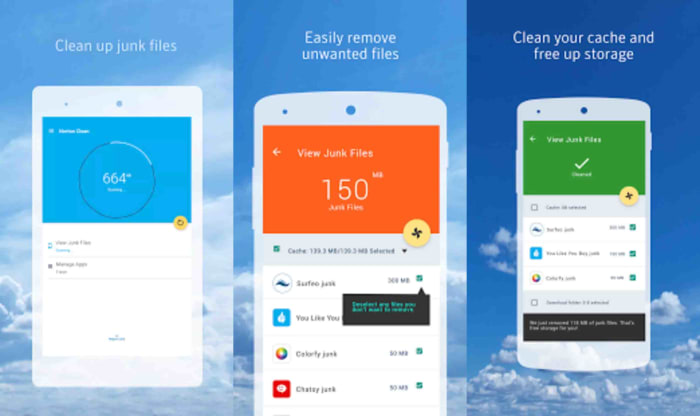
Norton is famous for its antivirus software that protects everything from Android smartphones to Apple Macs and iPads. Norton Clean, however, is a specialized app that deals exclusively with cleaning and optimizing your Android phone. The app will clean your device’s system cache, get rid of old APK files, and will get rid of your phone’s general junk too. It also comes with an app manager that will help you clear out those unused apps that are bogging your Android system down. This app is simple but effective.

Norton Clean Download now
7

All-in-One Toolbox

All-in-One toolbox

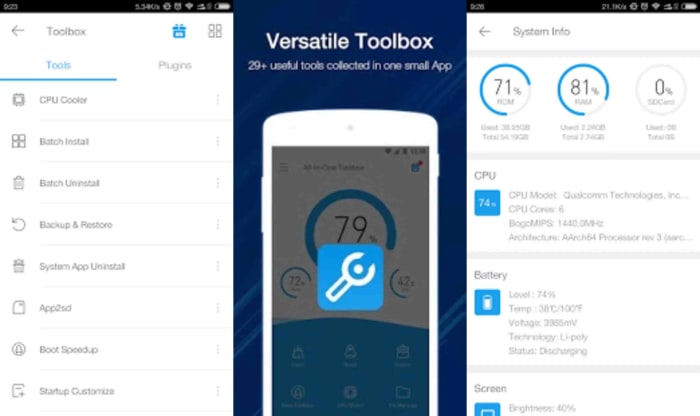
If you’re looking for an app that does more than just the basics then the All-in-One Toolbox from AIO Software could be what you’re after. As well as offering a one-click booster feature that will clean your cache, analyze your apps, and free up system memory; it comes with many other great features that will help you optimize your Android device’s performance. AIO also gives you a file manager, an app manager, a task killer, and a CPU cooler tool that will help you manage the apps you have running in the background. The only real problem with this app is that with so much going on it could have been designed a little better. It isn’t the easiest app to use but by offering so many ways to optimize your phone’s performance, it is definitely one to consider.

All-in-One Toolbox Download now
8

Clean Master

Clean Master for Android

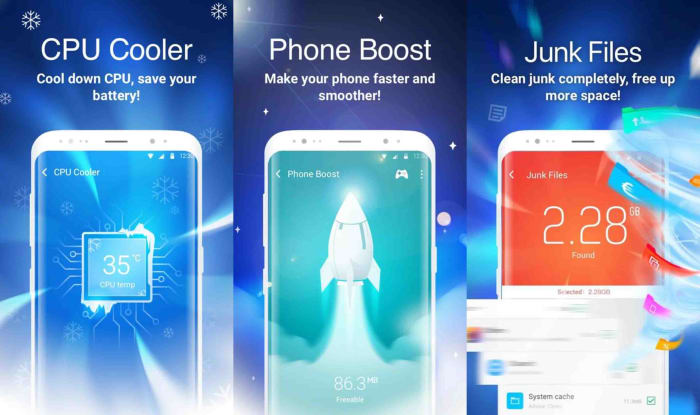
Cheetah Mobile’s Clean Master Android app is another excellent phone cleaner app for anybody looking to make their Android phone work a little better. The Junk Files tool makes it very easy for you to optimize your Android device by cleaning out the app cache, getting rid of temp files, and deleting duplicate files. Clean Master also comes with a powerful Phone Boost feature, which will have your phone running more quickly and smoothly with a single tap. An additional feature to consider is Clean Master’s app manager that not only allows you to monitor app performance but also enables you to move apps to your SD card and back up APK files.

Clean Master Download now
8

DFNDR Antivirus and Cleaner

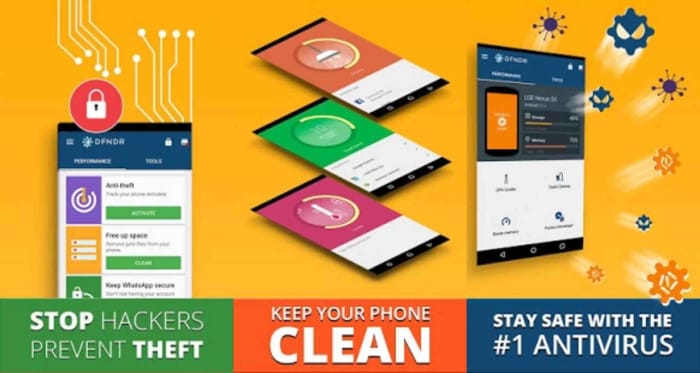
Android DFNDROur final app for cleaning and optimizing your Android smartphone is DFNDR by PSafe. DFNDR is another incredibly popular antivirus app that has seen well over 100,000,000 installs on Android devices with millions of positive reviews to go with them. DFNDR will keep you safe from viruses, malware, adware, and spyware threats and will also work to protect your private and personal data. This extensive app also offers a robust junk cleaner and other optimizer features that will enable all Android users to clean and optimize their device performance and get them working as effectively and efficiently as possible.

DFNDR Download now
10

How to solve the most common Android problems

These are all the solutions you’ll need to solve the most common Android problems

Android problems and solutions

Google has some of the most popular apps in the world. The likes of Chrome and Gmail have billions of users but they’d be nothing without another crucial piece of Google software. Google’s mobile operating system, Android, has secured its place as the most dominant operating system of all time. There are literally billions of Android smartphones in use right now all around the world, which massively dwarfs the number of Apple iPhone users. Most of us are Android users and when most of use something there is a good chance that a lot of us will be experiencing problems when we do.

These common problems are what today’s article is about. We’re here today to help you fix some of the most common Android problems. Google can help you fix certain Android problems like fixing an installed Android app or how to fix Android problems connecting to a Wi-Fi network, but we’ve had to figure out the solutions for a lot of these problems ourselves. Don’t worry though, they all work. This is how to solve common Android problems.

The most common Android phone problems and solutions

Frozen Android mobile device

We’re going to start today’s guide with a classic problem that has affected all electronic devices and a classic solution that has worked throughout the ages. If your Android phone has crashed, frozen, or if your screen is unresponsive, the best thing you can do is reset it. Yep, our first solution is to turn your Android phone on and off again.

To hard reset your Android phone all you need to do is hold the power button down until you see the screen go blank and then see the Android loading screen appear again. You’ll need to wait about 20 seconds. This should reboot your Android device and have it working as normal again. If your device froze after you dropped it, however, you might have a bigger problem. Also, if the problem persists, one or more of your apps might not be working properly.

Android apps not working properly

reboot to Android safe mode

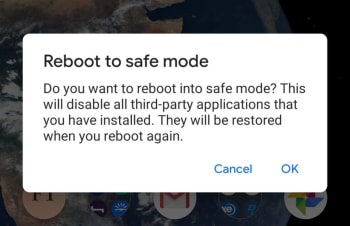
If your phone is stuck in a reboot cycle or is constantly crashing, freezing, or running slower than it normally should, you may have installed an app that is causing you problems. In order to test for this, you should restart your Android device in Safe Mode. Safe Mode will boot your Android phone with all your third-party apps disabled. This means you can check whether your phone works properly without them and then uninstall the problem apps, normally your new apps, and start again, if it doesn’t.

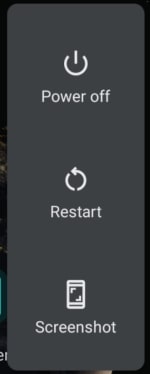
Android power menu

To reboot your Android device in Safe Mode, hold down your power button until the Android power menu appears. Then hold your finger down on the power off button until you see the Reboot in safe mode option. When you’ve done this, your phone will boot in airplane mode and you’ll see a little note in the bottom-left of your screen telling you your device is being run in Safe mode. Have a play around making calls etc. to see how your phone works with all third-party apps disabled.

Android phone needs resetting

If you still experience problems when running your device in Safe Mode you will need to perform a factory reset. You can do this by going to Settings, then Backup & Reset, and finally Factory Data Reset. Don’t do this, however, unless you’ve first tried finding the problem using Android Safe Mode.

Battery life problems

Battery storage issues

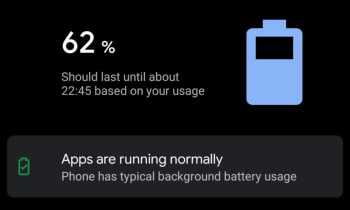
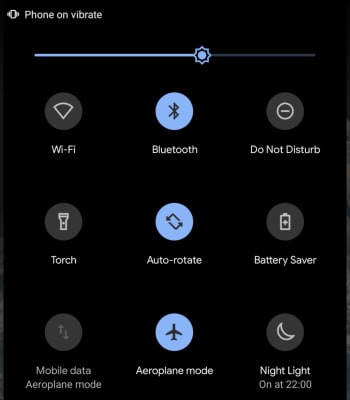
Battery drain issues affect almost every single smartphone user on the planet. It is just a fact of life that smartphone batteries aren’t big enough. There are, however, a few things Android users can do to alleviate battery problems. The first is Android’s Battery Saving mode, which you can find in the pull-down menu on your home screen. This will automatically limit many of your phone’s background settings that use up all your juice.

Battery Saver

Another big drain on your phone’s battery life will be your screen brightness. If you’re trying to get your phone to last to the end of the day have your screen brightness set as low as possible. If you don’t need them, turn off Bluetooth and Wi-Fi too. The other big change you can make is to disable Location services.

Android running slow/Low storage space

The most common reason Android phones run slow is because they’re running out of storage space. If your phone allows it, you could use an SD card to boost your internal storage, but you can try two software fixes to your memory issues too. Normally, these issues will be caused by having too many apps installed on your phone or too many photos saved. You can solve the former problem by uninstalling all the apps you no longer use. Another good trick for clearing up space on your Android phone is downloading a cleaning app like Clean Master, which will hunt out stray files in your cache and wipe them from your phone’s memory.

Clean Master Download now
8

You solve too many photos problem by installing Google Photos and using the auto backup feature. Google Photos knows when your phone is running low on space and will prompt you to backup your photos to the cloud and free up the local space on your device. You’ll then still be able to view your photos as normal whenever you have an active internet connection.

Google Photos Download Google Photos
7

Android running hot

If your Android phone is running too hot, you could have either a software or hardware related issue. If the problem persists when using a certain app, try updating or reinstalling the app to the latest version to see if this helps solve the issue. If it doesn’t, try searching through the Google Play Store comments and reviews for the app to see if anybody else has reported a similar problem.

Update apps

The problem could be related to Android itself, however. To check for this, Google your exact Android version with the phrase Overheating to see whether there is a history of a similar problem affecting other users. If nothing you find helps and your phone continues to overheat, you should think about taking your phone to a professional as there might be a hardware problem causing the overheating.

Can’t download Android apps

Google Play Store cache

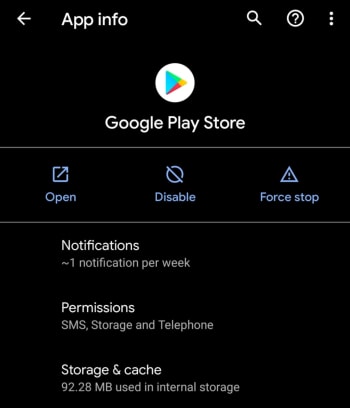
If you’re having problems downloading apps from the Google Play Store, there is a good chance the problem is that your Google Play Store app has a corrupt cache. To fix this problem go to the Google Play Store app settings menu by holding your finger down on the app and hitting the info button that appears. Then hit the Storage & cache option and tap Clear Cache.

Softonic Terms & Conditions – Avast contest 2020

Terms and Conditions for “SOFTONIC – Avast 2020” contest
Terms and Conditions for “SOFTONIC – Avast 2020” contest (Hereinafter the “Contest”)

This draw is run by Softonic International, S.A., whose registered office is at MediaTic Building – Roc Boronat, 117, 6th Floor – 08018 Barcelona (SPAIN) (“Promoter”).

The draw is open worldwide to persons aged 18 or over, excluding employees of the Promoter and its affiliated companies and their immediate families, as well as any other persons and companies professionally associated with this draw.

In order to be eligible to participate in this draw, participants need to

  1. Like this post
  2. Try out the new version of Avast Free Antivirus and share here a screenshot of your favorite feature!

By taking part in this draw all participants will be deemed to have accepted and be bound by these terms and conditions. The contest commences at 00:01 Central European Summer Time (CEST) on 27th February and closes at 23:59 on 7th March 2020.

Prize: The winner will receive an iPhone 11 Pro 64GB
(worth estimated retail value 1.159,00 euro, varying from country to country). The Prize is non-transferable and there is no cash alternative. There will be only one Prize Winner, who will be selected through a random automatic system among the valid eligible participants.

Announcement of the Prize winner: Winner will be notified via email on or after 9th March 2020.

Delivery of the Prize: The Promoter will contact the Winner via email. Winner will be required to provide his or her valid identification (ID) with a complete name, a shipping address and email address to the Promoter in order to be eligible to receive the Prize. The winner hereby authorizes Softonic to perform the purchase on the site link https://www.apple.com/ or link https://www.amazon.com/ thus processing and sharing the personal data provided strictly for the purposes of placing the purchase and mandate the relevant shop to ship the prize. Softonic will directly perform the purchase on the site establishing the Winner as the recipient . Please note that providers’ sites Apple and Amazon privacy policy will apply to your data. Please refer to Apple or Amazon on the forgoing links for more information. We will reach you to find a solution in the event the relevant shop has any restriction or limitation to shipping or exporting the prize to the location provided.

The winner must provide the above details within the period of two (2) days from the date when he or she was notified. If a person drawn as the winner of the Prize does not confirm acceptance of the Prize and provide the above-mentioned information by the end of that period of two (2) days, then the Promoter reserves the right to draw an alternate winner from the valid entries received at the time that the Contest ended.

Your personal information will be used by the Promoter to conduct the draw, and in accordance with Softonic’s Privacy Policy, found at https://hello.softonic.com/privacy-policy/. To access, rectify or delete the data provided, participants can send an email to privacy@softonic.com indicating in the subject “Contest Data Rights”.

If you are the Winner, the Promoter may use your information for marketing or promotional purposes, including using your name and your Facebook profile picture to announce the winners online including but not limited to Softonic’s web pages, blogs and Softonic’s profile pages on Facebook, YouTube, Twitter, Google+, Pinterest and Instagram.

Other than death or personal injury arising from the acts or omissions of the Promoter or its employees, the Promoter to the fullest extent by Law will accept no responsibility for any loss, damage, injury or disappointment suffered by any participant from entering this Contest or by a Winner’s acceptance or enjoyment of the Prize.

This draw is in no way sponsored, endorsed or administered by, or associated with Facebook. By entering you confirm that you understand that you are providing your information to the Promoter and not to Facebook. By entering the Contest, all participants agree to release Facebook completely of any liability.

The Promoter reserves the right to cancel, modify or supersede the draw (including altering prizes) at its sole discretion, if it is not capable of being conducted as specified. The Promoter reserves the right to substitute a prize in the event that circumstances beyond its control make this necessary. The decision of the Promoter is final and binding in all matters relating to this draw.

These terms and conditions and all matters arising from or in connection with them are governed by the laws of Spain without regard to conflict of law rules and the courts of Barcelona will have exclusive jurisdiction.

All you need to know about Tik Tok

TikTok is a Chinese video sharing and lip-syncing app

The Tik Tok Guide

TikTok has quickly risen to become the hottest trending social media app on iOS iPhone, and Google Android phones. This puts it ahead of other social media platforms like Twitter, YouTube, and even Facebook and Instagram. TikTok has been downloaded millions of times in the U.S.  ABC News in Australia calls it, “the app your kids love, but you’ve never heard of” which ultimately begs the question; what is TikTok?

What is TikTok?

The TikTok app, like Snapchat and a whole host of new apps these days can appear baffling to anybody born before the turn of the millennium. Users can create 15-second comedy skits using a variety of tools including lip-syncing, animations, special effects, and also beat matching popular songs to filmed footage. These all add up to create a tool that can give even the freshest and most inexperienced of movie-makers the ability to create videos that look polished and well made. Videos can they promote across the networks using tools like hashtags. Tik Tok is making people famous.

TikTok was formerly called Musical.ly, but now has a fresh look and new name. It was taken over by the Chinese firm Bytedance in 2017 and has since gone on to reach hundreds of millions of monthly users in over 150 countries.

9

TikTok’s success in the US has been helped along by late-night talk show host Jimmy Fallon. Fallon has not only encouraged his viewers to use the app, he has also offered an excellent introduction to what it is about: “What it is, is you post short videos of you doing fun stuff like lip-syncing to a song or a movie clip or acting out a silly scene with your friends, or even your pets” Another Fallon feature invites users to roll around the ground like tumbleweeds, using TikTok to overlay old western music on top of the video.

TikTok is a fun-to-use app that invites users to create funny, silly, and hopefully engaging videos that they can then share on the app. Let’s have a look then at some tips on how to use Tik Tok.

Top TikTok tips

Tip #1 The TikTok Share button does a lot

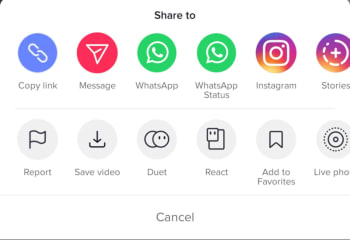
You’ll find Share buttons on almost all social networks and apps. You click share if you want your friends to see something you like or maybe hate. The Share button on Tik Tok, however, does a lot more than just sharing Tik Tok videos. First up, it’ll give you the option to download a video so that you can watch it later when you’re offline. Another cool thing you can do when hitting the Share icon on Tik Tok is saving the video as a GIF. This is a great option as many of the short Tik Tok videos look fantastic when played over and over again as GIFs. You can also make Live Photos out of Tik Tok videos.

The final cool feature found in the Tik Tok Share menu is the duet option. If you find a video you like, you can perform a duet with the performance in that video. Click here for our guide to Tik Tok duets.

Tip #2 TikTok Quick Actions

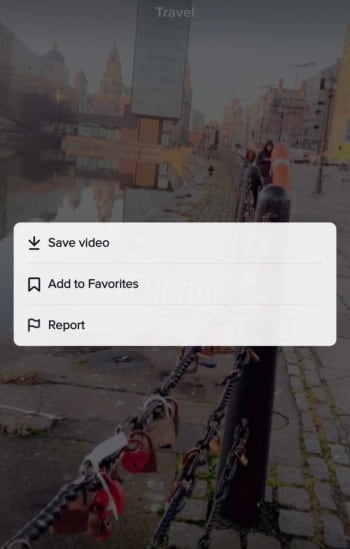
You can actually access some core Tik Tok features without having to go into any menus. When watching a Tik Tok video all you need to do is hold your finger down anywhere on the screen to open up the Quick Actions screen. This will enable you to quickly Save videoAdd to Favorites, or tell Tik Tok you’re Not Interested in this type of content, so it won’t show up in your Home tab.

Tik Tok Quick Actions

Tip #3 Use TikCodes to connect with other users

Tik Tok has its own cool version of QR codes that you can use to connect with other Tik Tok users. Your TikCode will look like a circular QR code that is wrapped around your profile picture. To create your own TikCode go to your profile page and hit the code button, which is above and to the right of your profile picture. This will show you your code, which you can either show to another user directly or save and share across your social networks and messaging apps. If somebody else shows you their code and you want to scan it, you need to tap the Scan button at the bottom of your TikCode screen. Once you’ve scanned the other person’s code, you’ll be taken to their profile page.

Tip #4 Privacy Settings are important

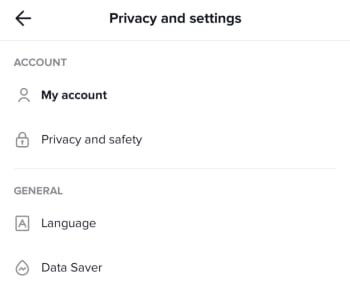
You need to consider your own safety when uploading videos of yourself to the internet. This means thinking about your privacy and who can have access to your videos, who can download them, and who can perform duets with them. To access your Tik Tok Account Privacy and Safety menu you need to open your Profile page and then tap the Ellipsis (three dots) menu icon in the top-right corner of the screen. This will open the Privacy and Settings menu, where you’ll find the Privacy and Safety menu as the second option in the Account section. This is where you’ll be able to control all of your privacy settings and keep yourself as safe as possible when using Tik Tok.

Tip #5 Handsfree makes anything possible

You want your Tik Tok videos to shine. That means doing a little bit more than simply hitting record and capturing whatever it is you’re doing at any particular moment. This means taking the time to plan out what will happen in your new video. You could practice a dance routine, go through your lines for a lip-sync masterpiece, or even draw up a script for a little 15-second movie. Once you’ve done all that though, you’re going to need to freedom to pull it all off without having to hold down the record button. To use Tik Tok’s timer feature go to the video capture screen and look for the small clock icon. Select how long you want the timer to wait before it begins recording, and then hit Start Countdown. Click here for our guide to help you become Tik Tok Famous.

How to duet on TikTok

Tik Tok Duets all you need to know and some great examples to help you plan your own.

Tik Tok is a lot of fun and one of the most fun parts of the app is the duet feature. Tik Tok duets allow you to record a video that can be played simultaneously alongside the video of another user. The result is something that looks like a split-screen video with both screens showing different performers but with the same audio clip.

You don’t need to actively collaborate with somebody to duet with them, you simply need to select a suitable video. This means you can duet with any Tik Tok video, although there are some exceptions depending on the settings each Tik Tok user has applied. Without further ado then, let’s have a look at how to duet on the Tik Tok app.

How to duet on Tik Tok

Step 1 Download Tik Tok

Before you do anything on Tik Tok, you’re going to have to download it to your Apple iPhone or Google Android device. To do so click the link below and follow all the onscreen instructions.

9

Step 2 Find the video you want to duet with

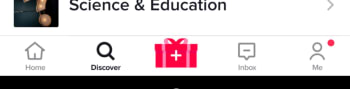
Once you’ve downloaded Tik Tok, open the app and browse through all Tik Tok videos. You can do this by simply scrolling through your feed when you open the app or hitting the Discover button and selecting a Topic to search through, or searching for videos directly using the Search bar.

Tik Tok's Discover button

Step 3 Hit the Share button and select the duet option

When you click the Share button on any video that is available for duets, you’ll see the duets option. By tapping this option you’ll get the chance to start recording your part of the duet. The video you’re duetting with will then play alongside your recording so you can try to keep up.

Tik Tok Share menu

Step 4 Add Special Effects

Once you’re done recording your part in the duet you can add filters, stickers, time effects and other effects to the duet video. To do this click the Special Effects button. You’ll also be able to add a cover for the duet video too. Click Next and then once you’re done and you’ve added a suitable description, hit Post.

Exceptions – How to control who can duet with you on Tik Tok

As we mentioned before, not all videos on Tik Tok are available for duets. Videos published to private accounts aren’t available for duets and normal users can also limit who can duet with their videos. If you want to limit who can duet with your videos, got to your Tik Tok account settings, then hit Privacy and Settings, and look for the Privacy and Safety option. Look for the Who can Duet with Me option and click it. Here you can limit your duets to Everyone, just your Friends, or turn them Off altogether.

Tik Tok Duet

The most popular TikTok memes

You’ll love these. They’are all the best Tik Toks we could find on the internet.

The most popular Tik Tok Memes

Is Tik Tok, the app formally known as musical.ly, better than Vine? We’re not quite equipped to get into such a deep philosophical debate right now. Honestly, we’d be here for hours and we probably wouldn’t even say that much. Suffice to say, when Vine shut down, we were devastated until Tik Tok burst onto the scene. The Tik Tok video app is glorious, with some crack TikTok user accounts never failing to have us rolling around laughing our heads off. Tik Tok videos might make you cringe, but they’ll definitely make you laugh.

That’s what we’re here for today. We’re here to celebrate Tik Tok in all its scripted, epic comedy, lip-sync music video goodness and go through some of the best Tik Tok videos ever. Quick note, these articles always take me longer than they should do as it is impossible to not get sucked in and just watch video after video. Buckle up, these are the funniest Tik Toks.

9

Funny Tik Tok memes

Second quick note; many of these will be in the form of tweets and Instagram posts. They all originated on Tik Tok, however, we guarantee it. Tik Tok users are like the new YouTubers and people will share their content across multiple platforms. You can even find Tik Tok videos shared on platforms like Snapchat and Google.

Scary cat

Tik Tok lets users add music clips to their videos. The clips can be used to create amazing lip-synced tributes to the biggest pop acts on the planet, but they can also help build tension for a jump scare payoff. Not bad at all when you only have 15 seconds to play around with.

Yeah, you’d better run

This is great. The music helps build the video up towards its epic payoff just like in the scary cat video above. Let’s face it, we all know how disgusting roaches are and we definitely don’t want them anywhere near us.

Risky business

What can you do with 15 seconds? Well, as this video proves quite a lot, actually. Filming is about getting the shot, no matter what. Use what you can to get the effect you’re looking for. This could be a helicopter, drone, multi-million-dollar special effects studio, or the ceiling fan in your living room. Oh yeah, don’t forget a backing track that will make your hairs stand on end.

Dead on

Apart from the odd social media manager or TV star, Tik Tok is the domain of Gen Z. If nothing else, this gives us hope for the future as they’ve been making us laugh for nearly two years now. They’re even better when they’re skewering themselves like in this classic Tik Tok.

No Steve, no

This classic Tik Tok meme has been painstakingly recreated with everything from gummy bears to wine bottle corks. That’s the great thing about Tik Tok, people reuse audio to make their own versions of popular memes. This video has an added extra treat at the end though, that will have you in stitches.

Hit or miss

Another big Tik Tok meme that has been rippling across the app and reaching out into the real world is Hit or miss. If you’ve ever heard this shouted out in public, you’ve found yourself right in the middle of the meme. Tik Tok users shout it out to see if there are any other Tik Tok fans around.

That’s not a knife, THIS is a knife

As we’ve already mentioned, you’ll often find a bit of star power mixed in between all the comedy gold coming straight from the youth of today. This video of Arnold Schwarzenegger laughing at the size of Sylvester Stallone’s knife fits in nicely. It might not have the production value of some of the other videos we’re featuring but it deserves its slot.

Full power wholesomeness

This video is simple. It includes a very happy dog, video game sound effects, and a charging cable. Enjoy.

The Bollywood cat

Duets are a big thing on Tik Tok. The idea is that you both video yourself in portrait mode singing/lip-syncing together and then play the videos along together. When done well they can look great. Not as great as this though. A Bollywood style dance duet between a man and a cat.

Dog the head banger

This dog needs no dance partner. This dog doesn’t even need to get up. This dog can do it all on its own while lying on the floor. We wish we could do what this dog does so effortlessly.

Just good content

@alainahatsuneI will never be the same ?? #thisismyvoice #girlsarentfunny #dank #ironic #meme #anime #cringe♬ original sound – alainahatsune

Like we’ve already mentioned, memes are often repeated across Tik Tok with different users adding their own spin to an already well-worn concept and idea. Here we’ve two excellent examples of the This is my voice… meme that sees users showcasing the changes they go through when they become members of a new digital tribe. Check out first what happens when you start watching Dora the Explorer and then afterwards what happens when you start watching anime. Both are great.

Cat cruelty

Animals are a big deal on the internet. We’re not going to get involved in the whole cats vs dogs debate. We love them both. We do, however, know that cats have a certain diabolical nature to them while dogs have more of a loveable gullible way of seeing the world. This Tik Tok illustrates these truths brilliantly and proves that you don’t need some incredible performing pet to make them internet video stars.

TikTok: Where to listen to the most popular songs of 2019

Check out our playlist of ten of the most popular hit songs that have taken Tik Tok by storm.

Tik Tok music hits

Tik Tok. It is definitely a global phenomenon but there are still people out there who think it is just a flash in the pan. No matter what side of that debate you fall on, you have to say that the lip-syncing music video app that came from musical.ly is lots of fun. TikTok users take music clips and then build their own fifteen-second videos out of them. People can then reuse the same audio clips making music memeable.

Tik Tok is so successful that it is easy to lose yourself to a couple of hours watching short videos and then come out the other side humming along to songs in your head that you’ve never even heard before. Yep, Tik Tok is now one of the best places to hear new music as there will always be somebody out there who is cooler than you, who’s listened to a new hit song you haven’t heard yet, and then turned it into a catchy Tik Tok video. From hip-hop rappers to Spotify heroes and Billboard dominators and influencers like Ariana Grande, Tik Tok has them all. These days, popular songs aren’t measured by views or listens, instead, they’re measured by how many videos have been made using their best bits. In no particular order then, let’s look at some of the most popular songs on Tik Tok from 2019.
9

Famous Tik Tok songs 2019

Lil Nas X Old Town Road – 2.6 million videos

Listen to it on:

YouTube video

Spotify

Deezer

Absofacto Dissolve – 1.1 million videos

Listen to it on:

YouTube video

Spotify

Deezer

DJ Snake Taki Taki Feat. Selena Gomez, Ozuna, & Cardi B – 1.1 million videos

Listen to it on:

YouTube video

Spotify

Deezer

Charlie Puth Betty Boop – 1.6 million videos

YouTube video

Imagine Dragons Believer – 1.7 million videos

Listen to it on:

YouTube video

Spotify

Deezer

Avril Lavigne Hello Kitty (Illusion Remix) 1.3 million videos


YouTube video

Spotify

Deezer

Avicii The Nights 1.4 million videos

Listen to it on:

YouTube video

Spotify

Deezer

Ariana Grande Thank U, next 1.5 million videos

Listen to it on:

YouTube video

Spotify

Deezer

Why Mona Wannabe 9.4 million videos

Listen to it on:

YouTube video

Spotify

Deezer

Billie Eilish Bad Guy 1.1 million videos

Listen to it on:

YouTube video

Spotify

Deezer

This holiday season, let Santa in, but keep the spies out

Shopping online can bring a lot of great gifts right to your door. But with all that increased surfing, it can also bring something else you don’t want to your computer: spyware.

Some spyware can be relatively harmless – like adware or cookies that track your surfing and purchase history for marketing purposes, such as serving you relevant ads. But spyware such as Trojans and system monitors can watch everything you do at your computer and harvest personal details including social security numbers, credit card numbers and more.

Defeat the mighty Trojans

Trojans generally arrive on your computer via a download link that you’ve clicked. For example, you might get a notice that your browser is out of date and needs to be updated. When you click on the link however, you’ll actually download spyware onto your system that can be very hard to detect. What’s worse, Trojans can continue to download more malware once they settle onto your system.

If you don’t have an antivirus program to identify them, the most likely way in which you’ll notice their presence is through system slow downs and frequent crashes. Other telltale signs include unusual icons in your toolbar that you’ve not seen before or error messages that seem unrelated to your activities.

Every click you make

System monitoring software is often masked as freeware and will log every keystroke you make, every site you visit, and every program you run. Again, caution is king when deciding what to download to your machine. Even if a site looks reputable, be smart when clicking on a download that seems too good to be true, or one that appears on your machine as a pop up.

If you suspect that your computer has been infected with spyware, you really only have one choice for removing it: aggressive antivirus and antispyware software. Just like spies in the real world, spyware is created to avoid detection, so without the right software to sniff it out, it could run on your computer indefinitely.

Avast Free Antivirus is one of our top picks for preventing, detecting and removing spyware. With continuously updated databases and algorithms, this software is tops in keeping your computer clean and your data safe.

Of course, you can also take steps on your own to limit your exposure to spyware by ensuring that your browser, operating system, and software have the latest updates and security patches; setting your browser security and privacy levels higher; using extreme caution if you frequent file-sharing sites; and not clicking on pop-up ads.

Once you’ve run your antispyware software and know what type of threats existed on your computer, you may want to contact your financial institutions to change credit cards and account numbers if it turns out that your personal data was at risk. You might also want to freeze your credit through national monitoring services to thwart identity theft.

Taking these steps should ensure that your online holiday shopping will deliver gifts Santa would be proud of, while keeping the spies out in the cold.

How to control Google Earth Flight Simulator

How to control the Google Earth Flight Simulator

Google Maps and Google Earth are edging closer and closer to becoming the same app. There is still a huge Google Earth feature missing from Google Maps though. One of the more lesser-known features of Google Earth Pro is the in-built hidden Flight Simulator. Accessible via the Tools Menu, the Flight Sim allows you to fly around the globe from a selected number of airports around the world.

This makes traveling the world using Google Earth a bit more interesting and fun than just panning it over with your mouse.

Google Earth Download
7

How to control Google Earth Flight Simulator

Step 1

To access the Google flight simulator mode, go to the Tools menu and look for Enter Flight Simulator…

Step 2

You can then choose between two types of planes. Also, you can choose whether to fly from your current position in Google Earth or take-off from a selection of different airports.

Flight Simulator

Step 3

The controls for Google Earth Flight Simulator aren’t very clear. It isn’t as simple as pressing a start flight button. There is joystick support so you can use a Joystick if you’ve got one but if not, you’ll need to refer to this list of flight simulator keyboard controls. These keyboard shortcuts include the arrow keys, page up, ctrl, alt+a, and all manner of complicated keystroke and mouse controls. Note that they are different for Windows/Linux and Mac.

Google Earth Flight Simulator keyboard shortcuts

Step 4

The Head-Up Display is a standard basic HUD that displays altitude, heading, throttle, etc.

Google Flight Simulator

Step 5

It takes a while to master the basics, especially controlling thrust and altitude to prevent crashing. Once you have, it’s fun flying around and clicking on points of interest as if you were browsing Google Earth normally. You can even land your plane by throttling down when you approach an airport and pressing G to extend the landing gear. It’s quite hard as you need to control your flaps as well as hitting both “.” and “,” to break the left and right wheels.

Over 60 Google Docs templates

We’ve put together links to some of the best Google Docs templates as well as some of the best place to find more.

The best templates for Google Docs

The Google Drive suite of productivity apps has taken the world by storm. Google Docs is kind of like the hip younger brother of Microsoft Word. It is free for a start, if you’ve got a Google account, but then it also has lots of modern new features like the fact you can use it anywhere on your web browser, it makes it really easy to collaborate on different projects, and you can even get down to business using the Google Docs app on your phone.

Being the younger brother, however, means that it isn’t as refined as Word and that it doesn’t come with as many potential add-ons and templates as you can get with Word. We’re here to tell you today, however, that when it comes to Docs templates the Google upstart is catching up with Microsoft Word. There are plenty of great Google Docs templates already available online and today we’re going to walk you through the best of them.

Google Docs download free ►
8

Templates for Google Docs

The Google Doc Template gallery

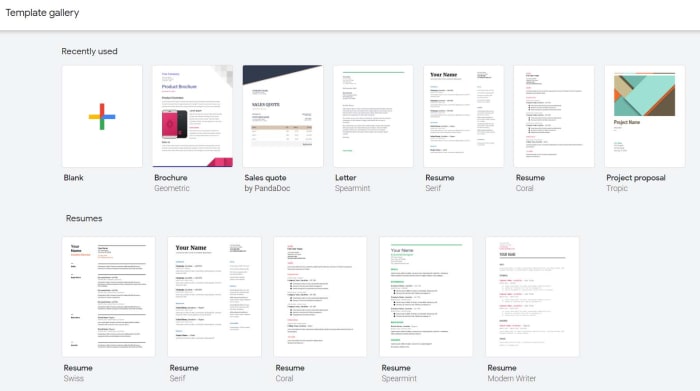
Google Docs actually has its own template gallery that you might not have noticed before. When you open the Google Docs homepage, you’ll see at the top next to the Start a new document icon a few example templates that you could use. These include templates for resumes, letters, and project proposals. Above these you’ll also see a small button labelled Template Gallery. Clicking this will open up the Google Docs template gallery that has 54 different templates for you to choose from. These include resume templates, letter templates, business letter templates, recipe templates, brochure templates, and newsletter templates among others.

This gallery isn’t an exhaustive list, however, so we’ll push on to recommend you some more great Google Docs templates. The other great thing about Google Docs, is that when you open one of our recommended templates it’ll go to your recent documents meaning it’ll be there next time you open Google Docs.

Google Docs templates resume

resume template

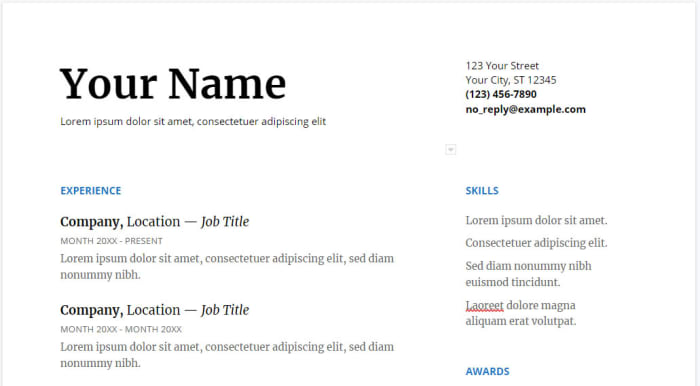
There are plenty of fantastic Google Docs resume templates out there that will help you lock down that job you’re after. With recruiters often having to go through hundreds of CVs and resumes it is more important than ever to have a resume that will stand out from the crowd. That is where these great free resume templates for Google Docs come in handy. You could try this Smart and professional resume template or go for something a little cleaner. Other options include this colorful resume template that contrast blue against white and this bold resume design that will catch anybody’s eye.

7

Google Docs templates cover letter

Cover Letter Google Docs template

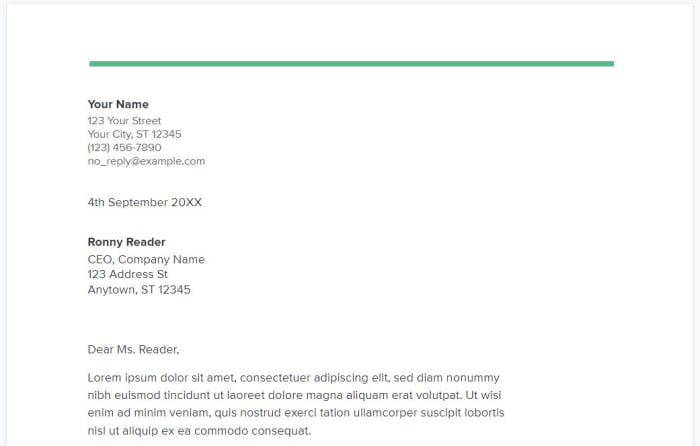
To go with that jazzy resume, you’re going to need an eye-catching cover letter. Fortunately, we’ve got some great cover letter templates for you. You could pair up the clean resume template from earlier with this minimalist cover letter design that looks very clean and clear. If you went for the blue and white resume earlier then this striking cover letter template could work well for you. Obviously, you’ll have to play around with fonts and job titles a little, but these are a great starting place.

Google Docs templates invoice

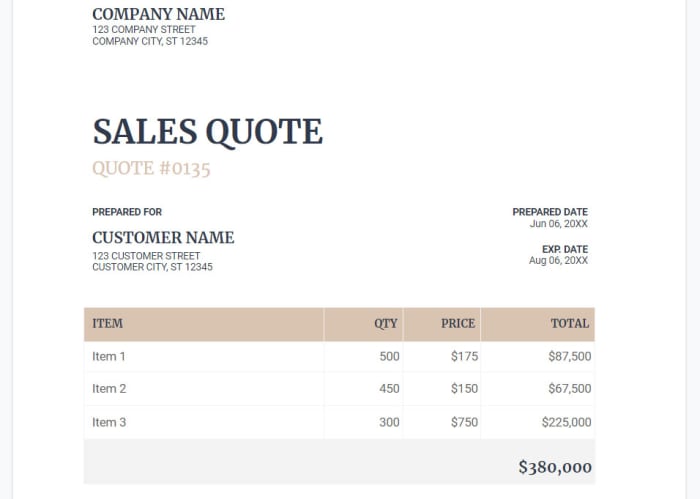
invoice templates for google docs

If you run your own business or if you work as a freelancer, chances are you’re going to have submit invoices regularly. This means having a reliable source of invoice templates is a must, unless you constantly want to have to draw them up from scratch every time you need one. Fortunately, you’ll be able to find a lot of invoice document templates for Google Docs at Superside. Another great place to find invoice templates is at Invoice Simple. As the name suggests, Invoice Simple specializes in helping you sort out all your invoicing issues. This means you’ll also be able to find invoice templates for Google Sheets as well as Google Docs.

Google Docs templates brochure

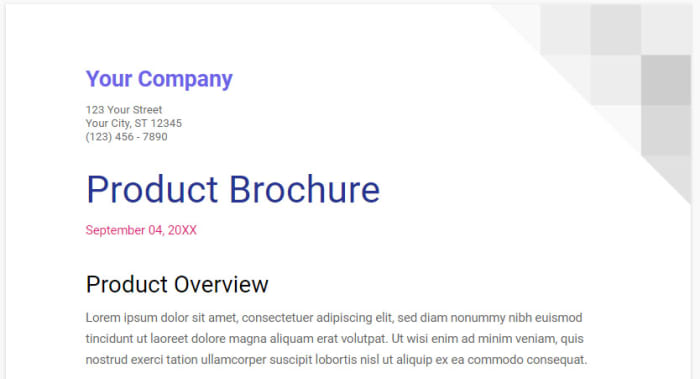
brochure template on Google Docs

Brochures are another key ingredient of the modern business. Whether you print them out and distribute them physically or share them digitally online doesn’t matter. A well designed and organized brochure is one of the key marketing and communications tools of the modern world. Again, there are lots of great templates here for you to take advantage of should you want to create a template using Google Docs. You’ll find some excellent Google Docs brochure templates at Envato Tuts+ and for more excellent options check out Template.net.

Google Sheets Download now
8

Google Docs templates business cards

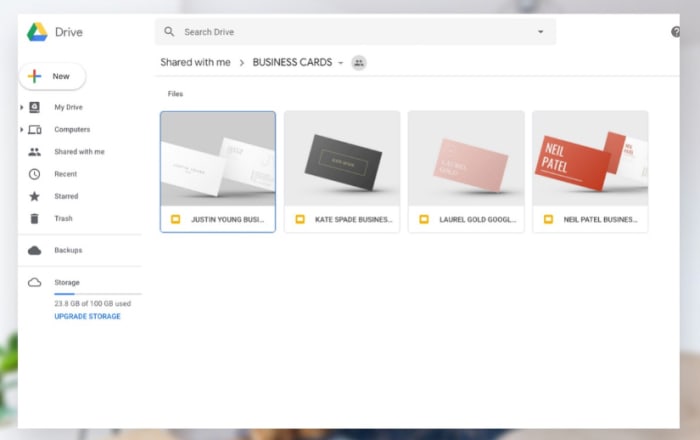
business card templates

Another staple of the business world here. Business cards have been given out by professionals for centuries. Handy little pieces of cards that carry all your major contact details are practical in the extreme sense. OK, these days they have websites and email addresses on them, but the basics are the as they ever were. For some excellent premium business card templates check out the Stand Out Shop. You will have to pay the Stand Out Shop templates but you’ll find some great free options at Every Last Template.

Google Docs template calendar

Google Docs calendar template

If you’re looking to create a calendar using Google Docs, you probably won’t be surprised to hear that Calendar.com has an excellent guide that will walk you through the process. If, however, you’d like to get your hands on some Google Docs calendar templates that will do most of the hard work for you then you should check out Smart Sheet, which has all sorts of different types of calendar templates for both Google Docs and Google Sheets.