OnSoftware Halloween Round Up

Looking for some Halloween themed fun for your computer or mobile? Here’s a collection of five spooky posts from  past, so you can get into the right mood on October 31!

Give your photos a Halloween touch with Picnik

Halloween wallpapers for everyone!

Dead Space: the scariest iOS game to date

Candy Mountain Massacre: scary free browsers game

Plan the perfect Halloween party

Happy Halloween!

The best Halloween game deals on the App Store

Halloween is upon is – which means an outbreak of spooky special offers on the iOS App Store. Prices have been slashed on lots of apps and games across the store, as developers dish out Halloween treats to iPhone and iPad users.

Halloween

One of the biggest deals is EA’s Halloween sale in which the developer has dropped prices on dozens of its iPad games, including the likes of Dead Space, FIFA Soccer 12, Madden NFL 12, Tetris and Scrabble. Games are at least 50% of, with some titles now available for just 99 cents.

Elsewhere there are lots of scary games available for free. Among the best free ones are The Creeps, Scream 4, Dawn of the Dead, Zombie Crisis 3, and Jaws Revenge. There are reductions on other grizzly games, including Plants vs. Zombies (99 cents), Resident Evil 4 (99 cents), and Zombieville USA (99 cents).

Other non-horror-related titles on offer include Football Manager Handheld (now $4.99), Real Racing HD (now 99 cents), and Civilization Revolution for iPad, which drops from $12.99 to only $1.99.

Go hit the App Store now – if you dare! Let us know if you find any more great deals worth mentioning.

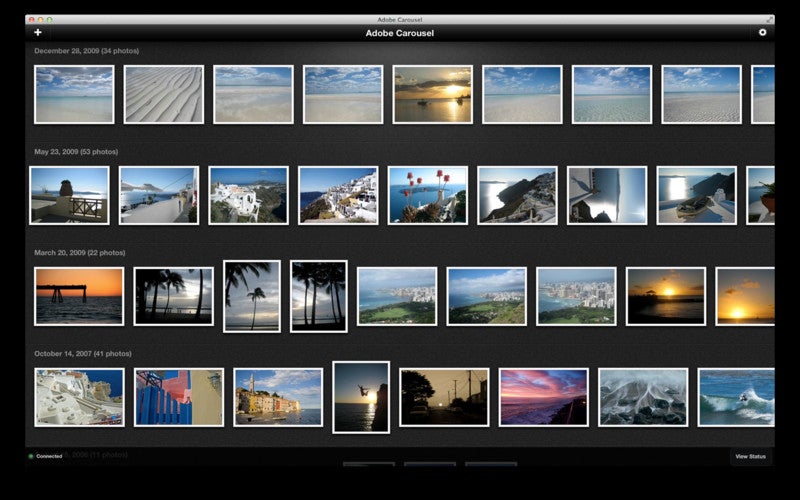
Adobe launch photo sharing service Carousel

Adobe have announced the launch of Carousel for Mac and iOS which enables users to share photos seamlessly across Apple devices.

Adobe Carousel gives you access to your entire photo collection from your iPad, iPhone or Mac. Adobe Carousel also allows you to enhance them using the same technology as Adobe Photoshop Lightroom. You can import as many photos as you want but you have to pay a subscription fee to use it. At the moment, Adobe are offering an introductory price of $59.99 a year or $5.99 a month although this offer expires January 31, 2012.

The photo enhancement tool is somewhat limited compared to Adobe Lightroom but is useful for just simple effects. Most importantly, you can fix exposure, white balance, and saturation. A slider enables you to change contrast, brightness, vibrancy etc. Changes are none destructive i.e. they don’t affect the original photos.

Finally, you can create libraries which friends and family can access via an Adobe Carousel app for iOS via which they can also add photos to albums.

Adobe Carousel is very polished app and for anyone that doesn’t plan on using iCloud regularly and only wants to share photos, it’s a quick and convenient way of sharing. However, the price of the subscription price will no doubt put-off many mac users but if you only intend on sharing photos and love Adobe products, it may be worth it.

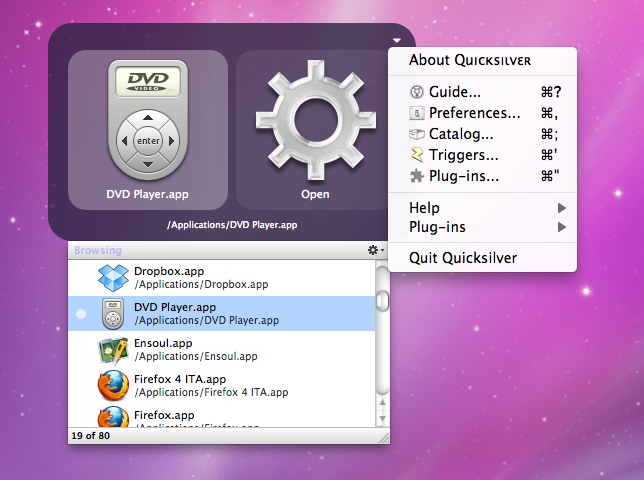
Quicksilver now works with OS X Lion

Fans of handy app and folder launcher Quicksilver will be pleased to hear that it has now been updated to work with Lion.

Despite the introduction of integrated search Spotlight in OS X, Quicksilver remains a very popular application with Mac users.
If you’ve never used it, Quicksilver allows you to search just about any program, folder or file with a few keystrokes. You don’t have to go searching through your files and you don’t have to worry about how your folders are arranged.

The new update also features 40 other new feature additions, fixes and changes including automatic plugin updates.

One of the things that Quicksilver users prefer over Spotlight is that it “learns” from your search requests and recalls those items that you search for most frequently. The other bonus is that unlike Spotlight, Quicksilver can be extended with plugins including everything from dialing a phone number to interacting with iTunes.

Check out Quicksilver on Lion by trying it for yourself here.

Free game Way is a great cooperative experience

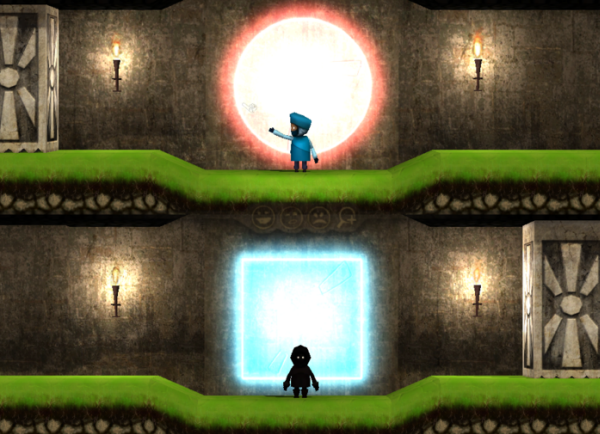
Cooperative multiplayer is no new concept, but indie game Way makes the experience totally fresh. It’s an attractive platformer, where you play with an unknown partner, and have to communicate with each other using simple expressions and arm movements to explain where to go and when.


As an example, there are part where platforms for one player are only visible to the other. In this case it’s most common to guide the player around by pointing. The sections where timing is necessary can be pretty tricky, but they really bond players, and by the end you’ll have a great sense of shared achievement.

Graphically, Way reminds me of Little Big Planet (as does the rather floaty jumping), but the communication aspect makes it a really different game. It shouldn’t take much over 30 minutes to complete, and believe me you’ll be pleased you did. Check out my review here (also available on Mac).

Moving files? Make it fun!

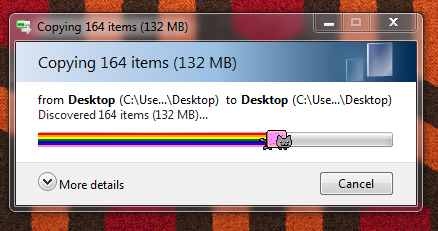
Is there anything more boring than the progress bar? If you use a Windows PC, you’re sure to see it on a fairly regular basis, whether you’re copying, moving or deleting files. Moving files around can be a boring job, especially if they’re big ones, but one enterprising developer – Ben Stone – has decided to add some fun to the process with two hilarious apps – Nyan Cat Progress Bar and Instant Elevator Music.
Nyan Cat Progress Bar
Now, I’ll be the first to admit that when compared to other, more useful software, you might be thinking that these apps are a bit useless but, goddamit, they’re fun! As you can see above, Nyan Cat Progress Bar replaces the normal, boring progress bar with Nyan Cat and its rainbow-colored space trail. It also plays Nyan Cat’s signature Nyanyanyanyanyanyanya! song.

If that’s all a bit psychedelic for you, try sister app Instant Elevator Music. This one’s purely aural, playing tinkly elevator music whenever you’re waiting for an app to open or a file to move. You can actually set Instant Elevator Music to play any music while you wait, but the bland, anodyne elevator tune is 90% of the fun! For two such seemingly trivial apps, they actually have a surprising amount of options, including an ignore list and, crucially, the ability to silence the music in one click.

Unfortunately, we don’t think you’ll want to use both apps at the same time. In fact, if you did, we’d be quite worried about you. Download them one at a time. and lengthy file operations will never be the same again!


5 reasons to switch to Windows Phone

Nokia has announced its first Windows Phone 7 devices at the giant’s Nokia World event in London. The long-awaited LUMIA 800 and 710 were revealed amid fanfare about their software capabilities. Besides including all the standard Windows Phone Mango tools, the LUMIA 800 integrates bespoke Nokia services such as turn-by-turn voice navigation, a music service and an ESPN sports hub.

[youtube]http://www.youtube.com/watch?v=rdMoRhfd1Sk[/youtube]

I think it’s fair to say that with Nokia now packing Windows Phone 7 into its new devices, Microsoft’s mobile operating system has become a strong alternative to the iPhone and the top-end Android devices.

If you’re choosing a phone now, you should definitely give some consideration to Windows Phone 7 – it has a number of advantages over iOS and Android. Here’s a quick run-down of some of the reasons to switch to Windows Phone 7:
Continue reading “5 reasons to switch to Windows Phone”

Prepare for zombies in Pocket God: Journey To Uranus

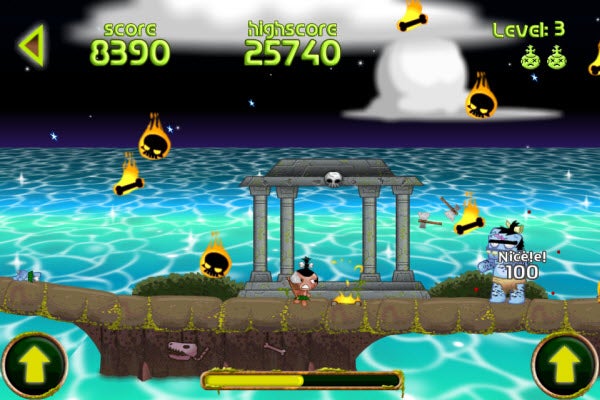
Just in time for Halloween, Bolt Creative has unleashed the newest update to Pocket God: Journey To Uranus entitled Episode 6: Decapithon.

Episode 6 is the latest addition to the universal app for iOS. Decapithon requires players to kill zombie pygmies with hatchets and cleanse the earth of the undead. Side-scrolling through multiple levels with a variety of zombie types, use accelerometer and touch controls to maneuver around their attacks.

Read my Softonic review here.

Pocket God: Journey To Uranus includes other planet-specific mini-games and even some hidden little surprises. Or players can act like a wrathful creator and throw pygmies into the volcano or strike them down with lighting!

GTA V announced – trailer on its way

As a huge fan of the Grand Theft Auto series, I’m overjoyed to pass on the news that GTA 5 has been announced by Rockstar Games! The surprise confirmation, made on Rockstar’s Twitter feed, links to a teaser image on the developer’s homepage. The image confirms that a trailer for the latest GTA will be available from November 2nd.

GTA V has been announced

While the image itself doesn’t seem to contain too many clues, it’s worth noting that the typeface of the ‘FIVE’ text is lifted from a $5 bill. My expectation (shared with Jon and lots of other people, it seems) is that GTA V will take place in roughly the same setting as San Andreas (which covered fictional cities inspired by Los Angeles, San Francisco and Las Vegas). There is also some speculation that the ‘new’ number (moving to ‘V’ rather than continuing with ‘IV’) suggests a new engine might be used in the game.

What do you think? Where… and when… do you think the game will be set? Leave your thoughts in the comments section below. And if you’re unfamiliar with GTA, you can still get the GTA IV screensaver here.

How to: Make animations on your iPhone or iPad

Want to make your own cartoons on your iPhone or iPad? Install Dink on your iOS device and you’re just a few steps away from becoming the next Walt Disney or Tim Burton.

Dink, available for 99 cents in the App Store, is a surprisingly powerful animation app that allows you to make your own cartoons quickly and with little effort. Dink’s user interface is a bit confusing to start with though, so I’ve put together a quick guide to help you get started in this fun application.

Step One: Create a new animation

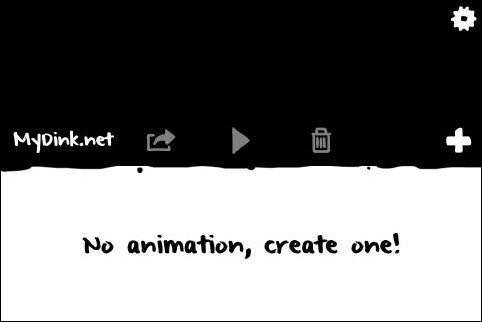
Dink’s front screen doesn’t make it completely clear where to start. What you actually need to do is to click the ‘+’ button to dive into a new animation.

Dink One
Continue reading “How to: Make animations on your iPhone or iPad”