 No, I’m not talking about the Three Tenors, I’m talking about the browser which seems to have been around for ages but has never really made a big splash in a market dominated by Internet Explorer and Firefox. However, if you’re someone who has never really given it a chance, then you should take a second look. Opera is one of those browsers that people either love or don’t really care for much but there are a few downloads on Softonic to help get you started.
First of course is the Opera browser itself. Opera began life in Norway as far back as 1994 and was in fact the first browser to introduce tabbed browsing. In fact, I remember a friend showing me this feature around 5 years ago and I dismissed him as “fancy pants”. Nowadays, I couldn’t live without it and it’s standard in both Firefox and IE. Other things that Opera has pioneered include mouse gesturing – basically navigating web pages using only the mouse – and integration with torrents and IM clients. The big drawbacks of Opera, especially in it’s early days, were that it took some time getting used to because it was such a radical departure from conventional browsers and also, it was rather slow.
Those days are long gone now though and today it comes with widgets enabling you to check everything from the weather to performing currency conversions plus many more that are being developed constantly by it’s devoted users. It also allows you to zoom in and out of web pages more effectively than the leading browsers in my opinion although it still remains only the 5th most popular browser in the world, behind IE, Firefox, Safari and Netscape. However, in the mobile market, it’s had far more success and is one of the most popular browsers for those on the move.
Talking of which, if you are on the move but don’t want to use Opera on a mobile device, then just put it on a USB stick with Opera USB. This ultra stripped down version of Opera managed to maintain all the functionality – integrated IM client, e-mail client and security features – without losing the functionality. If you’re worried about taking your passwords on the road or if you’ve simply forgotten them whilst you’re out and about, then you can also try using Opera Password Recovery which attempts to recover any password you’ve used in Opera whilst browsing sites. It even works if you’ve flushed the cache although many sites have grown wise to it and you’ll find it won’t be able to retrieve every time.
So if you’ve grown a bit bored of your current browser, consider spending a night with the Opera and you may find it music to your fingertips.
 There are many ways to free up disk space in Windows, most of which involve installing a
  Ok, so you’ve finished all your work for the day and have exploited all the possibilities of Freecell or Solitaire on your office PC. You know that P2P and BitTorrent downloading are not allowed in your company, but heck, you’ve decided you’re still going to take the risk to enjoy the greater bandwidth which your home connection will never match. If so, you’ll find useful the following five tips written up by
  Your IP address is the only thing that distinguishes you from millions of other users on the Internet so it’s worth knowing how to manage it properly. For network administrators, it’s absolutely essential in ensuring that users can be easily identified and there are no IP conflicts on the same network.
 The Periodic Table was probably one of the scariest things I ever dealt with at school. I couldn’t remember my Na’s from my Fr’s which lead to some experiments that went horribly wrong in the classroom.
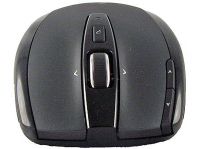 One of the greatest inventions of humanity has got to be the wheel. The scroll wheel, some PC users might suggest. Well, although this technical addition is probably not as world rocking as the creation of the wheel, it has changed the way we work with our mouse. With it you can move through documents or web pages at the speed of light, zoom in or quickly switch weapons in your favorite video game. Honestly, for me not a day goes by when I don’t find myself using it to speed through files. Apart from scrolling through documents, what else can you do with your scroll wheel then?
 It can be an uphill battle trying to keep track of your incoming and outgoing payments if you’ve got a lot of activity in your bank account. Unless you’ve employed the services of a professional accountant, you’ll probably rely on guesswork and your own memory to keep track of things which works up to a point. However, if your accounts or finances are spiralling out of control, then using a simple accounting program can save you a surprising amount of money, stress and time. By having a clear overview of where your money is going, you’re in a much better position to manage it. Best of all, these are free applications.
 As crazy as it sounds in this day and age, I’m running out of ways to communicate with people. I’ve outgrown instant messaging, got fed up with racking up bumper phone bills, and email is just far too passé for me. So, I’ve taken to harnessing the power of Bluetooth to chat with people now – it’s instant, it’s free, it’s discreet and I love it. Besides being a handy way of silently conversing with pals at work or in the cinema, Bluetooth messaging is also great for making new friends in a library or chatting up someone in a crowded nightclub, because you can hook up with anyone who has a Bluetooth-enabled phone.
 Copying and pasting are probably the two most frequent actions you perform during a working session with the computer. The Windows clipboard is thus an essential tool for all sorts of tasks, saving you loads of typing and time.