How to: Make your subject pop out of the photo

Some photo effects are easier to create than they seem. A good example is this effect, where it looks as if the subject of the image was popping right out of the photo margins themselves. It’s a great effect for photos with a lot of movement (sports, for example) and is really easy to do. Follow these steps and see for yourself!

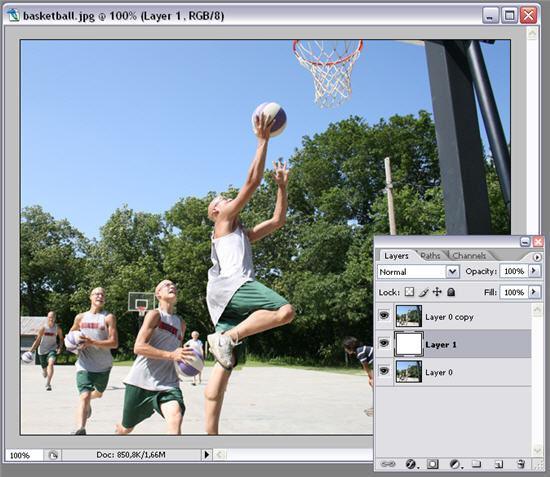
1. Open the photo you want to work with, duplicate the background layer and add another new layer between these two. Fill in this newly created layer with white.

Make your subject pop out of the photo

2. Now go back to the background duplicate layer and select the person or object that you want to pop out of the photo’s margins. In my case, this is the basketball player in the foreground. You may use any selection tool in Photoshop. Then copy this selection to a new layer. Continue reading “How to: Make your subject pop out of the photo”

No connection? Here’s Gmail Offline.

New this week from Gmail Labs is “Offline”. As the name suggests, this allows you to access your Gmail when you can’t get connected to the web. It requires installation of Gears, which is a Google plug-in for Firefox and IE that allows them to store certain information so it can be accessed offline.

Initial installation is pretty lengthy (a few MINUTES!), but after the first time you’ll never notice it. You can put a Gmail shortcut on your desktop, which will The result is you can navigate around Gmail as usual, your attachments are still accessible and you can write mail. As soon as you get a connection, messages are automatically dispatched, and your installed mail synchronizes

In your Gmail account, click Settings, then Labs and you should see a link to”Offline”, which will take you through the installation process. It’s an especially useful tool to have on a laptop or netbook, meaning you can write and send messages on a plane or train without using an additional email client like Thunderbird.

With Google’s cloud/browser based apps becoming viable alternatives to traditional computer based programs,  are we seeing the death of the PC as we know it? I don’t think hardware developers will be having sleepless nights yet, as we’ll still need our machines: ‘the cloud’ is all very well, but it so far can’t be accessed through mind waves!

How to: Protect your wireless connection

Protect your wireless connectionWireless connections are generally regarded as being less secure and more easily hacked than wired ones. However, I love sitting on the couch with my laptop and being able to browse the web without any wires around me. So why should I give up on a wifi connection then? The trick to securing your wireless connection is following a series of basic tips to keep it as safe as possible, and using specific software tools to secure it if necessary. If you bear that in mind, you’ll be able to enjoy a perfectly secure, fully protected wireless connection.

The first and most obvious tip is to avoid using the network’s default name, also known as SSID. This name is usually the same as your router brand, and there’s nothing so attractive for hackers as a network named LinkSys, 3Com or D-Link.

Also, disable the SSID broadcasting option in your router’s configuration menu. This option makes the name of your network visible for anyone doing a wifi network scan, whereas if you disable it your network won’t show up, or it will appear as “unnamed network”. In any case, you’ll need to enter the network’s identifier in order to access it.

Another important tip in the protection of your wireless connection is setting up a password. Turn on WEP encryption on your router’s configuration menu and set up a proper pass phrase that can’t be easily broken. You may want to follow our advice on how to create secure passwords.

If possible, use the MAC address filter on your router. MAC addresses are unique ID numbers that identify every single piece of networking hardware. Most routers allow you to specify a list of allowed MAC addresses, leaving all the others outside. This means that only specified computers (those whose MAC addresses you have entered) will be able to access the network.

Finally, in case you want to add an extra layer of security to your wireless network, you can use software tools that have been specifically developed to protect wifi connections and prevent unauthorized users from accessing them. A couple of these tools are iPig Wifi Security Software and myWIFIzone . If you still need more security, there’s one option left: paint your home with this special wifi-shielding paint recently developed by Japanese researchers. But remember: at the end of the day, if someone really wants to hack your wifi connection, chances are they will.

The best (and worst) games based on 80s movies

I don’t know about you but personally I can’t wait for the release of the new Ghostbusters game. No, seriously, I can’t wait. In fact, to prevent me from going crazy waiting for it to finally come out, I’ve decided to revisit some of my favorite 80s movie-themed-games of all time. Looking at them now you might think they look a bit dated, and you’d be right of course. However, just like the classic films they were based on, they still have that same charm that captured people’s imagination all those years ago (well, the first five do anyway).

Rambo

As the first video game I ever played, this one still holds very dear memories for me. One of the few early Spectrum releases that’s still worth the loading time, Rambo sees you enter Vietnam as the famous maverick on a one-man mission to destroy every pixelated enemy he encounters. The graphics look ridiculously dated now, but my overriding memory of Rambo was that it had probably the best soundtrack of any Speccy game, incorporating actual music from the film to great effect.

[youtube]http://www.youtube.com/watch?v=mPFuLIVRJxM[/youtube]

Indiana Jones and the Last Crusade: The Graphic Adventure

Created in 1989 by LucasFilm, this was the third game to utilize the legendary SCUMM engine, later used in adventures such as Sam and Max and Day of The Tentacle. The aim of the DOS-based game was to help Indy find the Holy Grail by traveling around some of the places that appear in the movie, such as Venice, and the catacombs. The film wasn’t great but, it’s hard to argue that this isn’t one of the greatest point-and-click romps of all time. Download the demo here if you don’t believe me. [More games and videos after the jump] Continue reading “The best (and worst) games based on 80s movies”

Create custom ringtones for your iPhone the easy way

Ringtones are, together with wallpapers, the most frequently updated and customized element on mobile phones. Whether you download them from a website or create them by yourself, chances are you’ve changed your ringtone at least a couple of times in the last few months. But what if you own an iPhone? Can you create ringtones for it that easily? The answer is yes, as long as you have iRinger. With this free app, creating your own ringtones for the iPhones is a cinch!

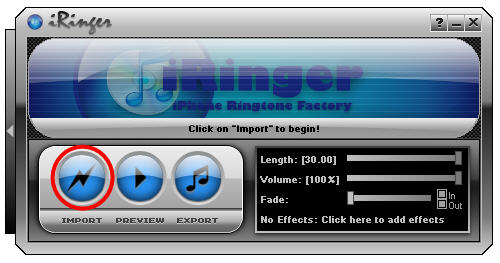
All you have to do is launch the program – no installation required – and click on the Import button to select the media file you want to use as ringtone. iRinger supports a wide variety of formats, including video.

Create iPhone ringtones with iRinger

Now it’s time to trim the file and cut out the part you want use as ringtone. iRinger is a bit different from the standard editor here. Instead of selecting a certain fragment of the time line and then copying and pasting it, simply grab the whole time line itself with your mouse and drag it to the left or right to set the starting point of your ringtone. Continue reading “Create custom ringtones for your iPhone the easy way”

Turn your Mac into a security centre

One thing that’s been great since switching to Mac has been the lack of virus threats and security problems that plague Windows. However, this is only one side of keeping your computer safe. As with Windows, I still have to perform backups, make sure my passwords are safe, secure my VPN connection and protect certain files from unauthorised access. There are several applications I’ve come to rely on to help me do this and these are 5 of the best:

1Password Logo1 Password Arguably one of the best password managers for Mac. Password Manager offers anti-phishing protection and even allows you to auto-fill web forms and help you generate strong passwords. 1Password keeps all your confidential information including passwords, identities and credit cards in one secure place provided by Apple’s OS X Keychain. An essential for anyone who’s always losing their passwords.

iBackupiBackup If you’re not a fan of TimeMachine then iBackup is an excellent alternative that while not as comprehensive, is simple and effective to use. It’s ideal as a manual backup for  files, folders application settings, system preferences and applications. Even better, it can perform backups to local or network drives and even WebDAV servers so if the worst happens to your Mac, you’ll always be safe.

TrueCryptTrueCrypt Worried about unauthorised access to your data? Or do you share your Mac with others? If so, TrueCrypt allows you to creates a virtual encrypted disk within a file and mount it as a real disk. It can encrypt an entire partition or storage device such as USB flash drive or hard drive or a partition or drive where Windows is installed. All encryption is done on the fly too so there’s no waiting around.

ShimoShimo An essential for anyone who works via a VPN client.  Shimo was designed originally to replace the Cisco client but it now supports a whole range of them. If you’re tired of broken connections or fluctuating traffic problems on your VPN, Shimo can help regulate it to make it more stable and functional. Although VPN clients are rarely complicated, it also makes it much easier to configure one.

MacScanMacScan Ever had to remove cookies for security purposes but then found you had to re-enter all your old passwords on your regular sites? This is just one of the things MacScan can help avoid by allowing you to blacklist and remove certain cookies while maintaining others. MacScan can also be scheduled to perform timely scans to clean up spyware and other trash left behind by internet surfing and uninstalling applications.

Today’s downloads for Windows, Mac and Mobile

Download F.E.A.R. 2: Project OriginWindows: What if you could take part in one of those horrifying stories you watch in terror movies? F.E.A.R. 2: Project Origin is the perfect mixture of action and terror: a first-person shooter where your opponents are not only enemy soldiers, but also a bunch of scary ghosts that will send shivers down your spine. Are you ready for the challenge?

Edit Depth of Field logoMac: Have you ever marveled at those pictures where the objects in the foreground have been given a special focus to make them standout? Usually it takes the work of a brilliant photographer or special focus lens to achieve such an effect but you can do it too with any photo using Edit Depth of Field. Edit Depth of Field allows you to focus the viewer on the subject of a photo by bringing it into sharp contrast and blurring the background.

Play cards on your BlackBerryBlackBerry: If you like Poker but can’t quite pull the right face at the right moment perhaps you should be looking for a similar yet slightly simpler card game. And that card game could be Croker. Instead of numbers in Croker you play with pictures – frogs, pigs, dice and baskets of fruit. It’s the way the French play, apparently

First look at Internet Explorer 8 RC 1

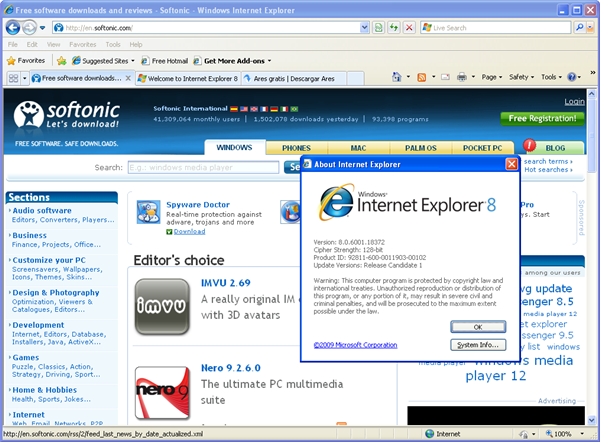
First look at Internet Explorer 8 RC 1Internet Explorer 8 is one of the new elements included in Windows 7. And while Microsoft keeps working on their next operating system, they’ve launched a first release candidate of their browser, so that we can have a sneak peek at all the new features it includes.

The first thing we notice is that Internet Explorer 8 RC1 hasn’t changed its interface that much comparing to previous beta versions. The address bar is again on top of the interface, and Favorites are accessible via a drop-down menu. However, there’s one big difference, especially if we remember the minimalist interface used in Internet Explorer 7: version 8 shows up to four different bars on its first launch (address bar, menu bar, Favorites bar, command bar) that cause an overall sense of clutter and take browsing space away.
First look at Internet Explorer 8 RC 1

Regarding new features, Internet Explorer 8 includes a bunch of them. The two most outstanding ones are Accelerators (previously known as Activities) and Web Slices. The first one gives you direct access to various online services just by right-clicking anywhere on the webpage or on highlighted text. For instance, you can look up a word, map an address, perform an online search and blog about or send by email something you just saw on the web straight away. The main drawback is that all these options are tied to Microsoft’s Windows Live services and there’s no option to switch them to other online tools.

First look at Internet Explorer 8 RC 1As for Web Slices, they work as a kind of RSS-style tool that allows you to track changes and updates on selected websites, without having to be constantly visiting them. It comes in really handy to track small changes that can’t be followed by RSS, like online auction bids, stock exchange values or weather information, to name a few. On the downside, the truth is I couldn’t really find any website where I could use Web Slices, except for the one provided as example on Internet Explorer’s website.

Besides these two major features, Internet Explorer 8 also includes a few other characteristics I found particularly interesting. One of them is InPrivate Browsing, which is more or less the Microsoft’s equivalent to Google’s Incognito browsing in Chrome. While InPrivate Browsing is on, the browser won’t save any data, including cookies, history and temporary internet files. No wonder they also call it Porn mode.

Web browsing has also been improved thanks to an enhanced address bar, similar to the Smart Location Bar you find in Firefox 3.  This address bar makes your browsing easier and more comfortable by suggesting URLs based on your own Favorites and your web browsing history. Continue reading “First look at Internet Explorer 8 RC 1”
The disappointing Theme Maker for iGoogle

A week ago I was pleased to read that Google had finally launched a tool to create custom themes for their personalized homepage, iGoogle. However when I tried to access the link provided in that post, the page wouldn’t load. In fact the iGoogle Theme Maker tool was down for a few days after its theoretical launch, until I could finally open it up today. And I must say I’m more than disappointed with it.

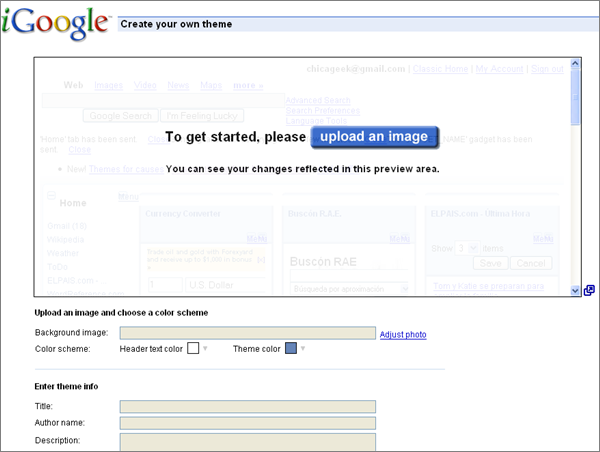
iGoogle Theme Maker gives a nice first impression: a simple form to fill in and voilà! you have your own personal theme up and running in no time. But it’s nowhere as easy as that.

iGoogle Theme Maker

First, the image uploader doesn’t work properly. You upload an image without having a clue about what’s the most suitable size, and sometimes get an error about image format (even if you have uploaded a JPG, GIF or PNG file, the ones supported by iGoogle). Also, I didn’t understand the usage of the cropping tool. What is it intended for? What size should I crop my image to? What is that thumbnail for? How do I know which part of the image will appear on iGoogle’s header?

Second, there’s the color scheme selector. I can’t say much about it, because it simply didn’t work for me. After doing some research I found that the problem could be due to my browser being in a language different from English, so tried it on an English-speaking Firefox. It didn’t work either.

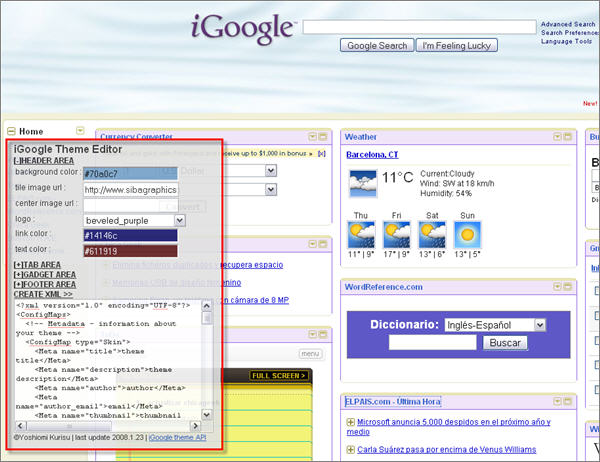
The funny thing is that, while I was searching for a solution for these bugs, I came across a much efficient way to create your own iGoogle theme. It’s a small Javascript bookmarklet you can save on your Bookmarks toolbar in Firefox and launch it when you open iGoogle.

iGoogle Theme Maker

You’ll see a small editor on top of the webpage, with which you can actually change iGoogle’s logo, background image, colors and more. The script generates an XML file you have to upload to a server and link from your iGoogle’s page (see complete instructions in the developer’s blog). Of course, this is not as user-friendly as Google’s Theme Creator, but hey, at least it works.

Today’s downloads for Windows, Mac and Mobile

Download IMVUWindows: Is Messenger too old-fashioned for you? Are you looking for a more original way to chat with your friends and meet new people? Then you have to try IMVU, a fun IM client in a 3D environment. Join actual chat “rooms” where you’re not just a nickname, but a nice 3D avatar that you can freely customize with new clothes and accessories.

JDownloaderMac: If you’re a big user of Megaupload.com or Rapidshare.com, then JDownloader might help you manage and organize your downloads in a far more convenient and faster way. JDownloader is an open source, platform independent download manager. It’s optimized for those that use one-click-hosting and sharing solutions such as Rapidshare and Megaupload including for those that do not subscribe to the premium services.

Get your pictures into shapePocket PC: With so many phones equipped with cameras these days, it makes sense to be able to view, manage and edit them on the move. XnView is perfect for all three of these things, containing five different viewing modes, tools for ordering your pictures more effectively, plus a bevy of editing functions.