 The Mobile World Congress today moved into it’s third day, and there’s still plenty of exciting launches to talk about. After Nokia dazzled us with an array of announcements on Monday and Google got all philosophical on us yesterday, today Microsoft stepped up to the plate, announcing its new desktop/mobile hybrid operating system, Windows 8 at the MWC. But there was plenty more to see, too: Continue reading “Mobile World Congress – Day 3 round-up”
Month: February 2012
Windows 8 Consumer Preview released
 Microsoft have today announced the release of their Windows 8 Consumer Preview, at the Mobile World Congress, available in 32 and 64 bit versions. We saw the developer’s preview last year, but this is much improved – more stable and with more features. It’s the ideal opportunity for Windows users to check out the new Metro interface and apps, which are a radical departure for Windows.
Read on for screenshots and my impressions of Windows 8.
Continue reading “Windows 8 Consumer Preview released”
Microsoft Flight out now
 When Microsoft closed the studio responsible for its Flight Simulator series, it looked like the end for the much loved game. However, soon afterwards Microsoft Flight was announced, and today it has been released as a free to play title.
I took a look at the closed beta last month, and while there are plenty of changes, I came away impressed. Microsoft Flight is great for new players, with excellent tutorials teaching you everything you need to know about flying. At first glance ‘hardcore’ sim fans might be put off, but I think there is enough depth once you get into it.
Run Android apps on your PC using BlueStacks
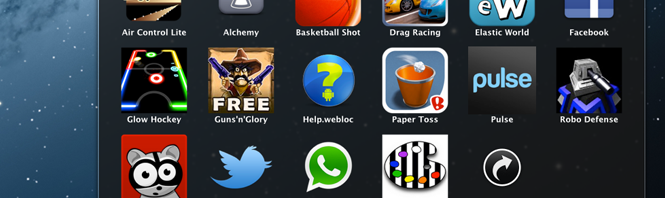
If you’ve ever wished you could use Android apps and games on your PC, now’s your chance. If you’ve got an Android phone, all you need is the BlueStacks App Player to do the rest.
BlueStacks is a virtual machine that lets you run Android apps on your PC. Now you can enjoy apps like Talking Tom Cat, Words With Friends and even Facebook for Android directly on your desktop
Downloading and installing BlueStacks App Player is simple. As an added bonus, it comes with 10 apps already installed. BlueStacks also offers additional apps on its website that you can add to the App Player, and you don’t even need an Android phone to enjoy those specific ones on your desktop.
The questions is, how do you get apps from your Android phone into the App Player on your PC? Conveniently, BlueStacks offers a cloud service that will synchronize your phone directly to its App Player in a few easy steps.
1. Register an account online with BlueStacks
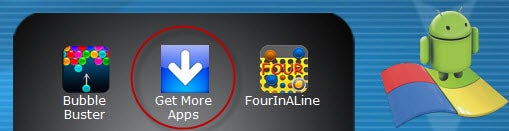
The first step is to click on the BlueStacks App Player itself, which should have appeared in the upper right corner on your desktop after installation. Scroll to the second page of pre-installed apps and click the “Get More Apps” icon.
.This will take you to the login page on BlueStacks’ website. You can either create email and password credentials or log into the site using your Facebook profile. If you go the email route, you’ll need to click a verification link sent to you by email before you can proceed.
2. Install BlueStacks Cloud Connect on your phone
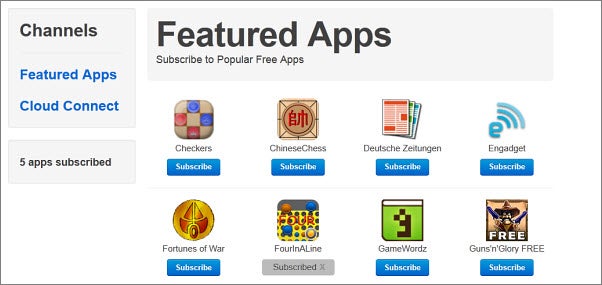
Once logged in, you’ll be shown a handful of apps that you can add directly from BlueStacks’ website. If any of these seem interesting, just click the Subscribe button and they’ll be transferred to your BlueStacks App Player automatically.
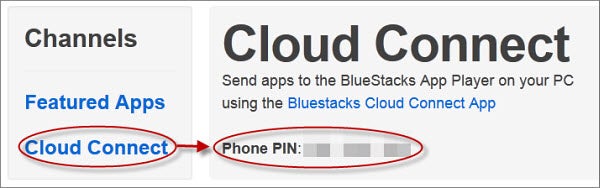
You’ll need to install the free BlueStacks Cloud Connect app onto your phone via the Android Market. Then return to the BlueStacks website and click the “Cloud Connect” link on the left of your screen. You’ll be given a unique PIN here that you can use to access the Cloud Connect app on your phone.
4. Sit back and wait for your apps to sync
Synchronizing between your phone and the BlueStacks App Player can take a couple minutes, so sit tight. Once synced, you’ll receive a message in your PC taskbar letting you know the apps synced. An image icon for each will appear in the actual App Player.
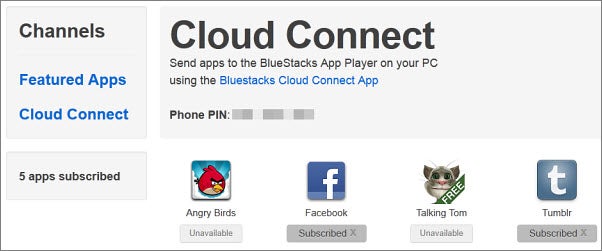
Since BlueStacks App Player is still in its alpha version, not all of your apps will be available for download yet. If some of the apps you tried to sync aren’t appearing, you can check on their status via BlueStacks’ website under the Cloud Connect option. If they were successfully transferred, a gray icon that says Subscribed will appear under their icon. If not, the icon will list them as Unavailable.
It’s likely that more apps will become available as BlueStacks App Player develops. The app is available for Windows and Mac, and there’s even a special version for Windows 8.
Have you ever tried BlueStacks? Did you manage to make it work?
Mobile World Congress – Day 2 round-up
Having survived the first day at the Mobile World Congress, we’ve been back for more today.
Here are some of the highlights from the announcements and apps on display today.
Listen to Twitter with The Social Radio
 The Social Radio for Twitter lets you listen to your Twitter feed, using your music collection as the soundtrack. It’s free for a limited time, so it’s a great time to check out this curious app. It’s now available for iOS as well as Android.
How it works
The Social Radio for Twitter uses one of your music apps as a basis for your radio station. So, not only will it use the iOS music app, but also any other music app you have installed if you want. Spotify and Soundcloud are supported, and a host of others.
Mobile World Congress – Day 1 round-up
 It’s been a busy first day here at the World Mobile Congress as some of the biggest names in the business attempt to make an impact from the kick off.
Nokia
Nokia kicked things off with the announcement of several new devices, apps and services. Highlights included three new S40 devices (202, 203 and 204) complete with the new Nokia Life SMS-based content channel; the cut-price Nokia Lumia 610; and the Nokia 808 PureView, which boasts a preposterous 41MP camera (below).
5 games you might have missed in 2011

 2011 was an excellent year for gaming. Games like Battlefield 3, Batman: Arkham City, and Dead Space 2 were fantastic. But these are all triple A games with massive development cycles behind them.
Smaller, but equally amazing games came out in 2011, but didn’t all have their time in the spotlight. These games may not be high definition or 100 hour experiences, but they are excellent examples of how independent games are becoming a great source for variety.
Here are five of these games that are worth playing:
What to expect from Mobile World Congress 2012
 Want to know what 2012’s must-have apps will be? Keen to find out what the mobile phone of the future will look like? Will Windows phones ever be cooler than an iPhone?
Stay tuned, because next Monday’s Mobile World Congress (MWC) could hold the answers to these questions, and many more. The World’s biggest mobile industry conference kicks off in Barcelona on the 27 February and the Softonic team will be there to check out the latest mobile innovations and cool apps at the event.
Continue reading “What to expect from Mobile World Congress 2012”
Basic housekeeping for Internet Explorer 9
 Internet Explorer 9 is a great improvement over its predecessors, as well as boasting a sleek look that really makes it stand out.
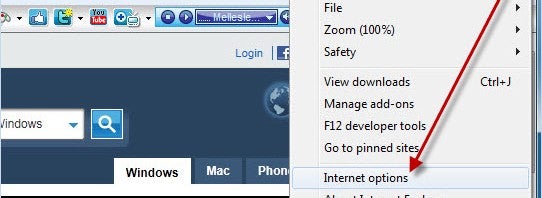
Its new look has also changed the location of important settings and features. If privacy is important to you, you’ll want to know how to do things like view or delete temporary internet files and manage cookies.
These are easy to do – if you know where to look. With a few simple steps, we’ll show you how to get your browser cleaned to your liking and keep it that way! Continue reading “Basic housekeeping for Internet Explorer 9”