Steam Family Sharing feature available to all

Valve has released Steam Family Sharing to all users. The feature first launched in beta September of last year and allows you to share your game library with up to 5 friends.

After you add players to your Family Sharing group, you can request access to a friend’s game. Only one of you can play at a time, though the owner of the game will have access at all times. The guest will be given the option to buy the game or to quit playing

To enable Family Sharing, you’ll have to ste up Steam Guard if you haven’t already. Go to Steam > Settings > Family to authorize your computer to share with users. You and your 5 friends can authorize up to 10 machines simultaneously.

To find out more, check out our original article about Steam Family Sharing and Valve’s FAQ at the source link below.

Source: Steam

RELATED STORIES

Windows Phone Guide: how to move from Android to Windows Phone

In this installment of our guide to Windows Phone, we explain how to transfer the data stored on your Android phone to a Windows Phone.

If you’ve finally decided to take the plunge and put your Android on the shelf in favor of a Windows Phone, you might be wondering how to transfer all your data from one phone to another. It’s a question that comes up with every new phone purchase, and the answer actually depends on several factors.

Microsoft understands the problems associated with making the switch, especially because its presence in the market is still relatively low, but it offers a relatively comprehensive help page to make the transition to Windows Phone easy.

Here, we’ll show you exactly how to move from Android to Windows Phone. Contacts, photos, videos, applications, and emails: this article will ease your fears if you’re still hesitating because you don’t want to lose your data.

Sync your mailbox with Windows Phone

This is probably the simplest of all operations. To display all of your emails in your new Windows Phone, you have to go to go to Settings > email + accounts. A very large number of email services are supported, including some of the most popular like Yahoo! Mail, Gmail, Hotmail, and of course, Outlook.

If your email provider isn’t included in this list? Don’t panic, just go to the option entitled other account. All mail accounts that support IMAP or POP should work correctly.
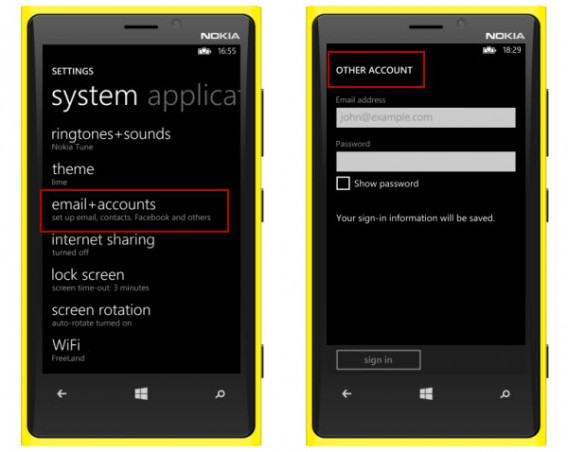
Add your email to Windows Phone

Synching with your mail shouldn’t cause any problems

Find contacts and calendars on your Windows Phone

From the moment you launch an Android device, Google invites you to link your phone contacts to a Google Account. This Google Account is the mandatory gateway that lets you benefit from services such as Google Maps or Google Drive, including emails, contacts, files stored online, and much more.

The good news is that Windows Phone supports the addition of Google accounts. Synchronizing a Windows Smartphone can happen in just a few simple steps. Once again, go to the Settings > email + accounts > Google menu, enter an email address and password, and then the process is extremely simple.
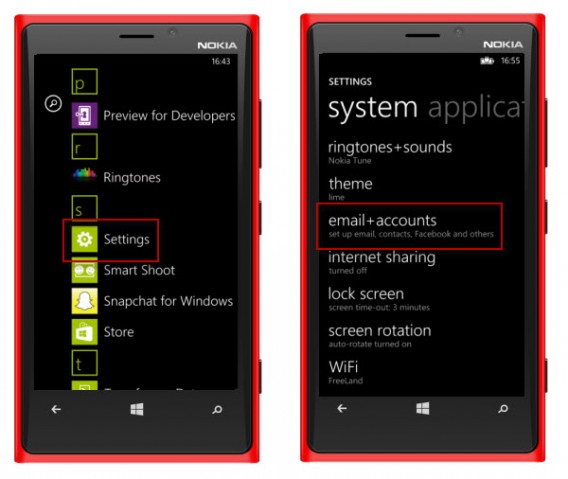
Windows Phone add Google account

Tap Settings and then Email and accounts
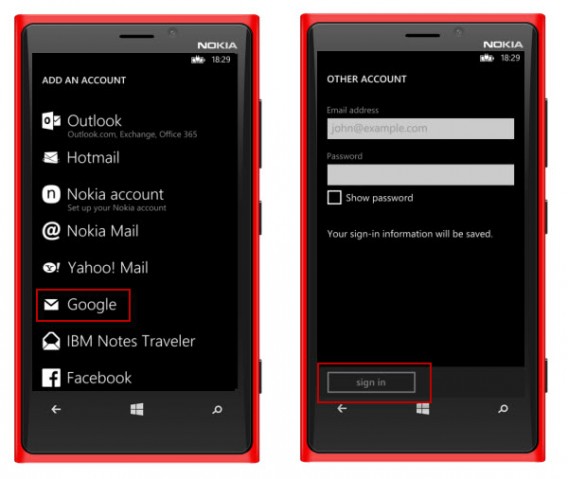
Add Google Windows Phone

Enter your Gmail address and associated password and validate

Then, simply select calendar, contacts, and email to synchronize everything.

If you’re not connected to Google on your Android and prefer the services provided by Yahoo!, Facebook, or even Outlook.com, then the procedure is exactly the same for these accounts.

For all other Android users who prefer to store their contacts on the SIM card of their phone rather than online, you can download the Windows Phone 8 transfer my data app. It automatically retrieves the contacts stored on your old phone using Bluetooth technology. The telephone numbers are automatically added to the People app on the Windows Phone.

Finally, it’s also possible to insert the SIM card into your new Windows Phone, and you’ll find your address book as you left it.

Import documents stored on your Android

Unlike emails and contacts, there is unfortunately no magic recipe for transferring spreadsheets, text files, and other PDF documents stored on your phone.

Only users of OneDrive, the Microsoft storage solution, are spared this hassle. The application is installed by default on your Windows Phone, and you simply have to connect to your Microsoft account to find all of the data you stored in your online space.
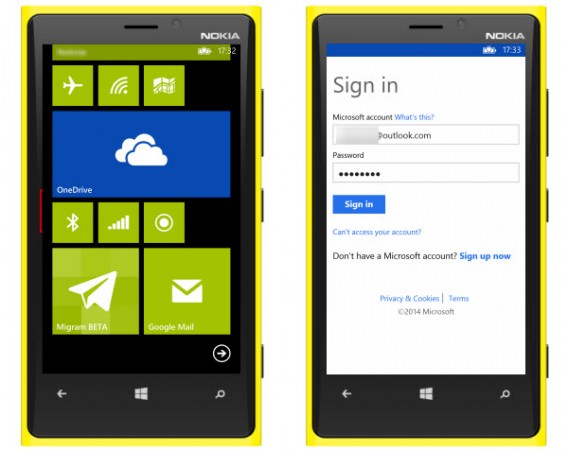
Documents in Outlook

The OneDrive Microsoft application is installed by default on Windows Phones

For those who manage their documents from Dropbox, it’s useful to know that there are unofficial apps like Boxfiles for Dropbox that can help. To be sure nothing is lost, however, we advise you to download all of your Dropbox files onto your computer, then copy them to the Windows Phone using a USB cable and with the help of Windows File Explorer or OS X Finder.
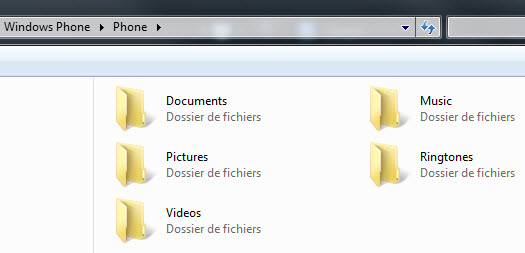
File explorer

Connect your Windows Phone to your PC using a USB cable to transfer files

To synchronize the contents of your Google Drive or other online storage solutions, like MEGA for example, the procedure is the same.

Microsoft offers parallel software to help you synchronize your documents with your Windows Phone. This official solution was developed by the Redmond teams and is available for PC and Mac

For people who use Windows 8 on their PC, you can’t go without the Metro application, My Windows Phone, probably the easiest one to use.

Music: find your favorite artists on Windows Phone

The solutions offered by Microsoft will vary depending on your use of the cloud. If you use a streaming service like SpotifyDeezer, or TuneIn Radio, they all offer working Windows Phone applications. All you need to do is log in to your account to listen to your custom playlists.
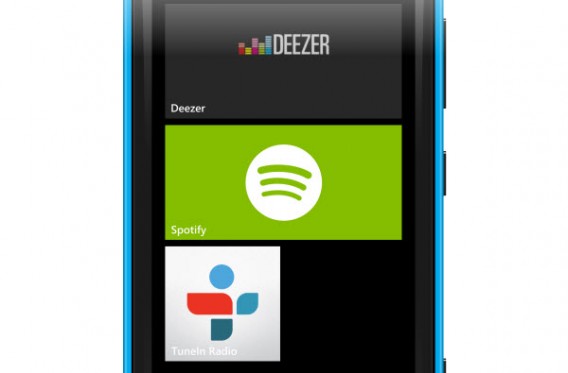
Streaming music

The main music streaming services are available for WP8

Do you keep your music library on your computer? Connect the Windows Smartphone via USB or use the Microsoft software to add music to your new device.

If you use the Google Play Music Manager, the service for storing and streaming audio from Google, you will unfortunately have to download all of your music onto your PC and then synchronize it using Microsoft software or via a USB cable. It’s the same situation if you use the Amazon MP3 Service: download the Amazon MP3 Downloader to retrieve your purchases and your local music, and then transfer the data onto your Windows Phone.

Photos & Videos: the Cloud makes it easier

Regarding your multimedia files, people who use online storage will again be in a better position. If you store your photos on Facebook, Flickr, or OneDrive, then download the corresponding Windows Phone 8 app and connect your account to synchronize all of your online files on your Windows Phone.

Bad news for those who don’t save their images in the cloud: you need to connect your old Android to your computer, copy the files to your PC or Mac, and then paste the data in your Windows Phone.

Application ecosystem

If you still have any doubts regarding the applications available for Windows Phone, we invite you to (re)read our summary of top 30 mobile services and their respective availability on Windows Phone, Android and iOS to get an idea of what’s out there.

Find out more about your Windows Phone in our guide.

Major Hangouts for iOS update brings stickers, video messaging

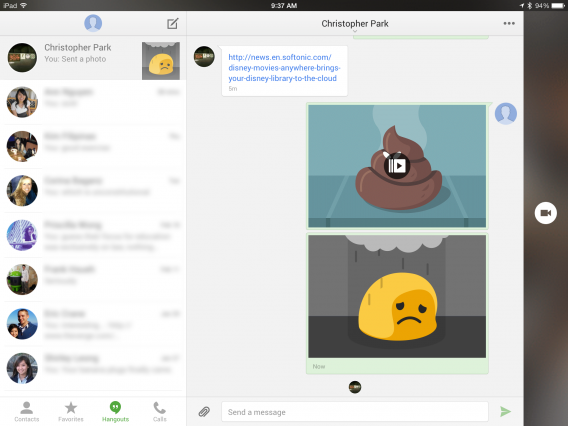
Google Hangouts for iOS received a major update this morning, bringing animated stickers and Vine-like video messaging. The previous version of Hangouts for iOS lacked many features of its Android counterpart but has now surpassed it. There’s no word from Google about when Android users can expect to see these new features.

Stickers are big business for messaging apps like LINE so it’s nice to see them in Hangouts. Unfortunately, the selection is mediocre and doesn’t feature original artwork.

Short video messages are also a nice addition, letting users send up to 10 seconds of video. Videos won’t play unless you tap on them but the thumbnails show an animated gif of the video.

The update also brings location sharing, which has been in the Android version but was missing in iOS. This means you can send an exact location to your friends.

Google Hangouts for iPad

Hangouts of for iOS also gets a redesign with new chat bubbles and an iPad optimized interface. iPad users will have a two column design with your chats listed on the right and your current chat on the left. There’s also a dedicated video chat button that runs along the right side of the screen.

The mobile messaging battle is heating up. With Facebook’s pending purchase of WhatsApp, messaging apps are all trying to find unique ways to draw more users. These new features in iOS should increase interest in Hangouts but Google is still competing in a crowded space.

Download Hangouts for iOS

Source: Google Hangouts (iTunes)

RELATED STORIES

The Softonic Minute: Mobile World Congress, CityMapper, Facebook Messenger and WhatsApp

Mobile World Congress invades Barcelona, CityMapper wins the GSMA App of the Year, Facebook Messenger for Windows and Firefox is discontinued, and WhatsApp will add voice calls in Q2. Check out this week’s biggest software news from the Mobile World Congress and beyond in the Softonic Minute.

Default player

<!–
By use of this code snippet, I agree to the Brightcove Publisher T and C
found at https://accounts.brightcove.com/en/terms-and-conditions/.
–>

<!–
This script tag will cause the Brightcove Players defined above it to be created as soon
as the line is read by the browser. If you wish to have the player instantiated only after
the rest of the HTML is processed and the page load is complete, remove the line.
–>
brightcove.createExperiences();

This week’s top stories:

Make sure to check out all of our past Softonic Minutes.

Disney Movies Anywhere brings your Disney library to the cloud

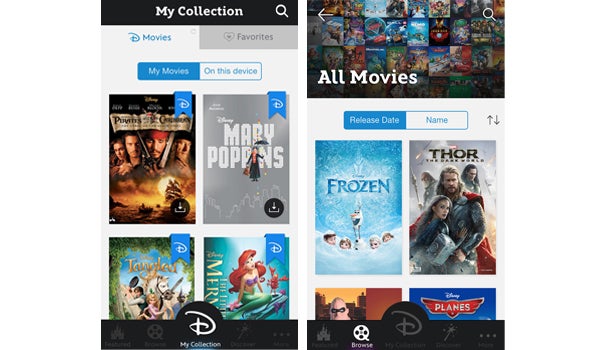
Fans of Disney movies are in for a treat as the entertainment company released a new app for iPhone and iPad this week. Disney Movies Anywhere lets you stream Disney movies that you’ve purchased using your iTunes account, directly through the app.

The app offers a new space to access your collection of Disney movies, but you’re effectively just purchasing them through iTunes. So what’s it got to offer that iTunes doesn’t? Not much, unless you’re a die-hard Disney fan.

When first installing the app, you’ll be asked to log in or register with a Disney account. From there, you’ll be prompted to connect your iTunes account, which isn’t necessary, but is incentivized by offering a free movie when connecting your account (for now, it’s The Incredibles, but this is subject to change). You purchase additional movies through your iTunes account, and you can access all of the Disney movies you’ve already downloaded through iTunes in the Disney Movies Anywhere app.

Disney Movies Anywhere

Movies from all of Disney’s branches including Pixar and Marvel, are accessible through the app. The biggest benefit, of course, is its integration with iTunes. Users don’t have to worry about registering more credit card details, and automatic syncing means that you have your entire Disney movie collection in one place. This will come in handy, especially once Disney integrates the app with additional retail services, which Walt Disney CTO Jamie Voris says is part of the expansion plan for building a sustainable digital ecosystem for Disney. The app currently offers around 400 titles.

Aside from its own browsing sections, there are additional features like exclusive behind the scenes videos, and an MPAA feature that lets parents control which content their kids can access.

While this app may not offer anything revolutionary, I remember my own collection of VHS Disney tapes filling the living room as a kid. Disney is big business, and loyal fans of the franchise, and their parents, will appreciate the convenience and perks that the app has to offer. Undoubtedly, it gives kids and parents a new space to store their Disney movie collection, one which takes up a little less room: the cloud.

Image: source

RELATED ARTICLES:

New Chrome Beta includes hands free voice search

The latest Chrome Beta has hands free voice search, activated by saying ‘OK Google…’ It is available in US English now, and will be brought to other languages soon.

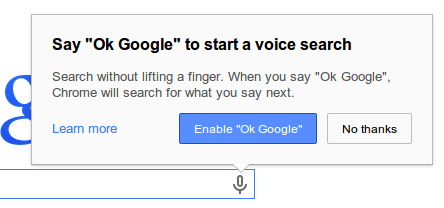
To enable the feature, you first need to click the small microphone symbol in the search bar, and click ‘Enable OK Google‘. Then, you just have to say ‘OK Google’ to activate voice search, and say what you are looking for. The official Chrome development blog explains how you can ask questions like ‘Ok Google, how many ounces are in a cup?’ or even create a Google Now reminder with ‘OK Google, remind me to pick up dessert at 6pm tonight.’

This means you can search in Chrome while doing the washing up or cooking, without having to clean your hands, or get your keyboard wet.

The Chrome beta also updates the ‘Supervised User‘ feature introduced last October. This feature lets you add family members and others to Chrome in a ‘managed environment’, where each user has certain permissions to control what they can see and do on the web. In the new beta, you can import any user to Chrome on any device, and their permissions will be synced.

Download Google Chrome Beta for Windows, Mac and Android.

RELATED STORIES

Google Play Services to scan for malware constantly

An upcoming update to Google Play Services will allow it to scan your apps after installation for malware, with a new Verify Apps feature.

Verify Apps scans any apps not installed via Google Play, and informs you if they are dangerous or contain threats. The scan currently happens only at installation, but soon it will continue to scan your apps afterwards. This means if a new threat is uncovered after you install an app, Android will be able to notify you.

The new version of Verify Apps will therefore run constantly in the background, instead of just activating when apps are side loaded (installed from outside Google Play). This further extends Android’s security, and makes side-loading safer than it is today. Most Android malware comes packaged with side-loaded apps from unofficial stores, so this is a good way to combat the problem.

RELATED STORIES

[Source: Computerworld]

Tor developing anonymous mobile OS

Tails (The Amnesic Incognito Live System) is a operating system that runs from a USB, and it is being adapted for mobile devices by the team behind Tor, the online anonymity software.

Tails for mobile will run on Android and Ubuntu devices, but not iOS. According to project lead Nathan Freitas, making it run on iOS is not worth battling Apple.

The current PC version of Tails boots directly from a USB, DVD or SD card, and Tor wants the mobile version to work in the same way. However, most devices will not allow booting from SD cards or USB sticks, so until that’s possible, Tails will work by rooting the device before it loads.

In theory, Tails is a secure and anonymous operating system that runs everything through the Tor network, and leaves almost no fingerprints on the device you use once it has been removed. The mobile version will include apps that feature end to end encryption, and won’t ‘leak data’. The idea is that Tails will be easy enough to use that you’ll be able to return to Android to play games and do ‘normal things’ like use Facebook and so on.

Tails for mobile is certainly interesting, but it’s worth mentioning that Tor is not completely secure or private. Law enforcement agencies have managed to trace illegal activities happening through Tor (like the famous Silk Road marketplace), so it doesn’t provide total secrecy.

RELATED STORIES

[Source: The Daily Dot]

ACR Drift: simplified mobile racing

There are a lot of racing games on mobile devices. Obviously some are better than others, but one of the main challenges in mobile racing is the controls. Regardless of the visuals and gameplay, if you can’t control the car well enough then the entire experience is worthless.

Auto Club Revolution is the first PC game from Eutechnyx, a developer who knows a lot about how to make racing games with work behind NASCAR: The Game. The game is highly regarded in the free-to-play market as a realistic and challenging racer.

Default player

<!–

By use of this code snippet, I agree to the Brightcove Publisher T and C

found at https://accounts.brightcove.com/en/terms-and-conditions/.

–>

brightcove.createExperiences();

To enter the mobile space, Eutechnyx partnered with CROOZ, a leading Japanese mobile game developer. CROOZ is best known in Japan for its mobile trading card games. Developing a racer was something new and different. The result of the collaboration is ACR Drift. A very simplified racing game focused on drift mechanics, ACR Drift is aimed at the casual racing fan.

Swipe controls

When I try mobile racing games, they usually attempt to include the main control schemes of cars. Gas, brake, e-brake, and either touch or accelerometer steering. This leads to over or under steering and a general necessity of caution making games frustrating. With the free-to-play model so popular now, games often artificially add on ways to make you wait to complete simple tasks like upgrades or even enter the next race.

ACR DRIFT - Screenshot

ACR Drift is different. It relies on swiping and little else. Since the core of the gameplay is focused on drifting around corners, the game is developed around precise timing. Talking with Chris Nelson of Crooz, he said that ACR Drift was developed to let casual players experience a racing game without getting frustrated by complex controls.

Early races teach you how to play. The start requires you to press the gas pedal which starts the timer to begin the race. To get an extra boost off the start line, you have to keep the engine in an optimal green zone. If the time hits zero and you’ve maintained the engine revving, you get a boost and extra points. Providing gas is no longer necessary because ACR Drift takes over.

You can steer by swiping left or right to change lanes. It’s not really noticeable early on, but there is a bug in the game when you start a race and there’s a car incoming head on. With your opponent so close, you often hit the NPC car and lose a lot of ground. In these short races, this means you lose because there’s not enough track to catch back up.

acr drift good rating

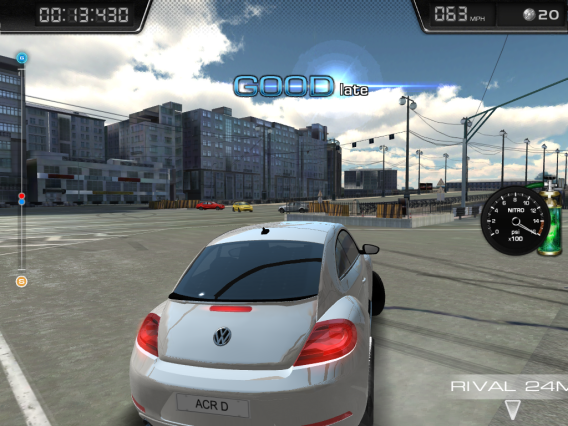
At turns, the car speeds to a white strip with arrows to tell you which way you need to swipe. Depending on how precise you are, you earn a ranking with points. The closer to “Perfect” you get, the more points you get at the end of the race. Nelson said that early races were designed to take around 15 to 30 seconds to allow quick play. Later levels will require more time and effort because they are more complex with over the 25 different courses around the world. Add in the 50 plus licensed cars with visual and performance upgrades, and there’s a lot to experience.

Customization

Nelson stated that visual upgrades don’t give you added benefit during races, but customizations do give you additional points during races. Since points convert to in-game money, improving the visual look of your car is a good investment as you earn credits each race. The performance upgrades are in stages and are designed to improve main areas in a car like the engine, exhaust, and springs. Cars have a limit to how tuned they can be before you have to buy a new one, but in the early stages it’s possible to improve a car’s performance high enough to win in your class.

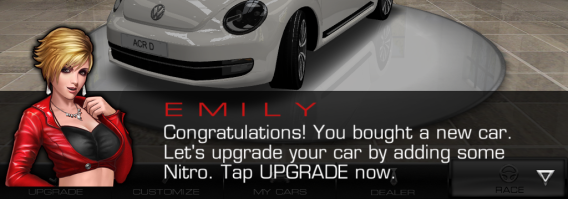
acr drift upgrade car

The inclusion of over 50 licensed cars will excite any car fan and while ACR Drift can’t meet the number of cars of games like Gran Turismo, Forza Motorsport, or Auto Club Revolution, there are enough cars to have a lot of fun.

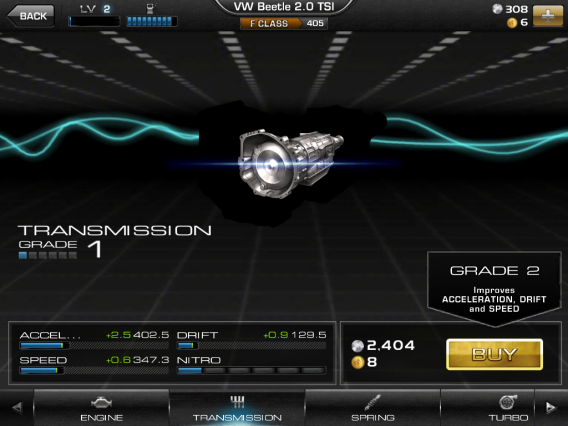
One of the best decisions that CROOZ made in ACR Drift was that upgrades are instant. There’s no waiting from the point when you buy an engine upgrade to when you can use it. Upgrades can be purchased with the in-app money earned through races or with the premium currency that can be bought with real-world money.

acr drift upgrade

Visual customizations like changing the car color or decals cost premium currency and at a huge cost, around 100 gold which I found a bit confusing. Other customization options like new sidewalls or hood could be bought with both. I don’t know how long it would take to earn 100 gold through races, but it seems like it would take a long time.

In my time with ACR Drift, I’ve found that the ease of entry in the system is great for the casual player, though more hardcore racing fans may find it too simple.

Focused release

CROOZ is a Japanese mobile powerhouse, but in the US the company has little recognition. Past attempts by other international companies like GREE have shown that simply pouring money into international expansion doesn’t work. ACR Drift’s precise gameplay mechanics, method of in-app purchases, and customization options are a solid base for a fun, if casual, racing game. Nelson said that CROOZ isn’t trying to attract the hardcore racing fans with the game, but the casual player who wants a racing game but doesn’t want to be confused with problems like controls or fine tuning parts.

One of the best mechanics of ACR Drift is the gas meter. Each race depletes one GAS point. If you have to retry a race, this will cost another point. The ten segments allow you to race ten times. I raced through ten races back to back and I was a little overwhelmed by the end. So the limited number of races is a way to combat burnout from the game. But if you want to keep racing, ACR Drift recovers a point every ten minutes.

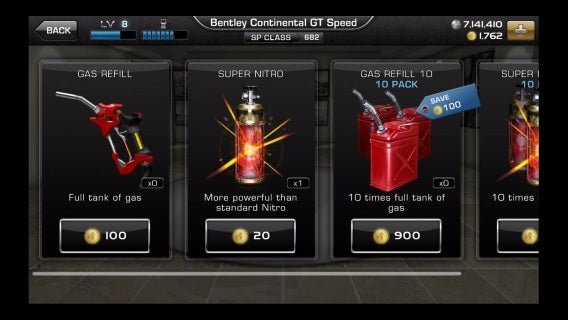
ACR DRIFT - Item Shop

If you do want to race back to back, you actually recover a lot of gas during that time. There is the option to purchase a refill, but I don’t really think it’s necessary.

Careful expansion

CROOZ has a good US debut with ACR Drift. It’s already attached to an established title that has fans worldwide. It also simplifies a genre that’s so focused on adding complicated and imprecise control schemes. What impressed me the most is that it uses free-to-play in-app purchases like it was in the early days. Instead of implementing time-based costs in every facet of upgrading, ACR Drift lets players race and naturally earn money. In all, it seems like a recipe for success.

GCHQ intercepted 1.8 million Yahoo! webcam images

Classified documents reveal that the British security agency has collected webcam images from over 1.8 million Yahoo! users. As part of the program code named “Optic Nerve,” the British Government Communications Headquarters (GCHQ) tapped web cameras of Yahoo! users for facial recognition data.

“Face detection has the potential to aid selection of useful images for ‘mugshots’ or even for face recognition by assessing the angle of the face.”

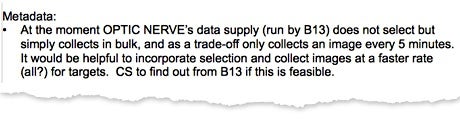
Optic Nerve collected images from Yahoo! users once every five minutes to avoid human rights violations and to prevent GCHQ servers from overloading. The classified documents state, “Face detection has the potential to aid selection of useful images for ‘mugshots’ or even for face recognition by assessing the angle of the face.” By cross referencing image data collected from Yahoo!, the GCHQ hoped to match faces with targets already in its database.

GCHQ photo limit

As you can imagine, the overwhelming collection of images from webcams resulted in tons of false positives. One of the documents dated from the mid-2000s read: “One of the greatest hindrances to exploiting video data is the fact that the vast majority of videos received have no intelligence value whatsoever, such as pornography, commercials, movie clips and family home movies.”

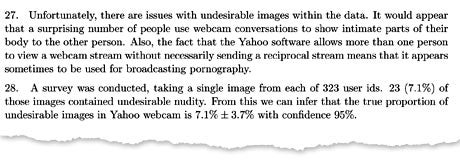
The document estimates between 3%-11% of images captured were of “undesirable nudity.” Optic Nerve implemented a pornography filter, which generated its own false positives, tagging people’s faces as pornogrphy. Images without faces were discarded.

GCHQ pornography

A spokesperson for Yahoo! responded immediately stating “We were not aware of, nor would we condone, this reported activity. This report, if true, represents a whole new level of violation of our users’ privacy that is completely unacceptable, and we strongly call on the world’s governments to reform surveillance law consistent with the principles we outlined in December.”

“This report, if true, represents a whole new level of violation of our users’ privacy that is completely unacceptable.”

Both the NSA and GCHQ have responded, stating that both organizations follow all legal and political frameworks. “All of GCHQ’s work is carried out in accordance with a strict legal and policy framework which ensures that our activities are authorised, necessary and proportionate, and that there is rigorous oversight, including from the secretary of state, the interception and intelligence services commissioners and the Parliamentary Intelligence and Security Committee,” said a spokesperson for the GCHQ.

Yahoo! joins other tech companies in urging Congress to stop NSA bulk surveillance. Last month, new leaked documents showed that both the NSA and GCHQ collected personal information from mobile apps like Flickr, which is also a Yahoo! product.

The Guardian does not specify how Optic Nerve managed to bypass Yahoo!’s security measures to collect webcam photos. There’s also the question of whether the collected data was from private or public web chats, though it should be noted that Yahoo! Messenger only supports private web chats. If the GCHQ was able to tap into Yahoo! Messenger, are services like Skype and Google Hangouts also vulnerable?

Source: The Guardian

FOLLOW THE PRISM SAGA