Shouttr: a noisy step too far for Twitter?

We love checking out Twitter clients. From Firefox add-ons to iPhone apps, Twitter seems to be the web service that is attracting the most creative development. In fact, does anyone tweet from the Twitter homepage anymore?

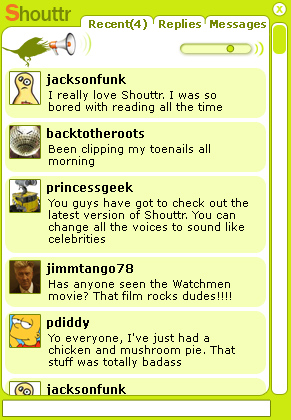
In this Twitter-frenzied world, it was only a matter of time before things went a bit too far. Shouttr, currently in an alpha-development stage, is a program that lets you post and read tweets others much like any other Twitter client. But it will also read aloud tweets for you as they arrive. You can configure voices yourself, from a selection included with the application (male, female, sexy and so on)

As well as shouting your Twitter feed, Shouttr also has an option to read out “Twitter Everyone”, which results in a cascade of never-ending tweet noise. Imagine you could hear everyone’s babble, all the time, all at once. This is a pretty good simulation – this is how it feels to be totally wired into the chatter node of human consciousness.

Whether or not it’s useful is another matter. The developer points out that by making tweets audible, you no longer need to read them, and therefore it saves you time. That’s as may be, but many people will find this massively distracting.

The iPhone version that’s apparently in the works takes things to another level. It means that soon you won’t be able to walk down the street without hearing a constant stream of consciousness being burped out of the Internet. The promotional video for Shouttr demonstrates just how far Twitter ‘enhancements’ have come. But do we really need this level of advancement of a Web service that’s made a mark because of its simplicity?

Which iPhone VoIP client: Skype or Nimbuzz?

Is Skype the best?Is Nimbuzz the bestiPhone users have today been buzzing about the prospect of making free calls, following the release (at long, last) of Skype on the Apple device. The client allows users to make free Skype-to-Skype calls over WiFi, and SkypeOut calls to anyone around the World over 3G. It marks a significant breakthrough for Skype, a company, perhaps quite rightly, feared by mobile network operators for the damage it could do to their cushy business models.

The new iPhone version of Skype will be a worry for Nimbuzz, which, until now, has been top of the pile in terms of iPhone chat apps. Until now, Nimbuzz offered the best way to make Skype calls from an iPhone. So, how does the official version of Skype compare with the Nimbuzz offering?

Firstly, it’s worth remembering that Nimbuzz is a multi-network client that allows you to pull all your contacts together in one place, so you can exchange messages with all your friends on networks such as MSN, AIM, Yahoo! Messenger, Google Talk, Jabber, Facebook, or MySpace – as well as Skype. The iPhone Skype client, however, is designed solely for Skype users and, as a result, has more of the native functions from the VoIP service.

Usability

The user interface in Nimbuzz combines all of your contacts from all these various networks in one place, and you can see who is online at any time. Everything is presented in a very neat and clear way: contacts are ordered alphabetically and each has a different icon depending on which network they belong to. You simply need to tap on a person’s name then select an icon from: Call, Chat or Mail.
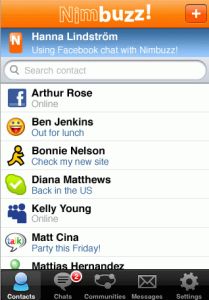

Nimbuzz contactsSkype contacts

The Skype UI is equally impressive. In fact, I would say it’s unerringly similar. Skype also has an alphabetized contacts, which is even easier to navigate than the one in the desktop version of the program. You can choose to view all of your contacts, or only the ones who are online. Click on a contact and their profile page will be loaded, giving you the option to either call them, chat, or view their full profile. Both Skype and Nimbuzz have similar, finger-friendly dialpads, for making calls over SkypeOut.

Continue reading “Which iPhone VoIP client: Skype or Nimbuzz?”

Five tips to avoid Conficker.C on April 1st

Five tips to avoid Conficker.C in April 1stApril 1st is nearly upon us, which means you must be prepared for two things: one, finding all sorts of pranks and hoaxes on the web, and two, facing the attack of Conficker.C, the latest version of the Conficker worm which is due to be activated on this very day.


Conficker’s aim seems to be the creation of a botnet that would enable the worm’s coders to control millions of computers worldwide and use this massive collaborative force to launch attacks on particular websites, send spam messages and other similar tasks. However, some people think this could be the biggest April Fool’s joke ever played on the web, and security experts think there’s no actual danger for your PC, as long as it’s clean before the dreaded date. In any case, if you want to be on the safe side, pay attention to these tips to avoid Conficker.C:

  • Make sure your Windows system us up to date. Launch the Windows Update tool and download any security patches you haven’t installed yet. As an optional security measure, you can also Download Microsoft Malicious Software Removal tool – always as a complement to your current anti-virus tool, not as a replacement for it.
  • Disable the Autoplay functionality. One of the spreading methods used by the Conficker worm is an autorun file that infects USB removable devices. To avoid the risk of immediate infection when connecting one of those devices on your PC, learn how to turn the Autoplay feature off.
  • Run a quick scan to search and remove worms. Download and launch F-Secure Easy Clean, a free standalone security tool that helps you find and remove malware, spyware and worms, including Conficker.C.
  • Use a specific ‘vaccine’ against Conficker.C. McAfee has released a special build of their McAfee AVERT Stinger tool, with which you can scan your system and clean any Conficker variant. This tool will be updated on a daily basis to grant you support for possible future versions of the worm.
  • Check your system with online security tools. If all four previous steps are not enough for you, have a look at our list of online ant-virus tools, perfect for scanning your whole system or just a single file without having to install any application.

Today’s downloads for Windows, Mac and Mobile

Windows: If you’re jealous of Apple OSX’s dock, Xwindows Dock will give you a pretty sweet version of it for your XP or Vista desktop. It’s not perfect, and doesn’t entirely replace the Windows taskbar, but it looks the part, and does actually feature most of the things, like stacks, that the Leopard version does. Not bad for free!

Get weather forecasts on your Pocket PC

Pocket PC: With all this climate change going on it’s getting ever harder to work out whether you need to take an umbrella out with you, or pack your suntan lotion. Luckily, if you install Elecont Weather on your PDA, you shouldn’t get caught unprepared again. This app provides you with 10-day, up-to-the-hour forecasts forecasts for more than 51,000 different cities across the World.

Second Life logoMac: If you’ve ever dreamed of a life without limits or boundaries then Second Life is for you. Second Life is a 3-D virtual world entirely built and owned by its residents. Since opening to the public in 2003, it has grown explosively and today is inhabited by over 100,000 people from around the globe with whom you can interact, trade and live that life you’ve always dreamt of

OnSoftware Daily Digest

Wikipedia running out of facts? [NY Times]

Skype coming to iPhone [CrunchGear]

Pirate bay launch Facebook app [Guardian]

Spotify signs deal for downloads [BBC]

Make your own magazines cheaply [Magcloud]

Vast online spy network stole from Dalai Lama [NY Times]


/* Style Definitions */ table.MsoNormalTable {mso-style-name:”Tabla normal”; mso-tstyle-rowband-size:0; mso-tstyle-colband-size:0; mso-style-noshow:yes; mso-style-parent:””; mso-padding-alt:0cm 5.4pt 0cm 5.4pt; mso-para-margin:0cm; mso-para-margin-bottom:.0001pt; mso-pagination:widow-orphan; font-size:10.0pt; font-family:”Times New Roman”; mso-ansi-language:#0400; mso-fareast-language:#0400; mso-bidi-language:#0400;}

Microsoft Worldwide Telescope now available online

Worldwide Telescope, Microsoft’s app for astronomy fans that managed to make Scobleizer cry, has recently launched a handy online version that enables you to surf the sky without having to install the program on your computer. Well, you do have to install something else: Microsoft Silverlight. No more support for Flash, I suppose.

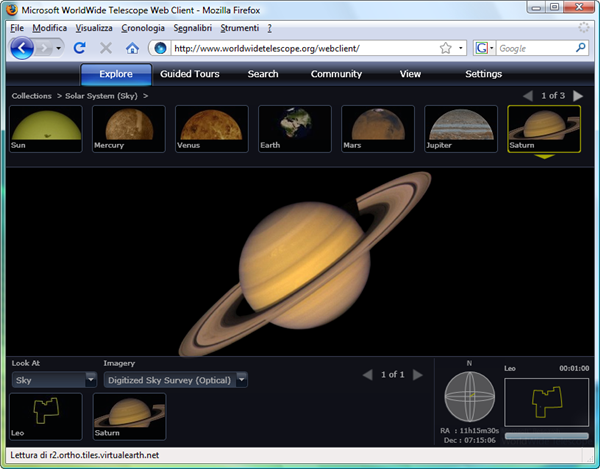
The web-based version of this massive astronomy app is very similar to the original desktop one. Surprisingly enough, it loads up quite fast and features smooth, seamless animations. You can freely move around the universe with the help of your mouse, though you’re probably best off with the app’s featured Collections: packs of space landmarks that let you easily travel from one planet or constellation to another, with one mouse click.

Worldwide Telescope online

Worldwide Telescope Online also includes user-created guided tours which, despite taking a while to load, are also a good way to take a deeper look at specific elements in the universe and learn more about the topics you’re interested in.

Like I said, the whole website works quite smoothly and loads fairly quick. Though it does require some space on your local hard drive to save data, it’s definitely a good alternative to the desktop version. Plus the web client works with Windows and Mac.

Future Shock – the mobile phone of 2015

Being the forward-thinking technophiles we are, the OnSoftware team is constantly musing over what the future holds for the world of software and technology. Every coffee break or brainstorming meeting seems to end up with us debating the prospect of flying cars, how long before chips are planted in our heads, and whether Apple will ever release its fabled tablet device. Instead of us arguing amongst ourselves over the plausibility of a time-traveling MP3 player or if it’s right for a human to marry a robot, we decided to each vent our perceptions of the future in a series of posts.

Is this the Nokia of the future
(Photo by asifpk)

As OnSoftware’s resident visionary genius mobile devices editor, I get to go first. I’m going to explain my theories about the future of mobile phone technology. Then, over the coming days, the rest of the team will be prophesying about their own specialist tech subject, revealing their crackpot ideas about what the World will look like in 2015.

The changing mobile environment

I guess it makes sense to start by considering what mobile software will be like in 2015. And I think ‘convergence’ is the key word here (as it always has been). At present there are a plethora of mobile operating systems to choose from and handset manufacturers must pick and choose which to include on their devices. For the software developer, it’s now a grand task to produce apps that run on every OS, and consumers too are baffled by which to opt for. I think mobiles will go the same way as desktop computers, and that platforms will converge, so handsets will come with one of only two or three operating systems. My guess is one will be an Apple OS (i.e. a descendant of the current iPhone platform), one will be open source (my bet is that Google will eventually snap up the Symbian cooperation and Android will rule supreme), and the other will be a more business-oriented platform from BlackBerry, Microsoft, or even Palm, depending on who can squeeze out/buy out the others first. Continue reading “Future Shock – the mobile phone of 2015”

Friday timewaster: You Be The Driver

Do you have what it takes to be a BMW Sauber Formula 1 driver? You’re too late for the 2009 season, which starts this Sunday, but maybe next year? With You be the Driver, you’re taken through three tests to see if you have the necessary reactions. You probably will have! Don’t worry if you’re a terrible driver – your lack of skills won’t hamper you in these tests. Maybe you can be the next Robert Kubica or Nick Heidfeld?

How to manage your social networks and media?

Juggling the ever increasing number of social networks and media sites can be a time consuming pain. Logging into lost of different accounts, you can have a very busy browser before you’ve don anything constructive. I thought I’d look at the current range of solutions to this. I’ll start with some honesty: At the moment there is no one good solution, but there are some which do a reasonable job.

alert

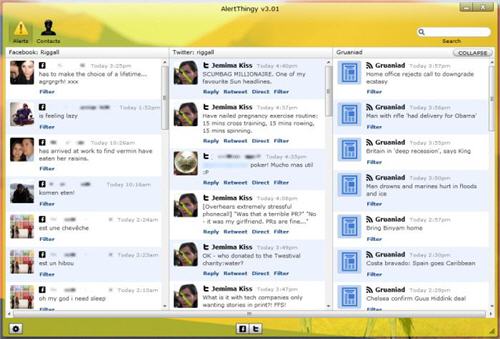
Notable stand alone applications AlertThingy, TweetDeck and Skimmer all offer to pull together your social networks. Skimmer is quite interesting, but it’s very much a beta product, and is the only one with Blogger support, but doesn’t feel finished! It’s something to keep your eye on. TweetDeck and AlertThingy are much slicker, although both are focussed on Twitter and Facbook. Both work very well for Twitter – you don’t miss any of the Twitter experience doing through either of these clients. Facebook is a mixed bag – you can’t do everything you can on the website from any of these clients. AlertThingy offers many more social networks, and they both look good, so TweetDeck loses out just by being a bit too limited.

Firefox has similar add-ons. These give you the more or less the same features as the stand alone apps, but are integrated into Firefox. The most flexible we’ve found is Yoono. It’s a bit of a monster, but can bring Facebook, Twitter, Flickr, Myspace and more into the same space. On top of that it features instant messaging from Microsoft Messenger, Google Talk and Yahoo chat, plus the option to add feeds from your favourite websites. The amount of stuff can get a bit overwhelming, but you can choose exactly what you do and don’t want. The Facebook feed also gives you your news feed, not just status updates, which is great.

ZenOnline services like Zenbe bring your email together with Facebook, Twitter and more. I found this less comfortable than using either a Firefox add-on or a stand alone application. What is clear at the moment is that no one has a perfect solution. Everything I’ve seen can handle Twitter easily, but Facebook always feels like ‘Facebook lite’, and all of these social network aggregators suffer from becoming cluttered.  I am looking forward to Skimmer’s further development, as its Blogger support could make it the most complete package, but we’ll have to wait and see.