Songbird music player reaches 0.5

SongbirdIs Songbird the Firefox of music players? That’s what we’d like to think so of the open source program. Songbird, which is commonly expected to compete with iTunes once it comes out in full version, reached 0.5 last week. We’ve been keeping an eye on the open source music player for a while now and we’re glad to hear about the update. Slowly but surely, the Songbird team have been building up the player, with developers around the world contributing to make it a better program. This new version comes with a number of significant improvements, which you can read about in more detail on the team’s blog.

They include MPT device support (to connect to a number of portable media players and mobile phones), view customization, a better filter picker and rating UI and added developer resources. This last point may not sound very significant to some of you, but to me may be more important than all the other updates. It shows that the Songbird team is really active in sharing the project with other developers around the world. Like with Firefox this means you get an application which is constantly looked after and with all sorts of new features popping up often. An example of this is add-ons. Songbird has its own Add-ons page where you’ll see plenty of extensions to download, from iPod support to an album art manager or a playlist export tool.

This update of Songbird is a good opportunity to encourage you to try it out. It has a sleek interface, a solid iTunes-like structure, an embedded browser through which you can download tracks and read about music news and loads of add-ons to customize it your way.
Add customized buttons to Picasa

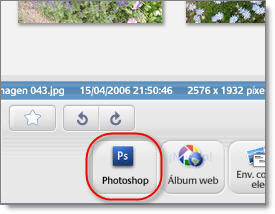
Picasa customized buttonsThe more I use Picasa, the more I like this great photo viewer and editor from Google. And now I just learned that you can make it even more yours by adding customized buttons to its interface. With these buttons you can open your photos in another graphic tool for further editing or upload them straight away to your blog or your favorite online photo manager.

This customization however requires certain programming abilities, as it works with the so called Google APIs. There are currently two different APIs available for Picasa: Picasa Button API and Picasa Web Uploader API. Provided you have the necessary coding knowledge – or just feel like testing them by yourself – these APIs enable you to create personalized buttons for Picasa’s interface that let you make use of third party apps, both offline and online.

If you’re ready to take the challenge, here’s all the information you need, including tutorials, example files and videos. Those of you who aren’t convinced yet, have a look at this Photoshop customized button (this link requires Picasa to open) created by Michael Herf with the Picasa APIs. It’ll add a new button to the Picasa interface from which you’ll be able to open the selected images right in Photoshop CS3.

5 ways to make your PC icon-ic

IconsIcons are usually boring and dull affairs especially where Windows is concerned. You would have thought with all the effort (or not) that Microsoft put into developing their operating system, they would give users more customisation options than just to change their desktop wallpaper now and then. Luckily however, there are applications out there that allow you to customise Windows icons in all kinds of ways. From simply adding a bit of colour to them to changing them completely with photos and even sound, these are five applications that will ensure that your PC has a truly individual touch:
Vista Drive Icons – Even if you can’t afford Vista, you can still steal the icons

Futurama Icons – Turn all your icons into characters from the TV series Futurama

FolderIcons – Add a bit of colour to your icons for easy identification

ArtIcons – Create your own icons from scratch with this MS Paint style app

When Icons Attack
– Finally, this is what happens when the icons decide they’ve had enough!

How to move Firefox settings from one PC to another

Move Firefox settings from one PC to anotherI recently upgraded my computer and therefore had to go through the pain of installing the whole operating system and all my favorite applications from scratch. Luckily they’re not that many and some of them make the process of moving to a new PC a lot easier these days.
I’m talking particularly about Firefox, which features an embedded tool to backup bookmarks and import them back to your newly installed Firefox anywhere else. To use it, just go to Bookmarks > Organize Bookmarks and once you’re in the Bookmark Manager, go to File > Export. Firefox will save all your bookmarks as an HTML file which you can import later in exactly the same place.

Also, for those of you who make use of the Firefox built-in password manager, you may also want to backup your passwords. While Firefox doesn’t feature an special embedded tool for that like it does for bookmarks, you can use this handy extension. Password Exporter lets you backup all saved passwords to a CSV or XML file and import them in another computer.

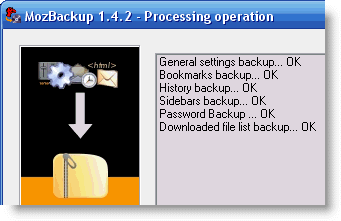
Finally, if you’d like to make a copy of your whole user profile in Firefox, I definitely recommend using MozBackup. This excellent tool will backup your whole profile including bookmarks, browsing history, cookies, passwords and cache. I used it to move all my data from the old PC to the new one and it worked perfectly well.

Say “Guten Tag!” to OnSoftware in German

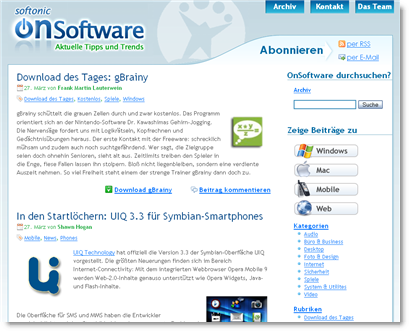
Some more great news for our readers from around the world: we’re pleased to announce the launch of yet another new edition of OnSoftware, this time in German! As you might have guessed, the German edition of OnSoftware has been in the pipeline for quite some time, so the blog’s already packed with handy tips and software reviews, completely auf Deutsch.

onsoftware-de-1.png

So if you’re a German-speaking software lover, check out our new German blog now! Even if you don’t speak German, this is good news for all our readers as it means that we’ve got an even bigger team of writers working to make OnSoftware a great software blog.

As usual, there are loads more features and announcements on the way, but to tell you about them now would ruin the fun! In the meantime, why not drop by and say “Hallo” to our new sister blog, OnSoftware in German?

Firefox get a new Add-ons site

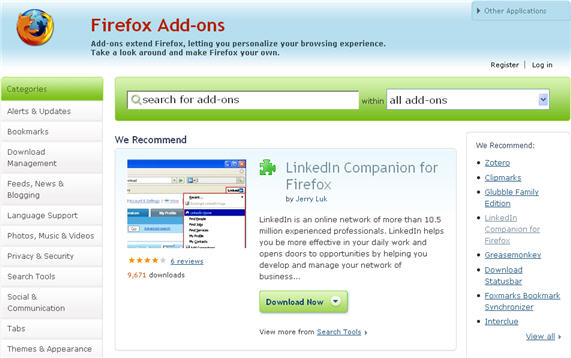
Firefox has been my main browser now for a few years and add-ons are a big reason for this. I enjoy digging in the Add-ons site, just to find interesting and new extensions or see what other Firefox users have set up on their browser. I remember the Firefox Add-ons site being the same for quite a while, so I was glad today to see it finally updated.

fa.jpg

The interface is definitely more clear and the search has been made bigger. Firefox now show three recommended add-ons every day, and the right of the page is composed of another list of recommended add-ons and the most popular ones. Pages for each extension are much more clear and you have a proper download button, instead of a simple link in the old design, which wasn’t always very visible. I also like how Mozilla have added a quick rating feature, although it could have been a bit more precise. Reviews have always been an important part of the Firefox Add-ons site, and I never install an extension without checking out what people think about it. Mozilla have improved this too and it’s now much easier to quickly type in your review. For a longer review though you’ll have to be logged in with your own Add-ons user account. A drop down tab on the top right also gives you quick access to other Mozilla programs, Thunderbird, SeaMonkey and SunBird.

The only real issue I had with it had to do with the rendering of pages. It seems to freeze up really frequently on me and can take time some time loading up. I remember the old Mozilla Add-ons site being much faster at loading and displaying pages.

Overall, this is a welcome improvement to the Firefox Add-ons page and it seems Mozilla have made an effort to make it easy to navigate through. I find that it’s easier to search for programs and see what other people recommend. Leaving comments is also simpler. If you use Firefox on a daily basis, I suggest taking a look around. Add-ons are really what makes the Mozilla browser special and let you tailor your web experience to your own needs.

Todays downloads for Windows, Mac and Mobile

Get more from your Nokia phoneGot a Nokia phone? Then make sure you’ve got Nokia PC Suite. The software is a package of Windows-based apps that help you get more from your mobile phone. Depending on your phone model, Nokia PC Suite lets you edit, synchronize and back up many of your phone’s files on a compatible PC through a cable or wireless connection.

Download System Explorer PortableIf you need something more than the standard Windows Task Manager, you’ve come to the right place. System Explorer Portable is a full featured task manager and system analyzing tool with which you can take complete control over your PC: check active processes, manage startup items and track system resources, all from a single interface. This portable version can be saved in your USB memory stick and run on any PC.

Poker AcademyDecided to try your luck at Las Vegas? If so then you should first practice with Poker Academy for Mac. Filled with tutorials and statistics it will let you improve your game, analyze your hand and see what you can improve. What’s more you won’t have to bet a penny as you’ll only be pitted against virtual players, before you decided to take on more seasoned poker players.

Software to manage your credit cards

Credit CardCredit spending is very much in the news at the moment due to the credit crunch that is taking place in the USA that’s slowly spreading elsewhere. If you’re someone who maxes out your cards as soon as you’ve received them or just have trouble managing your credit spending, then there is a range of software designed to help stop your plastic from melting down.

Credit Repair Planner is a useful tool that helps you schedule repayments on several credit cards at the same time. It’s designed to ensure that you get all your cards down to 50% of their limits in the most cost effective way possible by transferring balances depending on what interest rates each card charges. Credit Card Tracking is a slightly more dated tool which allows you to track credit card spending so you don’t go too wild in the aisles and it’s particularly useful if you have a business expense account.

If you’re looking for something that takes into account other spending as well as your credit cards then HomeMoneyManager is an award winning piece of software that’s designed for large families that are trying to get a grip on all their incomings and outgoings. The same goes for Money Manager which can help you offset credit card debts by taking into account your savings and working out whether it’s prudent to use them to pay off your cards and by exactly how much.

Although credit cards are commonplace nowadays, remember that having one requires responsible spending that no amount of software can help you with. If you’re thinking about getting one or want to know the ins and outs of having one, check out this brief guide.

Google announce launch of YouTube Insight

YouTube InsightIf there’s one thing that has been desperately lacking from YouTube, it’s a statistical analysis tool to show detailed information about who’s been watching your videos. There have been some independent efforts such as TubeMogul and Vidstats but Google have just announced their own official tool – YouTube Insight.

With YouTube Insight, you’ll be able to find out a wealth of data about who’s viewing your videos, where they’ve come from, how they found it plus much more. According to Google:

Uploaders can see how often their videos are viewed in different geographic regions, as well as how popular they are relative to all videos in that market over a given period of time. You can also delve deeper into the lifecycle of your videos, like how long it takes for a video to become popular, and what happens to video views as popularity peaks.

To access YouTube Insight, click under the “About this Video” button under My account > Videos, Favorites, Playlists > Manage my Videos. The tool has mainly been designed for those advertisers and YouTube partners that want to increase their viewing figures and reach a wider audience but it makes fascinating reading for individual uploaders who are simply curious about how people found their videos. Considering the popularity of YouTube worldwide, this is one hell of a marketing tool and remarkably, completely free at the moment. Maybe it will also mean that YouTube can start to reign-in those people that abuse the service with malicious and highly racist comments by being able to track their movements more accurately.

Top 10 iChat programs

Apple iChatWhile Messenger tends to be the preferred choice of most people when it comes to chatting online, AIM or .Mac users are also lucky to have the iChat application already installed on their Macs. iChat is a pretty good program to use for chatting with your buddies. Not only can you stick to the traditional text chats but you can also initiate video conferences, that is if you have iSight or a webcam set up. The application looks nice and clean, like any Apple program, and offers most features you’d expect of such an app, like emoticons, ordering contacts by lists or sharing files. Video and audio playback are generally of a very good quality and you can even use the program to share a screen with another user.

Like Messenger, iChat seems to be popular enough that many developers have created all sorts of software which improve your iChat experience. If you’re the kind of person that likes customizing their apps, I suggest taking a look at these ten programs that can bring more functionalities to iChat:

  • Emotimaker – Create your own packs of smileys and emoticons.
  • MoreIchatEffects – 48 original effects to spice up your video chats.
  • Chat Transcript Manager – Save and manage transcripts of all conversations.
  • iModz – Display a custom message and the iTunes song you’re playing in iChat.
  • ShowMacs – Show pictures and live captures in any iChat conversation.
  • More iChat Smileys – 120 cool emoticons to use in iChat.
  • Chax – Customize things like the user list or message window.
  • ChatFX – A plugin to add video effects to the Mac messaging app.
  • iTwist n’Go – One click control of every function in iChat. Great for messaging addicts.
  • iChat Borderless – Give a streamline iTunes look to the Apple messenger.