Gmail Priority Inbox has arrived!

While most people have been taking it easy over the summer vacation, Gmail seems to have been working overtime. The email giant is just getting better and better – a new interface, updated undo send and even multiple account login! The latest feature to make it to our inboxes is Gmail Priority Inbox.

31-08-2010-18-19-48.png

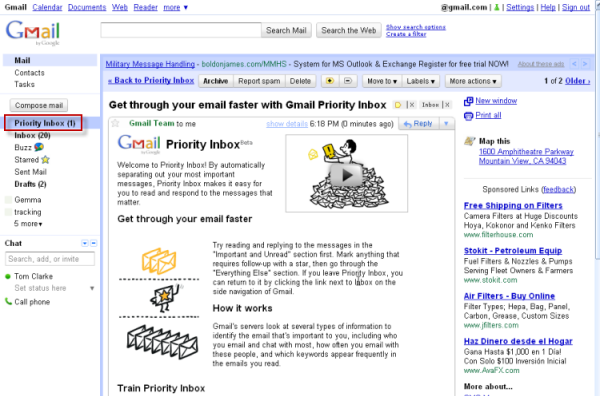
The feature hasn’t been fully rolled out yet, so don’t worry if you can’t see it in your account – it hasn’t appeared in mine yet, but as you can see from the screenshots, Tom’s already prioritizing with the best of them!

Gmail Priority Inbox is going to work like this: using technology similar to its anti-spam features, it will automatically identify important emails based on your usual email patterns – what you read first and who you actually reply to. It will then put these emails in a separate part of your inbox, so you can read them first and leave the less important stuff until later.

final1.png

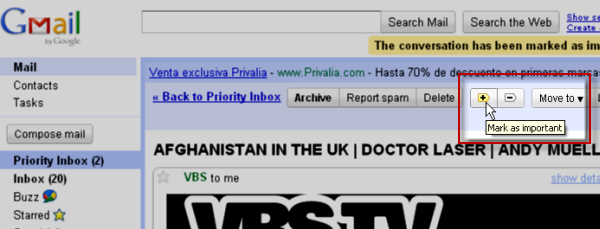
Even if Gmail Priority Inbox gets it wrong, there is also a feature to mark individual mails as more or less important, moving them in or out of the priority area as appropriate. If this feature works well, it will be huge, especially for high-volume emailers. I can’t wait to try it out, so hurry up Gmail – I want Priority Inbox now!

4 steps for making your webinar an immersive branded experience with ClickMeeting

Spice up your meetings and webinars with ClickMeeting!

Creating a webinar requires a significant time investment. Creating a useful and engaging presentation takes hours of research, writing, design and practice. So why not turn it into an interactive and branded experience to offer your audience more value, while adding a sense of authority to your work?

Here’s why you should brand your webinars:

  • Improve brand recognition. Whenever a prospective attendee arrives at your landing page, your branding (including your logo) should be displayed clearly. Once they become more familiar with your brand, they’ll be more likely to trust you and purchase your products or services.
  • Adds brand equity to your core business. Adding branding elements to your webinar helps viewers associate the value they receive on the webinar with the promise of value in your products and services.
  • Builds authority. People want to do business with someone who is an expert in their field. This means that if your brand has a reputation of helping people solve their problems, you can leverage that to promote yourself as an authority in your industry.

With this in mind, in this article, we’ll explain how you can make your webinar an immersive, branded experience with ClickMeeting, a browser-based, white label-friendly webinar platform.

Along the way, we’ll share actionable tips on how you can get more out of your webinars by equipping them with your business branding.

Step one: Send customized invitations to boost event attendance

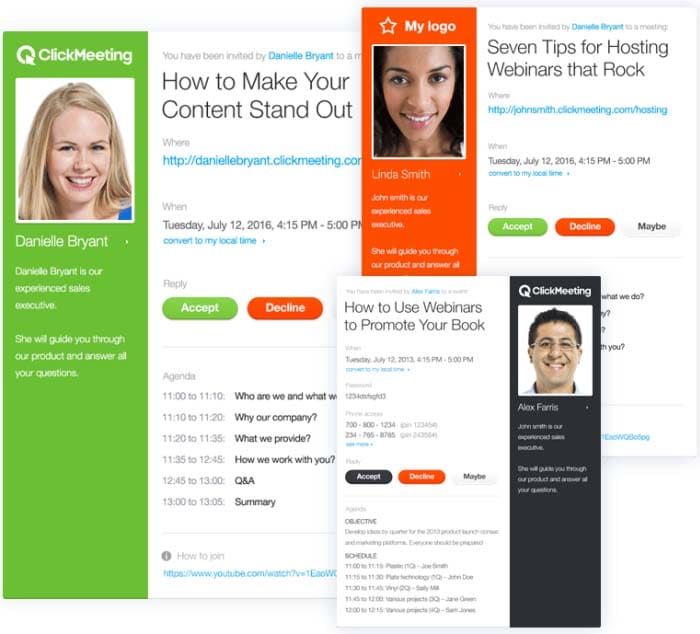
With ClickMeeting, you’re able to choose from a library of email templates to give your email invites a professional look and feel. It lets you customize the color scheme to match your branding.
Branded

ClickMeeting also lets you share important webinar details with attendees via your custom invite. For instance, you can share webinar objectives and agenda bullets, which encourages participants to attend your event and helps boost in-webinar engagement.

This way, attendees will know when to tune in for the webinar and what to expect from it.

It’s also a great way to share links to resources, for example, if you want attendees to download a PDF worksheet, for example, before the webinar begins.

Step two: Create a brand hashtag to promote your webinar

A great way to promote your events and build hype among your participants is by using a brand hashtag. It’s a powerful marketing tool for:

  • Building brand awareness.
  • Positioning your brand as a leader in your industry.
  • Finding and curating brand content to share with your audience.

For this reason, it’s a good idea to use branded hashtags in your marketing campaigns. Here are a few actionable tips to help you get started:

  • When you’re creating email invites, posting event content on social sites, or producing marketing material, always include your brand hashtag in your messaging.
  • Encourage webinar hosts and speakers to use your brand hashtags when they invite their followers to attend your webinars.
  • Include your brand hashtag in the title tag of blog posts, landing pages, and email newsletters when announcing your webinar. This way, whenever someone shares your event post, the hashtag will naturally show up in their tweet.
  • You can also combine your event marketing with Twitter chat marketing. For instance, before or after your webinar, you can organize a Twitter event for followers to ask questions using your event hashtag.

Step three: Customize your webinar pages

You invest a lot of time and resources creating and running marketing campaigns for your webinar. It only makes sense to promote them with your own branding. ClickMeeting enables you to build a professional reputation with customers and show them what your webinar is all about by customizing your webinar pages to match your branding.

You can easily create beautiful and professional-looking webinar pages in just a few clicks. It lets you customize your webinar registration page, waiting room, profile page, thank you page, and webinar room page.

Branding all of your webinar pages is important so attendees are able to recognize you right away. With ClickMeeting, you’ll be able to edit the color schemes and incorporate your logo and brand colors in your webinar pages. This is a great way to stand out from the competition and build trust with your target audience.

ClickMeeting also lets you add background images to match your branding and webinar theme. You can also use free, professional photos from Unsplash to add some personality to your webinar pages.

Branded

In addition to this, it lets you embed webinar content on hosted web pages. You can also create a customized CTA button for encouraging participants to click through to the webinar registration page or landing page.

Step four: Host an engaging and interactive webinar

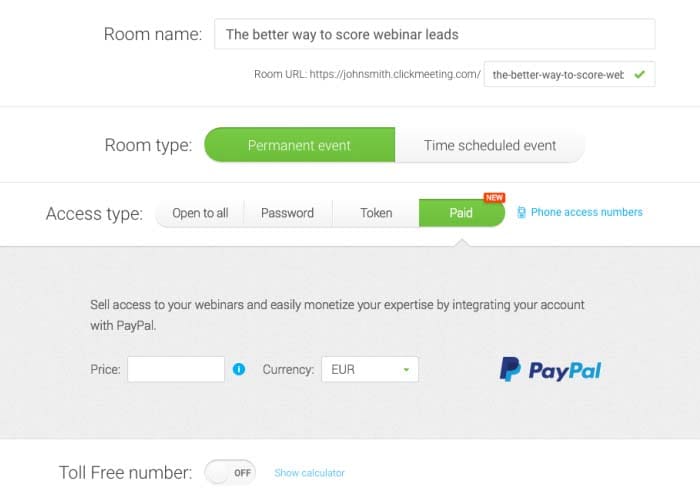
ClickMeeting lets you organize both free and paid webinars. It offers integration with PayPal to sell your webinars and collect payments from attendees. By enabling the payment feature, you’ll be able to choose which webinars you want to monetize and which ones to offer for free.
Branded

You’ll be able to decide how much to charge for each webinar and easily access your paid webinar’s stats to find out which webinar events were most profitable. ClickMeeting lets you organize on-demand webinars to help you tap into your target market and generate leads.

In addition to this, you can run your webinars on autopilot. You can simply upload recorded webinars, videos, and CTA, and select your Automated Webinar Timeline. The setup only takes a few minutes and the platform will handle everything else for you.

Here are some of the reasons why you should consider using ClickMeeting’s Automated Webinars feature:

  • It lets you automate the lead generation process so you can focus on converting more customers.
  • You can easily automate your online courses and spend more of your time engaging with students.
  • You’ll be able to create replays of meetings to ensure that everyone involved is on the same page.

ClickMeeting also lets you live-stream your webinar videos straight to Facebook and YouTube. This way, you can reach more of your target audience and boost engagement on social media platforms.

To take things to the next level, you can leverage audience engagement and encourage them to take action by displaying a well-crafted CTA within your content. This way, you’ll be able to direct participants to a sales page and showcase your product during the webinar.

Here are some other ways you can host an engaging and interactive webinar with ClickMeeting:

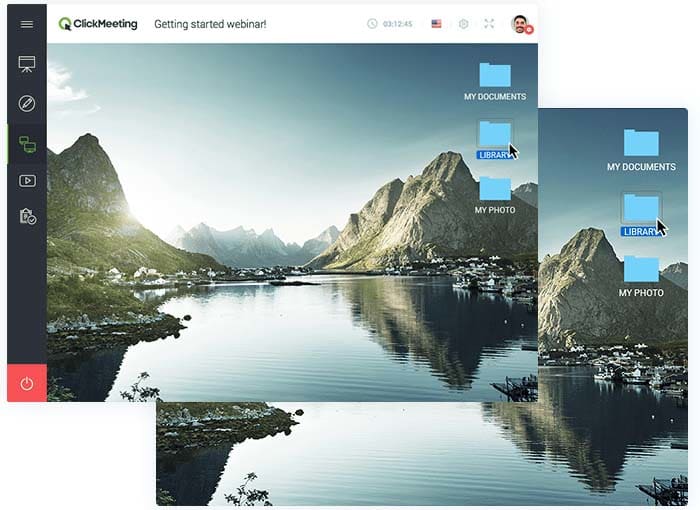
  • Screen sharing. Screen sharing enables remote attendees to see your computer screen. You can use it to show your participants how to configure a software program or demo your latest product. You can also use remote screen control to operate an attendee’s screen.
Branded

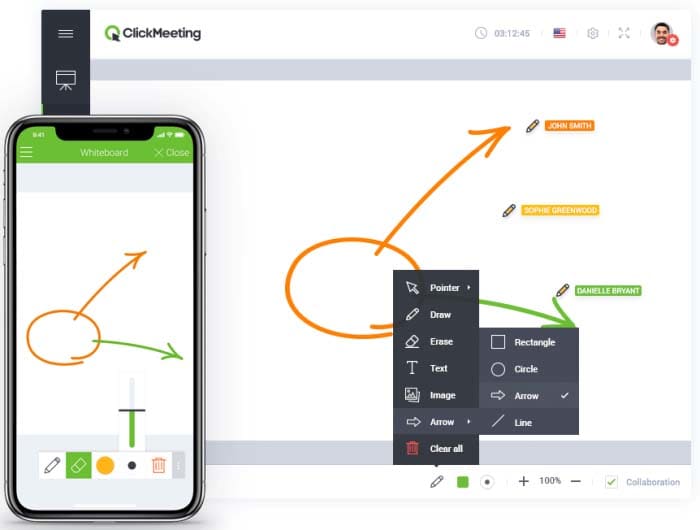
  • Whiteboard. This feature lets you communicate and collaborate with your attendees in an effective and creative way. You’ll be able to use shapes, text, drawing tools, and eraser to share ideas and offer a great learning experience to participants. Plus, you can save your work and include it with post-webinar resources.
Branded

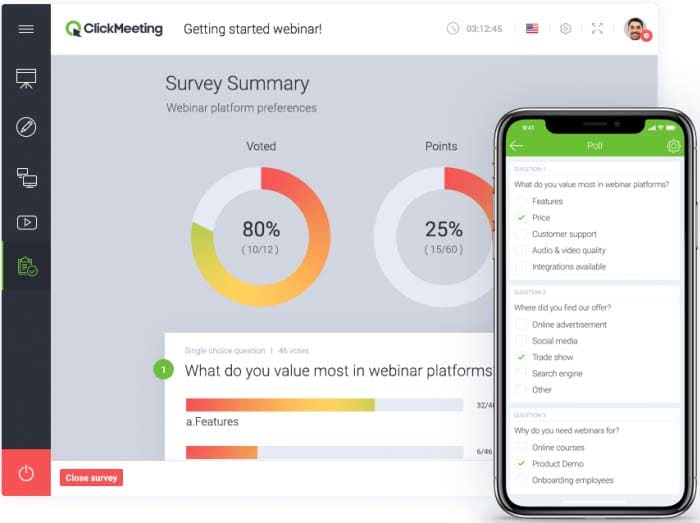
  • Surveys and polls. These are great for gathering helpful feedback and insights from your webinar audience. This information can help you improve future events as well as ask attendees for new webinar ideas. You can use polls to collect data during webinars, which is also great for keeping participants engaged.
Branded

  • Q&As. Q&A sessions enable your attendees to ask questions, interact with the host, and get immediate clarification. You’re also able to moderate attendee feedback in real-time and save chat history for future reference.
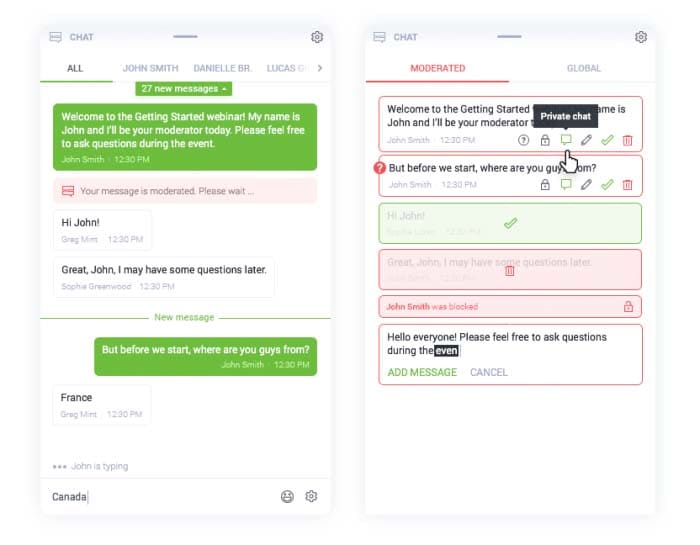
Branded

Bonus: Track Audience Behavior for Nurturing Afterwards

Let’s look at some of the ways you can track audience behavior using ClickMeeting:

  • Google Analytics. You’ll be able to add Google Analytics tracking code to your registration form, waiting room, logging page, profile page and thank you pages in order to track your audience’s behavior and interactions.
  • Google Tag Manager. This integration lets you manage tracking codes from popular analytics and marketing services such as RocketFuel, Facebook, AdWords, and Adroll. By getting access to a wide variety of predefined tags, you’ll be able to run targeted remarketing campaigns.
  • Facebook Pixel. It offers information about attendee’s behavior on ClickMeeting pages which can be used to run well-timed Facebook remarketing campaigns.

ClickMeeting also offers integration with Pipedrive enabling you to automatically export webinar registrants’ data to your Pipedrive account. This data can be analyzed to reveal useful information, so you can streamline your sales funnel by including in-webinar interaction data as part of your lead scoring model.

Conclusion

ClickMeeting is an amazingly powerful webinar tool that lets you deliver enhanced webinar experiences. You’re able to customize everything from email invites to webinar pages, amplifying the sense that your webinar is a rich branded experience.

It also offers a number of game-changing in-webinar features – like paid, automated, and on-demand webinars, surveys and polls, screen sharing, and Q&As – to help maximize attention and interactivity during your presentations.

In addition, the various tracking tool integrations make it easy for marketers to follow up with participants with follow-up emails, nurture drips and retargeting ads.
Today’s downloads for Windows, Mac and Mobile

USA TodayiPhone: The USA TODAY app for iPhone delivers the latest news, sports, weather and photos directly to your mobile phone. The free app condenses content from USA TODAY into an easy-to-access interface to help you stay ahead of current affairs on the go. You can check the latest headlines in six different categories (news, money, sports, life, tech and travel).

Download Zoner Photo Studio FreeWindows: Need an app to manage, view and edit images? Look no further: Zoner Photo Studio Free is what you’ve been searching for. This great free app lets you manage photos with ease, fix and optimize them with a set of editing tools, view them in full screen and finally share them online on Facebook or Flickr.

online.family norton.pngMac: Worried about what your kids are doing online? OnlineFamily.Norton gives parents the comfort to set their children free online while still keeping them safe and sound. Once it is setup, you will be able to see when your kids are online, what they’re looking it, who they are chatting with and even what they’re searching for.

Free back to school apps for iPhone

Sorry kids, but the golden summer is drawing to a close and it’s almost time to head back to the miserable world of the education system. I’m so glad I’m not you. Don’t be too despondent though because there are ways you can lift the doom of heading back through those gates of hell once more.

If you’ve got an iPhone or iPod touch then you’ve got access to a whole bunch of apps that’ll make the next year at school or college that little bit more bearable. Heck, you might even start enjoying it (actually, don’t quote me on that). Here’s a selection of essential free apps to help you with all subjects and to get you through the rigors of the school day.You can also check out the Back to School section of the App Store for other inspirational applications.

Math

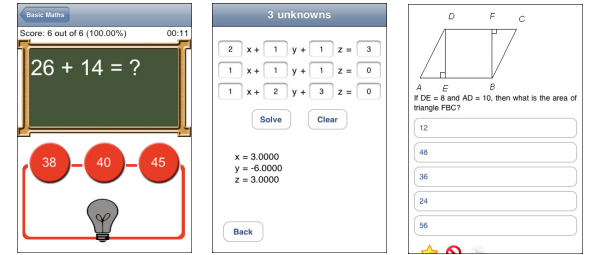
Primary: Basic Math – Teaches under 12s addition, subtraction, multiplication and division through a series of drills. The app includes a report card to keep track of performance, along with an on-board calculator with sound effects.

Secondary: Equation Genius – In a muddle over your equations? This app will help you to solve first, second and third degree equations, as well as helping you discover unknown variables.

College: CT Math Prep Practice Test Questions – Prepares you for your final exams by offering simulations of actual tests. Perfect answers to each question are provided, along with a detailed rationale explaining the workings out.

Math


separator21.jpg

Continue reading “Free back to school apps for iPhone”

Tweet Links from Anywhere!

25-08-2010-11-44-42.pngLast week Twitter announced a small but handy development – the arrival of a drag-on Twitter bookmarklet. Bunches of sites have a Share on Twitter option, but for those that weren’t down with the 140-character revolution, you’d have to take the link, shorten it with a 3rd-party service and then craft it into a minute yet fully-functional tweet. No longer! Go here, grab the bookmarklet, drag it up to your bookmarks toolbar and tweet anything from anywhere. And while you’re over at Twitter, log in and follow us!

Try Gameloft’s Android games for free

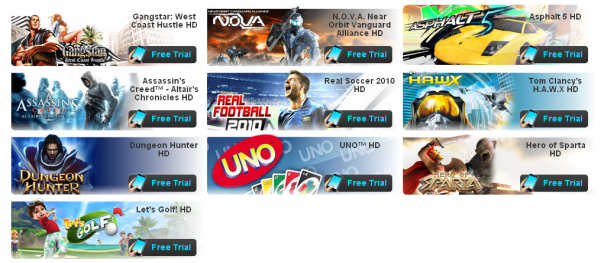
Android users can now try out Gameloft’s excellent line-up of HD mobile games for free. You simply need to head to the Android section of the developer’s site, and choose one of the 11 titles. Select your phone from the drop-down list, then enter your cell number and you’ll be sent an SMS with a link to download the game directly to your device.

Bypassing the Android Market, this is a great new concept in offering trials of Android games, especially given the quality of the titles on offer from Gameloft. The 11 available to get at the moment are: Modern Combat Sandstorm HD, Gangstar: West Coast Hustle HD, N.O.V.A HD, Asphalt 5 HD, Assassin’s Creed: Altair’s Chronicles HD, Real Soccer 2010 HD, Tom Clancy’s H.A.W.X HD, Dungeon Hunter HD, UNO HD, Heroes of Sparta HD, and Let’s Golf HD.

Free Gameloft trials

Renamer: A Seriously Powerful Batch Renamer

I’m going to come clean on this one – to this day, I’ve never been faced with a situation where I needed to rename a bunch of files. Judging by the number of file renamers that are downloaded from Softonic every day, though, I seem to be in the minority.

ReNamer is a batch renamer that’s been around for a while. Just because it’s getting on a bit certainly doesn’t mean it’s past it, though. This little application is small, but very, very powerful. If you have a serious renaming task on your hands, I’d recommend you take a look – what differentiates this app from its competitors is the variety of renaming rules you can choose – there’s 13 pre-configured and the option to add your own. Want to change a capitalized file name into lowercase? No problem. Transliterate Russian file names into English? Sure thing. Rename music using meta tags? Okeydokey! ReNamer has it under control.

untitled-1.png

Admittedly, if you are looking for a simple renaming app, there are better programs out there. Batch File Rename Utility is flexible, but more limited in its options, which keeps things simple. Ken Rename, meanwhile, balances options and ease of use nicely. If you’re not afraid of the awesome power of ReNamer, however, download it now. It will change your life.Well, maybe that’s pushing it, but I promise it’ll do wonders for your files!

Push notifications added to Google Mobile iPhone app

Google has finally decided to add Gmail and Calendar push notifications to its iPhone app. It’s been more than a year since the iOS was equipped with push support for third-party apps, so this update to the Google Mobile app is more than a little overdue.

This latest update means that your iPhone will alert you when you receive new mail or a new calendar event gets added. A badge count on the app’s icon displays how many unread messages/events you have. You’ll be given an option to enable push notifications for Google Mobile when you install the update on your app and log into Gmail through it.

Push notifications in Google Mobile

Translate 58 languages on your desktop

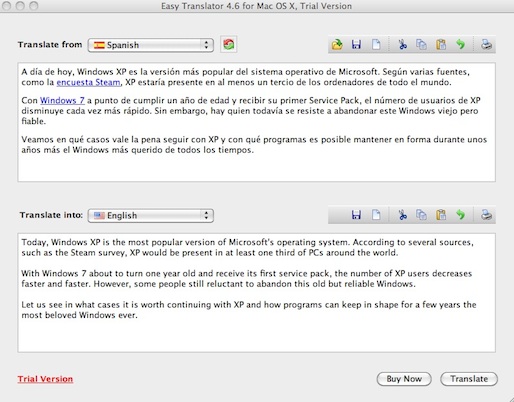
easy-translator.pngGoogle Translate is a seriously useful tool but it can be annoying having to open a new tab every time you want to translate something. Easy Translator is a convenient desktop client that translates 58 languages and seems to be based on the Google Translate engine although the developers are a little more vague than that claiming that “Easy Translator employs the power of Internet machine language translation engines”.

Easy Translator is easy to use. Simply paste the text that you want to translate, select the languages you want to translate to and from, hit Translate and you’re done. There aren’t many other features apart from standard copy, paste and cut tools but there’s a print feature to print translations.

easytranslate.jpg

In test translations, Easy Translator produced the same results as Google Translate. What I really like about this tool is that when you copy the translation and paste it in somewhere else, it doesn’t include the original text attached to it, unlike Google Translate.

I suspect that for most languages, Easy Translate uses Google Translate as its main engine. However, it’s impossible to verify the accuracy of each translation. It’s not clear if there’s a text limit either although there doesn’t seem to be one. However, the more text you paste, the longer it takes Easy Translator to process it. Note that, unlike Google Translate, there’s also no auto-detect language feature for text that’s pasted in.

10 great free games for Java phones

Still rocking a crappy old Java-based mobile phone? I bet you’re sick of all your iPhone/Android owning friends bang on about the latest cool games they’ve installed on their superphones.

Calm down and don’t get so jealous, because there are still plenty of awesome free Java games that you can download and install on your phone. Here’s a selection of some of the best free mobile games available for Java devices. They may not all be great graphically, but they can be just as much fun to play as even the most polished iPhone titles.

separator21.jpg

Arcade & action

MarioSuper Mario Planet – This reworking of the Nintendo classic sees you guide the veteran plumber around level after level of challenging platform action. It’s surprisingly easy to control with the keypad and looks as good as it ever did back on the Super Nintendo.

TankzorsTankzors Pro – Like blowing stuff up? Then check out Tankzors Pro. Based around the classic NES game Battle City, Tankzors sees you try to defeat the enemy militia by getting behind the wheel of a tank and crushing any bad guys you come across.

ZeldaZelda Mobile – Another legendary Nintendo title, Zelda translates surprisingly well to the small screen of the mobile phone. Be careful when playing on the bus because you’ll more than likely miss every stop on the route, such is the engrossing nature of this adventure game.

Tom and JerryTom & Jerry Food Fight –  The world’s most famous cat and mouse combo team up in this riveting game of skill on your mobile. The object of Tom & Jerry Food Fight is to catch the falling food but it’s a lot more exciting than it sounds. The cartoony graphics look great, too. Continue reading “10 great free games for Java phones”