iOS developers unite against Candy Crush trademark

Developers are flooding Apple’s App Store with an assemblage of candy themed games in protest of King’s trademark on the term “candy.” Last week, developer King of Candy Crush fame, was granted a trademark on the term “candy” in Europe and is currently awaiting approval for the trademark in the US.

More than 100 candy themed games have flooded the App Store such as “King’s Candy – Saga at the Edge of Greed” and “LSD Laser Unicorn Flippin’ Candy Adventure.” These games were obviously made very quickly so there’s very little content in most of them, but their titles all feature hilarious, passive-aggressive jabs at King. You can check out the rest of the games at the “Candy Jam” website.

“BECAUSE TRADEMARKING COMMON WORDS IS RIDICULOUS, BECAUSE ETHICS MATTER AND BECAUSE IT GIVES US AN OCCASION TO MAKE ANOTHER GAME JAM”

Developers who have games that feature the word “candy” or even “saga” are being contacted by King to remove their games or change the name. Benjamin Hsu, developer of All Candy Casino Slots” was forced to change the icon and the name of his game to “All Sweets Casino Slots” as he could not afford to fight King in court.

Candy Jam also claims King is bullying smaller developers and cloning games themselves. “Unfortunately, King is not bad at only one thing : King clone games while making millions over it. King bullies smaller game devs. King use curious monetization tactics. King is disingenuous enough to say that ‘The banner [sic] Saga’, a game about vikings and well… sagas, is a ‘deceptive’ name. All of this screams unethical behaviour,” says the organizers behind Candy Jam.

Time will tell if the Candy Jam movement will have any effect against King’s litigation against all candy-based games.

Source: Candy Jam

RELATED STORIES

The Softonic Minute: Facebook, Hotline Miami, SkyDrive and VLC

Facebook Paper comes to iOS, Hotline Miami:2 Wrong Number gets a launch date, Microsoft renames SkyDrive to OneDrive, and VLC for Windows 8 is on its way to the Windows Store. Check out this week’s hottest software news in The Softonic Minute.

Default player


brightcove.createExperiences();

VideoLAN submitting VLC for Windows 8 app

The open source video player has finally been added to the Windows Store. After a crowd-funding project backed by more than 3000 users, many delays and various technical problems, VLC can finally be used with Windows 8 and RT. Download VLC for Windows, Mac, iOS and Android.

Hotline Miami 2: Wrong Number coming Summer 2014

The next installment of the violent action game has been scheduled for release in Summer 2014. The developer of Hotline Miami 2, Dennaton Games, has promised to stick to the same plot as part one, but will also include more complex characters and a more difficult mode. Download Hotline Miami for Windows or Mac.

Microsoft SkyDrive renamed OneDrive

After having to change the Metro name of its interface to Modern UI, Microsoft has once again been forced to do the same with its online storage service, due to legal issues. In addition, it’s rumored that Office Web Apps will be renamed Office Online. Download OneDrive for Windows.

Paper, the latest app from Facebook, launches February 3rd in US

The social network announced a new app for iOS. In true Flipboard fashion, Facebook’s Paper lets you see the news via a neatly organized interface. For now, it’s only available for iOS in the US. Download Facebook for iOS.

Check out all of our past Softonic Minutes here.

Watch a new nine minute Dark Souls II gameplay video

Dark Souls II is coming to Windows this March, and now we can see nine minutes of gameplay in a new video that also features the voice of British Actor and noted Dark Souls fan, Peter Serafinowicz.

Dark Souls II is the sequel to one of the most loved games in recent years. Famous for its uncompromising difficulty and bleak, lonely atmosphere, Dark Souls captured the imagination of millions. This sequel is looking good, despite early worries that original Dark Souls director Hidetaka Miyazaki isn’t working on the game.

Default player


brightcove.createExperiences();

We know from last year’s Gamescom that Dark Souls II is being designed to be even more lonely than the first. Namco Bandai’s Takeshi Miyazoe told us that they are making it even harder for any kind of cooperative play with friends. You can of course play with strangers, but Miyazoe said that playing with friends would spoil the game.

RELATED STORIES

Rumor: Next Windows 8.1 update may boot to classic desktop by default

Russian developer WZor has leaked more Windows 8.1 2014 update details. This time he explains how the latest build he received booted directly to the classic desktop by default. If this becomes a standard feature in Windows 8.1, it would look like Microsoft admitting defeat for its tile based modern user interface.

According to WZor, Windows build 9600.16606.WINBLUES14_GDR_LEAN.140126-2042 boots directly to the classic desktop, meaning you have to hit the Windows button to jump to the Modern UI. The Modern UI has also been adapted to work better with mouse control, if you are not using a touch screen. Windows 8’s interface was definitely designed with touch (and Kinect) in mind, and it wasn’t as comfortable to use with a mouse.

There is still a lot we don’t know, and we should be careful not to jump to conclusions. Booting direct to the classic desktop by default may only happen on PCs without a touchscreen, for example, but we don’t know.

Until the Microsoft Build Developer Conference in April, when we expect the 2014 update to be released, we won’t know what Microsoft is planning with the Modern UI. We expect to find out something about Windows 9 at the conference. Will the Modern UI be sidetracked as a failed experiment, or will Microsoft plow ahead with it in the next version of Windows?

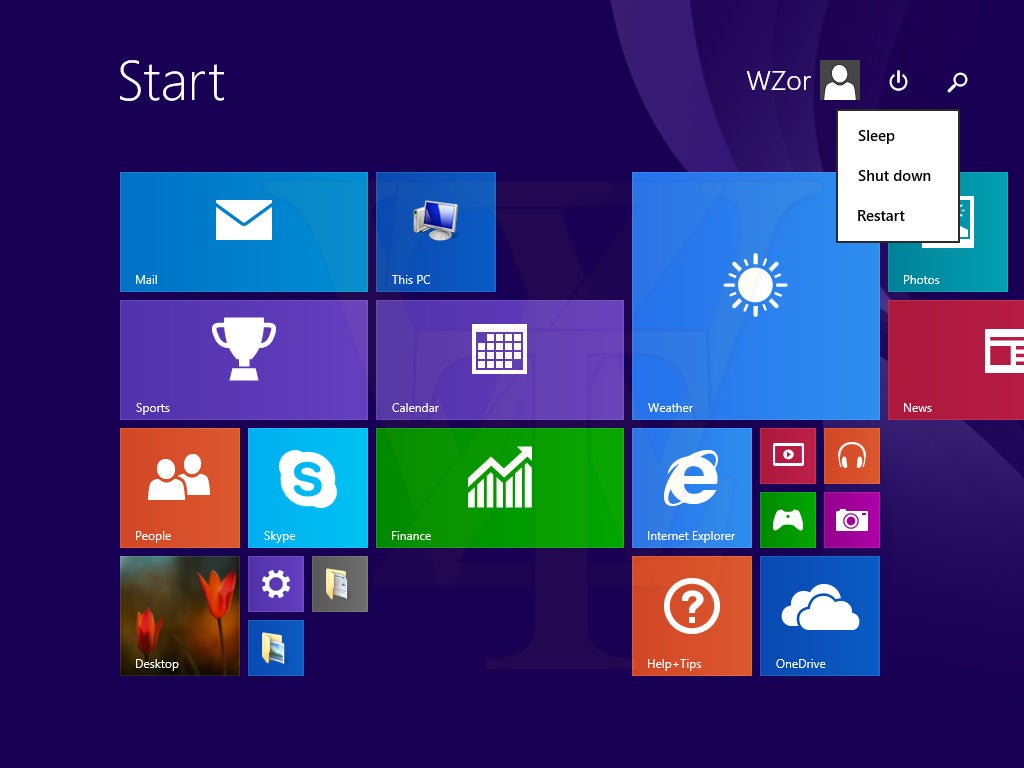
WZor also explains how a power button has been added to the Modern UI, so it’s easier for users to turn off their device from there.

RELATED STORIES

[Source: WZor.net]

Check your Windows 8 battery health using the hidden command ‘powercfg’

Using the powercfg command, Windows can create detailed reports on the built-in battery in your Windows 8 notebook or tablet. In addition to the maximum operation time in battery mode, you’ll also learn how healthy the battery is. Even better, checking the status of your battery is really easy!

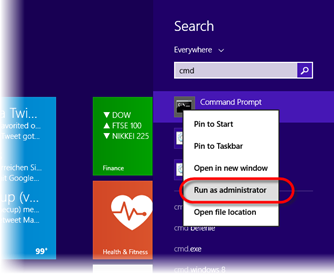
1. Start Command Prompt and choose to Run as Administrator

Command prompt

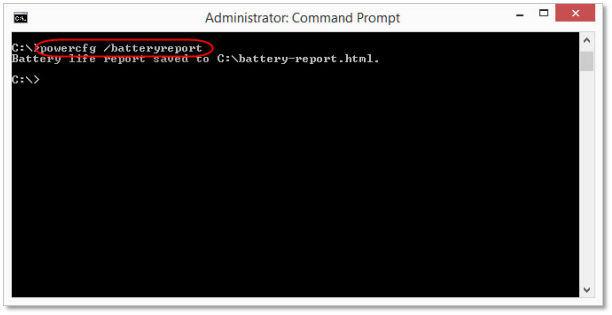
2. Type in the command ‘powercfg /batteryreport’ and hit Enter

Powercfg/batteryreport

3. Load up the report in a browser

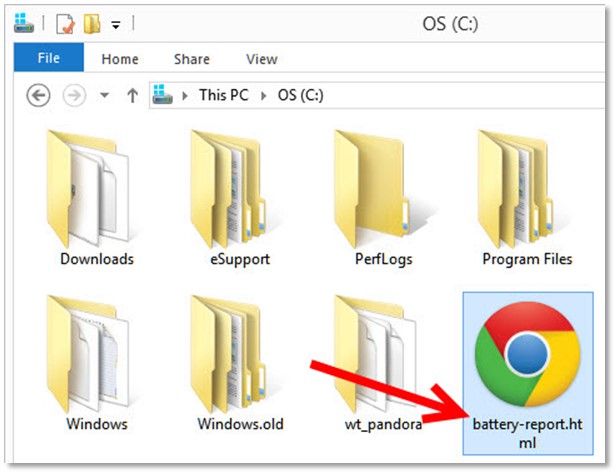
The default option for saving the Powercfg report is to save it as an HTML file in the C:\ folder. Double-click on the file called battery-report.html, and open the report in your browser.

Open the 'powercfg' report in your browser

Useful information in the battery report.

First, you’ll see a brief summary of the important information about your computer and the integrated battery. The Design Capacity value is the value provided by the manufacturer relating to the maximum capacity of an unused battery. Full Charge Capacity displays the current maximum capacity of a fully charged battery.

On the basis of these values, ​​you’ll quickly be able to see how much power is left in your battery. If you’re buying a new one, you can easily discover damaged batteries and, if necessary, exchange the unit.

Battery report

Further down in the report, you can find information regarding all the previous charging cycles, in chronological order. If you re-install Windows, you will lose all of the data previously collected.

Battery capacity history

Using this and other data, ‘powercfg’ estimates the expected remaining battery life. This value, however, is never exact because it depends on how the device is being used; tasks that involve heavy use of the processor, Wi-Fi use and turning up the screen brightness, all mean that the battery won’t last as long.

Battery life estimates

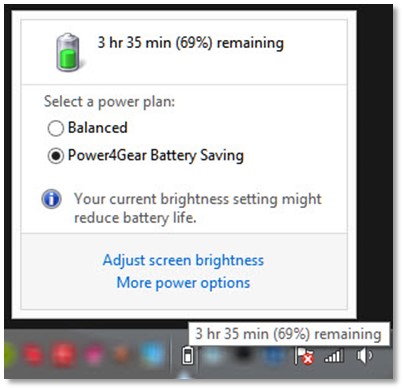
The more data that Windows has at its disposal, the more accurately it can estimate battery capacity. This value can then be queried at any time via the system tray icon.

Power settings

Each week, our Windows experts publish a new tip about Microsoft’s operating system.

If you want more information about Windows 8, check out our Essential guide to Windows 8.

NFL Now is your personalized football channel, launching this summer

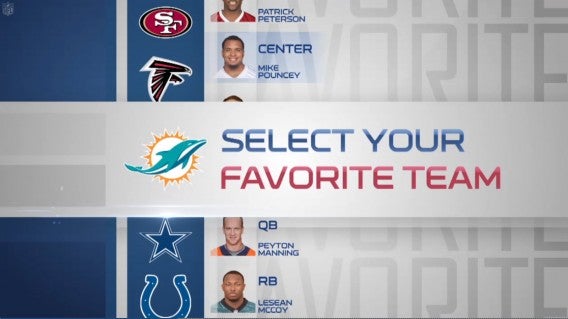
The NFL has announced its new NFL Now service, which promises to bring users a personalized football experience. Football fans will be able to pick their favorite teams for a continuous stream of related content. You will even be able to manage your fantasy football league with NFL Now.

NFL Now teams

While NFL Now will feature current footage, it also has access to historical footage so fans can learn the history of each team. Fans will even be able to stream clips but will not be able to stream live games. This is because NFL Now isn’t supposed to replace your cable subscription but serves to augment it as a second screen experience like the new tvtag app.

The NFL has also partnered with Verizon as a major launch and distribution partner for NFL Now using its 4G LTE netowrk. There’s no word whether this deal will be an exclusive, but we sure hope not. Microsoft and Yahoo! have also signed on as launch advertisers who will help keep the app free.

There will also be a premium subscription launching called NFL Now Plus, which promises to provide “access to premium content and features for a monthly fee,” though the NFL doesn’t go into detail about what those premium features are.

NFL Now will launch sometime this summer on the web, Android, iOS, and the Xbox One. Super Bowl XLVIII is this Sunday so learn how to stream the game before then.

Source: NFL

RELATED STORIES

Yahoo! Mail suffers widespread hacking attempt

Yahoo! has just issued a statement on its Tumblr page that a widespread hacking attempt has been made on Yahoo! Mail. Yahoo! has investigated the origin of the attack and found that usernames and passwords were not taken from Yahoo!, but from a “third-party database compromise.”

With the recent data breaches at Snapchat and Adobe, information stolen from those separate attacks may have been used in this attempt to compromise Yahoo! Mail accounts. Yahoo! notes that the attacks seem to target the names and email addresses from the targeted accounts’ most recent sent emails.

To stop this widespread attack, Yahoo! has immediately reset the passwords for the affected accounts. Users will have to use Yahoo! Mail’s sign-in verification to re-secure their account. Affected users will be receiving an email or SMS text warning them to change their passwords. Yahoo! also claims to have put in additional measures to prevent attacks against Yahoo!’s servers, though it doesn’t say what those additional measures are.

Yahoo! is currently working with federal law enforcement to find and prosecute those involved in this attack.

Source: Yahoo! (Tumblr)

RELATED STORIES

Don’t have a TV? Watch Super Bowl XLVIII online

Sunday’s Super Bowl XLVIII between The Seattle Seahawks and Denver Broncos will bring together football fans and people who are only interested in the spectacle of the halftime show and watching those extremely expensive ads. Most people will be heading to the homes of friends and family to watch the game which becomes an all day event.

But when the game starts, the streets will be empty and people will be sitting inside. Those few who don’t have access to a TV in their homes may venture out to sports bars that will be playing the game. While you could drown yourself in craft beer with other lonely sports fans, you can avoid the mayhem by streaming the game online. Here’s how.

super bowl on fox

Streaming regular season games has become more common, but these games are usually blocked by a subscription paywall.

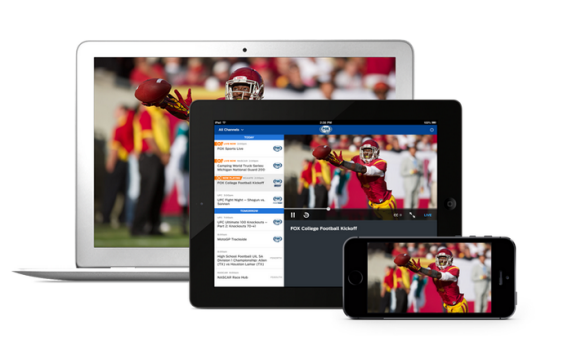
In terms of broadcasting rights, FOX has rights to the game. Following the trends of the previous Super Bowls, FOX has given cable subscribers the ability to stream the game online. FOX normally requires the use of FOX Sports GO, its live streaming app for desktop and iOS which requires a cable subscription to access the stream.

fox sports go

This year for Super Bowl XLVIII, FOX is lifting the paywall and allowing people to stream for free on the iOS app and on the web at FOX Sports GO.

FOX Sports GO will be free for a limited time between February 2 (12 AM Eastern Standard Time) to February 3 (3 AM Easter Standard Time). This means you can watch the entire game, the halftime show, and commercials all for free on your computer, or iPad.

Streaming the Super Bowl using FOX Sports GO is limited to desktops and the iPad and but will not be available on the iPhone, even though the app is compatible. If you are a Verizon Wireless customer who uses the NFL Mobile app with the premium features, you will be able to watch the Super Bowl on your mobile device using the app. Android users will need to use either the premium NFL Mobile app or watching the game on your desktop.

Regardless of which team you hope to win, you will be able to stream the game online, with a few restrictions. The NFL also released an interesting infographic about the Super Bowl if you’re looking to out-trivia friends that you can see here.

NFL to block video streaming at MetLife stadium during Super Bowl XLVIII

The National Football League will be blocking video streaming of Super Bowl XLVIII at MetLife stadium in order to control the use of bandwidth. Over 80,000 football fans will descend on MetLife this Sunday to watch the big game, which will put a huge burden on cellular networks since fans will undoubtedly be using Twitter, Facebook, Snapchat, and other apps to keep in touch with friends.

NFL Mobile app

While the four major carriers have invested heavily in creating a more robust network around MetLife, the NFL doesn’t want to take a risk to allow unrestricted bandwidth use during Super Bowl XLVIII. “While we could have made some available, it might have impacted the ability for the majority of fans to be able to stay connected to social media, tweet, Facebook, that kind of thing,” says NFL Chief Information Officer Michelle McKenna-Doyle. By blocking video streaming at MetLife, the NFL is ensuring network congestion won’t affect people attending the game and those within proximity to the stadium as well.

McKenna-Doyle remains optimistic that technology will grow to the point where the NFL won’t have to limit bandwidth usage at all. Currently, live streams use unicast technology which streams IP packets to individual users instead of sending those packets to a group of hosts. Sending packets to a group of hosts is called “multicast,” a technology that sadly won’t be implemented in time for this year’s Super Bowl.

Super Bowl XLVIII app

However, the NFL has released an official Super Bowl XLVIII app for Android and iOS to provide a “second screen” experience for those lucky enough to attend the game. Fans will be able to access an event guide with “exclusive content” like play bios, stats, and more but the apps will not allow any video streaming. You can download the apps below.

Download the Super Bowl XLVIII – Official Program: Android | iOS

Source: Ars Technica

RELATED STORIES

SwiftKey Note brings predictive keyboard to iOS with Evernote integration

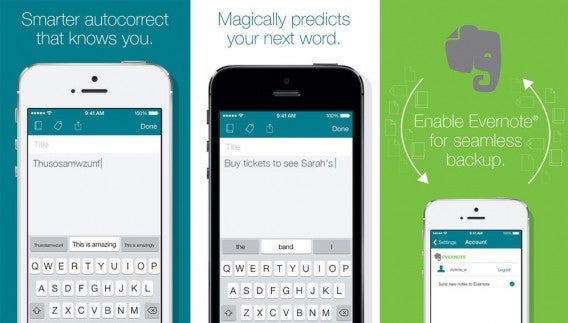
SwiftKey Note for iOS has been officially released, bringing the popular Android keyboard to Apple’s mobile operating system. The app is also tightly integrated with Evernote so you can save all of your notes using Evernote’s service. SwiftKey Note also learns how you type and what you type by scanning your archive of Evernote notes. Users can specify how far back SwiftKey Note is allowed to scan Evernote notes, from a single day to an entire year.

SwiftKey Note for iOS combined

Missing from the app is the rumored gesture keyboard feature that’s present in SwiftKey for Android. While it’s sad to see this feature omitted, SwiftKey’s predictive keyboard should allow users to type much faster without having to worry about being as accurate as the default iOS keyboard requires. While iOS’s default keyboard is good, it certainly lacks the more advance features of keyboard replacements like SwiftKey for Android.

Since Apple’s operating system won’t allow third-party keyboard apps to replace the stock keyboard, SwiftKey Note is the closest keyboard replacement iOS users have without jailbreaking.

SwiftKey Note is free and out now in the App Store.

Download SwiftKey Note for iOS

Source: iTunes

Via: PCMag

RELATED STORIES