The 7 most common mistakes you make when job hunting

Looking for a job but haven’t gotten even one interview? Have a flawless work record but nobody is looking at your CV? It’s possible that your online job hunt is going badly because you’ve made one of the common mistakes below. Don’t fret! They all can be fixed.

1. You’re still looking for work on Monster and job sites

Monster and other types of online job boards may help you find the type of skills asked today from companies in the sector that interests you or keywords to use in your CV to stand out (below I’ll give you more details). But that’s as far as they go: right now they’re not the best places to look for jobs.

AAEAAQAAAAAAAANcAAAAJGJiYjYzYzdlLTQ2MWQtNDE4Zi05YjNhLTRhZDBhNDc5YmM1Nw

These days if you want to get a job online, all the action is either on LinkedIn, or any social network with most of your contacts. I know sometimes it’s hard to contact people and say you’re looking for a job and if they know a place looking for somebody like you, but you’ve got no choice. Send emails, rekindle old friendships and even, if necessary, use that strange function known as “call” on your cell phone.

2. You haven’t kept your job hunt a secret

Except for rare exceptions, you should keep your job hunt a secret. I already know of three cases of friends who announced with fanfare on their Facebook wall that they’re fed up with their jobs and it’s time to look for new one. The result? Since some of their contacts were coworkers (including sometimes their direct superior), there were repercussions. Also, if somebody wants to hire you, looks at your Facebook and finds out that you rant and rave about your job, you’ll lose serious points.

moshenniki-na-puti-immigranta-2

For LinkedIn, you should immediately disable the option “Share Profile Updates” under the privacy settings of your account. Let me explain: each time you change your position on your profile (including the position you want for your next job), your contacts will receive the typical “Congratulate so-and-so on his/her new job!” email. I doubt that your boss would like to congratulate you on your next job.

3. You’ve sent out boring and standard CVs

Before sending your CV for a job opening, carefully scan the offer and put keywords repeated in the offer in your CV and any you find significant. This way, you’ll increase your chances: the company will think you’re the ideal person for the position because you’ve used the same language.

Besides that, you have dozens of online resources to improve your CV. In five minutes of searching, for example, I’ve found this article with 27 free templates for creating your CV. And if you don’t feel like reading, Youtube is full of fantastic tutorials with tips about how to make a great CV. Here you’ve got two great examples.

4. You haven’t researched the company enough

During the selection process, a company only uses nice words to describe themselves. Alright, but does this company interested in hiring you actually maintain those exceptional values? How do they treat their employees? Before you take any key decisions, research!

ext

Besides checking out their corporate webpage or Facebook, you have Glassdoor, a page that lets you search reviews of companies from their employees (current or past). Maybe you’ll save yourself from falling into a hidden trap!

The other option is more journalistic/detective-based. If your company is well-known, you can always research articles related to them and even video reports.

The goal, whatever path you take, is to understand the company’s actual situation and if it’s really aligned with what you’ve planned for your next job.

5. You go to the job interview without any prep

Let’s not get away from Youtube tutorials yet! Before going to your next batch of interviews, it’s important to improve your nonverbal language (both yours and how to “read” the interviewer’s body). On Youtube, you’ll find tons of videos for this (since body language is a visual element, videos are perfect). Here you’ve got a few examples.

Have you already become a master of relaxed body language? Great, because now it’s time to prepare for questions. The interviewer will ask you about the company (you’ll know how to respond if you followed my steps about researching them) and toss you questions like “What are your strengths and weaknesses?” or the previously mentioned “What can you contribute to our company?”

Again, the internet is teeming with resources, specifically great articles such as How to Answer the 31 Most Common Interview Questions100 top job interview questions—be prepared for the interview or Top 10 Interview Questions and Best Answers.

Research and study a little and you’ll see how smoothly your next job interviews go.

6. You didn’t clean up your social media profiles

Companies are increasingly looking at social media profiles of potential candidates. Proof of this is that companies can now post job offers directly from Facebook.

040816_0417_Howtogetyou1

Watch what you post on social media and adjust your privacy settings. An unfortunate photo, a comment written at a bad time or you venting about your previous job can destroy all your previous efforts to get a certain position. For more information about this topic, we highly recommend How to Check Your Online Presence Before Recluiters Look You Up, an article from Uptowork, a CV builder platform with a complementary blog plenty of tips to help you find your next job.

7. And worst of all: you aren’t taking 100% advantage of online resources

Throughout this article I’ve mentioned some online tools for looking for jobs. We’ve got obvious tools such as LinkedIn or others that you might not have thought of, such as Youtube video tutorials. But that’s not the end of it.

9de181415506d946a3f3b6b367609e61

How about asking your Twitter contacts? Or doing a little networking on pages like Meetup? Or improving your skills through online courses like Coursera, for example? And then there’s pages like emurse.com, which offers articles to help you find jobs.

You have thousands of online resources awaiting you. And each one has more uses than you think. Go on, use them!

Sources used for the making of this article: Lifehacker, Equipos y Talento + all sources that have appeared throughout the article.


6 tips for selling online (and making more money)

If you clean up your house a little bit, I’m sure you’ll find gadgets, clothes and other things that you don’t use, which are in good condition and you could sell. Why don’t you do it? Maybe because in the past you tried and had no good way to find a buyer, or in the end you sold everything at a loss.

While many are having financial issues and can’t pay much money, it’s also true that sometimes we don’t use good seller strategies when we want to get rid of something we don’t use. I’ve found tons of articles online about how to sell something in a professional way for businesses, but there’s hardly any info about how to sell something to individuals online. So, today I’ll leave you with 6 tips that I use when I want to sell my things online… I hope they work for you!

best price stamp on white background

1.- Toy with the price

When it comes to adding a price on what you want to sell, you have to be a real strategist. Don’t be “pricey” and try to post something used at the price of a new item. But also don’t sell your product at a loss, especially when there are other sellers that have higher prices.

Before posting something for sale, review prices for the item as new and on other sites where they sell used items. Add a competitive price, not too high or too low, and always mention that you’re willing to go down a little.

Don’t be close-minded about negotiating if a buyer is interested in your products. It’s not about selling at a loss, but rather getting rid of the item even if you get a little less than expected.

Another good technique for selling is not to hide the actual price of the item. In the description of what you’re selling, put the actual price of the item in stores so buyers see that they’re saving by buying an almost-new item from you.

pile-of-boxes (1)

2.- Consider free shipping

With services like Amazon, Aliexpress and other sales pages, people are used to free shipping, so they’re more hesitant about paying extra for shipping, even if it’s 3 measly euros.

If you’re selling remotely, consider including shipping in the price. Even if you put the item at a higher price, the fact of having “free shipping” or “shipping included” will encourage many buyers.

Another option, if you’ve put several things on sale, is to offer free shipping if somebody buys more than one product (and obviously charge shipping only once).

Equipment Isolated Girl Digital Camera Female

3.- Choose your images carefully, and your text!

When you’re willing to sell something on a platform, the sales listing is very important. Take good pictures of your products, making sure that you have good lighting and the item is shown in good condition (for example, if you’re selling clothes, make sure they’re clean and ironed, please! And if you’re selling a cell phone, wipe the fingerprints off… don’t be a slob!). Today, with a smartphone, it’s not necessary to have a great camera to take good photos.

Another option is to add official photos of the product, but also attach actual photos so the buyer knows what you have; it’s their job to see the potential!

Just as important as good photos is good text. Besides being careful with spelling, obviously, make sure to be brief but also give all basic info that the buyer may need: features, clothing size, model of the product/gadget and all relevant info.

images

In addition, to sell more successfully, market your item as it deserves. If it’s something new, clearly point that out and if it’s second-hand but in good condition, always put “like new,” “used very little,” etc. Also, if we’re talking about an item under warranty (especially for electronics), clearly say so in the description and attach the receipt (seriously, always keep receipts, you never know when you’ll need them).

Obviously, if the item has a small defect you should say so, but don’t wallow in this either. True story: I remember once on a Facebook sales group, I read something like “I’m selling this XXX brand bag, which is worn-out from use, but still may work.” Do you seriously think somebody wants to buy a “worn-out” bag, as good as the brand or price may be? If something is well-used, you can put “used but still in good condition” or “perfect with a few repairs,” as well as attaching a photo of the defect or imperfection. And alright, if you’re really selling something that’s worn-out maybe it’d be more useful in a garbage can than the house of a poor gullible soul.

thank-you

4.- Be helpful and friendly, even if you think you’re wasting time

This seems like a no-brainer, but I’ve encountered really obnoxious buyers! When you sell online, you have to accept the idea that potential buyers will ask detailed questions about the item. Always be helpful with this and respond to all their questions courteously.

It also happens that sometimes somebody is interested in an item, leaves a comment or sends you a private message (for example, on Wallapop for Android or iOS) and you hear nothing more from them. Keep at it, because sometimes a buyer forgets, whether from neglect or absent-mindedness, and not because they’re no longer interested in the item.

Obviously, don’t insist endlessly, there are lots of rude people who simply aren’t interested in buying something and don’t bother saying so… But those cases are the exceptions, often they haven’t answered you out of pure absent-mindedness.

If you’re selling to somebody in your city and they ask to meet up, make it happen, and if they ask to see or try the item before buying it, tell them yes. The nicer you are, the greater the chances that they’ll buy what you’re selling, plus they’ll leave you a good review if you’re selling through an app (Wallapop, eBay, etc).

vendedor-1024x683

5.- Talk like a pro seller

It’s one thing to be helpful, and the other is to treat potential buyers as if they were your soulmates. So, when you sell, use professional seller strategies. If your potential buyer is hesitant about an item, tell them that you have other people interested and they shouldn’t think too much (it may be true or not, but the person will never know).

Besides, if they’re in doubt, it’s time to negotiate (see number 1). Offer them a discount and say you’ll give them something (for example, if you’re selling a cell phone or camera, tell them you’ll include the cover for free, even though you were thinking of selling it). If you’re selling remotely, when you prepare the package, add a thank-you note for the buyer. My mother always tells me that we have to be grateful and she’s completely right… You never know when you’ll interact with that person again!

Mercadillos-virtuales-header-568x319 (1)

6.- Find the right platform for what you’re selling

Online there are many ways of selling, some completely free and others with fees. The good thing about second-hand ones (like eBay) is that they make sure more people see your item, but it’s not always necessary to choose them.

For example, if you sell very specific things, don’t go to general sites like eBay or Wallapop (available on iOS and Android). Scan Facebook for buyer-seller groups for your item. There, the audience is more specific and looking for certain types of items.

For example, I often sell clothes that I don’t use. My style is very different and not many like it on Wallapop and even Chicfy (service for selling only clothes). Instead, on Facebook groups for alternative clothes, I get many more interested people in a shorter time, plus they’re already predisposed to buy those kind of things. Apply this idea to anything you’re selling, you’ll be amazed by the specific buyer-seller groups in your area.

If you want to know more about sales platforms, I recommend this video, where we recommend 5 very good apps for buying-selling.

The Top 10 Photographers on Instagram

Instagram is a social network for images that everybody uses as they wish. Yet, an overload of photos of food, animals and makeup looks has distorted the idea of a photo social network and it’s not always easy to find good accounts to follow for seeing truly spectacular photos (whether from professional photographers or very talented amateurs). That’s why in this article I’ve made a list of ten really appealing IG accounts, full of gorgeous photos of different styles: landscapes, portraits, still lifes…

Take a look at them all and be swept away by their beauty and talent and hey… who says some day you can’t take photos as good as these artists?

Austin Mann

Austin is a young photographer specializing in travel photography, so on his account you’ll see a myriad of spectacular photos taken in remote landscapes on earth. Although he’s a professional photographer whose work has been published in outlets such as National Geographic, he’s also a fierce defender of photos taken with cell phones. An Apple ambassador, he tries out new iPhones before anybody else does to put them to the test. In fact, he’s published a free ebook where he teaches how to use an iPhone to take professional quality photos, which you can download here.

Jason Peterson

In the description of Jason’s account, he says “follow me into the dark” and when it’s all said and done, his Instagram is filled with black and white photos. In these monochrome snapshots, this photographer shows the beauty of urban landscapes, making use of general shots, impossible perspectives and lots of symmetry to show you a real world that becomes dreamy through his talent.

meltdown

Una publicación compartida de jasonmpeterson (@jasonmpeterson) el 9 de Mar de 2017 a la(s) 4:07 PST

Anna Argiropoulos

Anna’s account is the opposite of Jason’s, especially with her use of colors. On Instagram, this lifestyle and travel photographer illustrates a life of pastel colors, glamorous scenery and modern still lifes involving makeup, gadgets or a Starbucks coffee. Come on, if Instagram had existed during “Sex in the City,” this would have been protagonist Carrie Bradshaw’s account. All glamour and good vibes that cheer up any grey morning you may have.

Darryll Jones

Why use human models, who can have bad moods and long faces, when you can pose a doll instead? This must be the philosophy of Darryll Jones, whose IG profile stars a Stormtropper action figure. This intrepid character treks all over the world, visiting Irish plains, making street graffiti, playing guitar beside a river or “chilling” with a ginger ale. Besides this character, if you go through Darryll’s IG, you’ll find other tiny photogenic plastic models.

Terry O’Neill

Terry O’Neill is a “photographer of the stars,” with 5 decades of shooting stars from movies (Paul Newman, Sophia Loren…), music (Bowie, the Beatles…), fashion (Kate Moss…) and art in general. On her IG, you won’t see recent material (although she still works) but rather snapshots of the 50+ years of her career, including many photos from the age when digital cameras and Photoshop didn’t exist. If you’re a mythomaniac and adore portrait photography, you’ll enjoy the beauty of this IG.

Joel Robinson

Canadian Joel Robinson is a master of surrealist photography and retouching images. In his photos, you’ll see people surrounded by dreamlike environments. At first glance, maybe you’ll only see a good Photoshop retouch, but if you delve deeper, you’ll discover a peculiar world full of symbolism and social criticism.

Look For It

Una publicación compartida de joel robison (@joelrobison) el 10 de Feb de 2017 a la(s) 11:59 PST

Simone Bramante

Italian Simone Bramante defines himself, above all, as a “storyteller” and after checking out his IG you’ll see why: his photographs are very illustrative, showing beautiful rural landscapes or cities or people traveling the world. In each photo, you can build a story that you too want to experience, thanks to his exemplary use of light and color that makes the places he shows us even more beautiful.

Hiroaki Fukuda

Hailing from Tokyo, Hiroaki Fukuda shows beautiful photographs of the Japanese capital on his IG, which get away from travel guide stereotypes. But that’s not all! This artist is constantly on the move and photographs the whole world, from the Far East to the most cutting-edge European buildings, such as Stockholm’s dreamy metro station. Follow him if you want to see great cities and the most idyllic beaches from new perspectives.

♦️

Una publicación compartida de Hiroaki Fukuda (@hirozzzz) el 17 de Mar de 2017 a la(s) 7:50 PDT

Michael Christopher Brown

If you like socially engaged photography, you’ll love Brown’s work. This photojournalist goes around the world covering all kinds of conflicts and difficult situations. However, he avoids typical war photographs or excessively dramatic shots to show the more human face of conflict. For this, he puts the protagonists of these situations front and center, whether they are children, civil adults or soldiers. His idea is to show that, despite difficult situations, people don’t stop living everyday life.

Luiz Clas

If you adore feminine beauty, you’ll love Luiz Clas’s account. On his IG, this Brazilian photographer posts tons of photos of long-haired girls, but avoids the hypersexualization of women: his models use non-exaggerated poses with simple attire, which emphasize their natural beauty even more. Additionally, once in a while he posts photos of adorable dogs and other animals that seem out of storybooks, what more could you ask for?

Tell me where you at

Una publicación compartida de Luiz Claudio (@luizclas) el 15 de Mar de 2017 a la(s) 5:39 PDT

How to Spot Fake News on Facebook and other Social Networks

Although the Cambridge Analytica scandal is grabbing the headlines right now, Facebook and social networks, in general, have been in the grips of a more extensive crisis for a long time.

Fake news has been a buzzword for a while now. Fake news played a major part in the election of Donald Trump to the White House and it is now used as a weapon by the president himself to discredit any news stories that are critical of him. No doubt the latest polls showing him to have the lowest approval rating of any president at this point of his presidency will be called out as fake news despite them being entirely accurate.

Goodreads Access
8

The fact is that recent events prove that we can’t rely on the big, like Facebook, to take action. The ultimate responsibility falls to the individual user. It is on us to spot a fake news story, ignore it and ensure that it isn’t shared with others. The question remains, however, just how are we supposed to do this?

Well, Factitious is here to help us. Factitious is a simple game designed by a team at American University. All you have to do is look at the news story it shows you and decide whether you think the story is real or fake. As if you were on Tinder, you merely swipe right if you think the story is real and left if you think it is fake news.

How to Spot Fake News on Facebook and other Social Networks

The Factitious team offers you tips on how to get better at the game. These include checking out the source of the supposed news item and looking on sites like Snopes, factcheck.org and the Washington Post Fact Checker. As you get better at the game, you’ll get better at spotting fake news when you encounter them in your various news feeds.

Unfortunately, Fake News is a real problem but with initiatives like this and a bit of effort from all of us, hopefully, it is a problem we’ll solve sooner rather than later.

Follow me on Twitter: @PatrickDevaney_


Via: Lifehacker

7 Best Apps for Following March Madness 2017

Even if you are not a hardcore fan of basketball it’s hard to turn your head away from March Madness—it is a complete package of excitement, fun and drama. With 68 teams playing for men’s basketball title and 64 for women’s title, it’s difficult to follow all the latest news and the progress of your favorite teams.

Fortunately, there are some useful apps by which you can keep track of everything from watching the games to automation of your bracket picks—thanks to your smartphone. Here are our 7 best app picks for following March Madness.

1. NCAA March Madness Live 
Platforms & Price: iOS, Android, Amazon Fire, Microsoft | Free.

This is the tournament’s official app and an absolute must-have. Besides showing you every game live, the app allows you to pick a bracket. If you somehow miss any part of the game you can always back track and watch highlights. For those who want to run parallel with the excitement while at work or in the car this app has a live radio broadcast feature as well.

NCAAMarch

2. ESPN Tournament Bracket Challenge
Platforms & Price: iOS, Android | Free.

If you prefer strict bracket building, this no-frills app makes things easier for you. The chance of winning 10,000 bucks and a trip to Hawaii also sweetens the deal and makes the app more popular. If your chosen bracket makes it to the final four you’ll be entered in the contest. Not bad!

espntournament 3. CBS Sports
Platforms & Price: iOS, Android |Free.

CBS is national another broadcaster covering the excitement. In addition to covering every game, the app lets you listen to the broadcast on CBS Radio. The CBS app allows you to pick a bracket while including scores, stats and news.

cbssports

4. Thuuz Sports

Platforms & Price: iOS, Android | Free.

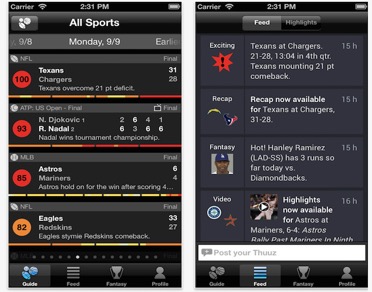
If you are in a conundrum which matches to watch especially in the first round when many teams play at the same time, Thuuz is the app for you. This app rates games on a 100-point scale via a smart algorithm that gives you a heads up when a game is worth watching. Thuuz narrows down your watch list and makes sure you see all the best games that are happening at any given time.

thuzzsports


5. The Score:
Platforms & Price: iOS, Android | Free.

The Score covers all sports but during March Madness it serves up special pages for brackets. The Score gives you the luxury of personalizing the entire experience so that you can stay on top of everything that matters. In addition, the app keeps an eye on the big upsets and when an underdog is about to knock off a giant it will send you a push notification. So you never miss the nail-biting moments.

thescore

6. Yahoo Fantasy Sports:
Platforms & Price: iOS, Android | Free.

Yahoo Fantasy Sports is a great app to follow the excitement with its own offering of $25,000 prize money for the user (only for men’s tournament) who picks the best bracket. With this app you can manage your bracket and arrange tournament groups for your friends and colleagues.

yahoofantasysports
7. IFTTT
Platforms & Price: iOS, Android | Free.

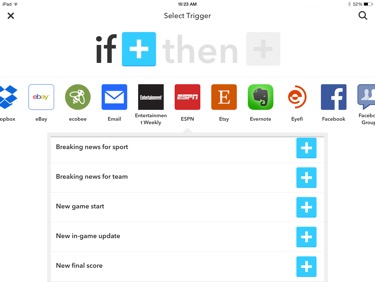
Not a sports-specific app, IFTTT is extremely handy in simplifying all your tasks and allowing you to create triggered messages and actions. For instance, you can program IFTTT to send you an email when any article about your team gets published on ESPN. Or you could set notifications before every match of your favorite team to remind you to trash talk with friends on social media. IFTTT can basically do anything you want it to do by just setting up the “recipe”: if this, then that (e.g. if my team appears in breaking news then tweet to my followers).

ifttt

6 quick and easy tricks to speed up your computer

It doesn’t matter how high-tech your computer is. Sooner or later it will be overrun by the most common and atrocious evil of the computer world: slowdowns. Is your computer slow to start up or does it have trouble opening certain programs? Don’t worry: follow these six simple tricks and it will be running smoothly in no time.

1. Install only the necessary; uninstall what you don’t use

How many applications, programs or browser extensions are installed on your PC? The more elements installed, the slower your operating system will run.

I recommend doing a general program clean-up. Uninstall programs that have gone two or three months without use and stick to the minimum, only the necessary. In Windows, it’s as easy as going to “Uninstall or change program” and sorting by frequency of use.

172277.alfabetajuega-pc-trucos-1-021216

Once you have everything cleaned up, think twice before installing anything new. Do you really need it? And even if you do, maybe there are web versions for that program (so you don’t have to install it) or a portable version you can install onto a USB.

Now that you’ve got only programs and extensions you really need, don’t forget to clean them up once in a while. Use programs such as CCleaner to free up space or get rid of unnecessary elements. Mac users can count on the help of Disk Inventory X, which offers a graphical overview of your hard drive’s situation. Windows users have a useful equivalent: Windows Directory Statistics.

If you only have time to do one of these tricks, do this one: you’ll immediately notice how your computer runs great after putting it on a diet.

2. Update everything often, I mean everything

“But it’s such a pain.” I know! But keeping your software and firmware up-to-date is the key to having a healthy and energetic Operating System. The reason? Pick one: it optimizes code, improves compatibility with other installed elements, fixes security bugs… You can get more info in another article about keeping your PC safe. This little trick is even more important for the latest updates of Windows or macOS; these updates usually include crucial improvements to avoid crashes or slowdowns.

C5qC8GjUYAAP7pI

The good news is that at this point many of your programs already include the option to automatically update in the background. But I would do a quick review just in case.

3. Watch out for programs running in the background

One of the reasons why your computer runs so slowly is the presence of too many programs running in the background. If you actually use some of these programs, let them be, so you have them immediately available. The important thing is to take care of programs that don’t contribute anything.

This involves pure trial and error. If you want to find out which background programs slow down your computer the most, you can consult the Task Manager (Windows) or Users and Groups (Mac) and try improving this little by little.

4. Ensure security measures

Malware negatively affects your computer’s performance. Not to mention those dang browser extensions whose only goal is to gather info on your PC and sell it to third parties.

I’d like to say everything is fixed by being selective about what you install, but there’s a lot of malware and adware that is installed stealthily. I recommend that you rely on an antivirus. Even though I’m shooting myself in the foot (after all, this is practically a freeware downloads site), it’s worth investing a little money in a professional antivirus edition.

logos

If you have Windows, Avira is the perfect option, which balances protection, ease of use and cost. And almost at the same level, we have Avast! which, unfortunately, has started to introduce intrusive elements such as the rather deceptive installation of its browser, SafeZone. If it weren’t for that detail, we would have given it more points. And in the lower bracket, you’ve got Kaspersky and BitDefender.

For Mac, there’s Sophos Anti-Virus: compact, easy-to-use and you can customize scans to great detail. Not convinced? Try ClamXav 2, Avast! or even Avira.

5. When the offender is obvious…

…go after it!

Sometimes it’s clear that a specific program, when you activate it, slows down your Operating System. In this case, you should focus all your efforts on fixing the problem.

It may sound cheap, but sometimes uninstalling and installing the program again does wonders since it eliminates all the trash it had accumulated for ages.

Captura

If a browser keeps giving you problems, such as Chrome, you can delete your recent history to see if performance improves.

And while we’re talking about extensions: keep extensions and open tabs to a minimum.

6. A classic: restore to factory settings

reset

Sometimes it’s worth avoiding trouble and restoring your computer to its original state. The latest versions of Windows and Mac make this procedure easy, so you won’t lose any of your personal data. That being said, make sure you have a backup of everything important, just in case. It’ll be easy to reinstall all the programs you usually use.

If you want to restore Windows, you’ll find all the relevant options in Backup and restore. On Mac, restart your computer and hold Cmd+R to find this function.

Sources used for the making of this article: Gizmodo (text 1, text 2), Apartment Therapy, CMIT Solutions, Coding Sec.

Grab your headphones: 10+ hours of music to work in chill mode

Are you at work or dealing with an important task at hand, and need to relax? Here I’ll recommend six different experiments: six types of music that are proven (by studies or personal experience) to maybe help you work. At the end of each explanation, you’ll have the musical pieces to find out if they relax you or not (more than 10 hours total!). Try listening while you work. See what results you get!

1. Nature sounds

Listening to nature sounds (waves rolling on the shore, bird calls, flowing noises) may help your cognition (your ability to process information through perception), optimize your ability to concentrate and enhance your levels of satisfaction. Or at least that’s what a study published in The Journal of the Acoustical Society of America claims.

The key to nature sounds, according to this study, lies in their similarity to white noise, a random signal with different time values that do not correlate to each other. This phenomenon protects you from other noises that may distract you because they break an existing acoustic correlation (example: the laughter of a coworker when the only sound is a computer keyboard).

Want to find out if nature sounds can isolate you from surrounding sounds? Put them to the test with three hours of relaxing music that use water sounds (from the YouTube channel TheHonestGuys).

2. Video game soundtracks

Whether you’re a gamer or just raising your eyebrows at this section, video game music can teach you to overcome obstacles you face every day at work. What’s a gamer’s goal? To get out of a dangerous situation by entering an even worse one, using his/her smarts, reflexes, creativity and, above all, perseverance. The best video game music instills these values, which help us take on the role of a hero in a deadly but epic adventure. Want to feel that way as you work?

If my reasons don’t convince you, I now present professor of psychology Siu-Lan Tan. Along with her colleagues John Baxa and Matt Spackman, she discovered that volunteers playing The Legend of Zelda: Twilight Princess without music or sound effects played much worse than those who listened to the soundtrack.

To check if music helps you overcome obstacles, in this video from YouTube channel Adam Campbell, you’ll enjoy nearly 6 hours of great game soundtracks such as Assassin’s Creed, Super Metroid, Uncharted or Metal Gear Solid 5.

3. Classical music

The famous “Mozart Effect” has been discussed to death. You’ll find studies in favor, which assure that listening to classics like Wolfie have a positive impact on spatial-temporal reasoning, the ability to think long-term or creating abstract solutions. And then you’ll find studies where workers performed better when they turned off classical music and worked in silence.

Will the Mozart Effect work for you? To increase your chances of success, I’ll share a trick from productivity guru David Allen’s forums: the key is to listen to classical music with at least 60 beats per minute. “This causes a lucid and fast metal state in which thinking and creating is easier.”

To check if it’s 60 beats per minute, I recommend not-so-classical classical music: Vitamin String Quartet, a group with pop covers and a string quartet style.

4. Instrumental music

If you listen to instrumental music, you’ll get better grades than if you listen to music with lyrics while you study for exams; or at least that’s what a study from Middle Tennessee State University concluded. And according to a study from Cambridge Sound Management, the more intelligible background noises at work, the more likely we are to get sidetracked. That’s why the chatting of nearby coworkers can cut off our productivity.

Personally, when I write, if I listen to music with lyrics in a language I understand, I usually get sidetracked because I think about the lyrics or try to follow them mentally or literally. In contrast, when I listen to Japanese pop music, the effect is the same as instrumental music for me.

Want to try it out? Here you’ve got four hours of instrumental and relaxing music that I’ve compiled from YouTube channel utopiansounds.

5. Downtempo music

We know downtempo music is the kind that uses mainly electronic music to create a relaxing atmosphere. Could it also be called ambient music? Downtempo is a pretty ambiguous definition that includes ambient, jazz, house, chill out… and all those musical variations that seem like modern descendants of hypnosis.

There are few studies to corroborate my theory. More than anything, it’s about personal experience and an experimental alternative to classical music. Classical music may be considered uptempo and in theory it cheers us up, gives us energy and helps us think. Thus, its opposite, downtempo, is ideal when we have to keep producing but need to relax or maybe enter a kind of hypnotic state to finish mechanical or routine tasks.

If you want to see if this type of music works for you, I recommend this playlist of electronic music made by Soundcloud user Rachel Gillet.

6. Noise

Certain noises may help us concentrate instead of distracting us because they interrupt sounds occurrences, which I’ve already mentioned in another section, called “sound masking.” The Wikipedia entry for this term explains it well:

“Imagine a dark room where someone is turning a flashlight on and off. The light is very obvious and distracting. Now imagine that the room lights are turned on. The flashlight is still being turned on and off, but is no longer noticeable because it has been masked. Sound masking is a similar process of covering a distracting sound with a more soothing or less intrusive sound.”

Atlanta-rain1a

Do you feel like listening to noise? I strongly recommend you try The Rainy Cafe Machine, a super-duper simple webpage where you can listen to rain or the sound of a cafeteria, separately or at the same time. Until writing this article, I had never thought of noise as helpful to creativity. Well, now I can say I’ve written most of this article whilst listening to the rain.

Sources used for the making of this article: Lifehacker, HubSpot, Business Insider, Telegraph, Bustle, Popular Science.

7 (+1) quotes from great tech leaders to motivate and inspire you

Need a boost of inspiration? Here you’ve got 7 quotes from great leaders in the modern tech world that will motivate and encourage you to take on new challenges. Each quote comes with explanations, suggestions, reflections…

P.S. I’ve included an 8th quote as a bonus, from a great tech genius of the past. We shouldn’t forget the giants on which we stand!

1. Tim Cook, director of Apple: Less is more

“[At Apple] we say ‘no’ to good ideas every day in order to keep the amount of things we focus on very small. You could put all the products Apple sells on one table, yet it is a $40 billion dollar company.”

tim-cook-290513

Specifically, Tim Cook focuses on three things: get close to smart people to collaborate with, connect strategies and execute them. This so-called Rule of 3,” consists of doing three things (or less!) every day, month and year.

Don’t try to do it all at once. Don’t say “yes” to all suggestions or anything you can think of. Learn to prioritize, find out what’s best for you, and go for it! You’ll discover that by doing only what’s necessary, you won’t just get better results, you’ll also have a better time of it.

Quote source: http://alifeofproductivity.com/3-things-tim-cook-focuses-on/

2. Jeff Bezos, director of Amazon: Don’t be afraid of criticism

“If you never want to be criticized, for goodness’ sake don’t do anything new.”

rawafrica_jeff-bezos-amazon

Be ready to receive criticism as soon as you start doing things differently. This criticism comes from everywhere: your parents, your friends, your partner, your lover, yourself (The Inner Voice: trying to self-sabotage from the start), your pet and strangers (see how they look at you sideways, it’s obvious!).

Sooner or later you’ll have to get used to criticism. Otherwise, you’ll remain static and frozen. It’s not easy to adapt to criticism. Maybe it’s comforting to know that criticism is a reaction to something. And if this reaction occurs, it means you’ve done it differently. That means you’ve made an impact! Don’t worry if the first steps are well received or not. You’ll learn on the go.

Quote source: http://www.cnbc.com/2014/04/29/cnbc-25-jeff-bezos.html

3. Elon Musk, director of Tesla Motors: Why do what you do?

“People work better when they know what the goal is and why.

Do you feel miserable at work or in life in general? You have two options: admit the absurdity of accepting your lack of general passion or ask yourself the reason for your actions. Why do you want to work? Why do you want to get thin? Why do you want to read at least ten books this year? Why do you want to find a partner?

If your answer to these questions is “just because” or “because that’s what is expected of me” or “I don’t know,” then the time has come to look for other activities that have a clearer why. If you discover a reason that makes you smile or feel excited, go on a limb for that activity!

Quote source: https://medium.com/highlight/top-10-elon-musk-quotes-about-innovation-5f6c8e037646#.pe39p5gtc

4. Bill Gates, co-founder of Microsoft: Learn from failure

“It’s fine to celebrate success but it is more important to heed the lessons of failure.”

There are many lessons hidden in this quote. The most obvious is that if you learn from your failures, they’ll become successes. But I’m also left with the implicit moral: don’t fear failure. Exactly the opposite: fail because it’s the only way to improve.

Pay attention to that. Don’t fail to fail. Don’t make mistakes carefree, saying “haha, it’s all good, because failure is a good thing.” Failure “is good thing” if you analyze it, if you stop to find out what happened and how you can improve from now on. You’ll learn little if you don’t take this important step.

Quote source: http://www.wealthlift.com/blog/8-bill-gates-quotes-learn-lot

5. Marissa Mayer, director of Yahoo!: Enjoy your hobbies

“I’ve always loved baking. I think it’s because I’m very scientific. The best cooks are chemists… I’m a businesswoman first and foremost (but) my hobbies actually make me better at work. They help me come up with new and innovative ways of looking at things.”

Don’t undervalue your hobbies. Do you like to knit? Don’t hide from it. Exactly the opposite: take it to the next level. Go to the movies, go for a walk, listen to music, sing, draw, read comics… All these elements not only make up who you are but also may be hidden sources of inspiration.

When you’re immersed in your hobbies, you enter a world you know, a world beyond danger. Your mind, which produces more noise than you think, becomes inactive because there are no problems in sight. And when fear or prejudices, those offshoots of the mind, disappear, ideas and creativity turn up. If you want to learn more about this, I encourage you to read the book Flow by Mihály Csíkszentmihályi. I’ve broken two fingers writing his name.

Quote source: http://edition.cnn.com/2012/07/17/tech/mayer-yahoo-career-advice/

6. Steve Jobs, co-founder of Apple: Look for the question, not the answer

“For the past 33 years, I have looked in the mirror every morning and asked myself: ‘If today were the last day of my life, would I want to do what I am about to do today?’ And whenever the answer has been ‘No’ for too many days in a row, I know I need to change something.”

It’s immensely important to ask the right questions regularly. The right question energizes you, lets you see things that went unnoticed, illuminates corners of your brain hidden in shadow. I prefer to discover a key question a thousand times over than find a thousand ambivalent answers.

I recommend that you keep a notebook at hand (or a cell phone, laptop, or recorder…) to collect those questions that renew you from within, so every now and then you think about them and write whatever comes to mind as a possible answer.

Quote source: https://www.themuse.com/advice/25-steve-jobs-quotes-that-will-change-the-way-you-workin-the-best-way-possible

7. Mark Zuckerberg, creator of Facebook: Take a step back

“On hard days, I really just step back, and that’s the thing that keeps me going.”

Sometimes you have to stop yourself from getting burnt out. There are many warning signs that it’s time to rest: a tense body, irritation, feelings of confusion, constant fatigue…

In this sort of situation, you could take another step forward and maybe win the battle, sure, but your body and mind will remember your actions and how you ignored their needs. And trust me: you don’t want to become your own enemy #1.

Quote source: http://www.inc.com/peter-economy/mark-zuckerberg-19-inspiring-power-quotes-for-success.html

8. Leonardo Da Vinci, Renaissance genius: Contemplate the stars

“He who is fixed to a star does not change his mind.”

Being passionate about a subject or idea is a good thing. But obsessed? Not so much. When obsession shows up, normally blinders do too, those screens we put on horses so they only focus on the path in front of them and not anything else.

If you’re obsessed, you’ll stop accepting new points of view, new sources of inspiration and even new passions that satisfy you much more than the ones you have. If you shook your head at the previous paragraph, it means you’re already obsessed. Stop fixing on one star: there are thousands of constellations awaiting you!

Quote source: https://www.brainyquote.com/quotes/authors/l/leonardo_da_vinci.html

Keep your home clean and organized with the help of these apps

Getting our households under control, clean and organized, is a goal that many have but few achieve. At the end of 2015, Marie Kondo, a young Japanese mother, published the book “The Life-Changing Magic of Tidying Up,” where she gave a series of tips for optimizing home spaces and being happy with less junk. The book, based on everyday tricks and also ancient zen philosophy, has been a huge success that has already sold millions of copies worldwide.

09-kondo-lede

Reading Kondo’s entertaining book could be a good option to start organizing your home, but if you’re looking for other more immediate solutions or you don’t fancy reading books, today I’ll suggest different solutions for organizing your home, based on applications or online services, all of which are free.

This homemade organization guide is divided into different parts, so use it as you wish: check out the whole thing or only read the parts that interest you:
  • Cleaning and organizing household chores
  • Organizing your wardrobe
  • Shopping and organizing weekly menus

Cleaning and organizing household chores

Housekeeping is an uphill battle for all of us. But sometimes it’s not so much laziness about cleaning the kitchen or bathroom as it is finding gaps in our schedules to do so. Thanks to technology, we can have total control of what we should do and when we do it, so our home doesn’t become a lion’s den.

img_como_organizar_mi_habitacion_45098_600

OurHome, available on iOS, Android and web, is the perfect app for keeping chores under control. With it, you can create lists of chores to do, select the regularity you do them and mark them when they’re complete. Since the app knows we’re forgetful, it sends us reminders when we haven’t checked off a certain chore… No more changing sheets every full moon, now there’s no excuses!

OurHome is perfect for those who live alone but also for households with several people. The app has an interface that lets you assign chores to different household members, so it’s perfect if you share an apartment, live with a partner or have kids old enough to take charge of some chores.

ourhome

In fact, if you have kids, a must-have app is Chore Monster (Android and iOS). With it, you can encourage your kids to do very simple chores (brush their teeth, clear the table, feed the pet) and evaluate their behavior at the end of the day. Good behavior translates into points that your kids can exchange for “Monsters”, virtual rewards.

chore-monster

Although any of these apps will leave you headache-free, it’s possible you’re old-school and prefer to do your planning simpler and on paper. In this case, go to this website to download cleaning and domestic chore planning sheets that you can print and adapt to your needs. And if you’re an Excel fanatic, click here to download a template in this format.

Now that you’ve got your chores organized, it’s time to do them. Certainly nobody is born knowing everything and it’s possible that if you recently became independent, it’s not clear how to do certain things. You can call Mom or, even better, look for resources that teach you how to be a good housekeeper.

img_45500_ins_3749629_600

There are many specialized websites for teaching certain everyday chores, my favorites are: How to clean anything, Real Simple, Organized Home and Good Housekeeping. The 4 websites are updated several times a week and it’s very easy to find what you’re looking for, from basic cleaning procedures to those foolproof grandmother tricks, and you’ll also save money on grocery products.

Organizing your wardrobe

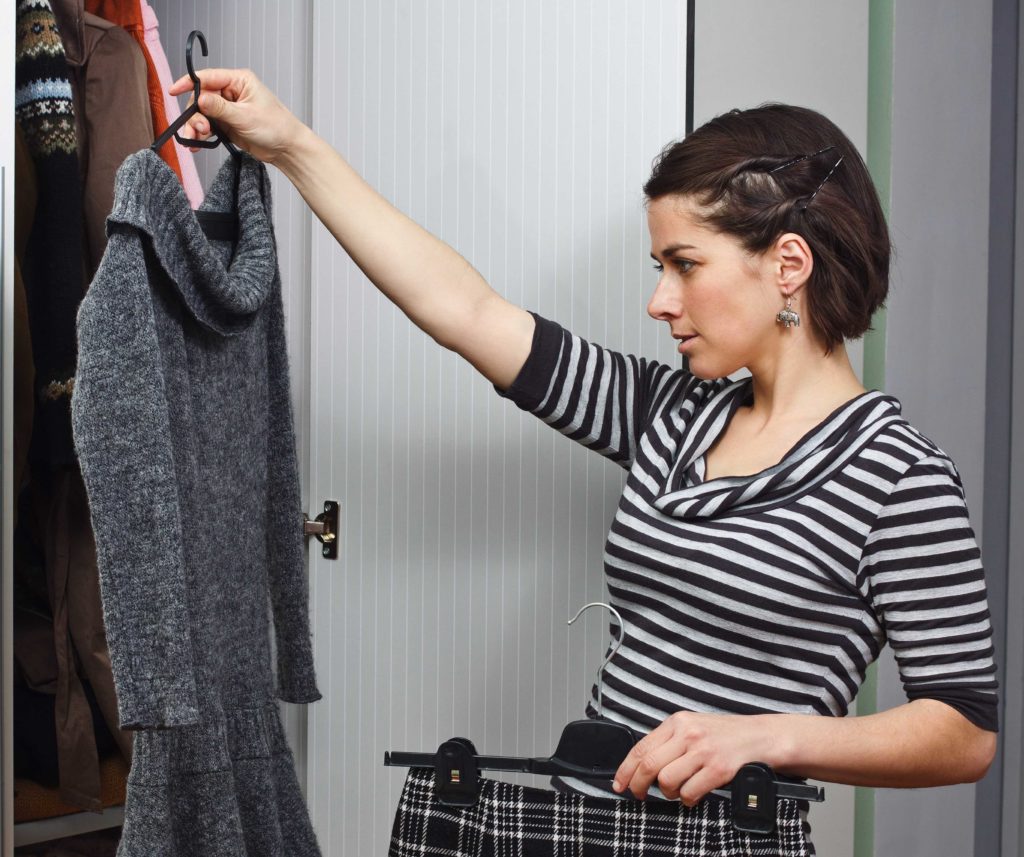
How many times have you heard the phrase “I have nothing to wear”? In general, we all have more clothes that we really need and, worst of all, we’re not aware of it. Maybe the next time you change your wardrobe, you should contemplate making a complete inventory of your “rags.”

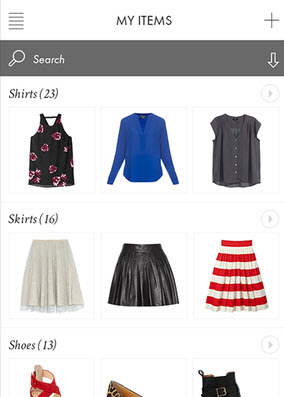
The app Closet Space (available on Android and iOS) will be excellent help for this task. With it, you can catalogue all your clothing to then know what you have and plan your outfits. Additionally, if you like fashion, you can consult the style of over 135 bloggers. If this topic especially interests you, I recommend an article that goes into more detail about other apps for organizing your wardrobe. Click here to read it.

closetspace

If, instead, fashion isn’t your thing, I recommend that you consider a minimalist wardrobe challenge. What on earth am I talking about? Well, basically it’s a system that lets you live with a minimal number of clothing items. One of the challenges many follow is Project 333, which suggests living with 33 clothing items per season. On this website you’ll find a complete explanation of this method as well as tips for getting started.

mujer-escogiendo-1024x857

Shopping and organizing weekly menus

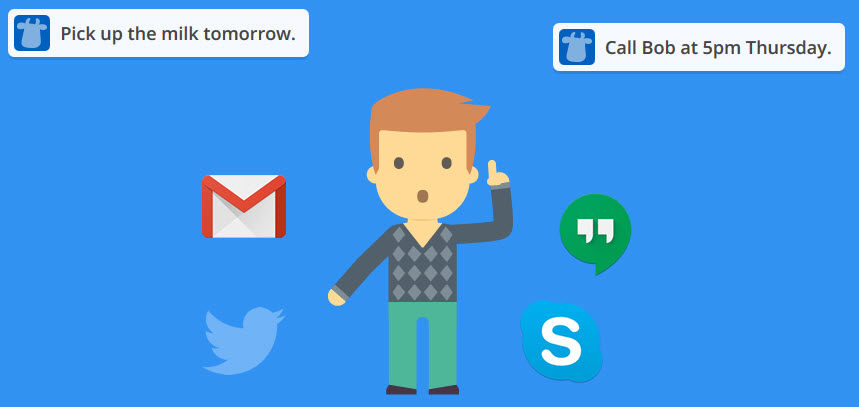
House ready to go, wardrobe in order… What about food? Shopping and cooking daily is another huge chore that shouldn’t be taken lightly. The best way to take control is to shop with a list app, and the queen of them all is Remember the Milk.

rtm

Under this vivid name, you’ll find a very simple-to-use application that lets you create infinite lists and chores, and even assign lists to others. Have you (literally) forgotten the milk? Send a reminder to your roommate so he’ll pick some up on the way home.

Remember the Milk can be used online with free registration or installed on iOS and Android. Data is synchronized between versions and with services such as Google Calendar or iCalendar.

pepper-1024x599

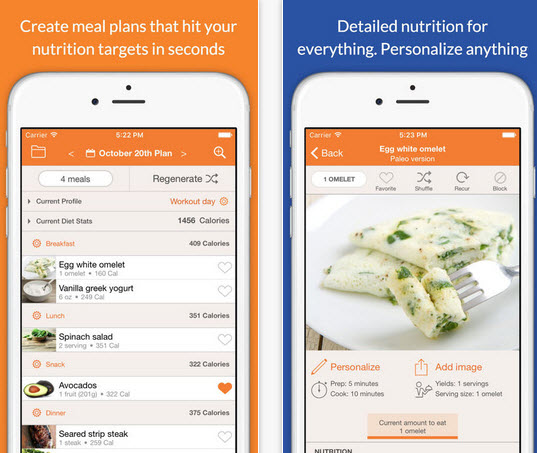
After shopping, it’s time to cook. If you don’t have time, there’s nothing like a weekly menu planner. The service Eat This Much (web, iOS, Android) nicely serves this purpose, letting you organize your menus with your recipes or with thousands of dishes available. eat-this.uchThis is only the start

There are many other household concerns: finances, administrative tasks, children’s issues… This article is only the first step to taking on a more orderly life and showing that, though you have little time, if you know how to stay organized, the battle of household chaos is nearly won.

10 Snapchat Tricks You Probably Didn’t Know Existed

Snapchat is a hugely popular messaging app (the company just went public with a $32 billion valuation) that has revolutionized the way the younger crowd communicates. The service had about 158 million daily active users at the end of 2016, who create an average of 2.5 billion “snaps” on Snapchat every day.

What’s Snapchat’s secret? The app can take away the drudgery of your daily life by embellishing picture messages with crazy effects and filters. But aside from the famous filters, we’re got 10 Snapchat tricks most users don’t know about. Incorporate these tricks into your stories and become a Snapchat pro!

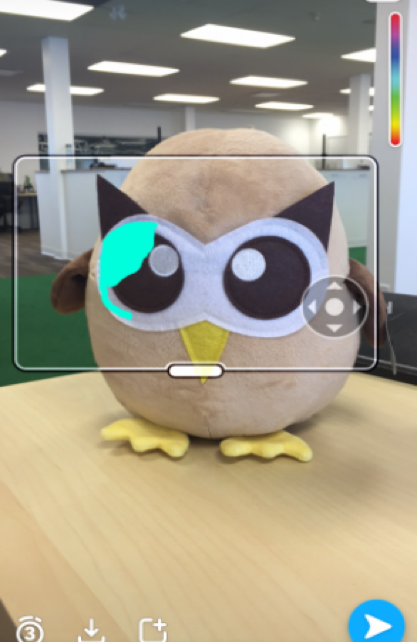
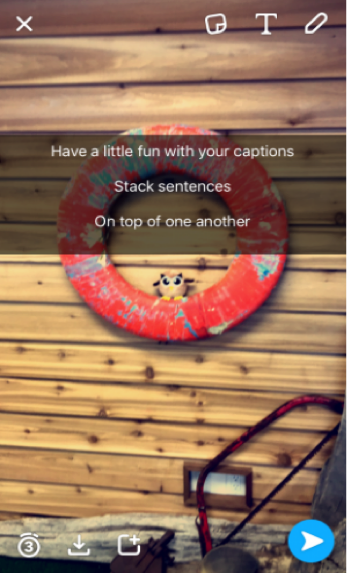
  1. Frame your snaps with characters: Ever think of using characters for borders and frames? With Snapchat you can do it with ease.

snapchat

  • You can caption a photo in Snapchat by selecting the ‘T’ icon.
  • Choose the largest text size if you want to create the caption.
  • Enlarge the image until it creates a border
  • You can move around the text until you are satisfied with the position.
  • That’s all you need to have a funky border!
  1. Draw impressive detail with zoom: If you want to show off your artistic masterpieces then this Snapchat hack is for you.

snapchat2

For iOS

  • Go to the ‘Settings’ and from ‘General’ settings select ‘Accessibility’
  • Under the ‘Vision’ section, enable ‘Zoom’
  • Go to ‘Show Controller’
  • Choose from Window or Full Screen from ‘Zoom Region’ section
  • Set ‘Maximum Zoom Level’ to 15x.

For Android

  • Select ‘Accessibility’ from ‘Settings’
  • Select ‘Vision’
  • Go to ‘Magnification Gestures’
  • Enable ‘Zoom’
  1. Add music to your snap: Your snaps are already cool, but how about adding music to them?  The trick requires a bit of time but it’s fairly simple. Here’s how:

snapchat3

  • Open the music app on your phone
  • Hit the play button after the song selection
  • Get back to SnapChat and start recording
  • Don’t forget to push ‘record’ during your favorite part of the music so that it gets included in the snap or video.
  1. Pin an emoji on a moving target: When you were a child you must have played ‘pin the tail on the donkey’ game. After all these years, it’s time to play ‘pin the emoji’ on Snapchat. The only exception is now you will be using a moving target. Try this:

snapchat4

  • Record the video that includes a moving object.
  • When you finish the filming tap the emoji icon and go to the preview screen.
  • After resizing the emoji drag it over the moving target
  • Hold it until Snapchat starts the video back up
  • Then the emoji should follow along
  1. Apply up to 3 filters on a single snap: Add the current temperature, a sepia filter and your location — all at the same time on a single picture. Here’s how:

snapchat5

  • After selecting a picture, swipe left to choose the first filter
  • Allocate a space for the first filter by using your thumb
  • Use the other hand to swipe through the other filters
  • Before selecting the third filter lift, the thumb off the screen for a moment and hold it down again.
  • If you are not happy with the combo simply swipe right to delete it and get your original image back.
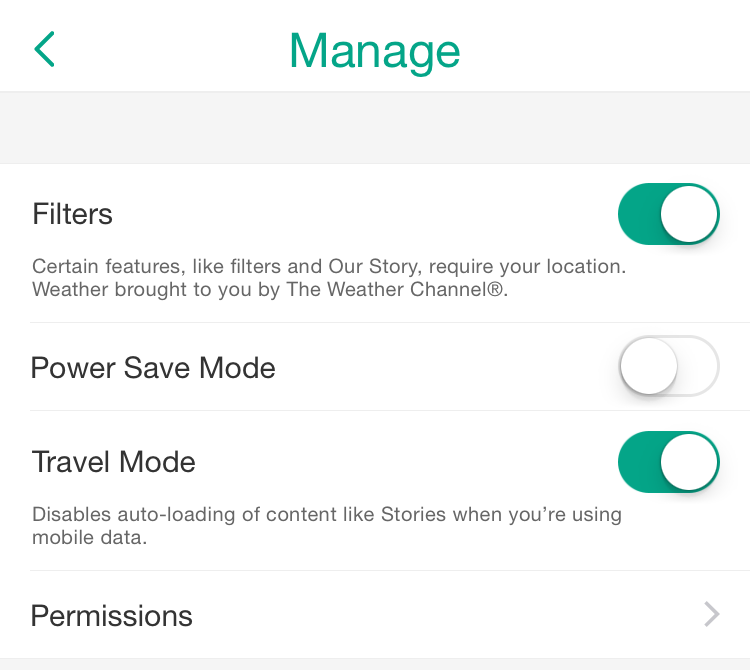
  1. Save your data with Travel Mode: Snapchat can save you some serious data while you are out there snapping. In travel mode, you can select which photos to download.

snapchat travel mode

  • Click on the ghost-icon on the Snapchat app.
  • Click the gear-icon and go to ‘Additional Services’
  • Go to ‘Manage Preferences’ and then enable Travel Mode.
  1. Color individual words and letters with your own style: spice up your snaps with colorful letters.

snapchat7

  • Tap the ‘T’ icon and choose the largest text size.
  • Choose the color from color palette.
  • Select the letter or word you want to highlight.
  • Then choose another color from the palette and color the next word or letter
  1. Say more with your snaps: It’s time to get wordy with your snaps. Try this:

snapchat8

  • Start by opening notes on your phone.
  • Tap the return button for every line you intend to create.
  • Copy those lines, open Snapchat and take a picture
  • Tap the ‘T’ icon and paste the empty lines
  • Select a line and start typing.
  1. Find out who’s following you: Unlike Twitter or Facebook, SnapChat doesn’t show you your followers. However, you can get this information with a quick trick:

snapchat9

  • Go to ‘Add Friends’ and then add persons by their username.
  • Hold down on their username.
  • Sometimes you will see a Snapchat score. This means the person is following you.
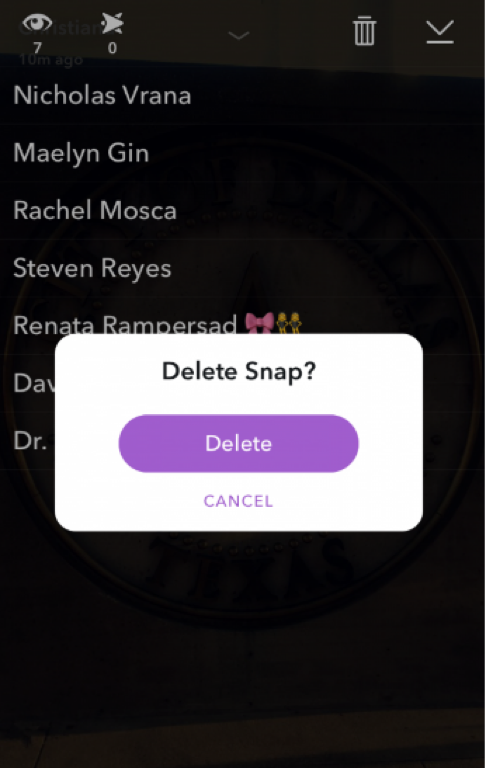
  1. Delete a snap you don’t like: One bad snap can ruin your great story. While Snapchat is instantaneous messaging and publishing to your followers, you can actually delete a snap that you don’t like. Here’s how:

snapchat10

  • Go to the default camera and swipe right to go to the Stories view.
  • Find the snap you want to delete.
  • You will see a trash can once you swipe the photo up.
  • Tap on it and then tap ‘Delete’