
You’re under a tight deadline. Your client is waiting on you. And yet, here you are rummaging through files like ‘Final_v2_Updated-v7_Final-Final.ai’. You manage to uncover ten iterations of this identical logo. One has the wrong color profile. Another is outdated. The actual final version? Still missing. If you’re a creative type, that probably sounds familiar, right?
Managing creative assets shouldn’t feel like detective work, but for many of us, it does. As a photographer, designer, or a member of a team syncing across devices, the volume of content grows fast. The whole “structuring” part? That rarely comes into the equation, though we all know it should. Digital disarray drains your time, clouds your focus, and quietly derails productivity. Looking for a solution? Enter Adobe Bridge.
In today’s article we will discuss why creative workflows often become disorganized, introduce Adobe Bridge’s advanced features tailored for creative pros, and present how it simplifies your workflow to save you precious time.
Why Creative Work Gets Messy
None of us want to become disorganized, but it’s not uncommon for your files to get out of hand when you’re dealing with client work, revisions, deadlines, and threads of feedback at the same time.
Here’s what that usually looks like:
- File names that make no sense two days later
- Assets saved somewhere… but you’re not sure where
- Three “final” versions of the same file, none of which are actually final
- A folder system that felt clever at the time but now lives across four platforms
These things slow down solo creators by forcing them to waste time finding things, get distracted switching between folders, and struggle with uncertainty about which one to trust. They make problems multiply exponentially for teams. Someone edits the wrong asset, a critical revision goes missing, and then everyone wonders how long they will be blocked from progressing while they sort it all out.
Most creative individuals burn a huge amount of hours every week simply searching for files or redoing missing assets they can’t find. What might initially feel minor is a constant drain on your time, energy, and creativity.
Understanding the True Causes of File Chaos
In most cases, file management is not caused by carelessness alone, but rather it is a combination of behavior, process, and tools that do not work well together. Here are a few examples of what we mean:
- Ad Hoc Storage Practices: Most artists begin small, saving files hastily without a plan for the long term. It may suffice initially, but it falls apart as projects increase and file numbers scale.
- No Common Structure: With no shared structure, everyone creates their own rules. Files become scattered across a variety of personal systems, and that makes collaboration across those systems cumbersome.
- Overloaded Drives and Tools: Local drives quickly become filled with files and eventually your storage clutters, access speed slows down, and you’re predisposed to human errors or duplication if not maintaining your system on a regular basis.
- Lack of Unified Search and Tagging: Even if the files are well-organized, inconsistent tagging or no searchable metadata makes it difficult to quickly find them. This is exacerbated in hybrid situations where teams constantly switch between apps or storage systems.
Collectively, all of these points will generate friction without you even realizing it. Each one stacking more complexity, making it more difficult to remain productive.

Quick Wins to Organize Your Files Right Now
Without the most recent tools, you can still substantially improve how you organize creative assets. Here are some useful tips to maintain your files organized:
Use familiar Naming Conventions
Develop clear, consistent file-naming conventions that your team can readily incorporate, streamlining file retrieval, and versioning management.
Implement Basic Tagging Systems
Although it’s more work upfront, manual tagging systems will enable you to sort through and locate files more quickly. Tags must be exhaustive as well as consistent so that they address all potential search situations. Use metadata within files or save your tags in a text file by the same name as the asset so that you can search for them later by keyword.
Create a Clear Folder Hierarchy
Create a standardized folder organization template for use across all projects. Consistency makes it clear to everyone where files should be located and stored, saving everyone time searching for them.
For instance, while it may vary based on project, you might utilize a template like:
ClientName_ProjectName/
01_RawAssets/ [Originals straight from the camera or source]
02_WorkFiles/ [Editable files (PSD, AI, Premiere)]
03_FinalExports/ [Deliverables (JPEG, PDF, MP4)]
04_References/ [Briefs, style guides, feedback]
Centralize File Locations
Try to keep all project files together in one repository wherever you can. This might be a server, cloud solution, or a digital asset management platform where everyone is using the same version of every file.
Recognize the Limitations
These Do-It-Yourself approaches, although effective to a certain extent, might not go far enough for professionals. This is particularly true within bigger or high-demand teams. Manual systems become clunky and vulnerable to mistakes. They do not possess the dynamic functionality of AI-empowered ones, such as automated tagging and built-in search mechanisms, which can grow with your team’s demands.
By recognizing these boundaries, you will better understand the importance of investing in specialized solutions as your projects become more complex and scaled.

Adobe Bridge: Solving Your Asset Management Chaos
You can go only so far with manual approaches, but there will eventually come a point where the number of files and complexities of digital content outpace even a high-quality do-it-yourself solution. If you’ve ever thought that there must be some easier, more straightforward means of managing your projects, then you’re not alone.
There is an industry-standard, go-to tool for asset management, and you’ve probably heard of it before. Adobe Bridge is Adobe’s solution built to simplify asset management headaches. It makes it easier to find, organize, and use your creative files, no matter how many you have or how scattered they’ve become.
This is how Bridge specifically addresses the typical problems we’ve already mentioned.
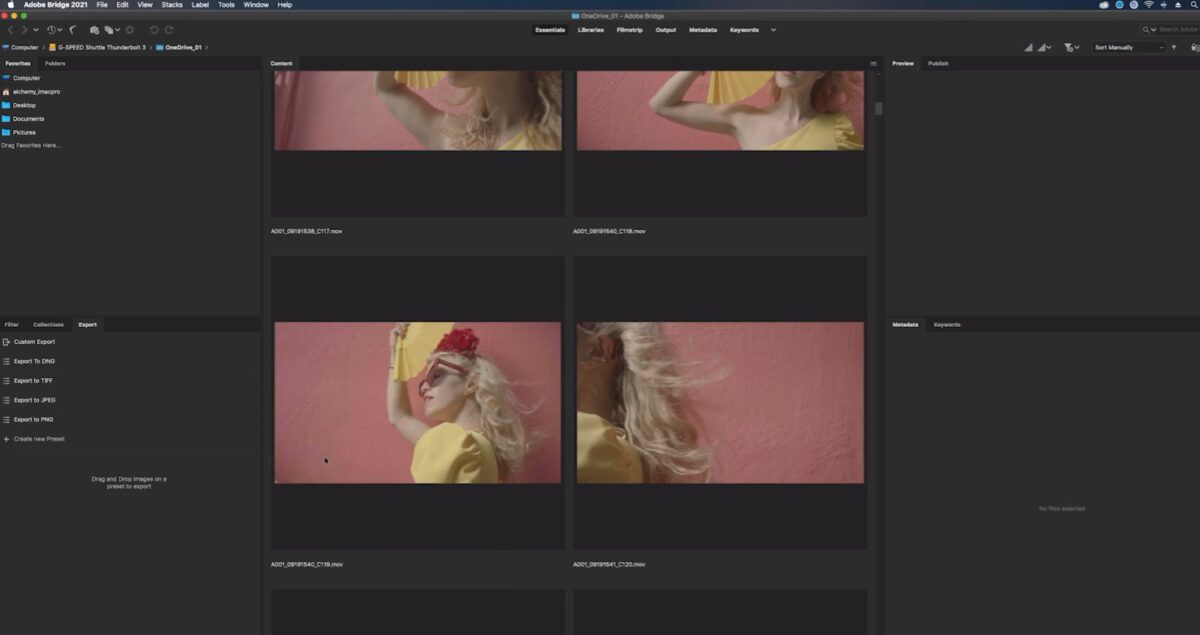
Visual Search Fuelled by AI
Rather than using only keyword tags, Bridge’s artificial intelligence driven search identifies visible content within your documents. For instance, searching for “beach sunset” or “concept logo” returns results based on content, not on filename or metadata.
Smart Tagging That Actually Saves Time
Bridge organizes applicable keywords and metadata onto your assets automatically. You can devote less time to tagging activities and more to work. Your photos, designs, and videos start sorting themselves without the need for manual overhead.
Effortless Batch Renaming and Version Control
Bridge enables batch renaming and multiple file management. It can maintain a clean version control within your naming and keep track of iterations without descending into “final-final-v2” madness.
Seamless Integration with Creative Cloud Apps
Bridge seamlessly integrates with Photoshop, Illustrator, Premiere Pro, and other Creative Cloud apps you use on a daily basis. You browse, preview, and send assets directly to your editing environment without the need to switch applications or waste clicks.
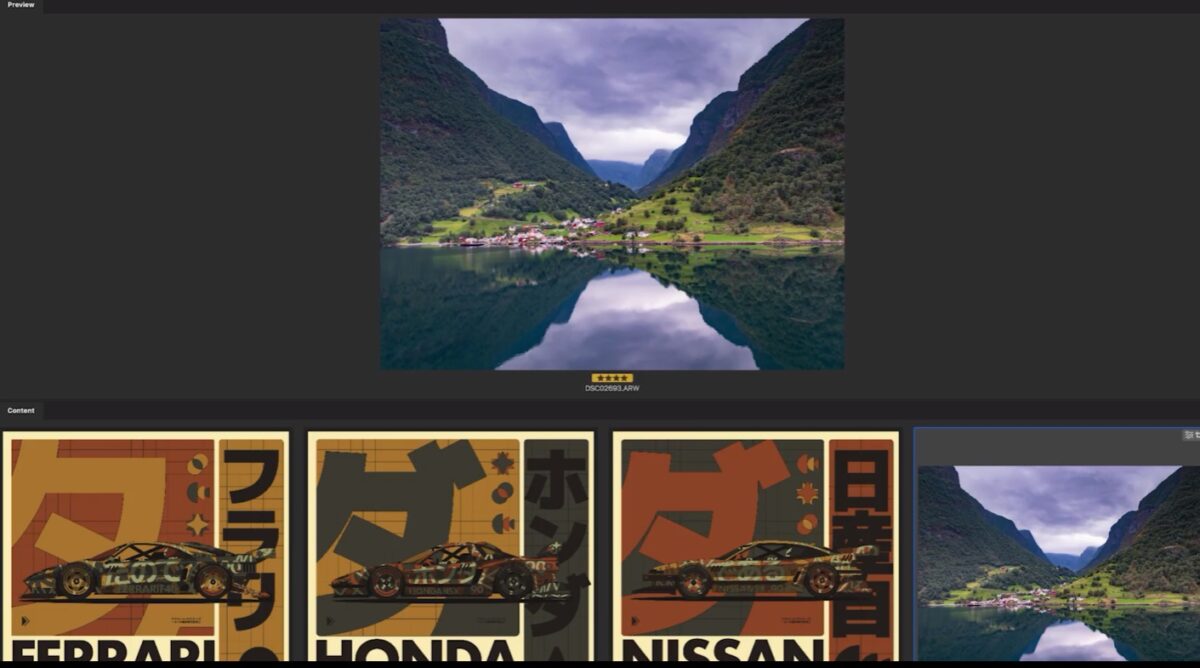
Instant Previews and Detailed Information
You don’t have to open every asset to review file contents. Bridge displays high-quality previews and extensive metadata at a glance, so you can sort, select, and prioritize more efficiently, without having to wait for apps or files to open again and again…
So, How Does Bridge Compare to Manual Asset Management?
| Manual | Adobe Bridge | |
| Tagging | A tagging workflow and management system are required | Automatic visual tagging |
| Renaming | Limited and cumbersome. Typically on a file-by-file basis. | Quick, easy batch processing |
| Integration | No. Via Explorer / Finder | Seamless, direct integration with Creative Cloud Apps |
| Search Efficiency | Depends on your naming/tagging consistency | AI-enhanced visual search |
Think of Adobe Bridge as your creative hub, tailored to manage large-scale asset management. Instead of being overwhelmed by a complexity of your own making, you get clarity, speed, and workflow confidence.
Bridge Keeps Evolving
These quality of life improvements to your workflow won’t stop with what’s available today. Adobe continues to evolve Bridge to keep pace with the rhythm of the professional creative industry. Some of the newest features at the time of writing include:
- AI Visual Search 2.0: Better accuracy, quicker content detection with enhanced object detection and contextual search cues.
- Smart Tag Context Hints: Context-aware prompts are now included in auto-suggested tags based on project type, file affiliations, and recent use.
- Faster Creative Cloud Sync: Improvements to speed and stability enable syncing between devices and teams to happen faster and more consistently, even for large media collections.
Who Benefits Most from Using Adobe Bridge?
Adobe Bridge is at its most useful when it streamlines real creative workflows. Whether it is one creator operating independently or a full team that produces together, its capabilities fit with the actual work being done.
For Photographers
Bridge imports camera metadata automatically and organizes it. You can categorize photos by subject, place, or date, filter by lens or options, and preview photos by the hundreds without ever having to open them individually.
For Designers
Keeping brands consistent across many files and formats is a challenge. Bridge unifies your fonts, color assets, templates, and logos so you’re not starting over from square one. Smart tagging and batch renaming keep things clear across changing projects as well.
For Video Editors
Time is important. With Bridge, scanning high-resolution clip previews is quick, organizing footage by duration or date is swift, and batch processing files for import is a breeze before adding them to your timeline. It saves time even before editing is started.
The larger the portfolio you manage, the more value Bridge becomes.

Where Adobe Bridge Excels and What you Should Keep in Mind
Adobe Bridge provides ample value where it is most important. Here is a brief summary of the things it does well and where you may experience some rough spots initially.
Pros – What It Does Really Well:
- Efficient: Makes it easier to move quicker with batch operations, automation, and smart searches.
- Intelligent: AI tagging saves you manual effort by recognizing metadata automatically.
- Centralized: Makes all your assets visible and accessible in one place.
- Visual-First: Previews allow for effortless browsing without needing to open every file.
Cons – Where You Might Hit Friction:
- Learning Curve: Bridge might not feel intuitive at first if you’re not accustomed to organized file management.
- Discipline Required: Bridge glows most brightly with consistent routines. Without them, even great tools can’t fully eliminate chaos.
In short, Bridge enhances workflows but is not going to cure an already tangled one. The payoff is greatest for you when you are willing to work within the structure it can offer and you genuinely desire greater control over your digital assets.
Ready to Cut Through the Clutter?
If it seems like organizing your creative files is a job within itself, perhaps it’s time to stop struggling with your folder structures and let this software do the work for you.
Try Adobe Bridge and experience the change it makes to your workflow. Start with Adobe’s free trial or jump into a quick tutorial to experience how quickly it can automate your workflow. Do less searching and spend more time where you’d rather be: Creating.
Is Bridge Worth Integrating into Your Workflow?
Disorganized assets cause everything to slow down. Disorganization hinders creative flow, squanders time, and can lead to high-cost mistakes.
Adobe Bridge is a clean, smart approach to organizing your creative files without the confusion. It organizes your folders for you, adds organization to your version control, and makes assets visible across your projects.
This will allow you to cut through asset management complexity, so you can do less searching and more producing.
If disorganized file systems are your daily experience, Bridge will definitely change your life.
