CCleaner, one of the most popular system cleaning and optimization utilities in the tech world, is taking a significant step forward with its new version 7.0. This update is not just a version number change: it’s a deep overhaul that modernizes the design, expands compatibility with current devices, and enhances the features most frequently used by users.

Below, we review all the new features and improvements arriving with CCleaner 7, a version that is designed to be faster, smarter, and easier to use.
A Fresh Look: Modern, Fluid, and Responsive Design
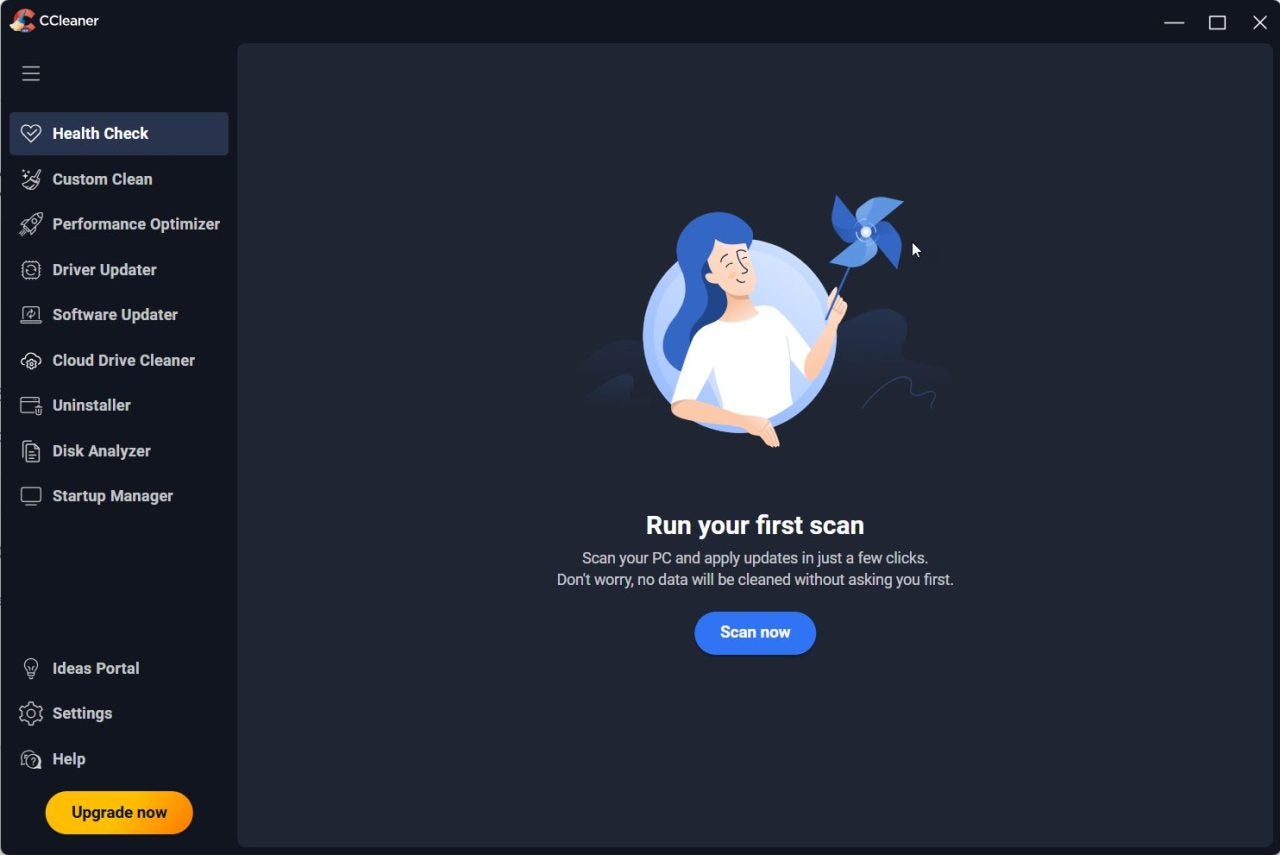
First impressions matter, and CCleaner 7 understands this. Its new interface moves away from the classic visual elements that have been around for years, opting instead for a cleaner, modern, and responsive design, built to integrate better with current operating systems.
Navigation is more intuitive, and sections are more clearly organized, which simplifies access to tools like the cleaner, application uninstaller, or disk analyzer. Furthermore, menus and panels automatically adapt to the window size or device resolution, a welcome change, especially on laptops and touchscreens.
And, for the first time, users can choose between three visual themes:
- Light Mode: Ideal for bright or office environments.
- Dark Mode: Ideal for individuals who prefer a lower brightness level or work at night.
- Automatic Mode: Dynamically adjusts the appearance based on the operating system’s configuration.
This aesthetic flexibility not only improves visual comfort but also contributes to a more personalized and modern user experience (a feature Android and iOS have had for years).
ARM64 Compatibility: CCleaner Free Adapts to the Future
One of the most relevant technical additions in CCleaner 7 is its new compatibility with the ARM64 architecture. This move aligns the application with market trends, where an increasing number of devices—especially ultralight laptops and hybrid computers—are utilizing ARM-based processors.
Thanks to this expansion, CCleaner will be able to run natively on modern devices without the need for emulation, resulting in increased speed, lower resource consumption, and more stable integration with the operating system.
Enhanced Uninstaller: More Powerful and Smarter
The software uninstaller has always been one of CCleaner‘s standout features, and it receives a deep update in this version.
The new integrated uninstallation engine allows you to remove applications more effectively, without relying on default system uninstallers, which often leave behind remnants or interrupt the process with unnecessary messages.
Here are the main enhancements:
- More Reliable Uninstallation: Easily removes even stubborn programs that previously resisted cleaning.
- Goodbye to Pop-ups: Reduces annoying alerts and dialog boxes that interrupt the task.
- Batch Mode: You can now uninstall multiple applications simultaneously, making it ideal for quick and thorough cleaning sessions.
- Residual File Removal: Cleans up the leftover files to help recover disk space and maintain optimal performance.
- Temporary Uninstallation: A new feature that allows you to temporarily remove an application to check its impact on performance, with the option to restore it if desired.
With all these improvements, the CCleaner 7 uninstaller becomes a much more complete, agile, and secure software management tool.
Improved Disk Analyzer: Smart and Visual Cleaning
Another major update is available for the Disk Analyzer, which now incorporates advanced functions for detecting and eliminating duplicate files in bulk.
This feature not only saves time but also helps keep storage organized and free up gigabytes of space in minutes.
Among the most notable additions are:
- Batch Removal of Duplicates: Enables the cleaning of hundreds of similar files in a single operation.
- Image Preview: You can now see thumbnails before deciding which duplicate to delete.
- Smart Selection: Users can automatically keep the most recent or oldest version of each duplicate file.
- Flexible Deletion: Offers the option to permanently delete files or send them to the Recycle Bin, for added safety.
Collectively, these enhancements make the Disk Analyzer an even more valuable tool for those seeking to keep their computer clean and optimized, while helping reduce the chances of accidentally deleting important content.

Faster, Smoother, and More Useful Than Ever
Beyond its visible features, CCleaner 7 introduces internal optimizations that enhance analysis speed, overall stability, and program performance. Tools open faster, cleaning operations are quicker, and the interface responds instantly.
This version also continues the simplification trend seen in recent years – a program that’s easy for beginners to use, yet powerful enough for users who want more control.
A Necessary Evolution
CCleaner 7 doesn’t reinvent the wheel, but it refines every element. Each improvement is designed to make the experience smoother and more modern, adapting to new user needs and the demands of current hardware.
With its new design, dark mode, ARM64 compatibility, and enhancements to the uninstaller and Disk Analyzer, this version marks a significant milestone for an iconic utility that, despite its long history, remains in peak condition.
New Features
- New Design:
More modern, adaptable interface with light, dark, or automatic themes - ARM64 Compatibility:
Native support for devices with modern architecture - Updated Uninstaller:
More reliable removal, no pop-ups, includes batch mode - Improved Disk Analyzer:
Mass deletion of duplicates with preview and smart selection - General Optimization:
Faster, smoother, and more stable program performance
The Verdict on the Renewed App
CCleaner 7 arrives as a solid update, designed for users who want to keep their PC clean without complications, but with professional tools at their disposal. Its aesthetic refresh, expanded compatibility, and new functions confirm it: the legendary cleaning app is ready for a new era.
