Is Apple losing its cool?

Critics of Apple fanatics have said that there’s nothing special about Apple, and it’s unfair for Microsoft to be labeled an uncool big corporation, when Apple is just a big corporation too.

Nevertheless, Apple products do have that special something that makes them likable. In the case of OSX, that special something is just being smooth and fast and working properly.  The iPhone effect on the mobile industry has been incredible. It’s incredible any company could jump into a developed market and revolutionise it just like that, and it’s incredible no established mobile manufacturer had made something that worked that well before.

There is something cool about Apple, and as a corporation they seem to get a lot more right than many. It’s a surprise, then, that the iPhone App Store seems to be getting stuck in controversies.

First was the Babyshaker app, that was bizarrely approved even though it was obviously offensive. Then Apple failed to approve applications for really odd reasons. The Nine Inch Nails app, that would allow users to link to an album with potentially offensive lyrics was banned, despite that material being easily available through iTunes (it was later accepted).

Now we have Eucalyptus, a reader that uses an online library of out of copyright literature. It was rejected on the grounds that you could read Kama Sutra of Vatsyayana – an English translation from the 1800s! The developer wisely pointed out this library is freely available on the internet, and you’ll only find that book if you expressly search for it, as you would using Apple’s own Safari. Apple have now accepted the application – but they must have people in their approval system with very strict ideas about objectionable material.

It all seems very un-Apple, and tarnishes their image as “the cool corporation”. Arbitrary bureaucratic absurdity is the thing of governments and faceless corporations – why are Apple doing it? Perhaps these strange decisions are just wrinkles in the system that will be ironed out. There are so many apps being submitted, maybe its not so bad to make the odd mistake.
Team Fortress 2 free weekend from today!

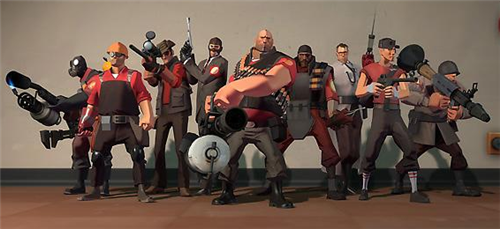
The lovely people at Valve, one of the best developers around at the moment, are offering a free weekend of multiplayer mayhem in Team Fortress 2. If you’re unacquainted with it, it’s possibly the best multiplayer team shooter out there, with great balance and an emphasis on fun gaming.

The game is available for pre-loading now, and the free weekend should start sometime today, finishing next Tuesday. You’ll have to install Steam, Valve’s download manager, but that’s no bad thing as there’s some fantastic stuff there.

How to: DJ with a laptop

Why not use your laptop (or desktop) as turntables at a party? With a little practice you can get a much better mix than simply sticking an iPod on shuffle. Plug your laptop into the stereo, and turn up the volume. Here’s my guide to learning to DJ with a laptop!

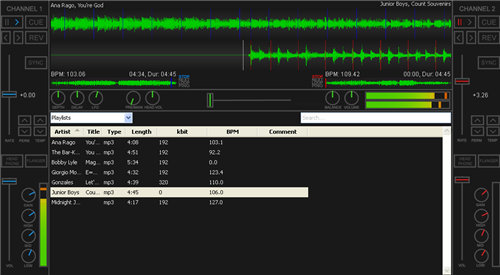
Software: There is lots of DJing software out there, but the free program Mixxx is pretty much as good as any available. This tutorial was done with the Windows version, but it’s the same on Mac and Linux too.

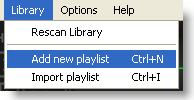
Playlist: Once you’ve installed Mixxx and imported your library,  it’s a good idea to create a playlist of tracks you like. Click on library and create playlist or you can even import one from iTunes. Select ‘playlist’ from the drop down menu above the library, and your playlist will appear.

Mixing: Right click on your first track and choose Load in Player 1, and do the same for your second track, but load in Player 2! Now you’re ready to start. After a few seconds, Mixxx will have estimated the BPM of your tracks, and it’s pretty accurate. Clicking SYNC on player 2 will alter the speed of that track to equal the first(if you want to), or you can use the pitch sliders to alter BPM too. While you can control Mixxx with the mouse, it’s much easier to do so with the mouse and keyboard. The most important keys: D and L play/pause Player 1 and 2 respectively.

Move the cross-fader to the left (it’s the slider in the centre of Mix) and hit D to start the music. Clicking and holding on the wave for player 2 (the static one), you’ll find you can drag it left to right. Use this method to line up the centre marker with the start of the music (you have to be gentle!). When track one is near the end it’s time to mix. If you’re trying to beat-match be patient, as it may take some practice! If not, start track 2 as you are moving the cross-fader from the left, and track two will fade in as track 1 fades out.

For beat-matching, move the cross-fader to the centre, and hit L on a beat, which will start track 2. If you are in time, track two will be playing and it will sound good. If so, slide the cross-fader gently to the right, and hit D to stop track1. Right click on track 3, load it into player one, and repeat the above process!

Tips: Use the channel 1 and 2’s volume and tone controls to get things sounding right – some tracks are naturally louder than others, so might need turning down.

In general, the better you know your tracks, the better you’ll be able to mix them, and the more you practice, the easier it becomes.

You don’t need to beat match – sometimes it sounds good if you jump from one track to another, flicking the crossfader so there is no transition between songs. Give it a go!

Have you used Mixxx, or would you recommend another application? Leave us a comment! If you don’t like Mixxx, you can try the free Virtual DJ Home Edition.

Friday Timewaster: Paper Moon

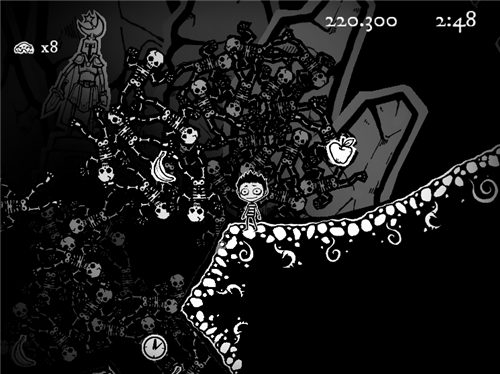
If you enjoyed the highly polished Scary Girl, you have to check out Paper Moon. From the same company that brought you Off Road Velociraptor Safari, this is a cute and atmospheric platform game. Developers Blurst are fast becoming the kings of the browser game, concentrating on quality and quirky games, instead of the usual lazy casual games that flood the internet.

Paper Moon is played against the clock, and it’s a bit of a challenge to make your way through but with its 3D paper style visuals, and gentle puzzles, it’s well worth a try. You’ll need to download the Unity plug-in for your browser too.

Today’s downloads for Windows, Mac and Mobile

Pocket PC : Using your mobile to watch online video? Why not give vtap a go? Search for videos without opening a web browser, or even visiting the site. Vtap pulls content from most major video sites, providing a convenient way to watch whatever you want from your Pocket PC.


Things iconMac: If you’ve ever read Dave Allen’s Getting Things Done then the newly updated Things might help you put some of his advice into practice. Things is an innovative task management program for Mac which lets you easily create tasks and organize them by type and importance in guiding you to become a more efficient worker.

Windows: If an e-reader is a gadget too far for you, but you like the idea of reading an electronic newspaper in its intended format, The New York Times TimesReader may be an answer. It’s really readable, and beautifully presented. This may be the model for the survival of newspapers in the future.

What will Apple announce at WWDC in June?

What are we expecting from the Worldwide Developers Conference in June? Lots of people are predicting that Palm will launch their much hyped Pre handset on June 7th, just a day before the Apple conference begins. Maybe Palm are hoping to overshadow any Apple announcements, but that looks dangerous to me, as Apple are likely to have some cool stuff up their sleeves.

Here at OnSoftware we’ve been wondering out loud what might happen, so starting with the most likely things, here we go:

1: Snow Leopard. Surely there’ll be an exhibition of the next version of OSX, 10.6, which sounds like it will build on what is already my favourite operating system. The most interesting thing about it for me is that it will have an overall smaller hard drive and RAM footprint (like Windows 7) – efficiency is always a good thing. We know that Windows 7 is lighter so it can work on netbooks…. Probability: 100%

2: The next surest thing, and it’s a pretty sure thing too, is an announcement of a third generation iPhone. What’s it going to be like? I wouldn’t expect much of a visual difference (it won’t be available in pink any time soon), but should do the things people think it should already do, like video capture or maybe a compass (like the HTC Magic). Perhaps you’ll be able to alter the backlight time too? Reading that back, maybe Palm are right to gamble, or maybe Apple have something really cool for the next gen iPhone? Probability: 90%

2.5:  Rumours abound that working with Verizon, there might be an iPhone lite in the works, and some have claimed to have actually seen the device. It’s worth remembering that Apple went as far as creating fake prototypes to keep people from knowing the truth about the original iPhone… I think an iPhone lite is a pretty underwhelming concept too. Probability: 30%

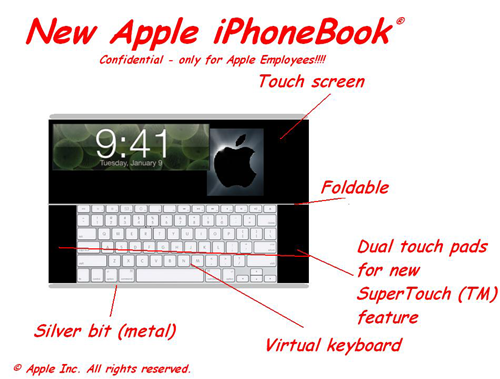
3: Mystery item! With all the stories about Apple ordering 10 inch touchscreens, Snow Leopard being easier on resources and the success of netbooks in general, there are many predicting Apple will announce something between a Macbook and iPhone. Tim Cook, Apple’s COO recently said that netbooks “suck”, but that could be a precursor to “but ours are cool”. Bets are divided between some kind of netbook or keyboard free tablet device. The 10 inch touchscreen tablet sounds like a sweet idea – a device for browsing and watching media. However, in my head that looks like a big iPhone, which shows a lack of imagination on my part! Probability: 50%

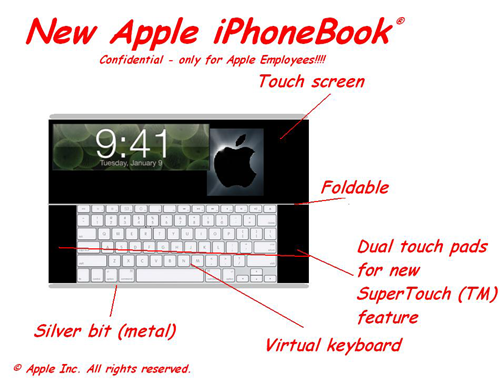
We’ve seen numerous alleged photos of Apple netbooks, or Macbook minis, but none of them look convincing (or good!)!

*thanks to our resident Apple insider Tom for the secret Apple iPhonebook image!

Battlefield Heroes – making war fun!

If you find regular war games just a bit too realistic these days, you’ll be pleased to hear that the developer of Battlefield Heroes, the cartoony online multiplayer shooter, is giving out beta testing keys. You just have to sign up here, and wait for a key to be emailed to you (it may take a few days).

Once you’ve got your key, after the installation process you’ll finally be able to log in and play. The game itself is really cool, with the emphasis on fun and accessibility. This is a game everyone should be able to enjoy, not just the hardcore gamer. There’s a training mission that’ll take you through everything you need to know, and then you’re off. Players are ranked, so you shouldn’t be outgunned by battle-hardened killers.

It’s completely free, and really well put together. The only criticism I had of it was that you can only play in full-screen mode, meaning you can’t jump out for a second to check your mail and so on. You probably won’t want to be distracted though, as the action’s really fast paced and competitive. We can’t wait for the full release of Battlefield Heroes.

Indie games roundup

The stream of indie games seams to increase by the minute, from big and lengthy developments, to games created in hours. Much of this output is also free, and without commercial marketing constraints there are some truly bizarre experiences out there.

A combination of money and resources mean the 2D scene is alive and well, from the beautiful Braid to short and tough mini developments like Sword Calibre. Some of these bring something new to 2D gaming, and many are resolutely retro in style and gameplay. Either way, what’s on offer is very different to most commercial releases.

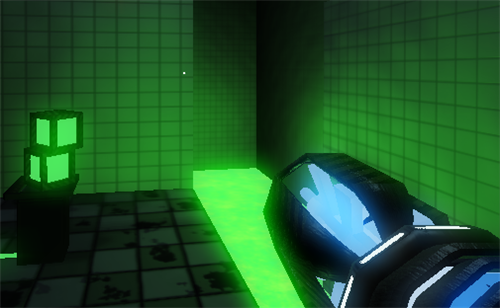
There are 3D games too.  Classic 1990s 3D engines, like Wolfenstein, Doom and Quake (the standard bearers for their respective generations) are still producing fun today: Bizarre story telling from cult developers with Judith, joyful uber street violence like Urban Brawl, and probably my favourite experience of the last year: Gravity Bone.  If you want something that looks a bit more modern, college creation Glasshouse is an interesting 3D puzzle game, with presentation and graphics that are incredible for a free game.

Another genre that’s produced a plethora of indie releases is the “physics based game” (which generally mean your success involves using gravity in some way). Crayon Physics is the most obvious example, but there are others like FlickerStrings, Numpty Physics and the excellent And Yet it Moves.