Download Wikipedia on your PC, Mac and Android phone

As the largest online collection of articles and information, Wikipedia has an answer to every question and is particularly useful when you want to look something up quickly.

Now there’s an app that lets you download the entire Wikipedia database to your computer so that you’ve got reading material available, even when you don’t have internet access. What’s the easiest way to get articles to your PC, Mac or Android Phone? Read on and find out!

1. Download the (free) software: Kiwix

For this article, we used the free software Kiwix, available for Windows, Mac and Android, but there are other programs, like Xowa, that will do the same thing. Kiwix is a good option because it lets you view both articles and pictures on Wikipedia when you’re offline.
Download Kiwix for Windows

Download Kiwix for Mac

Download Kiwix for Android

Kiwix Wikipedia

2. Install Kiwix

After you’ve downloaded Kiwix, you have to unpack it (in the case of the Windows version) and go to the “Install” folder. Click on ‘kiwix-install’.

In the Mac version, all you have to do is drag it to your applications to install. Of course, the installation proceeds automatically from Google Play.

3. Download the Wikipedia Files​

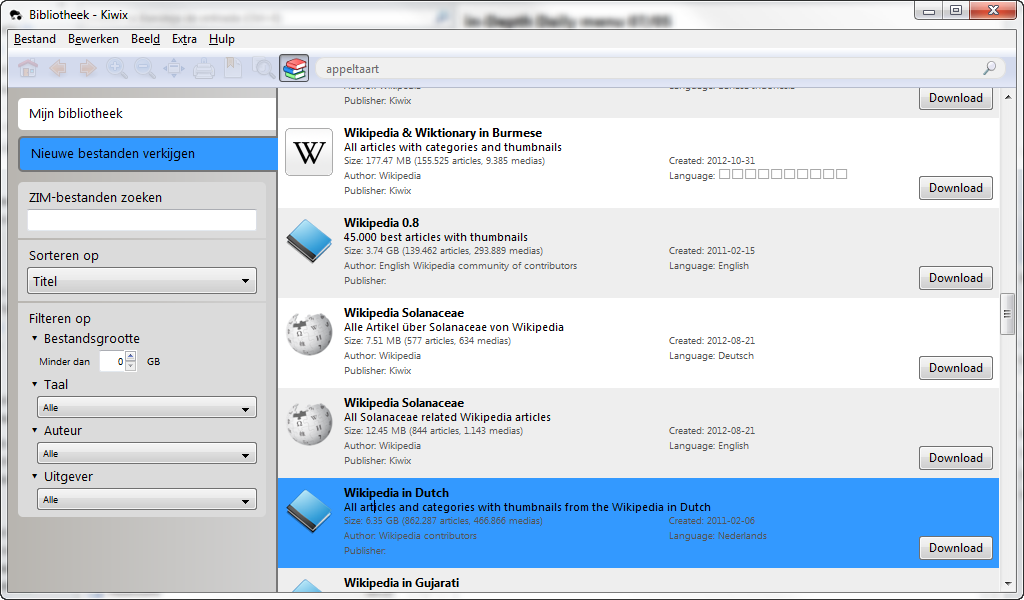
The Kiwix homepage looks a bit like a browser, and from its clean interface, you can download a local version of the whole of Wikipedia. Go to File and click Browse Library. A list of available databases appears with a download button on the right. Search for ‘Wikipedia in English” and tap the download button. Kiwix will start downloading the file in ZIM file format (like Wikipedia).

Please note that after the content has finished downloading, you won’t immediately see the database in the Kiwix library: you will have to search manually through the Windows Start menu.

Open the Programs and Files and search for ZIM. In the search results, the file ‘wikipedia_en_all_01_2011_beta1’ or something similar should appear. You’ll have to double click on the file, which will open using Kiwix. On Mac, use the Spotlight search feature, which you can access using the Cmd + Spacebar key combination.

Kiwix for Android

The version for Android works a little differently: from the app, follow a link to Kiwix.org (or access it from your browser) and do a database search (for a file that ends in ZIM). Once you’ve downloaded this file, open Kiwix and tap “open File” from the Kiwix settings.

And that’s it! You’ll have access to the entire Wikipedia database offline!

Will you download Wikipedia?

Interview: Launching Pad Games

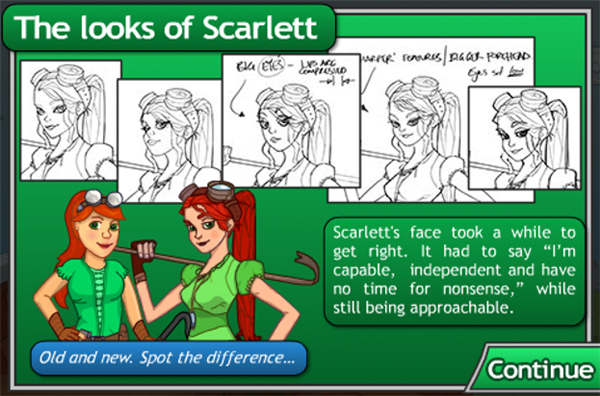
With all the casual games in the App Store, it’s great to run into titles that stick in your mind, and are involving from start to finish. Scarlett Adventures Episode 1 is such a game and buying it will not only make you chuckle on the subway: all proceeds go to the Red Cross until the end of March. You can read more about this great initiative here.

Scarlett and the Spark of Life is a breath of adventuring fresh air, with its witty dialogue and memorable characters. We enjoyed playing through the game, and were left hungry for more. We decided to ask creators Tim Knauf and Tristan Clark about the time-line for Episode 2, creating games for iOS and managing a software house with just two members:

You guys are low in numbers (2 and expanding?), yet deliver an all-round experience with your games. How do you manage? What exactly are your backgrounds and how did you get involved in the gaming business?

Tim: First up, we’ve got to give credit to the very talented James Ellis for the beautiful backgrounds and character design in ‘Scarlett’. His help arrived late into the project, yet after a few incredibly intense weekends, he had turned the art style around. You can see why we’re keen to bring him back full-time for Scarlett Episode 2.

Tristan: As for our backgrounds… would you believe we both have degrees in English Literature? Completely related to game development, I know. Actually, our love of stories is what led us to both our degrees and the kinds of games we most want to make, so there’s more overlap than you’d think.

Continue reading “Interview: Launching Pad Games”

Preview: Beneath a Steel Sky for iPhone

Welcome to the Gap

Fifteen years ago, I was 15 years old, ambitious and filled with dreams. Most of these entailed the creation of those fictitious worlds that sucked me in. Adventure games presented me with both worlds of magic (far, far away), as well as dystopian, grim representations of OUR world. Beneath a Steel Sky (1994) belongs to the latter category.

bass4.png

With references to Nietzsche, Huxley and Orwell, BASS came packed with intelligence, leaving us disconcerted by… hiatuses of thought. Of course back then, in The Netherlands, all we got from our English reading list was Watership Down. Don’t get me wrong: I felt sorry for those rabbits. However, I felt even sorrier for those who did not get their hands on a copy of Beneath a Steel Sky.

Your quest

The game takes place in a post-nuclear world, divided in an outside – the Gap – and an inside – a hierarchical city. Or is it the other way around? Robert Foster is a child of both worlds: he finds himself growing up in the Gap, yet feels something from the inside pulling him in.

bass5.jpg

What or who this is and what happens next, are catalysts in Foster’s quest. Find out who you are, where you come from, who put you there and how exactly that fits into the bigger picture. Kind of like ordinary life, wrapped up in a shiny iPhone port of a classic adventure. Continue reading “Preview: Beneath a Steel Sky for iPhone”