How and where to sell Starfield survey data

Do you also want to make money in Starfield? Well, you can sell your survey data to make some extra cash in the game. Today, we will show you how and where to sell Starfield survey data.

In the vast universe of Starfield, there are many ways to make a fortune. You could be a seasoned adventurer, exploring uncharted worlds and finding lost treasures. Or you could be a savvy trader, buying and selling goods and commodities across the galaxy. But there’s another way to make a lot of money in Starfield: by becoming a freelance scanning technician.

As a scanning technician, you’ll travel to different planets and moons, scanning them for valuable data. This data can be used by corporations, governments, and even private individuals to make informed decisions about exploration, colonization, and resource extraction.

The demand for survey data is high in Starfield, and the prices can be very lucrative. For example, a single survey of a gas giant can sell for thousands of credits. And if you’re able to find a rare or valuable planet, you could make even more money.

Of course, there’s no such thing as a get-rich-quick scheme in Starfield. Scanning planets can be a dangerous and time-consuming process. You’ll need to have the right equipment and skills, and you’ll need to be willing to take risks.

Let’s take a look at how and where to sell Starfield survey data!

starfield survey data
Credit

How to sell Starfield survey data

Scanning planets and gathering survey data is a straightforward two-step process, albeit with a few variations depending on the planet’s characteristics. Survey data typically consists of a planetary scan from orbit and detailed scans of the flora (plants) and fauna (animals) on the planet’s surface. Once you’ve collected all the required data, it consolidates into a survey data disk in your inventory, ready to be sold.

Here’s how you can collect survey data in Starfield:

  1. Set Your Course: Choose the planet you want to survey and set a course for it. Navigate your way to the selected celestial body.
  2. Orbit Scan: Upon reaching orbit, equip your scanner, select the planet, and open the planet map. Choose the “Scan Planet” option to initiate the survey. If the planet is a gas giant or lacks any significant resources, flora, or fauna, you can conclude your survey at this point.
  3. Surface Exploration: If more data is needed, you’ll need to land on the planet’s surface. Here, you’ll gather data on the planet’s flora, fauna, resources, and any unique traits it may possess.

To collect data on flora and fauna, scan multiple species to achieve a 100 percent scan. For resources, a single scan of each resource is sufficient. To gather information on planetary traits, locate unexplored geographical or biological features, like the Corraline Mineral Pools on Gagarin, and scan them. Invest a skill point in Surveying to make your surveying more efficient, increasing your scanner’s range from 10 to 20 meters.
Credit

Where to sell Starfield survey data?

Now that you’ve amassed valuable survey data, it’s time to turn your efforts into profit. While other potential buyers may be yet to be discovered, selling your survey data to Vladimir is the most lucrative option.

To sell your survey data, follow these steps:

  1. Find Vladimir: Vladimir can be found on The Eye space station near Jemison within the Alpha Centauri system, home to New Atlantis. You’ll encounter Vladimir early in the campaign during the “Into the Unknown” mission.
  2. Initiate the Transaction: Engage Vladimir in conversation and inquire about his research. Your willingness to sell him survey data will undoubtedly pique his interest. From this point forward, each time you interact with Vladimir, the option to sell survey data will be available in his dialogue options.

It’s worth noting that you can potentially sell survey data to other vendors, but Vladimir offers the most generous compensation. By consistently scanning planets and visiting Vladimir, you’ll find your credits accumulating steadily, ensuring you’re never short of resources in your Starfield journey.

Featured image credit: Bethesda

Farewell to our old friend: Microsoft shuts down WordPad

It has almost been 30 years since Microsoft rolled out WordPad, and the journey has come to an end. The tech behemoth revealed in its latest support note that WordPad will no longer get updates.

Microsoft has officially decided to discontinue WordPad, a basic text-editing application that had been hanging around for quite some time.

The announcement came recently, stating that WordPad will be deprecated, which means it will no longer receive updates and will eventually be removed in a future version of Windows. WordPad has been included by default in Windows systems since 1995, but it has been categorized as an optional feature since 2020, allowing users to uninstall it. This decision seems to align with the recent news.

Microsoft pointed out that it offers two alternative products, Microsoft Word and Windows NotePad, which can fulfill the needs of most users that WordPad previously met.

“WordPad is no longer being updated and will be removed in a future release of Windows. We recommend Microsoft Word for rich text documents like .doc and .rtf and Windows Notepad for plain text documents like .txt,” Microsoft said in the official announcement.

WordPad used to be a phenomenon in the past but lost its popularity in time

WordPad has been viewed as a Windows unnecessary function for a while now. In February 2022, it changed from being a required feature to an optional one. The declaration of its deprecation in 2023 doesn’t come as a huge shock in light of this decision and the changing environment of text editing tools.

Simple text and configuration file editing has historically been done with Notepad, a lighter-weight program. In contrast, WordPad had more sophisticated functionality, enabling users to work with formatted text, use numerous fonts, include photos, and make use of several other fundamental features. However, Microsoft deliberately constrained WordPad’s ability to create.doc and.rtf files in an effort to persuade users to upgrade to its pricey Office Word software.

Given that WordPad has been an optional feature in Windows since its debut with Windows 10 Insider Build 19551 in February 2020, the decision to deprecate it shouldn’t come as a surprise. WordPad is still pre-installed on all Windows PCs, but Microsoft allows users to remove it via the ‘Optional features’ control panel.

When Microsoft announced the deprecation and withdrawal of the original Windows Paint program, they took a similar action five years ago. That choice became official with the July 2017 release of the Windows 10 Fall Creator’s Update.

Microsoft WordPad alternatives to try

Now that Microsoft has pulled the plug and will not be releasing any more updates for WordPad, it is time to look for alternatives. Considering WordPAd is one of the oldest in the field, there are very modern and “better” alternatives that you can try. These alternatives also include more features than the old application that a generation has used for many years. HEre are some of the best WordPad alternatives that you can find right now:

  • Libre Office
  • Microsoft Word
  • Google Docs

As an alternative to WordPad, Microsoft suggests using the Microsoft Word app, which provides a more comprehensive set of features. For users who don’t need rich text support, Notepad remains a suitable choice. However, you can try Libre Office and Google Docs are also solid alternatives.

Best Starfield traits to choose

Are you having second thoughts on choosing your traits? We are here to give you an idea about the best Starfield traits you can choose!

Choosing your Starfield traits represents the last step in crafting your perfect spacefaring player character. These traits offer you certain advantages but also come with a few drawbacks.

In Starfield, the available traits span a wide range, from aligning with specific religious groups or factions to being introverted, empathetic, or having an Adoring Fan who is obsessively devoted to you. Given that each trait has disadvantages, carefully considering which traits align with your preferences and playstyle is essential.

(Credit)

What are traits in Starfield?

Once you’ve picked your Starfield background, you can improve your character by adding up to three Starfield traits. There are 17 attributes available for selection, but they are all completely optional, so you may skip any if you’d choose. Each attribute adds distinctive qualities to your character and offers benefits, restrictions, or drawbacks. You could be ready to put up with the drawbacks in return for the advantages depending on your playstyle or your allegiance to a certain organization, party, or religion.

It’s crucial to remember that not all attributes can be mixed. Selecting one attribute could make it more difficult to choose others. For instance, being both an extrovert and an introvert is impossible. Additionally, the attributes that are accessible for your Starfield character are unaffected by your background choice.

Here are all of the traits in Starfield:

  1. Alien DNA
  2. Dream Home
  3. Empath
  4. Extrovert
  5. Freestar Collective Settler
  6. Hero Worshipped
  7. Introvert
  8. Kid Stuff
  9. Neon Street Rat
  10. Raised Enlightened
  11. Raised Universal
  12. Serpent’s Embrace
  13. Spaced
  14. Taskmaster
  15. Terra Firma
  16. United Colonies Native
  17. Wanted

Let’s move on to the best Starfield traits you can choose in the game!

(Credit)

Empath

The Empath Trait in Starfield alters your combat performance, and it does so dynamically based on the responses of your companions. When you take an action that your companion approves of, you gain combat buffs for a brief period, such as an increased chance for critical hits. Conversely, actions that your companions disapprove of will lead to a debuff for an equal duration.

Extrovert

The Extrovert trait in Starfield reduces your oxygen consumption while running around, but this benefit is only active when you have another human companion with you. It’s particularly useful if you plan to explore space with a friend, which is the case for most players. If you also have the Empath trait, you’ll enjoy the effects of both companion-focused traits simultaneously.

“You’re a people person. Exerting yourself uses less oxygen when adventuring with human companions, but more when adventuring alone,” says the official game description.

(Credit)

Hero Worshipped

Selecting the Starfield Hero Worshipped trait grants you access to the Adoring Fan crew member, who has the tendency to offer you gifts spontaneously. The Adoring Fan can join you during your explorations and can also be assigned to manage an outpost or ship.

The Adoring Fan makes a comeback as an Easter egg from The Elder Scrolls: Oblivion, and he’s even more bothersome than before. You’ll encounter him early in the campaign once you reach New Atlantis. While he won’t provide the same level of interaction as Constellation companions like Sarah or Andreja, you can still assign him to manage an outpost. Of course, you also have the option to decline his offer to join your group.

How to get Taylor Swift Eras movie tickets

Taylor Swift Eras movie tickets are ready to be pre-purchased, and here is everything you need to know about it: how to buy tickets, dates, and more!

The Taylor Swift Eras Tour movie is on its way, and we’ve got some important details for you, including the release date, ticket info, and where you can watch it. Plus, you can catch the new trailer below. Here is how to get Taylor Swift Eras movie tickets!

Taylor Swift shared the exciting news on August 31st across all her social media platforms. She revealed that a special cinematic concert experience is set to hit theaters all over North America on October 13th. The Taylor Swift The Eras Tour movie captures her ongoing sixth concert tour, celebrating her albums and musical eras.

In the Instagram post, Swift said, “The Eras Tour has been the most meaningful, electric experience of my life so far, and I’m overjoyed to tell you that it’ll be coming to the big screen soon. Starting Oct 13th you’ll be able to experience the concert film in theaters in North America! Tickets are on sale now. Eras attire, friendship bracelets, singing, and dancing encouraged. 1, 2, 3 LGB!!!! (iykyk)”

However, when Swift shared a link to buy movie tickets on the same day as the announcement, some fans were concerned that the movie might only be available in U.S. theaters.

How to buy Taylor Swift Eras movie tickets

To purchase Taylor Swift Eras Tour movie tickets in the United States, fans can pre-purchase them through AMC Theatres, Regal, Cinemark, or Fandango. Given the high demand for Eras Tour concert tickets, the demand for the movie is expected to be significant. Watching the official movie in theaters is a great alternative for those unable to attend The Eras Tour live. Here is the link that Taylor Swift published on Instagram.

“Thank you for your patience as we experience high traffic volume. We have proactively created this queue for all visitors. When it is your turn, you will have 10 minutes to begin your TAYLOR SWIFT | THE ERAS TOUR Concert Film ticket purchase or other online visit,” says a message on AMC’s website.

AMC has made improvements to its website and ticketing system to handle a large number of ticket sales. However, the company acknowledges that even with these upgrades, the overwhelming demand from Taylor Swift fans when tickets initially become available can be challenging for any ticketing system in history.

“One Piece” on Netflix: The best anime live-action turned out to be the most challenging to adapt

AMC has cautioned that those booking tickets online should be prepared for potential delays, waiting times, and even system outages due to high demand. It’s important to note that AMC specifies on its ticket-booking page that tickets are non-refundable and do not accept passes, exchange tickets, or discount tickets for this event. The Taylor Swift Eras movie tickets will be paid in full amount.

Taylor Swift Eras movie release date

The “Eras Tour” concert film’s release date is set. It appears to be a recorded version of a performance or possibly a compilation of various performances from the “Eras Tour” during its North American leg.

You can catch the premiere of this concert film at select theaters in the United States, Mexico, and Canada on October 13th. Interestingly, shortly after confirming the release date, “The Exorcist: The Believer” decided to change its release date, originally scheduled for October 13th, possibly to avoid competing with the enthusiastic Swifties.

Where to watch the Eras movie

You can catch the Taylor Swift Eras Tour movie in North American cinemas, specifically at AMC, Regal, Cinemark, or Fandango theaters. As of now, the movie’s release has been confirmed only for North American theaters. However, there’s a possibility that a worldwide release will be announced at a later date. Taylor Swift Eras movie tickets will only be available in North America.

Taylor Swift Eras movie ticket price

For the “Eras Tour” concert film screening at AMC Theatres in the United States, adult tickets will cost $19.89 plus tax. This pricing choice playfully references Taylor Swift’s fifth studio album, “1989.” As for children and seniors, tickets are priced at $13.13 plus tax, a nod to Taylor Swift’s well-known lucky number, 13.

How to use Google Duet AI in Google Workspace

Google wants to let everyone know that it is also in the generative AI race, and recently, the company revealed its new technology at the Cloud Next 2023 event. Here is how to use Google Duet AI in Google Workspace!

Google has announced that it is adding a new AI assistant to Gmail called Duet AI. Duet AI can help users draft and customize their emails and assist with other tasks in Google Workspace, such as meetings, documents, and Google Chat. Duet AI aims to streamline the email drafting process and provide users with helpful suggestions to compose more effective and personalized communications. As AI technology advances, we can expect to see more and more AI assistants being integrated into our daily digital interactions.

What is Google Duet AI?

Google is giving its Workspace apps a new AI-powered friend called Duet AI.
Duet AI can help you with everything from drafting emails to creating presentations. It can even translate languages and answer your questions. So whether you’re a student, a business professional, or just someone who wants to be more productive, Duet AI can help you.

Duet AI is like a Swiss army knife for Google Workspace apps. It integrates seamlessly with Google Workspace apps, eliminating the need for manual copying, pasting, or exporting between different programs. This makes it more efficient and convenient for users to work with Duet AI. Duet AI also aims to enhance productivity by providing users with intelligent support across various tasks within these applications.

For example, Duet AI can help users draft emails, create presentations, and summarize documents. It can also help users find information, translate languages, and answer questions. Overall, the integration of Duet AI with Google Workspace apps is designed to make users more productive and efficient. In the next part, we will show you how to use Google Duet AI in Google Workspace!

How to use Google Duet AI in Google Workspace

Well, it has all these cool features, but they are not worth anything unless you know how to use Google Duet AI in Google Workspace. Luckily, the company released it for mass usage, and now everyone can try it for free without paying a single dime. If you want to know how to use Google Duet AI in Google Workspace, check out the step-by-step guide below:

  1. Go to Duet AI’s webpage. (Make sure you are logged in to your Google account)
  2. Click on “Try Duet AI.
  3. Fill in the boxes on the right side of your screen.
  4. Click “Submit.”
  5. Google will return to your trial request as soon as they can.

Google expressed its capabilities perfectly with great examples. Now that you know how to sign up, let’s move on to how to use Google Duet AI.

Gmail

The overwhelming workload can be daunting, but what if you had a collaborative partner that could intelligently assist you in real time, alleviating some of that burden? Duet AI is designed to offer such assistance, allowing you to focus on what truly matters while it handles other tasks.

Consider the scenario of being a financial analyst receiving an email from your boss at 5 PM, requesting a presentation on Q3 performance by 8 AM the following day. Rather than rushing through various documents and spreadsheets, such as forecasts in Sheets, profit and loss statements in Docs, and slides from monthly business reviews, you’ll soon have the option to simply ask Duet AI with a request like “create a summary of Q3 performance.” Duet AI can then take on the heavy lifting, generating an entire presentation complete with text, charts, and images, all drawn from relevant content in your Drive and Gmail.

Google Meet

Google is adding new features to Google Meet to help ensure that everyone can be seen, heard, and understood, even if they are in different locations or have different levels of technology. These features include:

  1. Studio look: This feature uses AI to improve your video call’s camera and sound quality, making you look and sound your best.
  2. Dynamic tiles and face detection: This feature ensures that everyone in a meeting is visible, even if they are in a conference room together.
  3. Automatically translated captions: This feature automatically translates the audio of a meeting into 18 different languages.
  4. Take notes for me: This feature uses AI to take notes and create a summary of a meeting, so you don’t have to.
  5. Summary so far: This feature gives a quick snapshot of everything that has happened so far in a meeting so latecomers can catch up.
  6. Attend for me: This feature allows you to send an AI assistant to a meeting in your place, so you can still participate even if you can’t be there in person.

Google Chat

Google Chat is a new way to collaborate with your team, whether you’re in the office or working remotely.

It’s a chat app that’s integrated with Google Workspace, so you can easily access your files, documents, and other resources.

Chat also has a number of features that make it a great tool for collaboration, including:

  1. A refreshed user interface makes staying on top of conversations easier.
  2. New shortcuts that make it faster to send messages and files.
  3. Enhanced search that makes it easier to find the information you need.
  4. The ability to chat directly with Duet AI can help you with tasks like summarizing documents and answering questions.
  5. Huddles are audio-first, impromptu gatherings that you can start right from Chat.
  6. Support for up to 500,000 participants in a Chat space.
  7. Enhanced smart reply in Gmail uses Duet AI to help you draft longer, more personalized replies with a single tap.

These features make Google Chat a powerful tool for teams that need to collaborate effectively, even when they’re not in the same place.

Is Google Duet AI safe?

Being safe has become an issue with the incredible spike in technology, especially artificial intelligence. Big companies are targets of hackers, and user data is the first thing that comes to mind before exploiting an attack. If you do, you will be using Google Duet AI for work purposes, and what if your data get stolen?

“In Workspace, we’ve always held user privacy and security at the very core of what we do. With Duet AI, we continue that promise, and you can rest assured that your interactions with Duet AI are private to you. No other user will see your data and Google does not use your data to train our models without your permission. Building on these core commitments, we recently announced new capabilities to help prevent cyber threats, provide safer work with built-in zero trust controls, and better support our customers’ digital sovereignty and compliance needs,” Google said in its official announcement.

Microsoft plans to carry this AI assistant with you everywhere

Some of us carry backpacks for mandatory reasons, it might be for school, work, or holidays; the span is pretty wide. Looks like Microsoft is aware of this too, and the company wants to make human life easier by coming up with an innovative solution for all backpackers.

According to one of the patent applications filed by Microsoft, the tech giant is working on a new AI-powered backpack that could be useful in various ways.

What does Microsoft’s AI-powered backpack offer?

With its built-in AI, Microsoft’s backpack is like having a personal assistant on your back. It can help you with everything from finding your way around to finding the best deals.

Whether you’re on a business trip or just running errands, the backpack can be a valuable tool for staying organized and productive. Microsoft says that the backpack is designed to be more portable and context-aware than current digital assistants. This means that it would be able to follow the user around and provide assistance wherever they are.

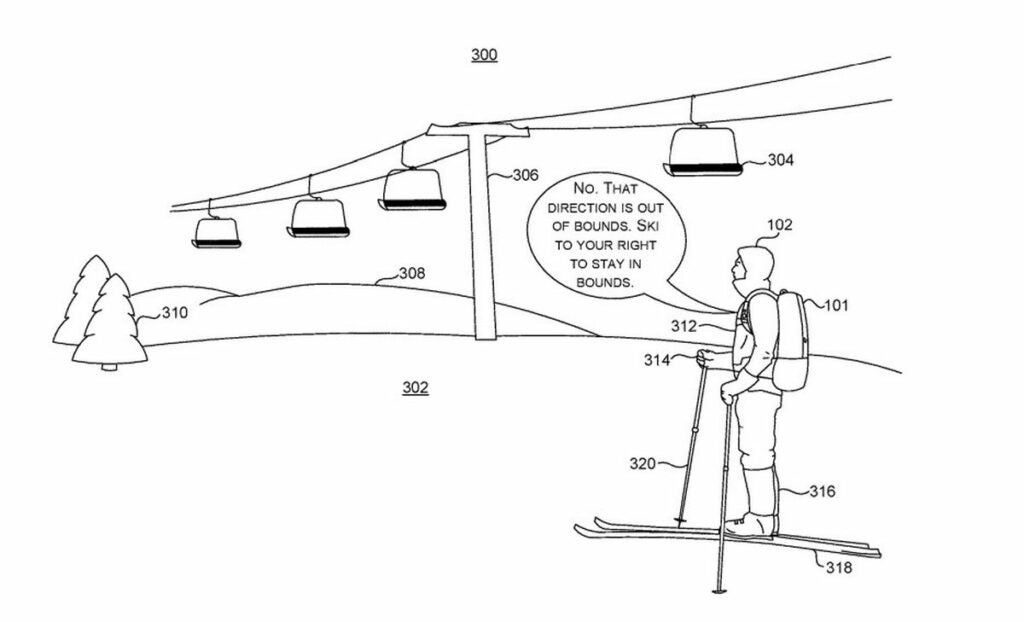
Image provided by Microsoft in the patent filing

As seen in the image above provided by Microsoft itself, the AI-assisted backpack can be very useful in certain aspects. It could even save lives as shown in the example above, in which a person is warned to return to their ski bounds, and the area that they are trying to go is out of bounds.

“The present concepts relate to an artificial intelligence assisted smart wearable that can function as a hands-free digital assistant. Moreover, the wearable may be context-aware such that a user can provide contextual commands that relate to the environment in which the user is situated and the wearable can understand the contextual command by sensing the environment and using artificial intelligence,” Microsoft’s detailed description read.

However, please be aware that these kinds of tech giants file many patent applications yearly, and most of them disappear in time as they decide not to continue with the project. It is unclear if the AI-powered backpack is one of those put on dusty shelves.

Microsoft’s investments in the field are getting bigger and bigger

Microsoft made its intentions in the artificial intelligence field very clear after the partnership with OpenAI. The tech giant invested a huge amount of money and cleared the way for OpenAI to dominate the scene with ChatGPT for the upcoming years. As a result, Microsoft implemented generative AI technologies into its tools, Copilot’s birth came thanks to this investment or partnership, however you want to call it.

Moreover, that is not the only investment the company made this year. KPMG and Microsoft have partnered to invest $2 billion in artificial intelligence (AI) over the next five years. The partnership will focus on developing AI tools that can help KPMG’s businesses automate tasks, improve decision-making, and identify new opportunities. KPMG and Microsoft will also work together to develop AI tools that can help KPMG’s clients comply with regulations.

This investment is part of a broader trend of consulting firms investing in AI. Rival consulting firms like PwC and Accenture have also made large-scale commitments to AI. This suggests that the use of AI is becoming increasingly important in the consulting industry.

The tech behemoth has even bigger plans in the field, and the executives are convinced that artificial intelligence will build the future. As mentioned, Microsoft’s AI-powered backpack patent might never see sunlight in the future, and the company might forget it just like hundreds of other patents. Either way, it is clear that Microsoft’s involvement in the AI industry will not be less than where it stands today.