Autodesk has just taken a particularly important step for those of us who work on a project basis, manage small teams or rely on the quality of Autodesk tools only occasionally. As of June 4, 2026, the minimum initial purchase for Autodesk Flex has been reduced by two-thirds, making Flex tokens a far more accessible option for studios, independent professionals and small businesses. We can now get started with a considerably smaller investment and add to our balance as the needs of each project evolve.
The update also strengthens the Autodesk for Small Business initiative, through which the company is bringing together resources, access options and tools designed for those of us looking for professional technology without having to take on the structures typical of large organisations. In this context, the Autodesk Small Business Hub becomes increasingly important as an entry point for exploring solutions, comparing alternatives and getting started.
A much more affordable access to Autodesk Flex for Small Businesses
The announcement comes with two very clear figures: 33 tokens and $99. Compared with the previous minimum of 100 tokens and $300, Autodesk has substantially reduced the upfront investment required to start using Flex. The financial barrier is now much lower, which is especially relevant when we are considering adding a new tool to our workflow, preparing a one-off deliverable or planning to bring additional capacity into a specific project for just a few weeks.
This change also arrives only one month after the launch of Autodesk for Small Business, the initiative through which the company is strengthening its relationship with smaller teams and independent professionals. The new minimum turns that commitment into a practical measure: it makes initial access easier, brings the investment down to a more appropriate scale and allows us to see how Flex fits into our workflow before purchasing additional tokens.

The reduction is particularly significant because small-business operations are often shaped by cycles. We may have several deadlines concentrated within one month, a quieter planning phase during the next and then an unexpected need for a specialized application to complete a specific part of a project. Our software usage can change very quickly, while our cost structure needs to remain as clear and predictable as possible.
The system gives us access to more than 100 Autodesk products. These include AutoCAD, Revit, Fusion, Inventor, Fusion Manage, Maya and 3ds Max; alongside many other solutions for architecture, engineering, construction, manufacturing, product design, animation and content creation. A single balance gives us access to an extensive catalogue, providing particularly valuable flexibility when our projects span multiple disciplines.
Autodesk Small Business Hub: the starting point for smaller teams
The Flex update is not just a reduction in the minimum purchase requirement. It fits into a much broader proposition for small businesses: helping us make better decisions about how to access Autodesk tools based on team size, frequency of use, project type and the investment capacity available at any given time.
This is where the Autodesk Small Business Hub becomes especially relevant. The hub acts as an entry point for exploring the company’s different tools, comparing options, getting started with the right products and accessing support resources. For a small business, centralising that information greatly reduces complexity, because we do not always have the time, budget or internal capacity to analyse every licensing alternative, every product and every usage scenario from scratch.
The Hub is also very useful when we are deciding between a dedicated subscription and the flexibility, if you will, of Autodesk Flex. If a tool is part of our day-to-day work, a subscription may make more sense. If we only need it for specific phases, production peaks, special projects or to test new capabilities, Flex may be a better fit. The value of the hub lies precisely in connecting those decisions with the reality of each team, rather than presenting a single access model for everyone.
In this respect, the new minimum of 33 tokens for $99 USD does make the entry point more gradual, but it is through the combination of the Small Business Hub and Flex that we can test tools, cover occasional needs, bring in external profiles or validate new services without having to commit to a larger purchase from the outset.
How Flex tokens work and what we can do with them
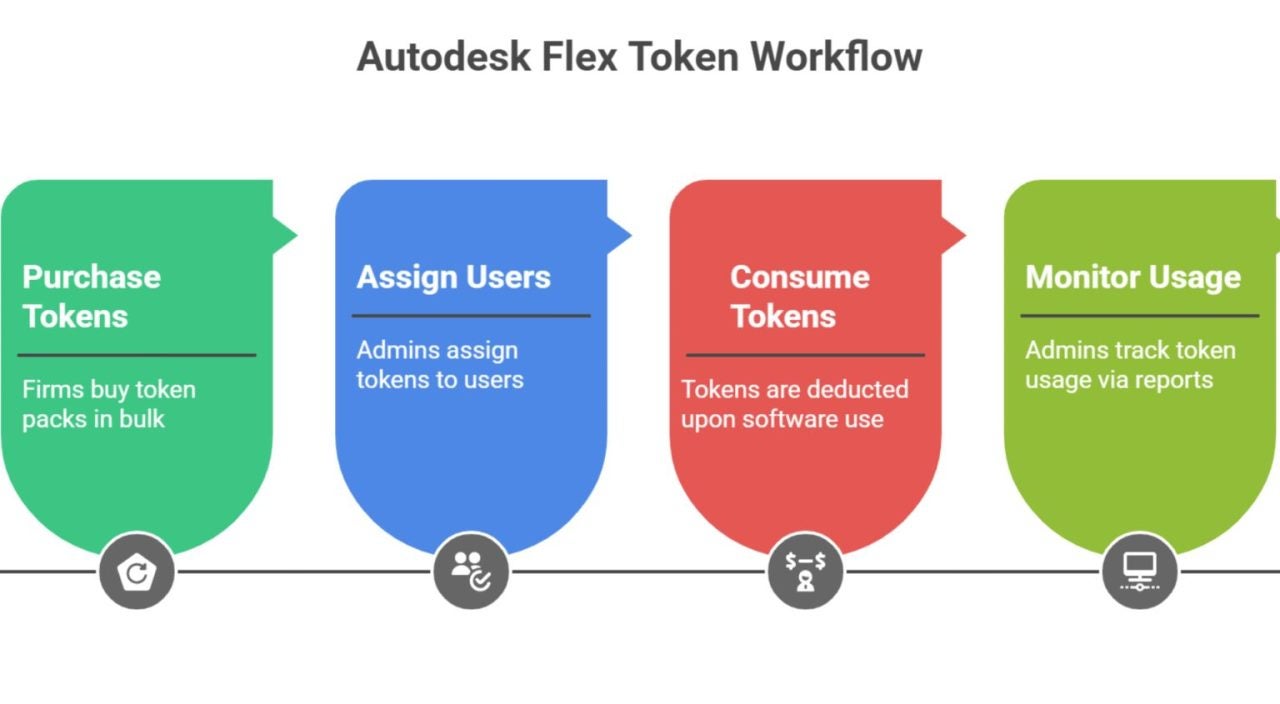
Autodesk Flex operates through a system of prepaid tokens. Once we have purchased them, we can assign users, select the products available to each person and use the balance to cover the applicable rate for each day of access to the different tools. Each product consumes a specific number of tokens per day, according to the official Flex rate sheet.
The daily charge is triggered every 24 hours while we use the product or service. Rates vary by application, as each solution provides different capabilities and levels of specialization. Fusion, for example, uses 3 tokens per day, AutoCAD uses 7, Inventor Professional uses 8, Revit uses 10, and Maya and 3ds Max use 6.
When someone on the team needs AutoCAD for a day, the balance covers the corresponding daily rate. During that period, they can work in the application using their assigned access. When a new 24-hour usage window begins, Flex applies the next charge. Spending closely reflects the actual number of working days, making it much easier to connect consumption with the tasks, phases and deliverables of each project.
Alongside this approach, Autodesk also offers dedicated subscriptions. The company describes these single-user subscriptions as an option for frequent access, while Flex is intended for occasional use and can provide access to multiple users through a pooled balance.
In practice, combining the two models can be particularly effective. Even within the same team, people who work with an application every day can have an assigned subscription, while specialists, collaborators or team members who only need access during certain phases can use Flex. In this case, the licensing structure reflects the team’s actual activity, with permanent resources for core functions and on-demand capacity during periods of greater intensity.
We manage everything through our Autodesk account. We can assign Flex credits to existing users, invite new people to the team and decide which products and services are available to each person. We can also create common product selections that apply to the whole team and review usage reports to understand how our requirements and costs are evolving.
Any new tokensAutodesk Tokens we purchase are automatically added to the team’s balance. When several token packs are available, Flex uses the tokens from the pack with the nearest expiration date first, as each pack remains valid for 12 months from the date of purchase. The system automatically prioritizes the balance that expires soonest, simplifying management when we make several purchases throughout the year.
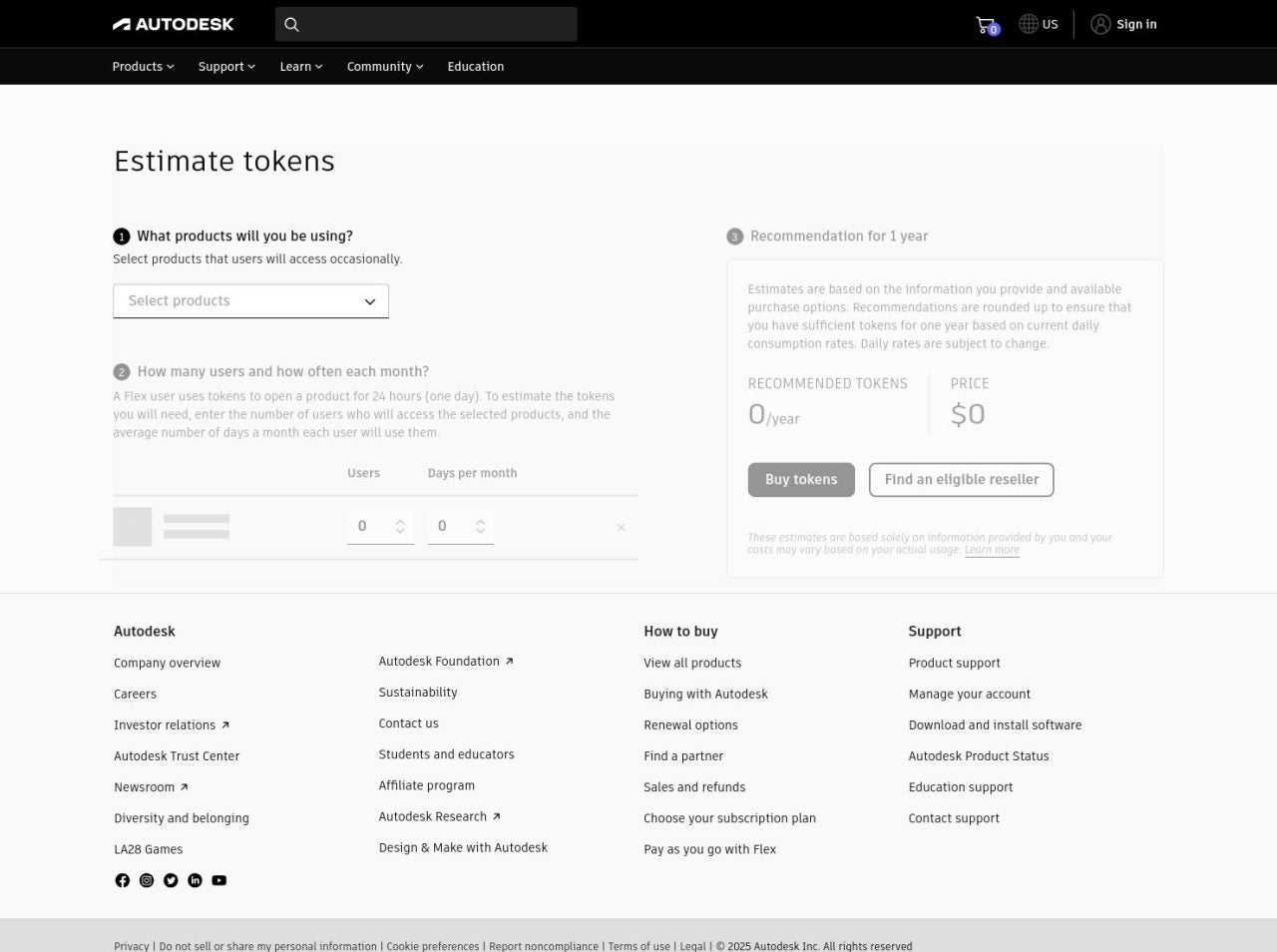
To help us plan, Autodesk provides a rate sheet and a token estimator. We can select different products, specify the number of people and enter the estimated frequency of use to quickly build a budget forecast.
Someone who needs Fusion for several days can calculate consumption using its rate of 3 tokens per day. A professional working with AutoCAD can start with 7 tokens per day, while adding some Revit work would require an additional 10 tokens for each day of use. The initial 33-token pack allows us to plan very specific uses from the outset, on a scale that is easy to relate to actual working days.
The versatility of the available tools is another important consideration. Flex brings together solutions for architectural design, civil engineering, manufacturing, simulation, coordination, management, visualization and entertainment within a single access model. This means we can cover a wide range of tasks using the same balance, reducing the complexity of arranging separate access for every specialized phase.
This flexibility can also be extremely useful when exploring new capabilities. A company considering an expansion of its services can assign a tool to one person for a trial period, assess its usefulness and evaluate actual demand. The initial investment of just $99 makes it easier to experiment with greater agility, particularly when we want to validate a new workflow before making it a permanent part of our service offering.
Greater flexibility to grow at the pace of each project
The value of the new minimum purchase for Autodesk Flex goes beyond the difference between $300 and $99. The change alters the scale at which we can consider using the Autodesk service. A smaller initial purchase enables faster decisions, but, more importantly, it allows us to connect the expense directly to a specific assignment.
For an independent professional, this flexibility could make the difference between accepting a project that requires an additional tool and having to turn it down. For a small studio, it could make it possible to bring in a specialist temporarily when that option might not otherwise have been considered. Tokens turn technological capacity into a fully adaptable resource, ready to support us as new opportunities appear on the calendar.
Because we know the daily rate for each product, we can include software usage as a specific cost when preparing a project estimate. The estimator helps us model different scenarios, while the management tools in our Autodesk account allow us to check that actual consumption remains in line with our forecasts.
Many small businesses work with external specialists, bring in talent for particular phases or distribute responsibilities differently depending on the assignment. Through user and product allocation, we can configure access according to each professional’s involvement, maintain centralized administration and adjust the setup as the project moves through each new stage.
It can also be useful to review consumption after every assignment. Reports allow us to quickly identify which products have been used most, which roles have relied on Flex more frequently and which requirements are starting to become routine. This data can guide future purchasing and subscription decisions, helping us build an increasingly objective basis for refining the company’s technology structure. When an application becomes part of our daily work, a subscription may be better suited to that frequency. When its use remains tied to specific moments, Flex provides its full value without any further commitment.
Autodesk presents this update as part of a broader evolution in its relationship with small businesses. Throughout 2026, the company will evaluate this new measure alongside other ways of improving accessibility, pricing, products and the overall experience. At this point, the Autodesk Small Business Hub allows us to follow that evolution from a space designed specifically for us, for those of us who need to compare options, find resources and get started with a setup that is proportionate to the actual size of our business.
Ultimately, professional software can adapt to the realities of teams of different sizes. A small studio can work on ambitious projects, collaborate with specialists and use advanced tools during the phases in which they are required. The size of the team no longer determines its technological reach, and our capabilities instead depend on how we organize ourselves around each opportunity, area of expertise and project.
With the new minimum purchase, Autodesk Flex becomes more accessible and offers greater practical value within the Autodesk for Small Business ecosystem. Getting started now costs two-thirds less than before, while the breadth of the catalogue, the support of the Small Business Hub and the usage model retain all their benefits. For those of us managing variable assignments, busy periods or specialized requirements, the difference could turn a future possibility into a tool that is already available for our next project.
