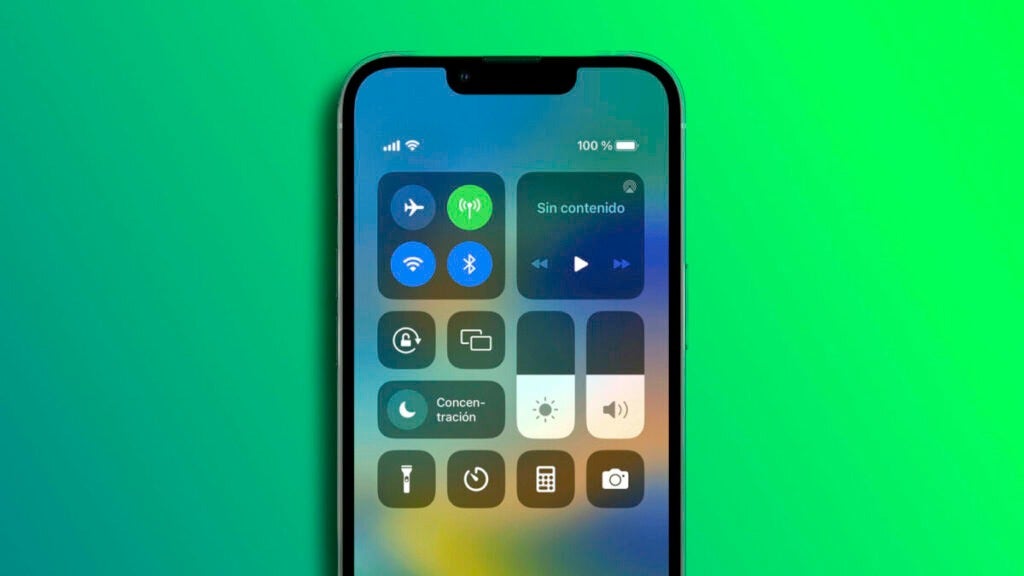
The Control Center is the nerve center of the quick settings of our iPhone or iPad. We can enable or disable Wi-Fi and Bluetooth, turn on the device’s flashlight, recognize songs and several other options that do not appear at first glance, but are at our disposal.

Holding down gives access to several extra options
Remember that to access the Control Center of our iPhone or iPad we must slide down from the upper right corner of the screen. Once the options are displayed we will see a lot of buttons. Buttons that we can remove or rearrange and also add new ones from the Settings app by entering Control Center. We can even, to improve the security of our device, disable access to it unless the iPhone or iPad is unlocked.
Well, let’s notice, to begin with, that we can press and hold on the two upper squares, which contain several controls inside, to see even more options. Also, once these are displayed or directly on other buttons that are not part of these two squares, we can press and hold to see even more options. Options such as choosing which Wi-Fi network we want to connect to, which Bluetooth device to link to, or the brightness level of the flashlight.
We may not initially think of it, but where we can also press and hold to access more controls is on the volume and brightness sliders. In the first we are offered to activate noise cancellation or transparency mode of our AirPods, while in the second activate or deactivate True Tone, Night Shift or the dark mode of the device.
Without pretending to list here all the options offered by the Control Center by pressing and holding on the buttons and controls that we find, what we do intend is that we keep in mind that many of them offer more than what is seen. From recording a video directly in the Camera, recording the screen to activating the dark mode, it is an excellent idea that, when we have time, we try what is behind the buttons of our Control Center.
Some of the links added in the article are part of affiliate campaigns and may represent benefits for Softonic.
