
Google Drive for iOS has a new look and a couple of new features. Today, Google rolled out an update for its Drive app for iOS to feature the same Google Now, card-style interface the company has been adopting across all of its products. The interface has been cleaned up a bit with an emphasis on search. At the top of the app, you’ll now notice a persistent search bar where you can quickly look for your files and documents. This includes the file name and text within a certain document, which is very handy.
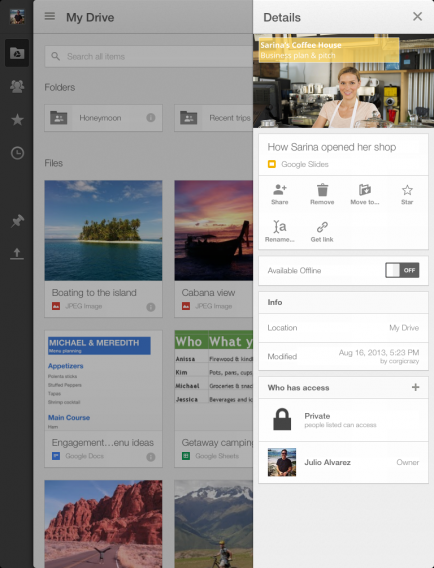
Files, photos, and documents have also been made more visual, giving users a large thumbnail preview of each file. Of course, users can change the layout to a list if they want to fit more files onto the screen. Files can now also be edited in landscape orientation.
Sharing has also gotten easier with the updated Google Drive app for iOS. When you tap on the details pane of Google Drive, you’ll see an option to “Get link,” which automatically copies the link to your clipboard for easy sharing. The details pane also allows users to move files or share an entire folder with a friend.