
All you need to know about Google Desktop

Google DesktopI recently reviewed the Gmail gadget launched by Google, which enables you to check your Gmail account right from your desktop. This gadget works with the Google Desktop sidebar, so I had to install it on my PC.

I must admit I wasn’t happy about having even more stuff on my desktop, but after testing it for a while I was pleasantly surprised by the functionality and nice design of this smart piece of software.

Google Desktop is mainly a powerful local search tool that makes use of the Google engine to find files, folders and apps on your hard drive. You can use it just as a Google-powered local search tool, either as floating bar on your desktop or a neat deskbar perfectly integrated in the taskbar. But if there’s a way you can make the most of Google Desktop, that’s the sidebar.
Google Desktop

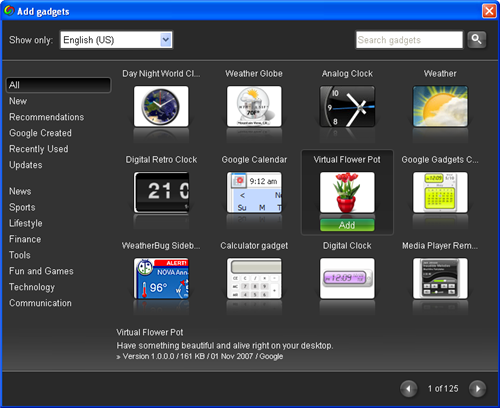
The Google Desktop sidebar is similar to the Vista sidebar, in the sense that it can hold a number of small handy webapps (the so called gadgets) that can deliver information to your desktop, show data, display photos and much more. Gadgets are very easy to install: you can get them right from the sidebar by clicking on the plus sign button on top, or simply download them from the Google Desktop website.

There are literally hundreds of gadgets to install. If you don’t know where to start, try sorting them by popularity. The top 10 gadgets include clocks (both analog and digital), weather information, calendars, calculators, games and even a virtual flower pot you can take care of like one of those old Tamagotchis.
Google Desktop vulnerability exposed

googledesktop2.jpgGoogle has been prompted into releasing fixes for Google Desktop after it was discovered the popular search utility was vulnerable to intruders. The holes were discovered by a PC security firm who highlighted a script vulnerability that could allow hackers to browse through the entire contents of a hardrive.

Google Desktop uses the same indexing technology as applied by its search engine – it trawls through every single document on a PC to enable users to perform a Google search on their own computer. However, the security firm said that there is a specific weak point in the integration between Google Desktop and Google’s online search engine. They claimed that any hacker could have also circumvented a firewall or anti-virus package to exploit the vulnerability.

“A fix was developed quickly, and users are being automatically updated with the patch,” Google said in a statement. “In addition, we have another layer of security checks to the latest version of Google Desktop to protect users from similar vulnerabilities in the future.”

The specific problem is a feature in Google Desktop which allows users to place ‘Desktop’ as one of the drop down choices on the Google home page search bar. Although the option is convenient, it immediately opens a backdoor between the contents of your PC and the internet.

Although I’m a big fan of Google products, I’ve never been keen on Google Desktop for precisely this reason. I don’t like the thought of anything trawling through my hardrive that can then send that information to a third party. Although they’ve patched it, Google should give users better warning on this type of risk when installing Goolge Desktop. Obviously, the safest thing is to not install it at all and stick to Windows inbuilt search function even if it hasn’t got Google’s amazing search power behind it.

Google Desktop to offer free SMS texting

orkutOne of Google Desktop’s coolest features is the social networking tool Orkut. Until now, it was very much an online networking tool allowing you link up with likeminded people or search for “romantic interests” as Google put it. However, Orkut is now branching it out into the offline world by enabling users to send free SMS messages to mobile phones.

At the moment, it’s only available in Brazil where they’ve come to an agreement with a local mobile network but if all goes well, the plan is for a worldwide rollout this year. The new SMS feature means Orkut’s special ‘scrapping‘ feature will be extended to mobiles, allowing you to do it on the move and pretty much anywhere else you’ve got an internet connection. Google also promise some new “hidden goodies” in the new Orkut which only the “adventurous” will find.

Whether this is yet another Google masterstroke remains to be seen. Other similar projects have been plagued with technical difficulties and commercial problems with the networks. Also, the fact that most people text while on the move makes us wonder whether it really will take-off.

In the meantime, keep an eye on your orkut account as when its finally available in your country, there will be a message from Google telling you how to get started.