

In the world of iPods and iPhones, there’s nothing more annoying than not being able to copy your music from them onto your hard drive. This is because Apple have locked both devices so that you can only copy music onto them but not vice-versa. This is incredibly frustrating if you want to replace a song you’ve lost or deleted in iTunes, your Mac has crashed and your iPod/iPhone is the only place you’ve saved your music, or if you simply want to transfer some songs between computers.
Fortunately, there are two excellent “unlocking” solutions for Mac in the form of Senuti and iPodRip. Both applications used to be free but now require a modest fee to use them. Both have free trial versions however and I put them both through their paces to see which is best.
Senuti
Firstly, Senuti supports both iPod and iPhones so if you own the latter as well, then it’s a no-brainer which to choose. The interface of Senuti is very clean and as soon as you connect your iPod, your music and playlists appear pretty much instantly. To transfer a song, you can either drag and drop them or select the song and click the clearly labeled “Transfer” button in the top left corner.
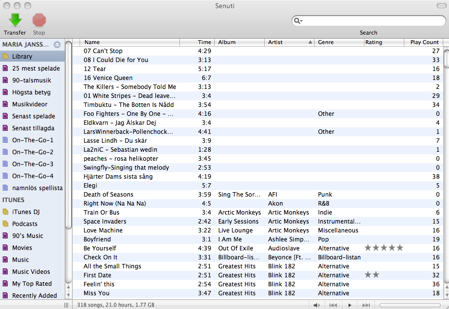
That’s about all there is to it. Once a track is transferred, it is denoted with a blue dot which tells you that it has already been transferred to your hard drive. You can also play songs simply by double clicking on them. The demo is limited to 30 days and 1000 song transfers but there’s no nag screen and the full license costs $18. Continue reading “Which iPod music ripper for Mac? Senuti versus iPodRip”