With Copilot appearing in all Microsoft applications, it was only a matter of time before the AI assistant made its debut in the classic Windows text processing software, Notepad.
Indeed, the latest update of the Insider branch of Windows 11 has done it and has added the Copilot functionality to the basic application. And not only that, but the update brings some welcome changes to the Windows snipping tool.
Snipping Tool and Notepad updates begin rolling out to Windows Insiders! Check out the blog post from @dgrochocki. (Snipping Tool gets shapes!) https://t.co/eciha7s8T2 ^BLB
Microsoft has announced the patch on the Windows Insider blog. At the time of writing, this update is only available in the special branch of Windows 11 Insider, where new features can be tested before their release. Therefore, you will have to wait a little longer for this update to reach computers worldwide.
With this update, users can right-click on the text within a Notepad document and click on a new button called “Explain with Copilot“.
This will send the text to the Windows AI assistant, which will summarize everything it is given. Microsoft claims that this will be useful for understanding both system log files and code segments.
The Notepad is not the only application that is being updated. The Snipping Tool is gaining the ability to annotate screenshots after taking them. This includes the addition of arrows, boxes, and circles, as well as color options for each. This makes it easier for users to highlight or indicate a specific part of an image.
These updates seem to be exclusive to Windows 11, which means that Windows 10 users will not get them. That being said, since the end of support date for Windows 10 is approaching quickly, now would be a good time to update the operating system.
The growth of Microsoft Copilot is more than evident, given the full trust that Microsoft places in its Artificial Intelligence. Such is its expansion that, as recently announced by the company, Copilot will also be integrated into Stream services within SharePoint, enabling its participation in conferences held within this application of the brand’s ecosystem.
Thanks to this, Microsoft emphasizes that it will enhance the quality of life for SharePoint users through the functionalities that can be added to this system via the synergy between Stream and Copilot. In this way, the company’s Artificial Intelligence continues to gain ground, positioning itself as one of the most relevant iterations in the world of technology for the future.
As explained by Microsoft in their blog, the addition of Copilot to the Stream service through SharePoint will allow users to have an AI capable of monitoring and understanding everything that takes place during these conferences. It will comprehend the information mentioned and synthesize it in a manner similar to what was previously announced months ago in Microsoft Teams.
However, these enhancements of Copilot in Stream will take a little longer to arrive, and these functionalities are expected to roll out throughout February and March of the year 2024. Therefore, the development team is still actively working on these recently announced features.
Copilot is the AI around which all future plans for Windows 11 are pivoting… and the ever-nearing Windows 12.
Copilot: Microsoft’s hope
For several weeks now, it’s evident that Microsoft has placed its future hopes in Copilot, its multitasking AI capable of providing numerous user support, assistance, and content generation services. Each passing week, we witness this AI making its way into more and more Microsoft applications and services.
Since its announcement in the early months of 2023, the company made its intentions clear regarding the scope they envision for this AI, and they’re staying true to that vision. In fact, currently, Copilot can already be utilized in applications such as Microsoft Teams, email management in Outlook, Microsoft Loop, in the Edge browser as a generative AI for what was previously Bing Chat, and more announcements are expected gradually.
Microsoft Ignite 2023 has blown the lid off with a flood of announcements, and the buzzword is Artificial Intelligence (AI). This year, as you may guess, the focus is on AI. The big player? Generative AI, taking the helm in Microsoft’s latest reveals. From beefing up language models on Azure to expanding the Copilot lineup, the event marks a turning point in how we engage with AI.
The kickoff was no small affair, with Microsoft dropping over 100 announcements covering Windows, Microsoft 365, and Azure. And guess what’s stealing the spotlight? AI, of course. Here’s the lowdown on the key highlights from Microsoft Ignite 2023.
Microsoft Ignite 2023: Copilot is the protagonist
Out with the old and in with the new! Bing Chat Enterprise is making way for the revamped Copilot experience. This is more than just a name change – a complete makeover. The fresh Copilot, slated to launch on December 1, 2023, is not your average chatbot. It’s a secure hub for commercial data, especially for those hooked into Microsoft’s Entra cloud-based identity management service.
Copilot isn’t sticking to its old haunts. It’s extending its reach to the Edge for Business management interface. Admins note that Copilot is here to help with recommended policies and extensions for your workplace browser. And that’s not all; there’s a new adoption dashboard for Microsoft Viva, giving insights into how Copilot features reshape user workflows.
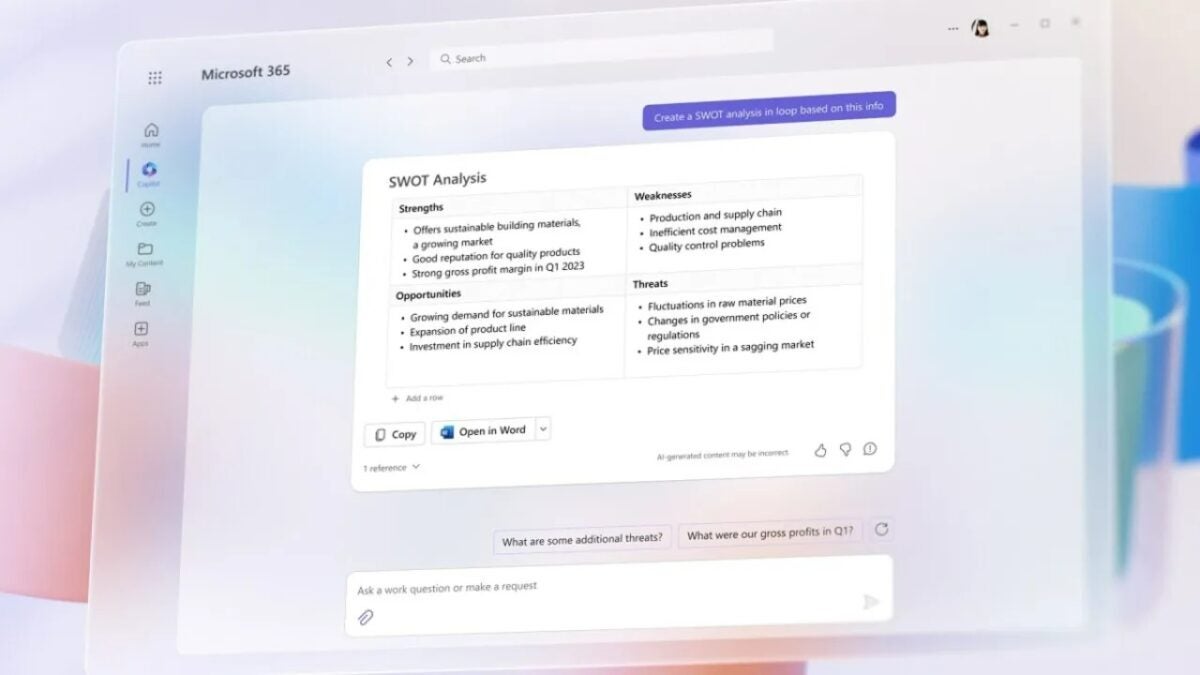
Copilot doesn’t discriminate. It plays nicely with Teams, Outlook, Salesforce, ServiceNow, and Zendesk. And the Copilot family is growing, covering Dynamics 365, Microsoft 365, GitHub, and Viva. Third-party suppliers are invited to the party, bringing plugins and connections from Jira, Trello, Confluence, Freshworks, and more. Exciting times ahead for Copilot in Microsoft 365 – Teams is gearing up to turn live meeting transcripts into interactive documents.
Credit: Microsoft
Meet Copilot Studio
Imagine ChatGPT but for forming copilots – that’s Copilot Studio. Microsoft’s AI solution development tool is playing with Azure features, speech recognition, sentiment analysis, and Power Platform connections. It takes the reins with Copilot Studio, steering the ship in the development process. The impact is real – early adopters report increased productivity, loyalty, and time savings according to Microsoft’s yearly Work Trend Index.
Microsoft’s Dive into Custom AI Chips
Big news on the hardware front – Azure Maia, a custom AI processor, and Azure Cobalt, an Arm-powered CPU, are making their debut in 2024. These processors aim to shake things up, reducing reliance on Nvidia and paving the way for an AI-dominated future in Azure data centers.
Unified Project Management with Microsoft Planner
Streamlining project management is the goal, and Microsoft is making it happen in spring 2024. Microsoft Planner merges Microsoft To Do, Microsoft Planner, and Microsoft Project for the web into one seamless experience within Microsoft Teams.
Credit: Microsoft
Windows AI Studio: AI Made Simple
Teaming up with Nvidia, Microsoft introduces Windows AI Studio. It’s a hub for developers to dive into AI models on their Windows PCs. Windows AI Studio simplifies the AI configuration process with a guided workspace setup and easy access to tools and models.
Microsoft Teams is getting a facelift with AI-powered features. The “decorate your background” feature, set for early 2024, uses generative AI effects to spruce up video calls, making them look more professional by cleaning up the clutter.
In a nutshell, Microsoft Ignite 2023 is ushering in a new era of AI integration, promising increased productivity and a personalized digital experience. As these innovations take center stage, Microsoft is steering the ship towards a future where AI is at the forefront of how businesses and individuals interact with technology. Get ready for an exciting journey into the world of AI with Microsoft!