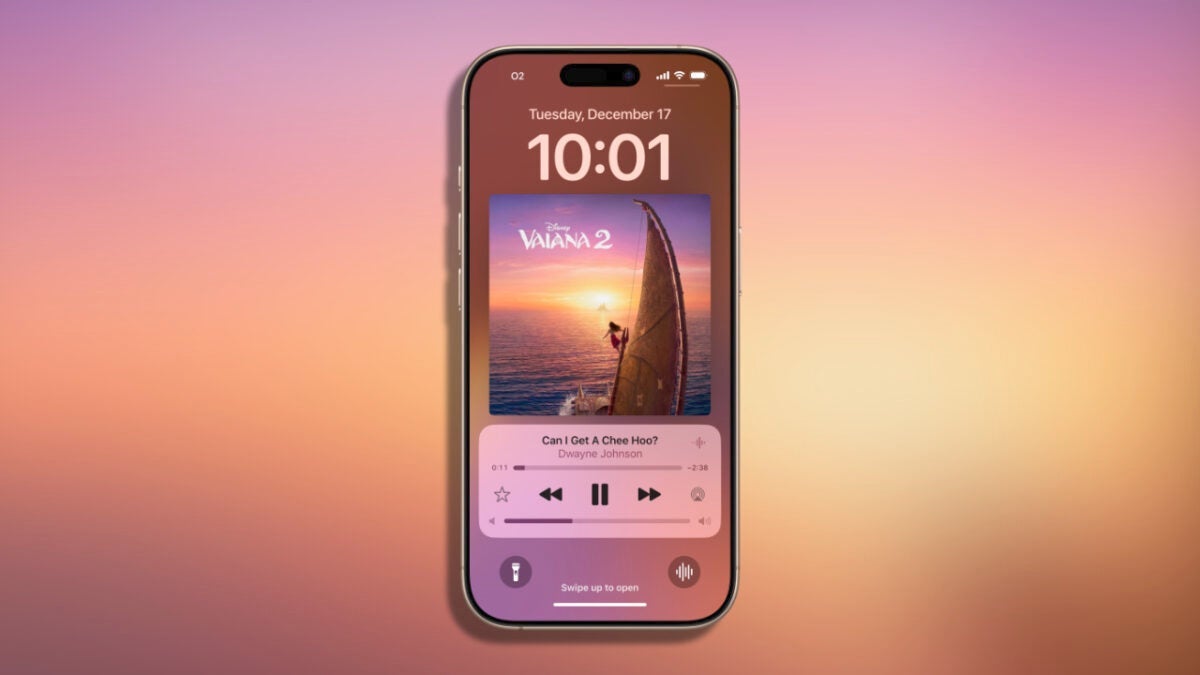
The arrival of iOS 18.2 brings with it, in addition to a new app and categories in Mail, a small change that many will appreciate: the volume control slider on the lock screen. A feature that disappeared two years ago with iOS 16 and that we may have missed since then. Now, with a simple adjustment, we can recover the volume slider in the lock screen player. Where to find the setting for the volume slider To activate this feature, we need to go to the accessibility settings. The steps […]
The arrival of iOS 18.2 brings with it, in addition to a new app and categories in Mail, a small change that many will appreciate: the volume control slider on the lock screen. It’s a feature that disappeared two years ago with iOS 16 and that we may have missed since then. Now, with a simple adjustment, we can restore the volume slider in the lock screen player.
Where to find the setting for the volume slider
To activate this feature, we need to go to the accessibility settings. The steps to enable the volume slider are as follows:
- We open the Settings app on our iPhone.
- We go to the Accessibility section.
- We enter Audio and Visual.
- We look for and activate the option Always Show Volume Control.
With this setting enabled, the volume slider will reappear on the lock screen whenever we are playing audio or video. This means we can adjust the volume with a simple gesture, without needing to use the physical buttons.
Sometimes, the small features are the ones that make the biggest difference in daily use of our devices, especially when we get used to them. The volume slider on the lock screen is one of those tools that can be really convenient if we tend to have the iPhone on a stand, for example, where it’s easier to touch the screen than to press a button.
Now, with iOS 18.2, we can once again enjoy the setting we were accustomed to. A small detail that we can customize according to our preferences and that can make an interesting difference.

Author: David Bernal Raspall
{
"de-DE": "Architekt | Gründer von hanaringo.com | Trainer für Apple-Technologien | Autor bei Softonic und iDoo_tech, zuvor bei Applesfera",
"en-US": "Architect | Founder of hanaringo.com | Apple Technologies Trainer | Writer at Softonic and iDoo_tech, formerly at Applesfera",
"es-ES": "Arquitecto | Creador de hanaringo.com | Formador en tecnologías Apple | Redactor en Softonic y iDoo_tech y anteriormente en Applesfera",
"fr-FR": "Architecte | Créateur de hanaringo.com | Formateur en technologies Apple | Rédacteur chez Softonic et iDoo_tech, précédemment chez Applesfera",
"it-IT": "Architetto | Fondatore di hanaringo.com | Formatore in tecnologie Apple | Scrittore per Softonic e iDoo_tech, precedentemente su Applesfera",
"ja-JP": "建築家 | hanaringo.comの創設者 | アップル技術のトレーナー | SoftonicおよびiDoo_techのライター、以前はApplesferaで",
"nl-NL": "Architect | Oprichter van hanaringo.com | Trainer in Apple-technologieën | Schrijver bij Softonic en iDoo_tech, voorheen bij Applesfera",
"pl-PL": "Architekt | Założyciel hanaringo.com | Trener technologii Apple | Pisarz w Softonic i iDoo_tech, wcześniej w Applesfera",
"pt-BR": "Arquiteto | Fundador do hanaringo.com | Instrutor em tecnologias Apple | Escritor na Softonic e iDoo_tech, anteriormente na Applesfera",
"social": {
"email": "races_provost0x@icloud.com",
"facebook": "",
"twitter": "https://twitter.com/david_br8",
"linkedin": "https://www.linkedin.com/in/davidbernalraspall/"
}
}
View all posts by David Bernal Raspall