 PDP, hacker and main contributor to the excellent GNUCITIZEN blog, revealed yesterday a flaw in Adobe Reader that could potentially put many users’ computers at risk. He defines it as a “HIGH Risk vulnerability: Adobe Acrobat/Reader PDF documents can be used to compromise your Windows box.” The issue was found using Adobe Reader 8.1 on Windows XP SP2 and previous versions and other PDF viewers are also concerned, although he did not say if the vulnerability could also affect other operating systems.
The senior security analyst declined to publish any code showing how the attack works for now, as this would obviously put a lot of people’s PCs at risk. He has promised to make it available as soon as Adobe fix this vulnerability though. For the time being he suggests to avoid opening any PDF files locally or remotely.
[via Macworld]
 OpenTTD is a cloned free version of the economic simulation classic, where you have to develop your own transportation network, via rail, air or sea, and build your empire delivering goods all over the country. This version has been completely revamped adding new features and better graphics and usability. You’ll even be able to play online with up to 8 players.
 Do you need to check your home PC from work? Do your friends -and customers- often need assistance with computers? No need to worry: use LogMeIn Free and you’ll be able to remotely access any computer from your web browser. Simply install the client in the target machine, connect to it and see the remote desktop as if you were sitting right in front of the PC!
 As you’ve probably realized, Windows comes bundled with all sorts of components, of which many of the system tools, online services and of course Windows Media Player, Internet Explorer, Outlook Express, MSN Explorer and Messenger. Some of these tools you’ll probably never use or even need. There’s nothing you can do about this during the installation procedure but afterwards, you can use
 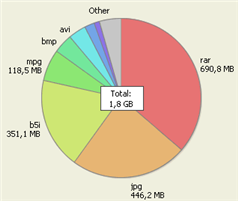 Windows Explorer doesn’t exactly provide much scope for analysing and delving deeper into the details of your hard drive. For example, it’s not easy to see which folders are the biggest on your hard drive, which files are taking up the most space and how much space your operating system is occupying. Fortunately, there are several tools out there that can help you see in an instant, what is what on your hard drive without even touching Explorer. These can help you do various things from identifying which files that are taking up too much space on your disk drive to which ones are obsolete.
 For those of you not acquainted with Pocoyo, and I must admit I’m more of a Bob the Builder man, apparently he has been taking children’s television by storm in both the UK and Spain over the past couple of years. He’s a smiley little boy dressed in blue with a rather fat face and a whole host of friends that include a pink elephant, a dog and a duck. And of course they get into plenty of adventures.
 You’re probably a hardcore gamer with hundreds of playing hours under your belt. You’ve created your own clan and you train a few hours everyday in your favorite First Person Shooter (FPS). You’ve even upgraded your PC just for the sake of playing. However, I’m sure there’s something you haven’t tried yet: playing your own game!
 If you’re a little on the obsessive-compulsive side then there’s probably nothing more satisfying than having your music library all neat and tidy, with all the track titles, authors, musical styles and album names entered correctly. Let’s face it though, filling in all those ID3 tags in your music library can be a real nightmare, all the so more if you have a lot of music and have never really tended to it. What you can do then is use an application that will specifically edit music tags.
 If you suspect you’re suffering hardware problems, then it’s worth testing it all to probe for suspected bugs or failures. This need not mean taking your PC to a technician though.
  There’s nothing more annoying than an Mp3 music collection that constantly varies in sound levels. One minute, you can hardly hear a track and then the next one comes blasting through your speakers.