 Shopping is stressful enough without having to remember everything you need to buy. Which is why it’s important to have a good list manager. Now in the old days, people used to write shopping lists in little books. On paper. They were crazy days. Since then, you’ll be glad to know, that we’ve moved on a few paces. Now the world of the shopping list is far more interesting.
Month: September 2007
Superhero downloads: Marvel vs DC
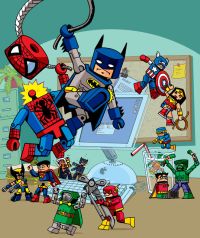 Any comic book-collecting uber-geek, will tell you the Marvel and DC comic books are completely different, in terms of their characters, style, moral values, etc. They will probably also tell you that Marvel and DC are like two brands like Pepsi and Coke and you can’t like both. Let’s face it, these people may know a lot about comics but they don’t know how to have fun. So, let me, Downloadman explain how you can enjoy the best of Marvel and DC superheroes from your PC.
Let’s start with a desktop theme featuring the very first comic book star, Superman. The pack includes a host of goodies from Mr Man’s last movie, including a wallpaper, resampled sounds, and a screensaver with widescreen images taken from the DVD. DC’s other heavyweight do-gooder is Batman, and Softonic has cool desktop adornements for both Batman Begins and the eagerly anticipated Dark Knight.
In the other corner, is the Marvel crew and I reckon they could easily take the DC lot in a fight. Want proof? Well check out the official X-Men game, which showcases some of the hardest dudes you’ll ever meet. Better still, you get to be them. Of course, everyone’s favourite Marvel hero is Spiderman (ironic, considering most people hate spiders) and there are a couple of great downloads for any fan. The first is called Bouncing Spiderman and is a screensaver where Spidey covorts around your desktop, and the second is the new Spideman: Friend or Foe game, where the friendly neighbourhood fellow joins forces with some of his arch rivals to kick some alien butt in NY.
However, probably my favourite comic book download is the Marvel Trading Card Game, where you get to match different superheroes against each other in order to win cards. It’s a real hoot and you can even play against other comic book fans online. Just don’t get them started on DC.
A customizable desktop calendar
 Rainlendar is a lightweight, effective calendar that keeps track of all your important events. The program can also be scheduled to trigger an alarm whenever an important event is approaching, so you don’t miss that important date again! Rainlendar integrates with Outlook calendar and can be customized with skins.
Add keywords to your photos
 Keyword Manager is a godsend for those of you that have large photo collections. This nifty iPhoto plug-in lets you add tags to your photos, regardless of whether you have only 3 or more than 5,000 of them. Keywords can be copied, pasted and structured in a hierarchy. The plug-in is presented is a sleek, dark, Leopard-like interface.
Simple tips to get more out of Firefox
 After having used Firefox for so many years, I couldn’t browse the web with anything else. I’ve been able to completely customize it to my needs so it almost feels like I designed this program myself. But I know there are hundreds of new users coming to Firefox everyday, so I thought it would be a good idea to explain some basic tips to the make the most of this excellent browser.
First of all, use extensions. Here at Softonic we have a large selection to choose from. Just bear in mind that having too many of them may affect the browser’s performance. Choose wisely and keep the three or four extensions that you like best. My personal picks would be Tab Mix Plus to manage tabs more efficiently, Gmail Manager to check my Gmail account and Download Statusbar for improved downloads.
Second, use keyboard shortcuts. It’s simpler and quicker than the mouse, believe me. Some of the most important shortcuts in Firefox are Ctrl+T to open a new tab, Ctrl+Tab to move between tabs, Ctrl+K to make the search field active, Ctrl+D to save the current page in your bookmarks, Ctrl+H to display your history and Ctrl+J to show the downloads window.
Last, but not least, improve performance with Firetune. This extension tweaks some hidden settings (no technical knowledge required) and makes Firefox to run faster and more smoothly, especially in mid- and high-spec computers.
Pimp my Outlook: Top Outlook add-ons
 With webmail providing excellent service to manage all your messages, it’s getting tougher for Microsoft’s Outlook mail client to keep its place in the sun. And yet, the application is still one of the most popular around, mainly due to the fact that it comes pre-installed on PCs but also because Exchange remains a reference in professional messaging and collaboration.
Notes, contact lists, filters and calendar…Outlook has just about everything you need to handle your emails then. Still, you can install a few add-ons to add some functionality to the mail client. WinZip Companion allows you to automatically zip or unzip any attachments you receive. Lookout adds a little search bar to your Outlook interface. Even though its been discontinued since June 2004, the add-on still displays results fairly quickly. Mailinfo will alert you every time an email you’ve sent has been received and read. Great for sending formal emails. If instead you worry more about incoming messages, how about using Mail Alert? Every time you receive a new message this plug-in will display all the essential information. Skype users can set up Skylook, which integrates Skype commands into Outlook, saving you the hassle of opening up the VoIP app every time. It can even archive and record your calls. Finally if it’s a real upgrade your looking to give to Outlook you can try out Bells and Whistles for Outlook. This add-on has no less than 19 productivity tools available, among which email notes, automatically adding new contacts to directory or message exchange tracking.
Softonic France launched!
It seems like only yesterday that we, the crew of the good ship Softonic English set sail on our quest for the very best software downloads on the world wide web. Now, nearly two years later, Softonic is delighted to announce the launch of its latest mission: Softonic en Français.
Dedicated to just the same editorial independence and critical analysis as Softonic Español, Deutsch and English, the French site is packed with software reviews and downloads for Francophones from all over the world.

Félicitations à l’équipe française! To all our French-speaking visitors, please check out the new site and let us – and the French team – know what you think!
Block unwanted callers
 I was interested to learn of a man from America who has set up his entire home phone operating system using Asterisk, open source software that IMs him whenever his phone rings, sets personalised MP3 ‘hold’ music and, definitely the most interesting, redirects unwanted callers to the screams of monkeys. In tribute to this piece of genius, I thought I’d show you some other ways of ruining the lives of telemarketers and nuisance callers.
- BlackBaller (Symbian) – Blacklist salesmen
- Call Filter (Symbian) – Reject a call, send a nasty SMS
- MagiCall (Win Mobile) – Block or hang-up, you choose
- Call Block (Palm and Pocket PC) – Block incoming calls by first or last digits
- Advanced Call Manager (Symbian) – Separate friends, enemies and family into lists
- PhonePilot (Symbian) – Engaged; reject; send SMS… 7 ways to avoid people
Top 5 alternative visual themes for XP
 Vista theme packs are undoubtedly the most popular themes for Windows XP at the moment but they’re not the only way of transforming the operating system. There are several other alternative themes out there that might not have the modern appeal of Vista but certainly give it a much needed face lift. If you’re getting bored of the XP style, spice up your life with these.
- Flyakite OSX – Give XP the Mac OS X look complete with cursors and sounds
- DameK UltraBlue – Makes your XP look like the Longhorn beta versions
- My Frame Panel ActiveX – Customise and design your own themes
- Xbox XtremeXP – Give your operating system the Xbox makeover
- Crystal Clear – Minimise and customise the look of XP for a more elegant feel
Get notified when a webpage is updated
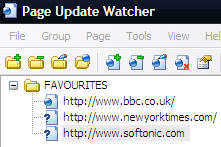 With RSS feeds and news tickers being all the rage nowadays, it might not seem necessary to install an app that can tell you when a page has been updated. However, there are still many websites out there that lack either an RSS feed or news ticker function and so the only way to keep updated is to regularly check the page. That is unless you have Page Update Watcher installed which automatically detects when a change has been made.
The program works by trawling pages that you’ve specified and alerts you with a simple pop-up bubble in your taskbar when something has been revised. You don’t even need to visit the page – you can just enter a URL or even import your Bookmarks or Favourites from Firefox or Internet Explorer. Afterwards, you can select which pages you want to check for updates as well the frequency at which Page Update Watcher verifies pages.
Be warned however that if you enter too many URL’s, you’ll be bothered by a permanent bubble popping up every time the slightest thing changes on a page. This is best used sparingly on those sites where there’s simply no other easy way of keeping track.