
Firefox 26 Beta features “Click to Play Plugins”, Firefox OS app manager

Mozilla has released new beta versions of Firefox for Android and the desktop. On the desktop side of things, users can expect “Click to Play Plugins” to be enabled by default, which disables most plugins (Flash being the exception) until you click on them and a new Firefox OS app manager. Android users get a new start screen, which Mozilla calls “Home.” The new Home page will allow users quick access to things like bookmarks, browsing history, favorites, and their Reading List.
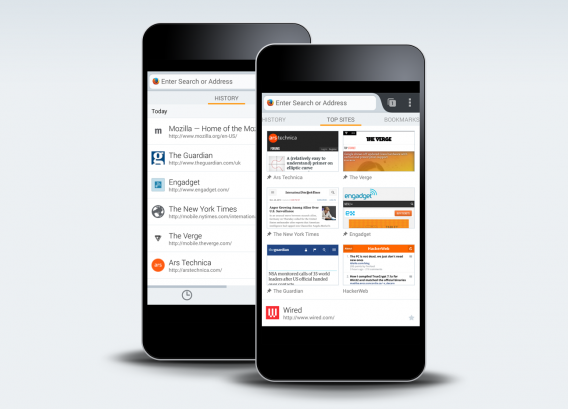
Firefox for Android Home screen

Click to Play Plugins is being implemented because of the security risk of auto-enabled plugins. Now most plugins will have to be enabled by the user, reducing the risk of running older, more vulnerable plugins. The new App Manager is a tool for developers to experiment with HTML5 applications that run inside the Firefox Browser. This will help Firefox developers create applications that work for the desktop and for Firefox OS. Google Chrome currently has browser-based applications as well.

For more information about the Firefox 26 beta, check out the source links below.

Download Firefox 26 beta for Android, Mac, and Windows.
RELATED STORIES

[Source: Firefox 1, 2]

Chrome Canary browser blocks malware downloads

The latest Chrome Canary build features automatic malware blocking for suspicious downloads. Google’s Canary developer channel is the “bleeding edge” of Chrome development so expect plenty of bugs, though you can install the browser alongside your stable version of Chrome if you want to test it out.

“Online criminals have been increasing their use of malicious software that can silently hijack your browser settings.”

Google is implementing automatic malware blocking in Chrome because of more sophisticated malware attacks that could reset your browser settings, leaving you vulnerable to subsequent attacks. “Online criminals have been increasing their use of malicious software that can silently hijack your browser settings. This has become a top issue in the Chrome help forums; we’re listening and are here to help,” says Linus Upson in a blog post.

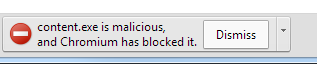
Malicious executables are easy to come across as they’re often disguised as benign things like free screensavers, icon packs, or video plugins. When you do accidentally download a malicious package, you will see the following image warning you.

Chrome malware blocking

There’s a big “Dismiss” button, which will block the download, but clicking on the menu button (the sliver on the right) will give you the option to continue downloading the file anyway. This makes it hard for users to download malicious software, but does give users the option to continue downloading if there’s a false-positive in Chrome’s malware detection.

Download Chrome Canary for Windows and Mac

RELATED STORIES

[Source: Google Chrome Blog]