Dell, Lenovo, Microsoft… Fingerprint sensor vulnerabilities on leading laptops

In a recent investigation, a team from Blackwing Intelligence uncovered significant vulnerabilities in the fingerprint sensors of popular laptop models including the Dell Inspiron, Lenovo ThinkPad, and Microsoft Surface Pro X. This discovery was part of a project initiated by Microsoft’s Offensive Research and Security Engineering (MORSE), focusing on the integrity of widely used embedded fingerprint sensors in Windows Hello authentication systems.

The research effort, led by Blackwing’s Jesse D’Aguanno and Timo Teräs, concentrated on the embedded fingerprint sensors produced by ELAN, Synaptics, and Goodix. These sensors, integral to the security mechanisms of the Microsoft Surface Pro X, Lenovo ThinkPad T14, and Dell Inspiron 15, were found to have exploitable flaws, raising questions about the robustness of biometric security in these devices.

GAMER! PLAY WITH OPERA GX AND SAVE 80% MORE RAM

A FREE Gaming Browser that consumes 80% LESS RAM, Built-in FREE VPN, Twitch & Discord integrated and much more!

How researchers compromised these devices?

The fingerprint sensors in question, all being Match-on-Chip (MoC) varieties, are designed with their own microprocessor and storage. This design enables secure, internal fingerprint matching within the chip itself. However, a significant limitation emerged in this setup.

While MoC sensors effectively prevent the misuse of stored fingerprint data for authentication, they are not inherently designed to block a compromised sensor from imitating the communication patterns of a legitimate sensor. This flaw could result in false signals of successful user authentication or the replay of past interactions between the sensor and the host system.

In response to these potential vulnerabilities, Microsoft introduced the Secure Device Connection Protocol (SDCP). This protocol aimed to confirm the integrity and trustworthiness of the fingerprint device, as well as safeguard the data exchange between the fingerprint sensor and the host on these specific laptops.

Despite these measures, the researchers from Blackwing Intelligence managed to navigate around the Windows Hello authentication system on all three laptop models. They employed man-in-the-middle (MiTM) attacks, utilizing a custom setup involving a Raspberry Pi 4 running Linux. Their approach involved a mix of software and hardware reverse engineering, cracking cryptographic weaknesses in the Synaptics sensor’s custom TLS protocol, and deciphering and replicating proprietary communication protocols.

In the case of the Dell and Lenovo laptops, the security breach was accomplished through a method of identifying valid user IDs and substituting the attacker’s fingerprint for that of a legitimate Windows user. This was possible because the Synaptics sensor in these devices relied on a unique TLS stack for securing USB communication, rather than using Microsoft’s Secure Device Connection Protocol (SDCP).

For the Microsoft Surface device, which was equipped with an ELAN fingerprint sensor lacking SDCP safeguards, the situation was different. This sensor communicated in cleartext over USB and lacked authentication protocols. The researchers managed to imitate the fingerprint sensor by disconnecting the Surface’s Type Cover, which housed the sensor, and then sending valid login confirmations from this spoofed device.

The researchers pointed out a critical oversight in the implementation of security protocols by device manufacturers. “Microsoft did a good job designing SDCP to provide a secure channel between the host and biometric devices, but unfortunately device manufacturers seem to misunderstand some of the objectives,” they stated. They also highlighted a significant limitation of SDCP, noting, “Additionally, SDCP only covers a very narrow scope of a typical device’s operation, while most devices have a sizable attack surface exposed that is not covered by SDCP at all.” This statement underscores the gap between the design and implementation of security measures in these devices.

The investigation by Blackwing Intelligence revealed a critical oversight: the Secure Device Connection Protocol (SDCP), a key security feature, was not activated on two of the three laptops they examined. This finding led to a significant recommendation from the Blackwing team. They urged vendors of biometric authentication technologies to not only incorporate SDCP but also ensure it is actively enabled. The effectiveness of SDCP in deterring cyber attacks is nullified if it remains unused.

Avast DOWNLOAD

Reflecting on the broader context of biometric security, Microsoft had previously shared some enlightening statistics. Three years ago, the tech giant reported a notable shift in user behavior on Windows 10 devices. The proportion of users opting for Windows Hello biometric login over traditional passwords had surged to 84.7 percent, up from 69.4 percent in 2019. This marked increase underscores the growing reliance on biometric solutions for securing devices, making the findings of Blackwing Intelligence especially pertinent for both users and manufacturers.


Hacker group blurs lines, reports MeridianLink breach to SEC

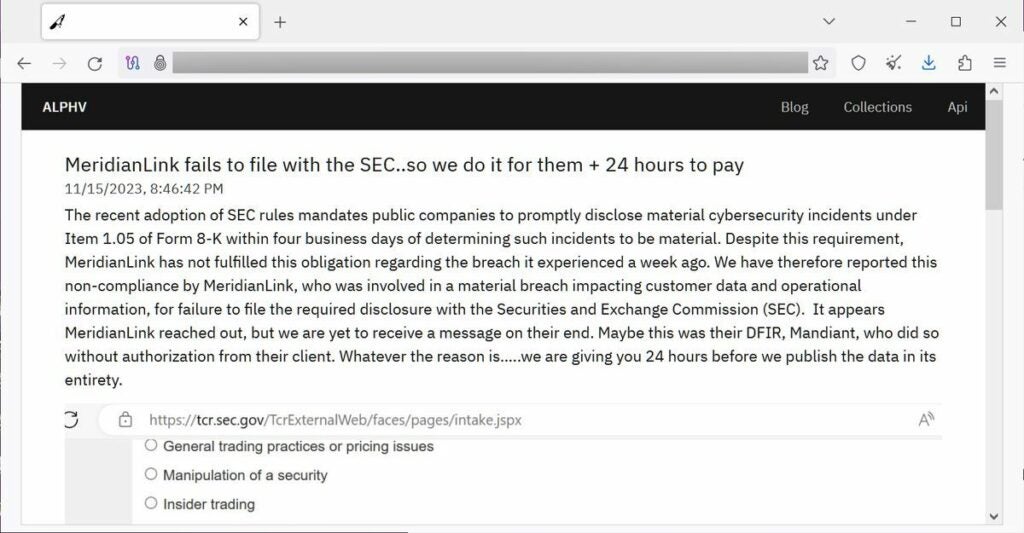
The notorious ALPHV/BlackCat ransomware syndicate has taken an unprecedented step by lodging a formal complaint with the U.S. Securities and Exchange Commission, targeting MeridianLink. This notable software provider, integral to financial institutions like banks and credit unions, now faces allegations of not reporting a cyberattack within the required four-day window.

The plot thickens as MeridianLink’s dilemma is publicly exposed on the ransomware group‘s data leak website. ALPHV has set a tight deadline, demanding a ransom from MeridianLink within just 24 hours to avert the release of what they claim to be stolen data. This turn of events in the MeridianLink breach narrative represents a significant ramp-up in ransomware tactics, underscoring an increasing trend of cybercriminals boldly challenging large, publicly traded enterprises.

Avast Download Now

New details emerged about the MeridianLink breach

Peering further into the complexities of the MeridianLink breach, new details emerge, painting a picture of an unconventional cyberattack. According to DataBreaches.net, ALPHV, also operating under the alias BlackCat, asserts they penetrated MeridianLink’s network back on November 7. Veering off the usual ransomware path, they claim to have extracted sensitive data instead of the standard practice of encrypting company systems.

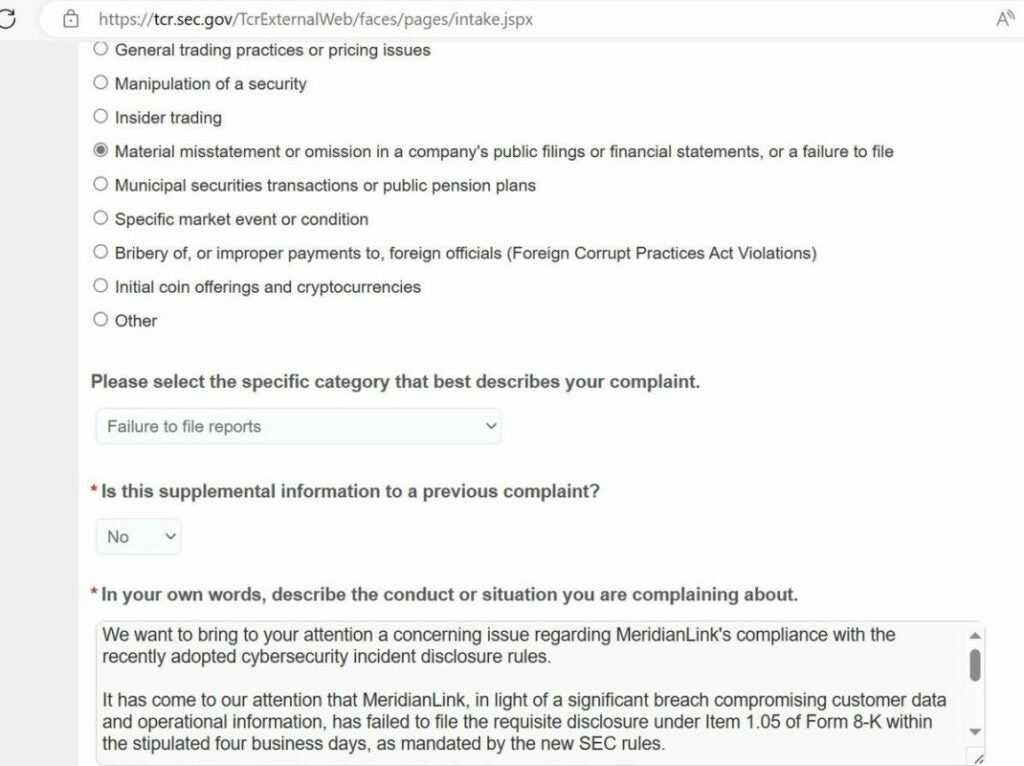
Adding an unexpected twist, ALPHV revealed that though there seemed to be initial outreach from MeridianLink, this did not evolve into meaningful negotiations over the alleged stolen data. This lack of communication might have triggered the hackers to shift gears, adopting a more confrontational approach. Their next move was to file a complaint with the U.S. Securities and Exchange Commission (SEC), accusing MeridianLink of not disclosing a cybersecurity incident that affected crucial customer and operational data.

To bolster their allegations, ALPHV posted a screenshot on their site, showing a completed form on the SEC’s Tips, Complaints, and Referrals portal. They communicated to the SEC, describing the situation as a “significant breach” and alleging that MeridianLink failed to meet the disclosure obligations as required in Form 8-K, under Item 1.05.

This scenario fits into a larger pattern of rising cybersecurity threats, like the MeridianLink breach, across the U.S. Reacting to this uptick in incidents, the SEC has rolled out new rules, compelling publicly traded companies to swiftly report cyberattacks that have a material impact. The MeridianLink case not only showcases the evolving strategies of ransomware groups but also emphasizes the growing need for prompt and clear disclosure in such incidents.

Yet, the MeridianLink breach scenario is further complicated by a crucial timing element. In a report from early October, Reuters pointed out that the new SEC cybersecurity rules are scheduled to come into effect on December 15, 2023. This timing adds an intriguing twist to the already complex MeridianLink case.

Adding to the unfolding drama, ALPHV has taken the step of displaying the SEC’s confirmation of their complaint against MeridianLink on their website. This action is a deliberate move by the ransomware group to validate their SEC submission and to show that their tactics have real-world impacts, extending into the realm of regulatory compliance. This development in the MeridianLink breach not only intensifies the situation but also highlights the bold strategies cybercriminals are employing.

Moving forward in the MeridianLink breach narrative, the company has now confirmed the cyberattack. Speaking with BleepingComputer, MeridianLink outlined its immediate measures to mitigate the threat, emphasizing the rapid deployment of containment strategies and the engagement of external cybersecurity experts for an in-depth investigation.

MeridianLink is actively evaluating the extent to which consumer personal information may have been affected by this cyberattack. The company has committed to notifying any individuals whose personal data may have been compromised.

In a statement meant to provide assurance, MeridianLink stated, “Based on our investigation to date, we have identified no evidence of unauthorized access to our production platforms, and the incident has caused minimal business interruption.” This comment seeks to reassure stakeholders about the control and minimal impact of the situation.

Avast Download Now

This development represents a pivotal moment in the evolving tactics of ransomware and extortion. While threats to report breaches to the SEC have been made by cybercriminal groups in the past, the MeridianLink incident could be the first where such a report is publicly confirmed. Traditionally, ransomware groups have exerted pressure through tactics like informing customers of the breach or directly intimidating the victim. ALPHV’s decision to file a complaint with the SEC marks a significant shift towards more formal and assertive strategies in the realm of cyber extortion.

Images used in this post are courtesy of BleepingComputer.

Massive ransomware attack hits LA Schools

Ransomware attacks have been on the rise in recent years as large institutions such as city councils and hospitals have been targeted by scammers seeking ransom for the release of critical institutional information and data. Unfortunately, another ransomware attack has just hit every school in Los Angeles. Here is everything you need to know about the attack as well as some broader information about Ransomware attacks in general.

Avast Download Now

The Los Angeles Unified School District (LAUSD), which is one of the largest school districts in the US, encompassing over 600,000 students and 26,000 teachers has reported that it has been hit by a ransomware attack. The attack coincides with the beginning of the new school year.

According to the LAUSD press release announcing the news of the attack:

“Los Angeles Unified detected unusual activity in its Information Technology systems over the weekend, which after initial review, can be confirmed as an external cyber attack on our Information Technology assets. Since the identification of the incident, which is likely criminal in nature, we continue to assess the situation with law enforcement agencies.”

The press release goes on to say that the school district has an emergency plan of action for securing the continuity of learning for students across the areas and that certain sensitive aspects of the school district’s data infrastructure such as employee healthcare and payroll details have not been impacted.

Unfortunately, according to cybersecurity specialists at Avast who have recently published an in-depth report into ransomware attacks, these types of targeted and higher-value ransomware demands form a part of almost limitless demand for targeted ransomware coupled with “more effective ways to deliver their payloads, encrypt data, receive payments, and pressure victims.”

The report makes it clear that the blame for these types of attack does not fall solely onto those managing the school districts but also falls on policymakers too. The report states that:

“It is imperative that policymakers measure success against targeted ransomware in terms of the overall volume of ransomware payments, not just the absence of attacks on high-risk entities. It is time to start investing in a more secure future.”

On a personal level, however, Avast recommends taking three steps to protect yourself and your institution from a ransomware attack. Keep your systems updated, invest in and make use of reliable security software and ma regularly back up all your files. We have also put together a guide to help protect yourself against ransomware on your Android phone too.

How to get rid of viruses on Android that return after a factory reset

A little over two years ago, a brand new type of malware burst onto the Android scene. The story of this particular piece of malware first appeared in the news cycle over at Android Police. In an article released in April 2020, AP explained that the malware, named xHelper, was able to survive even the most thorough Android factory resetting regimen.

Unfortunately, such malware still roams the internet, hidden within unmonitored APKs and as overlays of already suspicious websites. It lies there, patiently, waiting for a user to click on the wrong webpage or download the wrong APK, and then it strikes. Luckily, we’re about to break down what researchers found out about malware like xHelper and how to deal with it so that it cannot return. This is your crash course in one of the most ruthless examples of Android-focused malicious software the world has ever seen. 

What is xHelper?

xHelper is malware that came about in early 2020 and infected a vast majority of Android 6-7 devices. A Kaspersky researcher discovered that the malware operates by downloading a rootkit. A rootkit is basically an application, in this case malware, that can grant itself root privileges on your Android device. Once this software has root privileges, it can install additional malware onto your device. The worst is that it doesn’t install any additional malware to easily accessible directories that you can clear from your OS; anything it installs attaches directly to your system partition. 

Once malware gets into the system partition it immediately becomes an even bigger task to remove, and it won’t just disappear with a factory reset. Worse still is that the system partition isn’t even a part of your phone you can access under normal circumstances; it’s a read-only file that you cannot mess with. 

Here you’re probably thinking that some Android users are more resourceful than others. In fact, some users have root access, which means they can manipulate root files. Surely these Android elites can remove rootkits? Unfortunately not. This malware is so pernicious because it roots itself so deep into your device, it’s in the same place all your other components are, where no amount of Android root know-how can pose any threat.

As hopeless as the rootkit situation must seem, there is indeed light at the end of this Android malware tunnel; We’re about to show you how to remove rootkits, no matter how deep they’re buried.

How to remove rootkits on Android

Here’s the kicker; you’re going to need a third-party app. Yes, our system guides usually focus on how to do things without downloading external software, but this time you can’t go it alone. We suggest enlisting the help of Avast for this one. Not only is Avast one of the top names in antivirus protection for all your devices; unlike some rivals, Avast offers a free rootkit scanner and remover. You read that right; Avast and Free in the same sentence.

  1. Find Avast’s free rootkit scanner and remover

    How to get rid of viruses on Android that return after a factory reset

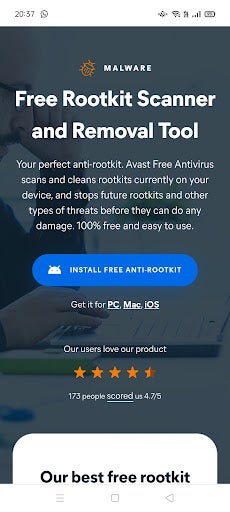
    You can get the app directly from Avast by typing ‘Avast free rootkit scanner and remover’ into your browser. On the Avast website, you’ll see a blue Install free anti-root kit button. Give in to temptation and click it.

  2. Download the root-kit

    How to get rid of viruses on Android that return after a factory reset

    Next, you’ll be redirected to the download. Click install and wait for the app to finish downloading. Once downloaded, click open

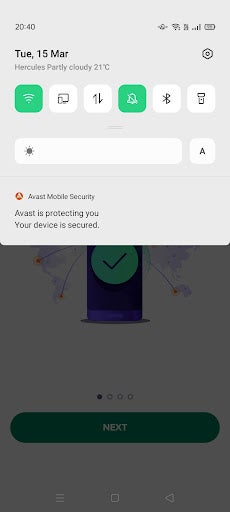
    Hit the green Get started button as soon as Avast opens, and take a quick look at your notifications, You should see a banner from Avast reading Your device is secured.

    Avast is a company, and like most companies, they want you to end up purchasing their wares. Feel free to hit Continue with free on the next page you see.

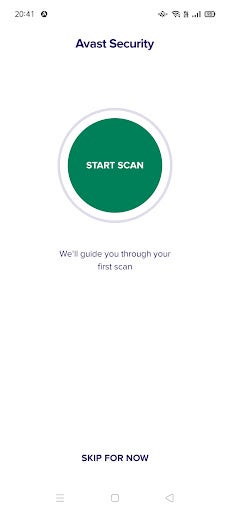
  3. Your very first scan

    How to get rid of viruses on Android that return after a factory reset

    Avast immediately teleports you to the scan interface. This is to make quick work of getting your device secure, and to give you a general lay of the Avast land so that you know what’s going on. You can skip this for now, but we recommend doing the first scan.

    When the scan is complete, you’ll see a short summary of what Avast did. On our test device for example, it scanned 291 apps and 22 files, checked 11 security settings, and resolved one vulnerable setting.

  4. Deep scan

    How to get rid of viruses on Android that return after a factory reset

    The first scan is a good way to check up on your device’s security status, but one scan does not a secure Android make, as the adage goes. Next, hit the green scan button once more, and then you’ll be prompted to choose between a regular scan and a deep scan.

    Choose use deep scan. This will take longer than a regular scan, as it scans your entire device from root to tip for vulnerabilities. You’ll notice that with the deep scan, the number of scanned files jumped from 22 to 2349; this is how you know how deep the deep scan goes. It scans system apps you didn’t know you had, files you can’t get to, and system directories not even shown on your phone.

Rootkits aren’t so scary if you’re protected. 

With the appropriate protection, malware loses power. Yes, there are still virulent trojans and droppers out there in the vastness of cyberspace, but with an app like Avast, you at least stand a chance. Better still is that companies like Avast provide perfectly usable free versions of their antivirus software, meaning you don’t need to pay an arm and a leg for proper protection. That said, you’ll definitely have to deal with a few ads.

Avast updates its Free Antivirus to ensure more protection

With its release of a new 2020 antivirus software package, Avast has shown that it’s willing to go toe-to-toe with the toughest threats online.

When it comes to antivirus protection for your devices, the software you choose is only as good as its most recent update. That’s because viruses, hackers, phishers and other online scammers and dangers are constantly growing more sophisticated and better able to sidestep protections. With its release of a new 2020 antivirus software package, Avast has shown that it’s willing to go toe-to-toe with the toughest threats online.

The company, a leader for years in online security services, is beefing up its protection algorithms across a range of features for the new decade – and astoundingly, all of these protections are available in Avast’s free version of the software.

At the heart of the enhanced security features offered by Avast Antivirus 2020 is of course, a robust and continuously updated virus database. As you access the internet, the software works in the background comparing your surfing and email activity to this database and blocking viruses, malware, spyware, ransomware and phishing attacks. It also alerts you to unsafe websites without the need to install browser extensions, and employs a “Behavior Shield” that identifies suspicious behavior patterns on your computer. 

avast

Also found in the free version of Avast Antivirus 2020 is a CyberCapture feature that quarantines suspicious files to be analyzed in the cloud and reports back to you on any possible safety risks. And the software also comes with a Wi-Fi inspector that can alert you to potential vulnerabilities across your entire network including all connected devices.

avast

Unlike other antivirus programs, Avast 2020 also delivers additional features that go beyond security to make your computer as sound as possible. 

These include a software updater that automatically scans for new versions of programs on your computer; a password manager that allows you to securely store all your login information to various sites under one master password; a browser clean-up function that removes unwanted toolbars, add-ons and extensions you choose to toss; and the ability to create a rescue disk image on a CD or USB drive, which would come to the rescue if your computer becomes inoperable. 

And to reiterate, all of these features come along with Avast’s FREE version of its software.

For those looking for even more functionality, the company also offers a Premium plan with extra smart security features. For example, Avast Premium Antivirus will alert you whenever someone joins your Wi-Fi network so that you can disconnect immediately if you don’t recognize a device – whether it be from a hacker or a neighbor looking to tap off your service. The premium version of the software will also place your photos and files in a ransomware-proof vault to keep your most personal data safe. 

Avast

Whichever version you choose, you can be assured that Avast is continuously striving to improve their offerings in the marketplace. This is a rarity – especially for a free software solution, which other companies can often neglect or offer with limited functionality. 

Avast Antivirus 2020 is available for Mac, PC, Android and Apple mobile devices. The free version of the software is likely sufficient for most users, but the extra protections offered by the Premium package is certainly worth considering for those looking for enhanced safeguards. Avast Antivirus Premium 2020 is now being offered for $59.99 per year.

Win an Avast Premium Antivirus license and a multi-device VPN!!

Download and install Avast Free Antivirus on your PC to get a chance to win an Avast Premium Security single-device license and an Avast SecureLine VPN multi-device subscription for 1 year.

We’re very happy to bring you a chance to win a premium subscription to Avast’s award-winning antirust suite. Avast is known for offering industry-leading support and protection against viruses, malware, and all modern threats such as ransomware, spyware, phishing attacks, and even password breaches and hacks.

Incredibly, Avast offers a free version of its antivirus suite that is designed for ease of use. With a single click, Avast Free users can set machine-learning virus protection algorithms to work, scanning for known threats, analyzing system and application behavior for suspicious activity, and keeping you safe from spyware. It has never been easier to protect your PC for free.

Download Avast Free Antivirus now

If you’ve downloaded Avast Free Antivirus, your device is now protected. You can go one further, however, and enter our contest to win an Avast Premium Security single-device subscription for a whole year, plus a 1-year multi-device Avast SecureLine VPN for those who want to enjoy the Internet without intrusive eyes. This means that our contest first winner will be able to protect themselves and up to five of their friends and family for the next twelve months. Do you fancy being a hero? It could be as simple as entering our contest.

Some features that come with the Avast Premium Security suite include ransomware protection, a robust web shield that blocks dangerous downloads and websites, a webcam blocker to prevent hackers breaching your webcam and spying on you in your own home, and an advanced firewall to keep cybercriminals off your computer.

Back to the competition!

To get a chance to win an Avast Premium Security single-device license and an Avast SecureLine VPN multi-device subscription for 1 year:

1. Install Avast Free Antivirus
2. Tag the friend/s to recommend Avast Free Antivirus to!!

Download Avast Free Antivirus here in case you haven’t done it already. The contest ends on February 1st. Winners will be announced on February 3rd. The first winner will receive an Avast Premium Security single-device license for 1 year (real price on the website $69.99) and the Avast SecureLine VPN for up to 5 devices for 1 year (real price on the website $89.99). The second and third winners will receive an Avast Premium Security single-device license for 1 year each.

For Terms and Conditions: Softonic terms and conditions

Terms and Conditions for “SOFTONIC – Avast 2020” contest

Terms and Conditions for “SOFTONIC – Avast 2020” contest
Terms and Conditions for “SOFTONIC – Avast 2020” contest (Hereinafter the “Contest”)

This draw is run by Softonic International, S.A., whose registered office is at MediaTic Building – Roc Boronat, 117, 6th Floor – 08018 Barcelona (SPAIN) (“Promoter”).

The draw is open worldwide to persons aged 18 or over, excluding employees of the Promoter and its affiliated companies and their immediate families, as well as any other persons and companies professionally associated with this draw.

In order to be eligible to participate in this draw, participants need to

  1. Like this post
  2. Try out the new version of Avast Free Antivirus and share here a screenshot of your favorite feature!

By taking part in this draw all participants will be deemed to have accepted and be bound by these terms and conditions. The contest commences at 00:01 Central European Summer Time (CEST) on 27th February and closes at 23:59 on 7th March 2020.

Prize: The winner will receive an iPhone 11 Pro 64GB
(worth estimated retail value 1.159,00 euro, varying from country to country). The Prize is non-transferable and there is no cash alternative. There will be only one Prize Winner, who will be selected through a random automatic system among the valid eligible participants.

Announcement of the Prize winner: Winner will be notified via email on or after 9th March 2020.

Delivery of the Prize: The Promoter will contact the Winner via email. Winner will be required to provide his or her valid identification (ID) with a complete name, a shipping address and email address to the Promoter in order to be eligible to receive the Prize. The winner hereby authorizes Softonic to perform the purchase on the site link https://www.apple.com/ or link https://www.amazon.com/ thus processing and sharing the personal data provided strictly for the purposes of placing the purchase and mandate the relevant shop to ship the prize. Softonic will directly perform the purchase on the site establishing the Winner as the recipient . Please note that providers’ sites Apple and Amazon privacy policy will apply to your data. Please refer to Apple or Amazon on the forgoing links for more information. We will reach you to find a solution in the event the relevant shop has any restriction or limitation to shipping or exporting the prize to the location provided.

The winner must provide the above details within the period of two (2) days from the date when he or she was notified. If a person drawn as the winner of the Prize does not confirm acceptance of the Prize and provide the above-mentioned information by the end of that period of two (2) days, then the Promoter reserves the right to draw an alternate winner from the valid entries received at the time that the Contest ended.

Your personal information will be used by the Promoter to conduct the draw, and in accordance with Softonic’s Privacy Policy, found at https://hello.softonic.com/privacy-policy/. To access, rectify or delete the data provided, participants can send an email to privacy@softonic.com indicating in the subject “Contest Data Rights”.

If you are the Winner, the Promoter may use your information for marketing or promotional purposes, including using your name and your Facebook profile picture to announce the winners online including but not limited to Softonic’s web pages, blogs and Softonic’s profile pages on Facebook, YouTube, Twitter, Google+, Pinterest and Instagram.

Other than death or personal injury arising from the acts or omissions of the Promoter or its employees, the Promoter to the fullest extent by Law will accept no responsibility for any loss, damage, injury or disappointment suffered by any participant from entering this Contest or by a Winner’s acceptance or enjoyment of the Prize.

This draw is in no way sponsored, endorsed or administered by, or associated with Facebook. By entering you confirm that you understand that you are providing your information to the Promoter and not to Facebook. By entering the Contest, all participants agree to release Facebook completely of any liability.

The Promoter reserves the right to cancel, modify or supersede the draw (including altering prizes) at its sole discretion, if it is not capable of being conducted as specified. The Promoter reserves the right to substitute a prize in the event that circumstances beyond its control make this necessary. The decision of the Promoter is final and binding in all matters relating to this draw.

These terms and conditions and all matters arising from or in connection with them are governed by the laws of Spain without regard to conflict of law rules and the courts of Barcelona will have exclusive jurisdiction.

Softonic Terms & Conditions – Avast contest 2020

Terms and Conditions for “SOFTONIC – Avast 2020” contest
Terms and Conditions for “SOFTONIC – Avast 2020” contest (Hereinafter the “Contest”)

This draw is run by Softonic International, S.A., whose registered office is at MediaTic Building – Roc Boronat, 117, 6th Floor – 08018 Barcelona (SPAIN) (“Promoter”).

The draw is open worldwide to persons aged 18 or over, excluding employees of the Promoter and its affiliated companies and their immediate families, as well as any other persons and companies professionally associated with this draw.

In order to be eligible to participate in this draw, participants need to

  1. Like this post
  2. Try out the new version of Avast Free Antivirus and share here a screenshot of your favorite feature!

By taking part in this draw all participants will be deemed to have accepted and be bound by these terms and conditions. The contest commences at 00:01 Central European Summer Time (CEST) on 27th February and closes at 23:59 on 7th March 2020.

Prize: The winner will receive an iPhone 11 Pro 64GB
(worth estimated retail value 1.159,00 euro, varying from country to country). The Prize is non-transferable and there is no cash alternative. There will be only one Prize Winner, who will be selected through a random automatic system among the valid eligible participants.

Announcement of the Prize winner: Winner will be notified via email on or after 9th March 2020.

Delivery of the Prize: The Promoter will contact the Winner via email. Winner will be required to provide his or her valid identification (ID) with a complete name, a shipping address and email address to the Promoter in order to be eligible to receive the Prize. The winner hereby authorizes Softonic to perform the purchase on the site link https://www.apple.com/ or link https://www.amazon.com/ thus processing and sharing the personal data provided strictly for the purposes of placing the purchase and mandate the relevant shop to ship the prize. Softonic will directly perform the purchase on the site establishing the Winner as the recipient . Please note that providers’ sites Apple and Amazon privacy policy will apply to your data. Please refer to Apple or Amazon on the forgoing links for more information. We will reach you to find a solution in the event the relevant shop has any restriction or limitation to shipping or exporting the prize to the location provided.

The winner must provide the above details within the period of two (2) days from the date when he or she was notified. If a person drawn as the winner of the Prize does not confirm acceptance of the Prize and provide the above-mentioned information by the end of that period of two (2) days, then the Promoter reserves the right to draw an alternate winner from the valid entries received at the time that the Contest ended.

Your personal information will be used by the Promoter to conduct the draw, and in accordance with Softonic’s Privacy Policy, found at https://hello.softonic.com/privacy-policy/. To access, rectify or delete the data provided, participants can send an email to privacy@softonic.com indicating in the subject “Contest Data Rights”.

If you are the Winner, the Promoter may use your information for marketing or promotional purposes, including using your name and your Facebook profile picture to announce the winners online including but not limited to Softonic’s web pages, blogs and Softonic’s profile pages on Facebook, YouTube, Twitter, Google+, Pinterest and Instagram.

Other than death or personal injury arising from the acts or omissions of the Promoter or its employees, the Promoter to the fullest extent by Law will accept no responsibility for any loss, damage, injury or disappointment suffered by any participant from entering this Contest or by a Winner’s acceptance or enjoyment of the Prize.

This draw is in no way sponsored, endorsed or administered by, or associated with Facebook. By entering you confirm that you understand that you are providing your information to the Promoter and not to Facebook. By entering the Contest, all participants agree to release Facebook completely of any liability.

The Promoter reserves the right to cancel, modify or supersede the draw (including altering prizes) at its sole discretion, if it is not capable of being conducted as specified. The Promoter reserves the right to substitute a prize in the event that circumstances beyond its control make this necessary. The decision of the Promoter is final and binding in all matters relating to this draw.

These terms and conditions and all matters arising from or in connection with them are governed by the laws of Spain without regard to conflict of law rules and the courts of Barcelona will have exclusive jurisdiction.

This holiday season, let Santa in, but keep the spies out

Shopping online can bring a lot of great gifts right to your door. But with all that increased surfing, it can also bring something else you don’t want to your computer: spyware.

Some spyware can be relatively harmless – like adware or cookies that track your surfing and purchase history for marketing purposes, such as serving you relevant ads. But spyware such as Trojans and system monitors can watch everything you do at your computer and harvest personal details including social security numbers, credit card numbers and more.

Defeat the mighty Trojans

Trojans generally arrive on your computer via a download link that you’ve clicked. For example, you might get a notice that your browser is out of date and needs to be updated. When you click on the link however, you’ll actually download spyware onto your system that can be very hard to detect. What’s worse, Trojans can continue to download more malware once they settle onto your system.

If you don’t have an antivirus program to identify them, the most likely way in which you’ll notice their presence is through system slow downs and frequent crashes. Other telltale signs include unusual icons in your toolbar that you’ve not seen before or error messages that seem unrelated to your activities.

Every click you make

System monitoring software is often masked as freeware and will log every keystroke you make, every site you visit, and every program you run. Again, caution is king when deciding what to download to your machine. Even if a site looks reputable, be smart when clicking on a download that seems too good to be true, or one that appears on your machine as a pop up.

If you suspect that your computer has been infected with spyware, you really only have one choice for removing it: aggressive antivirus and antispyware software. Just like spies in the real world, spyware is created to avoid detection, so without the right software to sniff it out, it could run on your computer indefinitely.

Avast Free Antivirus is one of our top picks for preventing, detecting and removing spyware. With continuously updated databases and algorithms, this software is tops in keeping your computer clean and your data safe.

Of course, you can also take steps on your own to limit your exposure to spyware by ensuring that your browser, operating system, and software have the latest updates and security patches; setting your browser security and privacy levels higher; using extreme caution if you frequent file-sharing sites; and not clicking on pop-up ads.

Once you’ve run your antispyware software and know what type of threats existed on your computer, you may want to contact your financial institutions to change credit cards and account numbers if it turns out that your personal data was at risk. You might also want to freeze your credit through national monitoring services to thwart identity theft.

Taking these steps should ensure that your online holiday shopping will deliver gifts Santa would be proud of, while keeping the spies out in the cold.

Keep your software humming along with Avast Business Patch Management

Avast has now released Business Patch Management, a program that can be added to any of the company’s anti-virus products. Try it out!

Software patches are a bit like the annoying little brother of the IT world. 

These updates that can enhance efficiency, repair security vulnerabilities and deliver new features, seem to pop up sometimes on a daily basis, asking IT professionals to interrupt the smooth flow of their networks to deploy the fixes, which can sometimes take hours. In fact, deploying patches is such a constant and unrewarding task that in a recent survey conducted by cybersecurity firm Avast, out of 500,000 devices analyzed, only 304 were fully patched.

Wanting to address this glaring problem and help businesses keep their IT products 100 percent up-to-date, Avast has now released Business Patch Management, a program that can be added to any of the company’s anti-virus products. The solution works in the background to monitor the software on all devices on a network to discover and deploy patches automatically, saving a significant amount of administrative time.

Centralized Dashboard

To make the patch process as painless as possible, Avast has built this new software right into its existing dashboard for its antivirus products, known as the Management Console. Here, IT professionals can see at a glance where patches are needed and what the severity level of the patch is, along with the name of the patch, release notes and the release dates.

Working in the Console, users can also choose when to scan their systems for patch requirements. Scans can happen daily, weekly or monthly and can be run at any time of the day, and are downloaded to a master agent that then distributes the patches across the network. 

Furthermore, it’s possible to schedule automatic patch rollouts, which can be deployed at low-usage times, such as overnight. Applications that should be excluded from patches can also be designated and, the Console will provide automatic alerts if certain patches failed to install, so that they can be redeployed.

Flexible and comprehensive

One of the standout features of Avast Business Patch Management is that users can set the automatic system to scan and install all patches or to activate only when patches reach a certain level of severity. It’s also possible to block scans by vendor or product. 

And, speaking of products, the program not only scans the Windows operating system for needed patches, but it also analyzes thousands of other applications including widely used programs like Chrome, Firefox, Skype and Adobe Acrobat as well as lesser-known software like Blue Jeans and KeePass. Products from one hundred vendors in all are covered.

Avast Business Patch Management also features robust reporting features, so that you can easily customize the kind of data your business operations require, export that data to a PDF and print it for sharing with team members and management. Along with automatic patch update alerts and a simple sorting feature, the program truly is an incredible assistant for IT pros. 

Avast Business Patch Management is available for a free 30-day trial, and can then be purchased for $29.99 per device per year. While it is currently only available for all Windows operating systems including Windows Server, the company is working on a version for iOS, which it expects to release later this year.