Netflix has forever changed the way we watch movies and TV shows. This popular streaming platform gives us access to an incredible catalog of films, series and exclusives, requiring only a subscription and stable Internet connection. While this is convenient for long sessions of binge-watching at home, online-only access can be a handicap if we want to enjoy our favourite series on the go. Fortunately, Netflix lets you download TV shows and movies to your laptop and mobile devices to be able to enjoy offline. Do you want to know how? Just keep reading.
How to download movies and series from Netflix
Step 1. Make sure your Netflix app is up to date
To be able to download movies and TV shows from Netflix you’ll need to have the latest version of its mobile or Windows app installed. You can download them below:
- Netflix for Windows

- Netflix for Android
- Netflix for iOS
Step 2. Choose a video quality
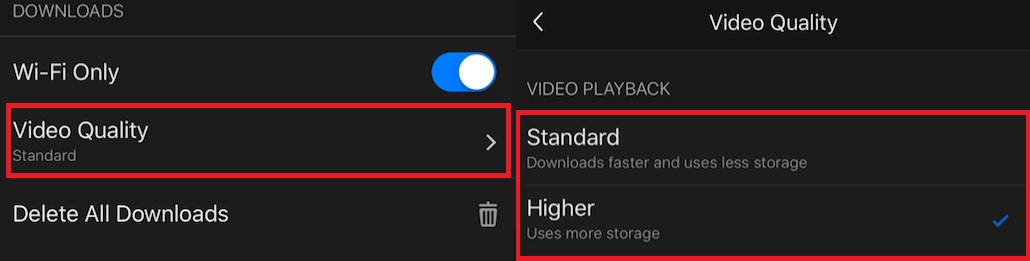
Now it’s time to choose a resolution for the movie or TV show you want to download. First of all, open the Netflix app and tap on your profile icon. Now simply press on the “Video Quality” button and select between Standard/720p or Higher/1080p. Keep in mind that the higher the quality, the more time it’ll take for you to download the movie or show.
Step 3. Download your preferred movie or TV show
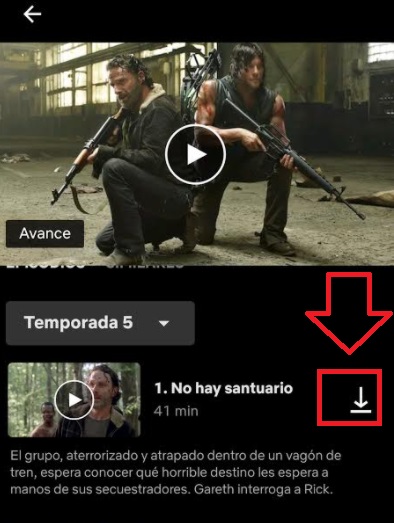
To begin downloading the title you want to enjoy offline, simply click on the “Download” button you’ll find next to the movie or episode. This button looks like an arrow pointing downwards onto a flat line, highlighted in the image below.
Once you’ve done this, the download will start and in few minutes you’ll have the video stored in the “Downloads” section of the app.
Enjoy your favourite films and show offline
Downloading movies and series from Netflix is very easy, enabling you to enjoy your favourite titles even without an Internet connection. It only takes a few minutes and is a great way to make the most of your subscription on this amazing streaming platform.

How to record Netflix in 3 easy steps
READ MORE