Skip to content

Softonic English

Just another Softonic Sites site

Maintain resolution when removing backgrounds with AI

Photo editing programs have advanced so much that practically anyone can remove the background from a photograph in a matter of minutes and without overthinking it. However, not everyone does it equally well. Sometimes, we can end up with distorted figures or poorly cropped backgrounds. Fortunately, you can easily avoid this issue with Photoshop or even Adobe Express. In addition to avoiding shoddy results, with Adobe programs you can ensure that the image resolution is maintained and that, therefore, it does not affect your professional projects. Bad edits are noticeable, but […]

Photo editing programs have advanced so much that practically anyone can remove the background from a photograph in a matter of minutes and without overthinking it. However, not all do it equally well. Occasionally, we can end up with distorted figures or poorly cropped backgrounds. Fortunately, you can easily avoid this issue with Photoshop or even Adobe Express.

In addition to avoiding shoddy results, with Adobe programs you will ensure that the image resolution is maintained and that, therefore, it does not affect your professional projects. Poor edits are noticeable, but now you will see how you can avoid them in the following paragraphs.

Adobe Photoshop
Adobe Photoshop DOWNLOAD

The problem that comes with poor editing

Yes, there are many online and free tools that promise to remove the background from an image in a nearly miraculous way. It is true that, in most cases, they deliver on their promise. However, with them, you will not achieve a professional and high-quality result.

And the truth is that although these images may work at first glance or seem to look good on your mobile, for example, the reality is that they can cause problems in other formats. If you need it to be in a very high resolution or in a banner, I’m sorry to say that it is most likely that they will not look good.

Maintaining resolution while removing the background is possible: here’s how you can do it

The large number of tools that Photoshop has allows us to reach the same point using different paths. Here we propose one of those paths with the Quick Actions.

With your image open, select the image layer located within the Layers panel. Make sure the selected layer is the main one and that it is unlocked. If it is locked, double-click on the layer and in the new panel that appears, select OK.

Next, click on Help > Photoshop Help from the menu bar, which will open a new panel with a search bar. Then, type in that search bar Remove background. You need to click on Remove background, an option that will appear under Quick Actions.
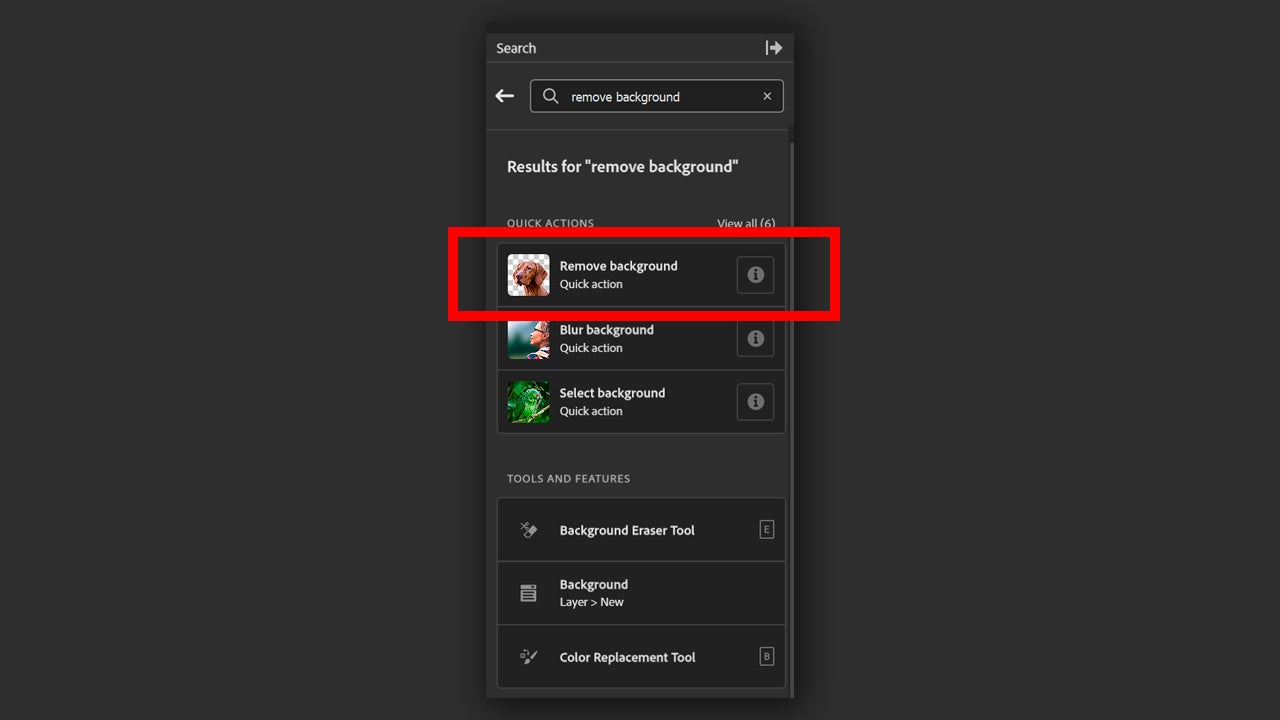
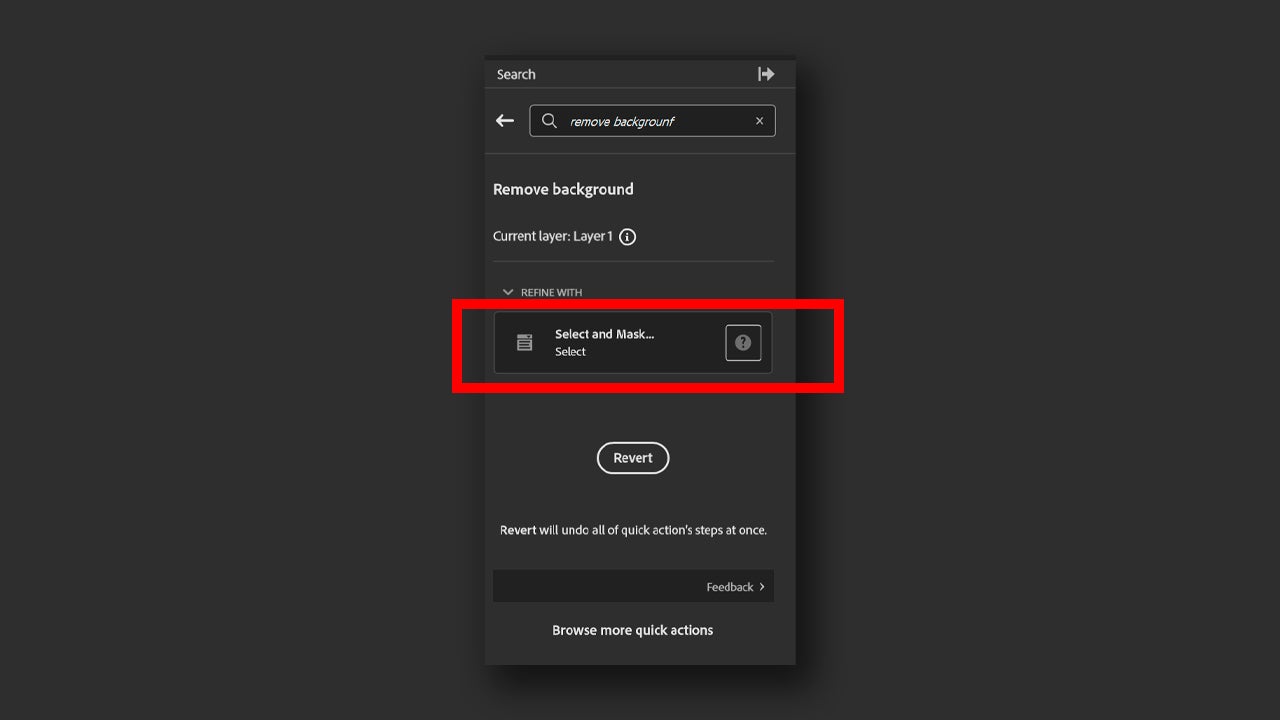
By doing so, the background will be automatically removed without you having to do anything else. If you want to fine-tune the result, you can select Select and Mask…, the option that appears in the Refine With section.
If not, you can also go directly to the mask from Layers and right-click on it. Then, select Select and Mask.
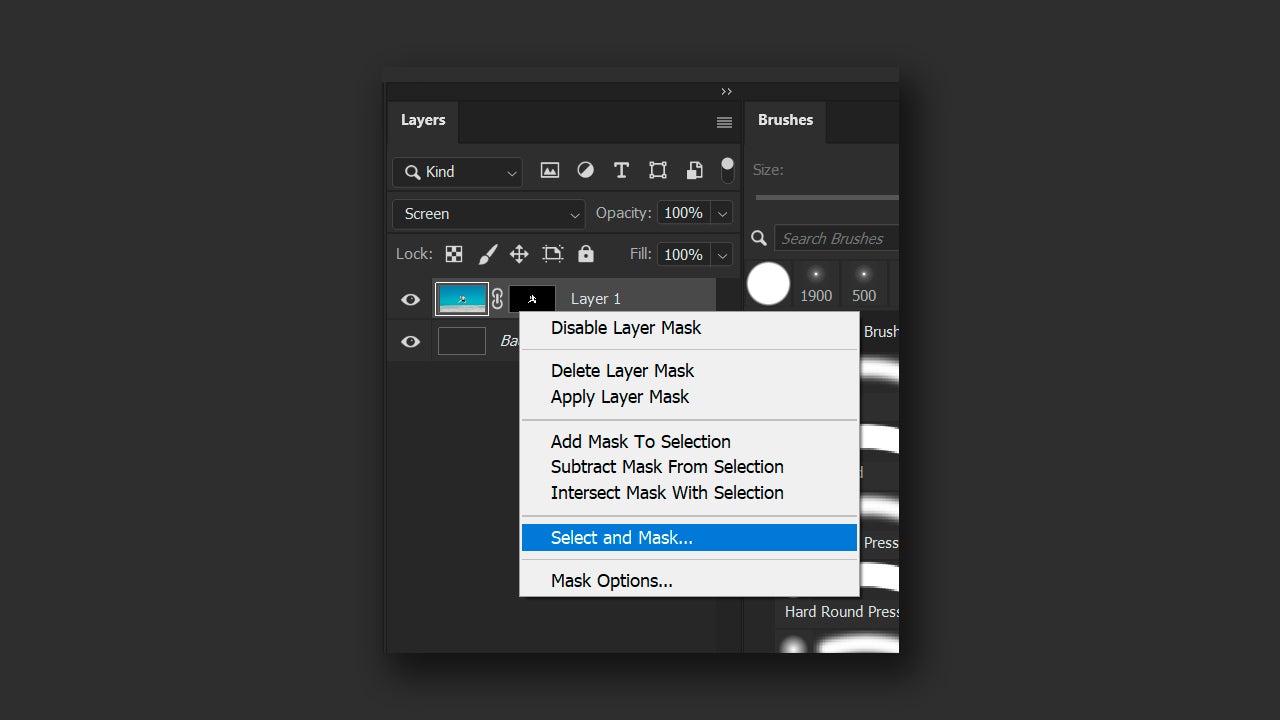
This will serve to access the properties of the mask and refine the cropping done by the action we used earlier.

Learn to use masks

The layer masks are one of the most useful features and the most used within Photoshop. They are used to erase parts of an image non-destructively. If you erase a certain area and then regret it, with the layer mask you can revert the image to how it was before erasing that part.

To start using them, we first need to make an initial selection. According to the image, you can use different paths. If you go to the Magic Wand icon and right-click on it, you will see other tools like Object Selection and Quick Selection. If we stick with Magic Wand, for example, we can click on Select Subject. This option works locally or through the cloud and allows Photoshop to automatically select the main subject of the image.
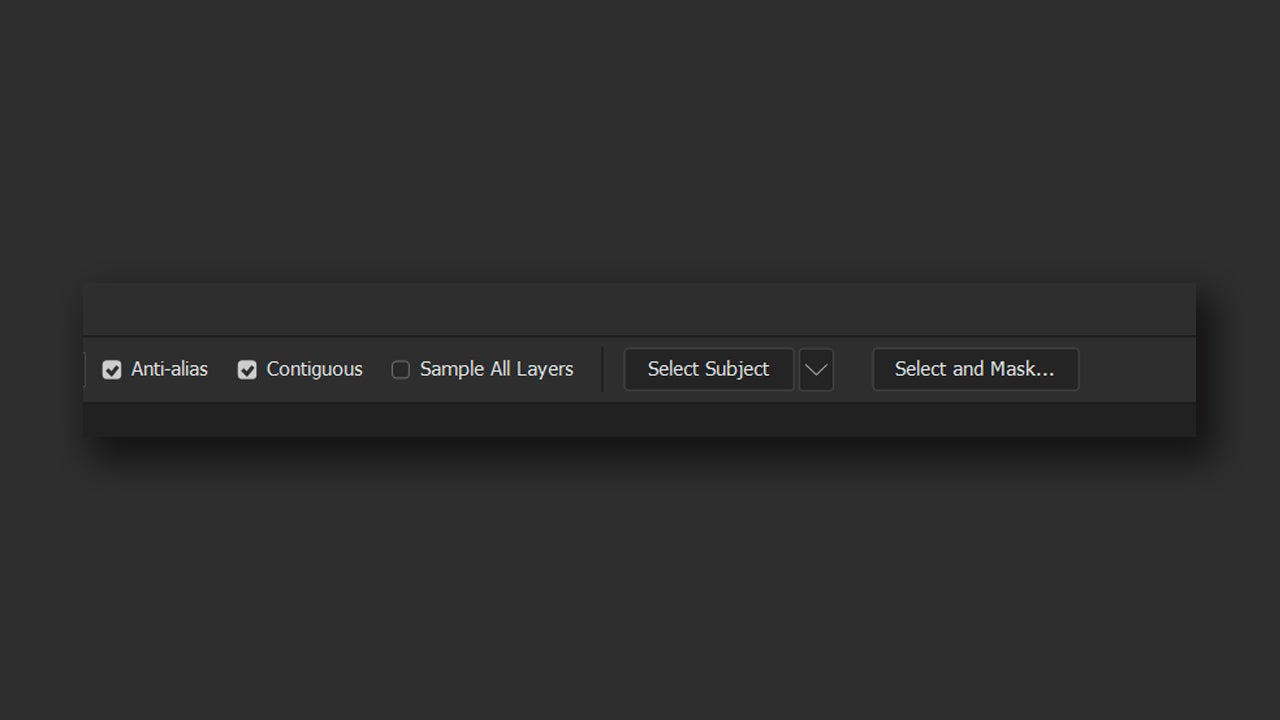
Once we have clicked on Select Subject, we will have to wait a few moments for Photoshop to process the image. After that, we will see how the subject is already selected. Next, click on Select and Mask to refine the cut and turn it into a layer mask.
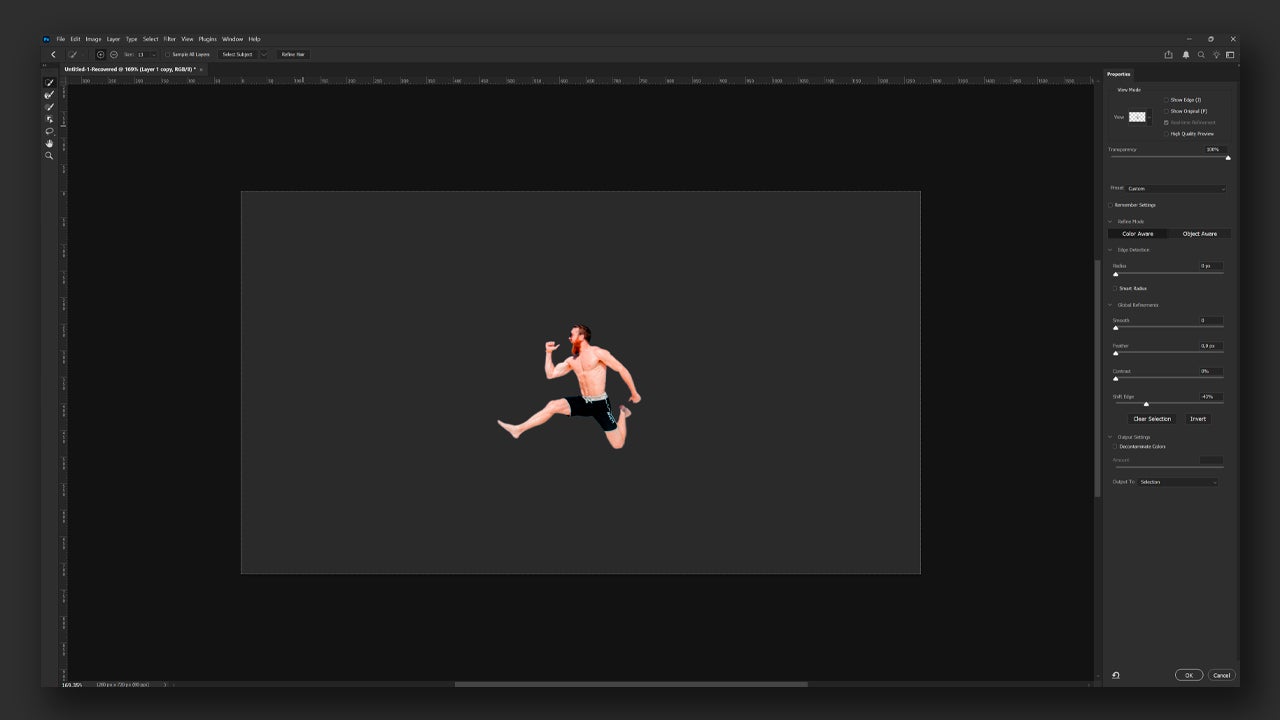
Once you have refined the crop, you can try it on different backgrounds to see how it looks. From here, we recommend that you test it on a white background, a black one, and a gray one. This way, you can quickly see any type of “halo” or poorly done crop. If you want, you can manually refine the layer mask in a very simple way: paint on the mask with black to hide and white to reveal.

It is advisable that you work directly with a layer mask when you need to cut out any object. Deleting pixels directly will limit you a lot when it comes to correcting later. Of course, this whole process will not alter the resolution of the image or its pixels per inch.

Adobe Express for simple and quick solutions

While Adobe Express lacks the complexity of Photoshop, that also works in your favor if you want to make much simpler and faster edits. Express is ideal for removing any background in seconds and creating quick content for immediate use.

To use Adobe Express, you have two options: from the browser on your PC or through the mobile app. When accessing from the browser, you will see that quick access options for editing already appear on the main screen. One of them is Remove Background.
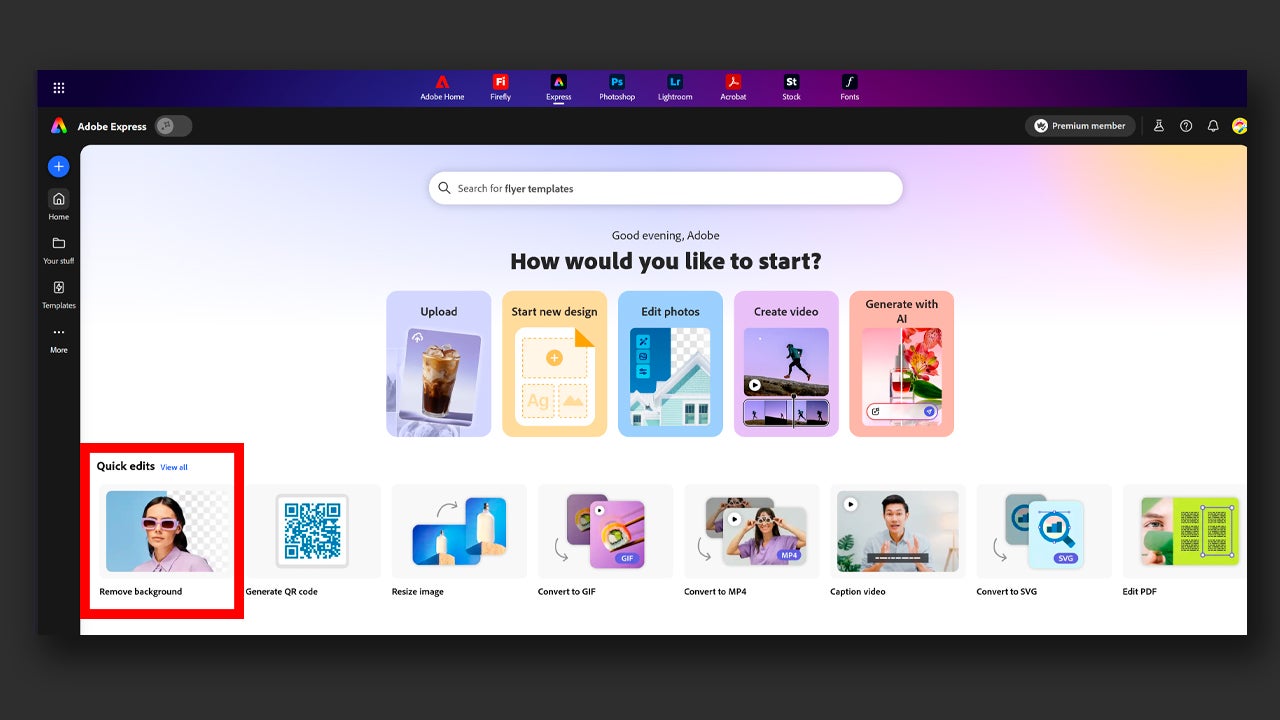
Select the option and then upload your image. Automatically, Express will remove the background in a matter of seconds. From here, Express gives you the option to add a new background by uploading an image, continue editing by clicking on Open in editor, or download the result directly.
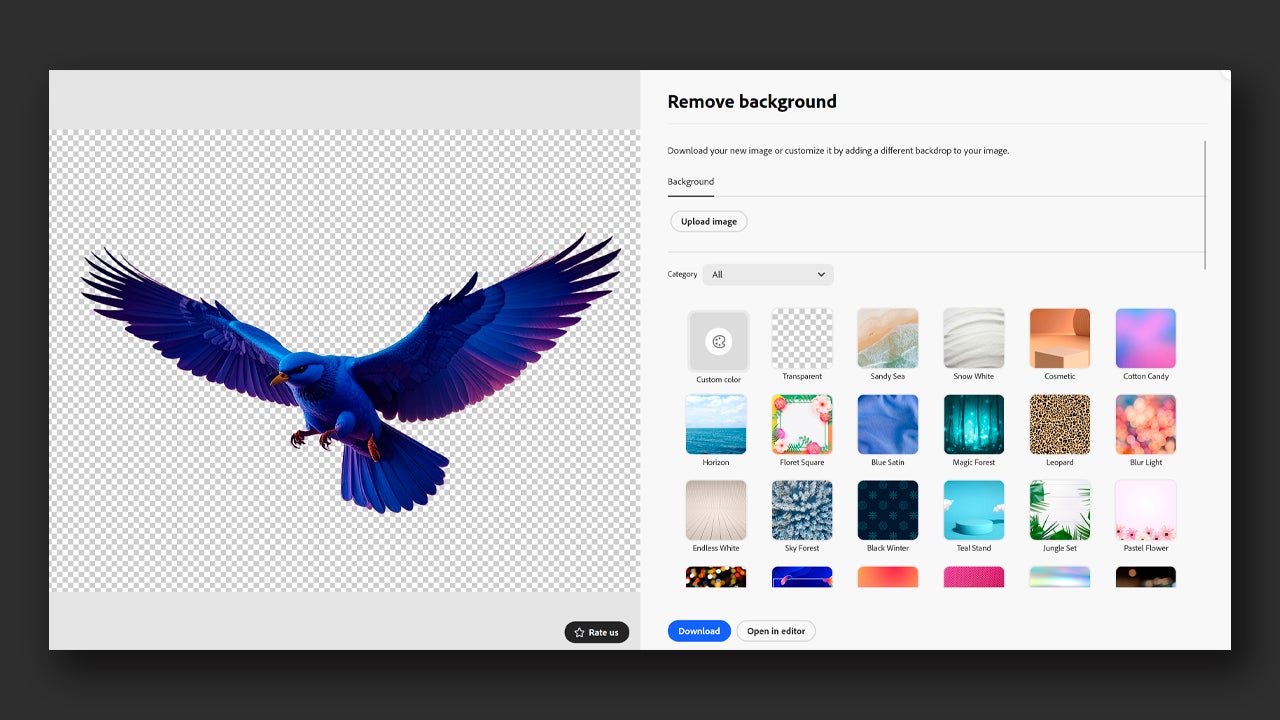
The process is very similar from the app. Upon entering, you will see the same option for Remove background. Just click on it and upload the image to edit. Just like in the browser, you can continue editing, place a new background, or download the image without a background.

Adobe Express
Adobe Express DOWNLOAD

Author: María López

{ "de-DE": "Künstler aus Berufung und Technikliebhaber. Seit ich denken kann, habe ich gerne an allen möglichen Gadgets herumgebastelt.", "en-US": "Artist by vocation and technology lover. I have liked to tinker with all kinds of gadgets for as long as I can remember.", "es-ES": "Artista de vocación y amante de la tecnología. Me ha gustado cacharrear con todo tipo de gadgets desde que tengo uso de razón.", "fr-FR": "Artiste de vocation et amateur de technologie. J'aime bricoler avec toutes sortes de gadgets depuis que j'ai l'usage de la raison.", "it-IT": "", "ja-JP": "", "nl-NL": "", "pl-PL": "", "pt-BR": "", "social": { "email": "", "facebook": "", "twitter": "", "linkedin": "" } } View all posts by María López

Author María LópezPosted on March 20, 2026March 20, 2026Categories News

Post navigation

Previous Previous post: Trending Show? Trending Scams: How to Protect Your Devices
Next Next post: The director of Resident Evil Requiem confirms that we will have to wait to learn Leon's biggest secret

Recent Posts

  • The best 'Star Wars' series is one that we will never see. George Lucas planned more than 400 episodes
  • No foreign series could pass the Iron Curtain… except the Muppets
  • Bluey lives, the fight continues: Why Disney+ just released new mini-episodes even though they promised the series was over
  • The critics are hating The Mandalorian and Grogu and that could mean the end of Star Wars
  • Sony's new game is strange, creepy, and dodging literal bullet rains is incredibly fun

Archives

  • May 2026
  • April 2026
  • March 2026
  • February 2026
  • January 2026
  • December 2025
  • November 2025
  • October 2025
  • September 2025
  • August 2025
  • July 2025
  • June 2025
  • May 2025
  • April 2025
  • March 2025
  • February 2025
  • January 2025
  • December 2024
  • November 2024
  • October 2024
  • September 2024
  • August 2024
  • July 2024
  • June 2024
  • May 2024
  • April 2024
  • March 2024
  • February 2024
  • January 2024
  • December 2023
  • November 2023
  • October 2023
  • September 2023
  • August 2023
  • July 2023
  • June 2023
  • May 2023
  • April 2023
  • March 2023
  • February 2023
  • January 2023
  • December 2022
  • November 2022
  • October 2022
  • September 2022
  • August 2022
  • July 2022
  • June 2022
  • May 2022
  • April 2022
  • March 2022
  • February 2022
  • January 2022
  • December 2021
  • November 2021
  • October 2021
  • September 2021
  • August 2021
  • July 2021
  • June 2021
  • May 2021
  • April 2021
  • March 2021
  • February 2021
  • January 2021
  • December 2020
  • November 2020
  • October 2020
  • September 2020
  • August 2020
  • July 2020
  • June 2020
  • May 2020
  • April 2020
  • March 2020
  • February 2020
  • January 2020
  • December 2019
  • November 2019
  • October 2019
  • September 2019
  • August 2019
  • July 2019
  • June 2019
  • May 2019
  • April 2019
  • March 2019
  • February 2019
  • January 2019
  • December 2018
  • November 2018
  • October 2018
  • September 2018
  • August 2018
  • July 2018
  • June 2018
  • May 2018
  • April 2018
  • March 2018
  • February 2018
  • January 2018
  • December 2017
  • November 2017
  • October 2017
  • September 2017
  • August 2017
  • July 2017
  • June 2017
  • May 2017
  • April 2017
  • March 2017
  • February 2017
  • January 2017
  • December 2016
  • November 2016
  • October 2016
  • September 2016
  • August 2016
  • July 2016
  • June 2016
  • May 2016
  • April 2016
  • March 2016
  • February 2016
  • January 2016
  • December 2015
  • November 2015
  • October 2015
  • September 2015
  • August 2015
  • July 2015
  • June 2015
  • May 2015
  • April 2015
  • March 2015
  • February 2015
  • January 2015
  • December 2014
  • November 2014
  • October 2014
  • September 2014
  • August 2014
  • July 2014
  • June 2014
  • May 2014
  • April 2014
  • March 2014
  • February 2014
  • January 2014
  • December 2013
  • November 2013
  • October 2013
  • September 2013
  • August 2013
  • July 2013
  • June 2013
  • May 2013
  • April 2013
  • March 2013
  • February 2013
  • January 2013
  • December 2012
  • November 2012
  • October 2012
  • September 2012
  • August 2012
  • July 2012
  • June 2012
  • May 2012
  • April 2012
  • March 2012
  • February 2012
  • January 2012
  • December 2011
  • November 2011
  • October 2011
  • September 2011
  • August 2011
  • July 2011
  • June 2011
  • May 2011
  • April 2011
  • March 2011
  • February 2011
  • January 2011
  • December 2010
  • November 2010
  • October 2010
  • September 2010
  • August 2010
  • July 2010
  • June 2010
  • May 2010
  • April 2010
  • March 2010
  • February 2010
  • January 2010
  • December 2009
  • November 2009
  • October 2009
  • September 2009
  • August 2009
  • July 2009
  • June 2009
  • May 2009
  • April 2009
  • March 2009
  • February 2009
  • January 2009
  • December 2008
  • November 2008
  • October 2008
  • September 2008
  • August 2008
  • July 2008
  • June 2008
  • May 2008
  • April 2008
  • March 2008
  • February 2008
  • January 2008
  • December 2007
  • November 2007
  • October 2007
  • September 2007
  • August 2007
  • July 2007
  • June 2007
  • May 2007
  • April 2007
  • March 2007
  • February 2007
  • January 2007
  • December 2006
  • November 2006
  • September 2006
  • August 2006
  • June 2006
  • May 2006
  • July 2001
  • January 2001
  • November 2000
  • September 2000
  • August 2000
  • July 2000
  • April 2000
  • March 2000

Categories

  • Affiliate post
  • Expert Review
  • Gaming
  • Guides
  • How to
  • Legacy how To
  • News
  • Noticias
  • Software>Security
  • Sponsored
  • Trucos y Consejos
  • Uncategorized
  • Windows software

Meta

  • Log in
  • Entries feed
  • Comments feed
  • WordPress.org
Softonic English Proudly powered by WordPress