
Skip to content

Softonic English

Just another Softonic Sites site

Adobe Firefly is much more than a video model

One thing is certain: videos have become the epicenter of current entertainment. Recording and editing video is an increasingly common task, and Adobe wants to make things a bit easier for us with Adobe Firefly. This video-focused model aims to help the growing community of editors and creators who want to achieve quality results in a short time. Seemingly simple tasks like filling gaps in your projects will be very easy thanks to Adobe Firefly Video and its generative magic. Generating videos with descriptions is already a reality. Generative artificial intelligence allows us […]

One thing is certain: videos have become the epicenter of current entertainment. Recording and editing video is an increasingly common task, and Adobe wants to make things easier for us with Adobe Firefly.

This video-focused model aims to assist the growing community of editors and creators who want to achieve quality results quickly. Thanks to Adobe Firefly Video and its generative magic, simple tasks like filling gaps in your projects will be very easy.

Adobe Premiere Pro
Adobe Premiere Pro Download

Generating Videos with Descriptions is Now a Reality

Generative artificial intelligence has allowed us to do incredible things, like creating images from scratch just by describing what we want to see. Adobe has brought this technology to videos with its Adobe Firefly Video model. We can generate sequences and complete clips to complement our projects through a prompt.

With Adobe Firefly, it will be easier to visualize what we want to shoot and how before we set out with our camera. If you want to know if your idea works, you can always test and generate your clips. This way, you can also speed up your production. If you want to know how to do it, follow these steps:

  • Sign up for the waiting list: Add your user through this link. You will be notified by email when you can access it. Keep in mind that Adobe is limiting the number of users for now. Still, you can try your luck.
  • Open Firefly: When you receive the email confirming that you can access it, go to the Adobe Firefly website and log in with your account. Once inside, choose the Generate Video option.
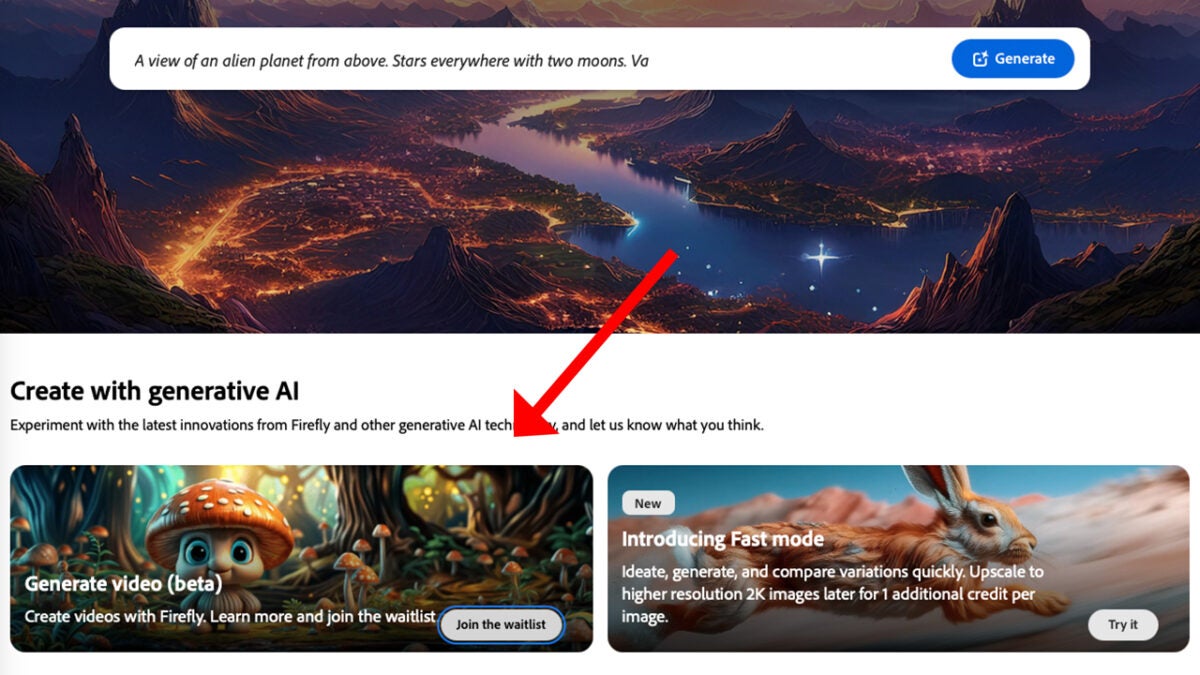
  • Write how you want your video to be: To get good results, Adobe clarifies that the first thing you should do is describe the type of shot, which character will appear, the action, the location of the video, and its visual aesthetics. Don’t beat around the bush; it’s always best to be concise and brief (you will have a limit of up to 175 words). The Firefly website also allows you to transform a static image into one with movement. Here, you just need to describe what you want the image to do.
  • Generate and review your video: Once we have our description, click on Generate and wait for the result. Firefly also lets you change aspects such as camera angles or the aspect ratio. Keep trying different descriptions and settings until you achieve what you desire.

At the moment, Adobe Firefly has some technical limitations. One of them is the videos’ duration and resolution: five seconds at 720p is the maximum we can currently obtain.

Generative Extension: Extend Your Videos in Premiere Pro with Adobe Firefly

In addition to generating video from text, the benefits of Adobe Firefly Video are also found in other Premiere Pro functions, such as Generative Extend. This new feature allows us to add AI-generated frames at the beginning or end of a clip.

It is available in the beta version of Premiere Pro and works as follows:

  • Within your project, select the clip you want to extend. Videos must be at least two seconds long, and in the case of sounds, they must last at least three seconds.
  • With your clip already selected, click on the Generative Extend Tool. It is in the toolbar, which you can activate by clicking on Window and then Tools.
  • Click and drag the edge of the clip to extend it as far as you want. You can extend videos up to a maximum of 2 seconds. In the case of audio, the limit is extended to 10 seconds.
  • To try other results, right-click on the generated area and select Regenerate.

Being a fairly new feature, there are some limitations you will need to consider:

  • The videos to be extended cannot have resolutions higher than 1920×1080.
  • The aspect ratio must be 16:9.
  • The videos must have between 12 and 30 fps.

Regarding sound, Generative Extend cannot create or extend dialogues. It also cannot extend songs or music in general and is only compatible with mono or stereo sounds.

Adobe Premiere Pro
Adobe Premiere Pro Download

Integration with other Adobe applications

Adobe Firefly technology is available in the most popular and widely used programs in the Adobe ecosystem. Your workflow will greatly improve by using the benefits of Firefly in different ways and then combining them if you wish. These are just some of the things we can do from Adobe apps:

  • Photoshop: Here, you will find quite powerful features like Generative Fill, Generative Expand, and Text to Image, which will help us enhance our images with AI-generated elements.
  • Illustrator: Illustrator users can benefit from Generative Shape Fill and Project Neo, among other things. The latter allows us to transform 3D objects into vectors.
  • Lightroom: Lightroom’s Generative Remove feature makes it much easier to remove imperfections and objects that clutter our photos.
  • InDesign: The Generative Expand feature is also found in InDesign, which is perfect for adjusting our images to the millimeter.
  • Adobe Express: Here, you can find a wide variety of options, such as Generate Image, Remove Background, Animate Characters, or Generate Template, for example.

Author: María López

{ "de-DE": "Künstler aus Berufung und Technikliebhaber. Seit ich denken kann, habe ich gerne an allen möglichen Gadgets herumgebastelt.", "en-US": "Artist by vocation and technology lover. I have liked to tinker with all kinds of gadgets for as long as I can remember.", "es-ES": "Artista de vocación y amante de la tecnología. Me ha gustado cacharrear con todo tipo de gadgets desde que tengo uso de razón.", "fr-FR": "Artiste de vocation et amateur de technologie. J'aime bricoler avec toutes sortes de gadgets depuis que j'ai l'usage de la raison.", "it-IT": "", "ja-JP": "", "nl-NL": "", "pl-PL": "", "pt-BR": "", "social": { "email": "", "facebook": "", "twitter": "", "linkedin": "" } } View all posts by María López

Author María LópezPosted on November 10, 2024July 1, 2025Categories News

Post navigation

Previous Previous post: 7 of the best mobile games for iOS and Android
Next Next post: That time Mega Man started playing soccer for some reason

Recent Posts

  • Everyone is getting it wrong with The Blood of Dawnwalker: we explain how the 30-day cycle works
  • Mortal Kombat II could be the movie of the summer and the proof is its first movie
  • Mortal Kombat II could be the movie of the summer and the proof is its first movie
  • The best adaptation of Hannibal Lecter is coming to streaming to whet our appetite again
  • A year later, Oblivion Remastered still has some bugs that make it "somewhat annoying and unplayable"

Archives

  • May 2026
  • April 2026
  • March 2026
  • February 2026
  • January 2026
  • December 2025
  • November 2025
  • October 2025
  • September 2025
  • August 2025
  • July 2025
  • June 2025
  • May 2025
  • April 2025
  • March 2025
  • February 2025
  • January 2025
  • December 2024
  • November 2024
  • October 2024
  • September 2024
  • August 2024
  • July 2024
  • June 2024
  • May 2024
  • April 2024
  • March 2024
  • February 2024
  • January 2024
  • December 2023
  • November 2023
  • October 2023
  • September 2023
  • August 2023
  • July 2023
  • June 2023
  • May 2023
  • April 2023
  • March 2023
  • February 2023
  • January 2023
  • December 2022
  • November 2022
  • October 2022
  • September 2022
  • August 2022
  • July 2022
  • June 2022
  • May 2022
  • April 2022
  • March 2022
  • February 2022
  • January 2022
  • December 2021
  • November 2021
  • October 2021
  • September 2021
  • August 2021
  • July 2021
  • June 2021
  • May 2021
  • April 2021
  • March 2021
  • February 2021
  • January 2021
  • December 2020
  • November 2020
  • October 2020
  • September 2020
  • August 2020
  • July 2020
  • June 2020
  • May 2020
  • April 2020
  • March 2020
  • February 2020
  • January 2020
  • December 2019
  • November 2019
  • October 2019
  • September 2019
  • August 2019
  • July 2019
  • June 2019
  • May 2019
  • April 2019
  • March 2019
  • February 2019
  • January 2019
  • December 2018
  • November 2018
  • October 2018
  • September 2018
  • August 2018
  • July 2018
  • June 2018
  • May 2018
  • April 2018
  • March 2018
  • February 2018
  • January 2018
  • December 2017
  • November 2017
  • October 2017
  • September 2017
  • August 2017
  • July 2017
  • June 2017
  • May 2017
  • April 2017
  • March 2017
  • February 2017
  • January 2017
  • December 2016
  • November 2016
  • October 2016
  • September 2016
  • August 2016
  • July 2016
  • June 2016
  • May 2016
  • April 2016
  • March 2016
  • February 2016
  • January 2016
  • December 2015
  • November 2015
  • October 2015
  • September 2015
  • August 2015
  • July 2015
  • June 2015
  • May 2015
  • April 2015
  • March 2015
  • February 2015
  • January 2015
  • December 2014
  • November 2014
  • October 2014
  • September 2014
  • August 2014
  • July 2014
  • June 2014
  • May 2014
  • April 2014
  • March 2014
  • February 2014
  • January 2014
  • December 2013
  • November 2013
  • October 2013
  • September 2013
  • August 2013
  • July 2013
  • June 2013
  • May 2013
  • April 2013
  • March 2013
  • February 2013
  • January 2013
  • December 2012
  • November 2012
  • October 2012
  • September 2012
  • August 2012
  • July 2012
  • June 2012
  • May 2012
  • April 2012
  • March 2012
  • February 2012
  • January 2012
  • December 2011
  • November 2011
  • October 2011
  • September 2011
  • August 2011
  • July 2011
  • June 2011
  • May 2011
  • April 2011
  • March 2011
  • February 2011
  • January 2011
  • December 2010
  • November 2010
  • October 2010
  • September 2010
  • August 2010
  • July 2010
  • June 2010
  • May 2010
  • April 2010
  • March 2010
  • February 2010
  • January 2010
  • December 2009
  • November 2009
  • October 2009
  • September 2009
  • August 2009
  • July 2009
  • June 2009
  • May 2009
  • April 2009
  • March 2009
  • February 2009
  • January 2009
  • December 2008
  • November 2008
  • October 2008
  • September 2008
  • August 2008
  • July 2008
  • June 2008
  • May 2008
  • April 2008
  • March 2008
  • February 2008
  • January 2008
  • December 2007
  • November 2007
  • October 2007
  • September 2007
  • August 2007
  • July 2007
  • June 2007
  • May 2007
  • April 2007
  • March 2007
  • February 2007
  • January 2007
  • December 2006
  • November 2006
  • September 2006
  • August 2006
  • June 2006
  • May 2006
  • July 2001
  • January 2001
  • November 2000
  • September 2000
  • August 2000
  • July 2000
  • April 2000
  • March 2000

Categories

  • Affiliate post
  • Expert Review
  • Gaming
  • Guides
  • How to
  • Legacy how To
  • News
  • Noticias
  • Software>Security
  • Sponsored
  • Trucos y Consejos
  • Uncategorized
  • Windows software

Meta

  • Log in
  • Entries feed
  • Comments feed
  • WordPress.org
Softonic English Proudly powered by WordPress