Just when it seems like you’ve finished tweaking the layout size for one project, you find yourself having to dive into another file to manually extend the bleed for a label design. And there are still more projects waiting for your attention. Does this situation sound familiar to you?

Experiencing the annoyance of needing to expand on intricate designs, revisiting the same tasks over and over is common. It’s not just you. These time-consuming tasks erode time set aside for creativity. With each new format, it’s like resetting your work clock on another unproductive cycle.
Adobe has released a solution that might align more with the way many designers prefer to work: Faster, more adaptable, and with less repetition. We are going to take a look at Generative Expand for Illustrator, a tool engineered to minimize inefficiency and designed to mesh with the real pace of your design process.
Design and Layout Challenges
Experienced professionals acknowledge that there are parts of the design process that seem a bit disconnected from the creative aspect of the art… Tasks such as bleed adjustments and layout conversions are important but tend to demand more time than expected. Designers often look for ways to make these tasks less overwhelming. If that sounds like you, here are some common challenges you might encounter in your efforts:
- Manual Expansion for Bleed: Meticulously extending artwork edges by hand for print projects, ensuring color and design flow seamlessly beyond the trim.
- Repetitive Layout Edits: Each new format seems to reset the clock, altering dimensions and nudging elements package after package, page after page.
- On-the-fly Modifications: Quick edits come back for a second look, each minor change means reopening files and breaking momentum.
These Challenges Slow Us Down
It’s not just the amount of time they take. It’s the fact that each hour spent on these boilerplate revisions is one less hour for pure design. It’s not always obvious, but designers feel the need for something more tailored. Not a total overhaul, just a smarter way to clear the runway for creativity.
A Detailed Breakdown of Generative Expand
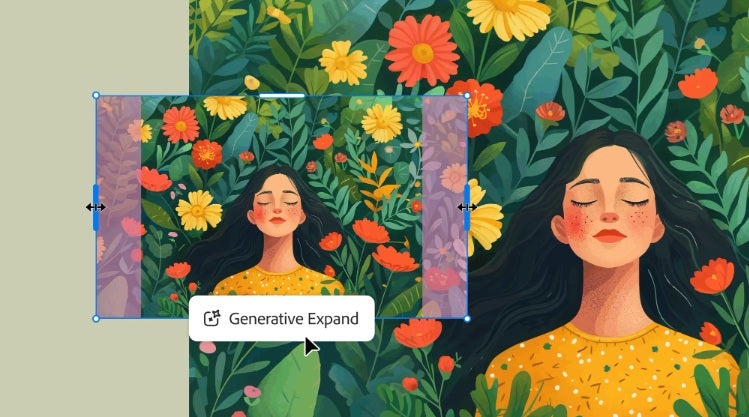
You might have already heard about this in beta, but Generative Expand is now available for Adobe Illustrator. It quietly addresses some of the specific headaches professional designers face, and these can become quite pronounced when time is tight.
Without any flashy announcements or press bells and whistles, Adobe instead presents this feature for Illustrator. There’s no need to fix what’s not broken, just a reduction of the friction in daily design workflows.
Expanding Bleed
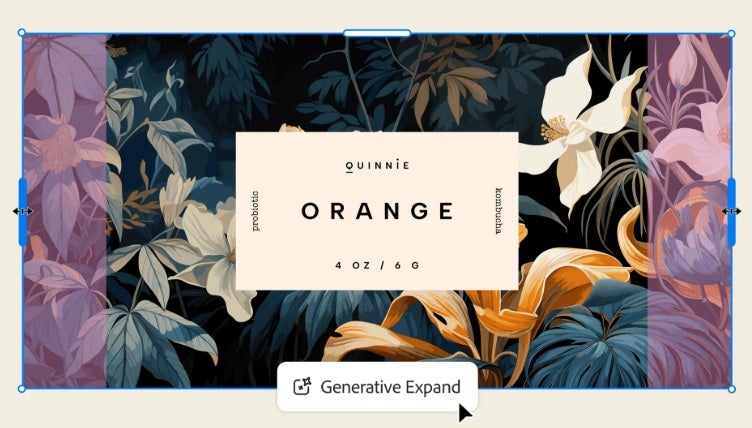
Generative Expand stands out as an indispensable tool for handling the tedious aspect of print designs, especially when dealing with bleeds. Instead of meticulously extending edges manually and hoping it tiles in with your artwork’s specific colors or textures, Generative Expand uses Adobe Firefly AI to generate content that’s contextually aware and doesn’t leave seams. Extend the artwork boundary, and you’ll get a fade that’s so seamless that it easily fits in with the original design, cutting down bleed preparation time from minutes to seconds.
Generative Recolor
Previously, creative refinements in designs involved going through a workflow full of can’t-dos and what-ifs based on an unsuitably restrictive tool stack. Generative Expand lays open a wholly new operating model: simply describe your desired change, and the tool will propose a layout based on your already-made design. If you want it to migrate from a square to a horizontal format, for instance, it can intelligently fill in the blank canvas with colors and motifs that match your initial work. This cuts out much of the back-and-forth involved in adapting ideas across different kinds of projects, and it does so using Firefly AI-based contextual understanding. Overall, very easy to integrate into your workflow.
Adobe Firefly Controls Generative Expand
All these improvements tap into Adobe Firefly to make sure that each bit of generated content is useful rather than random. The tool reallocates your design work from a repetitious step to an AI-assisted action, allowing more creative time while producing more consistent results.
If you find yourself sidetracked by recurring, manual tasks, Generative Expand is an offhand nod to making things a little easier without taking center stage.
How Does Generative Expand Work?
At first sight, Generative Expand may seem a bit futuristic. The reality is much more approachable and neatly connects to your current workflow. Here’s how you can use it for common design work.
Setting Up Your Design for Expansion
So, you have a poster that requires bleed extension, something you would normally spend a good chunk of time on. Drag your selection just beyond the current boundaries of your artwork, and this signals to Generative Expand where to step in. No need to worry about breaking up groups or rasterizing layers just to get it ready. The goal is for it to work cleanly out of the box with what you already have.
Prompt Crafting
Generative Expand requires text prompts, but these aren’t intended to be creative riddles. Just describe what’s missing: “Extend the sky beyond the trim” or “Continue the pattern in this empty area.” The more literal you are about what you want to see, the better it works.
Wait for Results
Adobe’s Firefly AI does its thing. Generally, it takes just a moment to line up new content with your artwork. Is there a texture missing? Is the color not quite matching? Usually, the tool gets the desired result on the first try. If there’s something you’d prefer to have adjusted, you can tweak it. Your result will offer a seamless transition instead of visible guesswork.
For Creative Cloud subscribers, Generative Expand has now been rolled out to all users, so you might want to check out the update. Generative Expand isn’t about washing away your creativity to the background in an attempt to bury something you don’t want to do, but rather it keeps your process less cluttered so your creative energy can get pushed to other places that matter. For some, it goes by unnoticed, but in the flow of work, it is precisely this subtlety that is most important.
Common Use-Cases: Adobe Illustrator’s Generative Expand in Action
Since going live, Generative Expand has found its footing well in the real-world tasks designers deal with day in and day out. Here are a handful of uses that stand out above the rest:
Preparing Print Bleeds
Converting a digital poster to print format is not a simple clerical change of format. The artwork around the edges never stretches nicely, manually blending textures and colors can cause you to trip up. Generative Expand allows you to extend the selection area and creates a seamless fill based on the original artwork in seconds.
Layout Resizing
Resizing a package design is not just a matter of scale. Expanding a label for a taller bottle is a good example. Designers would once tweak and nudge elements for hours; now, Generative Expand can craft a new layout that closely matches what the original implied. That reduces adjustment times for projects where design elements have to move to accommodate typical layout changes.
Fitting Fill-In Graphics
A bit less obvious to some is using Generative Expand to fill in background art for social media posts, posters, or even web banners, where detailed edges may be cropped or cut. Filling in the background for posters, web banners, or social media posts that will have their detailed edges trimmed down can feel pretty menial. Generative Expand simply takes your existing patterns and color blocks and expands them into a usable background in just moments. The feature might seem small, but it feels pretty significant when you’re working at break-neck speed.
Designers Like Working with What’s Already There
Generative Expand may not be single-handedly going to save everyone’s day, but when it reliably gives time back on each project, that’s big enough comfort. The way it pulls seamlessly from your working design is what makes it workable to use again and again.
Possible Pitfalls and How to Get Around Them
Clever as it is mechanically, Generative Expand isn’t magic. You may encounter a couple of scenarios where a bit of technical or creative troubleshooting becomes helpful.
Locked or Grouped Elements Can Cause Problems
Expanding locked Illustrator objects or dealing with older, more complex EPS assets can cause artifacts in the expansion or not work as expected. After identifying the cause, simply unlocking and separating them solves the problem. So, double-check any flexible assets before beginning the expansion process.
Artifacts or Imperfections On The Edges
An Illustrator project containing a great number of hard and soft edges, fine work, or unique contrasts may need checking because there can be nuance to patterns with complex edge transitions. This isn’t unworkable, but it calls for a quick QA review to ensure a good final result. Doing careful boundary checks before expansion can reduce problems.
Tips to Get Around These Issues
- Unlock and Simplify: Make sure expandable elements aren’t part of complex groups or locked before expanding.
- Brief QA Pass: After an expansion has been made, give the boundaries and edges a quick glance to avert potential future challenges.
Generative Expand feels very well integrated into Illustrator. Occasionally it could use a little more help based on the technicalities of a file rather than design complexity.
Best Practices for Maximizing Use of Generative Expand
Once designers become acquainted with Generative Expand, it can enhance almost every design project they tackle, providing a bit more creative headroom for the parts of the work that have been neglected. These are some of the best strategies and tips picked up from that community of early adopters.
Crafting Clear, Straight-to-the-Point Prompts
Generative Expand within Illustrator responds more to clarity than to cleverness. Designers have seen more consistent accuracy by providing clear and direct expansion instructions. Phrases such as “fill with gradient matching the top left” or “extend pattern horizontally” outperform more abstract directions.
Using Variations for Customization
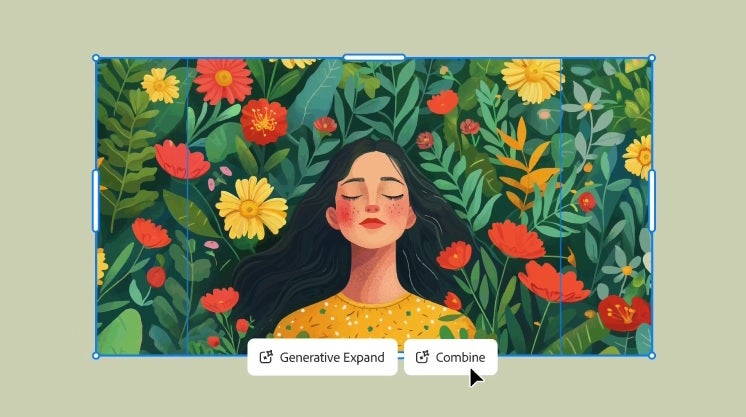
What makes Generative Expand truly stand out is providing multiple results you can cycle through. Often, designers pick two or more for further adjustments. One interesting hybrid approach is if you like only a portion of the edges, blend them together based on the packaging shape the artwork will be applied to.
Settings and Shortcuts for Workflow Speed
Those who work under pressure will recognize the importance of staying at pace. Keyboard shortcuts, such as ‘Ctrl+Z’ for quick undo, and preset settings for repetitive projects, can considerably decrease turnaround time.
For example, in Illustrator, use shortcuts not limited to Generative Expand , such as ‘Alt+Drag’ to duplicate vector elements or ‘Ctrl+D’ to repeat the last transformation, to enhance repeated outcome iterations with very little effort.
Also, set up prompt templates, so it is easier to reuse successful prompts between multiple projects.
Transparency, Ethics, and Licensing
Adobe has invested a lot of effort in making sure that Generative Expand is as accessible as possible to the designers working within and beyond Illustrator by integrating tools that foster transparency, manage licensing efficiently, and maintain ethical standards.
Content Credentials Unpacking
Adobe’s answer to this issue is Content Credentials, a feature that tags and provides information on files generated with Generative Expand within Illustrator. With this option, colleagues and clients can easily see the file’s history and how AI features have been utilized in their workflow. It’s a tool designed for transparency without any unnecessary complication.
This forms part of a broader initiative to make AI assistance in design explicit and clear, rather than something covert. While Content Credentials are still not widely used, it is an option in Generative Expand for those concerned about file provenance history.
Design Licensing and Credit Control
Generative Expand, like all Adobe Firefly Tools, is accessible to Creative Cloud paid subscribers, but works off a credit-based system. This is clear and straightforward, and stops you from triggering unexpected charges and billing headaches midway through a project.
Adobe’s Position on Generative Expand AI Ethics
Adobe trains its AI models responsibly without using third-party data, personal images, or patented artwork, which could otherwise violate the rights of users. It’s more about creating an AI reshape of your designs that compliments your processes without using another’s work.
With these tools, Illustrator’s AI aims for a more open and consistent experience in professional design as opposed to just being advanced for the sake of being advanced. The intention is to make ethical standards and transparency more related to everyday activities, such as a day’s worth of designing. The added bonus is that it evolves without causing confusion.

Overcome Monotonous Design Tasks with Generative Expand
Adobe Illustrator’s Generative Expand fosters efficiency and creativity by streamlining repetitive design tasks. As users experiment with the tool, they can regain time for creative pursuits, transitioning from frustration to innovation.
Generative Expand doesn’t look to rewrite the rules of design, it’s just tackling practical challenges that have been hanging around a little too long. These small differences in bleed and layout workflow, add huge time back into your day for creative work.
Don’t let minor problems consume a big part of your creative process. Let Adobe Illustrator’s Generative Expand give you a more fluid workflow.
