
Skip to content

Softonic English

Just another Softonic Sites site

Adobe Photoshop has a new feature to amaze you with

For creatives, Adobe has always been considered a safe bet. For years, programs like Photoshop have become indispensable in the professional world. Now, Adobe has decided to give its most famous tool a little facelift to improve it even further. Generative artificial intelligence has sparked change and innovation, something reflected in new and interesting features like Generative Fill. However, the new changes Adobe has incorporated go a step further. If you want to know how Photoshop can transform your workflows, stay tuned […]

For creatives, Adobe has always been considered a safe bet. For years, programs like Photoshop have become indispensable in the professional world. Now, Adobe has decided to give its most famous tool a little facelift to improve it even further if possible.

Generative artificial intelligence has sparked change and innovation, something reflected in exciting new features like Generative Fill. However, the new changes that Adobe has incorporated go a step further. If you want to know how Photoshop can transform your workflows, stay with us a little longer, as we explain everything to you.

Adobe Photoshop
Adobe Photoshop DOWNLOAD

A renewed interface

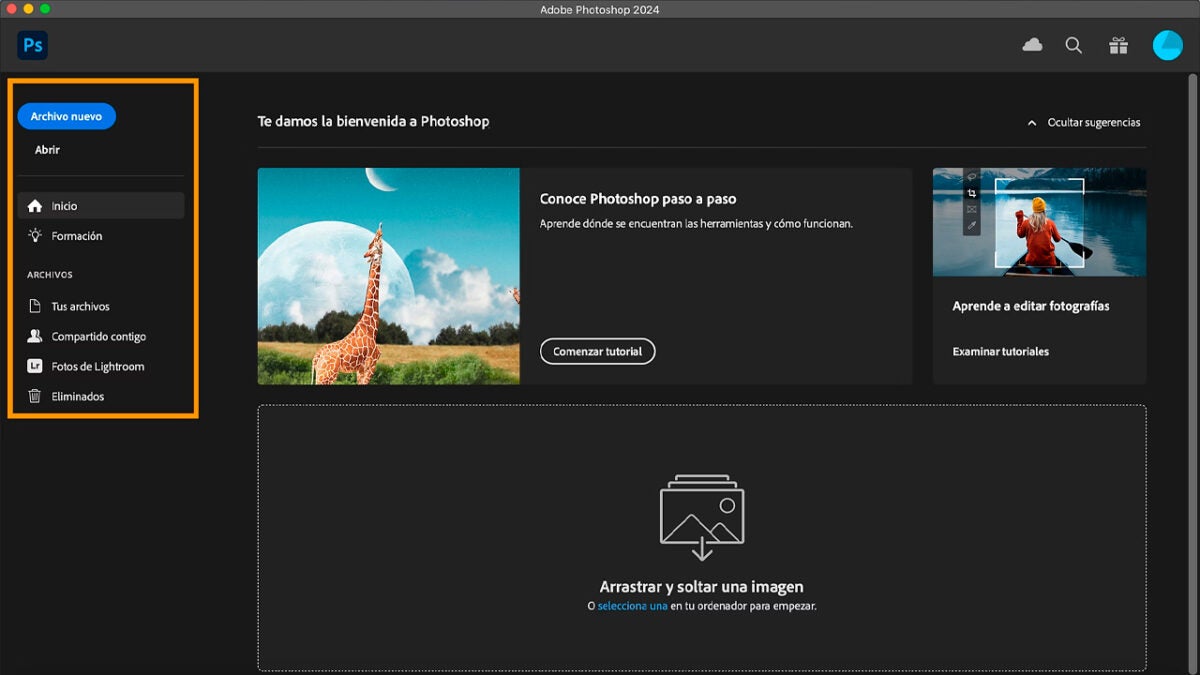
Those who are more familiar with Photoshop will have noticed changes in the interface. While all its functionalities and tools remain intact, we now find a new start screen or Home Screen.

Here, you will see firsthand information about the new features being added to Photoshop. You will also be able to access all your most recent files that are in the cloud or the last ones you have opened or shared. The number of files that appear can be customized from Preferences > File Handling, where you can choose between 0 and 100.

From the Home Screen, you can already perform many actions, such as opening a file, creating one from scratch, or accessing Adobe tutorials. You will find the options in a column located on the left.
This is how Generative Fill works

As we mentioned at the beginning, generative artificial intelligence has landed in Photoshop with Adobe Firefly, Adobe’s proprietary model. One of the most useful features for you will be Generative Fill, which will allow us to add, remove, or extend any type of element within an image through a text command or prompt.

It’s easy: just write what you want to happen and let Photoshop do the dirty work. Powered by the latest version of Firefly available, its results will be even more photorealistic and convincing. Here’s how you can use Generative Fill in your projects:

  • With any of the selection tools, paint over the area where you want to add, remove, or modify any element
  • When you do this, a small contextual bar/menu will appear. There, the option for Generative Fill will appear directly. Another way to access it is by going to Edit > Generative Fill.
  • After selecting Generative Fill, write a brief description in the box of what you want to generate.
  • Click on Generate. On the right, you will see a series of variations in the Properties panel to choose the option you like the most.
  • If you are not happy with the result or want to try other prompts, modify the text and select Generate again.

Keep in mind that to use Generative Fill you must be connected to the network at all times. Additionally, to use this feature you must have enough generative credits, an amount that varies depending on the plan you are subscribed to.

Collaboration Tools

Adobe has made collaboration even easier between teams and individuals within the programs included in Creative Cloud. Photoshop allows us to invite other users to our projects so they can also modify whatever is needed whenever necessary. The main options we have for this are Invite for Edit and Share for Review.

With Invite for Edit we can enable shared editing of the same document with one or more collaborators. Thus, each user will be able to edit the file, shared in the cloud, one by one.

To use it, go to File > Invite to Edit. In the new menu that will appear on the screen, enter the users you want to invite and then choose between Only invited people can access or Anyone with the link can comment. With the first option, only the users you choose will be able to edit the file. The other option allows anyone with access to the link to comment.
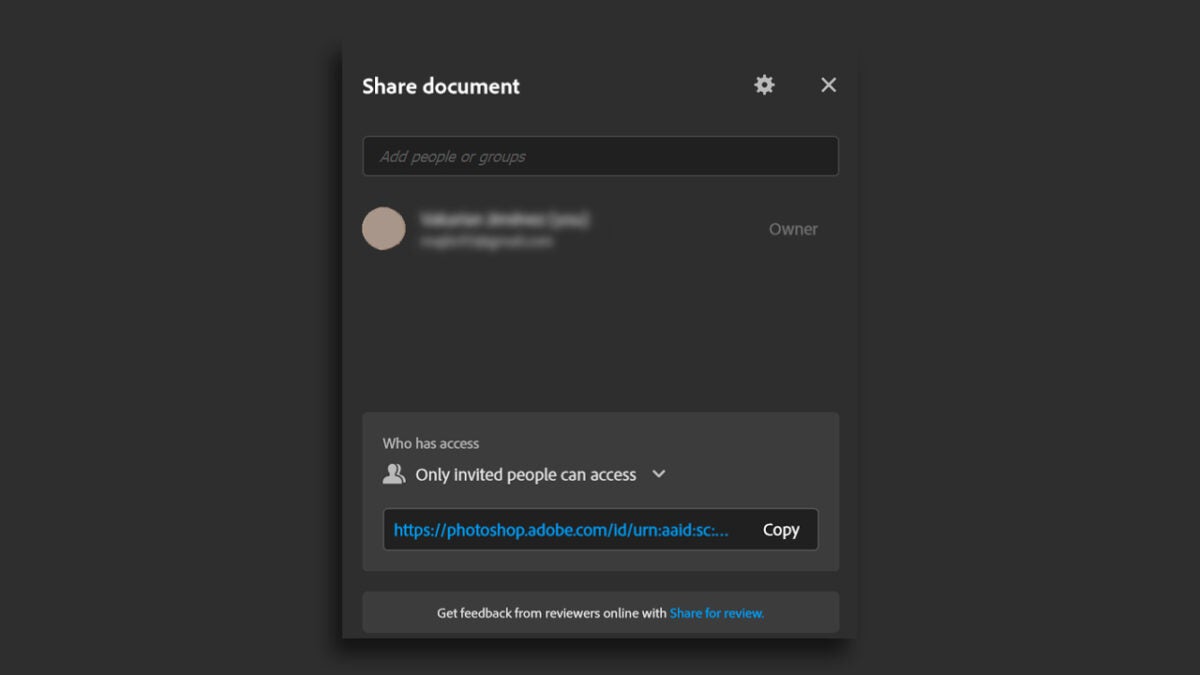
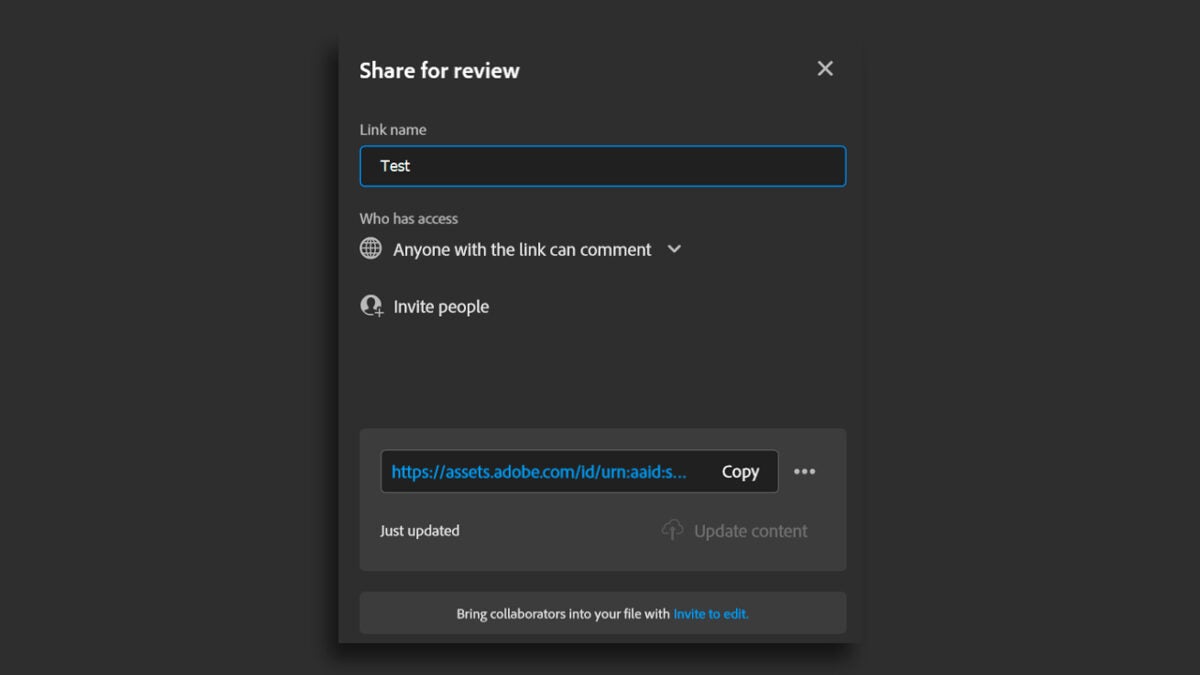
With the Share for Review option, we can generate a review link to share with others so they can comment in writing. With your document open, go to File > Share for review or select the blue Share button located in the upper right area of Photoshop. From the panel that opens, which is very similar to the previous one, you can modify the document name and control who can access the link.

The options you will have are:

  • Only invited people can comment: You will not be able to access a document until a link is sent to you by email.
  • Everyone at “__” can comment: Anyone from a specific organization can comment. Their email address must be included in the organization’s domain.
  • Anyone with the link can comment: A public link is generated that anyone can access just by clicking it.
Adobe Photoshop
Adobe Photoshop DOWNLOAD

When you finish, you will have your document ready to share. You have more configuration options, which you will find by selecting the three-dot symbol located next to the link:

  • Create a new review link: A new review link is generated.
  • Link settings: You can hide or show comments from any user with access to the link.
  • Delete review link: It is used to delete the link and make it stop working. Keep in mind that once it is deleted, the comments that have been left cannot be recovered.
  • Manage review links: From here, you will open the Creative Cloud website, and you can see all the links created for the document in Files > Your Files > Published.
Author: María López

{ "de-DE": "Künstler aus Berufung und Technikliebhaber. Seit ich denken kann, habe ich gerne an allen möglichen Gadgets herumgebastelt.", "en-US": "Artist by vocation and technology lover. I have liked to tinker with all kinds of gadgets for as long as I can remember.", "es-ES": "Artista de vocación y amante de la tecnología. Me ha gustado cacharrear con todo tipo de gadgets desde que tengo uso de razón.", "fr-FR": "Artiste de vocation et amateur de technologie. J'aime bricoler avec toutes sortes de gadgets depuis que j'ai l'usage de la raison.", "it-IT": "", "ja-JP": "", "nl-NL": "", "pl-PL": "", "pt-BR": "", "social": { "email": "", "facebook": "", "twitter": "", "linkedin": "" } } View all posts by María López

Author María LópezPosted on November 12, 2024July 1, 2025Categories News

Post navigation

Previous Previous post: What Is Generative AI? And What Does it Mean for You? Statistics Shaping 2024
Next Next post: How to Protect Your Grandparents from Thanksgiving Digital Scams

Recent Posts

  • Fake BTS tour ticket scams are spreading: Here’s how to stay safe
  • 'Harry Potter' suffers a blow in its HBO Max series. One of its main actresses is leaving between seasons
  • Adobe Express vs Canva: Which Is Better for Non-Designers in 2026?
  • Woody is not just Tom Hanks: there is another person who voices the character from 'Toy Story'
  • The Boys has shown the first teaser of its new spinoff, but you won't be able to see it on the Internet yet

Archives

  • May 2026
  • April 2026
  • March 2026
  • February 2026
  • January 2026
  • December 2025
  • November 2025
  • October 2025
  • September 2025
  • August 2025
  • July 2025
  • June 2025
  • May 2025
  • April 2025
  • March 2025
  • February 2025
  • January 2025
  • December 2024
  • November 2024
  • October 2024
  • September 2024
  • August 2024
  • July 2024
  • June 2024
  • May 2024
  • April 2024
  • March 2024
  • February 2024
  • January 2024
  • December 2023
  • November 2023
  • October 2023
  • September 2023
  • August 2023
  • July 2023
  • June 2023
  • May 2023
  • April 2023
  • March 2023
  • February 2023
  • January 2023
  • December 2022
  • November 2022
  • October 2022
  • September 2022
  • August 2022
  • July 2022
  • June 2022
  • May 2022
  • April 2022
  • March 2022
  • February 2022
  • January 2022
  • December 2021
  • November 2021
  • October 2021
  • September 2021
  • August 2021
  • July 2021
  • June 2021
  • May 2021
  • April 2021
  • March 2021
  • February 2021
  • January 2021
  • December 2020
  • November 2020
  • October 2020
  • September 2020
  • August 2020
  • July 2020
  • June 2020
  • May 2020
  • April 2020
  • March 2020
  • February 2020
  • January 2020
  • December 2019
  • November 2019
  • October 2019
  • September 2019
  • August 2019
  • July 2019
  • June 2019
  • May 2019
  • April 2019
  • March 2019
  • February 2019
  • January 2019
  • December 2018
  • November 2018
  • October 2018
  • September 2018
  • August 2018
  • July 2018
  • June 2018
  • May 2018
  • April 2018
  • March 2018
  • February 2018
  • January 2018
  • December 2017
  • November 2017
  • October 2017
  • September 2017
  • August 2017
  • July 2017
  • June 2017
  • May 2017
  • April 2017
  • March 2017
  • February 2017
  • January 2017
  • December 2016
  • November 2016
  • October 2016
  • September 2016
  • August 2016
  • July 2016
  • June 2016
  • May 2016
  • April 2016
  • March 2016
  • February 2016
  • January 2016
  • December 2015
  • November 2015
  • October 2015
  • September 2015
  • August 2015
  • July 2015
  • June 2015
  • May 2015
  • April 2015
  • March 2015
  • February 2015
  • January 2015
  • December 2014
  • November 2014
  • October 2014
  • September 2014
  • August 2014
  • July 2014
  • June 2014
  • May 2014
  • April 2014
  • March 2014
  • February 2014
  • January 2014
  • December 2013
  • November 2013
  • October 2013
  • September 2013
  • August 2013
  • July 2013
  • June 2013
  • May 2013
  • April 2013
  • March 2013
  • February 2013
  • January 2013
  • December 2012
  • November 2012
  • October 2012
  • September 2012
  • August 2012
  • July 2012
  • June 2012
  • May 2012
  • April 2012
  • March 2012
  • February 2012
  • January 2012
  • December 2011
  • November 2011
  • October 2011
  • September 2011
  • August 2011
  • July 2011
  • June 2011
  • May 2011
  • April 2011
  • March 2011
  • February 2011
  • January 2011
  • December 2010
  • November 2010
  • October 2010
  • September 2010
  • August 2010
  • July 2010
  • June 2010
  • May 2010
  • April 2010
  • March 2010
  • February 2010
  • January 2010
  • December 2009
  • November 2009
  • October 2009
  • September 2009
  • August 2009
  • July 2009
  • June 2009
  • May 2009
  • April 2009
  • March 2009
  • February 2009
  • January 2009
  • December 2008
  • November 2008
  • October 2008
  • September 2008
  • August 2008
  • July 2008
  • June 2008
  • May 2008
  • April 2008
  • March 2008
  • February 2008
  • January 2008
  • December 2007
  • November 2007
  • October 2007
  • September 2007
  • August 2007
  • July 2007
  • June 2007
  • May 2007
  • April 2007
  • March 2007
  • February 2007
  • January 2007
  • December 2006
  • November 2006
  • September 2006
  • August 2006
  • June 2006
  • May 2006
  • July 2001
  • January 2001
  • November 2000
  • September 2000
  • August 2000
  • July 2000
  • April 2000
  • March 2000

Categories

  • Affiliate post
  • Expert Review
  • Gaming
  • Guides
  • How to
  • Legacy how To
  • News
  • Noticias
  • Software>Security
  • Sponsored
  • Trucos y Consejos
  • Uncategorized
  • Windows software

Meta

  • Log in
  • Entries feed
  • Comments feed
  • WordPress.org
Softonic English Proudly powered by WordPress