
Make history with Softonic

rise-and-fall-pic-1.pngThe Christmas season is over but you’re probably still grinding through those new games. While some exciting consoles have been launched recently, the PC still plays host to countless reputable titles. Softonic has some real classics in store for you this week, among which are two of the greatest strategy games ever launched: Civilizations and Age of Empire. Let’s take you through them.

Rise & Fall: Civilizations at War, the latest in the series, gives you the chance to command some of the greatest empires in history: Rome, Greece, Persia and Egypt. You’ll have to organize your troops and set out your plans to become the dominant civilization on the planet. We really like the graphics, particularly the third-person perspectives, and the level of freedom the game gives you in developing your armies. Few feelings compare to that special rush you get from launching a massive attack on your enemies while you just sit back and watch events unfold.

Age of Empires III takes you to a different era and a different continent. Carry out various missions through Latin and North America, defending the Aztecs against the Spanish conquistadors or assisting Simon Bolivar with his South American revolution. The game is scenario-oriented and you’ll only be able to choose one side, that of Morgan Black and his family, but you’ll participate in many historic events that shaped the American continent.

Both of these games are thrilling historical military strategy games. Choosing the right one for you will depend on the era you’re interested in and whether you like to follow a scenario, or plan everything yourself. Or you just play them both.
McAfee AVERT Stinger hunts down viruses

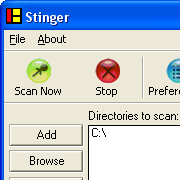
networks-associates-mcafee-avert-stinger.pngWhen protecting your PC from online threats, any weapon you come across is welcome, especially if they can take care of what other security applications don’t. McAfee AVERT Stinger is a small virus extractor specialized in hunting the viruses listed by McAfee.

Because it is lightweight, the program saves you the hassle of big and cumbersome antivirus applications and you can easily run it in the background while you carry out another task. Just launch McAfee AVERT Stinger, select your directory, press the scan now button, and wait for the results to come. The application runs relatively quickly depending on the size of the directory you have chosen to scan and if McAfee AVERT Stinger finds any malware it will pop up on the screen. The application is very basic but it can scan self-extracting executables and compressed files and will automatically remove viruses it comes across. To find out which viruses McAfee AVERT Stinger recognizes just click on the list button and scroll the names of all malware recognized by the antivirus manufacturer.

Continue reading “McAfee AVERT Stinger hunts down viruses”

MySpace develops child monitoring app

ms.jpgIt was bound to happen, it just did. Four families have sued News Corp and the MySpace social networking site after their daughters were sexually assaulted by offenders they had met on the site.

In response, MySpace will release Zephyr, an application for parents to closely monitor the description their children use on the social networking site. The program should in principle help ensure that children or teenagers do not give away sensible information or enter a false profile (ie older age). Monkey Bites, however, sees through the monitoring app, claiming:

For all practical purposes Zephyr seems to do little more than possibly give MySpace some wiggle room in its many pending lawsuits.

And that’s not forgetting the skepticism Zephyr has received from other Web companies. According to MSNBC, both Facebook, the social network site and Xanga , a weblog community, declined to take part in Zephyr. Other bigger companies like Google or Yahoo have yet to say whether they will join.

While parents who install Zephyr on their PCs won’t be able to view the content posted on MySpace, they’ll be kept informed every time a profile is updated. The program will also let monitored users know that it’s keeping an eye on them. For this reason, you start to wonder if Zephyr might not instead lead teenage users of MySpace to move on to other social networking sites where they know their parents can’t monitor them. We’ll have to wait till June to test out Zephyr’s effectiveness and see the consequences of it on MySpace’s popularity.

Back to the original Grand Theft Auto

gta1.jpgI’ve been playing Vice City on the PS2 a lot recently. What surprises me most is that even though it was released in 2002, the graphics and game play are still pretty impressive. The next version, GTA IV, will only be released on October 16, 2007, on Xbox first, and rumors already claim it will be an MMO, in what we can only imagine as a humongous gunfest.

There’s still a couple of months to wait until this release and in the meantine I suggest going back to the original 1997 release, Grand Theft Auto. Although this game only had an overhead view and rather poor graphics you could wander freely around the city and pick your missions. There were no cut scenes and you accessed missions from ringing phone booths or by entering a car. You had to follow particular instructions which were liable to change at any given time. Like in recent releases, you could cruise around the city, but ramming other cars or killing policemen gave you a significant number of points. You could use police bribes (the police-badge stars in the latest version), go on killing frenzies (rampage) and pick a “Get outta jail” card to use when you were arrested. Essentially, the whole principal of the game was the same as it is now. Any true fan of the recent editions of GTA is guaranteed to find some enjoyment in good ol’ Liberty City as it used to be in its first incarnation.

10 internet apps you might not know

q_logo.pngIf you’re on this blog there’s a good chance you know about alternative browsers like Firefox or Opera and that you probably even use them. You might know what tabs, extensions, session restore or pop-up blocking are but your web experience might not go farther than this. Here are some programs to improve your overall browsing experience:

  1. ToolbarCop : Quickly uninstall all those unnecessary extensions
  2. Ghostzilla : Browse undercover
  3. Tor : Protect your privacy whenever you connect to the web
  4. AI Roboform : Memorize passwords and form entries
  5. DU Meter : Measure your bandwidth
  6. Windows Live Writer : Desktop blogging
  7. Bookmark Base : Export and carry your bookmarks
  8. WikiReader : Open Wikipedia from anywhere
  9. Quintura Search : A search query based on tag clouds
  10. ted : Create your own schedule of TV series torrents

We tried to list all sorts of apps, from security to bookmarking, searching or blogging. If there’s a program you use while browsing and that you really like, let us know!

Pimp your ride with Drag Racer!

dr2.jpgDrag racing is all about jazzy tuned-up cars, the ‘bling’ attitude and adrenaline filled races on abandoned highways. Pimp the interior and exterior of your ride and boost your engine to compete with other revamped high powered vehicles. To be someone in drag racing, your ride needs to pack power and show some style.
Drag Racer emulates the tuning spirit. Your objective is to customize and improve your car as much as you can and win your races against all types of vehicles, from a Honda Civic to the Lamborghini Murcielago. Choose your car among more than 20 different constructors and customize it completely from the steering wheel to the seats and exhaust pipes. You can add wings and decals and give it a paint job. Win performance points to improve your ride in different categories like suspension, turbo, engine or ignition.

Continue reading “Pimp your ride with Drag Racer!”

KMPlayer vs VLC Media Player

You’ve probably noticed by now the large number of good, free video players available. We’ve decided to compare contenders KMPlayer and VLC Media Player and see how they fare.

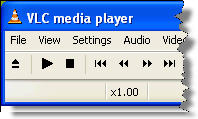
vlc.jpgFirst off, let’s look at the interface. KMPLayer is fully customizable and, like Winamp, allows you to open multiple windows for controls, playlist or equalizer. You can move these around and adjust them to your liking. VLC has a very basic and intuitive interface, but also supports a number of skins. Each program offers a basic menu and hotkeys, giving you quick access to the playback functions.

Compatibility with a great deal of video formats is what makes both of these video players extremely popular. However VLC Media Player probably has the edge here, because, Real video being an exception, it seems to cover all existing video files. It can also play incomplete videos and will try to play an unknown format in its raw form. Each player has a large array of audio and video filters to process and enhance your videos. However, KMPlayer adds a feature for effects like aspect ratio or colors, to improve playback quality, not available in VLC.

Continue reading “KMPlayer vs VLC Media Player”

Destroy sensitive info with East-Tec Eraser

homesplashcrop.jpgIn most cases, privacy and security are crucial to maintaining a business afloat. Making sure you have the right application on your PC can avoid you the risk of information theft. East-Tec Eraser caters to users by offering all the tools to fully erase files and information from your computer.

The application is fitted with 3 essential file cleaning features, directly accessible from the quick start menu: protecting your privacy, erasing deleted files, or erasing specific files. Choosing the first option will thoroughly check your PC and remove all existing registry entries and cookies. A detailed progress bar makes the process speed and time spent on the task visible. You can also decide to configure automation options such as if your PC should shut down or restart after it has been wiped clean.

Continue reading “Destroy sensitive info with East-Tec Eraser”

All aboard with the Railroad Tycoon!

sid meier's railroad tycoon deluxeTo coincide with the release of Sid Meier’s Railroads, the original Sid Meier’s Railroad Tycoon (SMRT), straight from 1990, has now been made freely available in full. The game takes you back to the 19th century where you create your own transportation empire by building railroads, buying new trains and setting up connections between cities.

Those of you who are worried about compatibility: fear not. You won’t have to access DOS to play the game because it features its very own DOS Box. Original gamers of SMRT, will fondly appreciate the minimalistic graphics, midi country music, pixelized area maps, but most of all, the crux of the whole series, managing your money and assets. You start off with a million dollars (of which you’ll have to pay back $500,000) and must first choose a good location, build a station and then start laying tracks. You’ll soon become familiar with all the varieties of locomotives, like the Norris, Crocodile or Ten-Wheeler. The game really starts to get addictive when you see your network of railroads reach more and more cities and your income start to rise. Depending on the level of difficulty you choose, you’ll also come across rough competition and you’ll have to protect your assets from truly aggressive entrepreneurs.

Even though the graphics don’t compare to what you’ll find in the latest release, Sid Meier’s Railroads, the simulation aspect of Railroad Tycoon is as much thrilling now as it was 10 year ago. All aboard!

Morpheus: full multimedia P2P app?

m.jpgMorpheus is one of those age old P2P applications and, with support for Gnutella, eDonkey, Bittorrent and many others, probably the most versatile you can find on the market. The new version aims to turn the P2P client into the ultimate multimedia application. Does it succeed?

Morpheus has gone through a complete face lift and the new version brings a similarly new interface. The window is divided into 4 tabs: search results, my files, podcasts and Morpheus online, giving you a clear idea of which aspects of the program are considered to be most important. A pane on the left side allows you to create playlists or keep track of searches and videos – although strangely not music. Morpheus lets you also sync all your downloaded files to import them automatically to iTunes. Oddly enough, the chat tool is now hidden at the top of the interface, next to help and preferences.

Continue reading “Morpheus: full multimedia P2P app?”