
Best Internet Explorer add-ons

best-ie-addons.png

So you thought that add-ons were just a matter for Firefox, eh? Well actually you were partially right as there are many more extensions, themes and functions you can install to Mozilla’s popular browser. Nevertheless, IE also has some free applications you can install and play with, to enjoy a richer experience while web surfing. I have looked at what is on offer and have chosen what I believe to be the most interesting tools you can try… enjoy!

  • Me.dium – a social-browsing add-on that lets you surf with your friends like never before. In the real world, doing things alone feels, well, lonely. So why do we do everything alone when were online? Start navigating the web with the people you care about. Bump into your friends and interact with the crowds, wherever they are – just like in the real world.
  • StumbleUpon – discovers web sites based on your interests, learns what you like and brings you more. With StumbleUpon you can also connect with friends and share your discoveries, meet people who have similar interests, and check out what other people are discovering.
  • PicLens – instantly transforms your browser into a full-screen, 3D experience for viewing images on the Web. Photos and videos will come to life via a cinematic presentation that goes well beyond the confines of the traditional browser window. With PicLens, browsing and viewing media on the Web will never be the same again.
  • Browse3D – Why browse the Web one page at a time? Browse3D works like a tabbed browser but the open Web pages are easier to find and use since their image is always visible on one of the 3 walls. Advanced search and anti pop-up features are integrated with XP SP2. Pre-load Web pages and eliminate the wait. The center wall is the main browser, the left wall is for history pages and the right wall is for other open and saved page groups.
  • Rip Clip – Need to save Web articles? Focused more on article extraction as opposed to Web site extraction, Rip Clip has specific features for this task that make it superior to other offline browsing tools. Features include the ability to get information about the structure of your Web article to easily determine whether you’re missing any pages; the ability to control precisely which pages you want; and a simplistic interface for collecting Web pages while you surf. This ensures you download only the pages you want, without missing the pages you need; saving on download time and disk space. Continue reading “Best Internet Explorer add-ons”


Are Facebook and Badoo useful or just a waste of time?

All online social network sites claim to be useful because they allow you to stay in contact with friends you wouldn’t otherwise hear from. Having a profile online allows you to post photos, videos and write thoughts or experiences available for anybody to read or see. They can all know where you are, what you are up to and so on. It’s cool and time saving, isn’t it?


Badoo

Although it is true that Facebook is mostly used to maintain contacts with people you know, the ‘temptation’ of enlarging your social network is always there. It’s surely not like LinkedIn where you just invite work colleague and you really want to maintain your profile linked just to specific people. In Facebook most users leave their profile open for others to see and it can happen that complete strangers ask you to be their ‘friend’. Sometimes you may think, ‘why not’, so you accept the invitation, simply basing your willingness on the other person’s picture.

Even though people say they use social networks just to maintain contacts with family and mates, the possibility of knowing ‘new friends’, or of being ‘on the market’, really stands behind the popularity of these social websites. If this weren’t true, if the possibility ‘to flirt’ were not an option, people would just have a personal blog, a mailing list or a private forum to stay in contact with whoever they wanted.

This trend is even clearer with Badoo, a ‘new’ service which is becoming extremely popular, and taking ground on Facebook. It is actually a free dating web site, under the appearance of a social network. Of course the service is meant to create your community of friends, share photos and videos. With this site you rate other people’s pictures, which can actually be funny, and post a brief profile. Within minutes you receive dozens of messages of people asking to be your friend and so on. Not that they will write more than ‘Hi, how are you’ though. Users can even pay to have their photo in the site’s home page, so they can be in contact with the entire world. The human omnipresence delirium has its chances to be fulfilled.

Continue reading “Are Facebook and Badoo useful or just a waste of time?”

It’s party time! Or how your PC can help you dance

Party timeSo the weekend is here and you would like to leave all the stress of the week behind you. What’s better than going dancing then? Salsa and ballroom dancing sound fun and stress-free. It’s something we are all tantalized by, but there so many excuses for not actually doing it. Surely not knowing any dance step is a valid justification. For all shy people who wouldn’t attend a course because they feel clumsy, I’ve decided to look around, seeking how our computers can help us improve our confidence and dance skills.


There are loads of videos and web sites you can find online, but let’s start with something you can download and install on your computer. James introduced us to Stepmania and Dance with his post ‘Go dancing on your PC’. When I tried the new version of Dance, I found it rather difficult to follow. Basically, what you have is a representation of you and your partner’s shoes moving on the dance floor. It’s true that there are many different steps to choose from, but there is no music associated. You have to download midi files manually and there is no way to link them to the relative steps.

Although the graphics are rather poor, I’ve found Salsa shine very useful. You have several salsa figures and steps, listed in increasing difficulty. What I’ve found of extreme utility is the slow motion function, which allows you to see movements better. This is the real advantage of a PC course and something you wouldn’t even get from a real class with an instructor . In fact, when taking courses , I’ve always found it difficult to understand exactly where I have to place my feet because teachers move so fast. Instead in this application the teacher is facing the same way as you, so that if he moves the left foot, you don’t have to think of which foot you have to move. It’s simply the left one! I know this may sound silly, but when figures get complicated I can assure you it eases things a lot. With the slow motion, you can finally see exactly where you have to place your foot, saving you some trouble and your partner from bruises.

Looking online there are several resources which may help you improve your style and general knowledge on how to dance. While I’m curious to know what your favorite sites are, I listed the ones which I think can be of some use. Continue reading “It’s party time! Or how your PC can help you dance”

Programs to keep you fit and healthy

keep you fitStaying long hours sat in front of a PC, is surely not qualified as the best exercise you can do to stay fit. Although there is a great move of hands and fingers, they don’t really burn as much calories as you would wish.

Nevertheless PCs can actually help you stay motivated, set targets and see exercises you can do to stay fit and healthy.

Fast walking, running, swimming and cycling are all excellent options to keep you healthy, but if you want to get the most of them, a flexible and ‘balanced’ body – in the real meaning of the word – is a must have.

Yoga can help you to achieve that, and good practice of it everyday will ensure you the best results. To know more about this discipline and also start practicing it with a very effective but simple exercise, check out Yoga Freeware 3 and Yoga trainer. The former features step by step images of the Sun Salutation which is the best way to start your day.

As said in Latin, ‘mens sana in corpore sano’, the better way to keep fit is to exercise your brain, together with your body. Brain Practicer provides 7 methods to exercise your intelligence and hopefully improve it. I say ‘hopefully’ not because I don’t think you’re smart, but simply as it’s something we all want to increase.

You have trained your body and exercised your mind, now what else could you do to keep fit? You already know the answer, although you pretend not to. Checking what you eat. CRON-O-Meter helps you keep an eye on your food intake to ensure you get enough vitamins, minerals, proteins and carbohydrates each day.

Continue reading “Programs to keep you fit and healthy”

Video conversion tools: Online VS Offline

Video conversionThere is always an ever-increasing need to convert video files into formats that are suitable for portable devices like iPod, PSP and mobile phones. This is because people want to have their favorite YouTube videos with them wherever they go, and also because users produce more video content they would like to show to their friends or see whenever they want.

There’s a great need then for easy to use, effective and ideally free conversion and editing tools. Although there are web services that offer these features, in my experience it can be hard to edit or encode video files online, both because of the upload bandwidth limits and because while editing, if anything goes wrong, like a temporary server failure, a problem with the connection or a stability issue of your browser, you can lose all your work.

If you need to convert small videos and you want to try some online services, here’s a list of useful website to keep in mind:

  • YouConvertIt – Convert any media file format (Documents, Images, Audio, Video & Archives) for free and without installing anything to your PC.
  • Cellsea – Free online video editor and converter. It has some issues managing medium-sized files.
  • Hey!Watch – Hey!Watch is a professional and reliable encoding platform available via a simple and intuitive interface. No file size limit.
  • Youtubehack – Download YouTube video as FLV, MPG, XviD, MOV or MP3 (sound only) format.

Specifically for medium-sized videos, it’ll be some time before web applications overtake software you install on your computer, although it’s good to have options available and surely online services will improve in the near future. For the moment, you will get better results with some freeware applications:

  • On DVDVideoSoft you’ll find a collection of free software for your PC, for fast and efficient results, to download, convert, extract, edit videos.
  • SUPER – If you need a simple, yet very efficient tool to convert, encode or play any multimedia file, without reading manuals or spending long hours training, then this program is all you need. It is a multimedia encoder and a multimedia player, easy-to-use with one simple click.
  • Videora and Free iPod Video Converter – If you are interested just in converting files for your iPod.

The Sex and the City software kit

sex-and-the-city-the-movie-200805151105042462.jpgSex and the City has been recently in the news for the world premier in London of the cinematic follow-up to the successful TV series. According to the film’s marketing team, they are creating smallish premieres in Europe, the next one will be in Berlin, in order to create enough suspense for the New York premier which will be ‘enormous’ and will happen just before the film opens worldwide, which is set for May the 30th.


For all the millions of fans of this fantastic series, I’ve found a great screen saver which will bring to your desktop all the allure of the four stylish women and that feeling of friendship, love and disillusion-illusion, that so appealed to so many of us.

Although the screensaver should allow you also to save the images as wallpaper, this function didn’t work when I tried it, so I though of making your life simpler by taking screenshot and zip them in this Sex and the City wallpaper collection, which I’m sure you’ll love.

If you really are a fan of the series, try this Trivia Game at HBO to find out where you rank on the Sex and the City scale. It will be also funny to test yourself to see with which character you have most affinity with: whether you are more like the high maintenance Charlotte, the pragmatic Miranda, the sexy Samantha, the all-in-one Carrie or a mix of them.

If you are a man, it’s still interesting to know which kind of woman you would be if you were one. I’m something in between Carrie and Charlotte. I just don’t live in Manhattan and would have some problems in buying a pair of Manolo Blahnik a week; but that’s just a matter of perspective, isn’t it?

How to know everything about a web site

Whowho.pngwho.pngwho.pngDo you want to know what people say about a web site in terms of security, reliability and privacy? It’s not just a matter of curiosity: having user ratings on websites can save you lots of time and trouble. There are many services you could try to know more about the number of visitors a web site has, the server location, the visitor location, etc. We have found one though that includes all the information you might need to know about a web site: WOT.

This is a Firefox and IE add-on that adds a colored ring near the home page button of your browser. This lets you know easily, by changing color, if a web site is trusted, safe to use and whether the general reputation among end-users is good. You can also add your own rating by clicking the colored ring and give your score on trustworthiness, vendor reliability, privacy and child safety. If you click on the “View scorecard for rating details” option, you’ll be able to write a comment and read what other people have said about that website.

What about all that useful hidden data you wanted to know? In the rating details page, the application displays the references found for a website on other sites. In this page you will also find the ‘Whois’ function which provides interesting information about indexed, registry and server data. You can even find a physical address behind a web site, which can be extremely useful, for example in cases of commercial fraud.

Other services that provide you information about websites are:

WhoIsTheOwner.net – If you want to know the contact address, email and phone number of the website owner, this free service will help.

WhoIsHostingThis.com – Enter the URL of any website and this online service will display that site’s hosting details.

SocialMeter.com – This service helps you determine the popularity of a web page on social sites like Digg, del.icio.us, Google Bookmarks, etc.

Popuri.us is for estimating the relative popularity of a website with ranking data and inbound links from sites like Compete, Quantcast Google, Yahoo!, Windows Live, etc.

OthersOnline is a Firefox and IE add-on that gives you the list of people interested in a particular website and if they are online, you can chat with them and exchange opinions.

Opera 9.5 beta2 – the fastest web browser on the Net?

opera-browser.jpg

As soon as you install this browser you will have a new pleasant experience about web surfing. Every page loads faster and this is something measurable even without having to use a stopwatch, such is the difference respect other web browsers.
In terms of computer resources then, Opera stands out. Compared with Firefox for example, the former uses 30% less RAM, with the same number of web sites and tabs open.

Another immediately visible improvement is the scrolling page function which is much smother when compared with other web browsers. Also the full screen mode (press F11 for this), takes up nearly all of your screen leaving nothing but the web site you want to look at. I also liked the way the browser lights up tabs and query buttons, when you pass the mouse over them.

Among the most important features outlined by Opera you can find:

  • Quick Find – type one word of a web site you visited, and Opera finds the page for you
  • Opera Link – Syncs your bookmarks and Speed Dial between your computers and mobile phone.
  • Speed Dial – set of visual bookmarks you see when you open a new tab. Very effective and useful to keep an eye on multiple web pages, at the same time!
  • Stay safe – Fraud Protection is enabled by default, detecting and warning you about fraudulent Web sites automatically.
  • Email enlightened – Opera’s built-in e-mail client features improved responsiveness.
  • Web developer tools – Supports cutting edge Web standards and the upcoming Web developer tools.

Have you tried the new Opera? If you haven’t, now’s the time!

Does Open Source make sense for security programs?

Open Source SecurityOpen Source software is great when it comes to productivity applications. That’s because many different programmers can see the source code of an application and write plug-ins or suggest improvements to make the application more efficient and improve the users’ final experience. When talking about security though, do you really want hackers to see how your firewall or antivirus software works? Isn’t it a complete contradiction?
Clearly it’s not for some developers, as they believe in the efficiency that open source necessarily has. The advantage of having different programmers who can spot errors or weakness in the code is the great advantage of Open Source, even when it comes to security. As soon as a mistake or bug is spotted, it can be reported and fixed by the main developers who are taking care of the official distribution. It’s the principle of peer review; Open Source software undergoes a process of continuous improvement and frequent updates which leads to a more reliable product. The point Open Source supporters make is that knowing how something works doesn’t necessarily allow you to know how to crack it. Even if we know how a safe works, we will never be able to open it if it’s well designed.

If you want to give Open Source software security programs a try here’s a list of the most famous:

There are also other free solutions for your PC protection. Here’s the best free software selected for you:
Continue reading “Does Open Source make sense for security programs?”

Create and publish Flash web sites for free with Wix

wix.png

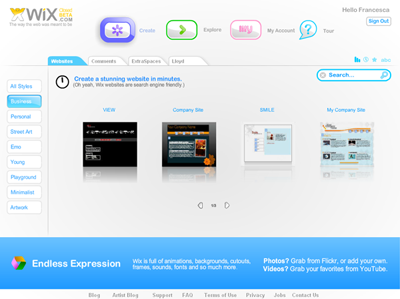
With Wix, you can build a graphically attractive website in few clicks. This web-based application allows you to create Flash websites for your personal page or small business. Although Flash websites are not the best solution for SEO and accessibility purposes, they can look very nice and thanks to services like Wix, they are also very easy to create, without having to worry about learning coding languages like HTML.

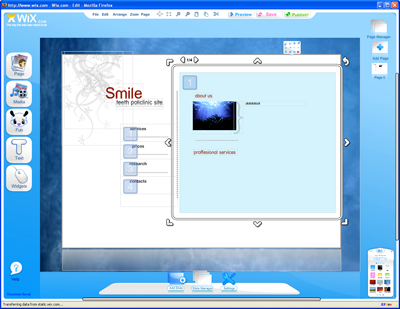
There are a lot of small businesses that pay for basic, rather ugly web sites; with this service at least you can choose from professional looking and more artistic layouts and all for free. Firstly, have a look at the nine sections with the collection of the style you can choose from: Business, Personal, Street Art, Emo, Young, Playground, Minimalist and Artwork. When you have found something that you like, press Edit and start changing the text, the pictures or add new pages to your web sites. The editing tool is not as fast as we would like, because it’s all web based, but generally speaking the design is really nice, and shouldn’t prove too daunting, even to less experienced end-users. Once you’re done, you can publish your fabulous new website at http://www.wix.com/your_account_name and make it accessible to search engines.

wix2.png

Although Wix is a closed beta, we’re pleased to let you know that OnSoftware readers can try the tool using this special invitation. Don’t miss it, and tell us what you think about it.