Is an Apple HomePod Worth Your Money? It Depends

Apple is historically a company that refuses to be left behind the technological curve. It either innovates by offering amazing products before most of the marketplace does — such as with the iPod — or develops items that directly compete with already available and popular products.

The HomePod is Apple’s smart speaker, which falls into the latter category. But does it succeed in its goal, and is it worth purchasing?

Is the Apple HomePod worth it?

1. It Offers Fantastic Sound Quality

If you’re an audiophile and mainly looking for a sleek speaker that sounds amazing in your living room, the HomePod could prove a worthy purchase. There are eight speakers inside it, seven of which are tweeters that push sounds in various directions. That means it offers an immersive auditory experience that seems much bigger than what should come from such a small speaker.

The device also conducts a 10-second sound test when you bring it into a room, sending beams of sound in all directions. It then can tell when they bounce back and where from, which offers information about the room’s dimensions and how to make the music sound best in it.

2. It’s Based on Apple Music

One of the persistent criticisms of the HomePod is that it forces you to use Apple’s products, rather than third-party apps that do similar things. As an example, its music library comes from Apple Music.

Apple Music Download Now
7

If you use Spotify and want to listen to a playlist from that service, you’ll have to use AirPlay, plus a Mac or iPhone, to stream the content through the HomePod.

3. It Has a Cool Waveform Indicator

Most of the smart speakers available for purchase only have lights that indicate they’re turned on and listening. Apple went a visually pleasing step further and built the HomePod with a swirling, colorful and touch-sensitive waveform that responds to every word you say.

Reviewers like the moment-to-moment feedback that assures the device picked up vocal cues, and appreciate that it looks appealing, too.

If the “wow” factor is important to you while showing off the HomePod in your living room, the speaker’s design should certainly help. Otherwise, the smart speaker may not be the best option.

4. Alexa Offers Many More Capabilities

To some people, Apple products fall short right out of the box. Take the iPad, for example. It didn’t come with a stylus, which made it difficult to do some highly precise tasks with the tablet.
15%
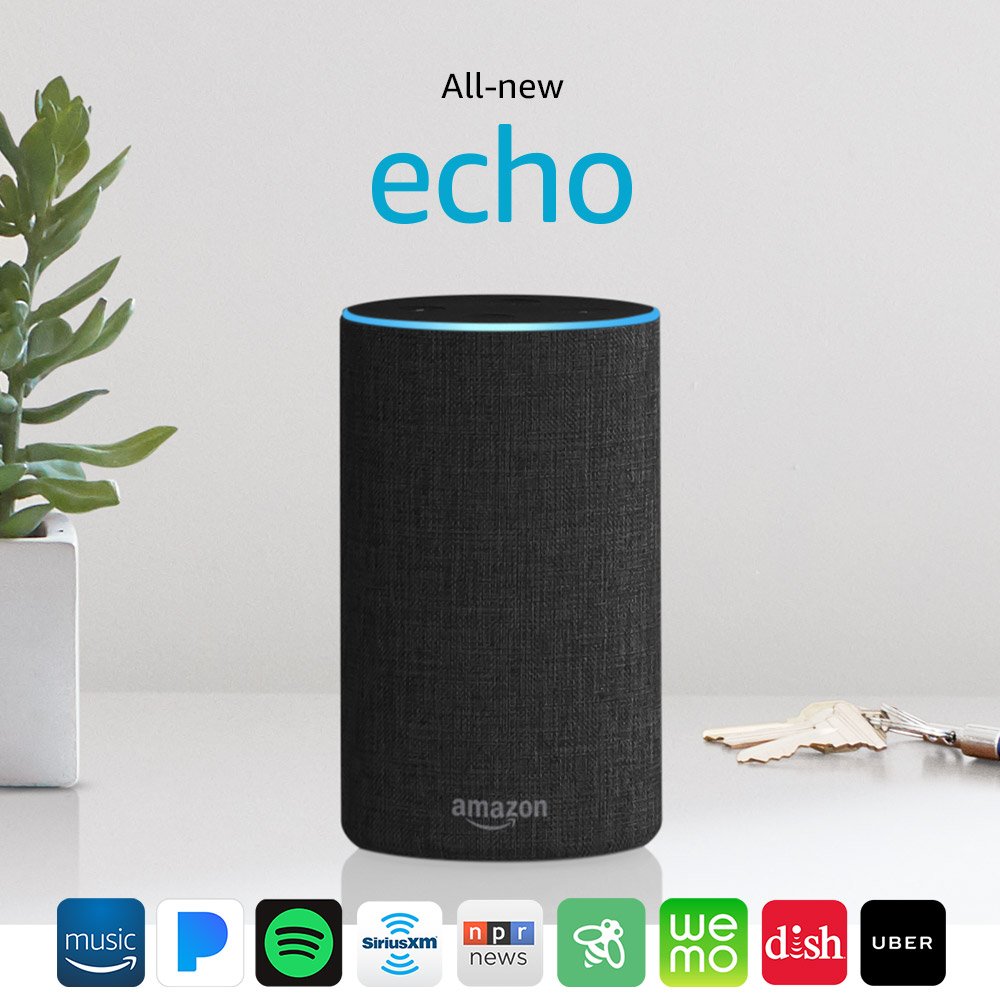
Amazon Echo

From: Amazon

$84.99 $99.99

So, the company later released the Apple Pencil, which was a less-than-ideal accessory in many ways. Similarly, the HomePod can’t do as much as any of Amazon’s smart speakers because it’s not as feature-rich.

You can depend on Amazon’s virtual assistant Alexa to help with making phone calls, giving you details about a new restaurant’s opening hours and so much more. And, if an Amazon speaker can’t do what you want via built-in capabilities, there’s a good chance you could boost its usage by activating a skill from a third-party company.

However, on the HomePod, Siri only makes the speaker work with a few Apple-based applications that don’t include email or the calendar.

5. The HomePod Can Hear You While the Music Plays

Besides making the HomePod sound great, Apple’s engineers built it to detect your voice from 15 feet away, even when playing tunes at 80 percent volume. That’s useful if you depend on the HomePod to provide background music at a party.

However, there’s a substantial limitation to what the HomePod hears, which is that it cannot differentiate between voices yet. Unlike Google Home and Amazon’s speakers, the technology can’t tell when you speak versus when your daughter, spouse or anyone else who lives in the same household does.

6. It’s a $349 Investment

The $349 price tag for the HomePod is understandably a characteristic that could discourage people from buying it. You might agree, especially if you’re just curious about what the smart speaker market offers and how its products could make your life easier.

In closing, if you’re a diehard Apple aficionado and interested in getting a speaker with higher-than-average sound quality and obvious visual appeal, consider the HomePod. Otherwise, you’re better off finding speakers that do more and cost less.

For a cheaper version you could try the Google Home.

30%
Google Home

From: Walmart

$99 $129

New tech features coming to retail stores near you

Retailers know they must continually improve to meet customers’ needs and keep them interested. That often means they turn to technology. There are several new advancements you can expect to see more often in the stores where you shop this year — here are six of them.

1. Augmented Reality to Stimulate Purchases

Augmented reality (AR) is becoming a fun, helpful way for people to envision using products before they buy them. MAC Cosmetics unveiled an AR-powered mirror that lets people experiment with 30 different eye makeup variations via a live video of a user. The mirror also reflects the looks in different lighting conditions.

You can already see this try-on mirror at MAC Cosmetics outlets in the U.S., but the brand anticipates a worldwide rollout this year.

2. Tablets That Replace or Enhance Shopping Carts

Since so many people are familiar with tablets and many individuals own them, retailers have evaluated ways to make the gadgets part of a shopping trip. Crate & Barrel launched a pilot program that lets shoppers take a tablet called a “Mobile Tote” and carry it around the store to scan the items they wanted to buy. Then, they could go through an exclusive checkout line where a store representative gathered the merchandise for them.

Also, at a recent trade show, Focal Systems showed off its tablets that attach to grocery carts. The accessories help with navigation or highlight promotional offers for customers. They work through artificial intelligence and reportedly increase the number of things in a person’s basket by an average of 10 percent.

If the cart tablets work as well as people hope they will, this kind of in-store tech could reduce the likelihood of shoppers having to find store associates to ask them questions. Plus, when customers get disoriented in a store and can’t find the necessary answers themselves with no employees in sight, they may give up on buying items altogether. The tablets could help reduce that occurrence.

3. Apps That Sense When a Person Enters a Store and Offer Help

Many stores already have standalone apps made to encourage people to get in their cars and drive to physical stores or purchase things online. However, Walmart recently updated its app to provide more support for in-store shoppers as soon as they walk in.

Once a person with the Walmart app on their phone enters the store, the app transitions into a Store Assistant mode, providing information about where to find items in the store and whether they’re in stock.

Walmart’s representatives think if they can get shoppers to embrace the idea of doing in-app searches for items in the stores, it’ll be easier to shape the entire purchasing experience.

4. Fully Branded Credit Card Terminals

People are accustomed to entering their PINs on keypads at the checkout and watching the accompanying screens for confirmation of transaction approvals. However, American Apparel aims to do much more for its customers during the checkout process. The terminals it offers capture customer emails and relay information about the brand’s loyalty program. They also can generate e-receipts and feature brand-centric graphics.

5. Dynamic Store Shelves That Dispense Information and Attract Attention

The price and other pertinent information displayed about a product available to buy could play a key role in whether people decide to purchase the item or not. Sometimes, pricing information is unclear or seems outdated.

However, Kroger is one of the major retailers experimenting with digital “smart shelves.” After a successful test run, the grocery chain will add them to almost 200 of its locations this year.

Store representatives can quickly change prices or use engaging videos to attract attention from shoppers who aren’t looking directly at a shelf. From the consumer side of things, the prices for items are easy to read, which should reduce potential confusion.

6. IoT Sensors That Capture Insights about Customers and Products

You can expect to see more stores using sensors connected to the Internet of Things (IoT) this year. Samsung even offers retailers pop-up stores for rent that come equipped with sensors and other connected devices, allowing short-term analytics tracking for brands that may not have the resources to invest in the IoT in more extensive ways.

By looking at the metrics captured inside those particular stores, retailers can understand how customers spend their time there, view demographic information, or filter statistics based on the time of day.

Also, some of the IoT technologies that benefit customers originate outside the stores. Mercedes-Benz provides a sensor that attaches to delivery vans.

Launched in Europe with plans to make it available elsewhere, the accessory allows fleet managers to track the location of delivery vehicles and adjust routes. Drivers use mobile apps to communicate with fleet managers and keep them abreast of progress and obstacles, too.

These are some of the most impressive advancements disrupting the retail landscape. If you haven’t seen them in action yet, you probably will soon.

Image: JJ Merelo

How Speed Reading Can Help You Get More Done (And 4 Apps to Help)

If you’re looking to maximize your productivity, having speed reading as a skill can help you out a lot. It allows you to read more, faster, while still comprehending and retaining the information that’s on the page. Whether your goal this year is to read more books or you just need a boost in reading documents for work, speed reading can help you.

How Speed Reading Works

Speed reading trains your mind to stop vocalizing the words you’re reading in your head, which is what slows us down. With speed reading, you scan the page and take in the words that are relevant, with your mind filling in the rest, as not every word needs to be read to comprehend what’s going on.

There are various methods for speed reading, as different ones will work for different people. They all involve focusing your concentration and scanning for the key words in a paragraph to get the gist of what the piece you’re reading is trying to say. Training in the art of speed reading helps you break your old reading habits and replace them with the new ones. Luckily, technology offers multiple apps to help you out.

1. Spreeder

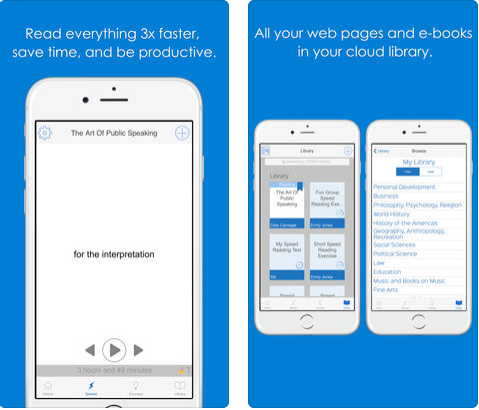
Spreeder offers speed reading software as well as training exercises so that you can get even more practice. Its tool lets you adjust the speed so you can start off slowly and increase as you get better at speed reading. The app also gives you reports on your progress so you can see what you’ve accomplished and what you need to improve.

You can input multiple file types on the platform so you can practice on e-books, articles from news sites, and reports from work. It also comes with a public domain library already built into the cloud. Spreeder offers a free web app, as well as free apps for iOS and Android that are solid. However, to unlock all of the features, the full software is $37.

Spreeder Try Spreeder
7

2. Spreed

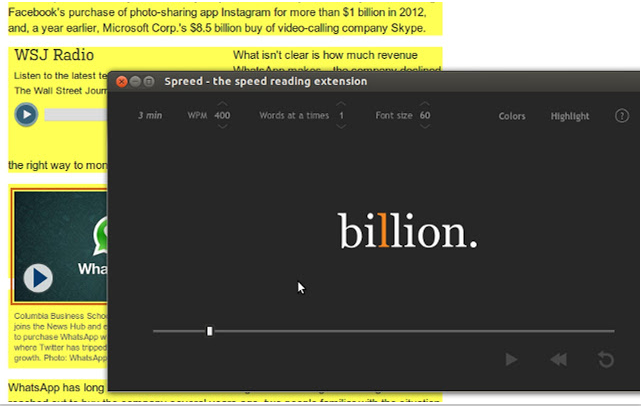
While the name is almost identical, Spreed is different than the aforementioned Spreeder. If most of the reading you do is web- and browser-based, Spreed is an excellent tool. It’s a Google Chrome plugin, so you can highlight the text of whatever web page you’re on and choose to use the Spreed plugin to read it instead of just the standard page. You can adjust how many words are viewed at a time as well as words you see per minute. And it’s free.

3. Wear Reader

If your smartwatch is your go-to gadget because you’re always running around, Wear Reader is perfect. It lets you speed read right on your watch face, so you can read while you’re on the go.

The small watch screen is perfect for speed reading, as it will only show one word at a time. As with the others, the speed is customizable. You can also rewind and fast forward in case you missed something or want to jump ahead. Available for both Apple Watch and Android Wear, it’s $1.99 for Apple and free for Android.

4. ReadMe!

Made for iOS and Android, ReadMe! has two different kinds of speed reading techniques built-in. BeeLine uses color to guide readers’ eyes where they need to be, while Spritz cuts down on eye movement. These are a bit different from the usual method, which is reading one word at a time.

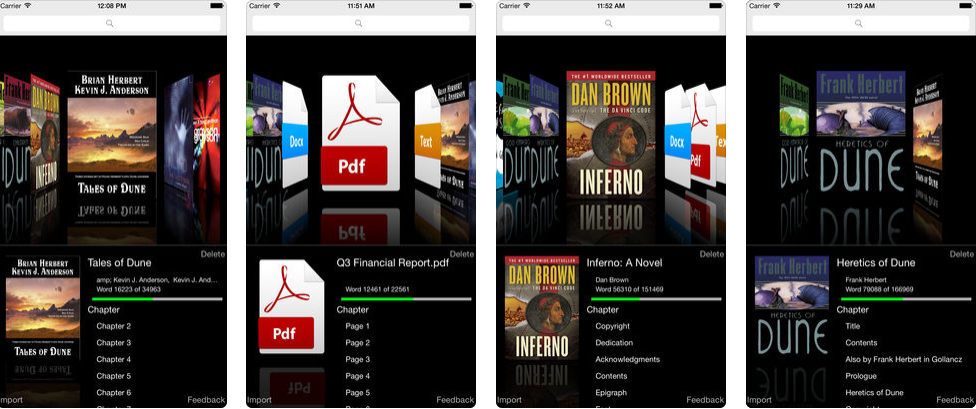
A subscription to the service is $1/month or $5/year. This gets you great features like offline usage and PDF support, which can be crucial for things like company documents and briefings. They also advertise using the Dyslexie font, which is the font that’s found to be best for people with dyslexia and other reading difficulties.

Speed reading is a useful skill, both for comprehension purposes and just having a bit more time on your hands since you’re able to read faster. Get these apps, then go ahead and start digging through that to-read list you’ve been working on.

6

Photo by Vikas Pawar on Unsplash

How to become a brand ambassador on Instagram

Like most Instagram users, you’ve probably noticed posts from brand ambassadors — also known as influencers — on the social media platform and felt a twinge of envy.

What’s better than growing your Instagram audience, supporting brands you love and getting paid to do it?

In addition to receiving money for posts, you’ll usually get free products to try. Those items drive the content posted to your Instagram feed.

Being successful as an Instagram brand ambassador isn’t hard. However, it requires a careful strategy.

Instagram Download Instagram
7

Continually offer high-quality, relevant content

As a brand ambassador, you’re one of the online voices representing a company. That’s why it’s a good idea to start publishing your best content now. Avoid grainy photographs or snapshots you took after having a little too much to drink at a party.

Also, try to publish material that has a common theme relating to your interests. For example, if you’re a car enthusiast, it’s probably not worthwhile to post numerous pictures of what you ate for dinner.

If you choose carefully when deciding what to post, your Instagram feed could become a reliable indicator of authority. Brands look for authoritativeness because they want an assurance of knowledge.

Make it easy for brands to contact you

Image via Pexels

Consider including your email address on your Instagram profile. Evan Mungo, a user who gets paid to post content on the platform and elsewhere online, put contact details in his profile, and his first moneymaking Instagram opportunity came about when a company reached out to him.

Mungo thinks his use of hashtags and emphasis on polished content caused that brand to take note. Including your contact details is helpful, but other actions you take can also make brands interested.

Get creative with your hashtags and cross-promote them

Speaking of hashtags, pick one that represents your personal brand. Also, go beyond that one and come up with several others that are funny or memorable.

Demonstrating your effective use of hashtags shows brands you understand one of the fundamental aspects of getting noticed on Instagram and helping others find your posts.

Furthermore, don’t overlook ways to spread the word about your hashtags offline. For example, you may want to get a personal hashtag printed on your business cards.

If you get interviewed on television or a radio station and asked about your Instagram usage, naturally work the hashtag into the conversation. Brands love it when ambassadors bring up product names naturally. By doing that with your hashtag, you’re getting good practice.

Recognize the power of pictures for stimulating curiosity

Image via Pexels

Instagram is one of the most popular ways brands use photographs for promotional purposes online. Events and meet-ups in any industry are likely to include photo booths and other inviting opportunities for social media promotion.

You can do the same and build your brand with Instagram photos that draw people in and make them curious.

By capturing viewers’ attention, you’re more likely to make them want to return to your profile — and keep coming back. When that happens, your number of followers grows, making your Instagram profile even more attractive to brands.

Know what your audience wants

Your overall reach matters substantially to brands when they decide whether to hire you as an ambassador. Besides populating your Instagram profile with compelling images, another beneficial way to

grow your audience is to understand the needs, desires and pain points they have. Then, come up with outstanding content that answers the call.

When brands look for Instagram ambassadors, they prefer to hire people who already have clear understandings of their target audiences. An existing connection to followers fosters ongoing trust.

Join an influencer network or similar service

Image via Pexels

Once you’ve amassed at least 1,000 followers, consider joining an influencer network that relates to your niche.

Doing that could make it easier for brands to find you, and you can discover which brands align best with your content to potentially contact them first.

Also, Heartbeat is a female-centric service that allows Instagram users to apply to become brand ambassadors. If accepted, you’ll get offers from Heartbeat’s brand partners and can decide whether to get on board or decline them.

Even if you decide not to take an offer, you’ll remain in the system for future possibilities. Payment for campaigns occurs via PayPal, typically in less than a week.

Pay attention to requests

After hiring you, the creative freedom each brand will give you varies. In some cases, you might not receive any direction.

However, companies might prefer certain camera angles or methods for showing off their products, too.

Always take specifications into account. By doing that, you demonstrate an ability to follow instructions, which could lead to more work and a stronger reputation.

These suggestions should help you make progress while aiming to break into the world of Instagram brand ambassadorship.

Then, you could use a platform you love to showcase products to your followers — enjoying perks like money and freebies while you’re at it.

10 illegal things you’re doing online without knowing it

Do you pride yourself on being a law-abiding citizen? People are often shocked to learn that many of the internet-based activities they engage in every day are illegal.

We’ll look at numerous law-breaking behaviors below. If some seem familiar, don’t worry; we’ll also give you alternative legal options.

10 illegal things you’re doing online without knowing it

1. Using Torrent services to grab copyrighted material

Torrent services allow you to tap into the resources other people have and download “chunks” of a file until your computer’s hard drive eventually contains the whole thing. Torrent services themselves are not illegal because you could potentially use them to get non-copyrighted material. But by relying on them to get the latest TV episodes or songs, you’re breaking the law.


What to do instead: Explore legal routes of obtaining the media you want. There is a growing number of subscription-based streaming services for movies, music, and TV shows. If cost is a concern, start putting aside a small amount of money to use specifically for legal means of watching and listening to your favorite things.

2. Sending spam emails

Judging by the number of spam emails you probably receive per day, you’d  never think that sending them was illegal. You might even feel tempted to distribute some yourself, especially when trying to get people to pay attention to something you’re promoting. However, spamming is illegal per the CAN-SPAM Act of 2003. Despite its misleading name, it prohibits sending spam and enforces hefty fines.

What to do instead: Consider encouraging people to follow your social media profiles. By doing that, they’re indicating they want to know more about what’s important to you. Keep in mind, though, that some federal courts ruled that the CAN-SPAM Act applies to social media too, so be careful to verify that people truly appreciate and value what you send.

3. Writing a fake news article to damage someone’s reputation

Fake news has become an especially prevalent topic since the most recent U.S. presidential election. Because it’s so commonplace, you might not think there’s any harm in writing a bogus story that could hurt a person’s reputation.

However, coming up with that kind of illegitimate news — along with producing any libelous online content — is illegal. Legislators have not yet banned fake news in the U.S, but major sites including Facebook are cracking down on it.

What to do instead: Put energy into boosting your reputation instead of worrying about other people’s statuses. Also, if you love appearing in the news, organize notable events in the community and write press releases to distribute to news outlets.

4. Using photos you found on Google

Like many people, you might think Google’s image search is one of the most convenient features around. Unfortunately, it’s not okay to freely use the pictures found through that method for a blog post, website, or another type of web-based content. Many are copyrighted, and by using them without permission from the owner, you’re breaking the law.


What to do instead: Depend on photos that use a  Creative Commons license. There are many websites that compile such photos and allow you to search and download them for free.

5. Over-the-line pranking on YouTube

Spend just five minutes browsing YouTube after typing a search term like “humor” or “prank,” and it’s clear that people have varied opinions on what’s funny. Mike and Heather Martin learned that the hard way by when they were put on probation for allegations of child neglect. The couple had a YouTube channel that showcased questionable parenting techniques, including playing jokes on their youngsters that traumatized rather than amused them.

What to do instead: Before launching a YouTube channel based on humor, run the idea by several friends and get their take. The Martins’ content outraged many people, and the individuals in your circle of friends will probably raise red flags if needed, too. If in doubt, choose another angle. Doing that is better than risking getting in hot water.

6. Making a website that’s not in accordance with a service agreement

Even though some unsavory internet activities fall into a “grey area” as far as state or national laws go, website hosting services probably make them illegal. The specifics vary, but if you have a site with threatening or obscene content, it’s probably a no-go. The website probably won’t stay live for long.

What to do instead: For starters, don’t launch a site with threatening or obscene content! Also, read all the legal stipulations associated with a hosting service before you sign up for it. If you have questions along the way, get answers from an official representative rather than asking friends or making assumptions.

7. Impersonating a friend on social media

Most people have done it to joke around, but depending on where you live, it might be illegal to log in to the social media account of a person you know for impersonation. Nine states made online impersonation illegal, but there are some specifics regarding what’s against the law.

For example, you cannot pretend to be someone else as a way to coerce a person into giving you money. An impersonation attempt that embarrasses an individual and harms his or her reputation is also barred.

What to do instead: Stick to publishing content on your own accounts. And resist the urge to take advantage of someone who fell asleep while logged into a service. Take the high road and realize that poking fun at someone isn’t worth damaging a friendship.

8. Being insensitive or unkind online

Because you typically don’t see people’s facial expressions while interacting with them online, it’s hard to know how they’ll react. If you bring up sensitive topics and keep mentioning them after someone tells you to stop, you might be participating in cyberbullying. Although there are no federal laws against it, there are 48 state-specific laws against harassing someone online.

What to do instead: Remember that the battles a person deals with aren’t always obvious. If someone says that your words or actions online are causing them distress, listen up and change your approach. Offering an apology is another good step.

9. Collecting personal information about people younger than 13 without permission

Maybe you’re interested in opening a candy shop in your town or creating a web portal where young people can spend time safely. Those are both innocent activities, but if you use surveys or other means of freely gathering data from people who are under 13, you’re violating the Children’s Online Protection Act.

What to do instead: Get a verifiable form of consent from children’s parents. You must also mention which information you’re using and how. If your online destination includes online gaming or a contest, limiting the information you take is another crucial step to stay within the law.

10. Extracting the audio from most YouTube videos

There are many websites where you can input the address of a published YouTube video, wait a few seconds, and get an audio file containing sounds from the clip. People often view those sites as solutions for getting music for free. After all, the selection available from YouTube is virtually limitless. But this practice is illegal when using it for copyrighted material.

What to do instead: Download the free version of Spotify. This streaming service’s library includes millions of songs, plus podcasts, video episodes and audiobooks. Who needs those illegal sites when you can explore all that content?

Ready to take this newfound knowledge out into the world?  Hopefully, you’ll avoid the hassles of terminated accounts and shuttered sites due to unwittingly breaking the rules. Good luck, and stay clean!

How your smart speaker can make you more productive

The Amazon Echo and Google Home are two of the most popular smart speakers on the market.

30%
Google Home

From: Walmart

$99 $129

15%
Amazon Echo

From: Amazon

$84.99 $99.99

However, many people consider using them to do things like listen to news reports or hear party playlists.

As it turns out, you can use both of these well-known products to improve your focus when working on important, deadline-sensitive projects.

1. Use your Amazon Echo as a noise machine

Numerous studies confirm that the fluctuating sounds familiar to an office or a home with kids and pets can compromise your ability to work and study by disrupting your focus.

Fortunately, you can reduce that phenomenon by using noise-masking techniques and converting your Amazon Echo into a noise machine.

Listen to ambient noise through Amazon Prime or Spotify. There are even dedicated Alexa skills that play certain types of ambient noise. White noise is particularly suitable for boosting focus because it masks all frequencies.

However, if stress is negatively impacting your concentration and being at the beach normally calms you down, listening to crashing ocean waves might help.

2. Make Google Home adjust the thermostat

Sitting in a room that’s too hot or cold is one of the fastest ways to break your focus.

However, if your abode has a compatible climate control system, Google Home can adjust the temperature for you. Then, not only will you be more comfortable as you work, but you also won’t have to stop whatever you’re doing to change the temperature.

After linking your smart home system to Google Home, you can say, “Make it warmer/cooler” or just use the command, “Raise/lower the temperature by [number] degrees.”

To get even more specific, try “Set the temperature to 74” or any other temperature you prefer.

3. Let Alexa help you work in time blocks

Productivity pros often say time blocks help them get more done than they would when working without them.

By using a time-blocking system, you stay devoted to single tasks for predefined amounts of time.

Even if your mind wanders and you feel tempted to do other things during a block, it’s crucial only to do the planned activity. Eventually, you should find that this technique helps you remain perpetually focused.

Alexa, the virtual assistant inside the Amazon Echo, offers a built-in timer feature.

You can ask Alexa to set a timer for a specified period or give your timers unique names based on the tasks for which you use them. It’s also possible to ask how much time there is on an active timer.

4. Rely on Google Home as a speakerphone

As handy as our smartphones are, they’re notorious for stealing focus.

For example, maybe you originally intended to use your phone to make a one-minute call to your colleague and get an opinion on a proposal in progress.

However, it’s easy to get distracted and check Facebook for “just a second” or respond to a non-urgent text message. Before you know it, one second becomes ten minutes, and your focus is long gone.

However, the Google Home also works as a speakerphone. It can dial your contacts using your mobile number or a dedicated one for Google Home. You can simply say, “Hey Google, call [person’s name].”
Also, this feature works for multiple users. For example, if both you and your roommate have a contact named Dave in your lists, the smart speaker figures out who’s giving the voice command and dials the right person.

5. Get Your calendar details From Alexa

Even your best attempts to stay focused can go poorly if you’re constantly thinking, “Have I forgotten to do something today?” That’s why it’s a good idea to ask Alexa to give you a rundown of the events on your calendar at the start of every day.

Just say, “Alexa, what’s on my calendar?” Then, you’ll hear about all the day’s obligations.

Of course, the Google Home and Amazon Echo speakers can do fun things, too. Both of them offer dozens of games and trivia-centric features.

Once you use the focus-boosting tips above, you’ll have more time left in your day for purely pleasant activities that don’t relate to keeping your concentration unwaveringly sharp.

Photo by Piotr Cichosz 

4 online scams you’d never think to check

Most of us are accustomed to receiving emails from strangers hailing from far-away nations who want to transfer money, and we know not to fall for the trick.

We’ve also gotten used to reporting emails that appear to come from our banks and other service providers but ask for passwords or bank card numbers.

However, online criminals know they have to continually come up with new ways to fool unsuspecting people. That’s why some online scams — like those listed below — catch even well-informed individuals off guard.

1. A bogus website for retrieving valuables lost in taxis

The transportation authorities in New York City undoubtedly realize people often misplace their valuables by leaving them behind in the yellow and black vehicles. That’s why many people thought it made sense that there’d be a website to report lost items.

Mark Jakubczak decided to set up such a site — despite not having any affiliation with New York taxi regulators. He charged people $47 to use the site to give details about missing items. Although some thought the fee was strange, others assumed it was a processing fee.

After paying, people’s name and phone numbers got posted on the site, along with descriptions of their lost items.

Eventually, Jakubczak added a disclaimer on the website to clarify he wasn’t connected to any city agency, but that didn’t happen before people became irate and demanded that genuine officials investigate.

One of the reasons why this scam was so effective is because Jakubczak was apparently very well-versed in SEO practices and URLs that seem authentic.

People said his site was the first one they saw after going online to find out to recover items lost in cabs. Also, the URL, YellowCabNYC.com, seems legit.

2. Inflated charges for emergency garage door repairs

In the case above, a scammer preyed on desperation. People were so eager to get their valuables back that they didn’t always think things through or read the website carefully.

Scammers played a similar trick on people who need urgent fixes for their garage doors — such as when the doors won’t open. Like legitimate companies, the entities with less-than-honest intentions typically advertise online and are visible on the first pages of search results.

However, instead of charging customers fair prices for services performed, they run up the rates by carrying out unnecessary repairs with parts the clients don’t need.

Besides capitalizing on desperation, the companies that engage in this scam know most people don’t understand how garage doors work or know the prices for common parts.

That lack of knowledge makes people fall victim without realizing it. However, doing additional research by reading service provider reviews can alert consumers about potentially deceptive practices.

3. Non-authentic booking procedures for hotel rooms

If you think about the last time you were getting ready to go on a fun trip, the hotel booking process might have been one of the most exciting parts. There’s just something about it that signifies the excursion is happening soon.

However, it’s common for people to get carried away during their room reservation attempts and unintentionally place bookings at websites not operated or authorized by the respective properties.

Legitimate third-party sites like Trivago and Booking.com make it clear people aren’t reserving directly from the hotel.

However, some unscrupulous web designers build sites that could be entirely fake but seem associated with hotels. Some include the hotel’s name in the URL but have additional, vague phrases like “hotel reservation headquarters” in the address. The bogus sites frequently don’t have secure connections, either.

When booking with any hotel online, always look for pop-up windows, redirects or any other aspects that suggest you’re going away from a property’s main site or a third-party provider you trust. Also be aware when you’re making a non-refundable reservation.

4. Companies sending unqualified locksmiths to customers

If you need a professional to change your locks after breaking up with an ex or need help due to locking your keys in your car, performing an online search for a nearby locksmith seems like a logical move.

However, some of those search results could be for companies originating in other states or countries.

The people who orchestrate this kind of scam trick Google’s algorithms into thinking the establishments are local. Then, when customers call them, they send contractors who are often untrained and ready to charge more than necessary.

The individuals who contact these businesses usually get quotes over the phone or via text but find the contractors demand several times as much for the service upon arrival.

The scammers are out there

People often exclaim, “I would never have thought!” when they begin talking about how they got scammed or heard about a victimized friend.

This list demonstrates why that’s so often the case. Criminals evolve and work in ways that seem above board at first — until the unsuspecting individuals realize they’ve been had.

Image by Wes Hicks

6 Chrome extensions to make you more productive at work

Workplace productivity is something most people struggle with from time to time.

However, did you know Chrome has numerous extensions to help you tackle your time-wasting techniques and get back on track?

The options below are some of the standout choices.

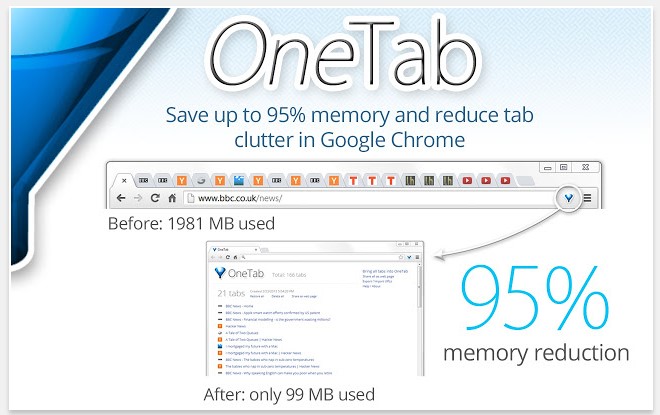
1.      OneTab

If your computer has low memory, it may stop you from running multiple programs at once or even prevent opening crucial programs. Also, when you have dozens of tabs at the top of your browser, it’s hard to find the content you need quickly.

In short, tab clutter and reduced computer memory both hinder productivity. This addition conquers both by turning your tabs into a list you can share with other people or export to your smartphone and tablet.

OneTab also lets you reorder the content and group the tabs into intuitive categories, and you won’t lose the material if the browser crashes. (Free)

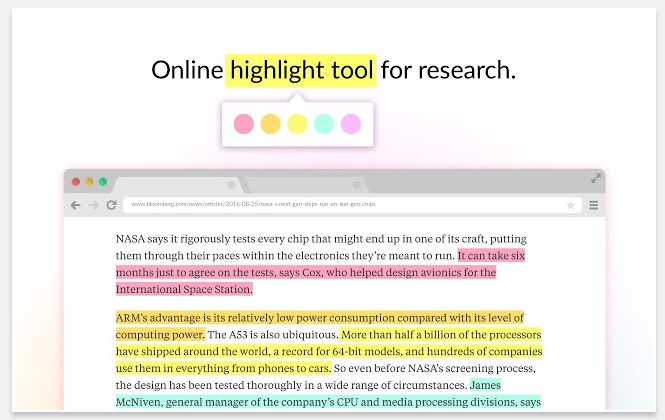
2.      Weava Highlighter

No matter what you need to call attention to online, the Weava Highlighter extension simplifies your research process and giving you multiple or single-colored highlighters to mark PDFs or webpages.

Then you can send the material to team members with the highlights you’ve made.

It’s also possible to organize highlighted material into collections for faster retrieval and even make a citation for each highlight in common styles, such as MLA and APA.

When using this tool, you can easily skim for important information, which could be helpful when getting ready for a presentation or another significant workplace event. (Free, with premium version starting at $5.99 per month)

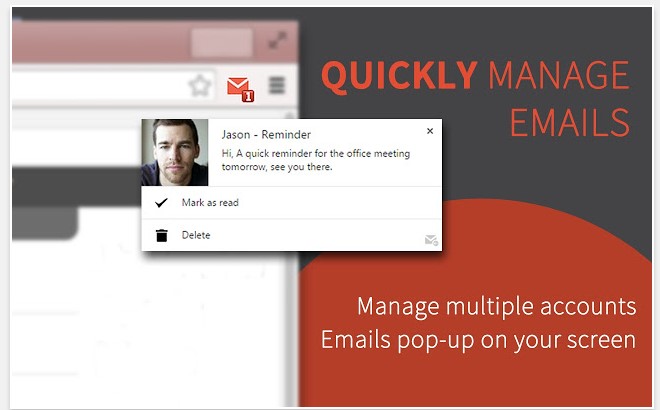
3.      Checker Plus for Gmail

Despite the convenience of your Gmail inbox, it can be a major time sink. How many times have you told yourself you’d only check the inbox for one email you’re expecting and then get back to whatever you were doing, only to spend at least five minutes clicking through other emails, too? This Chrome extension allows you to monitor emails without opening  Gmail.

When new messages arrive, a notification pops up on your screen and lets you see the sender’s name and part of the message. You can set it to read notifications out loud, too.

There is also a Do Not Disturb feature that mutes notifications until your specified time. It’s particularly helpful when you’re trying to buckle down and finish a tough task.

If you prefer, this extension can run in the background even after you close Chrome. (Free)
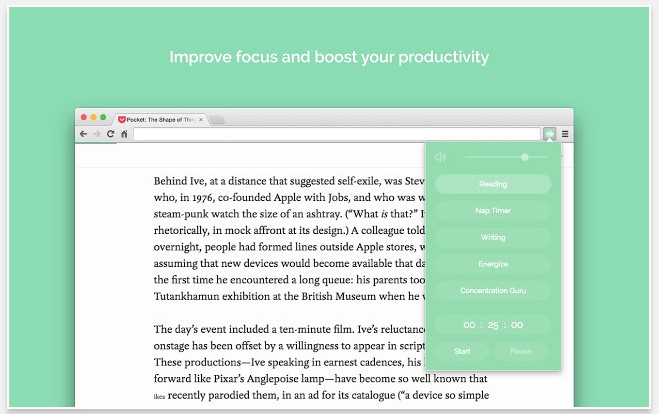
4.      Noisli

You might not think of sounds as colorful, but people who study them do. They know white noise is great for helping people concentrate because it covers all frequencies and tends to make other noises in the environment disappear.

Noisli is a Chrome extension that lets you turn on a soundtrack of white noise — as well as brown and pink noise, plus nature sounds — while you work.

Change the volume and even create mixes to combine favorite sounds. Also, use the timer function to hear audio for a preset time and use that period to boost focus once you’ve segmented your schedule into blocks. (Free)

5.      Limitless

Maybe you have good intentions to become more productive but don’t know which improvements to make for the biggest impact. Limitless could help — at least with work done online.

It offers a beautiful dashboard that shows how long you spend doing particular tasks and breaks your internet time into categories, such as browser-based work and social media. You can create custom categories based on how you typically use the internet, too.

In addition to gorgeous photography that livens up your desktop, this extension offers productivity tips to help you spend time wisely, and also provides inspirational quotes.

After using Limitless for a while and paying attention to the feedback provided, you might be surprised at how easy it is to make positive changes that last. (Free)

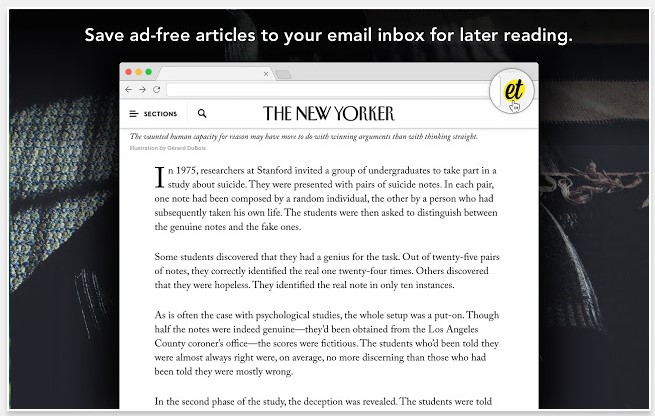
6.      Email This

Like many people, you probably come across interesting articles while working.

Even though they’re not related to your current task, you might stop and read them immediately. It might not seem like it, but that practice cuts into the time you have to devote to other things.

The Email This extension saves ad-free versions of articles so you can read them later. It does so by delivering an email containing the content, allowing you to read it during your downtime instead of at work.

Once you find something worthwhile, just click the Email This extension in your browser bar to generate the message.

Being able to read articles later enables you to focus on the material when you genuinely have time to do so, not while you’re trying to eat lunch and read a proposal from your colleague at the same time.
Also, because Email This removes the ads, it reduces distractions to help you focus on the text. (Free)

By using these Chrome extensions — or even one of them — you could make the most of your workday and stop wasting time.
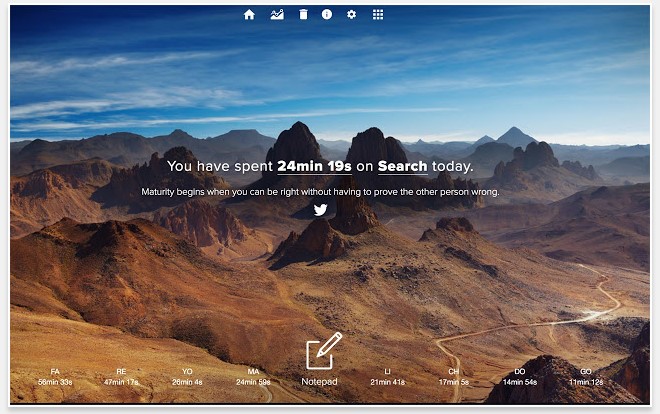
Image by Burst

The top smartphone brands of 2017

At one time, maybe even further in the past than we remember, there were only a handful of smartphone brands on the market. More importantly, only a few brands were even relevant. That’s not the case today.
In fact, the market is more saturated than ever before. Sure, you have the major flagships like the latest iPhone, Samsung handset or Google’s own Pixel lineup, but there are multitudes of others too.

Brands like Huawei, Motorola, Razer, OnePlus and many others have a variety of models available — all of which make great phones for the right person.

With the list of potential brands and opportunities growing, which one is truly the best? What brands are decidedly worth your hard-earned money? When it’s your turn to pick out a new phone, what are the best companies to select from?

The first thing you need to understand is that there’s a huge difference between best-rated and top-value phones.

What’s considered one of the best phones on the market, for instance, doesn’t necessarily offer the most bang for your buck.

Top-Rated vs. Top-Value

A top or best-rated phone is one that is critically acclaimed, has great reviews and may even be raved about by friends, family or colleagues. The new iPhone X is a great example of this. It’s an awesome phone, has a lot to offer, and people that own and use it are often quite satisfied.

On the other side of that equation, there’s the actual value of said phone. The iPhone X is a premium device that is quite expensive, especially when up against comparable models. Apple devices have always taken this route, actually, with price and style winning over anything. That’s not to say they are bad phones — quite the contrary. The point is just that you pay more for the name slapped on the device.

That alone means you may not necessarily be getting the most bang for your buck or the best value.

There’s also the trade-in or resell value aspect to consider when looking at phones. When you upgrade to a new device, you have the option to keep your old phone, trade it in or even sell it privately to someone else.

This is where the inherent benefits of Apple’s brand come into play, as Apple phones tend to hold their resale value longer. Other brands that retain their values, even used, include HTC, Motorola, Google, LG, Samsung and more.

A phone can be top-rated, top-value, or both. That’s an important distinction to make and also one you always want to consider when purchasing or selecting a new phone.

Cheap doesn’t necessarily indicate the rating or quality of a phone, especially these days — just like price doesn’t always indicate value.

1. Apple iPhone X

The Apple iPhone X is a huge leap forward, especially in terms of size. Compared to previous models, this is a quite large phone that manages to retain its beauty and grace.

The new facial recognition feature, which allows you to interact and unlock your phone simply by looking down at it, is charming and super convenient.

It’s expensive and definitely premium or high-end, but the reviews also reflect that investment. Though you may be paying a higher price tag, you are getting something well-built, which also performs reliably.

This has solidified Apple as one of the biggest smartphone manufacturers around.

Let’s be honest: No one expected them to relinquish that crown anytime soon. Going into 2018 and beyond, it becomes more apparent that Apple devices will continue to be some of the best phones on the market — no matter how you feel about the brand.

As for whether or not they offer a great value, that’s subjective.

2. Google Pixel Lineup

The Google Pixel 2 XL is, as some describe, one of the best Android phones ever made — and we don’t make that claim lightly. Android has advanced considerably in recent years, surpassing even Apple’s capabilities in terms of what it can offer and what experiences its ecosystem can deliver.

It seems like yesterday when we started hearing rumors of Google diving back into the hardware game, and now, here we are.

Like their successors, the Nexus line, the Pixel phones use a rather stock and pure version of the Android mobile OS.

If and when you get your hands on one of these, you immediately see the allure in a pure version of Android, especially thanks to streamlined OS updates, which would normally have to pass through carrier processes that take forever.

The experience is also completely unlike one you’d get on a Samsung or LG, which is heavily customized and rebranded to match that company’s initiatives.

Although technically Google doesn’t manufacture the hardware and phones, we’re definitely moving into 2018 with their latest lineup standing tall. The company is sure to have some momentum in the coming year, especially for those that want a reliable, relatively budget-friendly device.

3. Samsung

Samsung did have that whole battery debacle, which we won’t bother getting into, but it got back on track with its latest release of the Galaxy S8. This is one of the most stunning and beautiful phones ever made. It gives even the new iPhone X a run for its money despite coming out months before.

Known for its heavily personalized experiences that favor convenience and multitasking, Samsung is sure to deliver more flagship devices in 2018 that continue to impress and up the ante in the market.

Not only is the company competitive, but it is also regularly innovative — which is a plus as mobile devices continue to advance year after year.

You can’t go wrong with a Samsung device. Just wait for initial reviews to make sure they don’t spontaneously combust in your hand or pocket.

All three of these phones are top picks, and they all have their plusses and minuses. Which is the right one for you?

Image by Kaboompics

How to tell if an app is safe to download

It’s getting increasingly difficult — and dangerous — to navigate the online world.

With threats ranging from malicious programs that steal your identity to hidden codes that, when executed, hold your data for ransom, the average computer user faces more hazards than ever before.

Making matters worse is the idea that these threats can originate from nearly any site and, in some cases, secretly embed themselves into legitimate software.

There are many steps you can take to safeguard your system, your identity, and your digital assets. There are also many reputable utilities you can rely on to identify potential threats and remove them from your PC as quickly and as efficiently as possible.

Although your PC will never be completely impervious to the effects of viruses and malicious software, a little bit of diligence, planning, and preparation can go a long way in keeping your system as safe as possible.

The best antivirus programs

Perhaps your first line of defense against today’s cyberthreats, modern antivirus programs are quite effective at mitigating much of the risk. Some of the most popular options include:

But good software doesn’t necessarily have to cost a fortune. There are plenty of free antivirus options available on the consumer market, including Avast Free Antivirus, Adaware, Bitdefender Antivirus Free Edition and many more.

Many of these solutions include built-in advertisements, which can be annoying, but it’s the trade-off you make when relying on free software.

How to choose anti-malware software

While maintaining an updated antivirus utility is critical when trying to avoid harmful apps and software downloads, viruses aren’t the only threat posed by apps.

Malicious software, often referred to as malware, has the potential to be just as harmful as — if not worse than —modern computer viruses.

Although malware is often lumped into the same category as a traditional virus, key differences in the software’s coding and architecture can make these files undetectable by antivirus software. Because of this, malware requires a different approach altogether.

Most anti-malware programs are, in many ways, the same as their antivirus counterparts. Some even have integrated antivirus functionality.

Real-time scanning prevents you from downloading malware or infected software in the first place, while periodic and user-initiated scans keep your drive clear of any dormant or unidentified hazards.

Some of the most useful programs include MalwareBytes Anti-Malware and Spybot Search & Destroy. While both of these are available for free, additional features are unlockable by purchasing the appropriate upgrades.

Safety features of modern web browsers

You can even fight online threats with your web browser. The most popular browsers all offer some form of add-on integration, and many antivirus and malware developers make add-ons to complement their products.

Although they’re often limited in functionality, these add-ons can make your online life far less stressful.

Another utility, VirusTotal, is a free online tool that lets you scan files or hyperlinks before you even download them onto your computer.

Given the increasing sophistication of online threats, viruses, and malware, next-gen solutions like this ensure you’re not wasting the bandwidth on such files.

Take a multifaceted approach to online security

Remember, it’s not enough to use an antivirus program on its own. The uniqueness and variety seen in today’s viruses and malicious programs require different approaches, strategies and software solutions, and there’s no end in sight.

As hackers and identity thieves continue to expand their reach with new and more creative bugs, consumers will be forced to tighten their digital borders even further and enhance security to all-new levels.

Image by Rawpixel