
5 tricks to speed up Windows 10 start time

Follow these steps for a faster Windows experience.

windows

Windows 10 has a ton of cool features, but for some users, starting it up is a slow process.

This is especially true after continued use or on older computers. Luckily, with a few tweaks and simple maintenance you can speed up your startup process and resume using Windows 10 without so much waiting around. So without further ado, here are 5 ways to speed up  your Windows 10 start time:
Windows 10 Download now
7

1. The fast startup feature

Windows 10 comes equipped with a setting specially designed for faster startup times. The aptly named fast startup feature will prepare your computer on shutdown for the next time you power up, so you can get to work more quickly.

When this setting is enabled, upon shutdown, Windows will save the state of your device, including open programs and drivers.

It will preload that information so when your turn your PC on again, it can quickly boot it all back up. It’s similar to hibernation mode, so if you want to update your computer, you’ll have to disable this feature or hit restart.

To enable fast startup:

1. Open your Power Options

To do this, just hit the Win key and type ‘Control Panel.’ Open up the Desktop app. Sort by Large Icons and you’ll see Power Options:
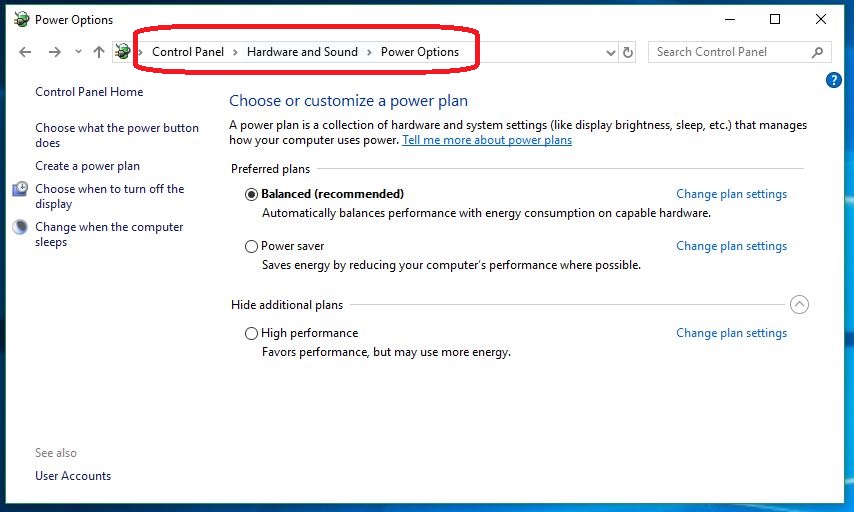
You can also adjust those plan settings.

If you want to speed up your PC, you can also be sure Balanced or High Performance are set on this screen. Avoid Power Saver.

2. Choose what the power button does

On the left of this window is an option that says ‘Choose what the power button does.‘ Click it.
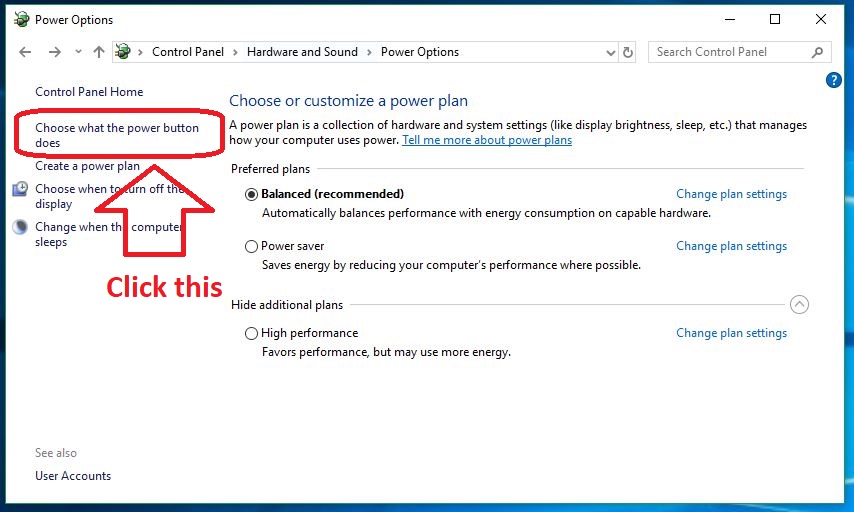
Adjust the settings here.

3. Unlock control

Now you’ll be on the screen where we’ll be changing the settings. Oftentimes these settings are locked. Simply click the Admin option to ‘change settings that are currently unavailable’ and you’ll be given control.
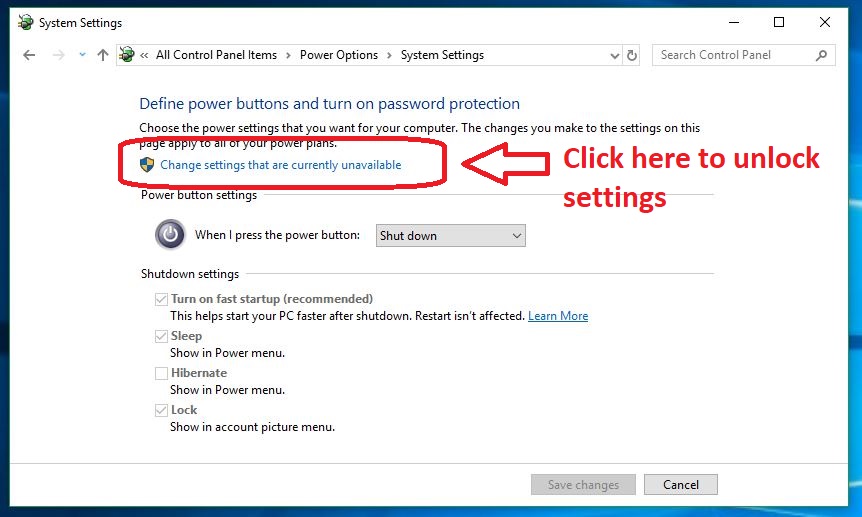
Don't forget your password!

If your Shutdown settings are blocked, you need to unlock them via Admin control.

4. Enable ‘Turn on Fast Startup’

The top option under the ‘Shut down‘ drop-down should be ‘Turn on fast startup (recommended).’ Be sure to have this option engaged and you should notice faster boot times.
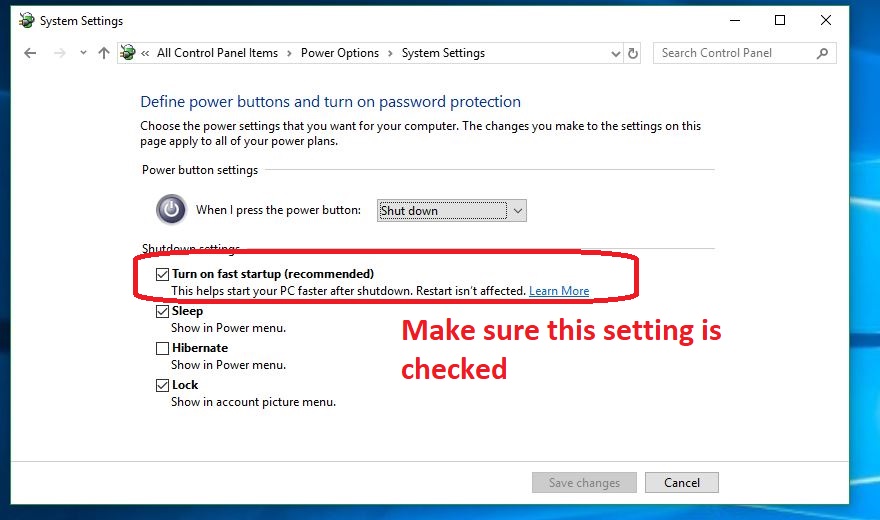
It's checked on by default.
You can also adjust Hibernate, Lock, and Sleep options.

2. Automatically open fewer programs

If your computer still takes a long time to boot up, it could be a sign that your computer is opening too many programs when it turns on.

If it automatically opens a lot of programs it has more work to do, which means everything’s going to take longer to get started. Luckily there’s a way to tell Windows not to bother opening specific programs on start-up.

How to open fewer programs on startup

1. Open Task Manager

You can open your Task Manager at any time by hitting Ctrl+Shift+Esc or by right-clicking the bottom bar of your screen and selecting Task Manager. You can also bring it up via the Ctrl+Alt+Delete menu.

2. Open the Startup tab

‘Startup’ should be the fourth tab in your Task Manager. Open it to view all your Startup processes.
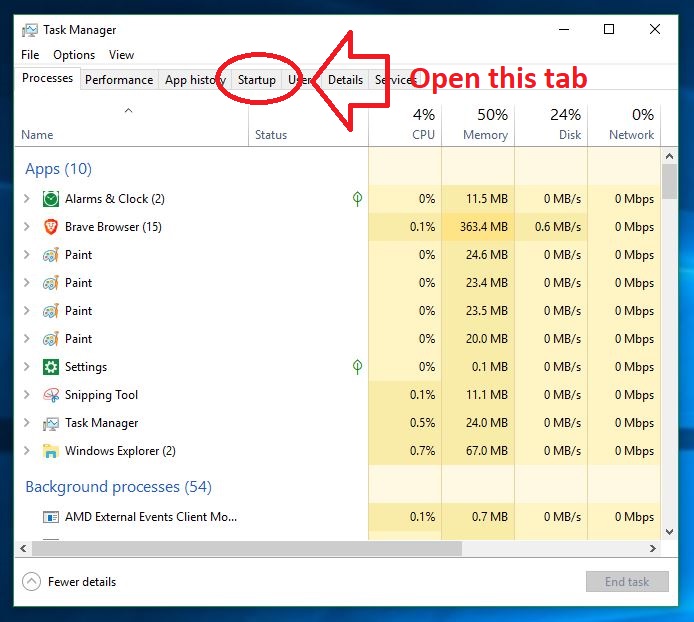
How many Chrome tabs do you really need open?
Another trick is to disable processes on this page.

3. Disable unnecessary programs

On the Startup page you’ll be able to see any programs that are hogging Windows’ attention upon booting. Anything that you don’t want to be done automatically should be selected and disabled. You should notice a significantly faster startup time after doing this.
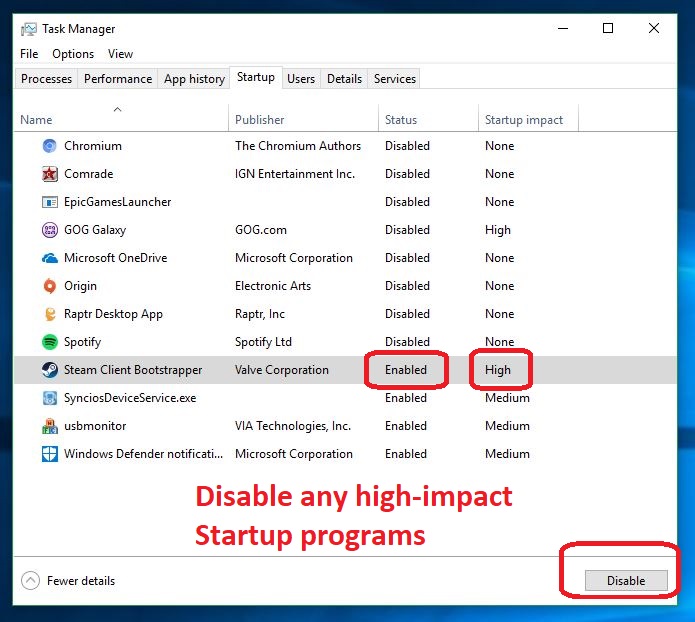
You can also manage the startup queue.
High-impact programs should be the first to go if you have to choose.

While you’re here, you can also manage the queue of which Publisher gets priority upon startup.

3. Clean up your files

Cleaning out space on your hard drive will make things easier on your computer, enabling faster startup times and more efficient operation. To do this, you can run Disk Cleanup or manually delete things you don’t need, often called bloatware.

To run Disk Cleanup, just search for it, open it and hit OK. If you’ve never done this before, you’ll be surprised how much your PC will clean out.
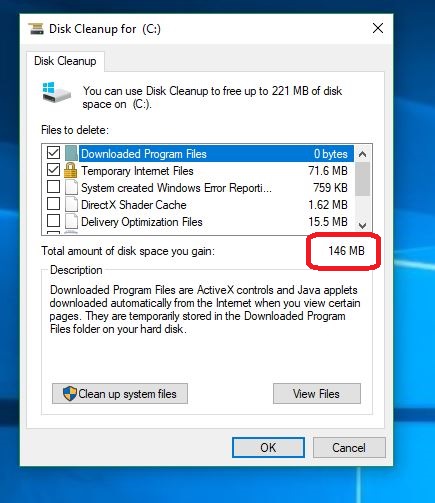
Make your computer happier by deleting waste data.
We’ve seen this number as high as 4 GB.

You can also choose ‘Clean up system files’ for the program to go through your computer and rid it of temporary files, installers and other unnecessary baggage.

The cleanup program should only take a few minutes.
The process is fast and is an investment towards a faster, lighter computer.

You can also uninstall specific programs by doing the following:

  1. Right-click the Start menu
  2. Select Control Panel
  3. Go to Programs
  4. Choose Uninstall a Program
  5. Select the unneeded programs and hit Uninstall

4. Shorten the Boot Menu timeout

When Windows starts up, you see the Boot Menu appear before the operating system loads. From this menu, you can choose startup options, such as Safe Mode.

By default, the Boot Menu displays for 30 seconds. If you reduce this, you can cut down your startup time by a few seconds.

How to shorten the Boot Menu timeout

1. Open Control Panel

As before, to open your Control Panel all you have to do is hit the Win key and type ‘Control Panel.’

2. Open Advanced System Settings

Click ‘System and Security,’ then System. On the left you’ll see ‘Advanced system settings.’ Click here.
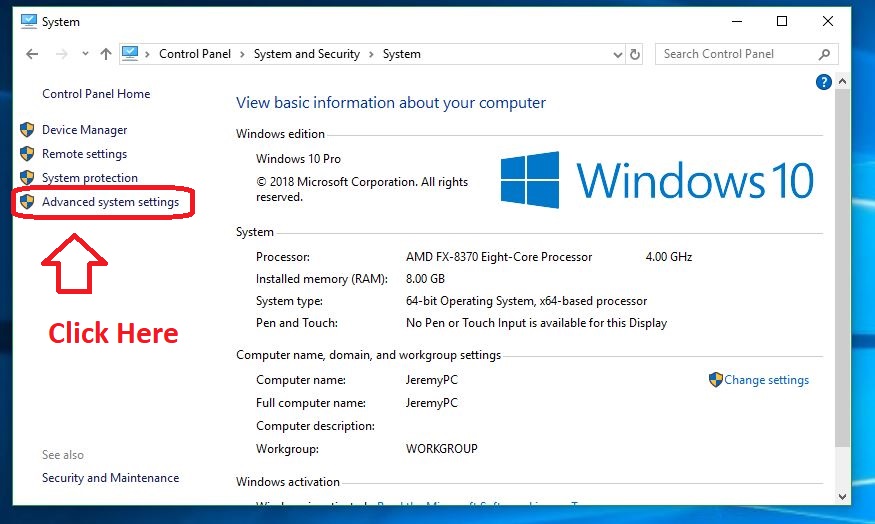
Advanced System settings appear on the left

3. Adjust the time

From the Advanced system settings screen, click ‘Settings’ under Startup and Recovery. From here you can lower the time to display the list of operating systems. Hit OK when you’re done.
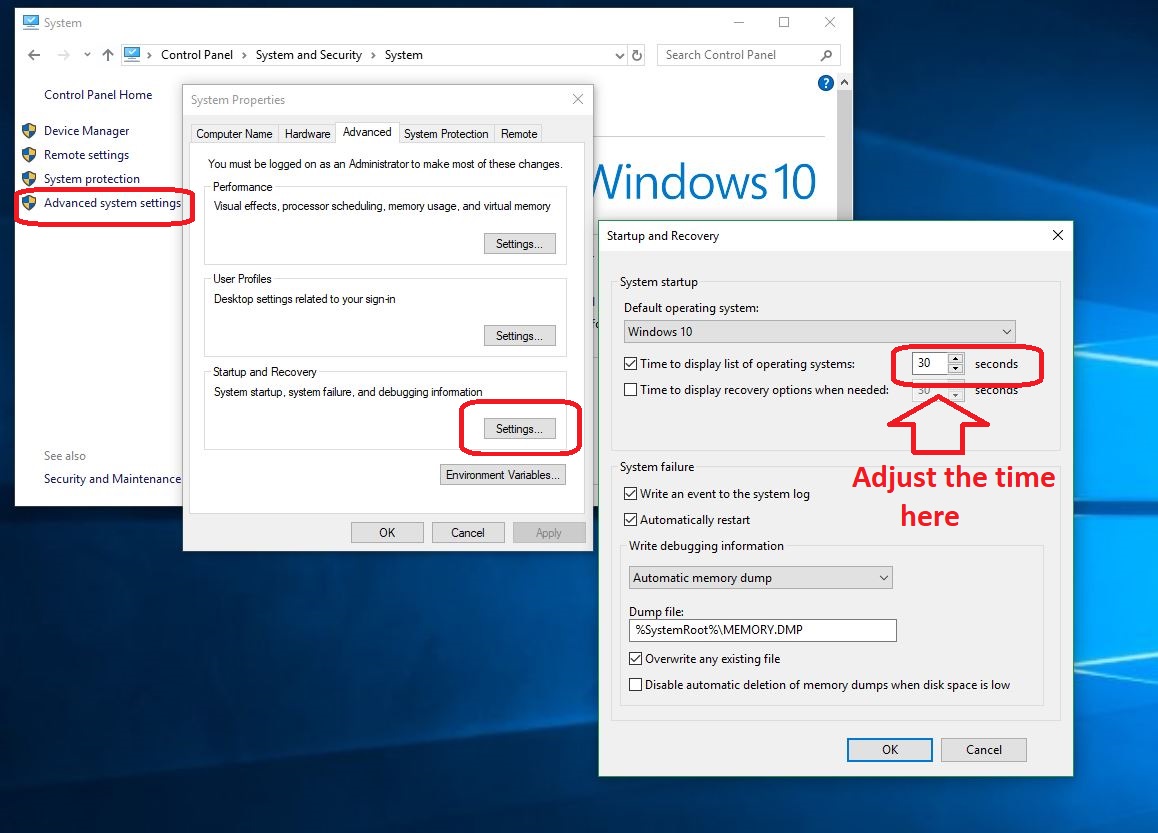
It's especially worth your time if you've only got one OS to begin with!
Most people don’t know you can even do this.

5. Go Bare Bones

Windows 10 includes a number of special effects and features that are more for looks than anything else. If you’re more concerned about startup time than style, you can turn off options like drop shadows and thumbnails to speed things up a bit. Here’s how.

How to drop some features to speed up Windows 10

1. Head back to Advanced System Settings

Open the Control Panel back up by pressing the Win key and typing ‘Control Panel.’ Click ‘System and Security,’ then System. On the left you’ll see ‘Advanced system settings.’ Click here.

2. Open the performance options tab

Click ‘Settings’ this time within the box that says ‘Performance.’

3. Adjust for best performance

The new window should allow you to handpick which visual effects Windows 10 will use. For the best performance all around, you should just check the box that says ‘Adjust for best performance.’
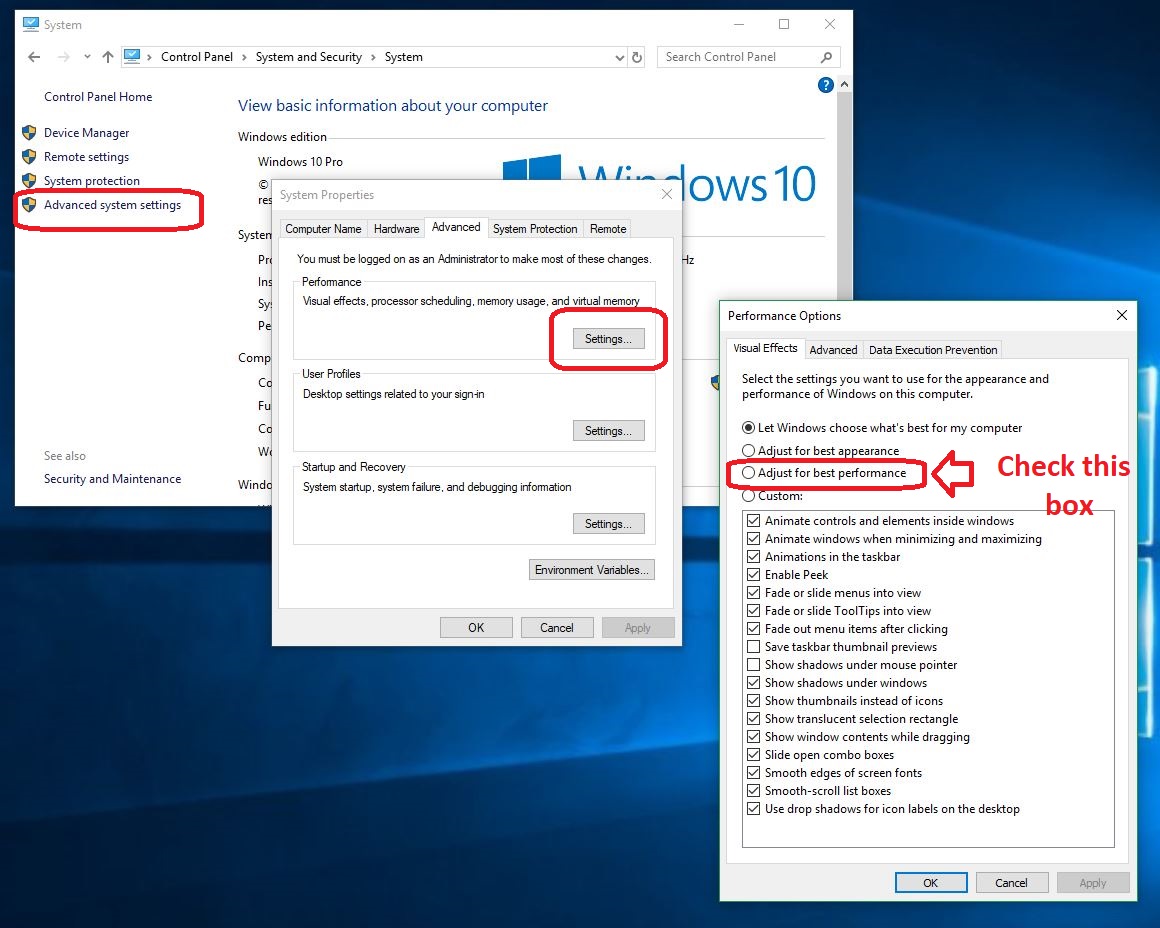
We care more that it's fast rather than pretty.
Turn off any of the superfluous bells and whistles here.

With the custom settings, you can also manually remove find other little features to turn off. Each item you get rid of will boost your PC’s performance by a little bit. Our recommendation is to simply deselect anything you think you can live without. Flashy stuff like transparent menus and tip notifications are cool, but don’t do much but bog you down.

If you try all of this and your computer still starts up slow, let Windows automatic troubleshooter program take a look around your computer and see if it spots any issues. It will then do its best to automatically fix them.

Using these tricks should help you speed up your startup time and get more done, while also taking care of your computer.


How to learn about Bitcoin without actually investing in it

Depending on who you ask, Bitcoin is either a worthless passing fancy or an existential threat to the Federal Reserve and the rest of the banking industry.

One thing’s for certain: There’s a learning curve attached to this exciting new form of doing business. And before you start investing “real” money in the Bitcoin craze, you’ll want to find out everything you can about how it works and what to expect from your experience.

Here are five ways you can begin your self-education on the promise and the perils of investing in Bitcoin without actually investing in Bitcoin.

1. Take an Online Course

People spend many years at university learning how to handle money and invest in the business practices that make global finance possible. So? Don’t expect to understand Bitcoin overnight either.

Short of taking a university class, versions of which are proliferating faster than you probably expect, there are online courses available that can teach you about Bitcoin and help you make informed investment decisions.

One such course, called “10 Days of Bitcoin,” is a ten-day-long, email-based training series intended to introduce users to, in their words, “the most exciting technological advancement and financial instrument in recent memory.”

If you seek out a course like this one, be mindful of the course author’s list of credentials — or lack of them. “10 Days of Bitcoin” was written by a software engineer, app developer and founder of a startup that was purchased by a Fortune 500 company.

2. Read a Book

Contrary to the rumors, the print industry is alive and well. Even so, books might not have been your go-to source of knowledge when Wikipedia is so handy. But Wiki won’t help you become a smart investor.

Books are some of your best allies if you want to really understand the implications of decentralized currencies and comprehend, on an intuitive level, why they’re so simultaneously promising and volatile.

Books like “Mastering Bitcoin,” “Cryptoassets” and several others explain in great detail the historical relevance of Bitcoin, explore in layman’s terms the technology that powers it and generally helps fill in some of the knowledge gaps that upstart Bitcoin investors should probably know before they dive in head-first.

3. Listen to a Bitcoin Podcast

Unlike an online course or a book, which can take some effort to update as new developments warrant, podcasts frequently arrive in weekly or possibly fortnightly installments.

This process puts you closer to the “action,” as it were, and gets you closer to some of the thought leaders who are emerging in this space.

Crypto is changing practically by the day. Look for a cryptocurrency or Bitcoin-focused podcast from, once again, somebody with real-world experience and meaningful credentials.

Just as importantly, find a podcast that’s frequently updated and thorough about providing citations and attributions for the information they provide.

Photo by Andre Francois on Unsplash

4. Try a Bitcoin Simulator

We’ve all taken our turn playing god or goddess in “Sim City” and “Farming Tycoon” — but did you know there are Bitcoin simulators out there too?

Using them is maybe one of the best ways to really dig into this subject and find out how much of a “virtual” virtual currency mogul you can become before playing for keeps.

It works like this: Using a web or mobile app, simulators like “Bitcoin Hero” and “CoinMarketGame” let you buy and sell cryptocurrencies like Bitcoin, Dash, Ethereum and Litecoin without any real-world consequences.

It might fall short of replicating some of the strong emotions associated with true investing, but this is still a great way to, among other things, train yourself to recognize the ideal times to buy and sell. You’ll find out pretty quickly whether or not you have the instincts for it.

Bitcoin Hero Download free
7

5. Take a College Course

It was probably inevitable: Bitcoin is being taught on college campuses alongside other forms of economic and fiscal theory.

At New York University, a new cryptocurrency class drew so many registrants that the professor had to retain a larger auditorium for the more than 200 students who turned out.

To name just a small handful of schools who’ve implemented, or plan to implement, classes about Bitcoin and crypto, Cornell, Duke and Carnegie Mellon have all put together graduate-level courses designed to educate students on the theory and practice of trading in digital currencies.

Here’s the ultimate point of talking about all of this: Like anything to do with money, there’s a huge amount of information and misinformation swirling around crypto right now.

Whether you’re picking up a book, enrolling in a college course or following a podcast from an authority on the subject, you owe it to yourself to do high-quality research before investing your hard-earned money in Bitcoin or another digital currency.

It could absolutely be worth it in the long run — but you have to know what you’re doing.

Curious what apps our Solutions community favors to learn and track cryptocurrencies? See what they recommend here!

Why China Is Winning the Race to 5G

5G networks have the strength and sophistication to power looming technological advances, like self-driving cars, virtual reality, and robotics.

About 10 times faster than its 4G predecessor, 5G is capable of downloading a 3D movie to phone in 30 seconds. On 4G, the same download will take six minutes.

Although most consumers are solely familiar with 4G and 5G concerning their smartphones, the power of 5G extends well beyond phones.

With additional speed and capacity, in addition to virtually zero lag time between device and server, 5G has ample potential in general, especially as the number of connected devices continues to increase.

At the moment, 5G is entering a gradual replacement process. It’s unable to take over entirely since it requires super-high-frequency airwaves and additional infrastructure.

The Trump Administration shows interest in a government-funded 5G public utility. Still, inaction from the U.S. and other countries is enabling China to lead the pack among nations with interest in 5G.

China’s Emerging 5G Ascent

A combination of government support and industry momentum is pushing China to the lead of the 5G race, at least currently. 5G technology requires significant government and private sector investment, simultaneously, for considerable expansion, which China is beginning to accomplish.

Per CTIA analysis, Beijing has plans to deploy 5G by 2020 on a large commercial scale, with China’s top carriers working with the government to help ensure this timeline goes to plan.

The Chinese government is already distributing a good amount of necessary radio frequencies for 5G in preparation for their 2020 aim.

Whereas the relationship between government and industry in the U.S. can vary wildly, China has a more uniform government-industry link that relies on extensive coordination, especially in the telecom industry.

Especially following the Pyongyang Olympics, South Korea is making strides in 5G, and some consider them to be second in the 5G race, between China and the United States. South Korea’s largest telecom firm, KT Corp, used Pyongyang as a showcase for the world’s first 5G tablet.

The Future of 5G in the United States

The United States has the resources to emerge as the leader in 5G. Despite the potential, the country needs to make adjustments for that to happen.

The U.S. lacks clarity regarding the allocation of radio frequencies, comparative to China and South Korea. It’s on U.S. lawmakers to enact legislation to permit an infrastructure overhaul that includes more clarity on radio frequency allocation.

The CTIA, a trade association representing the wireless communications industry in the United States, is lobbying for 5G reforms.

Some 5G lobbyists view Trump’s blocking of Broadcom’s $117 billion bid for Qualcomm due to national security concerns as a positive for 5G’s future. There were fears that such a massive takeover would lead to stagnation in 5G development.

The possible speeds alone, with 5G offering speeds as high as 20 gigabits per second, show 5G’s massive potential without technical jargon.

It’s apparent that high-frequency signals are emerging as the standard, though 5G will require a broad spectrum of unused frequencies that are free from signals that compete, which prompts clarity regarding U.S. radio frequency allocation.

Predicting who will be leading the 5G race in 2020 is contingent upon several questions.

Will the U.S. clarify their laws regarding radio frequency allocation? Will China continue to show cohesive collaboration between government and industry? Will South Korea emerge as the dark house, considering their showcasing of numerous 5G products already?

Either way, it’s a positive that many countries are showing considerable interest in 5G.

Consumers should be patient meanwhile while staying well aware that speed and connectivity are bound to increase in the coming years regardless of which country is leading the pack.

Photo by Li Yang

How do I know if I need to upgrade my PC?

Computers are finicky devices. Although the current generation of hardware is much easier to work with than earlier models, modern systems still need to be maintained, updated and protected from outside threats — and that still might not be enough.

Even in the best-case scenario, computers are known to fail from time to time. The good news is that most of them provide telltale warning signs well in advance.

How do I know if I need to upgrade my PC?

1. Slow system speed

Your system probably doesn’t perform nearly as well as it did when you first brought it home. There are numerous strategies to help restore the original speed and performance of a laptop or desktop PC, and some of these tricks are quite helpful. Defragging your disk drive, removing junk files and physically removing dust from your PC’s case all go a long way toward  restoring your computer to its former glory.

But if you’ve tried all of the methods without any luck, it’s probably time to upgrade. You might be able to struggle by for another year or two, but the rapid development of technology makes it even harder to catch up if you do fall behind.

2. Frequent crashes or virus infections

Every computer is prone to virus infections, but most of these threats are mitigated by modern antivirus or anti-malware protection. Even if your system is infected, the effect on a healthy computer is typically minimal.

If you find that a recent virus is wreaking havoc on your desktop or laptop, or if you experience frequent or regular crashes, it’s probably time to upgrade your entire computer.

3. Software incompatibility

Is your computer capable of running the latest applications and utilities? Can you play new games with your graphics settings at the maximum? Unless you bought your computer secondhand, it was likely compatible with all of the software on the market at the time.

If you find that you now have to pass up the newest and most exciting games, or if you find it difficult to find compatible drivers for the latest software, it’s probably time to begin shopping for a whole new computer.

4. Showing its age

Computers are like humans — no matter how hard they try to hide it, their true age always comes to light eventually. There are several signs to look for when trying to determine if your system is too old. Odd or unexpected noises, internet lag and the appearance of the infamous “blue screen of death” are all telltale signs that your computer is just too old.

As a general rule of thumb, many computer enthusiasts upgrade their systems every four years. Not only does this ensure compatibility with the latest software and hardware releases, but it also helps safeguard your system against the most recent viruses, malware, and cyber-threats.

Upgrading your PC on a budget

Although brand-new components are expensive, it is possible to upgrade your PC while maintaining a tight budget. Refurbished hardware and used hardware mean different things, but both types will help keep your costs to a minimum.

The term used typically refers to pre-owned hardware. Unlike refurbished equipment, there typically aren’t any guarantees to the remaining performance of the device.

Authorized refurbished equipment undergoes a remanufacturing process and extensive testing before it’s made available to consumers, and many refurbished items include a limited warranty of some kind.

Don’t wait until it’s too late!

It’s easy to get aggravated when your desktop or laptop is struggling to perform at acceptable speeds, but tech-savvy users know that this is a sign of an outdated system.

Whether you’re experiencing system bottlenecks, frequent crashes, or software incompatibility, it’s important to recognize what your computer is telling you and respond promptly.

Not only does this let you get a jump on any serious problems, but it could help you prevent data loss or corruption in the future.

The 12 best gadgets for students

Whether you’re heading to college or university soon or equipping someone who is, you’ll want to make sure you have the right tech to maximize learning and make the transition smooth. From taking notes in lectures to  developing good independent study habits, students who are on their own for the first time have a lot to think about. Get them started off on the right foot with these worthy tools.

1. Sony CD-PX440 Voice Recorder with Built-in USB

A 4-gigabyte capacity lets students store up to 1,043 hours of lectures, test-prep notes and more on this easily portable voice recorder.

Because it works with a pair of AA batteries, students can quickly find replacement power sources when needed. That shouldn’t happen often though, because this tech tool boasts a battery life of up to 96 hours. ($79.99)

2. Fitbit Aria 2 Smart Scale

Unlimited buffets at college dining halls and spending more time sitting than staying active are two things that could cause the dreaded freshman 15 weight gain. This Fitbit product helps users take a proactive approach to body mass. It’s an intelligent scale that measures weight, BMI and more, plus remembers settings for up to eight individuals. This device captures trends over time, too.

When used with the accompanying Fitbit app, the scale offers even more capabilities. People can use built-in technology to track exercise, log their food intake and see if they’re drinking enough water. ($129.95)

3. Cisco TelePresence PrecisionHD USB Camera

Although most of today’s laptops and smartphones have built-in, live video camera functionality, the equipment inside those products is not intended for intensive use and doesn’t give high-quality results.

Plus, today’s learning options are drastically different from past eras. Students commonly log into classrooms that exist in the cloud and learn alongside people from all over the world who are also using streaming camera technology.

This sleek option from Cisco delivers 720p video at 30 frames per second. It also has a manual tilt feature, so users can shift the camera up or down as needed. ($178.11)

4. Lumo Lift Posture Coach

Many people don’t realize how much they slouch on a typical day — until experiencing day-disrupting backaches. This wearable device pays attention to a student’s posture and vibrates when he or she starts to hunch over.

It also works with compatible smartphones, making it possible for people to set goals and get updates on their progress. After learning how to assume a more appropriate posture, students may not feel the effects of sitting in long lectures. ($79.99)

5. Sonic Alert SB300SS Sonic Boom Loud Vibrating Alarm Clock

Classes starting at 8 a.m. aren’t usually favorites of students who would rather sleep in than get up early. Some people enrolled in college even ignore the alarms set to rouse them from slumber. It’s virtually impossible to not notice this specialty alarm clock. The device has a 12-volt bed shaker attachment and a 113-decibel alarm with volume and tone adjustments. There is also a battery backup, so the clock maintains the correct time after a power outage. ($40 and up)

6. EzPro BrewGenie BG120 Smart Coffee Maker

Students who feel the stimulating effects of caffeine frequently admit they’d never make it through late-night cram sessions, meetings with professors during morning office hours, and those essential extracurricular activities without coffee. Thanks to this intelligent brewer, campus dwellers don’t have to resort to nearly flavorless cups of coffee from a nearby vending machine.

This appliance syncs with smartphones, letting you brew coffee while lying in bed. you can also set things up so that the coffee-making process begins at the same time each morning. Then, students and their roommates can wake up to the pleasant smell of fresh coffee. There is also a function that keeps the beverage warm for up to two hours. ($82)

7. Digiroot Precision Disc-Tip Stylus

This tool increases the usage options for any touch-screen device, such as a tablet or smartphone. Unlike most styluses, this one comes with a transparent disc attachment on the tip. It facilitates seeing the exact location of the writing instrument’s point, which gives better accuracy when performing precise tasks.

Users can rely on this stylus to highlight text, draw on virtual paper and more. It’s a great gift for someone who is environmentally conscious and does not want to waste paper, or wants to keep textbook pages free from marks to get more money when selling them. ($11.99 for a set with two styluses and several accessories)

8. Hidrate Spark 2.0 Water Bottle

With so many competing interests and responsibilities on campus, hydration can sometimes take a backseat to studying (or partying, as the case may be). But it’s so important. The Hidrate Spark 2.0 is an intelligent water bottle that syncs with a smartphone or smartwatch to tell the user when it’s time to drink. Available in several stylish colors, the Hidrate starts glowing when people need to hydrate. The accompanying app that shows you how much you drink over time. That feature keeps goal-oriented people motivated and makes it less likely they’ll stop trying to improve. ($54.95)

9. Spire Stone Stress Tracker

Many students may refer to their college years as some of the best times of their lives because of the new opportunities, friends and learning experiences. However, an educational setting can also be stressful. The Spire Stone Stress Tracker is advertised as the only wearable device proven to reduce stress.

It monitors your breathing and uses your breath characteristics to help you become less stressed, plus sleep better. Also, the device is extremely small, so it inconspicuously fits with any outfit. ($99)

10. Seagate Backup Plus Ultra Slim

It seems there’s an unwritten law stating that hard drive crashes happen the night before major deadlines. This backup drive offers two TB of storage and measures less than 10 millimeters thick. It also comes with 200 GB of storage from Microsoft OneDrive, perfect for students who prefer storing stuff in the cloud. ($87.99)

11. Logitech Slim Folio iPad Keyboard Case

iPads are common sights on college campuses, but the on-screen keyboards don’t make it easy to type efficiently. This Logitech keyboard creates the conditions needed for faster typing and protects the iPad at the same time. It even includes a full row of iOS keyboard shortcuts that let students change the input language or device volume without taking their fingers away from the keys. ($99.00)

12. HP Sprocket Portable Photo Printer

Students live largely digital lives and store their pictures on tablets, smartphones, and in the cloud. However, it’s still nice to decorate dorm rooms and communal living areas with physical snapshots. The HP Sprocket Portable Photo Printer makes that possible. It connects to a smartphone and creates 2×3 sticky-backed photos students can attach to the fronts of their notebooks or textbooks, the lids of their laptops and more. ($129.95)

The right gadgets can make college life more enjoyable for students, no matter what they’re studying.

This list is a strong starting point for parents who want to get their kids equipped for success, relatives looking for birthday gifts the recipients really want, and students who are in the mood to splurge.

Here’s how hackers get your info from the stores where you shop

Data breaches and major hacks are a dime a dozen these days.

Recently, Saks Fifth Avenue and Lord & Taylor experienced a wide-scale attack, which resulted in the corruption of more than 5 million customer credit and debit card numbers.

The information was stolen thanks to a unique software planted within their point-of-sale and cash register systems.

The attack siphoned a continuous stream of financial details, up until last month when it was discovered.

It is now one of the largest known breaches of a major retailer, alongside Target’s 2013 breach, Home Depot’s 2014 breach, and 2017’s Equifax breach.

It begs the question, how do hackers manage such attacks? What tools and systems do they use to gather all that sensitive information?

How hackers make their mark

One of the most common forms of attack is called phishing, which essentially clones an official portal or website making you think you’re visiting an actual brand’s page.

Generally, they trick you into providing personal information when you try to log in, such as payment information.

Ransomware is another common attack, which seizes a system and data and then demands a monetary payment to re-access.

Unfortunately, even after payment, those affected hardly ever get access to their data and systems back.

In the case of large-scale data breaches, such as those Saks encountered, hackers will take advantage of security vulnerabilities within their internal systems.

In the most recent case, the thieves gained direct access to payment systems and stole data from customers making purchases at retail brick-and-mortar stores and online. The major Target breach involved a similar attack.

In Equifax’s case, the breach was a bit less complicated. Hackers gained access to the companies virtual system and made off with data files containing sensitive details.

If and when these data files are not properly protected — using encryption or the like — the hackers can read sensitive information contained within the files.

It’s not a secret that for these kinds of attacks, negligence is one of the most damaging problems — they can easily prevent or stunt using proper security measures.

The problem with modern attacks and breaches is that the onus for proper security belongs to everyone, from the store, to the systems and electronics providers, to even you, the consumer.

It’s such a fragmented responsibility that it’s truly tough to maintain in any reasonable manner. You can do your best, but there’s no guarantee the other involved parties will.

That doesn’t mean you shouldn’t focus on maintaining personal security when you can, however.

It’s important that companies have both in-store and online security measures in place, such as real-time notifications, two-factor authentication, verification checks and captchas.

Even an unsecured CMS can have serious repercussions, which is why brands must also practice good security too.

How can you protect your data?

While many of the above descriptors are generalized, hackers tend to use the same methods and vulnerabilities to gain access to various systems.

What we didn’t cover is the common issue of improper personal security.

1. Use strong passwords

Using strong passwords with a healthy combination of upper and lowercase letters, as well as numbers and symbols, can make it more difficult for anyone to guess or discern your account info.

More importantly, never use the same password across various accounts. If one is compromised, then hackers are smart enough to try using it for other accounts associated with your particular email or username.

They could effectively gain access to even more accounts and information using the one password.

It’s good practice to use strong passwords, never reuse them and never share them with friends, family or colleagues. Software like Lastpass can keep tabs on your passwords so you won’t forget.

8

2. Mind companies’ reputations

Pay attention to a company or website’s reputation before handing over your personal details. Providing an email for a newsletter subscription is not necessarily so risky.

But allowing a retailer to save your credit and billing info for later can be dangerous. It’s possible to make purchases on a website or storefront, without saving this information — putting an awful lot of trust in the organization to protect your data.

3. Use cash or credit

Try to avoid using debit cards and bank cards which offer direct access to your funds.

Instead, opt for a credit card when making online purchases, or buying goods and services from a party you don’t know well enough.

Most credit card companies and services offer fraud protection. While thieves could access your credit card number, they cannot directly access your bank funds.

4. Always review your statements

Pay close attention to your online and banking statements and keep an eye out for fraudulent or strange activity.

The sooner you realize and file claims when something happens, the better off you’ll be both financially and security-wise.

If you think something is wrong, simply get in touch with your card provider and have them cancel your current variant and send a new one. They will often do this with no hassle, especially when potential fraud may have occurred.

5. Enable real-time notifications

Some financial providers and institutions even offer real-time notifications for purchases and changes on a card or account.

If you have the option, always enable these features so you’ll get up-to-date reminders on what’s happening with your account.

6. Enable 2FA when applicable

You should also enable two-factor authentication (2FA) for any accounts or personal logins where applicable.

This forces you to enter a temporary code — sent either to your phone through text, a mobile app or email — to verify your identity before accessing your account.

It ensures your information and accounts are not compromised, even if the connected passwords are. You need a second layer of security details to gain access, hence the name two-factor.

Stay aware of hacking trends

The best line of defense, at least on a personal level, is to remain in touch with what happens around you.

Pay attention to the major data breaches happening, and if you’re affected or believe you may be, then start paying closer attention to your credit reports and financial statements.

Naturally, you should do this already, but it’s still an important step to note.

Finally, make use of all the additional security measures and processes available to you, such as two-factor authentication, security pin numbers, and strong passwords.

So long as you adamantly protect your own personal security, it will serve as the last line of defense if and when a company you shop with drops the ball.

How the IoT will affect your job

Major changes that affect the workplace tend to cause mixed emotions. That’s true in the case of the Internet of Things (IoT) and the connected devices under its umbrella.

Will high-tech advances make your life easier? Or will smart devices make your job obsolete?

Let’s take a look at some of the most likely ways the IoT will alter things at work and explore the pros and cons of such developments.

How the IoT will affect your job

1. The reduction of repetitive tasks

One of the positive aspects of the IoT on employees is that it’ll probably mimic the assembly line by reducing repetition in the work environment, especially when the IoT devices learn from past experiences.

From that point on, the humans who used to handle those jobs can spend more of their time on rewarding and mentally challenging work.

Think about how some repetitive tasks, such as typing, can cause problems like carpal tunnel syndrome (though this is rare). Still, severe cases require surgery and may make a person who types a lot for a living unable to work as efficiently.

However, many IoT devices recognize voice commands, theoretically allowing people to type less and talk more.

2. Less employee autonomy

There’s also a possibility that the IoT will adversely affect your ability to make some decisions, mostly because as devices try to deliver convenience, they may make it so that you don’t have to choose.

Consider an IoT-enabled coffee maker that learns what time you get to work and has your favorite brew waiting when you arrive.

Or what about a thermostat that knows you like to drop the temperature by a few degrees in your office each afternoon to help yourself stay alert?

Both of these examples already exist, and they’ll become even more prominent in workplaces, as well as homes.

Although you can change settings so that the gadgets don’t keep doing things that don’t suit your preferences, the fact that the smart devices know what you want before you ask may make you feel stripped of free will.

3. Better data collection

As mentioned above, IoT gadgets that help humans take care of tedious work could give them more time to do other things. Those devices can also capture data that accumulates during workdays, allowing managers to analyze that information and make wiser decisions.

According to some estimates, it’s possible to process up to 90 percent of invoices without human intervention. That statistic shows how automation could drastically affect the workforce of the future.

Because processing data is only one part of the equation, some companies offer platforms help business leaders see all of them with one interface.

The Google Cloud IoT Core service provides users with the infrastructures and services necessary to manage numerous connected devices at once, thereby facilitating better data usage over time.

When managers efficiently use those gadgets and the information they compile over time, it should be easier to make profitable choices, increase employee productivity and create an all-around better work environment.

4. The possibility of unintended career changes

It’s not difficult to find alarmist articles about how the IoT and related technologies could steal jobs.

According to one study carried out by Harvard academics, 47 percent of U.S. jobs are in the “high risk” category for being replaced by automation. (Curious if your job is going to be automated? You can check here.)

However, it’s important to realize how the IoT is also creating jobs people hadn’t previously imagined. That’s happening inside and outside the United States. For example, Aruna Sundararajan, a government telecommunications leader in India, believes the IoT will create up to 15 million new jobs in the country over the next few years.

Instead of thinking the worst and assuming the IoT might make you unemployed, now is the time to prepare for what’s ahead and gain the knowledge needed to start working in an IoT-centric role potentially.

Depending on factors such as your age, the field in which you work and how much you like your job, you might have thought you’d stay in your current position until retirement.

Shifting into a different role might seem scary at first because you’re making a move you hadn’t planned for.

However, the specialization required by many IoT jobs means they also offer higher-than-average salaries. Even if you hadn’t thought of changing careers, your decision to do so — or at least keep the option in mind — could help your career and boost your bank account balance.

Pros and cons

Based on this list, you can see there are pros and cons associated with the growing prevalence of the IoT in today’s workplaces.

In the best-case scenario, employers should take their workers’ concerns into account when implementing emerging IoT technologies, while workers should stay continually alert for ways to develop their skills in case a career change becomes the best option.

Related Articles: 

IoT and the smart home

6 alternatives to eBay for selling items online

eBay is one of the most popular places to sell things online. Whether you’re getting ready for a cross-country move, earnestly clearing your house of clutter, or just trying to make money, it’s not your only option. Here are some other sites to try.

6 alternatives to eBay for selling items online

1. Bonanza

According to a 2016 survey about places to sell things online, this site was the one respondents would most likely recommend to friends. Bonanza doesn’t charge setup or listing fees, which makes it an appealing option if you’re worried about potentially spending more than you earn when selling through the Internet. You will have to pay a fee of 3.5 percent of the price of the item sold. That’s less than either Amazon or eBay.

The site also gives you a seller statistics dashboard. It shows details like how many people clicked on your items or the number of things sold in a given period. By using it, you could track trends that improve future results.

2. eBid

Established in 2008, this site boasts 4 million listings and more than 14,000 product categories. That means even if you’re trying to part with quirky items that are hard to categorize, there’s probably a way to sell them here. It’s always free to list things, and the sale fees for eBid are 3 percent or less.

3. Craigslist

Craigslist offers an extremely basic platform for selling items. Unlike eBay, it’s not a bidding site. You either set a price or let potential buyers know you’re open to negotiating. There’s also a section for items people are giving away.

The other sites covered so far have customer service departments you can rely on for clarification and help with the selling process. Craigslist isn’t like that, and depends on its users to make sure everyone follows the rules. There is a forum you can read for help, but no phone number associated with Craigslist to call.

People can report rule breakers by flagging their ads. As you can imagine, not everyone is honest when using this system. Many people who are following the terms of service get their content flagged anyway because competitors want to make those ads less visible. This dishonest practice is particularly problematic in the automotive and real estate sections of Craigslist.

Photo by Ivan Dorofeev on Unsplash

4. Item-Specific Sites

Perhaps you’re trying to sell a very particular kind of item you know has a niche market. In that case, your best bet is to focus on item-specific sites.

For example, Apfelbaum facilitates direct sales of collectors’ stamps after an appraisals process. SecondSpin is for selling CDs, DVDs and Blu-rays. There are also sections on that site for video games and vinyl.

Trying to get rid of clothes or handbags that are still in good condition? Look no further than thredUP. It could be an especially lucrative site if you have high-end, brand-name items. However, one little-known aspect of selling there is you must pay for a special bag thredUP sends you to use for shipping your clothes.

5. Facebook Groups

If you’re even a casual user of Facebook, you’ve probably seen users there attempting to sell everything from baby strollers to couches.

Wondering how you could do the same? It’s easy. First, use the search function to find a group to sell your items, preferably one in your area. Then, read the rules for using the group. Many stipulate there are certain things you cannot sell, such as animals.

If you’re satisfied with the standards, request to join the group. Once approved as a member, find the Sell Something link on the group page. You’ll then have to fill out a form that indicates what you’re selling and for how much.

After adding those details, click the Post button. Depending on how the group operates, you might see the content right away, but it’ll probably appear after a moderator reviews it.

6. BriskSale

One of the main perks of BriskSale is it doesn’t charge any seller’s fees. Also, every item you post gets automatically uploaded to the Google Shopping Network for better visibility.

If you have a hectic schedule and want to sell many things, but don’t have time to upload them all to the site, BriskSale representatives can do it for you as a bulk upload. You just have to send them a file of your inventory, and they’ll post it to the site within one to three days for no charge.

If you’re done with eBay or at least taking a break from the site, you can still sell things online. After trying one of these alternatives, you may never return to the famous bidding website.

Related articles:

6 tips for selling online (and making more money)

Apps to sell unwanted gifts

Ways to find a lost phone

Do you lose your phone all the time? Whether at a friend’s house, in a car or lodged in between couch cushions, we have all had that moment of panic when we realize we misplaced our phone. Maybe you left in your other pair of jeans, or maybe it fell out of your pocket at the gym.

Thankfully, there are now more ways than ever to track your phone and keep you from losing your most valuable electronic device forever! No matter if you lose your Android phone or iPhone, these tools will help you quickly recover your device and notify you of its last known location.

How to Find a Lost Android Phone

If you lose your Android phone, there are several different options to search for your device.  There is a phone finder feature integrated directly into your device from Google, as well as a number of third-party apps and solutions to get to the bottom of things.

Find Your Device with Google

The easiest method to use is Google Find My Device which is built directly into all Android phones using Google Play Services as well as any phone that runs Android 2.3 or newer. You can search ‘where is my phone’ in Google for the service to start looking for your device.

You can use the Find My Device options to set a new password, ring your phone from afar and more. While you can configure this service ahead of time, to ensure the best access to your device, you can also log in and get data even after you have lost your Android phone. By the use of wifi and GPS data directly from the phone, your Google account will provide you the very latest information on where you might have left your favorite touchscreen device.

Third-Party Apps

While Google offers a solution to find lost Android Phones, there are many third-party options in the Play Store that will allow you to locate and secure your device. One of the best is Cerberus Anti Theft, a free application which can communicate with your phone in several different channels. The app allows remote control of your Android device through the apps web portal login, and it can automatically alert you when you have a potentially lost device.

Lastly, you can send your phone text messages from another device to lock down and track your device even after it has gone missing. By taking remote photos, using the alarm function and displaying a message that remains on the screen, you can lock down a lost phone and prevent usage by any would-be thieves.

How to Find a Lost iPhone

The easiest – and only way – to find your lost iPhone or other Apple device is to use the native feature called Find My iPhone. This app comes on every iOS device and displays a map to help you easily locate and manage your lost electronics. To fully track activity, however, you have to have access to another iOS device or computer with the Find My iPhone app.

While the missing iPhone is turned on, it will send data when connected to the internet, but if this feature is turned off, there may be no way to contact the phone. The phone can display a message while in communication with this software to contact the missing owner, and the data on the phone can be wiped remotely if needed. One great feature about the Find My iPhone software is it requires an Apple ID and password to reactivate this feature, meaning that crooks who have your device may end up not being able to fully use the device.

Use Google Maps as a Timeline

While there are not a lot of other options specifically for iPhone users, if you use Google maps on your Android or iOS device you can look at your timeline page that may have more detailed information about your history. If you drop your device and look for its last location, this timeline tool may show you the last time your phone connected to the web and your Google account.

Call or Text Your Missing or Lost Phone

This one may seem obvious but sometimes sending a phone call to the missing device might reveal its location or help you get a better idea of where to look. Even if your ringer is not on, the vibration motor in your Android or iPhone can often send sounds into whatever surface it is resting on and allow you to pinpoint the spot.

No matter where your phone is, losing your precious device with all your personal information inside of it can be a stressful experience. While it is hard to tell exactly where phones are located without some assistance, each of these special tools can help find your lost Android or iPhone and get your data back into safe hands.

Considering a smart product? Read these 5 tips before you shop

Maybe you went over to someone’s house recently, saw a smart product in action, and decided you can’t live without it. Or maybe you read about how some smart products are extremely energy-efficient, and you want to know how much they might reduce your bills.

The smart products market has become so vast that it’s not wise to buy without doing some research first. There are factors to weigh and characteristics to be aware of before taking the plunge. Read on to learn how to make smart decisions about smart products.

A buying guide to purchasing smart products

1. Consider the initial price, plus money or time saved

When you’re surveying the market for a smart device, don’t consider only the upfront cost; add in costs for accessories, replacement parts, and other necessities into the equation.

When you read reviews about the products that catch your interest, aim to get rundowns from people who have owned the items for a while. They’re the most likely sources to give you a genuine glimpse of the money you could save through long-term ownership.

In some cases, a smart product won’t save you money, but it stops you from wasting so much time. If you hear a lot of feedback saying that people get more done by using a smart product that recognizes voice commands, for example, you might realize that a product that performs as well as people say is certainly worth whatever it costs.

Don’t let a steep upfront price immediately convince you to look elsewhere. Instead, think about the benefits you could receive as time passes by owning that product. Conversely, also examine whether you might spend more time learning to use a smart product than actually reaping its rewards.

2. Pay Attention to Popular Products

The most prominent merchandise in the smart products market has usually achieved that position for a reason. People buy something, try it, love it and encourage friends to follow suit. The most well-known brands typically also have a stronghold in the market and spend time making product improvements.

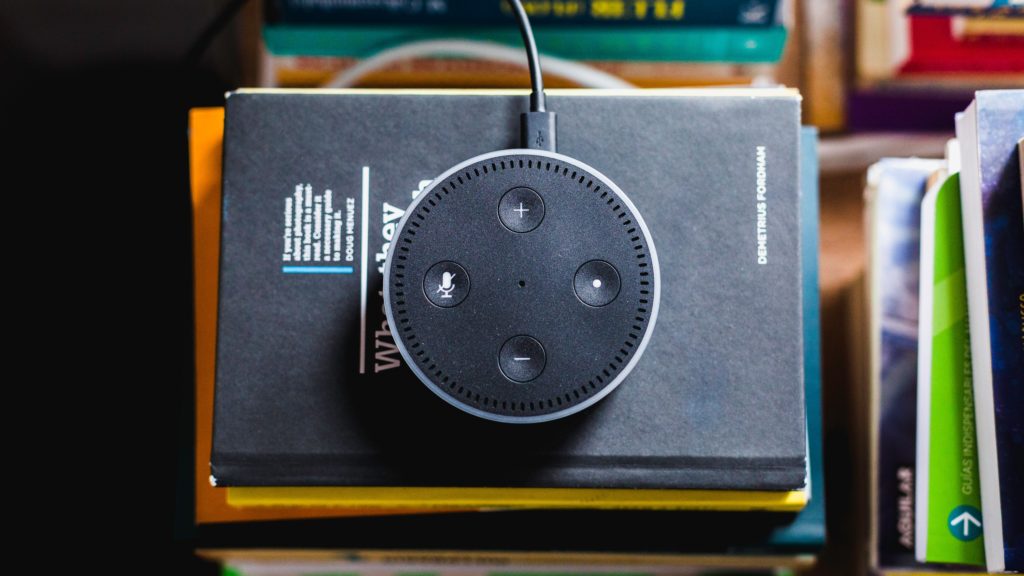
Recent statistics indicate that as of this September, Amazon sold three times as many of its smart products than Google had. Google and Amazon are two mega brands, so why is Amazon winning in this case? It has existed in the smart home marketplace longer than Google and often sells its Echo, Dot and similar products at low prices. However, you can rest assured Google has invested technology into understanding what consumers want, too.

If you make sure to include well-known manufacturers in your research instead of just focusing on up-and-coming names, you’ll see what’s available from brands that have excellent resources and access to the marketplace. It’s not necessary to steer clear from smaller brands altogether, but you should realize that by potentially buying a smart product from one of them, you might be aligning with a name that’s untested compared to the more popular companies.

3. Decide what you want to achieve

Once you nail down at least a few reasons for buying smart products, it’ll be easier to avoid buyer’s remorse. The possibilities are almost limitless when it comes to the kinds of smart products you could buy.

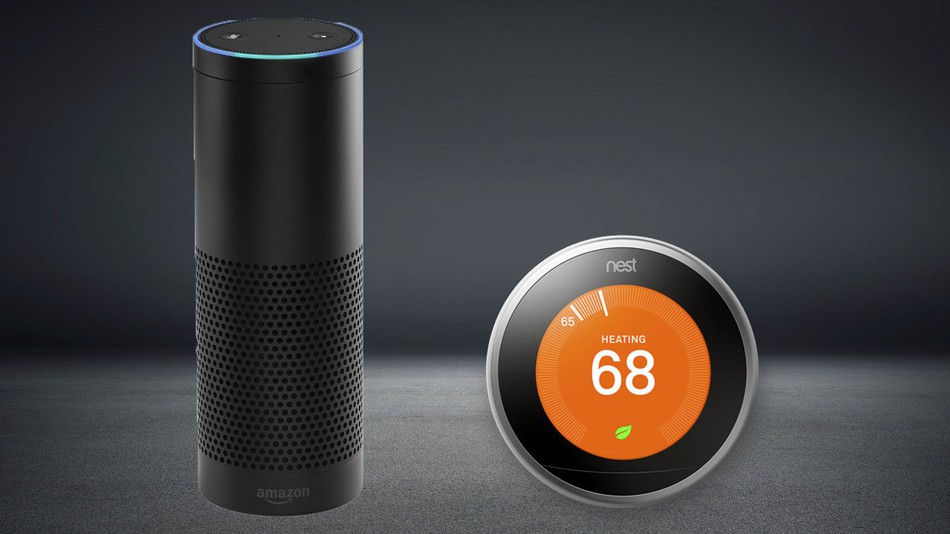
There are the more common options, such as thermostats, lights, and speakers. All of those could make life easier by preventing you from moving around the house so much. Plus, smart thermostats save $180 per year on average for the households that use them, so if it’s cost-effectiveness you’re after, look for similar research that indicates why a particular product could keep your expenses down.

And then there’s the “wow” factor to consider. For example, Jim Beam came up with a smart decanter that can pour your whiskey. Compared to the other products mentioned above, this is not a purchase that will save you money or time  — but it will definitely impress your friends.

Source: Jim Beam

Focus your smart-buying efforts by determining your smart product goals. Are you trying to cut down on boring tasks, turn your home into a more comfortable place or simply make people say “Wow!” when they walk into the room and see what you own? When answering these questions, get input from other household members, too. You might find they have unmet needs you hadn’t considered yet.

When you answer those questions, it’ll be easier to understand which features should be among your most-wanted capabilities. If you hate dealing with tech learning curves, you probably want a smart home product that’s extremely user-friendly. On the other hand, you might not mind a more in-depth and complex product if it can do all or most of the things you need at once.

Bear in mind that some features available on smart home products might seem a little gimmicky. You might also pass a judgment that they’re more trouble than their worth after hearing how numerous people mentioned the features didn’t work properly when they wrote their reviews. However, if a big reason why you want a smart product is for the bragging rights, it probably won’t matter to you that a company hasn’t perfected a feature, as long as it exists.

4. Check out the offerings from retail stores

Buying your smart product online may seem like the most convenient option — unless you have trouble setting it up or making it work. A study from Parks Associates found there will be 10 million smart products sold by 2021, and most of them from retail stores rather than websites. Even Amazon ships some of its smart products to physical stores.

It knows some people prefer to see and touch the items in person before buying them. Plus, if difficulties arise along the way, individuals can get professional insight from the store instead of solely seeking help on the phone and through the mail.

After making a shortlist of smart home items you’re excited to possibly own, see if retailers in your area have them in stock. If you find at least a few that do, go to those outlets and see if the demonstration models of the products match or exceed your expectations. During those evaluation outings, you’ll probably notice some unexpected characteristics that result in positive or negative impressions.

5. Be realistic

A smart product might be the coolest thing you buy for a while, but it might not drastically change your life. The specifics vary depending on the type of innovation you get but expect it to enhance the way you live, not completely alter it. Most smart products simplify life by doing some of your typical tasks for you. They might also learn how you behave, then adapt accordingly.

If you’re having trouble envisioning how a smart product will improve your life, spend several hours with a trustworthy friend who owns at least one of them. Watch how that person interacts with the gadget or multiple devices, then imagine whether you’d find those same commands useful.

By keeping these tips in mind, you can discover smart products that fit your lifestyle and needs and don’t make you feel like you’ve wasted money.
Taking your time with the research process is important because it’ll help you avoid impulse buys. Also, realize that the smart home market is a rapidly evolving industry. If you don’t see an item that matches your requirements, developers might be in the middle of engineering something that does.