7 apps to optimize and speed up your Android

Is your Android slower than it used to be? Is your battery life too short? Here are the seven best apps to help your Android run as smoothly and efficiently as possible.

Each one is a way you can proactively help to maintain and improve the speed of your mobile, better managing memory usage and cleaning unnecessary files from your storage. Let’s check them out!

Softonic Turbo Booster, for freeing up RAM

One reason Android devices get slower is that system memory gets clogged up with processes from many of the apps we install. On way of speeding things up is to use an app like our own Softonic Turbo Booster.
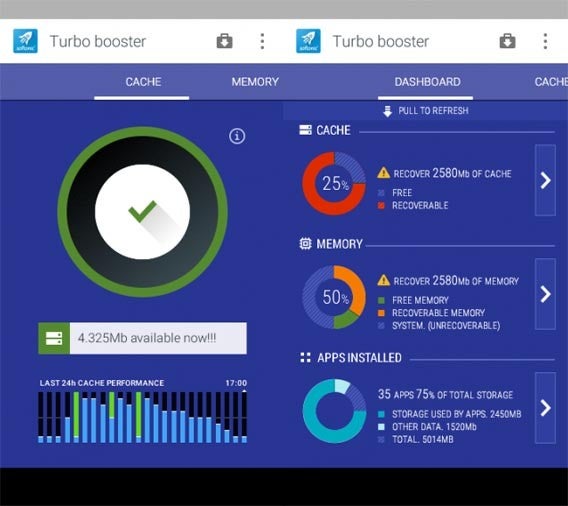
Softonic Turbo Booster’s main function is freeing up system memory, killing apps that are running unnecessarily in the background. It stops completely apps that sometimes use system resources even if you’re not using them.

Another factor that can slow down your device is how many apps you have installed. Lots of us have apps installed even though we never use them any more. Some of these will use your system resources despite never being opened. Here Softonic Turbo Booster can also help, identifying the apps you never or rarely use, and letting you uninstall them quickly and easily.

Download Softonic Turbo Booster.

Clean Master, for cleaning rubbish from your phone

Some apps fill your device’s memory with useless files, and worse still, then don¡t necessarily remove them even if you delete the app. Clean Master is the best file cleaner around, and you might be surprised how much space you can free up by using it.
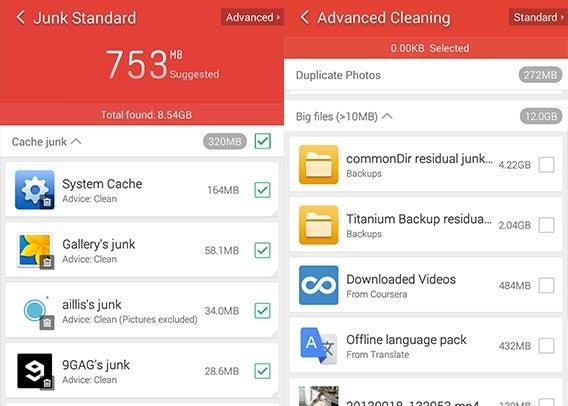
Clean Master is especially good at finding and deleting temporary and unnecessary files, but it also has an advanced search, where you can choose precisely which files you want to delete. For example, you may have videos that are taking up a lot of space, and you can use Clean Master to find them.

Download Clean Master.

ES File Explorer, for organizing your device

Many manufacturers of Android devices actually include a file explorer, but they are usually very simple and have few tools.
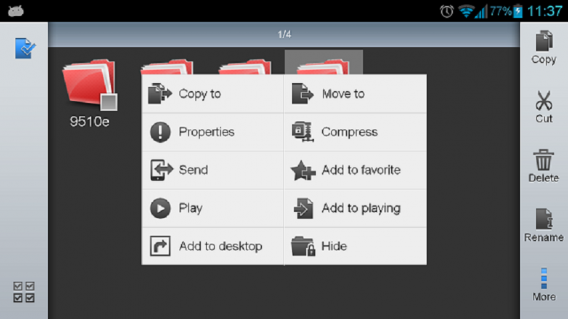
ES File Explorer

ES File Explorer, however, even compares well to Windows Explorer. It shows you pretty much everything – shared folders, cloud folders, protected folders. With this app you can easily rename, copy, paste, delete, compress, and share your files and folders. ES File Explorer really gives your the same control you’re used to with Windows.

Download ES File Explorer.

Gallery Doctor, deletes your poor and repeated photos

Over time, your photo library in your phone just grows and grows without stopping. Even finding a particular photo can be a drag, but forget having to revise your library photo by photo – Gallery Doctor does it for you.
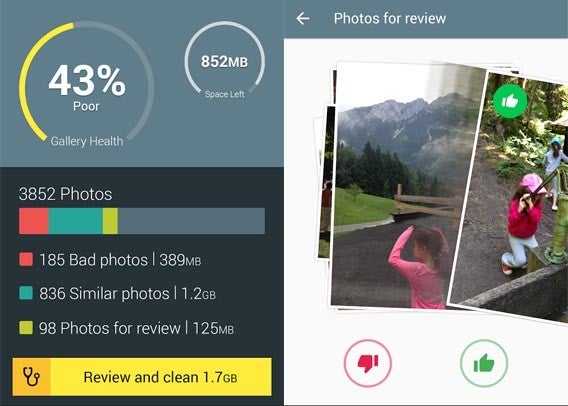
Gallery Doctor analyzes you all the photos in your phone, and classifies them as bad, duplicate or for revision. It doesn’t delete anything without your consent – just chooses the photos it thinks could be deleted, and presents them to you. The process is pretty fun, giving you a collection of photos to flick through, choosing those you want to delete or keep, as if you were flicking through profiles on dating app Tinder.

Download Gallery Doctor.

Battery Doctor, for helping extend your battery life

Like the previous doctor cared for your photos, Battery Doctor looks after your battery. The idea is to achieve a the longest usage possible from your battery. It does this smartly with methods such as reducing your screen brightness and deactivating GPS when possible.
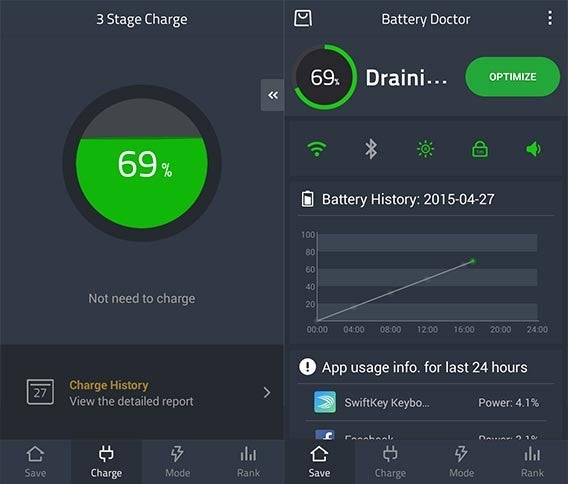
There’s even a mode that kills all your phone’s functions except sending and receiving calls and SMS. This is ideal if you really need your battery to last as long as possible. From the makers of Clean Master, Battery Doctor is excellently designed and extremely easy to use.

Download Battery Doctor.

Avast Mobile Security, keeps you safe from viruses and threats

There’s not much point in a clean and optimized phone if you’re vulnerable to threats like viruses and malicious apps. On your Android, your worst enemy isn’t usually viruses, but apps which are not what they claim to be. Avast Mobile Security does an exhaustive analysis of all your installed apps, and finds anything that looks suspicious.
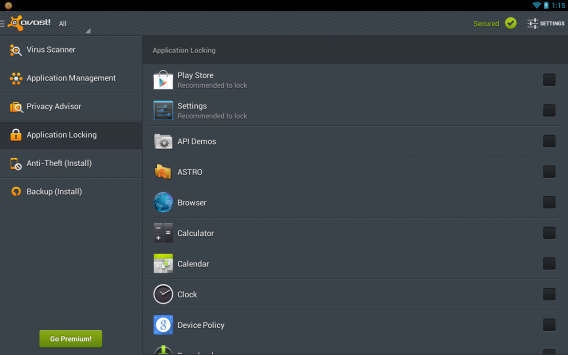
Avast Mobile Security also tells you if you have any ‘unsafe’ settings, such as allowing apps to be installed outside of the official Google Play store. The free version protects you on the web and from malicious SMS, but you need to buy a Premium subscription to get the full feature set.

Download Avast Mobile Security.

Nova Launcher, the fast way to open apps

Your launcher is one of the most important apps on your Android. It’s your home screen, where you start every time you open your device. Most manufacturers like to add their own launcher to your device, but some of these are slow or use too much memory. One way to immediately speed up your phone is to swap your default launcher for a third party replacement.
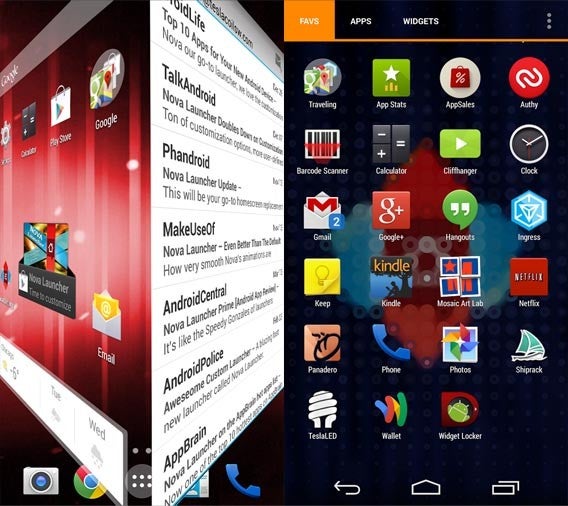
Nova Launcher is one of the best around. It’s fast, with a great range of personalization options and an free version with no limitations. After using it, your original launcher could feel positively prehistoric.

Download Nova Launcher.

Use just what you need

Check out the apps above, and see what suits you and your Android device. Install them all or just a couple. Test, compare and tell us below what works for you, or if you found other ways to make your Android faster.

Related Articles

Best Android browser comparison 2015
App of the Week: Google Handwriting Input

Best free office suite

Ask OnSoftware!

Do you need help getting the most out of your favourite program? Has your system locked you out and gone all HAL 9000? Want to find a simple way to fix that annoying little software issue? Well, you’ve come to the right place.

Whatever question you have, we want to hear it. Whether it’s about Windows, Linux, Mac, phones, games, whatever. All you have to do is send an email to this address:

ask@onsoftware.com

Make sure you explain your problem or query as clearly as possible. Obviously we won’t help you out with any illegal stuff or do your homework for you… but apart from that, the sky’s the limit. (Though questions that aren’t related to software at all may also get short thrift: this is a software blog, after all).

Each week, we’ll read through your mails (and the ones sent to OnSoftware Spain), we’ll select the most interesting questions,  and answer them here on the blog. We think it’s a pretty good way of sharing knowledge with our readers, as well as a good way to find actual solutions to real problems.

So what are you waiting for? Ask OnSoftware now!

Softonic launches new user profiles and features

If you thought it had been a little quiet around here of late, that’s for a very good reason. We’ve all been hard at work implementing and testing a new codebase for Softonic English which makes the site smarter and easier to use, as well as adding some great new features for users.

Softonic program pageThe homepage, while appearing quite similar to its previous version actually includes numerous changes and enhancements, including a new high-visibility zone for blog posts like this one; much better category listings; dynamic charts which show whether programs have moved up or down since last week and a smoother, cleaner design.

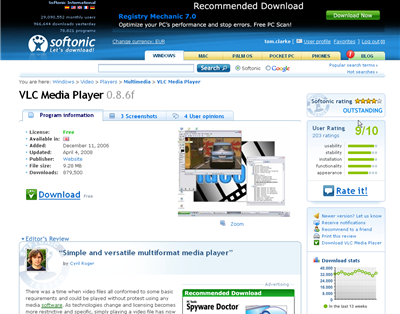
Our program page has also undergone some important changes. Apart from some cosmetic adjustments and enhancements, we’ve also made it much easier to interact with programs, meaning that the tools that let you rate, review, bookmark and track your favourite software are always easily accessible.

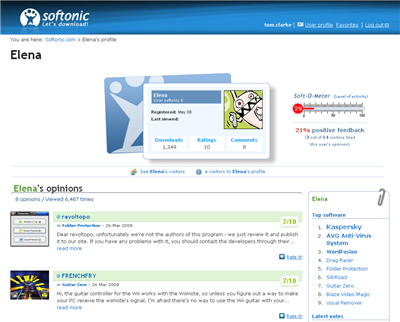
But the biggest new feature for the site is our new user profile page. Visitors to the Spanish Softonic will already be familiar with the features available in the new profile page. Now you can pick an avatar, visit other profiles, see your visitors and more. We’ve also got the Soft-O-Meter, a popular feature on the Spanish site which shows your level activity on Softonic.

Softonic user profile pageFinally, we’ve launched Softonic Deluxe – a premium edition of Softonic designed for true fans of software. Deluxe members get access to a special edition of Softonic, free of advertising and with 100% guaranteed high-speed and secure downloads. For more info about Softonic Deluxe or to get a free trial, click here.

We’re always working on more features and already have loads of exciting new stuff in development… but we’ll let you know about that later. For the moment, take a look at the new, improved Softonic. And as always, please let us know if you’ve got an opinion on the site or an idea for making it even better!

Legal terms for Penguin Palooza Giveaway

1.    Object

With the purpose of promoting the iOS game Penguin Palooza, and the Twitter account @softonic_en, Softonic International, S.L (hereinafter, “Softonic”), a Spanish Company, with corporate address in Barcelona, c/ Rosselló i Pòrcel, 12 and Spanish Tax Identification Number B-63920920 plans to develop an international campaign to be carried out between 26 January  2012– and 30 January 2012 and which will allow the users to win one of two promo codes for the iPhone version of Penguin Palooza or one of two promo codes for the iPad version of Penguin Palooza according with what is set forth herein.

2.    Scope of the promotion

The scope of the promotion includes the following sites and countries:

–    en.softonic.com (Worldwide)
–          twitter.com/softonic_en (Worldwide)

3.    Length of the promotion

The promotion shall start on 26/01/2012 and shall end on 30/01/ 2012.

After this period, a panel of judges from the Softonic English editorial team shall choose four entrants, based on the originality, creativity and humor of their response to their question, who shall become the winners.

The prizes shall be given to the winners on 31/01/12

4.     Spreading of the promotion

The campaign shall be spread on Twitter via a series of tweets. These tweets will outline the rules of the competition and will encourage followers of @softonic_en to participate in the giveaway

Such spreading shall take place between 26/01/12 and 30/01/12. Moreover, it shall detail the following information:

–    Information regarding the prize.
–    How to participate in the promotion.
–    Start and termination date.
–    Free promotion

5.    Procedure

In order to participate, each contestant shall follow the @softonic_en account and post a tweet with a joke about penguins, including the hashtag #penguinprize. The contestant shall also specify which operating system they would like to receive the code for, should they be selected as a winner. Winners will be notified via direct message on Twitter.

6.    Prize

One promo code per winner, from a total of two promo codes for the iPhone version of Penguin Palooza, and two promo codes for the iPad version of Penguin Palooza.

To the effects foreseen in the Law of Personal Data Protection, every contestant accepts that, in the event he becomes winner, the organizer shall be entitled to use his/hers Twitter account name to inform about the result of the promotion.
The prizes and its winners shall be published as a tweet via Softonic’s @softonic_en account

7.    Miscellaneous

In the event the winner did not accept the prize, he will be required to refuse it in writing, and the prize will be given to the substitute. If the written refusal is not received by the organizer, the prize could be considered as void.

The participation in this promotion supposes:

o    The acceptance of these legal conditions.
o    The refusal of the participant’s jurisdiction, accepting the courts of Barcelona as the only competent to solve any claim.

The organizer declines any liability regarding any damages or perjudices arosen after the promotion regarding the prize.

The organizer is exempted from any obligation or compensation with the contestants in the event the promotion was waived by a legal cause or force majeure.

In Barcelona [26/01/2012]

Announcing the Softonic Toolbar!

Softonic logoSoftonic is pleased to announce the launch of a new browser toolbar designed to help you get the most out of our site. The toolbar includes links to our pick of the day, software search and access to our RSS feeds, meaning you’ll never miss another update or addition on the site.

In addition to the Softonic features, our toolbar also includes an email checker, embedded weather forecast, Babylon translation tool, radio tuner and a powerful Google search engine. Whether you want to stay up-to-date with the latest software on Softonic or you just want to be add loads of extra functions to your browser, the Softonic Toolbar is definitely worth a look. It’s available for Firefox and Internet Explorer and you can download it for free from Softonic right now!

Softonic throws a huge 10th birthday party

Softonic birthday partyAlthough the English version of Softonic only launched in November 2005, the original Spanish language site celebrates its 10th anniversary this week. In honour of the big day, the website is throwing a birthday party here in Barcelona. All our users are welcome to attend, and you can get your free invitation by visiting the Spanish site here.

Starting at 11pm this Friday (7th of September), Softonic will welcome users, fans and download-addicts to the Parc dels auditoris del Forum in Barcelona. The night will be packed with live music, DJs, and apparently lots of surprises. Naturally, most of our English-language users don’t live in Barcelona but if you happen to be in town, why not come down to the party and seek out the English content team who’ll probably be talking about football somewhere. Oh and by the way: the first 1000 revellers through the doors will receive a free drink!

Where? Forum, Barcelona (map)
When?
11pm, Friday 7th of September
How much? Free! Click here for your invitations

Five of the best new games on Softonic

Our winner: Fantasy TennisWe do our best at insideTonic to cover as many niches as possible. Hairdressing software? You got it! Interior design applications? No problem. But sometimes it’s best to remember what everyone really loves about software: games. Here’s a pick of the best games recently added to our listings. So take a few minutes out, put your feet up and get ready for some great gaming fun!

  • In fifth place: Ship Simulator 2008. This realistic game puts you in control of some extremely detailed and tricky to control vessels. There’s no hiding the fact that this is a pretty difficult-to-master simulation but once you get the hang of things, it’s very enjoyable.
  • Next up: Beauty Factory. Step into the world of the cosmetics industry in this unusual but fun ‘Tycoon’ style game. With great graphics and immersive gameplay, Beauty factory puts you in charge of a cosmetics firm and gives you control over every aspect of the business. Fun, addictive and educational.
  • In third position: Fate By Numbers. Developed by four students as their graduation project, this striking game is set in a futuristic metropolis and features lots of 50’s-style ‘film noir’ imagery. The slightly slow gameplay is counterbalanced by impressive graphics and original design. A dark, mysterious adventure.
  • At number two: Real Race. While not looking particularly real, Real Race is by far and away the best free racing game available. It includes loads of cars and tracks to try out but unfortunately is lacking a multiplayer mode. The different weather and climate modes, as well as some interesting bonuses add a lot of variety to this undeniably fun, if not realistic, simulator.
  • In first place: Fantasy Tennis. This original take on the tennis game genre features stunning cartoon-style graphics and superb playability. Bringing an enjoyable arcade feel to things, Fantasy Tennis includes power-ups, altered tennis rules and stunning animation. Huge fun and great looking.