
We will help you discover great apps to listen to music for free. Enjoy your own tracks, listen to online radio, and stream your favourite artists.
There are lots of great apps to help you enjoy music for free. From players that let you enjoy your own catalog of digital music to streaming services that allow you to enjoy and discover entire music catalogs, there has never been a better time to be a music fan. There are lots of different free audio players available, the trick is to find the best one to suit your needs. Below is a list of some of the best, with the strengths and weaknesses of each to help you decide the best for you.
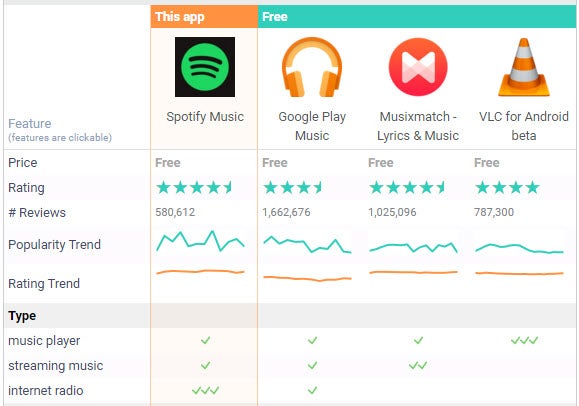
Compare the music players
 Android versions comparison
1. VLC Media Player
Play your audio and video with this versatile multimedia player
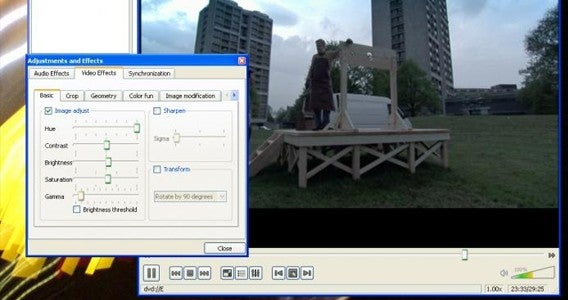
VLC is an incredibly versatile free media player that allows you to watch movies and listen to music. The best thing about VLC is the fact it can play almost any kind of video or audio format, including many that other players and devices can’t. The list of supported file formats include OGG, FLAC, MKV, MP3, MP4, WMV, and MOV – which should cover you for most situations. If you decide to use it for movies as well as for music, then it also supports subtitles so you can apply SRT format files to your videos.
Pros
- Supports a vast range of formats
- Simple user interface
- Google Drive and Dropbox streaming
Cons
- Playback isn’t always seamless
2. iTunes
Apple’s music and video player that is a must for iPhone and iPad owners
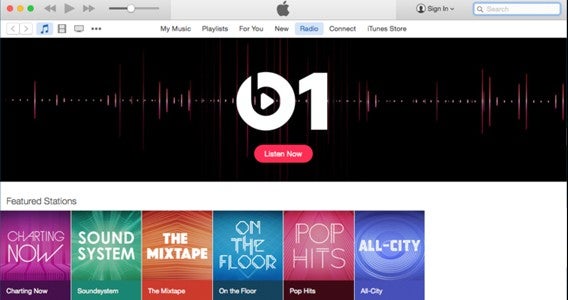
Apple’s leads the charge in the music industry’s shift to online distribution, and iTunes is the audio and video player that made it all possible. As well as offering a front for the iTunes store and Apple Music, this app also allows you to add your own music to its library from files on your computer and CDs, that you own, to listen to when ever you like. Perhaps most importantly, once items are in your library you can move them to any of your iOS devices because the app also allows you to manage your iPhone, iPads, and iPods from its interface. It’s an all-in-one home for your music and video.
Pros
- Simplified interface
- Apple Music streaming service
- Improved playlist creation
- Curated and automatic radio stations
Cons
- Limited file formats supported
- Almost overwhelming number of features!
3. Spotify
A massive selection of music to stream for free right now
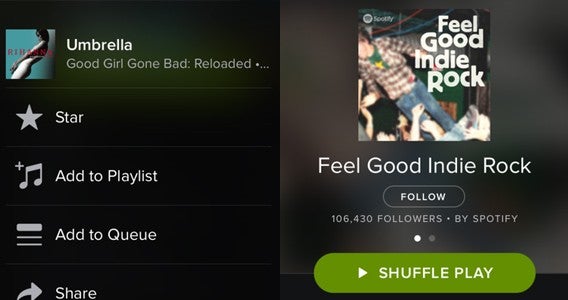
Spotify is a music streaming app that lets you listen to millions of songs from your smartphone and computer for free. The services’ popularity quickly grew when its came to Windows and Mac PC, but it was only after its mobile app became a free service (it was originally a premium service for subscribers) that it really became a household name. This free version of the app can now be enjoyed anywhere over Wi-Fi or a mobile data connection. However if you do not want to stream over 3G or 4G, and would rather download the files to host them locally on your device, you will have to pay the subscription fee.
Pros
- Large music library
- Excellent music discovery options
- Slick interface and social features
Cons
- Kills your battery
- Not good with a weak data connection
- Ads in the free version
4. Google Play Music
Free online and offline music player with lots of free cloud storage
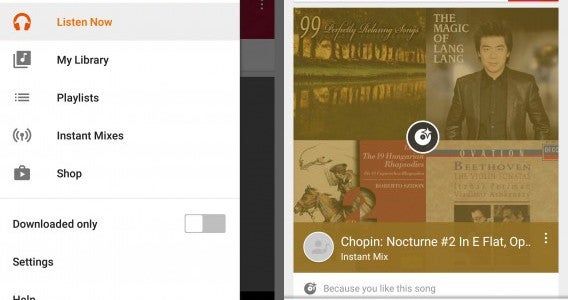
Yes, music streaming apps can quickly exhaust your mobile data. For this reason, the Google Play Music app lets you listen to music offline for free. The service lets you upload all of the music you have on your tablet, mobile phone, or PC to the cloud so you can share them between devices to play offline through the app. This allows you to listen to them anywhere, anytime, offline for free. You can upload up to 50,000 songs to your account, which could easily be your entire music library, if it isn’t though – you can always pay to unlock extra storage. Convenient and easy to use.
Pros
- Easy to use
- Cloud storage
- Works on and offline
Cons
- Will import tracks already on your device
- You can’t buy songs
5. musiXmatch
A nice streamlined player that can find you the lyrics to any song

If you love karaoke, memorizing lyrics, or singing along to your favourite songs, then musiXmatch is almost unbeatable. This music app integrates with other music players. Once installed it provides a floating windows over the player, containing the words of any song to which you are listening. It works brilliantly with Spotify, Apple, and Google music services. Along with offering lyrics in an overlay, musiXmatch is also an awesome audio player. Its interface shows the standard artist, album, playlist, track, and folder views – so you can browse your music library ease – while its clear buttons during playback should be simple enough for anyone to use.
Pros
- Huge database of lyrics
- Simple to use
- Connects to Spotify, Google Play Music, and Apple Music
Cons
- Vocal removal option is weak
- Intrusive advertising
Download for
More alternatives

Amazon Music | AND – iOS – WIN – MAC
jetAudio Music Player Basic | AND – WIN
MediaMonkey | WIN
doubleTwist – AND
Shuttle Music Player | AND
Poweramp | AND
Rocket Player – AND
More music players for Windows here
More audio players for Mac here
More MP3 and audio apps for Android here
More MP3 and audio apps for iPhone/iPad here


 Asphalt 5 is the first game in the Asphalt series that’s still playable, available on iOS and Windows Phone. The game was released in 2009, followed a year later by an HD version with upgraded graphics for Android and iPad. It wasn’t until 2012 that the HD version was made available on Windows Phone as well.

 Asphalt 6 goes back to its roots by giving each new release an additional name. It makes sense since the series has so many versions. The titular feature, Adrenaline, can be achieved by hitting the nitro while the meter’s at full. Once you go into ‘Adrenaline mode’, the road becomes a blur with purple undertones, and your car becomes indestructible – when you hit your opponents, they virtually fly off the track.

 Asphalt 7: Heat appeared six months after Asphalt 6. Maybe that’s the reason why this version is so similar to its younger cousin, both in terms of the artwork and the available tracks. But the absolute novelty was its pricing at 0.99, though it had one downside – Gameloft, who published and developed it, decided to make up for its low cost by adding a bunch of ever-present micropayments to the game. You don’t have to buy anything to get to the next level, but Asphalt 7:Heat will keep telling you to spend virtual money every second kilometer. The cash runs out pretty fast, but of course, you can always top it up with real money.

 What else can be said about this historic racing game series after such a big dose of adrenaline and heat-infused racing? It’s time to go up in the air with… yes, cars! Asphalt 8: Airborne offers some brand new and exciting racing tracks, full of ramps and springboards which will literally launch your sports car into the sky. It’s nothing like the cool, calculated racing you’ve experienced so far, but if you let yourself get carried away by the gorgeous graphics and licensed, quality music, it’s going to be right up your alley.
