Skip to content

Softonic English

Just another Softonic Sites site

Unlock Adobe Express: These Hidden Features will Elevate Your Designs

At Softonic, we have talked extensively about the benefits of Adobe Express, Adobe’s online design platform. Its intuitive interface and large collection of templates, among many other things, have made it the ideal tool for any content creator worth their salt. However, Adobe Express hides an entire arsenal of lesser-known features that can help you carry out your projects much more effectively. Real-time translations, batch design creation… From here, we invite you to discover some of these features so you can apply them […]

At Softonic, we have talked extensively about the benefits of Adobe Express, Adobe’s online design platform. Its intuitive interface and large collection of templates, among many other things, have made it the ideal tool for any content creator worth their salt. However, Adobe Express hides an entire arsenal of lesser-known features that can help you carry out your projects in a much more effective way.

Real-time translations, batch design creation… From here, we invite you to discover some of these features so you can apply them in your work.

Adobe Express
Adobe Express DOWNLOAD

Replace words with Find & Replace

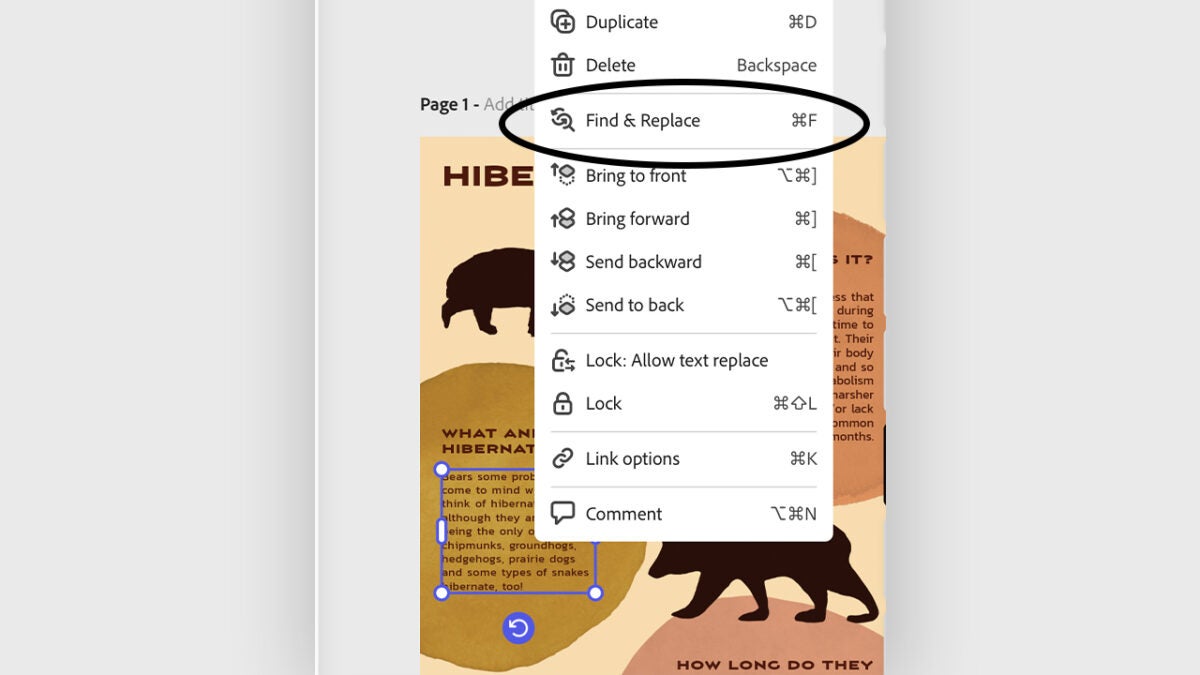
Preparing a lengthy document or presentation also involves reviewing and updating many texts, a task that, depending on the occasion, can be quite tedious. Fortunately, the latest feature of Adobe Express, Find & Replace, will help us replace the words we want in the blink of an eye. Here’s how to use it:

  • Open your project in Adobe Express.
  • Within a text, right-click on it and select the Find & Replace option.
  • You can also select the text and use the keyboard shortcut Ctrl + F (on Windows) or Command + F (on macOS).
  • In the Find box, type the word or phrase to change. In Replace, you will need to enter the other word or phrase that will replace the previous one. To finish, click on Replace or Replace All.
Don’t waste time: create batch designs

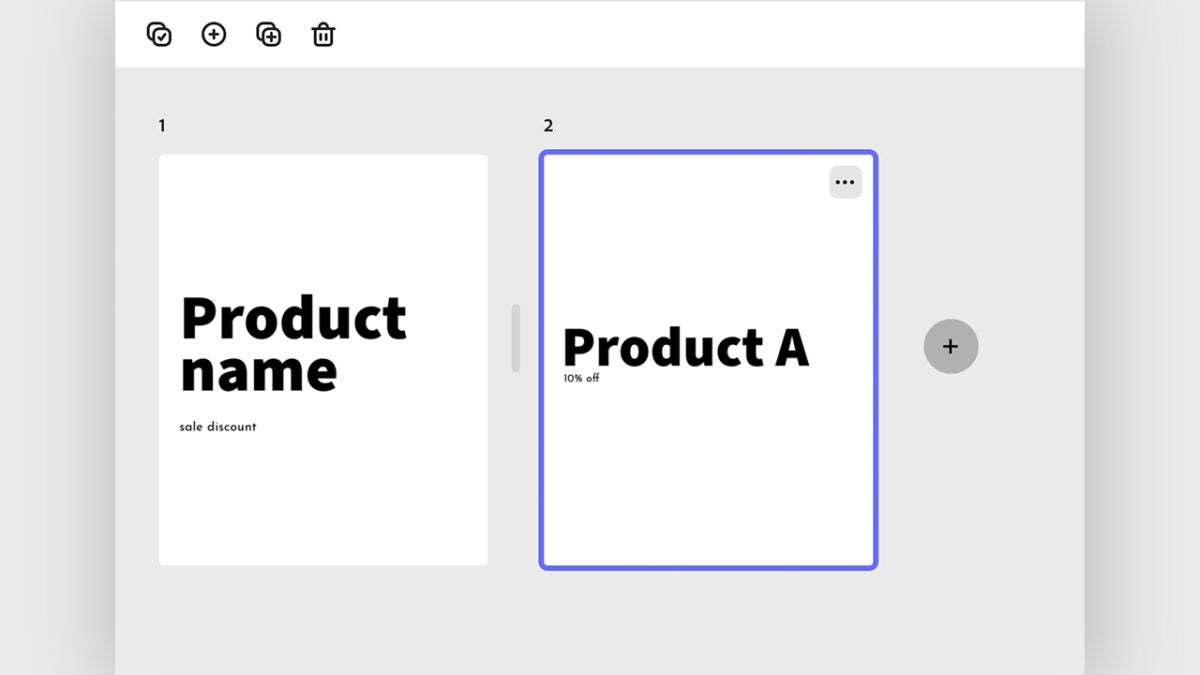
The creation of mass designs will be handy for having variations of the same design in a short time. However, before using this function, you will need to prepare two things:

  • Make sure that the file you want to start from to create different designs is in the correct format. In this case, you can use a PSD, PNG, and many others.
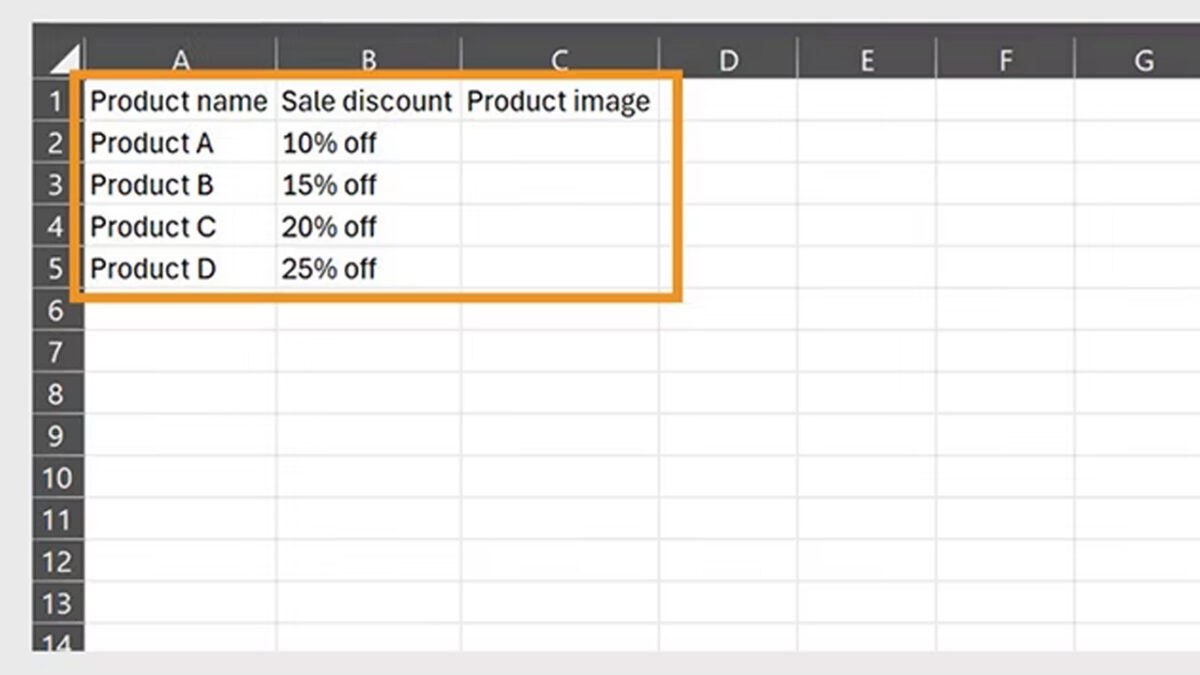
  • Set up a CSV file with the values that will change in each design. To do this, create a data sheet (it can be done in Excel, Google Spreadsheets, and other similar programs) and add different headers for each variation. Adobe Express will use this data to customize your designs.
Once ready, open your project to start:

  • Select the Bulk Create option. You will find it at the top right.
  • A new panel will open where you will need to drag the CSV file that we configured earlier.
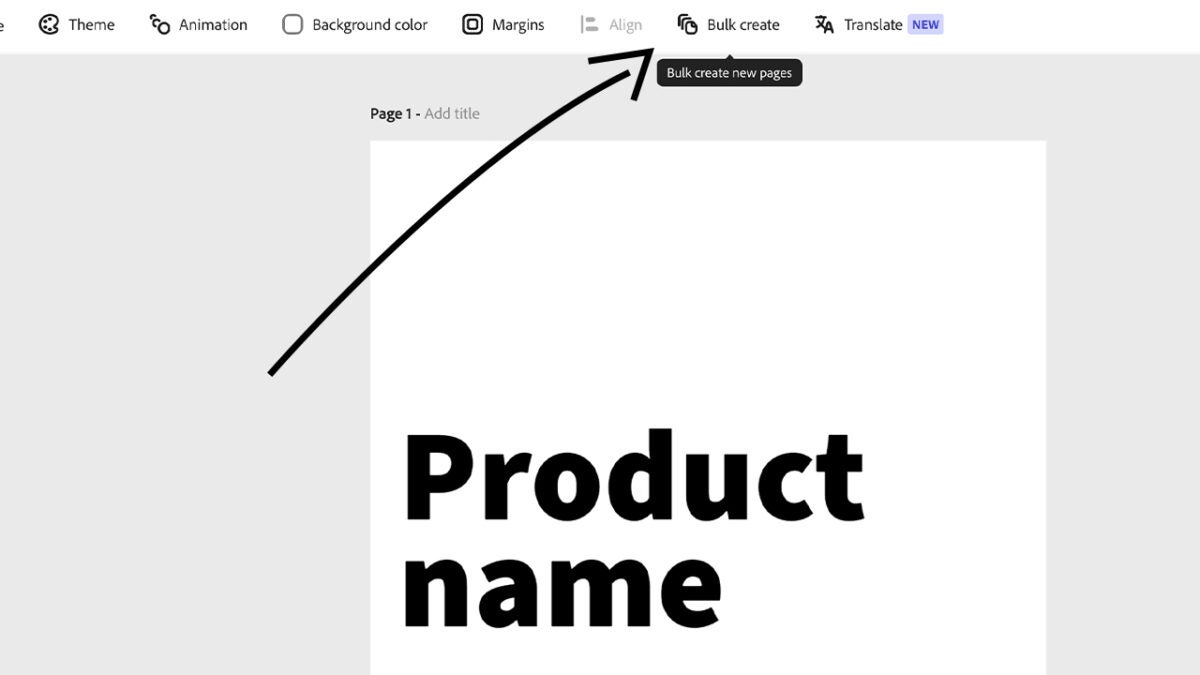
  • Adobe Express will detect the column titles of the CSV file. Choose the sections you want to change and then click on Connect Element. When you have finished linking data, select Next.
  • The platform will automatically generate a design for each row you have placed in your CSV file.
  • Within Manage & Preview, choose the image that should go in each variation and finally, select Upload from device to upload your own images.
Translate the texts of your designs

Don’t waste time switching between programs to translate texts into other languages: Adobe Express allows you to do it quickly and without complications:

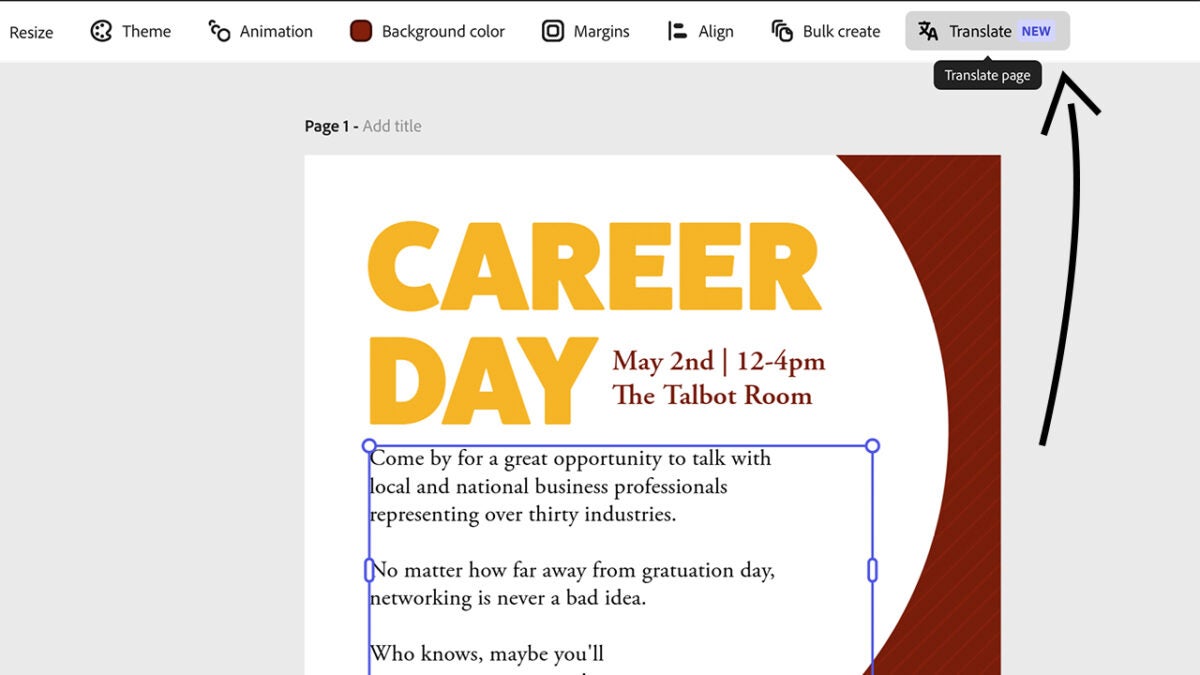
  • Open the file within Adobe Express and click on Translate. You will find it just above on the right.
  • Within the Translate panel, select the language you want to translate to from Translate to. You can even change the tone of the text if you want to make it more casual or formal.
Animate Your Projects Easily

If you want to bring your designs to life, animating them can be a good option. With Adobe Express, you can add simple animations to highlight your designs and capture the attention of those who see them:

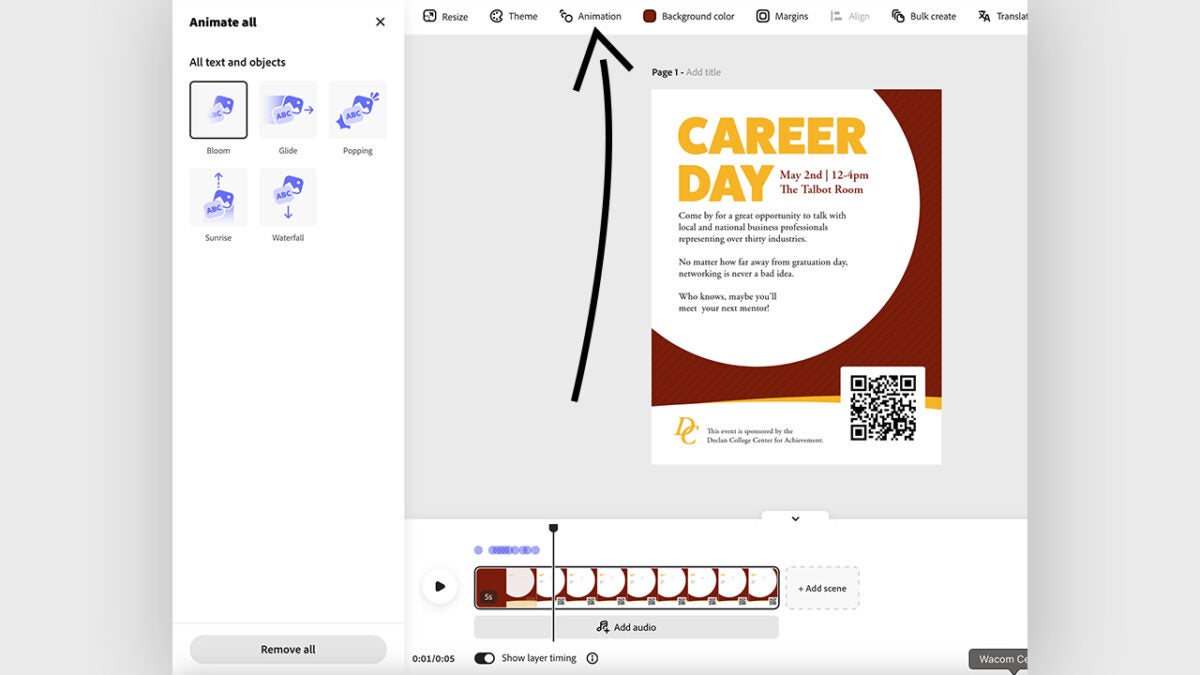
  • With your design open in Adobe Express, click on Animation. You will find it in the options bar above.
  • This will open the Animate all panel. Choose from some of the available animations and see how it looks in your design.
  • From Edit Timeline you can further adjust the result and even add background music.
Use your brand colors in multiple designs at once

Adobe Express gives us the ability to apply our visual identity (colors and fonts) to any design quickly and easily. This is ideal for anyone looking to maintain a consistent image across their designs. Here’s how you can do it step by step:

  • Open your project in Adobe Express.
  • If you haven’t set up your brand, you’ll need to start by clicking on Brands and then Create Brand. Name it and add the logos, colors, and fonts your brand uses.
  • With your design open, go to the menu on the left and click on Brands. Select the brand you want to use.
  • From here, you can apply your brand to all the pages of the project, change colors, fonts, and even the color of the graphics.
  • Finally, select Apply brand to keep the changes.
Adobe Express
Adobe Express DOWNLOAD

Author: María López

{ "de-DE": "Künstler aus Berufung und Technikliebhaber. Seit ich denken kann, habe ich gerne an allen möglichen Gadgets herumgebastelt.", "en-US": "Artist by vocation and technology lover. I have liked to tinker with all kinds of gadgets for as long as I can remember.", "es-ES": "Artista de vocación y amante de la tecnología. Me ha gustado cacharrear con todo tipo de gadgets desde que tengo uso de razón.", "fr-FR": "Artiste de vocation et amateur de technologie. J'aime bricoler avec toutes sortes de gadgets depuis que j'ai l'usage de la raison.", "it-IT": "", "ja-JP": "", "nl-NL": "", "pl-PL": "", "pt-BR": "", "social": { "email": "", "facebook": "", "twitter": "", "linkedin": "" } } View all posts by María López

Author María LópezPosted on December 17, 2024July 1, 2025Categories News

Post navigation

Previous Previous post: Capcom is going to revive even more franchises after Okami and Onimusha
Next Next post: The Power of BlueStacks and BlueStacks Store, Now on Mac with BlueStacks Air (Beta)

Recent Posts

  • Are you running out of space? You probably have hundreds of duplicate files without realizing it
  • Xbox Insiders introduce mythic achievements: here’s how they work
  • Brendan Fraser’s The Mummy hits Peacock October 1: sequel now set for 2027
  • MobLand is now No. 1 on Paramount+: 8.8 million viewers in week one
  • Coal still powers global grids: clean energy hasn’t displaced it yet

Archives

  • September 2026
  • August 2026
  • July 2026
  • June 2026
  • May 2026
  • April 2026
  • March 2026
  • February 2026
  • January 2026
  • December 2025
  • November 2025
  • October 2025
  • September 2025
  • August 2025
  • July 2025
  • June 2025
  • May 2025
  • April 2025
  • March 2025
  • February 2025
  • January 2025
  • December 2024
  • November 2024
  • October 2024
  • September 2024
  • August 2024
  • July 2024
  • June 2024
  • May 2024
  • April 2024
  • March 2024
  • February 2024
  • January 2024
  • December 2023
  • November 2023
  • October 2023
  • September 2023
  • August 2023
  • July 2023
  • June 2023
  • May 2023
  • April 2023
  • March 2023
  • February 2023
  • January 2023
  • December 2022
  • November 2022
  • October 2022
  • September 2022
  • August 2022
  • July 2022
  • June 2022
  • May 2022
  • April 2022
  • March 2022
  • February 2022
  • January 2022
  • December 2021
  • November 2021
  • October 2021
  • September 2021
  • August 2021
  • July 2021
  • June 2021
  • May 2021
  • April 2021
  • March 2021
  • February 2021
  • January 2021
  • December 2020
  • November 2020
  • October 2020
  • September 2020
  • August 2020
  • July 2020
  • June 2020
  • May 2020
  • April 2020
  • March 2020
  • February 2020
  • January 2020
  • December 2019
  • November 2019
  • October 2019
  • September 2019
  • August 2019
  • July 2019
  • June 2019
  • May 2019
  • April 2019
  • March 2019
  • February 2019
  • January 2019
  • December 2018
  • November 2018
  • October 2018
  • September 2018
  • August 2018
  • July 2018
  • June 2018
  • May 2018
  • April 2018
  • March 2018
  • February 2018
  • January 2018
  • December 2017
  • November 2017
  • October 2017
  • September 2017
  • August 2017
  • July 2017
  • June 2017
  • May 2017
  • April 2017
  • March 2017
  • February 2017
  • January 2017
  • December 2016
  • November 2016
  • October 2016
  • September 2016
  • August 2016
  • July 2016
  • June 2016
  • May 2016
  • April 2016
  • March 2016
  • February 2016
  • January 2016
  • December 2015
  • November 2015
  • October 2015
  • September 2015
  • August 2015
  • July 2015
  • June 2015
  • May 2015
  • April 2015
  • March 2015
  • February 2015
  • January 2015
  • December 2014
  • November 2014
  • October 2014
  • September 2014
  • August 2014
  • July 2014
  • June 2014
  • May 2014
  • April 2014
  • March 2014
  • February 2014
  • January 2014
  • December 2013
  • November 2013
  • October 2013
  • September 2013
  • August 2013
  • July 2013
  • June 2013
  • May 2013
  • April 2013
  • March 2013
  • February 2013
  • January 2013
  • December 2012
  • November 2012
  • October 2012
  • September 2012
  • August 2012
  • July 2012
  • June 2012
  • May 2012
  • April 2012
  • March 2012
  • February 2012
  • January 2012
  • December 2011
  • November 2011
  • October 2011
  • September 2011
  • August 2011
  • July 2011
  • June 2011
  • May 2011
  • April 2011
  • March 2011
  • February 2011
  • January 2011
  • December 2010
  • November 2010
  • October 2010
  • September 2010
  • August 2010
  • July 2010
  • June 2010
  • May 2010
  • April 2010
  • March 2010
  • February 2010
  • January 2010
  • December 2009
  • November 2009
  • October 2009
  • September 2009
  • August 2009
  • July 2009
  • June 2009
  • May 2009
  • April 2009
  • March 2009
  • February 2009
  • January 2009
  • December 2008
  • November 2008
  • October 2008
  • September 2008
  • August 2008
  • July 2008
  • June 2008
  • May 2008
  • April 2008
  • March 2008
  • February 2008
  • January 2008
  • December 2007
  • November 2007
  • October 2007
  • September 2007
  • August 2007
  • July 2007
  • June 2007
  • May 2007
  • April 2007
  • March 2007
  • February 2007
  • January 2007
  • December 2006
  • November 2006
  • September 2006
  • August 2006
  • June 2006
  • May 2006
  • July 2001
  • January 2001
  • November 2000
  • September 2000
  • August 2000
  • July 2000
  • April 2000
  • March 2000

Categories

  • Affiliate post
  • Expert Review
  • Gaming
  • Guides
  • How to
  • Legacy how To
  • News
  • Noticias
  • Software>Security
  • Sponsored
  • Trucos y Consejos
  • Uncategorized
  • Windows software

Meta

  • Log in
  • Entries feed
  • Comments feed
  • WordPress.org
Softonic English Proudly powered by WordPress