Skip to content

Softonic English

Just another Softonic Sites site

Dynamic text: simple typography with automatic flow

When it comes to getting down to work on a design, we know that every detail is vital to convey our idea. And in the case of texts, even more so. The latest version of Adobe Photoshop includes a new exclusive feature that will help us bring more life to our creations: Dynamic Text. As you can imagine, this feature will allow us to compose texts that are even more personalized and full of charisma. Stay with us to find out how you can transform your letters into Dynamic Text. Who knows: it might become one of your favorite resources Dynamic […]

When it comes to getting down to work on a design, we know that every detail is vital to convey our idea. And in the case of texts, it is even more so. The latest version of Adobe Photoshop includes an exclusive new feature that will help us bring more life to our creations: Dynamic Text.

As you can imagine, this feature will allow us to compose texts that are even more personalized and full of charisma. Stay with us to find out how you can transform your letters into Dynamic Text. Who knows: it might become one of your favorite resources.

Adobe Photoshop
Adobe Photoshop DOWNLOAD

Dynamic Text: adapt your texts to any type of design

Making your texts easily adaptable to your designs is one of the great challenges for any designer. Adobe has introduced Dynamic Text in its latest update to make this task easier for users. No matter what your level of knowledge of Photoshop is, this feature can be used by everyone as you will see now.

To get started, simply open or create a canvas from scratch; both options are valid. Then, select the Horizontal Type Tool and create a text box.
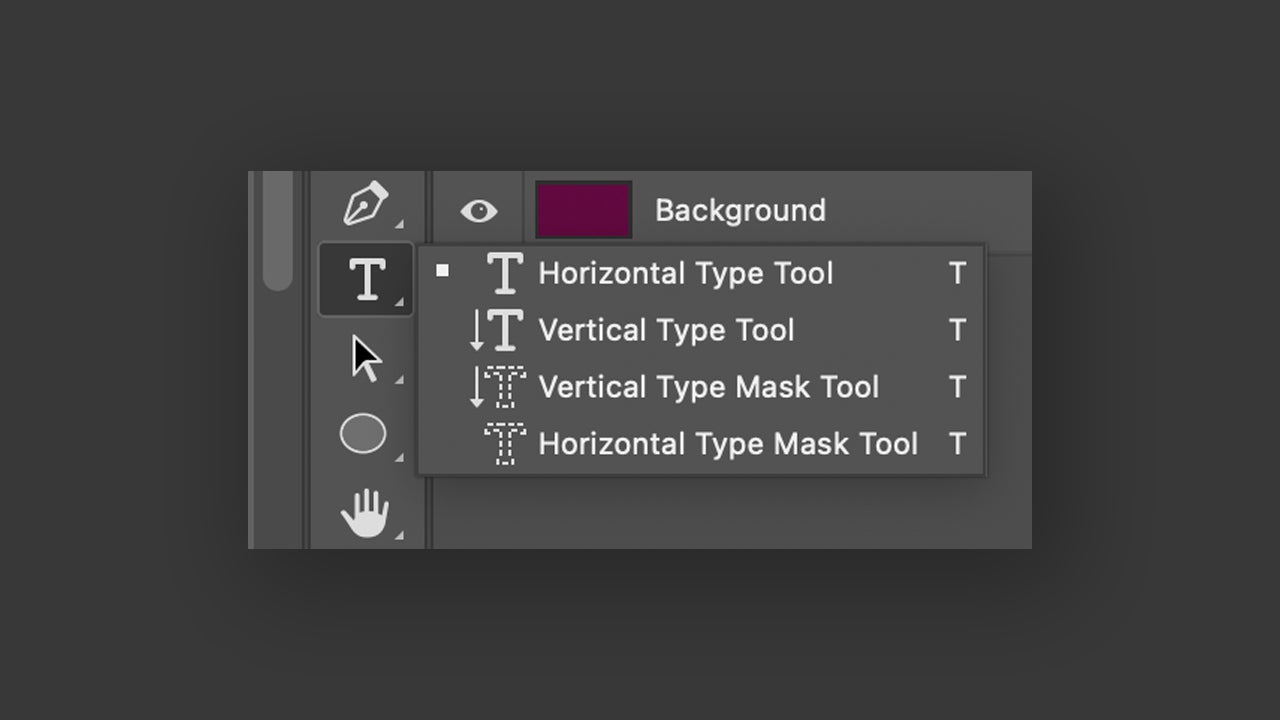
Write what you want. A title, a paragraph… you choose. Finally, go to Type > Convert to Dynamic Text. Change the scale or modify the text bounding box, and you will see how it adapts in real time to your movements. You can adjust sections like the space between words or add bullets from the Properties panel.
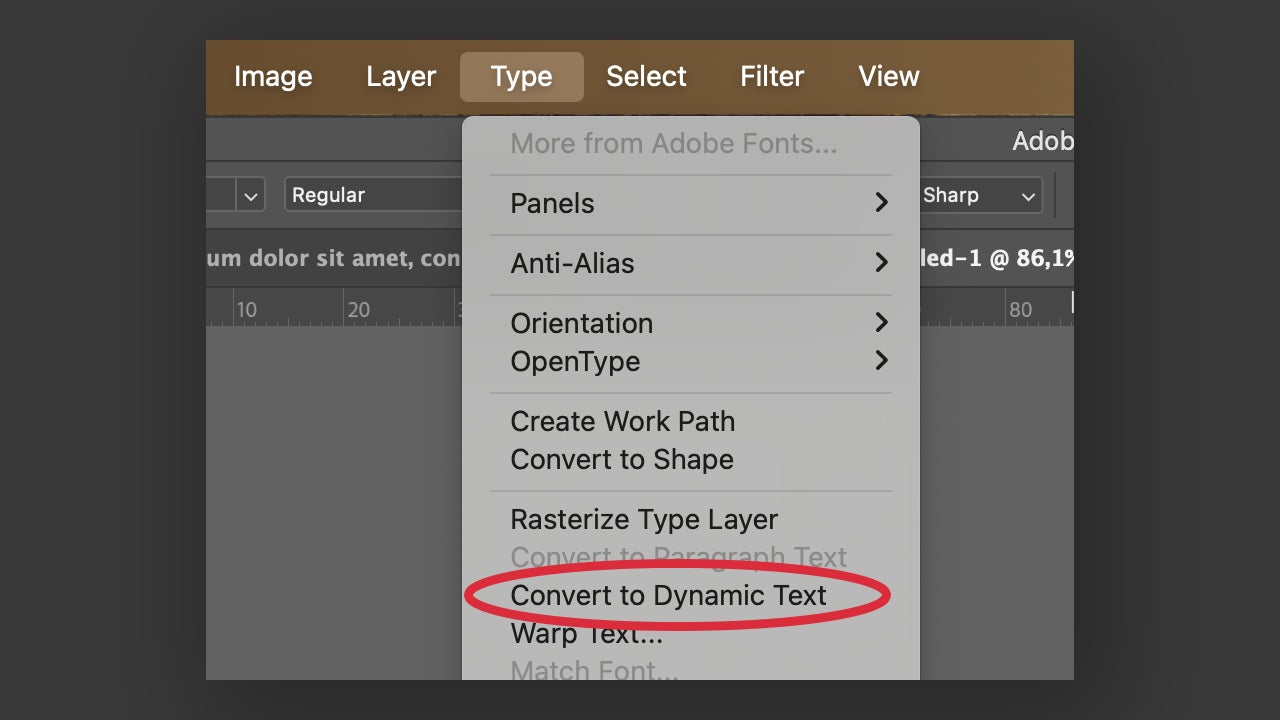
This novelty is ideal for those who work on signage design, social media posts, or any other type of work that involves adapting texts to different formats.

How to add or edit text in Adobe Photoshop

Although Photoshop is known for its powerful image editing tools, it also has features related to text creation and layout. If you don’t know how to add them within Photoshop, don’t worry: we explain it below.

Open Photoshop and select Open to open a file. You can also click on New file to create a project from scratch or drag the file directly into the program (already open). Then, click on the Horizontal Type Tool. Its symbol, a T, will help you find it quickly.
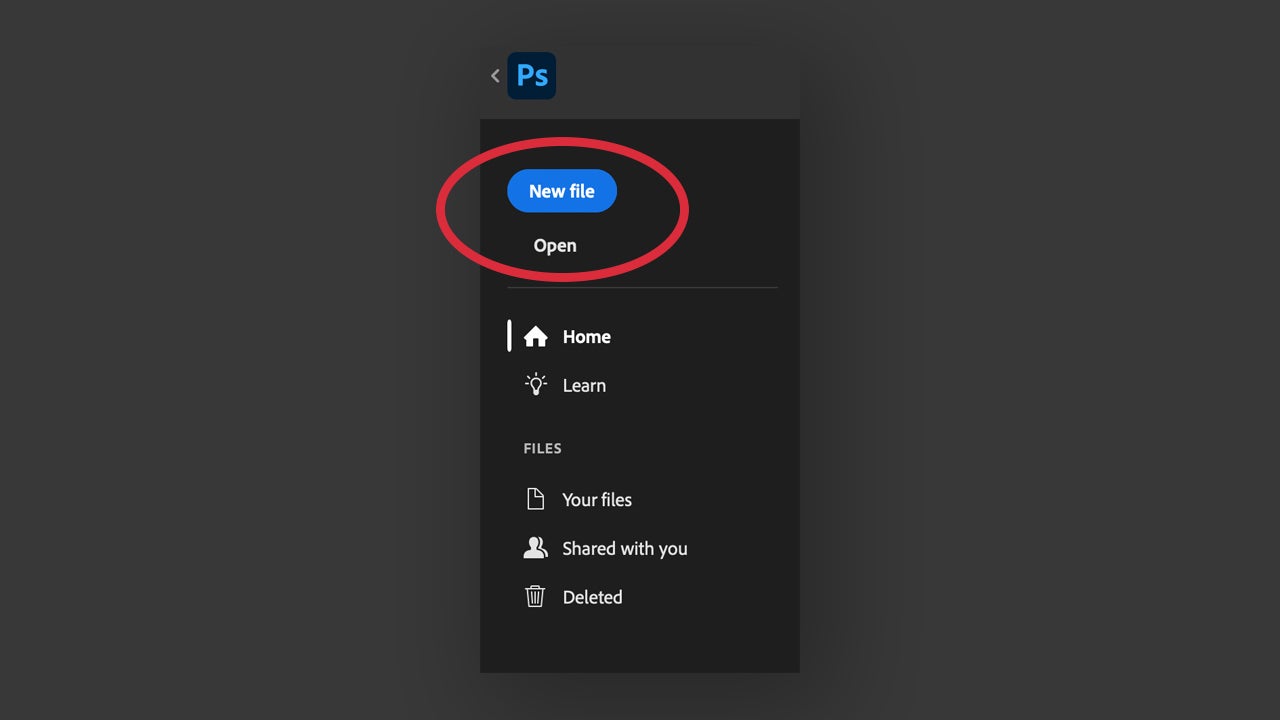
As an additional tip, you can also right-click on the same tool and change it to Vertical Type Tool. This will allow you to write vertically while the other is for horizontal text.

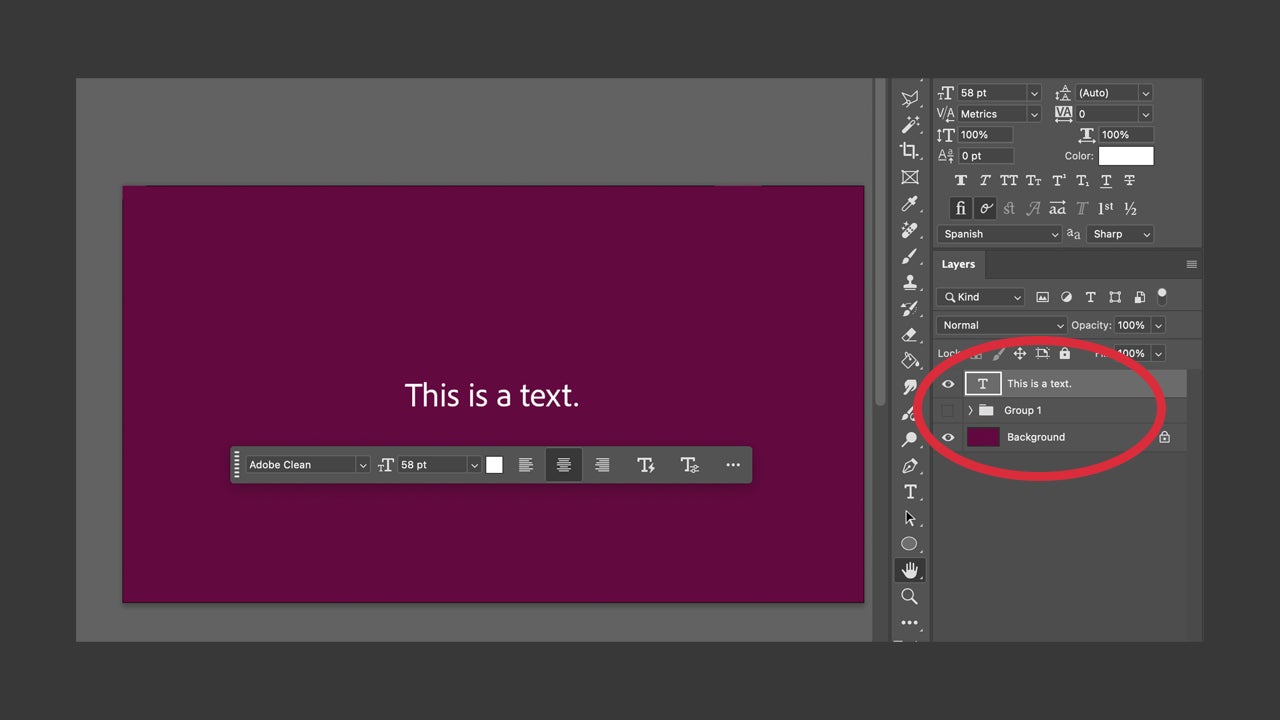
Create a new layer with the Create a New Layer. You will find it at the very bottom of the Layers panel or in the Layer > New > Layer… section. With the Horizontal/Vertical Type Tool already selected, click on the canvas and start typing. If you want to delve into more details, from the Character panel you can change the color, size, and alignment of the font.
Creation of text effects

Texts that adapt to shapes, that flow through images… all these kinds of effects can be achieved within Photoshop. Not to mention, the effect of creating text along a path is one of the most versatile and creative.

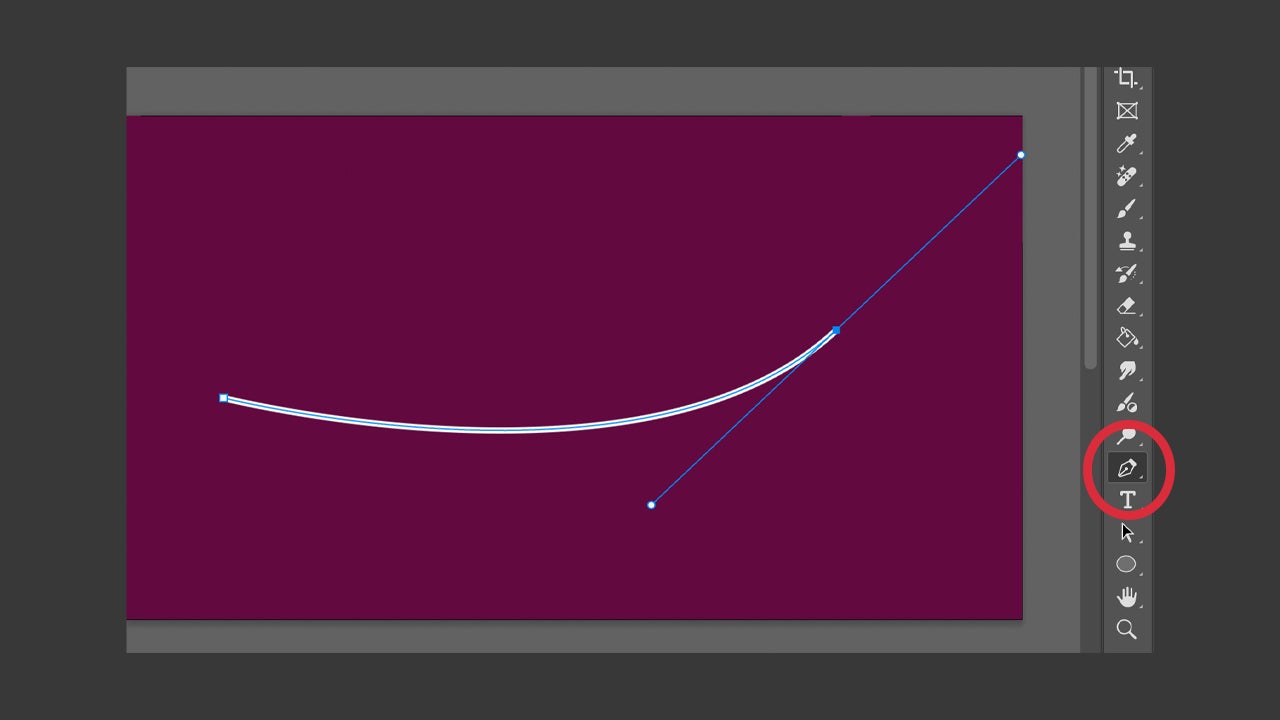
To carry it out, the first thing we need is a path, of course. Select the Pen Tool and draw the shape you want your text to follow.
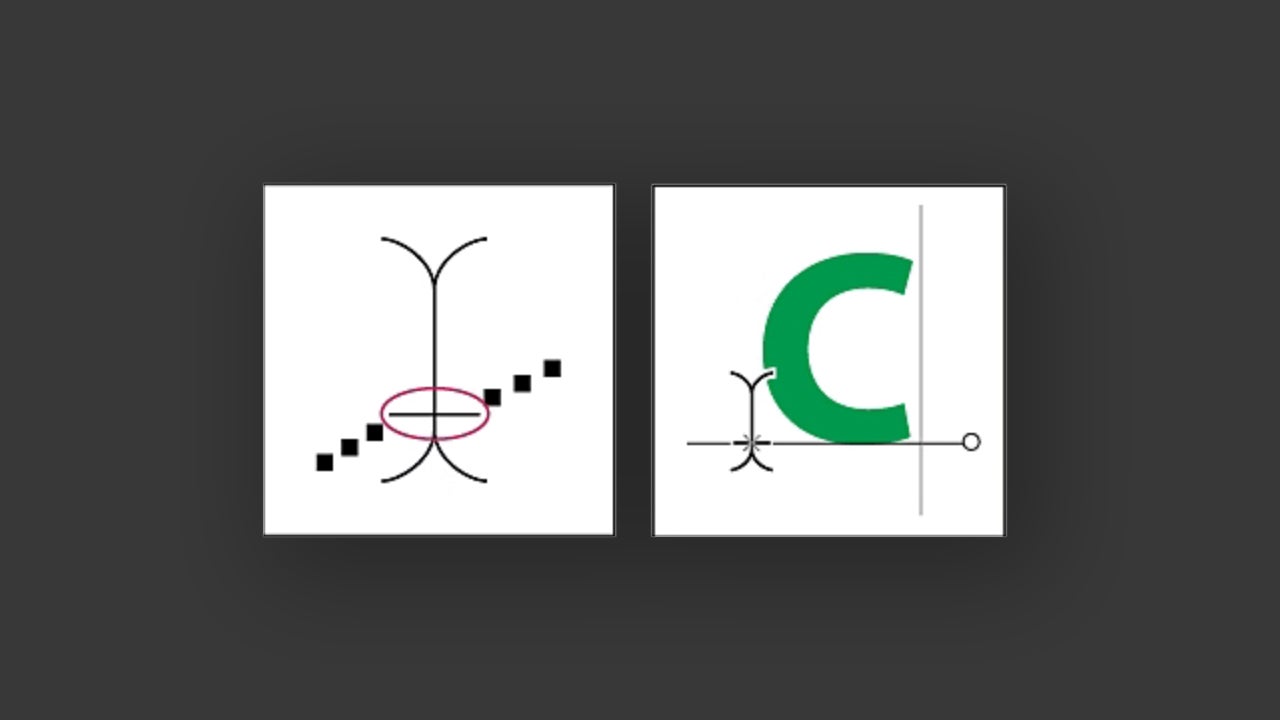
Choose the Horizontal/Vertical Type Tool again and place the cursor over the stroke we drew earlier. Notice that the tool symbol will change.
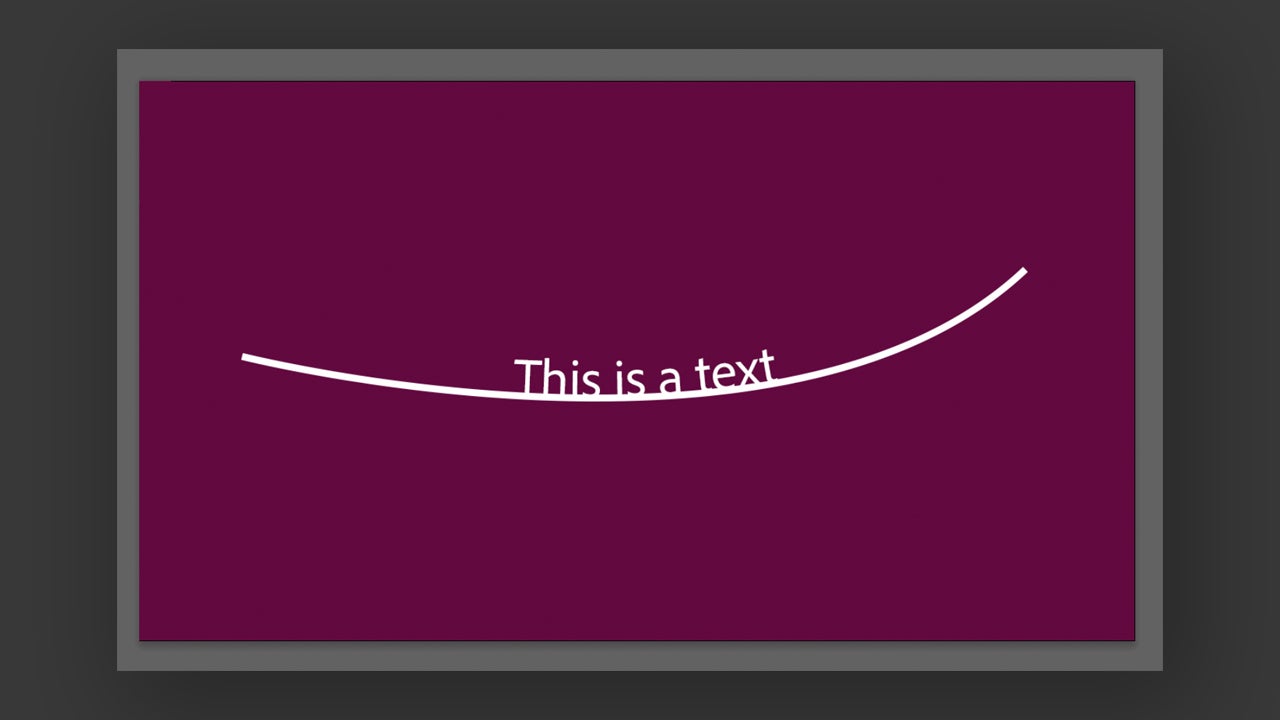
Click on the shape and start writing. You will see how the words follow the shape of the stroke. When you are done, you can leave the stroke or delete it so that only the text remains.
To edit the position of the text, select the Direct Selection or Path Selection tool and place the cursor over the characters. If you want to move it, click and drag the text along the shape. If you want to flip it downwards, click again and drag it down.

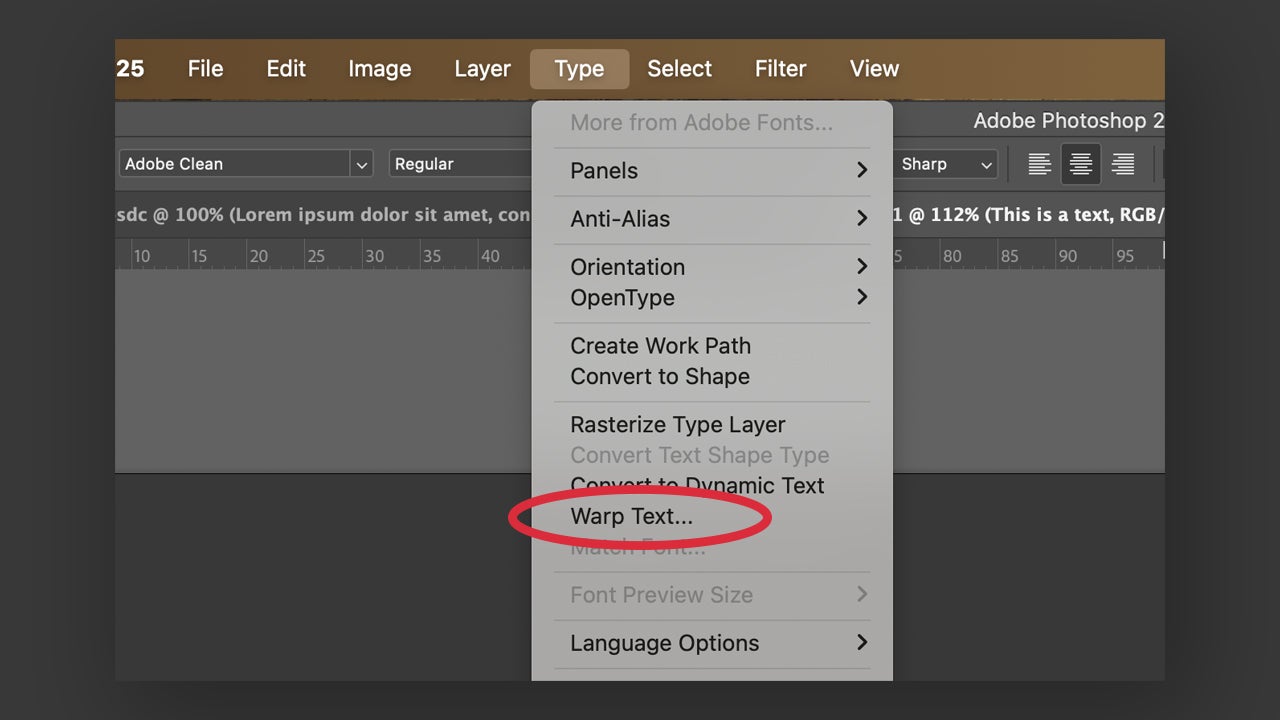
You can also warp text into any specific shape. Select the text layer and then go to Type > Warp Text. Another option is to go to the options bar at the top and select the Warp icon.
Choose a distortion style from the available options and its orientation. You can modify the degree of distortion and play with the effects until you get what you want.

Adobe Photoshop
Adobe Photoshop DOWNLOAD

As you can see, text editing within Adobe Photoshop can be very powerful. This gives users the ability to express their creativity through more complex and detailed compositions. If you are still unsure about whether to use Photoshop or not, remember that Adobe gives you the opportunity to try their programs for free for a short period of time.

Author: María López

{ "de-DE": "Künstler aus Berufung und Technikliebhaber. Seit ich denken kann, habe ich gerne an allen möglichen Gadgets herumgebastelt.", "en-US": "Artist by vocation and technology lover. I have liked to tinker with all kinds of gadgets for as long as I can remember.", "es-ES": "Artista de vocación y amante de la tecnología. Me ha gustado cacharrear con todo tipo de gadgets desde que tengo uso de razón.", "fr-FR": "Artiste de vocation et amateur de technologie. J'aime bricoler avec toutes sortes de gadgets depuis que j'ai l'usage de la raison.", "it-IT": "", "ja-JP": "", "nl-NL": "", "pl-PL": "", "pt-BR": "", "social": { "email": "", "facebook": "", "twitter": "", "linkedin": "" } } View all posts by María López

Author María LópezPosted on July 7, 2025July 7, 2025Categories News

Post navigation

Previous Previous post: The most successful musical of recent years, whose songs are already an anthem, is now available for streaming
Next Next post: F1: The Movie is a box office hit, already becoming Apple’s biggest cinematic success

Recent Posts

  • NotebookLM just got its biggest upgrade since launch: Google adds web research and code
  • Gemini Canvas turns prompts into apps now: Google taps Paris Hilton
  • The director of Hereditary wants to make a prequel to his most iconic film, but "it never seems to be the right time"
  • Xbox lowered the price of Game Pass after losing "millions of users"
  • Hugh Laurie goes out to defend House by comparing it to Bach and the blues

Archives

  • June 2026
  • May 2026
  • April 2026
  • March 2026
  • February 2026
  • January 2026
  • December 2025
  • November 2025
  • October 2025
  • September 2025
  • August 2025
  • July 2025
  • June 2025
  • May 2025
  • April 2025
  • March 2025
  • February 2025
  • January 2025
  • December 2024
  • November 2024
  • October 2024
  • September 2024
  • August 2024
  • July 2024
  • June 2024
  • May 2024
  • April 2024
  • March 2024
  • February 2024
  • January 2024
  • December 2023
  • November 2023
  • October 2023
  • September 2023
  • August 2023
  • July 2023
  • June 2023
  • May 2023
  • April 2023
  • March 2023
  • February 2023
  • January 2023
  • December 2022
  • November 2022
  • October 2022
  • September 2022
  • August 2022
  • July 2022
  • June 2022
  • May 2022
  • April 2022
  • March 2022
  • February 2022
  • January 2022
  • December 2021
  • November 2021
  • October 2021
  • September 2021
  • August 2021
  • July 2021
  • June 2021
  • May 2021
  • April 2021
  • March 2021
  • February 2021
  • January 2021
  • December 2020
  • November 2020
  • October 2020
  • September 2020
  • August 2020
  • July 2020
  • June 2020
  • May 2020
  • April 2020
  • March 2020
  • February 2020
  • January 2020
  • December 2019
  • November 2019
  • October 2019
  • September 2019
  • August 2019
  • July 2019
  • June 2019
  • May 2019
  • April 2019
  • March 2019
  • February 2019
  • January 2019
  • December 2018
  • November 2018
  • October 2018
  • September 2018
  • August 2018
  • July 2018
  • June 2018
  • May 2018
  • April 2018
  • March 2018
  • February 2018
  • January 2018
  • December 2017
  • November 2017
  • October 2017
  • September 2017
  • August 2017
  • July 2017
  • June 2017
  • May 2017
  • April 2017
  • March 2017
  • February 2017
  • January 2017
  • December 2016
  • November 2016
  • October 2016
  • September 2016
  • August 2016
  • July 2016
  • June 2016
  • May 2016
  • April 2016
  • March 2016
  • February 2016
  • January 2016
  • December 2015
  • November 2015
  • October 2015
  • September 2015
  • August 2015
  • July 2015
  • June 2015
  • May 2015
  • April 2015
  • March 2015
  • February 2015
  • January 2015
  • December 2014
  • November 2014
  • October 2014
  • September 2014
  • August 2014
  • July 2014
  • June 2014
  • May 2014
  • April 2014
  • March 2014
  • February 2014
  • January 2014
  • December 2013
  • November 2013
  • October 2013
  • September 2013
  • August 2013
  • July 2013
  • June 2013
  • May 2013
  • April 2013
  • March 2013
  • February 2013
  • January 2013
  • December 2012
  • November 2012
  • October 2012
  • September 2012
  • August 2012
  • July 2012
  • June 2012
  • May 2012
  • April 2012
  • March 2012
  • February 2012
  • January 2012
  • December 2011
  • November 2011
  • October 2011
  • September 2011
  • August 2011
  • July 2011
  • June 2011
  • May 2011
  • April 2011
  • March 2011
  • February 2011
  • January 2011
  • December 2010
  • November 2010
  • October 2010
  • September 2010
  • August 2010
  • July 2010
  • June 2010
  • May 2010
  • April 2010
  • March 2010
  • February 2010
  • January 2010
  • December 2009
  • November 2009
  • October 2009
  • September 2009
  • August 2009
  • July 2009
  • June 2009
  • May 2009
  • April 2009
  • March 2009
  • February 2009
  • January 2009
  • December 2008
  • November 2008
  • October 2008
  • September 2008
  • August 2008
  • July 2008
  • June 2008
  • May 2008
  • April 2008
  • March 2008
  • February 2008
  • January 2008
  • December 2007
  • November 2007
  • October 2007
  • September 2007
  • August 2007
  • July 2007
  • June 2007
  • May 2007
  • April 2007
  • March 2007
  • February 2007
  • January 2007
  • December 2006
  • November 2006
  • September 2006
  • August 2006
  • June 2006
  • May 2006
  • July 2001
  • January 2001
  • November 2000
  • September 2000
  • August 2000
  • July 2000
  • April 2000
  • March 2000

Categories

  • Affiliate post
  • Expert Review
  • Gaming
  • Guides
  • How to
  • Legacy how To
  • News
  • Noticias
  • Software>Security
  • Sponsored
  • Trucos y Consejos
  • Uncategorized
  • Windows software

Meta

  • Log in
  • Entries feed
  • Comments feed
  • WordPress.org
Softonic English Proudly powered by WordPress