Having your application or platform represented by a good icon is not easy. In this digital age, icons must be consistent and sustainable over time, recognizable, and easy to understand. Just like a logo, an icon can even tell a story (and if not, just ask Duolingo).
In this scenario, Adobe Illustrator can help you explore all kinds of designs and more with the potential of Adobe Firefly. Adobe’s AI allows us to harness the best of this technology without sacrificing Illustrator’s vector precision.
For students and educators building design systems as part of academic or learning projects, access to professional tools makes a real difference. For a limited time, Adobe is offering Creative Cloud Pro for Students and Teachers with 50% off for the first 6 months on annual plans, helping make advanced tools like Illustrator and Firefly more accessible from day one.
Valid for new subscriptions in the US and Canada only.
Why Icon Systems Are More Important Than Ever
Icons do not exist in isolation; they are part of large design systems that must function coherently. Keep in mind that these will be seen on a mobile, a tablet, or a computer; therefore, they must be consistent and sustainable eventually.
Thus, the combination of Illustrator and Firefly will allow you to experiment with many ideas while maintaining that cohesion. Good icons will help you strengthen your brand and facilitate its growth.
The challenges of large-scale icon design
Designing an icon may seem elementary from the outside. Nothing could be further from the truth. The main challenges that a designer usually faces include maintaining visual rhythm, avoiding iteration fatigue, and ensuring its scalability.
When we talk about iteration fatigue, we refer to the repetition of styles over and over again without trying other, more creative approaches. With scalability, we refer to the creation of new icons afterward that do not break the original system.
The role of Firefly in the icon design process
It is important to clarify that Firefly does not replace Illustrator in any way. The value of Firefly lies in the exploration of ideas. Adobe’s AI will be very useful to you in the earlier stages of creation to explore different styles or visual metaphors. Subsequently, in Illustrator is where we will execute our final idea.
If you’re learning or teaching icon design and visual systems, Adobe currently offers 50% off Creative Cloud Pro for Students and Teachers for the first 6 months. The promotion applies to annual subscriptions (billed monthly or paid upfront) and is available for new users in the US and Canada from January 15 to February 2, 2026.
A practical workflow: from defining the style of the icons to the complete set
Let’s put into practice a way of working that combines both Illustrator and Firefly, so you can see how both can create synergies:
Canvas Creation
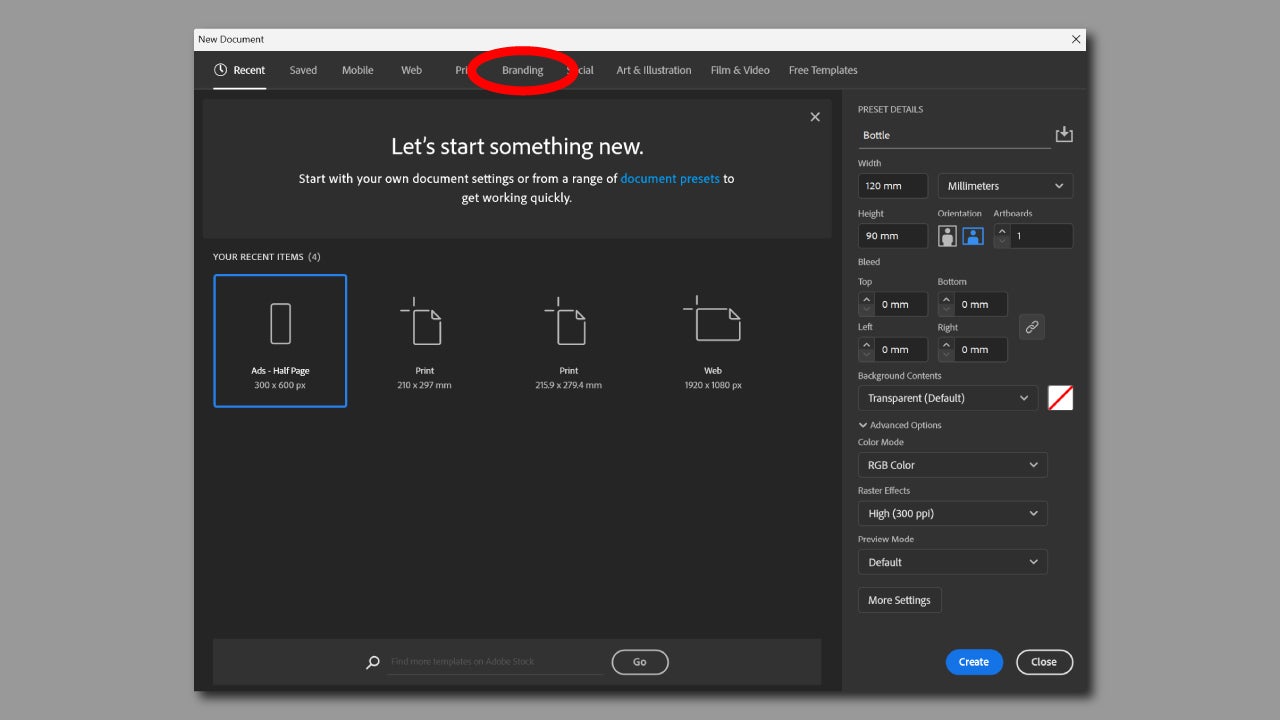
Before we begin, it is essential to set the framework. To complete this, we will go to Illustrator and create a new canvas by clicking on New File. You will see several rows with preset templates for mobile, print, web, etc. Go to Branding and choose the Square Logo option. If you have another type of dimension in mind, you can change them from Preset Details.
Exploration of Ideas
If you already have some clear ideas, we can start with Firefly. The new models specifically for Illustrator allow you to generate vector images from written instructions.
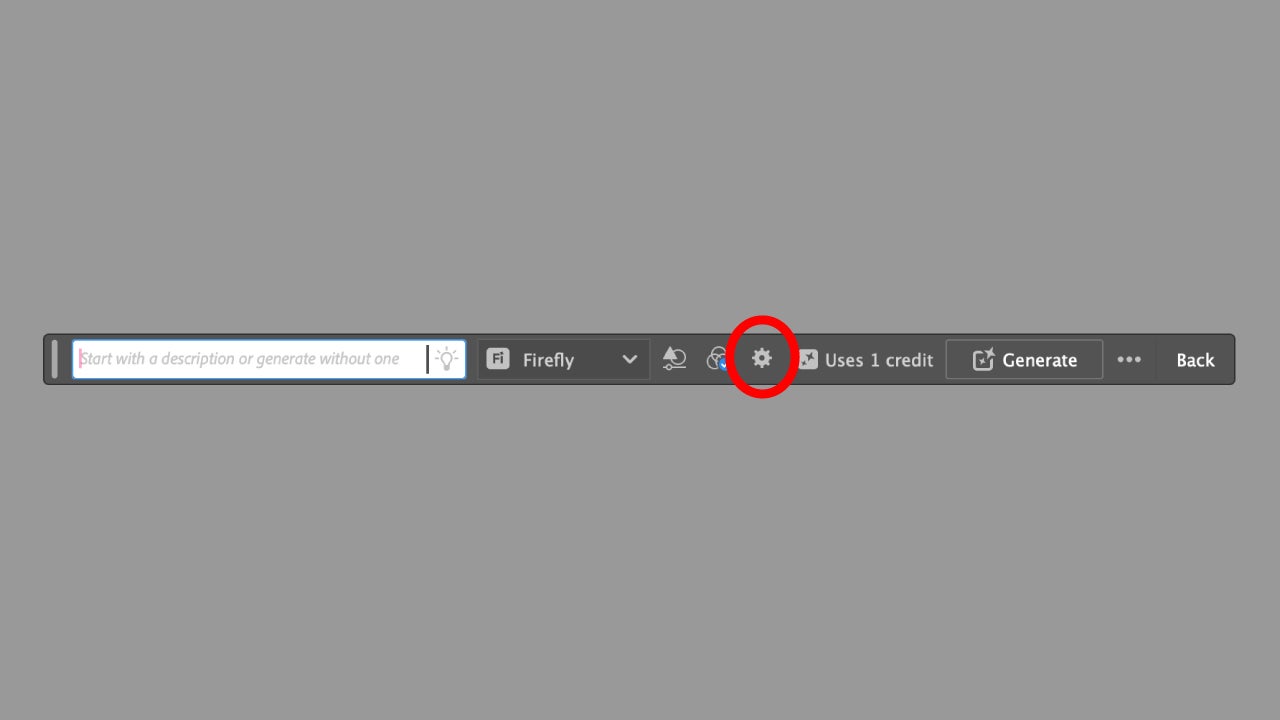
Create a rectangle the size of the canvas with the Rectangle Tool (shortcut key M). This will help to define the generation and prevent it from overflowing. When you do this, you will see a context menu where you will have the function of Generate Vectors. To access all its options, click on the gear icon.
Create with Generate Vectors
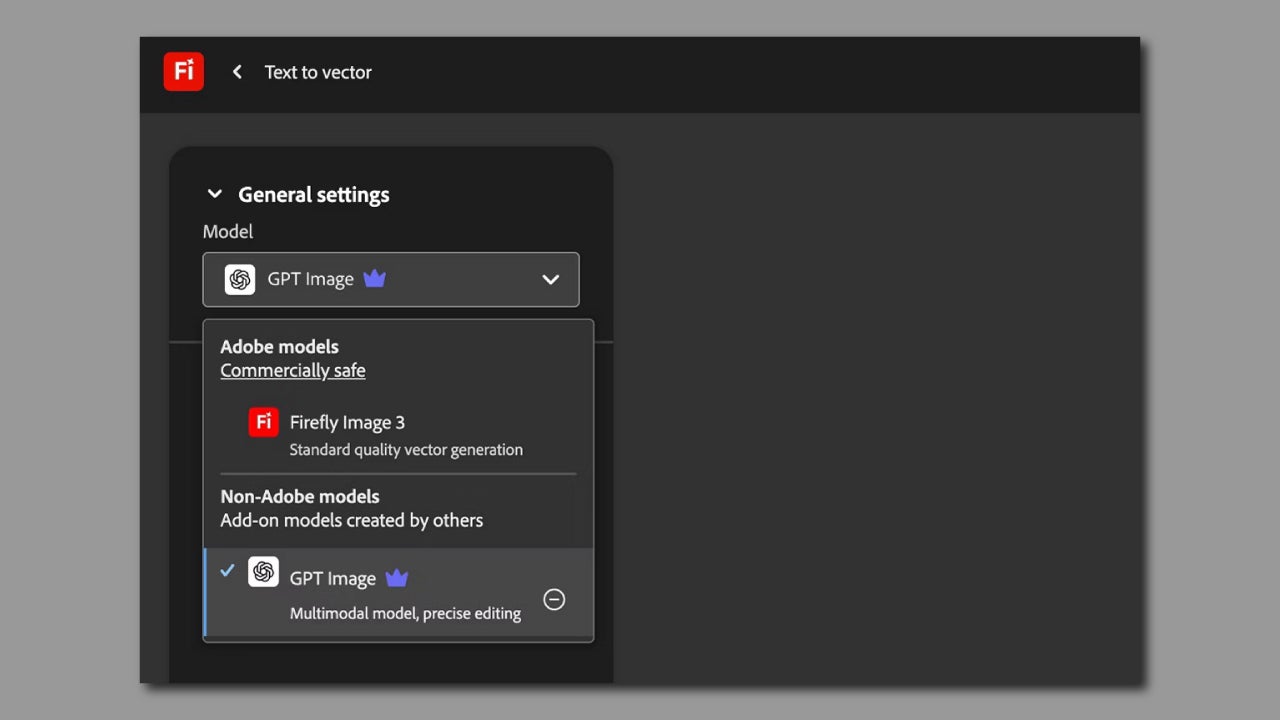
Now you will have a new panel on screen called Generate Vectors, from where you can do just that, generate vectors. From Model, you can select which model to use; it can be Firefly or another third-party one, like GPT Image.
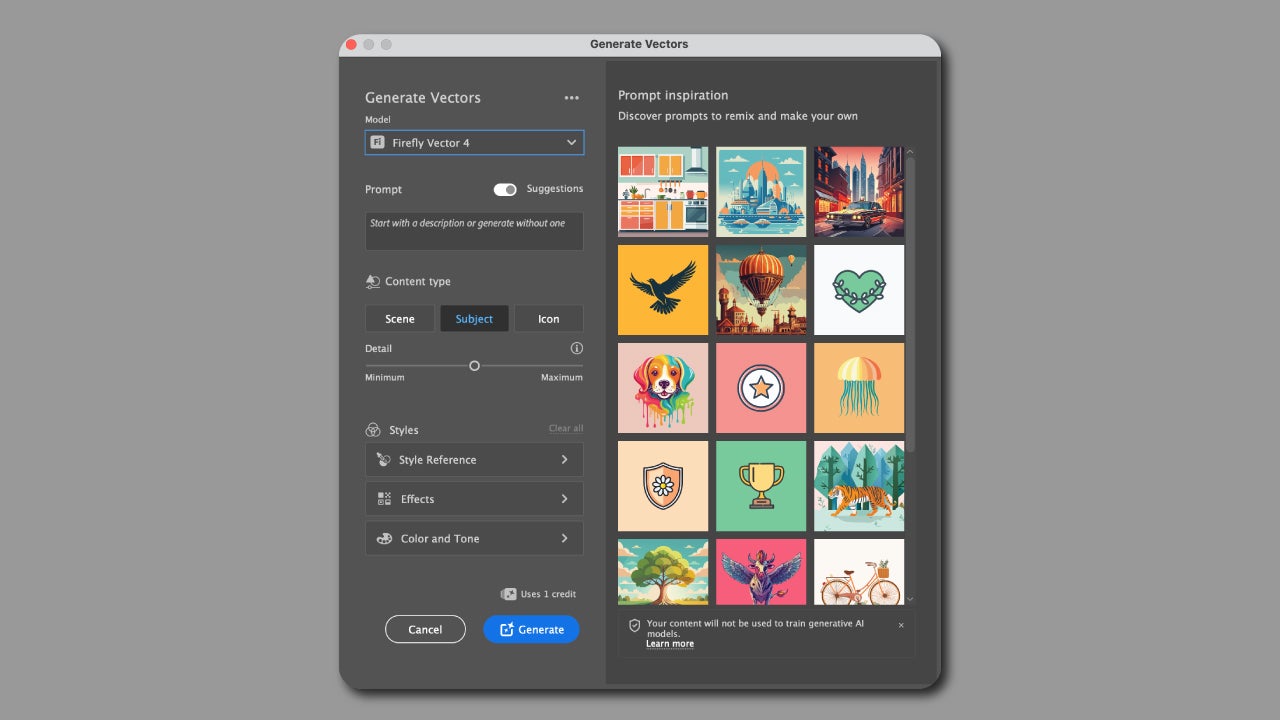
In Prompts is where you will have to write what you want to generate. Further down, you will have the section of Content Type; in our case, we will choose the option of Icon. You can play with styles, effects, colors… Try it and observe the results.
Design the ultimate icons
Once you have finished exploring the aesthetics, it’s time to design the final icons. Draw the icons as clean vectors and adjust proportions. You can start from one of the generations you have previously created or take it as inspiration to create your own.
Alternatively, you can also access the Adobe Firefly platform from a browser to generate concepts and ideas. There you can also use Text to Vector, a simple way to generate vector images. Download your creations in .svg format and edit them later in Illustrator.
Maintain consistency across the entire set of icons
Here are some practical tips that will help you design consistent icons:
- Define a standard size where all icons should fit in that space. Also set an internal margin to make your designs “breathe.”
- Standardize the stroke and lines you are going to use. Test from the beginning if you are still not completely sure. And above all: no “eyeballing.”
- Ensure they are legible and maintain the same criteria for all.
Expansion and update of icon systems over time
If in the future you need to add new icons, go back to the same advice as before. Following certain guidelines such as line thickness or maintaining a consistent visual language (whether it’s comic style, flat design, or others) will be key so you don’t get lost when adding new icons, in case they are needed.
Who benefits the most from this approach?
The combination of Adobe Illustrator and Firefly will be very useful to you, especially if you are a brand that is present on multiple platforms. Of course, it will also greatly improve your speed when it comes to creating and designing.
Final reflections: faster systems, stronger brand
Speed alone is not a value to consider if there is a loss of quality. Firefly acts as a creative support that allows you to iterate quickly. Illustrator will still be the place where you need to execute your final designs. By using both, you will be able to create cohesive icon systems more easily that fit your product.
For students and educators who want to build cohesive icon systems without slowing down their creative process, this is also a good time to get started. Adobe’s Creative Cloud Pro for Students and Teachers promotion offers 50% off for the first 6 months on eligible annual plans, lowering the barrier to professional-grade tools like Illustrator and Firefly.
Offer valid from January 15 to February 2, 2026, for new subscriptions in the US and Canada.