Over the years, the most well-known browsers, like Edge or Google Chrome, have gradually increased their security measures to protect users. Now, a new update will make Google’s browser warn us in a very striking way if we are about to download a “potentially dangerous” file.

Specifically, it is a warning that will take up the entire screen and will urge us to think twice before continuing with the download. For some time now, Chrome has been using Google’s proprietary Safe Browsing technology to protect users from threats on the Internet. When downloading a file, it is scanned in real time. If it detects that it is a threat to the user, Chrome instantly blocks the download. At least, that’s how it has been until now.
With this update, Google Chrome will display a new type of warning for users who try to download malicious files. The first thing it will do is block the download. From the downloads list, you will see how Chrome labels the potentially dangerous file as dangerous download blocked. In addition, clicking on the file from Chrome will show you some additional information explaining why it has been blocked.
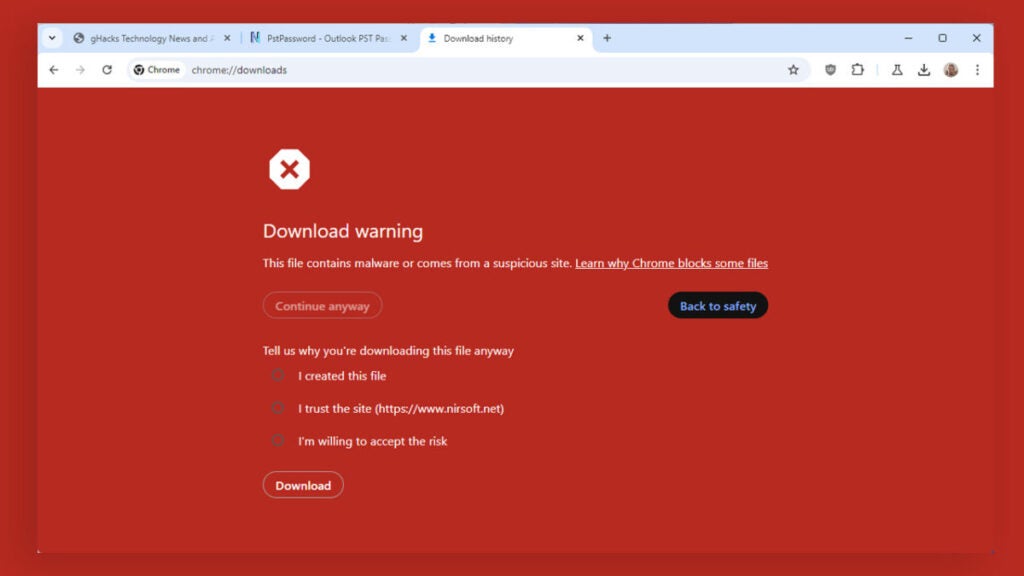
If you still want to insist on downloading it, you can do it, but following some extra steps. These are the following:
- Select Menu and then Downloads.
- Next, select Download dangerous file from the menu. Then, click on Continue anyway.
- Choose one of the three options that Chrome offers for downloading the file. It doesn’t matter which one you choose, they will all allow you to continue with your download.
- When you’re done, you can download the file normally.
It remains to be seen whether these new barriers will deter users from downloading dangerous files. In case these obstacles bother you too much, you can always use a different browser, such as Mozilla Firefox or Opera.
