Google has introduced numerous changes in Play Store lately. Now, Google Play Store allows you to see app ratings according to different devices, such as tablets and Chromebooks, through dedicated icons. But, far from stopping there, Google is already working on making the visualization of ratings even easier in its digital store.

According to an analysis of the Google Play Store apk (version 41.7.16-31) conducted by Android Authority and leaker AssembleDebug, Google is testing an improvement that displays app ratings for different devices without the need to tap on dedicated icons. In the current version, ratings are seen by tapping on the corresponding device icon, but the new beta version simplifies this process.
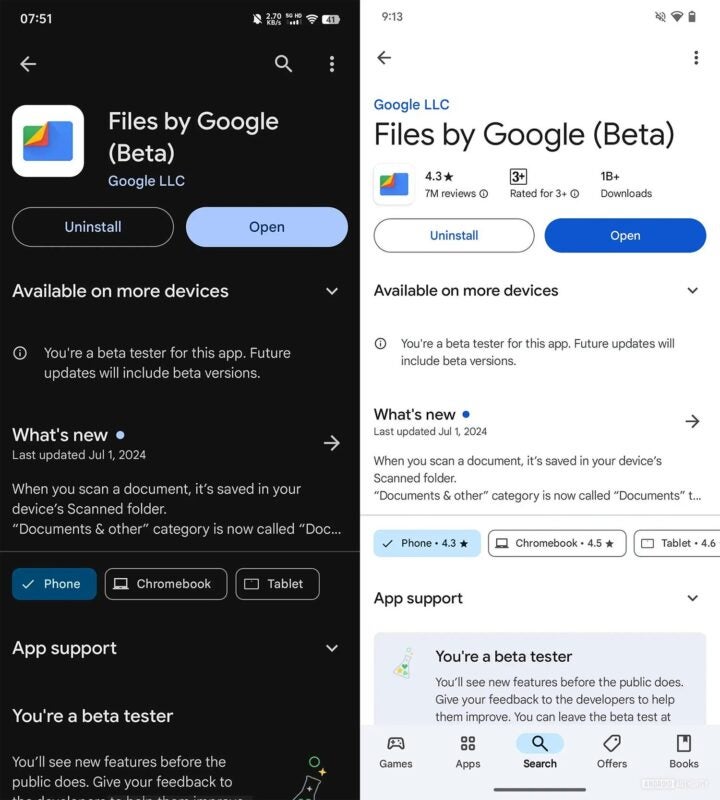
With this change, app ratings will appear next to the dedicated buttons for each device, eliminating the need to tap on them to see specific ratings. This saves time for the user by reducing the number of taps required to access this information. It is expected that this modification will improve the user experience, although the feature is not yet available to all users, as it is in the beta version of Play Store, and it is also unclear if Google will eventually release it in future stable versions.
