Apple’s new phone operating system, iOS 15 for iPhones, introduced several exciting new features to the device, including being able to play soothing soundscapes in the background. Called Background Sounds, this feature provides a tranquil listening experience for the user, which counters unwelcome noise in the environment and makes it fade away. Listening to this feature can be done along with music, which adds a new dimension.
If you like listening to soothing sounds, like the ocean and rain, to help you calm down, focus, fall asleep, or drown out the environmental racket, you can now get the sounds you need very conveniently right there on your iPhone.
Use headphones or earphones
It’s recommended that you use headphones or earphones to enhance your experience of using Background Sounds and get the full effect. The sounds do play without headphones or earphones, but they are really necessary to get the full benefit and to be able to immerse yourself in the sound. It’s distracting to have the sound play out in front of you, trying to compete with all the other sounds around you.
How to access Background Sounds
Accessibility settings
The Background Sounds feature is in the Accessibility settings on your iPhone using iOS 15. Here’s how you access it to enjoy the sounds:
Step 1: Access the feature
– Go to Settings on your iPhone and open it.
– Then go to Accessibility and tap on it.
– Go to Audio/Visual and open it.
– Select Background Sounds.Step 2: Set the volume
The volume for your background sounds is not the same as the normal volume on your phone. You can make it as loud as you want by setting the volume to max. Then turn up your iPhone’s volume as well. You can also use it when your phone media is playing. You can also play background sounds at the same time as playing music for an enhanced experience. Just switch on Use When Media Is Playing to be able to play both at the same time.
Step 3: Change the sound
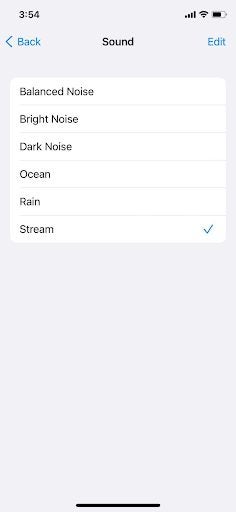
Tap on the Sound button to listen to a different background sound. Six sounds are available: Bright Noise, Balanced Noise, Dark Noise, Rain, Ocean, and Stream. Find the one you like most or listen to different ones for different purposes, like helping you relax or sleep or filtering out noise in your environment.
Control Center
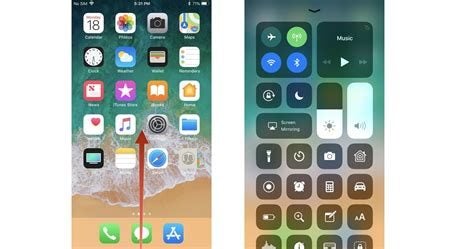
You can also access the background sounds on your iPhone via the Hearing tab in the Control Center. Some users consider it the quickest and most reliable way to change Background Sounds or turn them on or off.
Step 1: Activate the Control Center
Go to your Settings > Control Center. Look for Hearing, then tap on the Add (+) icon.
Step 2: Access Background Sounds
Swipe up from the bottom of the screen if you’re using Touch ID, or swipe down from the top right of your screen if you are using Face ID to access the Control Center.
Then tap on the Hearing icon, followed by Background Sounds to turn them on.
Step 3: Choose your sound
Just tap a sound to preview it, and then play it, or choose another one. You can turn the volume up or down by moving the slider. You can also press Background Sounds and hold to switch from any of the six available ambient sounds easily. They are Ocean, Bright Noise, Balanced Noise, Dark Noise, Rain, and Stream.
Control Background Sounds with Back Tap
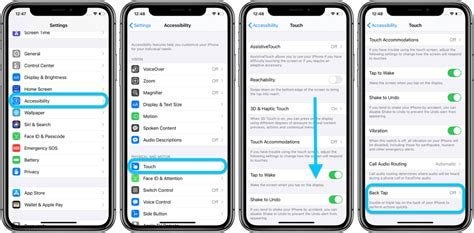
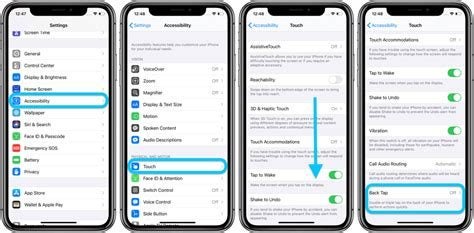
iOS 15 has an option called Back Tap that allows you to tap on the back of your phone twice or three times to get it to perform an action. You have to set up an Accessibility Shortcut to get it to do something.
- Go to Settings, Accessibility, and tap on Accessibility Shortcut. Choose Background Sounds from the list of options that appear.
- Then go to Settings, Accessibility, Touch, and scroll down to Back Tap. Tap on it to turn it on, and then tell it what to do.
- Choose Double Tap or Triple Tap, and tap on it. Then tap Accessibility Shortcut.
- Tap on Back Tap to exit.
After this, when you double or triple tap the back of your phone, depending on what you have chosen, background sounds will start — or stop.
Soothing sounds to make your day
Background Sounds, brought to you conveniently on your iPhone using iOS 15, could make a big difference to your life. We all have to put up with noise in our daily lives. There’s someone’s loud music you don’t like, chatter in your office, traffic noise, and more. Now you can tune it out by listening to soothing sounds on your phone or tablet. Or tune into them when you want to relax or sleep. Bliss!
If you have some more time, be sure to check out how to use universal control on mac and iOS devices.
