Have you though about creating something special with your holiday photos? We gave you some ideas last year, but if none of them really suit you, here’s another suggestion: launch Photoshop, follow these easy steps and you’ll be able turn your favorite photo into a very artistic oil painting.

1. Open your photo and increase its saturation level (Image > Adjustments > Hue/Saturation) to about 50%. Don’t worry if it looks a bit too bright: this is precisely what we’re looking for.

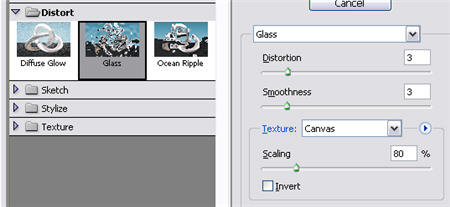
2. Now we’re going to start applying a few special filters. As a starter, click on Filters > Distort > Glass and apply the following settings:
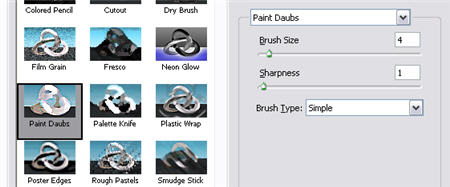
3. Without closing the Filters window yet, click on the New Layer button at the bottom. This will create another layer so that you can keep on adding different filters to the photo. Now open the Artistic category, select the Paint Daubs filter and set its values as follows:
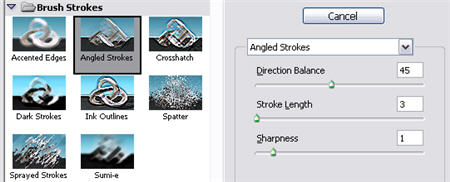
4. Still in the Filters window, create a new layer and open up the Brush Strokes category. Select Angled Strokes and configure it as you can see in the following picture:
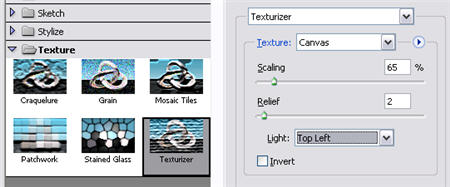
5. Finally, create another layer, click on the Texture category and choose the Texturizer filter. Apply the following settings to your photo:
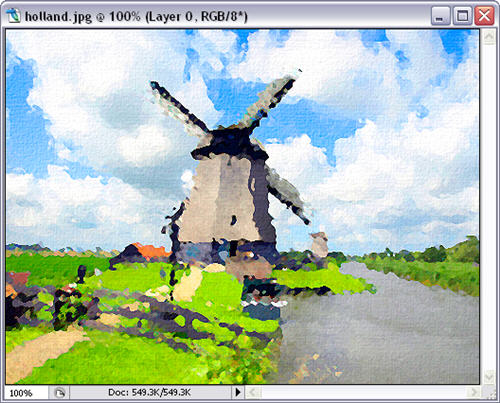
6. Now that all the effects have been applied, you can click on OK and your photo should look similar to this:
7. Duplicate the background layer with Ctrl+J, desaturate it with Ctrl+Shift+U and set its blending mode to Overlay.

8. Finally go back to Filter > Stylize > Emboss and apply the Emboss filter to your picture with the following configuration.

10. Your photo just turned into an oil painting!

Comments are closed.